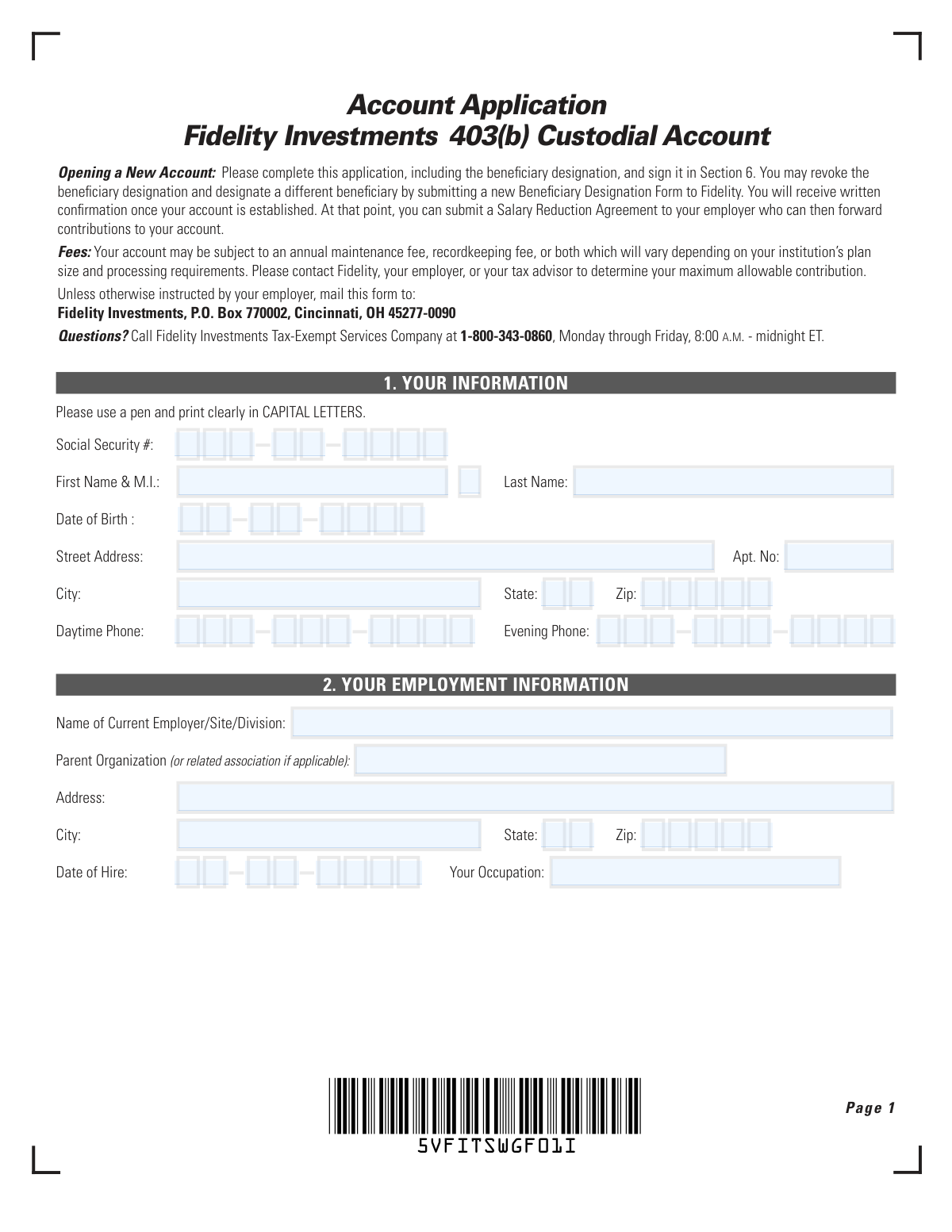
Yes! You can use AI to fill out Fidelity Investments 403(b) Custodial Account Application

The Fidelity Investments 403(b) Custodial Account Application is the official document required to open a tax-advantaged retirement savings plan with Fidelity. By completing this form, applicants provide personal and employment details, select investment options for their contributions, and designate beneficiaries for their account. This is a crucial step in setting up a long-term retirement strategy for employees of eligible organizations. Today, this form can be filled out quickly and accurately using AI-powered services like Instafill.ai, which can also convert non-fillable PDF versions into interactive fillable forms.
Our AI automatically handles information lookup, data retrieval, formatting, and form filling.
It takes less than a minute to fill out Fidelity 403(b) Account Application using our AI form filling.
Securely upload your data. Information is encrypted in transit and deleted immediately after the form is filled out.

Form specifications

Form name: Fidelity Investments 403(b) Custodial Account Application
Number of pages: 1
Language: English
Categories: investment forms, investment account forms, Fidelity forms, custodial account forms
main-image

Instafill Demo: How to fill out PDF forms in seconds with AI

How to Fill Out Fidelity 403(b) Account Application Online for Free in 2026

Are you looking to fill out a FIDELITY 403(B) ACCOUNT APPLICATION form online quickly and accurately? Instafill.ai offers the #1 AI-powered PDF filling software of 2026, allowing you to complete your FIDELITY 403(B) ACCOUNT APPLICATION form in just 37 seconds or less.
Follow these steps to fill out your FIDELITY 403(B) ACCOUNT APPLICATION form online using Instafill.ai:
  1. 1 Navigate to Instafill.ai and upload the Fidelity 403(b) Account Application or select it from the platform's template library.
  2. 2 Use the AI assistant to accurately fill in your personal details in Section 1, including your Social Security number, name, and address.
  3. 3 Provide your current employment information in Section 2, detailing your employer's name and address.
  4. 4 In Section 3, allocate your contribution percentages across the available investment options, ensuring the total equals 100%.
  5. 5 Carefully designate your primary and contingent beneficiaries in Section 4, specifying their information and percentage shares.
  6. 6 Complete the Spousal Consent in Section 5 if required, which may need a notary's signature.
  7. 7 Review all entered information for accuracy, then electronically sign and date the authorization in Section 6 to finalize your application.

Our AI-powered system ensures each field is filled out correctly, reducing errors and saving you time.

Why Choose Instafill.ai for Your Fillable Fidelity 403(b) Account Application Form?

Speed

Complete your Fidelity 403(b) Account Application in as little as 37 seconds.

Up-to-Date

Always use the latest 2026 Fidelity 403(b) Account Application form version.

Cost-effective

No need to hire expensive lawyers.

Accuracy

Our AI performs 10 compliance checks to ensure your form is error-free.

Security

Your personal information is protected with bank-level encryption.

Frequently Asked Questions About Form Fidelity 403(b) Account Application

This form is an application to open a new 403(b) custodial account with Fidelity Investments. A 403(b) is a retirement savings plan available to employees of certain public schools and tax-exempt organizations.

You should complete this form if you are an employee of an eligible organization and wish to open a new 403(b) retirement account managed by Fidelity.

You will need your Social Security number, date of birth, contact information, and employment details. You will also need to decide on your investment allocations and beneficiary designations.

Unless your employer instructs you otherwise, mail the completed and signed application to Fidelity Investments, P.O. Box 770002, Cincinnati, OH 45277-0090.

Fidelity will establish your account and send you a written confirmation. After that, you can submit a Salary Reduction Agreement to your employer to begin contributing to your account.

You must allocate 100% of your contributions across the investment options available in your employer's plan. Check with your employer for a list of available funds and enter your choices as whole percentages on the form.

You only need to complete Section 5 if you are married, your plan is subject to ERISA, and you are designating someone other than your spouse as the primary beneficiary for 50% or more of your account. In that case, your spouse must sign in the presence of a notary.

In Section 4, list the people or trusts you want to receive your account balance upon your death. The percentages for your primary beneficiaries must total 100%, and the same applies to your contingent beneficiaries.

If you need to name more beneficiaries, you can attach a separate, signed, and dated piece of paper with the additional information. Ensure the percentage allocations still total 100% for each group.

Yes, your account may have an annual maintenance fee and/or a recordkeeping fee. These fees vary, so you should contact Fidelity or your employer to understand the costs specific to your plan.

If you do not designate a beneficiary, your surviving spouse will automatically become your beneficiary. If you have no surviving spouse, the proceeds will be paid to your estate.

Yes, services like Instafill.ai use AI to accurately auto-fill form fields with your saved information, which can save you time and help prevent errors.

You can use a service like Instafill.ai to complete this form online. Simply upload the PDF, and the tool will make it fillable, allowing you to type your information directly into the fields and save your progress.

If your PDF is not interactive, you can use a tool like Instafill.ai to convert the flat PDF into a fillable form. This allows you to easily type in your information, save, and print the completed document.

Compliance Fidelity 403(b) Account Application
Validation Checks by Instafill.ai

1
Applicant Signature and Date Presence
Verifies that the applicant's signature and the date are present in Section 6. An application is not legally binding without a signature, which signifies the applicant's agreement to all terms and conditions. If the signature or date is missing, the application is invalid and must be rejected and returned to the applicant.
2
Social Security Number Format
Ensures the Social Security Number in Section 1 is a valid 9-digit number (XXX-XX-XXXX or XXXXXXXXX). This is the primary identifier for tax reporting to the IRS and identity verification. An invalid or missing SSN will prevent the account from being opened and lead to immediate rejection of the form.
3
Investment Allocation Total Equals 100%
Calculates the sum of all percentage fields for investment options in Section 3 to ensure they total exactly 100%. This is critical for ensuring that 100% of the applicant's contributions are invested according to their wishes. If the total is not 100%, the application will be held, and the applicant will be contacted to correct the allocation.
4
Primary Beneficiary Percentage Sum
Validates that the sum of percentages assigned to all Primary Beneficiaries in Section 4 equals 100%. This check prevents ambiguity in how assets are to be distributed upon the account holder's death. An incorrect total can lead to legal complications or distribution according to default plan rules, overriding the applicant's intent.
5
Contingent Beneficiary Percentage Sum
Validates that the sum of percentages assigned to all Contingent Beneficiaries in Section 4 equals 100%. This ensures a clear line of succession for the account assets if no primary beneficiaries are living at the time of the account holder's death. Failure to total 100% will cause the form to be returned for correction.
6
Spousal Consent Requirement Logic
Checks if the applicant is married and has designated their spouse as the primary beneficiary for less than 50% of the account. If these conditions are met, this validation confirms that the Spousal Consent in Section 5 is properly signed, dated, and notarized. This is a critical legal requirement under ERISA to protect spousal rights, and failure to comply renders the beneficiary designation void.
7
Beneficiary Uniqueness Check
Verifies that an individual or entity is not named as both a Primary and a Contingent beneficiary. The form explicitly prohibits this to avoid logical impossibilities in the order of asset distribution. If a beneficiary is listed in both categories, the application will be rejected for correction.
8
Date of Birth and Date of Hire Validity
Ensures that the 'Date of Birth' and 'Date of Hire' fields contain valid, logical dates that are not in the future. The Date of Birth confirms the applicant is of legal age to open an account, while the Date of Hire helps establish plan eligibility. An illogical date, such as a hire date after the application date, would cause the form to be flagged for review or rejection.
9
Completeness of Personal Information
Checks that all required fields in Section 1, such as First Name, Last Name, Street Address, City, State, and Zip, are filled out. This basic information is essential for establishing the legal owner of the account and for all future communications. An incomplete section will prevent the account from being opened.
10
Completeness of Employment Information
Verifies that the employer's name and address are provided in Section 2. Since a 403(b) is an employer-sponsored retirement plan, this information is mandatory to confirm the applicant's eligibility to participate in their specific plan. Missing employer information will halt the application process until it is provided.
11
Whole Percentage Validation
Confirms that all percentage allocation fields in Sections 3 (Investments) and 4 (Beneficiaries) contain only whole numbers, as explicitly instructed on the form. Using decimals can lead to processing errors or misinterpretation of the applicant's intent. Forms with decimal percentages may be returned for clarification.
12
Zip Code Format
Validates that the Zip code fields in both the personal and employment information sections contain a valid 5-digit numeric format. This is a basic data quality check to ensure mail deliverability for statements, confirmations, and other important documents. An incorrect format can lead to communication failures.
13
Notarization of Spousal Consent
If the Spousal Consent section is completed, this check verifies that the notary public section is also filled out, including the state, county, and evidence of a notary stamp. The notarization is what gives the spousal consent its legal validity. An unnotarized or improperly notarized consent invalidates the entire beneficiary designation.

Common Mistakes in Completing Fidelity 403(b) Account Application

Saved over 80 hours a year

“I was never sure if my IRS forms like W-9 were filled correctly. Now, I can complete the forms accurately without any external help.”

Kevin Martin Green

Your data stays secure with advanced protection from Instafill and our subprocessors

Robust compliance program

Transparent business model

You’re not the product. You always know where your data is and what it is processed for.

ISO 27001, HIPAA, and GDPR

Our subprocesses adhere to multiple compliance standards, including but not limited to ISO 27001, HIPAA, and GDPR.

Security & privacy by design

We consider security and privacy from the initial design phase of any new service or functionality. It’s not an afterthought, it’s built-in, including support for two-factor authentication (2FA) to further protect your account.

Fill out Fidelity 403(b) Account Application with Instafill.ai

Worried about filling PDFs wrong? Instafill securely fills fidelity-investments-403b-custodial-account-application forms, ensuring each field is accurate.