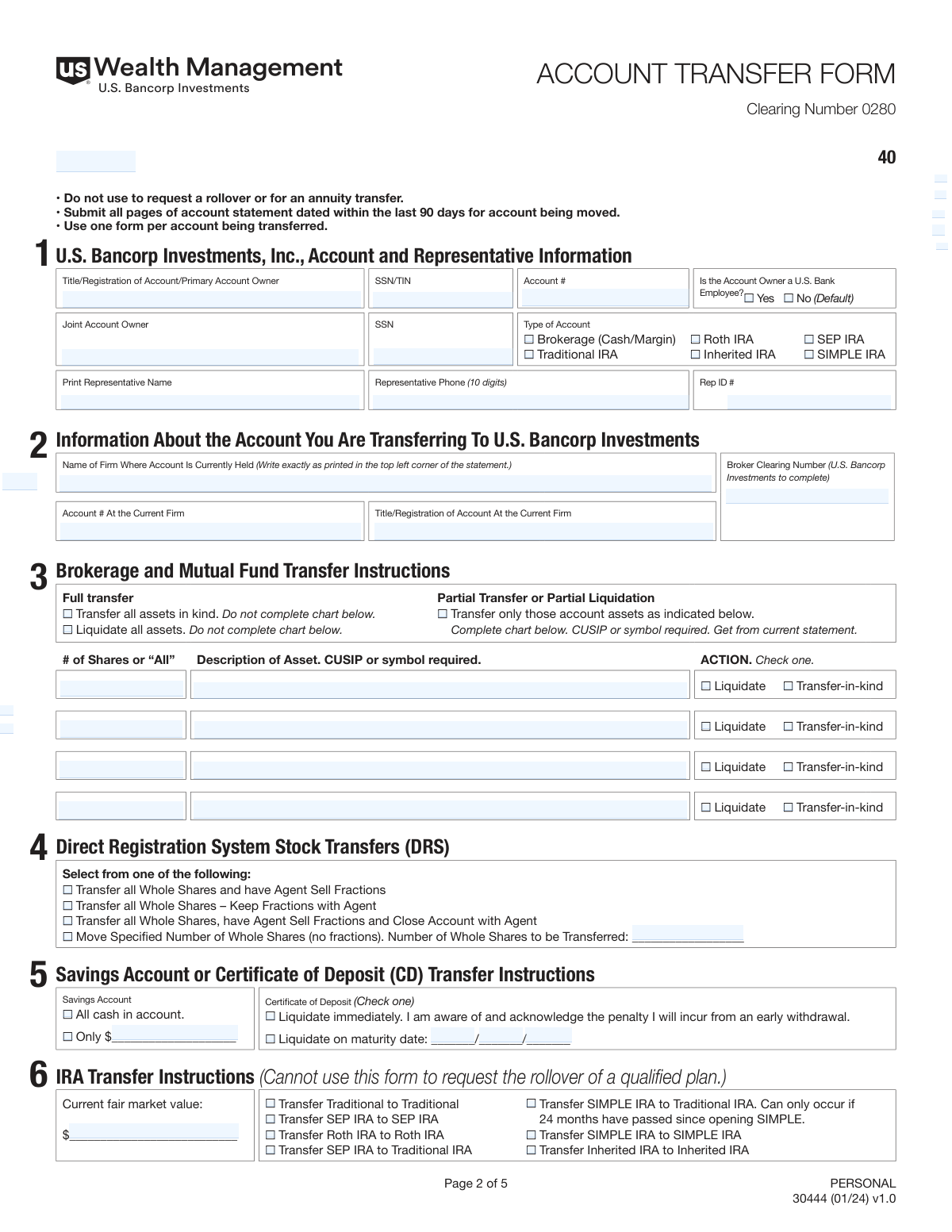
Yes! You can use AI to fill out U.S. Bancorp Investments Account Transfer Form
This form facilitates the movement of financial assets, such as stocks, mutual funds, or cash, from an account at another firm into a U.S. Bancorp Investments account. It is a crucial document for consolidating investments and requires detailed information about both the sending and receiving accounts, as well as specific instructions on how to handle the assets during the transfer. Today, this form can be filled out quickly and accurately using AI-powered services like Instafill.ai, which can also convert non-fillable PDF versions into interactive fillable forms.
Our AI automatically handles information lookup, data retrieval, formatting, and form filling.
It takes less than a minute to fill out Form 30444 using our AI form filling.
Securely upload your data. Information is encrypted in transit and deleted immediately after the form is filled out.
Form specifications
| Form name: | U.S. Bancorp Investments Account Transfer Form |
| Number of pages: | 1 |
| Language: | English |
| Categories: | investment forms, investment account forms, investment transfer forms, account transfer forms, transfer forms |
Instafill Demo: How to fill out PDF forms in seconds with AI
How to Fill Out Form 30444 Online for Free in 2026
Are you looking to fill out a FORM 30444 form online quickly and accurately? Instafill.ai offers the #1 AI-powered PDF filling software of 2026, allowing you to complete your FORM 30444 form in just 37 seconds or less.
Follow these steps to fill out your FORM 30444 form online using Instafill.ai:
- 1 Navigate to Instafill.ai and upload or select the U.S. Bancorp Investments Account Transfer Form.
- 2 Provide your U.S. Bancorp Investments account information in Section 1, including account title, SSN/TIN, and account type.
- 3 In Section 2, enter the details of the account you are transferring from, as they appear on your most recent statement.
- 4 Specify your transfer instructions in Sections 3, 4, and 5, indicating whether it's a full or partial transfer and whether assets should be moved 'in-kind' or liquidated.
- 5 If you are transferring an IRA, complete the specific IRA transfer instructions in Section 6.
- 6 Carefully review all the information auto-filled by the AI to ensure accuracy and completeness.
- 7 Sign and date the form in Section 8, then download the completed document to submit via email or mail as instructed.
Our AI-powered system ensures each field is filled out correctly, reducing errors and saving you time.
Why Choose Instafill.ai for Your Fillable Form 30444 Form?
Speed
Complete your Form 30444 in as little as 37 seconds.
Up-to-Date
Always use the latest 2026 Form 30444 form version.
Cost-effective
No need to hire expensive lawyers.
Accuracy
Our AI performs 10 compliance checks to ensure your form is error-free.
Security
Your personal information is protected with bank-level encryption.
Frequently Asked Questions About Form Form 30444
This form is used to authorize the transfer of your investment assets, such as stocks, mutual funds, or cash, from another financial institution to your U.S. Bancorp Investments account.
You must submit all pages of your most recent account statement from the firm you are transferring assets from. The statement must be dated within the last 90 days.
Choosing 'transfer in kind' moves your investments to the new account without selling them. Selecting 'liquidate' means all your securities will be sold, and the cash proceeds will be transferred.
In Section 3, check the box for 'Partial Transfer or Partial Liquidation' and fill out the chart with the specific assets, quantities, and whether to transfer them in kind or liquidate them.
Yes, if you are transferring any type of IRA, you must complete Section 6. This section requires information on the account's market value and transfer instructions.
No, this form explicitly states it should not be used to request a rollover from a qualified plan (like a 401k) or for an annuity transfer. You will need a different form for those actions.
All the details about the account you are transferring, including the firm's name and your account number, can be found on your most recent account statement.
A Signature Guarantee is only required for specific transfer types, such as Non-ACATS requests. You should contact your U.S. Bancorp Investments Representative to confirm if it is needed for your transfer.
You can email the completed documents to [email protected] or mail them to the U.S. Bancorp Investments Transfer Department address listed in Section 7.
You authorize the old firm to deduct any outstanding fees from the credit balance in your account. If the balance is insufficient, they may liquidate assets to cover the fees.
Yes, services like Instafill.ai use AI to accurately auto-fill form fields from your documents, which can save you time and help prevent errors.
You can use a service like Instafill.ai to upload the PDF. Their platform makes it an interactive, fillable form that you can complete and sign digitally from any device.
Tools like Instafill.ai can convert flat, non-fillable PDFs into interactive forms. Simply upload your document to their platform to start filling it out online.
Compliance Form 30444
Validation Checks by Instafill.ai
1
Primary SSN/TIN Format Validation
This check ensures the 'Primary Account Owner SSN/TIN' field in Section 1 contains a valid, 9-digit number. This is critical for tax reporting and correctly identifying the account owner. A failure would prevent the system from processing the transfer due to a legal and operational inability to verify the primary individual's identity.
2
Conditional Joint Owner SSN Requirement
This validation verifies that if a 'Joint Account Owner' name is provided in Section 1, the corresponding 'Joint Account Owner SSN' field is also filled and contains a valid 9-digit number. Omitting the SSN for a listed joint owner would result in an incomplete and legally invalid account registration. The form submission will be rejected pending correction.
3
Mandatory Account Type Selection
Ensures that one and only one 'Type of Account' checkbox is selected in Section 1 (e.g., Brokerage, Traditional IRA, Roth IRA). This selection dictates how the assets are treated for tax purposes and which subsequent sections of the form are required. If no box or multiple boxes are checked, the transfer cannot be categorized, and the form will be flagged as incomplete.
4
Conditional IRA Section Completion (Sec 6)
This check enforces a logical dependency between sections. If any IRA account type (Traditional, Roth, SEP, etc.) is selected in Section 1, this validation ensures that Section 6 'IRA Transfer Instructions' has been completed. Failure to complete Section 6 for an IRA transfer means critical information, like fair market value, is missing, and the transfer cannot proceed.
5
Mutually Exclusive Transfer Instruction (Sec 3)
This validation confirms that in Section 3, the user has selected either 'Full transfer' or 'Partial Transfer', but not both. These instructions are mutually exclusive and define the entire scope of the transfer. Selecting both creates ambiguity, causing the form to be rejected for clarification.
6
Partial Transfer Asset Specification
If 'Partial Transfer or Partial Liquidation' is selected in Section 3, this check verifies that at least one asset is detailed in the corresponding chart. A partial transfer requires specific instructions on which assets to move. An empty chart for a partial transfer is a contradiction and will halt processing until the specific assets are listed.
7
Asset Row Completeness
For each asset listed in the Section 3 partial transfer chart, this validation ensures the row is complete, containing the '# of Shares or All', the 'Description of Asset' including a CUSIP or symbol, and a selected 'ACTION' (Liquidate or Transfer-in-kind). Incomplete information for any listed asset makes the instruction ambiguous and unenforceable. The form will be returned to the user to complete the missing details for each specified asset.
8
CD Maturity Date Requirement
In Section 5, if the 'Liquidate on maturity date' option is checked for a Certificate of Deposit, this validation ensures a valid date is entered in the corresponding field. The date must be present and should be a future date to provide a clear, actionable instruction. Without this date, the transfer instruction is incomplete and cannot be scheduled.
9
Mandatory Signature and Date
This check verifies that the 'Signature of Primary Account Owner' and the adjacent 'Date' field in Section 8 are both completed. A signature and date are legally required to authorize the transfer of assets from the delivering firm. An unsigned or undated form is not legally binding and will be immediately rejected.
10
External Account Statement Requirement
This validation confirms that a copy of the most recent account statement (dated within the last 90 days) from the delivering firm has been submitted alongside the form. This statement is required to verify the account details, title, and assets being transferred. Failure to include a valid, recent statement will put the entire transfer process on hold until it is provided.
11
Completeness of Delivering Firm Information
This check ensures all fields in Section 2, 'Information About the Account You Are Transferring', are filled out, including the firm name, account number, and account title. This information is essential for U.S. Bancorp Investments to contact the correct institution and identify the correct source account. Missing information in this section will prevent the initiation of the transfer request.
12
SIMPLE IRA Transfer Eligibility
This is a specific business rule validation for Section 6. If 'Transfer SIMPLE IRA to Traditional IRA' is selected, the system should check if at least 24 months have passed since the SIMPLE IRA was opened, as stated on the form. This rule is a regulatory requirement to avoid tax penalties. If the condition is not met, the transfer type is invalid and must be rejected, with an explanation provided to the user.
Common Mistakes in Completing Form 30444
The form explicitly requires that all pages of the most recent account statement from the delivering firm be submitted along with the transfer form. People often forget this crucial step, assuming the form itself is sufficient. Without the statement, the receiving firm cannot verify the account details or the assets to be transferred, leading to an immediate rejection or significant processing delays until the documents are provided.
Section 2 requires the exact name of the firm where the account is currently held, as it appears on the statement. Users often enter a common or abbreviated name (e.g., 'Schwab' instead of 'Charles Schwab & Co., Inc.'), which causes the automated transfer system (ACAT) to fail. To avoid this, copy the firm's name precisely from the top corner of your statement. AI-powered tools can help by cross-referencing with databases of financial institutions to ensure accuracy.
The account title and number in Section 1 (for the new U.S. Bancorp account) and Section 2 (for the old account) must be an exact match to what is on file. Users may use informal names, initials, or transpose digits in the account number, creating a mismatch that will halt the transfer. Always reference your account statements for both firms to ensure the information is identical. Using a tool like Instafill.ai can help prevent transcription errors by saving and accurately populating this data.
In Section 3, users must choose whether to transfer assets 'in kind' (as they are) or 'liquidate' them (sell them and transfer the cash). Misunderstanding these terms can lead to unintended and potentially taxable sales of securities you wanted to keep. 'In kind' is for moving stocks or funds directly, while 'liquidate' is for cashing out. Carefully consider your financial strategy before selecting an option for a full or partial transfer.
When selecting a 'Partial Transfer' in Section 3, every field in the corresponding chart must be filled out for each asset, including the number of shares, the full asset description, and the CUSIP or symbol. People frequently omit the CUSIP/symbol, which is required to uniquely identify the security. This omission makes the instruction ambiguous and will cause the firm to reject that part of the request, delaying the transfer of those specific assets.
If the account being transferred is a joint account, all account owners listed must sign the form in Section 8. It is a very common oversight for only the primary account holder to sign, which renders the authorization incomplete. The delivering firm will reject any transfer request that lacks signatures from all required parties, forcing you to resubmit the form and start the process over.
For certain transfer types, a Medallion Signature Guarantee is required in Section 8. The instructions clearly state not to sign the form until you are in the presence of an authorized official who can provide the guarantee. Many people sign the form at home out of habit, which invalidates the signature guarantee process and requires a new form to be completed and signed correctly in the presence of the guarantor.
The top of the form explicitly states, 'Do not use to request a rollover.' This form is for direct transfers between similar account types (e.g., IRA to IRA, brokerage to brokerage). Users sometimes mistakenly try to use it to roll over funds from an employer-sponsored plan like a 401(k), which is an entirely different process requiring different paperwork. This error will result in an outright rejection of the request.
When transferring an IRA, Section 6 must be completed, which includes providing the fair market value from the end of the last calendar year and specifying the exact type of IRA transfer. Users may leave this section blank or guess the value instead of referencing their year-end statement. This incomplete or inaccurate information can cause compliance issues and delays, as the receiving custodian needs it for proper reporting.
This form is a non-fillable PDF, meaning it must be printed and completed by hand. Illegible handwriting, especially for critical data like SSNs, account numbers, and CUSIPs, is a frequent source of data entry errors by the processing team. These errors can lead to failed searches, incorrect transfers, or security breaches. To prevent this, print clearly in block letters. Alternatively, a service like Instafill.ai can convert the non-fillable PDF into a digital, fillable version, eliminating handwriting issues entirely.
Saved over 80 hours a year
“I was never sure if my IRS forms like W-9 were filled correctly. Now, I can complete the forms accurately without any external help.”
Kevin Martin Green
Your data stays secure with advanced protection from Instafill and our subprocessors

Robust compliance program
Transparent business model
You’re not the product. You always know where your data is and what it is processed for.
ISO 27001, HIPAA, and GDPR
Our subprocesses adhere to multiple compliance standards, including but not limited to ISO 27001, HIPAA, and GDPR.
Security & privacy by design
We consider security and privacy from the initial design phase of any new service or functionality. It’s not an afterthought, it’s built-in, including support for two-factor authentication (2FA) to further protect your account.
Fill out Form 30444 with Instafill.ai
Worried about filling PDFs wrong? Instafill securely fills us-bancorp-investments-account-transfer-form forms, ensuring each field is accurate.