Yes! You can use AI to fill out Voya Investment Management Account Maintenance Form (Includes Substitute Form W-9)
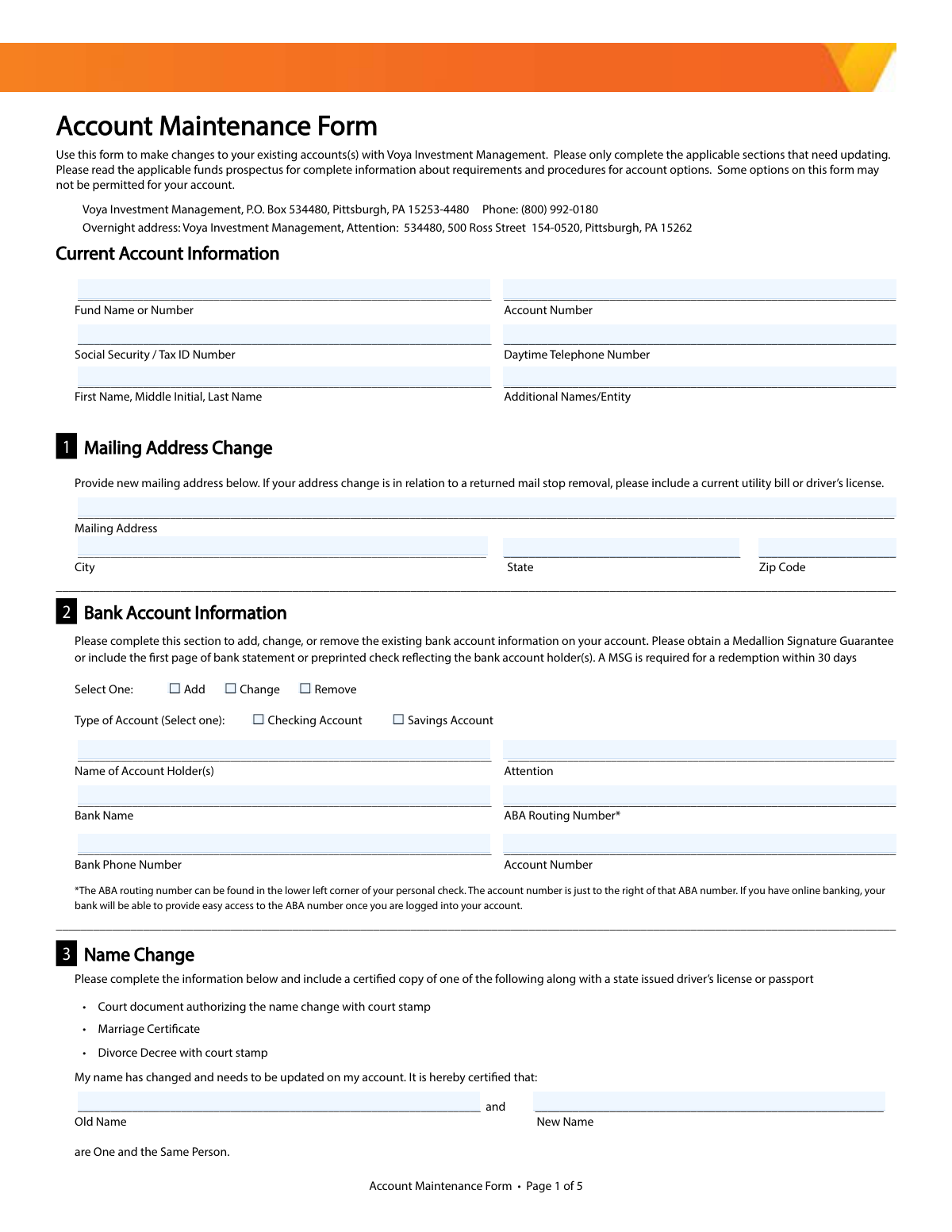
This form is used by existing Voya Investment Management clients to make changes to their accounts. It allows for updates to personal information like mailing address and name, changes to bank account details, modifications to investment plans, and updates to beneficiaries or cost basis elections. Today, this form can be filled out quickly and accurately using AI-powered services like Instafill.ai, which can also convert non-fillable PDF versions into interactive fillable forms.
Voya Account Maintenance Form is part of the
investment forms, investment account forms, account maintenance forms, account management forms, investment management forms and UK investment forms categories on Instafill.
Rather not fill this in by hand? Instafill is an online form filler that completes PDF forms automatically — upload the blank form, answer a few questions, and the AI fills every field.
Form specifications
| Form name: | Voya Investment Management Account Maintenance Form (Includes Substitute Form W-9) |
| Number of pages: | 1 |
| Language: | English |
Our AI automatically handles information lookup, data retrieval, formatting, and form filling.
It takes less than a minute to fill out Voya Account Maintenance Form using our AI form filling.
Securely upload your data. Information is encrypted in transit and deleted immediately after the form is filled out.
Instafill Demo: How to fill out PDF forms in seconds with AI
How to Fill Out Voya Account Maintenance Form Online for Free in 2026
Are you looking to fill out a VOYA ACCOUNT MAINTENANCE FORM form online quickly and accurately? Instafill.ai offers the #1 AI-powered PDF filling software of 2026, allowing you to complete your VOYA ACCOUNT MAINTENANCE FORM form in just 37 seconds or less.
Follow these steps to fill out your VOYA ACCOUNT MAINTENANCE FORM form online using Instafill.ai:
- 1 Navigate to Instafill.ai and upload or select the Voya Account Maintenance Form.
- 2 Provide your current account information in the designated section, including fund name, account number, and Social Security or Tax ID number.
- 3 Complete only the specific sections that require changes, such as updating your mailing address, bank account information, or legal name.
- 4 If applicable, fill out the sections to establish, modify, or delete systematic investment/withdrawal plans, dividend options, or Transfer on Death beneficiaries.
- 5 Review all the information you've entered, using the AI tool to check for completeness and accuracy across all relevant sections.
- 6 Electronically or manually sign and date the form in Section 16, certifying the Substitute Form W-9 information. Ensure any required Medallion Signature Guarantees are affixed.
- 7 Download the completed form and mail it to the Voya Investment Management address provided on the document.
Our AI-powered system ensures each field is filled out correctly, reducing errors and saving you time.
Why Choose Instafill.ai for Your Fillable Voya Account Maintenance Form Form?
Speed
Complete your Voya Account Maintenance Form in as little as 37 seconds.
Up-to-Date
Always use the latest 2026 Voya Account Maintenance Form form version.
Cost-effective
No need to hire expensive lawyers.
Accuracy
Our AI performs 10 compliance checks to ensure your form is error-free.
Security
Your personal information is protected with bank-level encryption.
Frequently Asked Questions About Voya Account Maintenance Form
This form is used to make changes to your existing investment account(s) with Voya Investment Management. You can use it to update your mailing address, bank information, investment plans, and more.
No, you only need to complete the 'Current Account Information' section at the top and the specific sections that correspond to the changes you wish to make.
When completing Section 2, you must include either a Medallion Signature Guarantee on the form or a copy of a preprinted check or the first page of a bank statement. A Medallion Signature Guarantee is mandatory if you plan a redemption within 30 days of the change.
Complete Section 4, the 'Pre-Authorized Investment Plan', to establish automatic investments. You must specify the amount ($100 minimum per fund), frequency, and provide your bank details in Section 2.
A Systematic Withdrawal Plan (Section 5) sets up regular cash withdrawals from your fund to your bank or by check. A Systematic Exchange Plan (Section 6) automatically moves a set amount of money from one of your Voya funds to another on a recurring basis.
Use Section 7, 'Dividend and Distribution Options', to choose how you receive dividends and capital gains. You can opt to reinvest them, have them deposited into your bank account, or receive a check.
For a name change in Section 3, you must provide a certified copy of a legal document like a marriage certificate or court order, along with a state-issued driver's license or passport.
This election in Section 10 determines the method for calculating taxable gains or losses when you sell shares. If you do not make a selection, your account will default to the 'Average Cost' method.
Complete Section 8 with the full name, date of birth, Social Security Number, and address for each beneficiary. If you are adding more than two beneficiaries, you will need to attach a separate sheet with their information.
Mail the form to Voya Investment Management, P.O. Box 534480, Pittsburgh, PA 15253-4480. An overnight address is also provided at the top of the form for expedited delivery.
Yes, services like Instafill.ai use AI to accurately auto-fill form fields, which can save you time and help prevent common errors.
You can use a service like Instafill.ai to complete this form digitally. Simply upload the PDF to their platform, and it will become an interactive form that you can type into, sign, and download.
If your PDF is not interactive, you can use a tool like Instafill.ai to convert the flat PDF into a fillable form. This allows you to easily type your information directly into the fields instead of printing and filling it out by hand.
A Medallion Signature Guarantee is a special certification stamp that verifies your identity and signature to prevent fraud. You can typically obtain one from a financial institution like a bank, credit union, or broker-dealer that is part of a Medallion program.
Compliance Voya Account Maintenance Form
Validation Checks by Instafill.ai
1
Validates Social Security or Tax ID Number Format
This check ensures that the Social Security / Tax ID Number provided in Section 1 consists of exactly nine digits. It is crucial for correctly identifying the account holder for tax reporting and account security purposes. If the number is not a valid 9-digit format, the form submission will be rejected to prevent account mismatches and compliance issues with the IRS.
2
Verifies ABA Routing Number Structure
This validation confirms that the ABA Routing Number in Section 2 is a 9-digit numeric value. The routing number is essential for correctly processing electronic fund transfers to and from the specified bank. An invalid routing number will cause transactions to fail, so this check prevents payment processing errors and delays.
3
Ensures Bank Information for Pre-Authorized Investments
This check verifies that if Section 4 (Pre-Authorized Investment Plan) is completed to establish or modify a plan, then Section 2 (Bank Account Information) must also be completed. Automatic investments are debited from a bank account, so this information is mandatory for the plan to be set up. Failure to provide bank details will result in the rejection of the investment plan request.
4
Validates Bank Information for Systematic Withdrawals
This check ensures that if the 'Directly deposit into bank account' option is selected in Section 5 (Systematic Withdrawal Plan), then Section 2 (Bank Account Information) is fully completed. Without valid bank details, direct deposits cannot be processed, leading to failed payments. This validation prevents setting up a withdrawal plan that cannot be executed as requested.
5
Confirms Bank Details for Dividend Deposits
This validation confirms that if the 'Deposit in my bank account' option is selected in Section 7 (Dividend and Distribution Options), then Section 2 (Bank Account Information) must be completed. This is necessary to ensure that dividend and capital gain payments can be successfully transferred to the client's bank. If bank information is missing, the request will be flagged for correction.
6
Checks Minimum Amount for Pre-Authorized Investment
This check verifies that the 'Amount' specified in Section 4 for a new or modified Pre-Authorized Investment Plan is $100 or greater. This rule is explicitly stated on the form and represents a minimum investment threshold per fund. Submissions with an amount less than $100 will be rejected to comply with the fund's investment policies.
7
Checks Minimum Amount for Systematic Withdrawal Plan
This validation ensures that the 'Amount' specified in Section 5 for a new or modified Systematic Withdrawal Plan (SWP) is $1,000 or greater. The form specifies this as a minimum withdrawal amount per Voya fund. If the amount is below the threshold, the SWP setup will fail, preventing withdrawals that do not meet the fund's requirements.
8
Validates Beneficiary Share Percentage Total
This check calculates the sum of the 'Share %' fields for all beneficiaries listed in Section 8 (Transfer on Death Beneficiary). The total percentage must equal exactly 100% to ensure the entire account value is allocated. If the sum is not 100%, the form will be considered incomplete, as it would leave the asset distribution ambiguous.
9
Verifies Beneficiary Date of Birth Format and Plausibility
This check ensures that the 'Date of Birth' for each beneficiary in Section 8 is provided in a valid MM/DD/YYYY format and represents a logical past date. A valid date of birth is required for proper identification and to distinguish between beneficiaries with similar names. An invalid or future date will cause the submission to be flagged for correction.
10
Validates Email Address Format for Electronic Consent
This check verifies that the email address provided in Section 14 (Consent to Receiving Electronic Documents) follows the standard '[email protected]' format. A valid email is essential for delivering electronic statements, prospectuses, and other notifications. An improperly formatted email address would lead to delivery failures and will be rejected.
11
Ensures Signature Date is Present and Valid
This validation confirms that the 'Date' field in the Signature section (Section 16) is filled out and contains a valid date. The signature date is legally significant as it establishes when the authorization was given. A missing or invalid date can render the form void, so the submission will be rejected until a proper date is provided.
12
Cross-references Dividend Reinvestment Target
This check ensures that if 'Reinvest into an existing account in another Voya fund' is selected in Section 7, the corresponding 'Fund Name' and 'Account No.' fields are filled out. These details are required to direct the dividend payments to the correct destination account. Without this information, the reinvestment instruction is incomplete and cannot be processed.
13
Verifies Completeness of Name Change Section
This validation confirms that if a name change is being requested in Section 3, both the 'Old Name' and 'New Name' fields are completed. Providing both names is essential to locate the correct account and apply the update accurately. An incomplete section will prevent the name change from being processed and will require the user to resubmit with full information.
14
Validates Primary Account Identifiers
This check ensures that sufficient information is provided in Section 1 to uniquely identify the customer's account. It verifies that the 'Account Number' is present, or alternatively, that both the 'Social Security / Tax ID Number' and the account holder's 'Name' are provided. Without these key identifiers, the system cannot locate the correct account to apply the requested maintenance, and the form will be rejected.
Common Mistakes in Completing Voya Account Maintenance Form
Users often misunderstand or forget to obtain a Medallion Signature Guarantee (MSG) when required, such as for bank changes followed by a quick redemption. An MSG is a special signature validation from a financial institution that protects against fraud, and its absence will cause the form to be rejected, halting the requested transaction. To avoid this, confirm if your transaction requires an MSG and visit your bank or broker well in advance to have the form stamped in the designated box.
In Section 2, applicants frequently forget to check 'Add', 'Change', or 'Remove', leaving their intent unclear. They may also fail to include the required proof, such as a preprinted voided check or bank statement, which is necessary to validate the new account information. These omissions prevent the processing of any transactions involving the bank account, such as direct deposits or automatic investments, until the missing information is provided.
A very common data entry error is accidentally swapping the 9-digit ABA routing number and the bank account number in Section 2. Even with on-form guidance, this mistake happens frequently and will cause any electronic fund transfer (EFT) to fail. Double-checking these numbers against a check or online banking portal is crucial to prevent delays in investments or withdrawals. AI-powered tools like Instafill.ai can help validate routing numbers to prevent such errors.
When setting up systematic investment, withdrawal, or exchange plans in Sections 4, 5, or 6, users often leave critical fields like 'Amount', 'Frequency', or 'Start Month' blank. They also may overlook minimum requirements, such as the $100 minimum for investments or the $1,000 minimum for withdrawals. An incomplete instruction cannot be processed, leading to the plan not being established and the user missing their intended transaction dates.
In Section 7, users must select an option for both dividends and capital gains separately, but many only check one, leading to an unintended default (reinvestment) for the other. Furthermore, selecting 'Deposit in my bank account' is a common mistake if Section 2 (Bank Account Information) has not been completed accurately. This ambiguity forces the processor to use default settings, which may not align with the investor's financial strategy.
When designating beneficiaries in Section 8, a frequent mistake is providing percentage shares that do not add up to exactly 100%. Any total other than 100% makes the beneficiary designation invalid and legally unenforceable, which can create significant complications for heirs. It is essential to verify that all percentages sum correctly before submitting the form.
For a name change request in Section 3, the form requires submitting a certified copy of a legal document, such as a marriage certificate or court order, along with a state-issued ID. Applicants often forget to include this mandatory documentation, causing an automatic rejection of the name change request. The account name will remain unchanged until all required paperwork is received and verified.
Forgetting to sign and date the form in Section 16 is one of the most common and fundamental errors. An unsigned or undated form is legally invalid and will be rejected immediately upon receipt, causing significant processing delays for any account maintenance request. Always perform a final review of the form to ensure all signature and date fields are completed. Since this is a non-fillable PDF, a tool like Instafill.ai can convert it to a fillable version, making it easier to spot and fill all required fields before printing to sign.
The form's first page instructs users to 'only complete the applicable sections that need updating.' However, many people fill out sections that are not relevant to their request, creating ambiguity for the processor. This can lead to confusion about which changes are intended and may delay processing while the firm contacts the account holder for clarification.
In Section 10, the form defaults to the 'Average Cost' method for tax reporting if no other option is selected. Many investors overlook this section or don't understand the significant tax implications of the different cost basis methods. Failing to make a conscious choice after consulting a tax professional could result in a suboptimal tax outcome when shares are sold.
Saved over 80 hours a year
“I was never sure if my IRS forms like W-9 were filled correctly. Now, I can complete the forms accurately without any external help.”
Kevin Martin Green
Your data stays secure with advanced protection from Instafill and our subprocessors




Robust compliance program
Transparent business model
You’re not the product. You always know where your data is and what it is processed for.
ISO 27001, HIPAA, and GDPR
Our subprocesses adhere to multiple compliance standards, including but not limited to ISO 27001, HIPAA, and GDPR.
Security & privacy by design
We consider security and privacy from the initial design phase of any new service or functionality. It’s not an afterthought, it’s built-in, including support for two-factor authentication (2FA) to further protect your account.
Fill out Voya Account Maintenance Form with Instafill.ai
Worried about filling PDFs wrong? Instafill securely fills voya-investment-management-account-maintenance-form-includes-substitute-form-w-9 forms, ensuring each field is accurate.
