Yes! You can use AI to fill out Merrill Edge Self-Directed Trust and Estate Cash Management Account (CMA Account) Account Application Booklet and Agreements

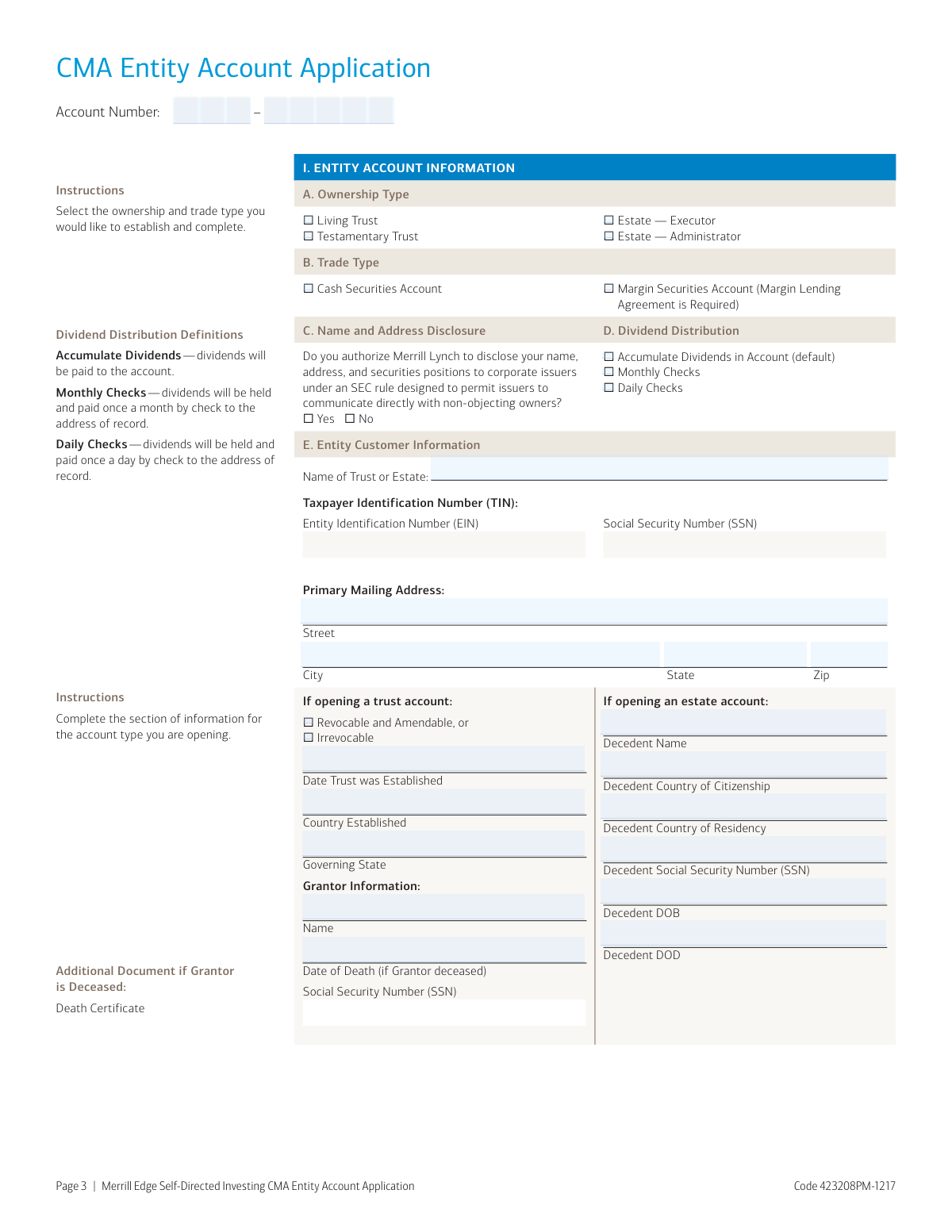
This application booklet is used to open a Merrill Edge Self-Directed Trust and Estate Cash Management Account® (CMA® Account), an investment account for U.S.-based trusts and estates. It allows the entity to trade and research various securities like stocks, mutual funds, and fixed income. Properly completing this application is crucial for trustees and executors to establish the financial framework for managing the entity's assets. Today, this form can be filled out quickly and accurately using AI-powered services like Instafill.ai, which can also convert non-fillable PDF versions into interactive fillable forms.
Our AI automatically handles information lookup, data retrieval, formatting, and form filling.
It takes less than a minute to fill out CMA Entity Account Application using our AI form filling.
Securely upload your data. Information is encrypted in transit and deleted immediately after the form is filled out.

Form specifications

Form name: Merrill Edge Self-Directed Trust and Estate Cash Management Account (CMA Account) Account Application Booklet and Agreements
Number of pages: 1
Language: English
Categories: estate forms, trust forms, PA state forms, account management forms, Merrill forms, NJ state forms
main-image

Instafill Demo: How to fill out PDF forms in seconds with AI

How to Fill Out CMA Entity Account Application Online for Free in 2026

Are you looking to fill out a CMA ENTITY ACCOUNT APPLICATION form online quickly and accurately? Instafill.ai offers the #1 AI-powered PDF filling software of 2026, allowing you to complete your CMA ENTITY ACCOUNT APPLICATION form in just 37 seconds or less.
Follow these steps to fill out your CMA ENTITY ACCOUNT APPLICATION form online using Instafill.ai:
  1. 1 Navigate to Instafill.ai and upload or select the Merrill Edge Self-Directed Trust and Estate CMA Account Application.
  2. 2 Use the AI assistant to complete the Entity Account Information section, specifying the ownership type (e.g., Living Trust, Estate), trade type, and the entity's name and Taxpayer Identification Number (TIN).
  3. 3 Provide the Individual Customer Information for each trustee, grantor, executor, and/or beneficial owner, including their role, identification, contact details, citizenship, and employment information.
  4. 4 Fill in the Affiliation and Financial Information for each individual, detailing any connections to financial institutions or political positions, as well as their household income, net worth, and investment experience.
  5. 5 Select the desired Banking Features, such as check writing or Visa cards (for trust accounts only).
  6. 6 Carefully review and complete the Tax Certification and Acknowledgement section, signing to agree to the terms of the Client Relationship Agreement, arbitration clause, and other disclosures.
  7. 7 Review all auto-filled information for accuracy, then securely download the completed application to be mailed, faxed, or delivered as per the instructions on the form.

Our AI-powered system ensures each field is filled out correctly, reducing errors and saving you time.

Why Choose Instafill.ai for Your Fillable CMA Entity Account Application Form?

Speed

Complete your CMA Entity Account Application in as little as 37 seconds.

Up-to-Date

Always use the latest 2026 CMA Entity Account Application form version.

Cost-effective

No need to hire expensive lawyers.

Accuracy

Our AI performs 10 compliance checks to ensure your form is error-free.

Security

Your personal information is protected with bank-level encryption.

Frequently Asked Questions About Form CMA Entity Account Application

This application is used to establish a self-directed investment account for a U.S.-based trust or estate. It allows the entity to trade securities like stocks and mutual funds, and includes cash management features.

Only U.S. residents and U.S.-based trusts and estates can apply for a Merrill Edge self-directed investing account. Each trustee, executor, or administrator must also provide their individual information.

For a trust account, you must submit a completed Trustee Certification of Investment Powers form. If the grantor of the trust is deceased, a death certificate is also required.

For an estate account, you must provide the decedent's death certificate, Letters of Testamentary or Letters of Appointment, and a completed Affidavit of Domicile. Some states may also require a tax waiver.

You can submit the completed application booklet and all required documents by standard mail, express delivery, or fax. The specific addresses and fax number are listed on the first page of the application booklet.

This section must be completed for every individual involved with the account, including each trustee, grantor, executor, administrator, and/or beneficial owner. You should make copies of these pages if there are more than two individuals.

No, this is a self-directed account, which means you are responsible for making all your own investment decisions. Merrill Edge will not provide investment advice, recommendations, or opinions on the suitability of any security or transaction.

Yes, you can request check writing services for both trust and estate accounts. Visa® cards are also available, but only for trust accounts.

A margin account allows you to borrow against the value of eligible securities in your account for investment purposes. To apply, select 'Margin Securities Account' in Section I and complete the separate Margin Lending Agreement form included in the booklet.

This section is for regulatory purposes and requires you to disclose if any account holder or their household members are employed by a financial institution, hold a senior political position, or are a director or 10% shareholder of a public company.

A trusted contact is an individual you authorize Merrill Edge to contact regarding possible financial exploitation or to confirm your well-being. Designating a trusted contact is optional and can be done by filling out the separate Trusted Contact Person Form.

Yes, services like Instafill.ai use AI to accurately auto-fill form fields, which can save you time and help reduce errors on a detailed application like this one.

You can use a service like Instafill.ai to upload the PDF and make it fillable online. This allows you to type your information directly into the fields, add your signature, and download the completed document for submission.

If you have a flat, non-fillable PDF, tools like Instafill.ai can convert it into an interactive form. This makes it easy to complete on your computer without needing to print and fill it out by hand.

Compliance CMA Entity Account Application
Validation Checks by Instafill.ai

1
Validates Taxpayer Identification Number Format and Requirement
This check ensures that the Social Security Number (SSN) for individuals or the Taxpayer Identification Number (TIN)/Employer Identification Number (EIN) for the entity is provided and adheres to the standard IRS format (e.g., XXX-XX-XXXX for SSN, XX-XXXXXXX for EIN). This is a critical requirement for identity verification under the Customer Identification Program (CIP) and for tax reporting purposes. An application with a missing or incorrectly formatted number will be rejected until corrected.
2
Ensures Conditional Entity Information is Complete
This validation verifies that all required fields in the 'Entity Customer Information' section are completed based on the 'Ownership Type' selected. For instance, if 'Living Trust' is chosen, fields such as 'Date Trust was Established' and Grantor information become mandatory. If 'Estate' is selected, all Decedent information fields must be filled out, ensuring the legal and structural details of the entity are properly captured for account setup.
3
Validates Logical Consistency of Decedent/Grantor Dates
This check ensures that any provided 'Date of Death' (DOD) is chronologically after the corresponding 'Date of Birth' (DOB) for a decedent or deceased grantor. This is a fundamental logical check to prevent data entry errors and ensure the accuracy of vital records associated with the account. An application with an invalid date sequence would be halted and require user correction.
4
Prohibits P.O. Boxes for Permanent Residential Address
This validation confirms that the 'Permanent Residential Address' provided for each individual customer is a physical street address and not a P.O. Box, as explicitly stated on the form. This is a strict regulatory requirement for identity verification under federal law, which mandates a physical location for the customer. If a P.O. Box is detected, the system will block submission and prompt the user for a valid physical address.
5
Validates Non-U.S. Citizen Documentation Requirement
This check is triggered if an applicant answers 'No' to the 'Are you a U.S. Citizen?' question. It then verifies that the 'Citizenship and Passport Information' section is fully completed, including all details for the passport and/or Green Card. This is essential for compliance with federal regulations regarding account opening for foreign nationals and resident aliens, and failure to provide this information will render the application incomplete.
6
Ensures Completeness of Conditional Affiliation Disclosures
This validation verifies that if an applicant answers 'Yes' to any affiliation question (e.g., employment at a broker-dealer, holding a senior political position), all corresponding sub-fields requesting specific details are mandatory and must be filled out. This information is crucial for regulatory compliance (such as FINRA rules) and internal risk assessment. An incomplete disclosure will prevent submission until the required details are provided.
7
Validates Visa Card Request Eligibility
This check enforces the rule stated in Section III.B that Visa cards are for 'TRUST ACCOUNTS ONLY'. The system will verify that the 'Ownership Type' selected in Section I is a 'Living Trust' or 'Testamentary Trust' before allowing a Visa card request to be processed. If an applicant for an 'Estate' account requests a card, the request will be denied with an explanatory message.
8
Validates Margin Account Selection and Agreement Submission
If an applicant selects 'Margin Securities Account' as the 'Trade Type', this check confirms that the separate 'Margin Lending Agreement Form' has also been completed and submitted. Opening a margin account involves significant risk and requires explicit agreement to specific terms regarding credit, interest, and liquidation rights. The application cannot be approved for margin trading without the signed agreement.
9
Verifies Consistency Between Individual Role and Entity Type
This check ensures the 'Role' selected by an individual customer (e.g., Trustee, Executor/Administrator, Grantor) is logically consistent with the 'Ownership Type' of the account (Trust or Estate). For example, an individual cannot be an 'Executor/Administrator' on a 'Trust' account. This logical validation prevents incorrect role assignments and ensures the account is structured correctly from a legal and operational standpoint.
10
Verifies Notarization of Required Legal Documents
For Trust and Estate accounts, this check confirms that the 'Trustee Certification Form' and/or 'Affidavit of Domicile' have been properly notarized where required. The forms explicitly state that signatures must be notarized and provide specific instructions for the notary. An application submitted with missing or improperly executed notarization is legally incomplete and will be rejected pending correction.
11
Verifies Submission of Required Supporting Documents
This check confirms that all necessary supporting documents listed in the 'Additional Required Documents' section have been uploaded based on the account type. For a Trust account, the 'Trustee Certification of Investment Powers' is required; for an Estate, 'Letters of Testamentary' and a 'Death Certificate' are mandatory. The system should prevent submission until all required documents are attached to ensure a complete and legally valid application package.
12
Requires Explanation for 'Other' Selections
This validation ensures that whenever an applicant selects an 'Other' checkbox (e.g., in Passport Type, Source of Income, Product Experience), the corresponding text field for explanation is not left empty. This is necessary to capture specific, non-standard information that is required for due diligence and account setup. The form will be considered incomplete if an 'Other' selection is not explained.

Common Mistakes in Completing CMA Entity Account Application

Forgetting to Include Required Supporting Documents

This application requires additional legal documents depending on the account type, such as a Trustee Certification, Letters of Testamentary, or a Death Certificate. Applicants often overlook the checklist on page 2, leading to an incomplete submission and significant processing delays. To avoid this, carefully review the 'Additional Required Documents' section and gather all necessary paperwork before sending the application. AI-powered tools like Instafill.ai can help by analyzing the application's requirements and reminding you of all necessary attachments.

Using the Wrong Taxpayer Identification Number (TIN)

On page 3, the form asks for the TIN of the Trust or Estate. A common error is to provide the grantor's or trustee's Social Security Number (SSN) instead of the Entity Identification Number (EIN) assigned to the trust or estate. This mistake causes tax reporting errors and can lead to application rejection. Ensure you use the correct EIN for the entity; if one has not been issued, you must apply for it with the IRS before completing this form.

Providing Incomplete Information for All Parties

The form requires complete individual information for each trustee, executor, or beneficial owner on pages 4-7. Applicants with multiple trustees often fail to make copies of these pages and submit details for only one or two individuals. This results in an incomplete application that cannot be processed. Since this is a flat PDF, a tool like Instafill.ai can convert it into a fillable version where you can easily add sections for additional individuals, ensuring no one is missed.

Entering a P.O. Box for a Permanent Residential Address

Page 4 explicitly states 'No P.O. Boxes' for the Permanent Residential Address, a requirement for identity verification under federal regulations. Many people use a P.O. Box for mail and enter it by habit, which will cause the application to be returned for correction. Always provide a physical street address for the residential address field and use the separate mailing address section if you receive mail elsewhere. An intelligent form filler like Instafill.ai can automatically detect and flag the use of a P.O. Box in a residential address field.

Submitting Unnotarized or Improperly Notarized Documents

The application packet includes separate forms like the 'Trustee Certification' and 'Affidavit of Domicile' which require a notarized signature. Applicants frequently forget to have these documents notarized, or the notary fails to complete the form correctly, rendering the submission invalid. This is a critical step that, if missed, guarantees the application will be rejected. While an AI tool cannot perform the notarization, Instafill.ai can highlight the notarization requirement on these forms, ensuring you don't overlook it.

Leaving Employment Information Blank if Retired or Unemployed

In the Employment Information section on pages 5-6, the form instructs applicants who are 'Retired' or 'Not Employed' to provide their previous employer's information. Many applicants in these categories leave this section blank, which is considered an incomplete entry. This information is used for compliance and background verification, so failing to provide it will delay the application. AI-powered form fillers like Instafill.ai can use conditional logic to prompt you for previous employer details if you select 'Retired' or 'Not Employed'.

Incorrectly Answering Financial or Political Affiliation Questions

The questions on page 6 regarding affiliations with broker-dealers or senior political positions are complex and often misunderstood. Applicants may answer 'No' incorrectly out of haste, which can lead to serious compliance issues and account restrictions later. It is crucial to read these questions carefully and provide accurate details about any affiliations for yourself, your spouse, or household members. Tools like Instafill.ai can provide contextual help for complex terms to prevent misunderstanding.

Forgetting to Sign, Date, or Specify Role on the Signature Page

The final acknowledgment on page 8 requires a signature, date, and the person's 'Title/Role' (e.g., Trustee, Executor). A very common mistake is to leave one of these three fields blank, especially the Title/Role. An unsigned application is invalid, and a missing role prevents the firm from verifying the signer's authority, leading to rejection. Because this form is a non-fillable PDF, a tool like Instafill.ai can convert it to a smart, fillable version that validates required fields, ensuring you don't miss these details.

Requesting Ineligible Banking Features

On page 8, the form specifies that Visa cards are for 'TRUST ACCOUNTS ONLY.' Executors or administrators of an estate account might mistakenly request a Visa card, which cannot be issued. This error, while minor, shows a lack of attention to detail and requires clarification, slowing down the process. When using an AI form filler like Instafill.ai, the system can automatically disable or hide options, like the Visa card request, if you have specified you are opening an Estate account.

Forgetting to Submit Required Identification Copies

Page 5 instructs applicants who are Resident Aliens to submit copies of their passport and green card with the application. This is a firm requirement for identity verification that is easily missed. Forgetting to include these photocopies will halt the application process until they are received. To avoid this, double-check all instructions for mentions of required copies before mailing your packet.
Saved over 80 hours a year

“I was never sure if my IRS forms like W-9 were filled correctly. Now, I can complete the forms accurately without any external help.”

Kevin Martin Green

Your data stays secure with advanced protection from Instafill and our subprocessors

Robust compliance program

Transparent business model

You’re not the product. You always know where your data is and what it is processed for.

ISO 27001, HIPAA, and GDPR

Our subprocesses adhere to multiple compliance standards, including but not limited to ISO 27001, HIPAA, and GDPR.

Security & privacy by design

We consider security and privacy from the initial design phase of any new service or functionality. It’s not an afterthought, it’s built-in, including support for two-factor authentication (2FA) to further protect your account.

Fill out CMA Entity Account Application with Instafill.ai

Worried about filling PDFs wrong? Instafill securely fills merrill-edge-self-directed-trust-and-estate-cash-management-account-cma-account-account-application-booklet-and forms, ensuring each field is accurate.