Yes! You can use AI to fill out New Fidelity Account® — Trust — Brokerage
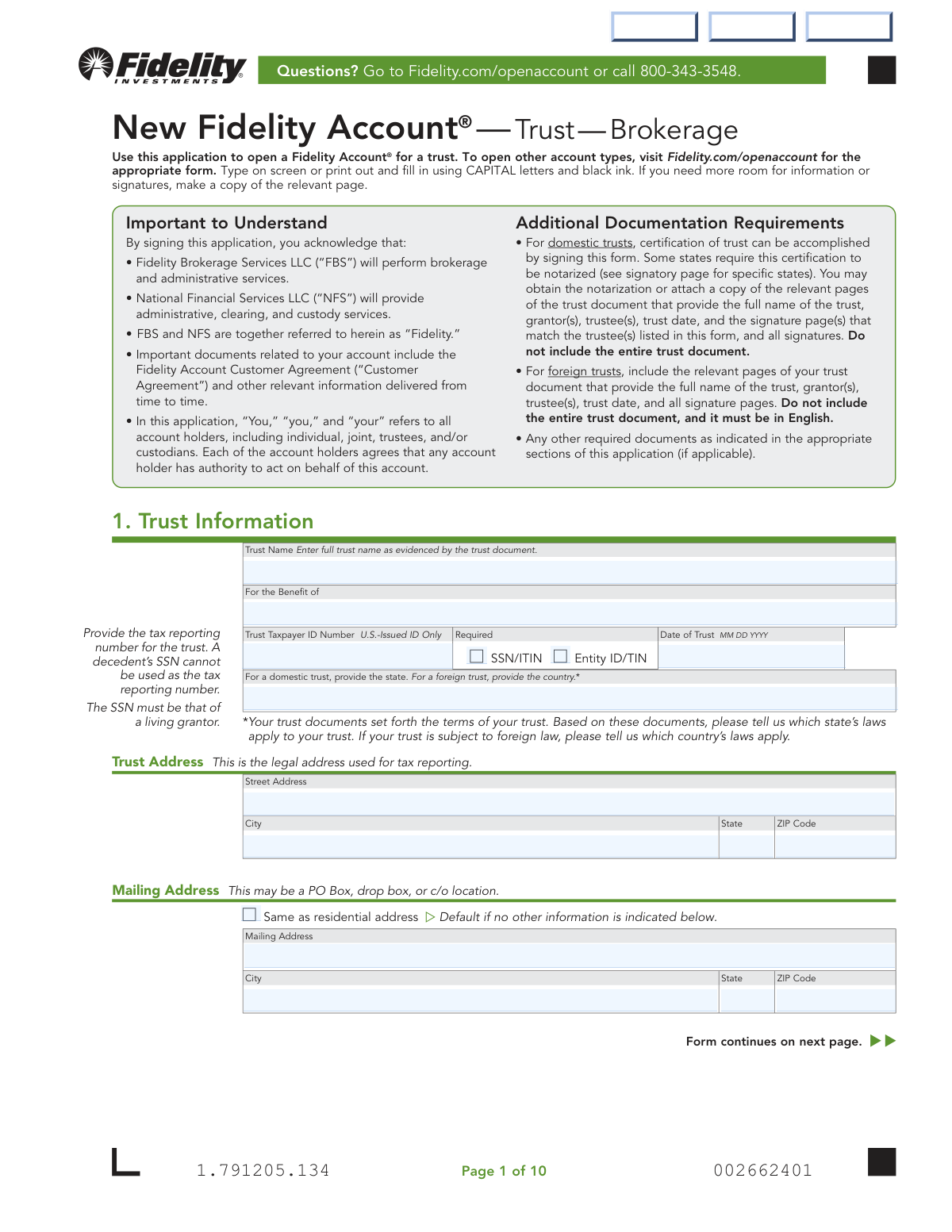
The New Fidelity Account® — Trust — Brokerage application is a comprehensive form required to open a brokerage account for a trust entity with Fidelity Brokerage Services LLC. This document gathers essential information about the trust, its trustees, grantors, and funding sources to ensure legal and regulatory compliance. Completing this detailed application accurately is crucial for establishing the account and defining its operational parameters. Today, this form can be filled out quickly and accurately using AI-powered services like Instafill.ai, which can also convert non-fillable PDF versions into interactive fillable forms.
Fidelity Trust Account Application is part of the
broker forms, brokerage account forms, brokerage forms, Fidelity forms, new account forms, trust account forms and trust forms categories on Instafill.
Our AI automatically handles information lookup, data retrieval, formatting, and form filling.
It takes less than a minute to fill out Fidelity Trust Account Application using our AI form filling.
Securely upload your data. Information is encrypted in transit and deleted immediately after the form is filled out.
Form specifications
| Form name: | New Fidelity Account® — Trust — Brokerage |
| Number of fields: | 221 |
| Number of pages: | 17 |
| Language: | English |
More forms in Broker forms
Instafill Demo: How to fill out PDF forms in seconds with AI
How to Fill Out Fidelity Trust Account Application Online for Free in 2026
Are you looking to fill out a FIDELITY TRUST ACCOUNT APPLICATION form online quickly and accurately? Instafill.ai offers the #1 AI-powered PDF filling software of 2026, allowing you to complete your FIDELITY TRUST ACCOUNT APPLICATION form in just 37 seconds or less.
Follow these steps to fill out your FIDELITY TRUST ACCOUNT APPLICATION form online using Instafill.ai:
- 1 Navigate to Instafill.ai and upload the 'New Fidelity Account® — Trust — Brokerage' application or select it from the available templates.
- 2 Provide the trust's information in Section 1, including the full trust name, tax ID number, and legal address.
- 3 Enter the detailed personal and financial information for the Primary Trustee in Section 2, including citizenship, employment, and any affiliations.
- 4 Use Section 3 to add information for any additional trustees, grantors, or other individuals with authority over the trust.
- 5 Specify the initial funding method in Section 4 and ongoing funding options in Section 6, whether by check, transfer from another firm, or from an existing Fidelity account.
- 6 Select desired account features in Section 7 and review the Certification of Trust in Section 8 to ensure all details are correct.
- 7 Have all trustees digitally sign and date the application in Section 9, notarizing signatures if required by your state's laws, before securely submitting the completed form.
Our AI-powered system ensures each field is filled out correctly, reducing errors and saving you time.
Why Choose Instafill.ai for Your Fillable Fidelity Trust Account Application Form?
Speed
Complete your Fidelity Trust Account Application in as little as 37 seconds.
Up-to-Date
Always use the latest 2026 Fidelity Trust Account Application form version.
Cost-effective
No need to hire expensive lawyers.
Accuracy
Our AI performs 10 compliance checks to ensure your form is error-free.
Security
Your personal information is protected with bank-level encryption.
Frequently Asked Questions About Form Fidelity Trust Account Application
This form is used to open a new Fidelity Account® for a trust, specifically a brokerage account. It is intended for trustees to establish an account in the name of the trust.
All trustees of the trust must provide their information and sign the application in Section 9. Information for grantors and other individuals with authority over the trust is also required in Section 3.
For most domestic trusts, signing this form is sufficient certification. However, if your trust is governed by laws in certain states listed on the signature page, you must either get the signatures notarized or attach copies of the trust pages showing the trust name, date, grantors, trustees, and signatures.
For a foreign trust, you must include the relevant pages of your trust document that are in English. These pages should provide the trust's full name, the grantor(s), trustee(s), trust date, and all signature pages.
You can fund the account by check, by transferring assets from another firm using a separate Transfer of Assets form, or by transferring funds from an existing Fidelity nonretirement account. Check the appropriate box in Section 4.
Notarization is required for domestic trusts governed by the laws of specific states (listed on page 8) if you are not providing copies of the trust document pages. A U.S. Notary must be used for this purpose.
The Core Position is where any uninvested cash in your account is automatically held while awaiting your instruction. By default, this form uses the Fidelity Government Money Market Fund (SPAXX) as the core position.
To establish checkwriting immediately, check the box in Section 7 and include a completed Checkwriting form with your application. You can also request information to set it up at a later date.
A Trusted Contact is a person you authorize Fidelity to contact if there are concerns about your welfare or potential financial exploitation. Designating a trusted contact is optional and does not give them authority to transact on your account.
You can send the completed application and any necessary attachments via regular mail to the P.O. Box in Cincinnati, OH, or via overnight mail to the address in Covington, KY, both listed on page 10 of the form.
Yes, services like Instafill.ai use AI to accurately auto-fill form fields from your profile. This can save you significant time and help reduce errors when completing complex forms.
You can use a service like Instafill.ai to upload the PDF and fill it out on your computer. The platform allows you to type directly into the fields, add digital signatures, and then download the completed form for submission.
If you have a non-fillable or 'flat' PDF, tools like Instafill.ai can convert it into an interactive, fillable form. This allows you to easily type your information instead of printing and filling it out by hand.
The form instructs you to make a copy of the relevant page if you need more room for information or signatures. For additional trustees, you should make a copy of Section 3 and have all trustees sign in Section 9.
Compliance Fidelity Trust Account Application
Validation Checks by Instafill.ai
1
Trust Tax ID and Grantor Status Consistency
This validation ensures that the Trust Taxpayer ID Number is valid and consistent with the grantor's status. It checks that a decedent's SSN is not used as the trust's tax ID. Furthermore, if an SSN/ITIN is provided, it cross-references with Section 3 to confirm it belongs to a living grantor. Failure to comply may result in tax reporting errors and rejection of the application by the IRS, requiring correction and resubmission.
2
Trustee Type (Individual vs. Entity) Field Dependency
This check validates that information provided for a trustee is consistent with their declared type (individual or entity). If the 'Trustee is an entity' box is checked, the 'Entity Name' field must be populated, while personal fields like 'First Name' and 'Date of Birth' must be empty. Conversely, if the box is unchecked, the personal fields are required and the 'Entity Name' field must be empty. An inconsistency here indicates a data entry error and will prevent the application from being processed until the trustee's information is clarified.
3
Foreign Citizen Information Completeness
This validation is triggered when a trustee is identified as a 'Foreign citizen'. It ensures that all required fields within the foreign citizen section are completed, including Country of Citizenship, U.S. residency status, and full Government Identification details. This information is mandatory for regulatory compliance (e.g., KYC/AML). If this section is incomplete, the account cannot be opened due to regulatory risk and the application will be returned.
4
Government ID Expiration Date Validity
This check verifies that any government-issued ID provided has not expired. The 'ID Expiration Date' must be on or after the date the application is submitted. This is crucial for identity verification as per federal regulations, which require an unexpired, government-issued ID. An expired ID will cause the application to be rejected pending submission of a valid, unexpired ID document copy.
5
Conditional Requirement for Income Source Details
This validation enforces conditional logic based on the trustee's employment status. If 'Employed' is selected, the 'Occupation' and 'Employer' fields are mandatory. If 'Retired' or 'Not employed' is selected, the 'Source of Income' field is mandatory. This information is required by industry regulations to understand the client's financial profile. Missing this information will result in an incomplete application that cannot be processed.
6
Deceased Grantor Data Entry Rules
When the 'DECEASED Grantor' box is checked in Section 3, this validation ensures that only the grantor's full legal name is provided. It confirms that all other personal data fields for that individual, such as Date of Birth, Taxpayer ID Number, and address, are left blank as instructed. Incorrectly providing extra information can lead to data processing errors and confusion about account roles, so the application will be flagged for correction.
7
Verification of All Trustee Signatures
This check ensures that every individual designated as a 'Trustee' in Sections 2 and 3 has provided a corresponding signature in Section 9. The system counts the number of trustees and compares it to the number of unique trustee signatures. A mismatch indicates either a missing signature or an incorrect role designation, which legally invalidates the agreement. The application will be considered incomplete and cannot be executed until all required signatures are present.
8
Notarization Requirement Flag
This validation checks the 'Trust governing law' state provided in Section 1 against a list of states that require notarization (e.g., CA, DE, ID, etc.) if trust documents are not attached. If the governing state is on the list and there's no indication of attached documents, the submission is flagged as requiring a notary seal. Failure to provide the required notarization for these states will result in the legal rejection of the form, delaying account setup.
9
EFT Bank Routing Number Format
When Electronic Funds Transfer (EFT) is being set up in Section 6, this check validates the 'Bank Routing/ABA Number'. It ensures the number is present and formatted correctly, specifically that it contains exactly 9 digits. An incorrect routing number will cause all EFT transactions to fail, so the system rejects invalid formats at the point of entry to prevent future processing errors and payment delays.
10
Mutually Exclusive Initial Funding Selection
In the 'Initial Funding' section, if a transfer from a Fidelity Brokerage Account is selected, this validation ensures the user provides either a specific dollar 'Amount' or checks 'All Assets', but not both. Selecting both creates an ambiguous instruction that cannot be processed. The form will be rejected for clarification to prevent incorrect asset movement.
11
Trusted Contact Uniqueness Check
On the 'Trusted Contact Authorization Form', this validation verifies that the person designated as a Primary or Alternate Trusted Contact is not the account owner. It compares the name and/or Taxpayer ID from Sections 3 and 4 against the Account Owner's information in Section 1. Designating oneself as a trusted contact is redundant and not permitted, so a match will cause the form to be rejected for correction.
12
Ancillary Form Requirement Check
This validation identifies when additional, separate forms are required to complete the request. It checks if 'Transfer from another firm' (Section 4) or 'Establish [checkwriting] now' (Section 7) is selected. If so, it flags the submission to ensure the corresponding 'Transfer of Assets' or 'Checkwriting' form is also present. Submitting the main application without these required ancillary forms will result in an incomplete package and processing delays.
13
Date of Trust Chronological Validity
This check ensures the 'Date of Trust' entered in Section 1 is a valid, logical date. It must be formatted correctly (MM DD YYYY) and must be a date in the past or the present, not a future date. A trust cannot be established on a future date, so an invalid entry would indicate a typo or misunderstanding. The application would be returned for correction to ensure the legal establishment date of the trust is accurate.
14
Primary vs. Additional Trustee Section Usage
This validation enforces the form's structural rule that Section 2 is exclusively for the 'Primary Trustee' and Section 3 is for all 'Additional' individuals. The system will check that only one person's details are entered in Section 2. If more than one trustee is listed, all subsequent trustees must be in Section 3. This ensures data is captured in the correct structured fields for proper role assignment in the system; failure would require manual data correction.
Common Mistakes in Completing Fidelity Trust Account Application
Applicants often get confused about which tax number to use for the trust in Section 1. The form requires a specific U.S.-issued ID for the trust itself, which could be a living grantor's SSN or a separate Entity ID/TIN, but explicitly not a decedent's SSN. Using the wrong number can lead to significant tax reporting errors, IRS penalties, and rejection of the application. To avoid this, carefully review the trust documents or consult a legal or tax professional to determine the correct Taxpayer ID Number before filling out the form.
Section 9 clearly states that ALL trustees must sign and date the application. In cases with co-trustees or multiple trustees, it is a frequent oversight to miss a signature, especially if trustees live in different locations. An application with missing signatures is considered incomplete and cannot be processed, causing significant delays. To prevent this, the primary applicant should create a checklist of all required signers and coordinate to ensure every signature block is completed before submission.
A critical and easily missed detail is the notarization requirement in Section 9. If the trust is governed by the laws of specific states listed (e.g., California, Delaware, Nevada) and you are not providing copies of the trust document, all trustee signatures MUST be notarized. Failure to get the required notarization will result in the application being rejected, forcing you to re-sign and re-submit the entire signature page. Always check the governing state of the trust and the corresponding signature requirements on the form.
In Section 1, applicants sometimes abbreviate the trust name or fail to enter it exactly as it appears in the official trust document. The form requires the full, legal name of the trust for the account to be titled correctly. Any discrepancy can lead to the application being rejected or future legal and transactional complications. To avoid this, have the trust document in front of you and transcribe the name precisely as written, including the date if it is part of the official name.
Sections 2 and 3 contain several checkboxes to define an individual's role (e.g., 'Trustee only', 'Trustee and grantor') and their specific powers ('Authority to amend the trust'). Applicants may not understand the legal implications and fail to check all applicable boxes, or check incorrect ones. This can result in a trustee having improper authority or lacking the necessary permissions to manage the account as intended. Carefully review the trust document to accurately reflect each person's designated powers on the application.
The application instructions specify providing only the 'relevant pages' of the trust document, not the entire thing. Common mistakes include sending the whole document, which can be cumbersome and contains private information, or forgetting to include the specific pages that show the trust name, trustees, date, and signature pages. Both errors can delay processing as Fidelity will have to request the correct, specific documentation. Prepare these specific pages ahead of time to ensure a smooth application process.
In Sections 2 and 3, the form requires the full legal name 'as evidenced by a government-issued, unexpired document.' Applicants often use nicknames, initials, or common names instead of the full legal name on their driver's license or passport. This mismatch will cause the application to fail the mandatory identity verification process, leading to rejection. Always use your full legal name and double-check that all personal data, like date of birth, matches your official documents.
When setting up Electronic Funds Transfer (EFT) in Section 6, applicants may fill out the bank information but forget the crucial step of attaching supporting documentation. The form requires a voided check, deposit slip, or bank statement to verify the account details. Without this attachment, Fidelity cannot establish the EFT feature, forcing the applicant to complete a separate process later. To avoid this, ensure you have a digital or physical copy of the required bank document ready when you fill out this section.
The separate 'Trusted Contact Authorization Form' is designed to name a third party Fidelity can contact regarding your account. A very common error is for the account owner to list themselves in the 'Primary Trusted Contact' section. The form explicitly warns against this, as it defeats the purpose of the authorization. This will invalidate the designation, leaving you without this important safety net. Always choose a different, reliable person who is 18 or older for this role.
The form is structured with Section 2 for the 'Primary Trustee' and Section 3 for 'Additional Individual Information' (including other trustees). The instructions explicitly state not to make copies of Section 2 for additional people. However, users often miss this and photocopy Section 2, leading to submission of incorrect or confusing information. This can delay processing as the firm tries to sort out the roles. Following the form's structure and using Section 3 as intended is essential for a correct submission.
Saved over 80 hours a year
“I was never sure if my IRS forms like W-9 were filled correctly. Now, I can complete the forms accurately without any external help.”
Kevin Martin Green
Your data stays secure with advanced protection from Instafill and our subprocessors

Robust compliance program
Transparent business model
You’re not the product. You always know where your data is and what it is processed for.
ISO 27001, HIPAA, and GDPR
Our subprocesses adhere to multiple compliance standards, including but not limited to ISO 27001, HIPAA, and GDPR.
Security & privacy by design
We consider security and privacy from the initial design phase of any new service or functionality. It’s not an afterthought, it’s built-in, including support for two-factor authentication (2FA) to further protect your account.
Fill out Fidelity Trust Account Application with Instafill.ai
Worried about filling PDFs wrong? Instafill securely fills new-fidelity-account-trust-brokerage-1 forms, ensuring each field is accurate.