Yes! You can use AI to fill out Fannie Mae Residential Broker Price Opinion (BPO) (Revised 03/99)
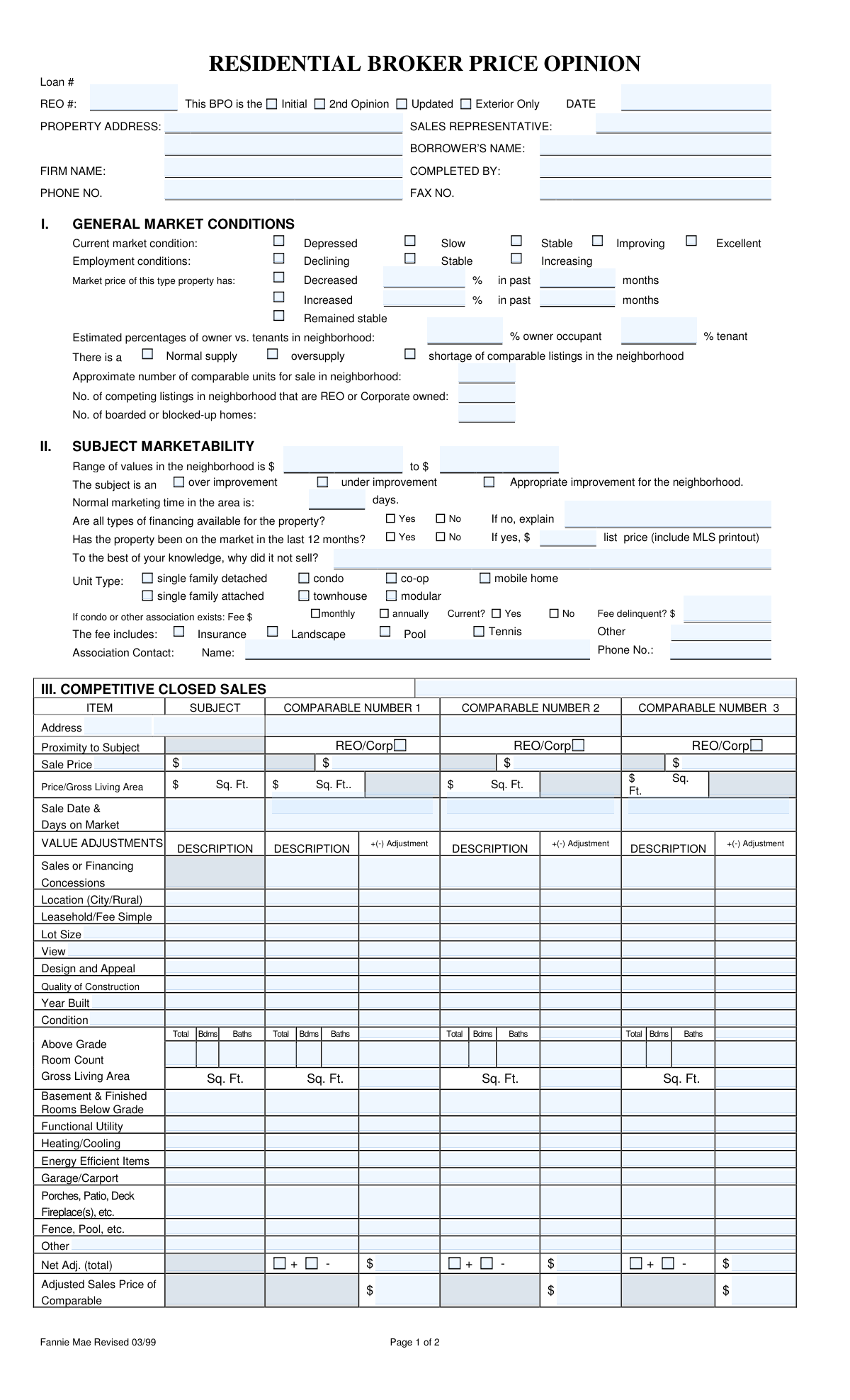
The Fannie Mae Residential Broker Price Opinion (BPO) is a standardized real-estate valuation form completed by a real estate professional to provide an opinion of a property's current market value. It documents neighborhood and employment trends, the subject property's marketability, comparable closed sales and listings with adjustments, and recommended repairs. Lenders, servicers, and asset managers use it—especially for REO/corporate-owned properties—to set list prices, determine as-is vs. repaired value, and plan a marketing strategy. Accurate completion is important because the BPO can influence pricing, repair budgets, and time-to-sale expectations.
Our AI automatically handles information lookup, data retrieval, formatting, and form filling.
It takes less than a minute to fill out Residential BPO (Fannie Mae 03/99) using our AI form filling.
Securely upload your data. Information is encrypted in transit and deleted immediately after the form is filled out.
Form specifications
| Form name: | Fannie Mae Residential Broker Price Opinion (BPO) (Revised 03/99) |
| Number of pages: | 2 |
| Filled form examples: | Form Residential BPO (Fannie Mae 03/99) Examples |
| Language: | English |
Instafill Demo: filling out a legal form in seconds
How to Fill Out Residential BPO (Fannie Mae 03/99) Online for Free in 2026
Are you looking to fill out a RESIDENTIAL BPO (FANNIE MAE 03/99) form online quickly and accurately? Instafill.ai offers the #1 AI-powered PDF filling software of 2026, allowing you to complete your RESIDENTIAL BPO (FANNIE MAE 03/99) form in just 37 seconds or less.
Follow these steps to fill out your RESIDENTIAL BPO (FANNIE MAE 03/99) form online using Instafill.ai:
- 1 Enter identifying details at the top of the form (loan number, REO number, date, property address, sales representative, borrower name, firm name, preparer name, phone and fax).
- 2 Complete Section I (General Market Conditions) by selecting current market and employment conditions, noting recent price trends, owner/tenant percentages, supply level, and counts of comparable units, REO listings, and boarded homes.
- 3 Complete Section II (Subject Marketability) by entering neighborhood value range, improvement level, typical marketing time, financing availability, prior listing history, unit type, and any HOA/association fees and contact information.
- 4 Fill Section III (Competitive Closed Sales) by adding 3 comparable sales, entering key data (price, GLA, sale date/DOM), applying value adjustments line-by-line, and calculating net adjustments and adjusted sale prices.
- 5 Fill Section VI (Competitive Listings) by adding 3 active/pending comparable listings, entering list data and sources, applying adjustments, and calculating adjusted comparable values.
- 6 Complete Sections IV and V by selecting occupancy status and marketing strategy (as-is/minimal repairs/repaired; likely buyer), then itemizing all needed repairs, marking recommended repairs, and totaling repair costs.
- 7 Determine and enter Section VI Market Value outputs (as-is value, repaired value, suggested list price, and quick sale value), add last sale details and comments, then sign and date the form and attach any required addenda/MLS printouts.
Our AI-powered system ensures each field is filled out correctly, reducing errors and saving you time.
Why Choose Instafill.ai for Your Fillable Residential BPO (Fannie Mae 03/99) Form?
Speed
Complete your Residential BPO (Fannie Mae 03/99) in as little as 37 seconds.
Up-to-Date
Always use the latest 2026 Residential BPO (Fannie Mae 03/99) form version.
Cost-effective
No need to hire expensive lawyers.
Accuracy
Our AI performs 10 compliance checks to ensure your form is error-free.
Security
Your personal information is protected with bank-level encryption.
Frequently Asked Questions About Form Residential BPO (Fannie Mae 03/99)
This form documents a broker’s opinion of a property’s current market value based on recent sales, active listings, and market conditions. Lenders and servicers commonly use it for REO, foreclosure, or loan-related valuation decisions.
A licensed real estate professional (broker/agent) who inspected the property and researched comparable sales/listings should complete it. The person who prepared the report signs and dates it at the end.
They indicate the type of assignment: the first BPO (Initial), a second independent valuation (2nd Opinion), a refreshed valuation after time has passed (Updated), or a drive-by/curbside assessment without interior access (Exterior Only). Select the option that matches the order request.
You’ll need the Loan #, REO # (if applicable), BPO date, property address, borrower’s name, sales representative, firm name, and the preparer’s contact information (phone/fax). These identifiers help the client match the BPO to the correct file.
Use the best available local data and professional judgment (MLS trends, market reports, and recent activity) to select the condition (e.g., Slow/Stable/Improving) and estimate changes in prices and owner-occupancy. If you estimate, be consistent with your comps and add brief support in comments.
It asks for the approximate share of owner-occupied homes versus rentals in the neighborhood. You can estimate using MLS rental activity, public records, local knowledge, or neighborhood observation, and note any assumptions in the comments.
“Normal marketing time” is the typical time it takes to sell similar homes in the area, often based on recent MLS DOM averages. For each comparable sale/listing, enter the actual DOM and the sale/list date shown in MLS or another verifiable source.
Complete the association fee amount and frequency (monthly/annually), whether it’s current, any delinquent amount, what the fee includes (insurance, pool, etc.), and the association contact name and phone number. If details are unknown, document your verification attempts and note “unknown” rather than leaving it blank.
Select the most similar recent closed sales in proximity, size, age, condition, and features, ideally within the same neighborhood/market area. If the best comps are farther away or older, explain why they were used and how they still reflect the subject’s market.
It indicates whether a comparable is a bank-owned (REO) or corporate-owned sale/listing. Marking this helps the client understand if distressed or institutional sales are influencing the value.
Describe differences between the subject and each comparable (e.g., living area, condition, lot size, garage) and apply a plus/minus dollar adjustment to reflect market-supported impacts. Adjustments should be consistent with local market evidence and result in an “Adjusted Sales Price” for each comp.
List all repairs needed to bring the property from “as-is” to average marketable condition for the neighborhood, including safety, habitability, and common marketability items. Include cosmetic items if they materially affect marketability or buyer appeal, and check the repairs you recommend the lender perform.
“As-Is” is the value in the property’s current condition, while “Repaired” reflects value after the listed repairs are completed. “30 Quick Sale Value” is a more aggressive price intended to sell within about 30 days, typically reflecting a discount for speed.
If your value conclusion falls outside the indicated range, re-check comp selection and adjustments first. If it still must be outside due to unique property factors or rapid market changes, clearly justify it in the comments and provide supporting data.
Use comments to document key positives/negatives and any special concerns such as encroachments, easements, water rights, environmental issues, flood zones, or financing limitations. Attach an addendum when you need more space or when supporting explanations and documentation are necessary.
Compliance Residential BPO (Fannie Mae 03/99)
Validation Checks by Instafill.ai
1
Loan Number and REO Number Presence & Format
Validates that at least one unique identifier (Loan # and/or REO #) is provided and matches the organization’s expected format (e.g., numeric/alphanumeric length, no illegal characters). These identifiers are required to correctly associate the BPO with the correct asset and servicing file. If missing or malformed, the submission should be rejected or routed to an exception queue because it cannot be reliably matched to a case.
2
BPO Type Selection (Initial/2nd Opinion/Updated/Exterior Only) Must Be Exactly One
Checks that exactly one BPO type checkbox is selected and that mutually exclusive options are not simultaneously marked. The BPO type drives downstream workflow, review requirements, and acceptable data completeness (e.g., Exterior Only may have different expectations). If none or multiple are selected, validation fails and the form must be corrected before processing.
3
Report Date Validity and Reasonableness
Ensures the DATE field is present, is a valid date format (MM/DD/YYYY or configured standard), and is not in the future beyond an allowed tolerance. The report date is critical for market condition context and compliance/audit trails. If invalid or missing, the submission should be blocked because time-sensitive valuation data cannot be trusted.
4
Property Address Completeness and Standardization
Validates that PROPERTY ADDRESS includes required components (street number/name, city, state, ZIP) and does not contain placeholder text. Address standardization (e.g., USPS normalization) should be applied to reduce duplicates and improve comparables matching. If incomplete or unparseable, the form should fail validation because the subject property cannot be uniquely identified.
5
Sales Representative, Completed By, Firm Name, and Borrower Name Required Fields
Checks that SALES REPRESENTATIVE, COMPLETED BY, FIRM NAME, and BORROWER’S NAME are not blank and meet minimum length rules (e.g., not just initials if policy requires full names). These fields establish accountability and are often required for compliance and vendor management. If any are missing, the submission should be rejected or returned for completion.
6
Phone and Fax Number Format Validation
Validates PHONE NO. and FAX NO. (if provided/required) conform to acceptable formats (e.g., 10-digit NANP with optional country code, no alphabetic characters). Correct contact information is necessary for follow-ups and dispute resolution. If the phone is missing or invalid (when required), the form should be flagged for correction; invalid fax should be flagged but may be non-blocking depending on policy.
7
Market Condition and Employment Condition Single-Choice Enforcement
Ensures exactly one option is selected for Current market condition (Depressed/Slow/Stable/Improving/Excellent) and for Employment conditions (Declining/Stable/Increasing). These are categorical fields used for analytics and valuation review. If multiple or none are selected, the submission should fail because the market narrative becomes ambiguous.
8
Market Price Change Logic (Increase/Decrease/Stable) with Percent and Months
Validates that only one of Decreased/Increased/Remained stable is selected, and if Increased or Decreased is selected then both the percentage and the number of months are provided and numeric within reasonable bounds (e.g., 0–100% and 1–60 months). This prevents contradictory trend reporting and supports reviewer reasonableness checks. If the trend is selected without required numeric details, validation fails and the user must supply the missing values.
9
Owner vs. Tenant Percentage Must Sum to 100
Checks that % owner occupant and % tenant are both provided, numeric, and sum to 100% (allowing a small rounding tolerance such as ±1). Neighborhood occupancy mix is used in risk and marketability assessment. If the values are missing, non-numeric, negative, or do not sum correctly, the form should be rejected or flagged for correction.
10
Supply Condition Selection and Comparable Counts Non-Negative Integers
Validates that exactly one supply condition is selected (Normal supply/oversupply/shortage) and that the counts for comparable units for sale, competing REO/corporate listings, and boarded/blocked-up homes are present (if required) and are non-negative integers. These fields support market absorption and neighborhood condition analysis. If counts are negative, non-integer, or missing when required, validation fails because the market condition section becomes unreliable.
11
Neighborhood Value Range Validity (Low <= High) and Currency Format
Ensures the Range of values in the neighborhood has both a low and high value, both are valid currency amounts, and the low value is less than or equal to the high value. This range is used to assess whether the subject’s indicated value is plausible. If the range is inverted or missing, the submission should be blocked for correction.
12
Marketing Time Must Be a Positive Integer (Days)
Validates that Normal marketing time in the area is provided as a positive integer number of days within a reasonable range (e.g., 1–365). Marketing time is a key marketability indicator and is used in quick-sale calculations and strategy. If missing, zero, or non-numeric, validation fails and the user must correct it.
13
Financing Availability Explanation Required When 'No' Selected
Checks that if 'Are all types of financing available?' is marked No, the explanation field is non-empty and meets a minimum detail threshold (e.g., at least 10 characters). The reason financing is limited can materially affect value and buyer pool. If No is selected without an explanation, the form should be rejected as incomplete.
14
Prior Listing in Last 12 Months Requires List Price and Non-Sale Reason
Validates that if 'Has the property been on the market in the last 12 months?' is Yes, then the list price is provided in valid currency format and a reason it did not sell is provided. This information is essential for diagnosing overpricing, condition issues, or market resistance. If Yes is selected without list price and narrative, validation fails due to missing required context.
15
Unit Type and HOA/Association Conditional Requirements
Ensures exactly one Unit Type is selected and, if condo/co-op/townhouse or any association exists, then association fee amount, frequency (monthly/annually), current status, delinquent amount (if not current), and association contact name/phone are validated. HOA obligations can affect marketability, financing, and net proceeds. If an association is indicated but fee/contact details are missing or invalid, the submission should be flagged or rejected based on business rules.
16
Comparable Sales/Listings Core Fields Completeness and Date Validity
Validates that each comparable used (Closed Sales and Listings) includes at minimum Address, Sale/List Price, Gross Living Area (Sq Ft), and Sale/List Date (and Days on Market where required), with dates in valid format and not in the future. These are the minimum data needed to support the valuation conclusion and reviewer audit. If any comparable is missing core fields, the form should fail validation or require the user to remove/replace the incomplete comparable.
17
Adjustment and Adjusted Price Arithmetic Consistency
Checks that Net Adj. (total) equals the sum of all individual line-item adjustments for each comparable and that Adjusted Sales Price equals Sale Price plus/minus Net Adj. according to the indicated sign. Arithmetic consistency is critical to valuation credibility and prevents downstream calculation errors. If totals do not reconcile, the submission should be rejected or flagged for recalculation before acceptance.
18
Market Value Section Consistency with Comparable Range and Quick Sale Logic
Validates that the stated Market Value (AS IS and/or REPAIRED) falls within the indicated value range supported by Competitive Closed Sales, and that 30 Quick Sale Value is less than or equal to the corresponding Market Value. This enforces the form’s stated rule and prevents illogical pricing recommendations. If values fall outside the supported range or quick-sale exceeds market value, the submission should be blocked or routed for reviewer override with justification.
Common Mistakes in Completing Residential BPO (Fannie Mae 03/99)
People often skip the Loan #, REO #, the BPO type (Initial/2nd Opinion/Updated/Exterior Only), or the effective DATE because they assume it’s already known by the client. Missing or mismatched identifiers can cause the report to be rejected, misfiled, or applied to the wrong asset. Always copy these fields exactly from the assignment order and ensure the same identifiers appear on both pages where requested.
A common error is entering a partial address (missing unit number, city/ZIP) or using a mailing address instead of the property’s physical address. This leads to incorrect comp selection, wrong neighborhood analysis, and potential compliance issues if the wrong parcel is evaluated. Use the full legal/physical address as shown in public records/MLS, including unit/suite, and verify it matches the parcel you researched.
Because the form uses checkbox-style choices (Depressed/Slow/Stable/Improving/Excellent and Declining/Stable/Increasing), users sometimes leave them blank or mark conflicting options. This makes the narrative internally inconsistent and can undermine the credibility of the value conclusion. Select one best-fit option per category and add a brief comment in the COMMENTS section if conditions vary by submarket or price band.
The “Decreased/Increased % in past months” section is frequently filled with a percent but no months, or months with no percent, or with unrealistic figures not supported by comps. This can trigger client questions and make the value conclusion appear unsupported. Provide both the percentage and the time period, and base the estimate on measurable data (median sale price trend, paired sales, or MLS stats) for the subject’s segment.
Respondents often enter rough guesses that add up to more than 100% or leave one side blank. This creates obvious math errors and suggests the neighborhood analysis is not carefully prepared. Ensure the owner-occupant and tenant percentages sum to 100%, and if unknown, use a defensible estimate from census/MLS rental prevalence and note the source.
The form asks for approximate counts of comparable units for sale, REO/corporate competing listings, and boarded/blocked-up homes, but these are often left empty because they require extra research. Omitting them weakens the marketability analysis and can affect the marketing strategy and pricing. Pull counts from MLS filters for the neighborhood/subdivision and do a quick drive-by/imagery review for boarded homes, documenting your method if needed.
When financing is limited (condition issues, condo warrantability, rural property, leasehold, etc.), people check “No” but don’t explain why. Clients rely on this to determine buyer pool and pricing, so a blank explanation can lead to follow-up requests or an inaccurate list strategy. If “No,” specify the constraint (e.g., cash-only due to condition, non-warrantable condo, title/leasehold issues) and how it impacts marketing time and value.
For “Has the property been on the market in the last 12 months,” users often check “Yes” but fail to include the list price, attach MLS printout, or provide a credible reason it didn’t sell. This can cause the BPO to be rejected and removes important context for pricing and repairs. Include the most recent list price, dates, days on market, and a data-based explanation (overpriced vs. condition vs. financing vs. location) and attach the MLS history when available.
People frequently misclassify the unit type (townhouse vs. condo vs. single-family attached) or skip HOA/association fields (fee amount, frequency, current/delinquent status, what the fee includes, contact info). Incorrect classification can lead to wrong comps and major valuation errors, especially for condos/co-ops with different financing and fee structures. Confirm the property type from public records/MLS, then provide HOA fee amount, monthly/annual frequency, delinquency amount if any, included amenities, and a reachable association contact.
In the Competitive Closed Sales and Competitive Listings grids, it’s common to omit GLA, sale date, DOM, proximity, or verification sources, or to mix up list vs. sale figures. Missing data prevents reviewers from validating the comp set and can invalidate adjustments and the final value. Use complete MLS/public record details for each comp, clearly label sale vs. list metrics, include proximity (miles/subdivision), and cite the data source used to verify each transaction.
Because the form requires +/(-) adjustments and a net adjustment total, users often reverse the sign (adding when they should subtract), leave adjustment lines blank, or miscalculate the net and adjusted sales price. This creates internal inconsistencies and can push the concluded value outside the supported range. Apply adjustments consistently (superior comp gets negative adjustment; inferior comp gets positive), keep adjustments market-supported, and re-check arithmetic so net adjustments reconcile to the adjusted sales price.
The Repairs section asks to itemize ALL repairs to reach average marketable condition and to check those recommended for best marketing, but people often provide a single lump-sum number or forget to total correctly. This reduces usefulness for asset managers and can distort as-is vs. repaired value conclusions. List each repair with an estimated cost, clearly mark recommended items, and ensure the GRAND TOTAL equals the sum of all line items.
Saved over 80 hours a year
“I was never sure if my IRS forms like W-9 were filled correctly. Now, I can complete the forms accurately without any external help.”
Kevin Martin Green
Your data stays secure with advanced protection from Instafill and our subprocessors

Robust compliance program
Transparent business model
You’re not the product. You always know where your data is and what it is processed for.
ISO 27001, HIPAA, and GDPR
Our subprocesses adhere to multiple compliance standards, including but not limited to ISO 27001, HIPAA, and GDPR.
Security & privacy by design
We consider security and privacy from the initial design phase of any new service or functionality. It’s not an afterthought, it’s built-in, including support for two-factor authentication (2FA) to further protect your account.
Fill out Residential BPO (Fannie Mae 03/99) with Instafill.ai
Worried about filling PDFs wrong? Instafill securely fills fannie-mae-residential-broker-price-opinion-bpo-re forms, ensuring each field is accurate.



