
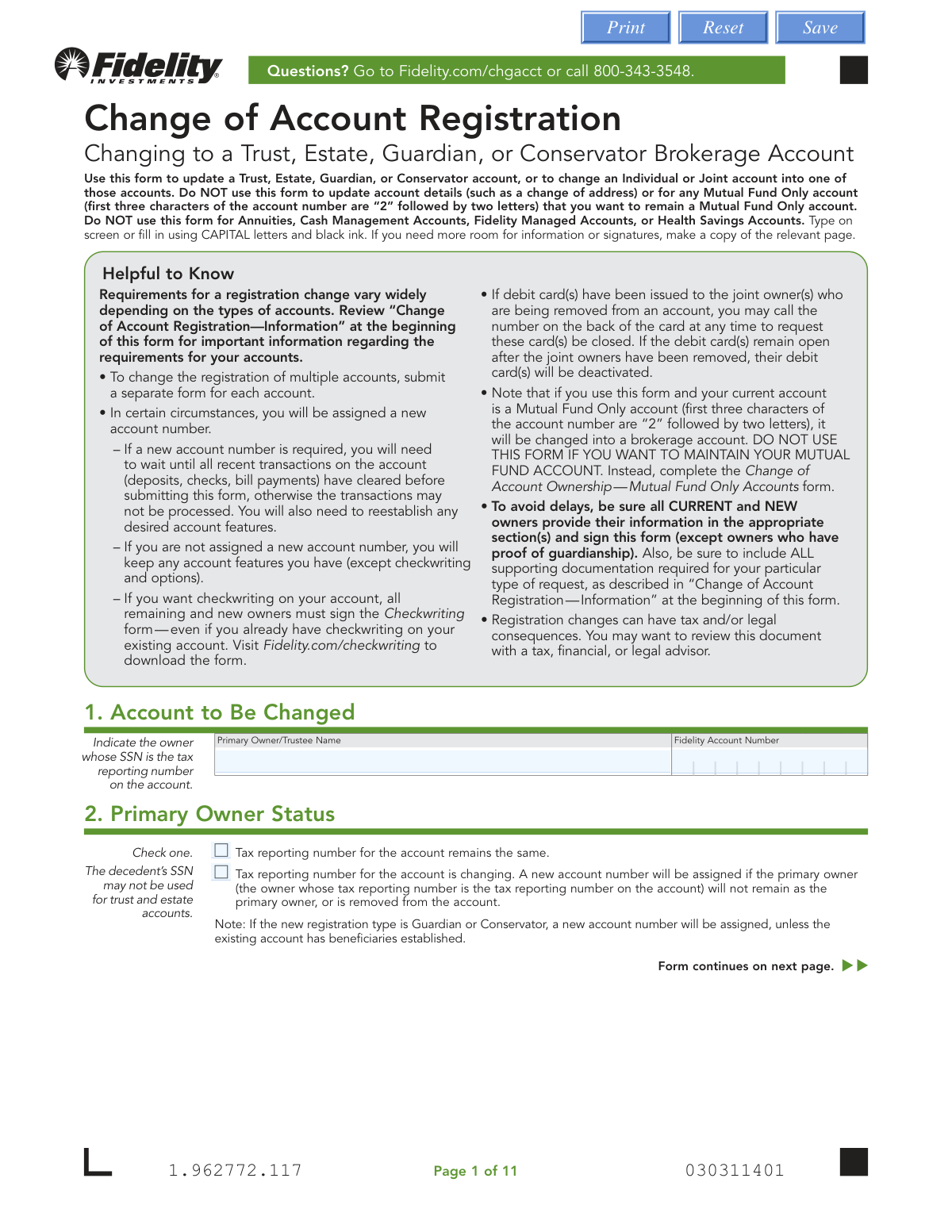
Yes! You can use AI to fill out Fidelity Change of Account Registration — Changing to a Trust, Estate, Guardian, or Conservator Brokerage Account
Don't type 218 fields by hand. Tell our AI about yourself, or upload your driver's license, and it fills every field in seconds. You check it, then download, print or sign.
The AI does the filling. You just check it.
No typing into boxes, nothing to install.
What this form asks for
The AI fills all of it, from your answers or your documents.
The AI checks your answers before you download
12 checks built for this form, so a wrong date or a missing answer is caught before anyone else sees it.
This check cross-references the 'From' and 'To' account types with the signature matrix on pages 1-3 to ensure the correct parties (e.g., current owner, legal representative, all trustees) have signed in the appropriate sections (10a or 10b). This is critical for ensuring the change is properly authorized by all required individuals. If the wrong parties sign, or signatures are missing, the registration change cannot be processed and will be rejected.
Validates that a Medallion Signature Guarantee is provided in Section 10a or 10b when the transaction type and account value meet the specified thresholds (e.g., over $100,000 for a relinquishing owner). This guarantee protects against fraudulent transfers by verifying the identity and authority of the signer. Failure to provide a required guarantee will halt the transaction until it is obtained and resubmitted.
For registration changes to an Estate, Guardianship, or Conservatorship, this check confirms that the submitted 'Certified copy of court appointment' is dated within the last 180 days. This ensures the legal representative's authority is current and legally valid at the time of the change. An outdated document will result in the rejection of the form pending submission of a newly certified copy.
This validation ensures that the Taxpayer ID Number provided for a new Trust or Estate in Section 4 is not the Social Security Number of a deceased individual. Regulations require a new trust or estate to have its own Taxpayer Identification Number (TIN) or use the SSN of a living grantor for tax reporting purposes. Using a decedent's SSN is a compliance failure and will prevent account setup.
If an individual in Section 5, 6, or 7 is identified as a 'Foreign citizen,' this check verifies that all associated fields are completed, including Country of Citizenship, residency status, and Government Identification details. This information is required for regulatory compliance and proper tax reporting under programs like FATCA. Incomplete information will cause processing delays until all required data is provided.
For any foreign citizen or other individual providing a government-issued ID, this check validates that the 'ID Expiration Date' is in the future. Financial institutions are required to maintain records of unexpired identification to comply with Know Your Customer (KYC) and anti-money laundering regulations. An expired ID will cause the application to be rejected until a valid, unexpired ID is provided.
And 6 more checks
- Ensures Residential Address is a Physical Location
- Checks for Required Supporting Documentation
- Validates State-Dependent Notarization on Trust Certification
- Ensures Owner Title is Provided in Signature Section 10b
- Cross-Form Consistency Check for Trust Information
- Verifies Eligibility for Margin Request
Let AI fill out your 1.962772.117
No typing. Every field filled in seconds, checked, ready to sign.
How to Fill Out 1.962772.117 Online for Free in 2026
What the AI walks you through.
- Navigate to Instafill.ai and upload or select the Fidelity Change of Account Registration form.
- Provide the current account information in Section 1 and indicate the primary owner's tax reporting status in Section 2.
- Select the new registration type in Section 3 (Trust, Estate, Guardian, or Conservator) and provide the new entity's details in Section 4.
- Enter the detailed personal, contact, and financial information for the primary and any additional trustees, legal representatives, or guardians in Sections 5 and 6.
- If changing to a trust, complete Section 7 with information for all beneficial owners, such as grantors or individuals with authority to amend the trust.
- Review all entered information for accuracy, then have all required parties provide their signatures and any necessary Medallion Signature Guarantees in Section 10.
- Download the completed form and gather all required supporting documentation (e.g., Fidelity Certification of Trust, death certificates) for submission to Fidelity.
Common Mistakes in Completing 1.962772.117
The ones the AI is built to catch.
Submitting an Incomplete Document Package
Incorrect or Missing Signatures
Failing to Obtain a Medallion Signature Guarantee
Providing Expired Legal Documents
Incorrectly Identifying an Entity vs. an Individual
Using an Invalid Taxpayer ID Number for a Trust or Estate
Incomplete Personal and Employment Information
Improperly Completing the 'Fidelity Certification of Trust' Form
Confusing Foreign vs. Domestic Trust Documentation
Failing to Disclose Financial Industry Affiliations
Frequently Asked Questions About 1.962772.117
Is it really free for 7 days?
Can I fill other forms too?
How do I cancel?
How does the AI fill out 1.962772.117?
What happens to my information?
How complex is 1.962772.117 to fill out?
What is the purpose of the Fidelity 'Change of Account Registration' form?
Who needs to fill out this form?
What documents do I need to submit with this form?
How do I know who should sign in Section 10a versus Section 10b?
What is a Medallion Signature Guarantee and when is it required?
The account owner is deceased. What is the first step?
How do I submit the completed form?
Will I get a new account number after submitting this form?
What is the 'Fidelity Certification of Trust' form mentioned in the documents?
What is the most common reason for processing delays?
Can I use this form for my Mutual Fund Only account?
Can AI tools help me fill out this complex form?
How can I use Instafill.ai to complete this form online?
What should I do if the PDF of this form is not fillable?
Get your 1.962772.117 filled out by AI
$0 today. Cancel before Nov 2 and you pay nothing.
Other forms like this one
estate forms: Form 593, Real Estate Withholding, Form 1099-S, Proceeds From Real Estate Transactions, Inland Residential Real Estate Services LLC Application for Lease (Form 4301, Rev. 11/14), New licence application – Form 1–1 (IND), Application for an individual’s licence (Real estate agent, property auctioneer, resident letting agent, motor dealer, chattel auctioneer, field agent), Judicial Council of California Form DE-111, Petition for Probate (Probate—Decedents Estates), Texas Real Estate Commission (TREC) One to Four Family Residential Contract (Resale) (TREC No. 20-18), City of Harvey Real Estate Transfer Declaration & Application (with Certificate for Exemption), Judicial Council of California Form DE-120, Notice of Hearing—Decedent's Estate or Trust, Form DE-160/GC-040, Inventory and Appraisal (Declaration of Representative/Guardian/Conservator or Small Estate Claimant and Declaration of Probate Referee), Judicial Council of California Form DE-120, Notice of Hearing—Decedent's Estate or Trust, Fidelity Change of Account Ownership — Mutual Fund Only Accounts (Changing to a Trust, Estate, Guardian, or Conservator Account), Valuing Your Estate Worksheet (from Vanguard's 'Understanding the basics of estate planning' guide), Alaska Residential Real Estate Purchase Agreement, Merrill Edge Self-Directed Trust and Estate Cash Management Account (CMA Account) Account Application Booklet and Agreements, Affidavit for Collection of Personal Property California Probate Code Section 13100, Oklahoma Real Estate Commission Tenancy Guidelines (01-01-2026), Oklahoma Real Estate Commission Residential Property Condition Disclosure Exemption Form (RPCD EXEMPTION FORM), Oklahoma Real Estate Commission Residential Lease, Oklahoma Real Estate Commission Tenant Flood Notice (01-01-2026), Oklahoma Real Estate Commission Property Data Form (Residential)
trust forms: Form 8855, Election To Treat a Qualified Revocable Trust, Private Trust (Mod(PT).2005), Form 3520 (Rev. December 2023), Annual Return To Report Transactions With Foreign Trusts and Receipt of Certain Foreign Gifts, Judicial Council of California Form DE-120, Notice of Hearing—Decedent's Estate or Trust, Judicial Council of California Form DE-120, Notice of Hearing—Decedent's Estate or Trust, Fidelity Change of Account Ownership — Mutual Fund Only Accounts (Changing to a Trust, Estate, Guardian, or Conservator Account), Fidelity Ownership Change to Trust, Trusted Contact Authorization Form, I.B.E.W. & Electrical Industry Local 697 Money Purchase Plan and Trust Direct Rollover Request Form Due to Qualified Domestic Relations Order, Bechtel Trust & Thrift Plan Rollover Process, General Purpose Loan Application Packet, IW DC of SOV Annuity Trust, NYPD Superior Officers Council Annuity Trust Fund Plan Rollover Form, Trust Certification and Trustee Powers, Housing Agency Retirement Trust Form #190, Request to Withdraw a Rollover Account, The Housing Agency Retirement Trust 457(b) Deferred Compensation Plan Request For Distribution Form, Housing Agency Retirement Trust Transfer/Rollover Form, Qualified Retirement Plan and Trust Summary Plan Description, The Housing Agency Retirement Trust 457b Deferred Compensation Plan Change of Beneficiary Designation Form, TIAA Trust, N.A. Private Asset Management, Request for a Direct Transfer From IRA Contracts, TIAA Trust Rollover From Your Retirement Plan (ERISA)
brokerage forms: 41, Fidelity Change of Account Registration: Changing to an Individual, Joint, or Custodial Brokerage Account, Move Assets from My Schwab Brokerage Account, Open a Schwab One® Brokerage Account, Charles Schwab PCRA Self-Directed Brokerage Account, Schwab Health Savings Brokerage Account (HSBA) to HSA Invest Choice Account Transfer Form, Intra-Brokerage Securities Transfer, Moving your Vanguard funds to a Vanguard Brokerage Account Disclosure statement, Vanguard Brokerage Account CREST Transfer Form, Moving your Vanguard funds to a Vanguard Brokerage Account Disclosure statement, TIAA Brokerage Incoming Account Transfer Form, TIAA Brokerage Joint Transfer on Death Account Agreement, TIAA Brokerage IRA Distribution Request (Form F11025), Request for a Qualified Charitable Distribution (QCD) from a Brokerage Individual Retirement Account (IRA), TIAA Brokerage Authorization To Gift Securities, Form F11014, TIAA Brokerage Power of Attorney (POA) Form, TIAA Brokerage Durable Power Of Attorney Affidavit Of Full Force And Effect, TIAA Brokerage Incoming Managed Account Transfer Form (F11319), Form F11015, TIAA Brokerage Designation of Beneficiary, Form F11004, TIAA Brokerage Individual Transfer on Death Account Agreement
ATO forms: Form 501A, Fantasy Contest Operator Personal Information Form (Commonwealth of Virginia, VDACS Office of Charitable & Regulatory Programs), Régie du logement Mandatory Form – LEASE of a Dwelling, Formato Solicitud de Afiliación (Persona Natural) – Cooperativa de Ahorro y Crédito Universidad Santo Tomás (USTACOOP), FDA Form 1572, Statement of Investigator, Form DE-160/GC-040, Inventory and Appraisal (Declaration of Representative/Guardian/Conservator or Small Estate Claimant and Declaration of Probate Referee), Tesorería General de la Seguridad Social (TGSS) — Mandato / Orden de domiciliación de adeudos directos SEPA para el pago de cuotas de la Seguridad Social (TC 1/15-3, 06-2022), California Department of Social Services Form RFA 07 (2/18), Resource Family Approval (RFA) Health Questionnaire (Mandatory), Dallas Area Rapid Transit Police Department Personal History Statement (Peace Officer / Telecommunicator), Fidelity Change of Account Ownership — Mutual Fund Only Accounts (Changing to a Trust, Estate, Guardian, or Conservator Account), ENVIRONMENTAL MONITORING LABORATORY, LLC Employment Application, Distribution Due to Death for Spouse Beneficiary - Elevator Constructors Union Local No. 1 Annuity and 401(k) Fund, Elevator Constructors Union Local No.1 Annuity and 401(k) Fund Distribution Request Due to Qualified Domestic Relations Order, Incoming Rollover Election for Elevator Constructors Annuity and 401(k) Retirement Plan, Mandatory Distribution Processing Authorization, Alberta Precision Laboratories General Laboratory Requisition (Form 21302), Contrato de Trabajo Indefinido, Contrato de Trabajo en Prácticas (Código 420), Professional Practice Employment Contract, Anthem Blue Cross Respiratory Syncytial Virus Enrollment Form, Formato de Inscripción al Registro Federal De Contribuyentes a Través de Oficina Virtual, Form CMS-209, CLIA Laboratory Survey Report Form
registration forms: Form DE 1, Commercial Employer Account Registration, Form 69-001, Industrial Hemp Registration, Form VTR-60, Application for Replacement License Plate(s) and/or Registration Sticker, Food (Registration of Premises) (Jersey) Order 2001 — Schedule 1 (Article 4(1)) — Form of Application for Registration of Food Premises, Discovery Health Practice Registration Form 2026 (DHHPR2001), Course Roster and Location Registration Form, Fidelity Change of Account Registration: Changing to an Individual, Joint, or Custodial Brokerage Account, Fidelity Change of Account Registration — Cash Management Account, MS(R) 21A, Application for the Registration of a Ship under the (Malta) Merchant Shipping Act, 1973, Form 130-U, Application for Texas Title and/or Registration, Anmeldung zum R+V-Firmenportal Vorsorge (Registration for the R+V Company Portal for Pensions), Form SSA-1694, Entity Registration and Taxpayer Information, Form IIGAREG, Institutional Account Registration Form, Form 2, Application for Licensure and First Registration, Licensed Clinical Social Worker, BIR Form No. 1901, Application for Registration For Self-Employed (Single Proprietor/Professional), Mixed Income Individuals, Non-Resident Alien Engaged in Trade/Business, Estate and Trust, California Voter Registration Cancellation Request Form, Form MV-82, Vehicle Registration/Title Application, Form 1-S, Full Requirement Initial Charity Registration Application, New York Vehicle Registration/Title Application, Form MV-145V, Application for Severely Disabled Veteran, Severely Disabled Veteran Motorcycle Plate Decal or Disabled Veteran Registration Plate
account registration forms: Form DE 1, Commercial Employer Account Registration, Fidelity Change of Account Registration: Changing to an Individual, Joint, or Custodial Brokerage Account, Fidelity Change of Account Registration — Cash Management Account, Form IIGAREG, Institutional Account Registration Form
broker forms: Letter of Authorization to Broker, Form 1099-B, Proceeds From Broker Transactions, 41, Fannie Mae Residential Broker Price Opinion (BPO) (Revised 03/99), Fidelity Change of Account Registration: Changing to an Individual, Joint, or Custodial Brokerage Account, Move Assets from My Schwab Brokerage Account, Open a Schwab One® Brokerage Account, Charles Schwab PCRA Self-Directed Brokerage Account, Schwab Health Savings Brokerage Account (HSBA) to HSA Invest Choice Account Transfer Form, Intra-Brokerage Securities Transfer, Moving your Vanguard funds to a Vanguard Brokerage Account Disclosure statement, Vanguard Brokerage Account CREST Transfer Form, Moving your Vanguard funds to a Vanguard Brokerage Account Disclosure statement, TIAA Brokerage Incoming Account Transfer Form, TIAA Brokerage Joint Transfer on Death Account Agreement, TIAA Brokerage IRA Distribution Request (Form F11025), Request for a Qualified Charitable Distribution (QCD) from a Brokerage Individual Retirement Account (IRA), Form OL 75, Auto Broker Log, TIAA Brokerage Authorization To Gift Securities, Form F11014, TIAA Brokerage Power of Attorney (POA) Form
brokerage account forms: BlackRock New Account Application For Non-Retirement Accounts, Fidelity Change of Account Registration: Changing to an Individual, Joint, or Custodial Brokerage Account, Move Assets from My Schwab Brokerage Account, Open a Schwab One® Brokerage Account, Charles Schwab PCRA Self-Directed Brokerage Account, Schwab Health Savings Brokerage Account (HSBA) to HSA Invest Choice Account Transfer Form, Moving your Vanguard funds to a Vanguard Brokerage Account Disclosure statement, Vanguard Brokerage Account CREST Transfer Form, Moving your Vanguard funds to a Vanguard Brokerage Account Disclosure statement, TIAA Brokerage Incoming Account Transfer Form, TIAA Brokerage Joint Transfer on Death Account Agreement, Request for a Qualified Charitable Distribution (QCD) from a Brokerage Individual Retirement Account (IRA), TIAA Brokerage Incoming Managed Account Transfer Form (F11319), Form F11004, TIAA Brokerage Individual Transfer on Death Account Agreement, Fidelity® Brokerage Business Account Certification, Brokerage Corestone Account Application, IRA/IRRA®/Roth IRA/SEP/SRA Divorce Transfer Instruction Form, Merrill AwardChoice® Individual Investor Account Application Form for U.S. Persons, Merrill Business Investor Account (BIA) and Working Capital Management Account (WCMA) Account Application Booklet and Agreements, Merrill Edge Self-Directed Trust and Estate Cash Management Account (CMA Account) Account Application Booklet and Agreements
trust account forms: Fidelity Trustee Certification — Adding or Removing Trustees, Fidelity Change of Account Ownership — Mutual Fund Only Accounts (Changing to a Trust, Estate, Guardian, or Conservator Account), Housing Agency Retirement Trust Form #190, Request to Withdraw a Rollover Account, TIAA Trust, N.A. Authorization to receive client account information, Letter of Authorization to Change Account Title to a Grantor Revocable Trust, Vanguard Personal Investor – Unregulated Trust details – Account information update, Option Information — Corporate and Institutional Accounts; Sole Proprietorship Accounts; Merrill Lynch Trust Accounts, Merrill Edge Self-Directed Trust and Estate Cash Management Account (CMA Account) Account Application Booklet and Agreements, Merrill Edge® Self-Directed Trust Cash Management Account® (CMA® Account) Account Application Booklet and Agreements, Option Information — Individual, Joint and Trust Accounts, New Fidelity Account® — Trust — Brokerage (1.791205.136), New Fidelity Account® — Trust — Brokerage (1.791205.134)
Let AI fill out your 1.962772.117
Your trial starts once a card is added. You pay nothing before Nov 2.
Our AI already knows this form, all 218 fields of it. Skip the typing: tell it about yourself, or upload what you have, and it fills the whole form in seconds.
- AI fills every field on all 17 pages, checkboxes included
- No typing into boxes: answer a few questions, or upload your driver's license, an old copy of this form, a photo of a document
- The AI checks the answers; you review and change anything before you download
- Download the finished PDF, print it, or sign it online
- Encrypted, and never used to train AI
Cancel before Nov 2 and you pay nothing.
A card is needed to start the trial. Cancel in two clicks from your account.
Terms · Privacy