
Instafill.ai
7 days free
AI form filling · 163 fields · 6 pages · done in seconds

Yes! You can use AI to fill out Form 1099-B, Proceeds From Broker Transactions

Don't type 163 fields by hand. Tell our AI about yourself, or upload your W-2 or last year's return, and it fills every field in seconds. You check it, then download, print or sign.
7 days free, then $19.99/month · Cancel anytime
AI fills it, no typingEncrypted, never used to train AICancel in two clicks
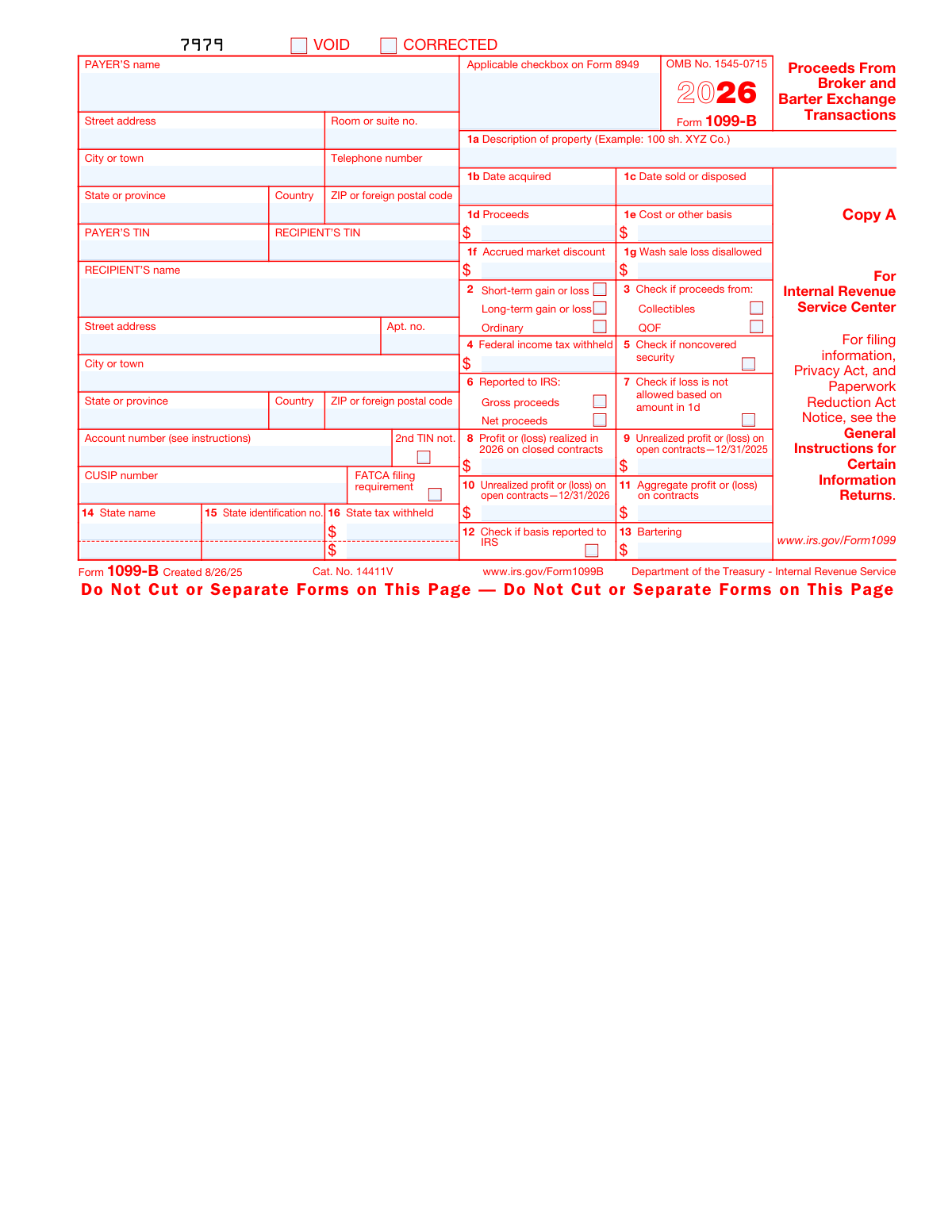
Form 1099-B, Proceeds From Broker Transactions, page 1
Moderate · 59/100Form Complexity Index

The AI does the filling. You just check it.

No typing into boxes, nothing to install.

Tell the AI about youAnswer a few questions in plain words, or upload your W-2 or last year's return. That is all the typing there is.
AI fills every field in secondsIt puts each answer in the right box on every page, checkboxes included.
Check it and downloadReview every field, change anything, then download, print or sign the PDF.

What this form asks for

The AI fills all of it, from your answers or your documents.

Form 1099-B, officially titled 'Proceeds From Broker and Barter Exchange Transactions', is a tax form used to report sales or redemptions of securities, commodities, and barter exchange transactions. It is important for accurately reporting capital gains and losses to the IRS and ensuring compliance with tax regulations.
Fillable fields163
Pages6
Sections21
Form Complexity IndexModerate, 59/100

The AI checks your answers before you download

15 checks built for this form, so a wrong date or a missing answer is caught before anyone else sees it.

Ensures that the PAYER'S name, address, and telephone number are correctly entered and formatted according to USPS standards.

This validation check ensures that the PAYER'S information on Form 1099-B is accurate and properly formatted. It verifies that the name is complete and matches official records. The address is checked for correct formatting and adherence to United States Postal Service (USPS) standards, which includes the street address, city, state, and ZIP code. Additionally, the telephone number is validated to ensure it is in the correct North American Numbering Plan format.

Verifies that the PAYER'S TIN is a valid Taxpayer Identification Number consisting of nine digits and follows the correct format (XX-XXXXXXX).

This validation check verifies the integrity of the PAYER'S Taxpayer Identification Number (TIN) on Form 1099-B. It confirms that the TIN provided is a nine-digit number, following the standard format with two digits, a hyphen, and then seven digits (XX-XXXXXXX). The check also includes a validation algorithm to ensure that the number sequence is potentially valid for tax reporting purposes.

Confirms that the RECIPIENT'S TIN is a valid Taxpayer Identification Number and matches the name provided.

This validation check confirms that the RECIPIENT'S TIN on Form 1099-B is a legitimate Taxpayer Identification Number. It ensures that the TIN is not only correctly formatted but also that it corresponds with the name of the recipient provided on the form. This cross-referencing helps prevent identity mismatches and potential tax filing issues.

Checks that the RECIPIENT'S name is fully entered and matches the associated TIN.

This validation check scrutinizes the RECIPIENT'S name entry on Form 1099-B. It checks that the full legal name is provided without any abbreviations or missing parts. The name is then cross-checked against the associated TIN to ensure that they match, which is crucial for accurate tax reporting and identification.

Validates the recipient's full address for accuracy and completeness, including apartment number if applicable.

This validation check is focused on the recipient's address details on Form 1099-B. It validates that the full address is accurately entered, including the street name, city, state, and ZIP code. If an apartment number or other secondary address information is applicable, the check ensures that this detail is also included and correctly formatted.

Ensures the account number is provided if applicable and is correctly formatted.

The AI ensures that an account number is provided on Form 1099-B if it is applicable to the taxpayer's situation. It verifies that the account number follows the standard formatting rules, which typically include a specific combination of letters and numbers without any special characters. The AI also checks for the correct length of the account number to prevent any truncation or padding errors. If the account number is not applicable, the AI ensures that this field is left blank or is marked as not applicable in accordance with IRS instructions.

And 9 more checks
  • Verifies the 2nd TIN not. box is checked only if a second TIN notification has been issued.
  • Confirms the CUSIP number is entered if applicable and is correctly formatted.
  • Checks the FATCA filing requirement box is marked if applicable.
  • Ensures the correct checkbox on Form 8949 is marked to indicate where to report the transaction.
  • Validates the description of property (1a) is provided and accurately describes the transaction.
  • Confirms the dates acquired (1b) and sold or disposed (1c) are properly formatted and logical (sale date is not before acquisition date).
  • Verifies the proceeds (1d) are accurately calculated and reduced by any commissions or transfer taxes.
  • Checks the cost or other basis (1e) is entered and is a plausible figure for the securities sold.
  • Ensures the type of gain or loss (short-term, long-term, ordinary) is correctly indicated in section 2.

Let AI fill out your Form 1099-B

No typing. Every field filled in seconds, checked, ready to sign.

7 days free, then $19.99/month · Cancel anytime

How to Fill Out Form 1099-B Online for Free in 2026

What the AI walks you through.

  1. Visit instafill.ai site and select Form 1099-B
  2. Enter payer's information
  3. Input recipient's TIN and details
  4. Provide property description and dates
  5. Report proceeds and cost basis
  6. Fill in additional financial details
  7. Sign and date the form electronically
  8. Check for accuracy and submit form

Common Mistakes in Completing Form 1099-B

The ones the AI is built to catch.

Filling out the wrong copy of the form
Filling out the incorrect copy of Form 1099-B can lead to processing delays and potential penalties. It is crucial to use the correct copy designated for the IRS, payer, or recipient as applicable. To avoid this mistake, carefully read the instructions on each copy of the form to ensure you are completing and distributing the correct one. The Copy A of Form 1099-B is typically red and is meant for the IRS, while Copy B is for the recipient, and Copy C is for the payer's records.
Incorrect or incomplete payer's name and address
Providing an incorrect or incomplete payer's name and address on Form 1099-B can result in the form being returned or misdirected, which may cause reporting issues. To prevent this error, double-check the payer's information against official documents or previous correspondence to ensure accuracy. It is also advisable to verify the address format and include all necessary details such as suite or apartment numbers, city, state, and ZIP code.
Omitting payer's telephone number
Neglecting to include the payer's telephone number on Form 1099-B can hinder communication and delay the resolution of any issues that may arise. To avoid this oversight, ensure that the telephone number is filled in the designated area of the form. The number should be current and direct to a person or department capable of addressing questions related to the form.
Entering incorrect payer's TIN
Entering an incorrect Taxpayer Identification Number (TIN) for the payer on Form 1099-B can lead to misidentification and potential fines. To prevent this error, verify the payer's TIN against official documents such as a prior year's tax return or a W-9 form. If you are unsure of the correct TIN, contact the payer directly to confirm the information before submitting the form.
Entering incorrect recipient's TIN
Inputting an incorrect TIN for the recipient on Form 1099-B can cause significant issues for both the payer and the recipient, including incorrect tax liability assessments. To avoid this mistake, request that the recipient provide their TIN using Form W-9, and cross-reference this information with your records. It is essential to input the TIN accurately and to reach out to the recipient for verification if there is any uncertainty.
Incomplete recipient's name and address
Failing to provide the complete recipient's name and address can lead to processing delays and misdirected forms. It is crucial to double-check that all parts of the recipient's name, including any middle initials or suffixes, are included. The address should be complete with the correct street name, number, city, state, and ZIP code. Before submitting the form, review the recipient's details against a reliable source, such as an official identification document or a verified account profile.
Failing to enter the account number
Omitting the account number can result in the inability to match the form with the recipient's account, causing confusion and potential tax reporting errors. Always ensure that the account number is entered accurately and corresponds to the recipient's brokerage account. This number is a key identifier and should be cross-verified with the recipient's account statements or records. If the account number is not known, contact the brokerage firm for confirmation before submitting the form.
Not checking the 2nd TIN notification box when required
The 2nd TIN notification box is an important element that must be checked if the IRS has notified the payer twice within three calendar years that the payee provided an incorrect Taxpayer Identification Number (TIN). Neglecting to check this box when required can lead to penalties. To avoid this mistake, maintain accurate records of any IRS notifications regarding TIN issues and verify the payee's TIN before form submission. If there has been a second notification, ensure the box is checked to stay in compliance.
Leaving the CUSIP number blank if applicable
The Committee on Uniform Securities Identification Procedures (CUSIP) number is a unique identifier for securities. If the transaction involves a security with a CUSIP number, it must be reported on the form. Failing to include this number can hinder the identification of the security and complicate tax reporting. To prevent this error, verify the presence of a CUSIP number for the security in question and include it on the form. This information can typically be found on the security's certificate or by inquiring with the brokerage firm.
Not checking the FATCA filing requirement box
The Foreign Account Tax Compliance Act (FATCA) filing requirement box must be checked if the filer is subject to FATCA reporting. Ignoring this requirement can result in non-compliance with international tax laws. It is essential to understand the filer's obligations under FATCA and to check the box if the filer's situation meets the criteria for reporting. Consult with a tax professional or refer to IRS guidelines on FATCA to determine if this requirement applies. If so, ensure the box is checked to accurately reflect the filer's reporting status.
Incorrect checkbox on Form 8949
Taxpayers often mistakenly check the wrong box on Form 8949, which is used to report sales and exchanges of capital assets. To avoid this error, carefully review the instructions for Form 8949 and ensure the correct box is checked based on the type of asset and whether the capital gain or loss is short-term or long-term. Double-check the box selected before submitting the form to ensure it aligns with the transaction being reported.
Vague description of property in 1a
A common error on Form 1099-B is providing a vague description of the property sold in box 1a. It is important to provide a detailed and accurate description to clearly identify the property for tax purposes. To prevent this mistake, include specific details such as the quantity of shares, the stock symbol, or any other identifying information. Review the description to ensure it is clear and complete before filing the form.
Incorrect date of acquisition in 1b
Entering an incorrect date of acquisition in box 1b can lead to reporting errors on Form 1099-B. To avoid this, verify the actual acquisition date of the sold property by reviewing your investment records or brokerage statements. Ensure that the date entered on the form matches your records and reflects the date you originally acquired the property, not the date of any subsequent events.
Incorrect date of sale or disposal in 1c
Taxpayers sometimes enter the wrong date of sale or disposal in box 1c. This date should reflect when the property was actually sold or disposed of, not when the proceeds were received. To prevent this error, cross-reference the date with your brokerage statements or trade confirmations. Confirm that the date entered on the form is the date the transaction was executed, as this can affect the calculation of capital gains or losses.
Incorrect proceeds amount in 1d
Reporting an incorrect proceeds amount in box 1d is a frequent mistake. This figure should represent the total amount received from the sale before any commissions or fees. To ensure accuracy, reconcile the amount reported on Form 1099-B with your sales receipts or brokerage statements. It's crucial to report the gross proceeds, not the net after expenses, to accurately calculate any capital gain or loss.
Incorrect cost or other basis in 1e
Entering an incorrect cost or other basis in box 1e can lead to inaccurate tax calculations and potential issues with the IRS. To avoid this mistake, taxpayers should carefully review their purchase records or brokerage statements to verify the correct cost basis of the securities sold. It is important to include any adjustments to the basis, such as commissions and fees, or changes due to corporate actions. If the basis is not reported to the IRS, ensure to check the appropriate box indicating this.
Omitting accrued market discount in 1f
Failing to include the accrued market discount in box 1f can result in underreporting income, as the market discount is taxable when the bond is sold or redeemed. Taxpayers should ensure they calculate the accrued market discount from the time of acquisition to the date of sale. This information is often provided on brokerage statements. If unsure about how to calculate the market discount, consulting a tax professional or the IRS guidelines is recommended.
Not reporting wash sale loss disallowed in 1g
Neglecting to report a disallowed loss from a wash sale in box 1g can lead to discrepancies in reported income and potential penalties. A wash sale occurs when an individual sells a security at a loss and repurchases a substantially identical security within 30 days before or after the sale. Taxpayers should track their trades closely to identify any wash sales and adjust the cost basis of the newly purchased securities accordingly. It is crucial to maintain accurate records of all transactions to ensure proper reporting.
Incorrect type of gain or loss in 2
Misclassifying the type of gain or loss in box 2 can affect the tax rate applied to the transaction. Short-term and long-term capital gains are taxed at different rates, so it is essential to distinguish between them correctly. Short-term capital gains are for assets held for one year or less, while long-term gains are for assets held for more than one year. Taxpayers should review the holding period of their securities and report the gain or loss in the appropriate section to ensure accurate tax treatment.
Not checking the box for proceeds from Collectibles, QOF in 3
Forgetting to check the box for proceeds from collectibles or Qualified Opportunity Funds (QOF) in box 3 can lead to incorrect tax calculations, as these items are subject to different tax rates. Taxpayers should verify if the sale involves collectibles, such as art, antiques, or precious metals, or investments in QOFs, which are subject to special tax incentives. Accurate reporting is necessary to take advantage of the potential tax benefits or to comply with the higher tax rates applicable to collectibles.
Omitting federal income tax withheld in 4
Failing to report federal income tax withheld in box 4 can lead to discrepancies between the taxpayer's reported income and the IRS records, potentially triggering an audit. It is crucial to carefully review the 1099-B form provided by the broker and ensure that any tax withheld is accurately reported on the tax return. Taxpayers should double-check their brokerage statements and consult with their brokers if there is any uncertainty regarding withheld taxes. Accurate reporting helps maintain compliance with IRS regulations and avoids unnecessary complications.
Not checking if security is noncovered in 5
Neglecting to indicate whether a security is noncovered in box 5 can result in incorrect tax calculations. Noncovered securities are those acquired before certain effective dates and are not subject to mandatory reporting of cost basis to the IRS by brokers. Taxpayers should verify the acquisition date of their securities and mark box 5 appropriately if the security is noncovered. This information is essential for the IRS to determine the correct basis for gains or losses on the sale of securities. Properly identifying noncovered securities ensures accurate tax reporting and helps taxpayers avoid overpaying or underpaying their taxes.
Incorrect reporting of gross or net proceeds to IRS in 6
Misreporting the gross or net proceeds in box 6 can lead to an incorrect calculation of capital gains or losses. It is important to distinguish between gross proceeds (the total amount received from the sale before expenses) and net proceeds (the amount received after commissions and fees). Taxpayers should carefully review their brokerage statements to determine the correct amount to report and ensure that it matches the information provided on Form 1099-B. Accurate reporting of proceeds is essential for the proper calculation of taxable income and to avoid potential penalties for underreporting income.
Not checking if loss is not allowed in 7
Failing to check whether a loss is disallowed due to wash sale rules in box 7 can result in the improper claiming of a tax deduction. A wash sale occurs when an individual sells a security at a loss and repurchases a substantially identical security within 30 days before or after the sale. Taxpayers should be aware of the wash sale rules and carefully review their trading activity to identify any disallowed losses. It is important to adjust the cost basis of the repurchased security accordingly and refrain from claiming a loss that is not permitted. Understanding and applying the wash sale rules correctly helps taxpayers maintain accurate tax records and comply with IRS regulations.
Incorrect profit or loss realized in 2025 in 8
Reporting an incorrect profit or loss for the year 2025 in box 8 can have significant tax implications. Taxpayers must ensure that they are using the correct tax year and that all calculations for gains or losses are accurate. This includes verifying the purchase and sale dates, the cost basis, and any adjustments for returns of capital or other corporate actions. It is advisable to maintain detailed records of all transactions and to use the services of a tax professional if there is any uncertainty. Accurate reporting of profits or losses is essential for the correct calculation of taxes owed and to prevent issues with the IRS.
Incorrect unrealized profit or loss on 12/31/2024 in 9
Reporting an incorrect unrealized profit or loss as of December 31, 2024, in box 9 can lead to discrepancies in tax calculations. To avoid this mistake, carefully review your year-end financial statements and consult with your broker or tax advisor to ensure the accuracy of the figure. Double-check the calculation method used for unrealized gains or losses to ensure it aligns with IRS guidelines. Maintain organized records throughout the year to simplify this process during tax season.
Incorrect unrealized profit or loss on 12/31/2025 in 10
Entering an incorrect unrealized profit or loss as of December 31, 2025, in box 10 can result in incorrect tax reporting. It is essential to verify the amounts with your financial records and confirm the calculation method complies with the IRS requirements. If necessary, seek assistance from a financial professional to ensure the figures are accurate. Regularly updating and reconciling your investment records can prevent errors when reporting unrealized gains or losses.
Incorrect aggregate profit or loss on contracts in 11
Filling in an incorrect aggregate profit or loss on contracts in box 11 can cause significant errors in tax liability. To prevent this, reconcile all contracts and their associated gains or losses at the end of the tax year. Use accurate and IRS-compliant methods to calculate the aggregate amounts. It is advisable to use accounting software or consult with a tax professional to ensure the figures are correct. Keep detailed records of all contracts to facilitate accurate reporting.
Not checking if basis reported to IRS in 12
Failing to check the appropriate box indicating whether the basis was reported to the IRS in box 12 can lead to confusion and potential audits. Always confirm whether the basis of the sold assets has been reported to the IRS before submitting the form. If you are unsure, consult with your broker or tax advisor. Accurate reporting of basis information is crucial for the IRS to match sales with purchases and for taxpayers to calculate the correct capital gains or losses.
Incorrect bartering information in 13
Providing incorrect information regarding bartering transactions in box 13 can result in inaccurate tax reporting. Ensure that all bartering transactions are properly documented and valued according to fair market value. Review IRS guidelines on reporting barter exchanges to confirm that you are providing the correct information. If bartering involves services or goods that are difficult to value, consider seeking a professional appraisal or guidance from a tax professional.
Incorrect state name, identification no., or tax withheld in 14-16
Entering incorrect information in boxes 14-16 for state name, payer's state identification number, or state tax withheld can lead to issues with state tax reporting and potential penalties. To avoid this mistake, double-check the state information provided by your broker or financial institution. Ensure that the state name is spelled correctly, the identification number matches the one provided by the payer, and the state tax withheld amount is accurate according to your records. If you are unsure about the correct information, contact your broker or financial advisor for clarification before submitting the form.
Not keeping a copy of the form for personal records
Failing to retain a copy of Form 1099-B for personal records can create difficulties if you need to reference the form for future tax filings or if the IRS requests additional information. It is important to keep a copy of all tax documents for at least three years from the date you file your return. To avoid this mistake, make a digital or physical copy of the completed form before submitting it to the IRS. Store the copy in a secure location where you can easily access it if needed for tax preparation or in the event of an audit.
Submitting the form with inaccurate information
Submitting Form 1099-B with inaccurate information can result in incorrect tax calculations and may lead to penalties or an audit. To prevent this, thoroughly review all the information on the form, including the description of the property, date acquired, date sold, proceeds, cost or other basis, and any adjustments. Cross-reference the details with your own trading records and confirm the accuracy of the reported transactions. If you find discrepancies, contact your broker to resolve them before filing the form. Always ensure that the information on the form aligns with your own records before submission.

Frequently Asked Questions About Form 1099-B


Is it really free for 7 days?
Yes. You pay $0 today. Cancel before Nov 1 and you are never charged. Keep it, and it is $19.99 a month for 5 fills of your Form 1099-B.
Can I fill other forms too?
This plan is for your Form 1099-B: your own AI agent fills it as often as 5 times a month. To fill other forms and upload your own, choose a Professional plan from your account.
How do I cancel?
From your account, in two clicks, any time. No email, no call.
How does the AI fill out Form 1099-B?
You answer a few questions in plain words, or upload your W-2 or last year's return. The AI reads what you give it and puts each answer into the right field of Form 1099-B, on every page, in seconds. It checks the answers against the form's own rules, and you review and change anything before you download, print or sign.
What happens to my information?
It is encrypted in transit and at rest, and it is never used to train AI.
How complex is Form 1099-B to fill out?
Form 1099-B has a Form Complexity Index of 59 out of 100, in the moderate tier: 163 fillable fields across 6 pages. Instafill.ai's AI fills it in under a minute, with every field there for you to review before you download.
What is Form 1099-B used for?
Form 1099-B, Proceeds From Broker and Barter Exchange Transactions, is used by brokers and barter exchanges to report sales or redemptions of securities, futures transactions, commodities, and barter exchange transactions to the IRS and the seller of the security or entity involved in the exchange. It provides details on the sales price, the cost basis of the asset sold, the date of the transaction, and whether the gain or loss is short-term or long-term. This information is used by taxpayers to fill out Schedule D (Form 1040), Capital Gains and Losses, and Form 8949, Sales and Other Dispositions of Capital Assets, when filing their federal income tax return.
Where can I find the official IRS instructions for Form 1099-B?
The official IRS instructions for Form 1099-B can be found on the Internal Revenue Service (IRS) website. You can access the instructions by searching for 'Instructions for Form 1099-B' using the search feature on the IRS website or by navigating to the 'Forms and Instructions' section. The instructions provide detailed guidance on how to complete the form, what transactions need to be reported, and how to submit the form to the IRS and the taxpayer.
What should I do if I receive a Form 1099-B with incorrect information?
If you receive a Form 1099-B with incorrect information, you should contact the broker or barter exchange that issued the form as soon as possible to request a corrected Form 1099-B. It is important to review the information carefully and ensure that it accurately reflects your transactions, as this information will be used for tax reporting purposes. If you do not receive a corrected form in time for filing your taxes, you may report the correct information on your tax return and attach a statement explaining the discrepancy. Keep records of your communications and any corrected forms for your records.
How do I report proceeds from broker and barter exchange transactions on my tax return?
To report proceeds from broker and barter exchange transactions on your tax return, you will need to complete Form 8949, Sales and Other Dispositions of Capital Assets. On Form 8949, you will list each transaction reported on Form 1099-B, including the date of sale, sales price, cost basis, and the type of gain or loss (short-term or long-term). After summarizing the information on Form 8949, you will transfer the totals to Schedule D (Form 1040), which is used to calculate the overall capital gain or loss. The results from Schedule D then affect your adjusted gross income on your Form 1040 tax return.
What is the difference between Copy A, Copy B, and Copy 1 of Form 1099-B?
Copy A of Form 1099-B is the copy that is filed with the IRS by the broker or barter exchange. It is printed in a specific red ink and cannot be duplicated. Copy B is the copy that is sent to the taxpayer who sold the securities or participated in the barter exchange; this copy is used for the taxpayer's records and for reporting the transactions on their federal tax return. Copy 1 is provided to the state tax department if the state requires reporting of the transactions. It is important for taxpayers to retain Copy B for their records and to use the information when completing their tax returns.
Can I print and file Copy A of Form 1099-B downloaded from the IRS website?
No, you cannot use a printed Copy A of Form 1099-B from the IRS website for filing with the IRS. The official printed version of the IRS form is scannable, but the online version of it, downloaded from the IRS website, is not. A penalty may be imposed for filing forms that can’t be scanned. You must obtain the official IRS forms from the IRS or its authorized distributors.
What are the penalties for filing a scannable Form 1099-B that can't be scanned by the IRS?
If you file a Form 1099-B that is not scannable, the IRS may impose a penalty. The amount of the penalty depends on various factors, including the size of the business and when the correct information return is filed. Penalties can range from $50 to $280 per form, with a maximum total penalty for small businesses being $1,130,500 per year ($3,339,000 for larger businesses).
Is electronic filing required for Form 1099-B?
Electronic filing of Form 1099-B is not required for all filers, but it is mandatory for those who have to file 250 or more information returns of any one type. If you are required to file electronically but fail to do so, you may be subject to a penalty unless you can establish a waiver or reasonable cause for not doing so.
What is the threshold for mandatory e-filing of Form 1099-B?
The threshold for mandatory electronic filing of Form 1099-B is 250 or more information returns. If you are required to file 250 or more Form 1099-Bs, you must file them electronically unless you have an approved waiver from the IRS.
What should I do if I have fewer than 10 information returns to file?
If you have fewer than 10 information returns to file, such as Form 1099-B, you are not required to file electronically. You can choose to file paper forms with the IRS. However, you must ensure that you use the correct version of the form that is scannable by the IRS if you are submitting by paper.
What is the purpose of the CUSIP number on Form 1099-B?
The CUSIP (Committee on Uniform Securities Identification Procedures) number on Form 1099-B serves as a unique identifier for the securities that were bought or sold. It is a nine-character alphanumeric code that helps to accurately identify the security and facilitate the processing and settlement of trades. The CUSIP number is used to ensure that the details of the security are correctly reported on tax forms and to assist the IRS and taxpayers in tracking the transaction history of a particular security.
What does the FATCA filing requirement checkbox indicate on Form 1099-B?
The FATCA (Foreign Account Tax Compliance Act) filing requirement checkbox on Form 1099-B indicates whether the filing institution (such as a brokerage firm) is complying with FATCA reporting requirements. If the box is checked, it means that the information on the form may be reported to the IRS for the purposes of FATCA, which is a law aimed at preventing tax evasion by U.S. persons holding financial assets in non-U.S. financial institutions and offshore accounts. The checkbox is part of the effort to increase transparency and ensure that all income from foreign assets is properly reported to the IRS.
How do I determine the cost basis for securities sold, as reported on Form 1099-B?
The cost basis for securities sold, as reported on Form 1099-B, is generally the original purchase price of the security plus any associated costs such as commissions or fees. The cost basis is used to calculate the capital gain or loss from the sale of the security. Brokers are required to report the cost basis to the IRS and to the taxpayer on Form 1099-B for covered securities, which are those acquired after certain dates specified by the IRS. For noncovered securities, the broker may not report the cost basis, and the taxpayer is responsible for determining the correct cost basis. Taxpayers should keep accurate records of their investment transactions to ensure that they can determine the cost basis when required.
What is a wash sale loss and how is it reported on Form 1099-B?
A wash sale loss occurs when an investor sells a security at a loss and then repurchases the same or a substantially identical security within 30 days before or after the sale. The IRS disallows the claim of this loss for tax deduction purposes to prevent taxpayers from creating artificial losses to offset gains. On Form 1099-B, a wash sale loss is reported by the broker with the amount of the disallowed loss and the date of the wash sale transaction. The disallowed loss is added to the cost basis of the newly purchased security, which will affect the gain or loss calculation when that security is eventually sold.
What are the implications of a checked box for 'noncovered security' on Form 1099-B?
When the box for 'noncovered security' is checked on Form 1099-B, it indicates that the security sold is not subject to the broker's mandatory reporting of cost basis to the IRS. Noncovered securities are typically those acquired before the effective dates for cost basis reporting requirements, which vary depending on the type of security. For noncovered securities, the taxpayer is responsible for calculating and reporting the correct cost basis on their tax return. This may require the taxpayer to maintain detailed records of their purchase transactions, including dates, prices, and associated costs. The implication is that the taxpayer must pay extra attention to accurately report capital gains or losses from noncovered securities to avoid errors that could result in IRS inquiries or audits.
What should I do with the state information provided on Form 1099-B?
The state information provided on Form 1099-B is used to report any state income tax withheld from your transactions to the appropriate state tax authority. When you file your state income tax return, you should include this information to potentially receive a credit for any taxes withheld. Additionally, if you are required to file a state tax return in a state that taxes capital gains, you will need to report the proceeds from your broker transactions as indicated on Form 1099-B and calculate any capital gains or losses for state tax purposes.
How do I report a loss from a reportable change in control or capital structure?
A loss from a reportable change in control or capital structure is typically reported on Form 8949, Sales and Other Dispositions of Capital Assets, and then transferred to Schedule D (Form 1040), Capital Gains and Losses. You must report the transaction details such as the description of the property, date acquired, date sold, proceeds, cost or other basis, and the gain or loss. It's important to check the IRS instructions for Form 8949 and Schedule D for specific reporting requirements and to determine if any special rules apply to your situation.
What are regulated futures contracts, foreign currency contracts, and Section 1256 option contracts as mentioned in Form 1099-B?
Regulated futures contracts, foreign currency contracts, and Section 1256 option contracts are types of derivative financial instruments. Regulated futures contracts are exchange-traded contracts to buy or sell a commodity or financial instrument at a predetermined price on a specific future date. Foreign currency contracts involve the exchange of currencies at a future date at a predetermined rate. Section 1256 option contracts include non-equity options, dealer equity options, and dealer securities futures contracts. These contracts are subject to special tax rules under Section 1256 of the Internal Revenue Code, which provides for a 60/40 tax treatment, where 60% of gains or losses are treated as long-term capital gains or losses, and 40% are treated as short-term, regardless of the holding period.
What is the significance of the 'basis reported to IRS' checkbox on Form 1099-B?
The 'basis reported to IRS' checkbox on Form 1099-B indicates whether the cost basis of the securities sold was reported to the IRS by the broker. If the box is checked, it means that the broker has provided the IRS with the cost basis information for the transactions listed on the form. This information is used to calculate capital gains or losses for tax purposes. If the box is not checked, it means the cost basis was not reported to the IRS, and the taxpayer is responsible for reporting the correct basis. Accurate reporting of the cost basis is important to ensure the correct calculation of capital gains or losses on your tax return.
Where can I find more information about developments related to Form 1099-B?
More information about developments related to Form 1099-B can be found on the IRS website. You can check for updates, instructions, and any new legislation affecting the form by visiting the IRS official website and searching for Form 1099-B. Additionally, the IRS publishes annual instructions for Form 1099-B that include the latest changes and guidance on how to report information from the form on your tax return. Tax professionals, financial advisors, and IRS publications such as Publication 550, Investment Income and Expenses, can also be valuable resources for understanding and staying current with the requirements related to Form 1099-B.
Encrypted in transit and at restNever used to train AIDelete your forms any time

Get your Form 1099-B filled out by AI

$0 today. Cancel before Nov 1 and you pay nothing.

Other forms like this one

1099 forms: Form 1099-NEC, Nonemployee Compensation, Form 4852, Substitute for Form W-2 or 1099-R, Form 1099-MISC, Miscellaneous Information, Form 1099-INT, Interest Income, Form 1099-DIV, Dividends and Distributions, Form 1099-R, Distributions From Pensions etc., Form 1099-S, Proceeds From Real Estate Transactions, Form 1099-G, Certain Government Payments, Form 1099-C, Cancellation of Debt, Form 1099-K, Payment Card and Third Party Network Transactions, Form 1099-OID, Original Issue Discount, Form 1099-PATR, Taxable Distributions from Cooperatives, Form 1099-Q, Payments From Qualified Education Programs, Form 1099-SA, Distributions from HSA/MSA, Form 1099-NEC, Nonemployee Compensation, Form 1099-NEC, Nonemployee Compensation, Form 1099-NEC, Nonemployee Compensation, Form 1099-NEC, Nonemployee Compensation, Instructions for Forms 1099-R and 5498, Form 1099-MISC, Miscellaneous Information

broker forms: Letter of Authorization to Broker, 41, Fannie Mae Residential Broker Price Opinion (BPO) (Revised 03/99), Fidelity Change of Account Registration: Changing to an Individual, Joint, or Custodial Brokerage Account, Fidelity Change of Account Registration — Changing to a Trust, Estate, Guardian, or Conservator Brokerage Account, Move Assets from My Schwab Brokerage Account, Open a Schwab One® Brokerage Account, Charles Schwab PCRA Self-Directed Brokerage Account, Schwab Health Savings Brokerage Account (HSBA) to HSA Invest Choice Account Transfer Form, Intra-Brokerage Securities Transfer, Moving your Vanguard funds to a Vanguard Brokerage Account Disclosure statement, Vanguard Brokerage Account CREST Transfer Form, Moving your Vanguard funds to a Vanguard Brokerage Account Disclosure statement, TIAA Brokerage Incoming Account Transfer Form, TIAA Brokerage Joint Transfer on Death Account Agreement, TIAA Brokerage IRA Distribution Request (Form F11025), Request for a Qualified Charitable Distribution (QCD) from a Brokerage Individual Retirement Account (IRA), Form OL 75, Auto Broker Log, TIAA Brokerage Authorization To Gift Securities, Form F11014, TIAA Brokerage Power of Attorney (POA) Form

7 days free, then $19.99/month · Cancel anytime