Yes! You can use AI to fill out Form OL 75, Auto Broker Log
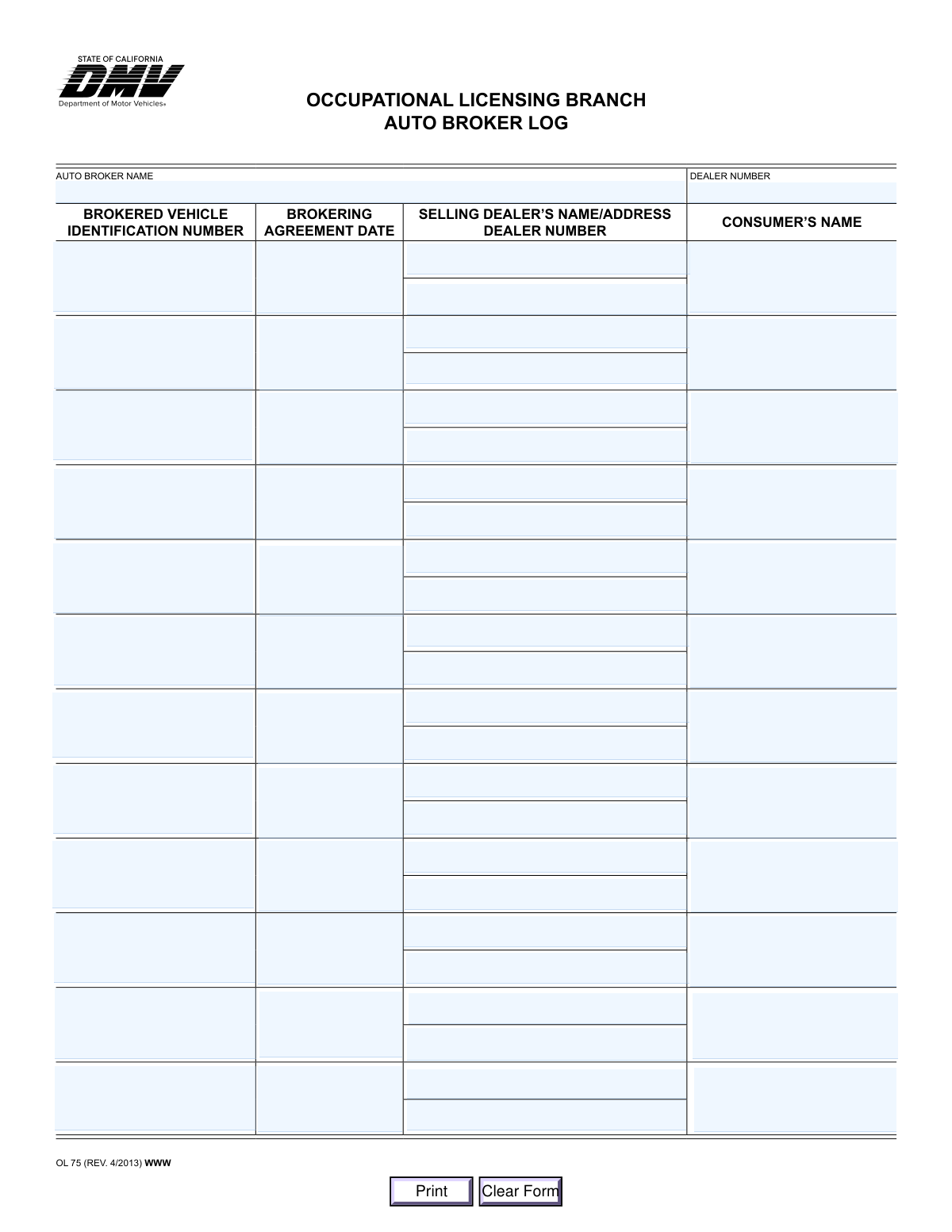
Form OL 75, the Auto Broker Log, is a document required by the Occupational Licensing Branch for auto brokers to log every vehicle transaction they facilitate. It serves as an official record for compliance and tracking purposes, detailing information about the vehicle, the selling dealer, the consumer, and the agreement date. Today, this form can be filled out quickly and accurately using AI-powered services like Instafill.ai, which can also convert non-fillable PDF versions into interactive fillable forms.
Our AI automatically handles information lookup, data retrieval, formatting, and form filling.
It takes less than a minute to fill out OL 75 using our AI form filling.
Securely upload your data. Information is encrypted in transit and deleted immediately after the form is filled out.
Form specifications
| Form name: | Form OL 75, Auto Broker Log |
| Number of pages: | 1 |
| Language: | English |
Instafill Demo: How to fill out PDF forms in seconds with AI
How to Fill Out OL 75 Online for Free in 2026
Are you looking to fill out a OL 75 form online quickly and accurately? Instafill.ai offers the #1 AI-powered PDF filling software of 2026, allowing you to complete your OL 75 form in just 37 seconds or less.
Follow these steps to fill out your OL 75 form online using Instafill.ai:
- 1 Navigate to Instafill.ai and upload or select the OL 75 Auto Broker Log form.
- 2 Enter your Auto Broker Name and Dealer Number in the designated fields at the top of the form.
- 3 For each transaction row, input the Brokered Vehicle Identification Number (VIN) and the Brokering Agreement Date.
- 4 Provide the complete name, address, and dealer number for the Selling Dealer involved in each transaction.
- 5 Enter the full name of the Consumer (buyer) for each corresponding log entry.
- 6 Continue filling out a new row for each brokered transaction until all activities are logged.
- 7 Review all entries on the log for accuracy, then save, download, or print the completed form for your records.
Our AI-powered system ensures each field is filled out correctly, reducing errors and saving you time.
Why Choose Instafill.ai for Your Fillable OL 75 Form?
Speed
Complete your OL 75 in as little as 37 seconds.
Up-to-Date
Always use the latest 2026 OL 75 form version.
Cost-effective
No need to hire expensive lawyers.
Accuracy
Our AI performs 10 compliance checks to ensure your form is error-free.
Security
Your personal information is protected with bank-level encryption.
Frequently Asked Questions About Form OL 75
This form is an official log used by licensed auto brokers to maintain a detailed record of every vehicle brokering transaction they handle, as required by the Occupational Licensing Branch.
Any individual or business operating as a licensed auto broker must complete and maintain this log for all their transactions. It serves as an official record for compliance and auditing purposes.
For each transaction, you will need the vehicle's VIN, the date of the brokering agreement, the selling dealer's full name, address, and dealer number, and the consumer's full name.
Your auto broker dealer number is entered once at the top of the form. The selling dealer's number is entered in the specific row corresponding to that transaction.
You should enter the exact date that the formal brokering agreement was signed and executed between you (the broker) and the consumer for that specific vehicle.
A single page of the OL 75 Auto Broker Log has space to record the details for up to twelve separate brokering transactions.
This log is primarily for your own business records. However, you must keep it current and make it available for inspection by the DMV or Occupational Licensing Branch upon request.
If you are filling out the PDF electronically, you can simply correct the field or use the 'Clear Form' button to start over. If filling by hand, neatly cross out the error, write the correction, and initial it.
If your PDF is flat or non-fillable, you can use a service like Instafill.ai. It can convert the document into an interactive, fillable form that you can easily complete on your computer.
Yes, platforms like Instafill.ai use AI to auto-fill form fields accurately using your saved information, which can save significant time when you are logging multiple transactions.
To fill this form online, you can upload the PDF to a service like Instafill.ai. The platform will make the form interactive, allowing you to type directly into the fields, save your data, and print the completed log.
The 17-character VIN is located on the vehicle's registration or title documents. It can also be found on the vehicle itself, typically on the driver-side dashboard or door jamb.
You must enter the full business name and physical address of the dealership that sold the vehicle, along with their official dealer number, for each transaction logged.
Compliance OL 75
Validation Checks by Instafill.ai
1
Header Information Completeness
This validation confirms that the 'Auto Broker Name' and the main 'Dealer Number' fields at the top of the form are filled. These fields are essential for identifying the brokerage responsible for the log. A failure to provide this information would render the entire log invalid as the transactions cannot be attributed to a specific licensed broker.
2
Validates Vehicle Identification Number (VIN) Format
This check verifies that each 'Brokered Vehicle Identification Number (VIN)' entry is exactly 17 characters long and contains only valid alphanumeric characters (0-9, A-Z, excluding I, O, and Q). A valid VIN is critical for uniquely identifying a vehicle for regulatory and tracking purposes. An invalid format will be rejected to prevent data entry errors and ensure compliance.
3
Ensures Brokering Agreement Date is a Valid Date
This validation ensures that the 'Brokering Agreement Date' in each transaction row is entered in a valid date format, such as MM/DD/YYYY. This is important for maintaining accurate and parseable records of when transactions occurred. If the date is not in a recognized format, the submission will be flagged for correction.
4
Verifies Brokering Agreement Date is Not in the Future
This check confirms that the 'Brokering Agreement Date' is not a future date. Logging a transaction before it has occurred is illogical and could indicate fraud or a significant data entry error. This validation ensures the temporal accuracy and integrity of the transaction log.
5
Validates Format of All Dealer Numbers
This check verifies that both the main broker's 'Dealer Number' and each 'Selling Dealer Number' in the transaction rows adhere to the expected format assigned by the DMV. This might include checks for length, character type, or specific prefixes. Correct dealer numbers are crucial for regulatory oversight and linking transactions to the correct licensed entities.
6
Ensures All Fields in a Transaction Row are Complete
This validation rule ensures that if any single field within a transaction row (e.g., VIN) is filled out, then all other fields in that same row (Brokering Agreement Date, Selling Dealer Info, Consumer's Name) must also be completed. This prevents incomplete or partial transaction records, which are unusable for auditing and compliance. An incomplete row will be flagged, requiring the user to either complete it or clear it.
7
Verifies Presence and Basic Format of Consumer's Name
This check ensures the 'Consumer's Name' field in each active transaction row is not empty and contains alphabetical characters. It confirms that a buyer has been identified for the transaction, which is a fundamental requirement of a sales log. Submissions with missing or invalid-looking consumer names, such as purely numeric entries, will be rejected.
8
Confirms Selling Dealer Name, Address, and Number are Provided
This validation verifies that for any completed transaction row, the selling dealer's information is fully provided, including their name, address, and dealer number. This complete information is necessary to identify the source of the vehicle in the brokered deal. Missing any part of this information makes the record incomplete and fails the validation.
9
Ensures Transaction Rows are Filled Sequentially
This check validates that the transaction rows are filled in order from top to bottom without any empty rows in between. For example, Row 3 cannot contain data if Row 2 is empty. This maintains the chronological and orderly nature of the log, preventing disorganized or hard-to-audit records.
10
Prevents Duplicate VIN Entries on the Same Log
This validation scans all entered VINs on the form and ensures that no two are identical. Each row should represent a unique vehicle transaction, so a duplicate VIN likely indicates a data entry error or an improper duplicate record. This check is crucial for maintaining the integrity and accuracy of the vehicle log.
11
Ensures the Auto Broker's Name is a Valid Business Name
This check validates that the 'Auto Broker Name' field contains a plausible business or legal name, primarily composed of alphabetic characters, and is not left blank. It prevents the entry of nonsensical data like random numbers or symbols in a field meant for a legal entity's name. This is important for ensuring the log is correctly associated with a registered brokerage.
12
Verifies Broker's Dealer Number is Different from Selling Dealer's Number
This logical check compares the main 'Dealer Number' in the header with the 'Selling Dealer Number' in each transaction row to ensure they are not the same. A broker's role is to facilitate a transaction between a consumer and a separate selling dealer. This validation helps enforce compliance by flagging transactions where the broker may be improperly listed as both the broker and the seller.
Common Mistakes in Completing OL 75
Users frequently make typos when entering the 17-character alphanumeric VIN, such as swapping the letter 'O' for the number '0' or 'I' for '1'. This happens due to manual data entry from source documents under time pressure. An incorrect VIN can lead to major compliance issues, failed audits, and an inability to correctly track a vehicle's history, potentially resulting in fines. To avoid this, carefully double-check the VIN against the vehicle's title or registration, not a marketing sheet. AI-powered tools like Instafill.ai can help by validating the 17-character format and checksum digit, significantly reducing transcription errors.
The form requires two different dealer numbers: the auto broker's number at the top and the selling dealer's number in each log entry row. People often mistakenly enter their own broker number in the 'Selling Dealer Number' field. This error complicates transaction audits and makes it difficult to identify the other party in the sale. Always verify you are entering the correct dealer's number in the appropriate field by cross-referencing the brokering agreement and the selling dealer's records.
A common mistake is entering the vehicle sale date or delivery date instead of the 'Brokering Agreement Date'. The log specifically requires the date the legal agreement between the broker and the consumer was executed. This discrepancy can cause legal and compliance problems, as it misrepresents the timeline of the transaction. To prevent this, refer directly to the signed brokering agreement document and use the execution date listed there for each entry.
Filers often provide only the selling dealer's name, omitting the full address and dealer number required in each row. This usually occurs when the information is not readily available or the filer is in a hurry. Incomplete logs are a primary reason for failing an occupational licensing audit and can result in penalties. Ensure you collect and record the selling dealer's full business name, complete street address, and official dealer number for every single transaction.
Instead of full legal names, users may enter abbreviations, DBAs (Doing Business As), or informal names for the auto broker, selling dealer, or consumer (e.g., 'Bob's Cars' instead of 'Bob's Quality Automobiles, LLC'). Official logs require precise, legal names for accurate record-keeping and regulatory compliance. Using incorrect names can create ambiguity and issues during audits or legal disputes. Always use the full, official names as they appear on licenses, registration documents, and legal agreements.
The form's layout for the 'Selling Dealer' information changes between rows (e.g., some rows combine name, address, and number into one field, while others split them). This design flaw leads to users entering data inconsistently, such as putting the dealer number in an address line. This makes the log messy and difficult to parse for regulators. Pay close attention to the specific field labels for each row to ensure data is placed correctly, or use a smart form-filling tool that can parse and place data accurately despite inconsistent layouts.
Some users will skip a row in the log, leaving a blank line between two completed transaction entries. This can happen accidentally or in an attempt to visually separate entries. However, regulators expect a continuous, chronological log, and gaps can raise questions about missing records or tampering during an audit. Always fill out the log sequentially without skipping any rows to maintain the integrity of the record.
When the form is printed and filled out by hand, poor or rushed handwriting can make critical information like VINs, dealer numbers, and names unreadable. This is a frequent issue that renders the log useless for compliance purposes and can lead to automatic audit failures. To avoid this, either type directly into the fillable PDF before printing or write slowly and clearly in block letters. Tools like Instafill.ai can convert flat, non-fillable PDFs into digital forms, eliminating handwriting issues entirely.
The 'Consumer's Name' field is often filled with just a first name and last initial (e.g., 'Jane D.') instead of the full legal name. This happens when the filer is working from memory or an informal note. An incomplete name is insufficient for official records and can make it impossible to cross-reference the transaction with other legal documents. Always use the consumer's full name as it appears on their driver's license or the brokering agreement to ensure accurate and compliant record-keeping.
Saved over 80 hours a year
“I was never sure if my IRS forms like W-9 were filled correctly. Now, I can complete the forms accurately without any external help.”
Kevin Martin Green
Your data stays secure with advanced protection from Instafill and our subprocessors

Robust compliance program
Transparent business model
You’re not the product. You always know where your data is and what it is processed for.
ISO 27001, HIPAA, and GDPR
Our subprocesses adhere to multiple compliance standards, including but not limited to ISO 27001, HIPAA, and GDPR.
Security & privacy by design
We consider security and privacy from the initial design phase of any new service or functionality. It’s not an afterthought, it’s built-in, including support for two-factor authentication (2FA) to further protect your account.
Fill out OL 75 with Instafill.ai
Worried about filling PDFs wrong? Instafill securely fills form-ol-75-auto-broker-log forms, ensuring each field is accurate.