Yes! You can use AI to fill out Move Assets from My Schwab Brokerage Account
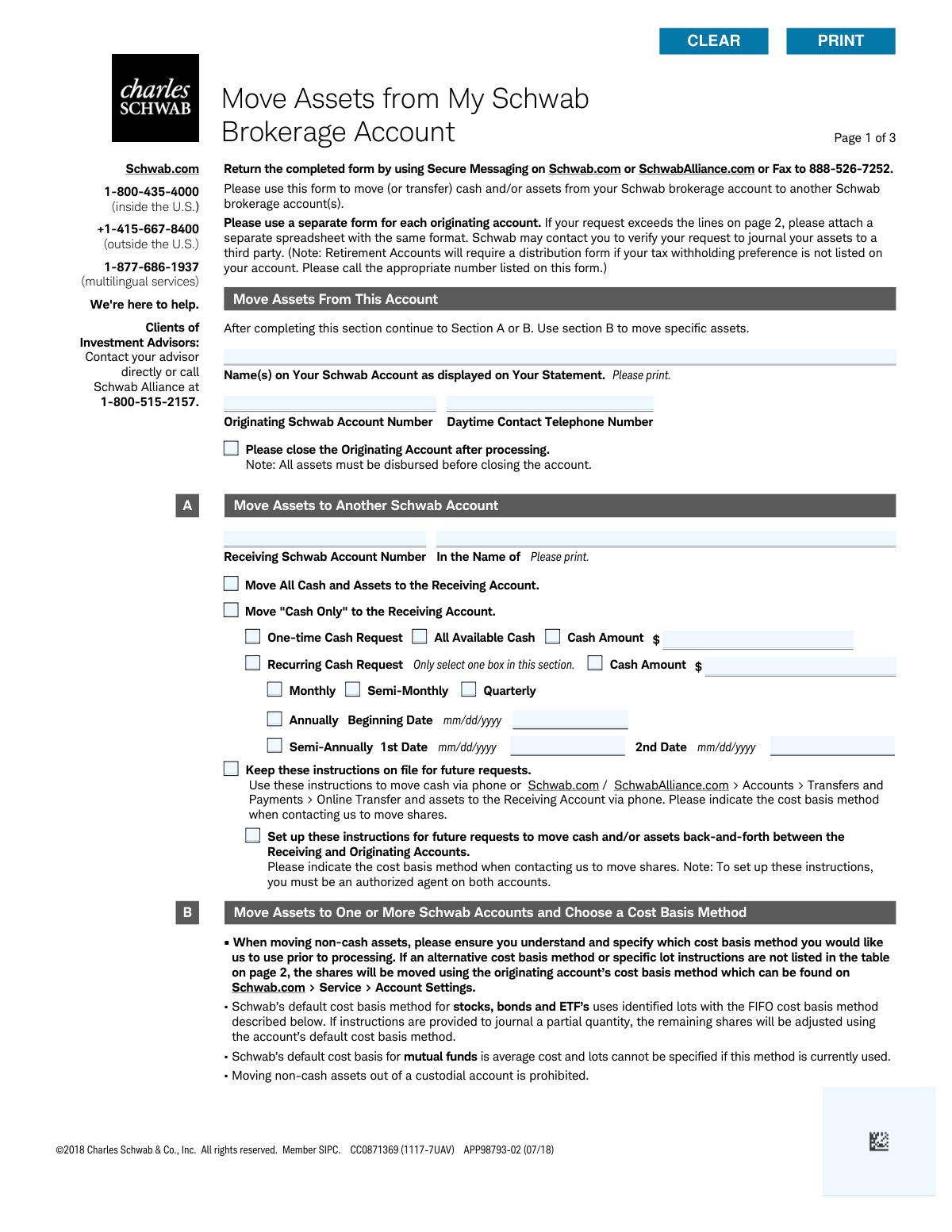
This form, officially titled 'Move Assets from My Schwab Brokerage Account' (APP98793-02), is a document provided by Charles Schwab & Co., Inc. for clients who wish to transfer cash and/or securities from one of their Schwab brokerage accounts to another. It allows for various types of transfers, including moving all assets, only cash, or specific lots of securities with designated cost basis methods. Today, this form can be filled out quickly and accurately using AI-powered services like Instafill.ai, which can also convert non-fillable PDF versions into interactive fillable forms.
Our AI automatically handles information lookup, data retrieval, formatting, and form filling.
It takes less than a minute to fill out APP98793-02 using our AI form filling.
Securely upload your data. Information is encrypted in transit and deleted immediately after the form is filled out.
Form specifications
| Form name: | Move Assets from My Schwab Brokerage Account |
| Number of pages: | 1 |
| Language: | English |
Instafill Demo: How to fill out PDF forms in seconds with AI
How to Fill Out APP98793-02 Online for Free in 2026
Are you looking to fill out a APP98793-02 form online quickly and accurately? Instafill.ai offers the #1 AI-powered PDF filling software of 2026, allowing you to complete your APP98793-02 form in just 37 seconds or less.
Follow these steps to fill out your APP98793-02 form online using Instafill.ai:
- 1 Navigate to Instafill.ai and upload the 'Move Assets from My Schwab Brokerage Account' form or select it from their template library.
- 2 Use the AI assistant to automatically fill in the 'Move Assets From This Account' section with your name, originating Schwab account number, and contact information.
- 3 Choose either Section A to move all assets or just cash, or Section B to move specific assets to one or more accounts.
- 4 In the selected section, provide the receiving Schwab account number(s) and the name(s) on the account(s).
- 5 Specify the transfer details, such as the cash amount, percentage of shares, or list specific assets (symbols/CUSIPs) and quantities to be moved.
- 6 If using Section B for specific lots, indicate the desired cost basis method (e.g., FIFO, LIFO) or provide specific lot acquisition dates and quantities.
- 7 Carefully review all entered information for accuracy, then electronically sign and date the form before downloading for submission to Charles Schwab.
Our AI-powered system ensures each field is filled out correctly, reducing errors and saving you time.
Why Choose Instafill.ai for Your Fillable APP98793-02 Form?
Speed
Complete your APP98793-02 in as little as 37 seconds.
Up-to-Date
Always use the latest 2026 APP98793-02 form version.
Cost-effective
No need to hire expensive lawyers.
Accuracy
Our AI performs 10 compliance checks to ensure your form is error-free.
Security
Your personal information is protected with bank-level encryption.
Frequently Asked Questions About Form APP98793-02
This form is used to authorize the transfer of cash and/or specific assets from one of your Schwab brokerage accounts to another Schwab brokerage account.
Any Schwab client who wishes to move assets between two different Schwab brokerage accounts must complete this form. A separate form is required for each account you are moving assets from.
You can submit the completed form through Secure Messaging on Schwab.com or SchwabAlliance.com, or by faxing it to 888-526-7252.
Use Section A to move all assets, only cash, or to set up recurring cash transfers. Use Section B to move specific non-cash assets, like stocks or bonds, and to specify the cost basis method for the transfer.
Yes, you can check a box to request the originating account be closed after the transfer. However, all assets must be fully disbursed from the account before it can be closed.
A cost basis method (e.g., FIFO, LIFO) determines which lot of a security is transferred, which can have significant tax consequences. If you do not specify a method in Section B, Schwab will use your account's default method.
The form indicates that retirement accounts may require a separate distribution form. You should call Schwab directly for instructions on moving assets from a retirement account.
If you have more assets to list than space allows, you should attach a separate spreadsheet that follows the same format as the table in Section B.
Yes, Section A provides options to set up recurring cash transfers on a monthly, semi-monthly, quarterly, or annual basis to another Schwab account.
Yes, the form states that moving non-cash assets out of a custodial account is prohibited. You may only transfer cash, and it must be used for the sole benefit of the minor.
Yes, services like Instafill.ai use AI to help you accurately auto-fill form fields with your information, saving time and reducing the chance of errors.
Simply upload the PDF to the Instafill.ai platform. Its AI will make the form fillable, allowing you to type your information, sign electronically, and download the completed document.
You can use a service like Instafill.ai to solve this problem. It can convert flat, non-fillable PDFs into interactive forms that you can easily complete on your computer.
Compliance APP98793-02
Validation Checks by Instafill.ai
1
Originating Account Number Presence and Format
This check verifies that the 'Originating Schwab Account Number' field is not empty and conforms to the standard Schwab account number format. This is the most critical piece of information for identifying the source of funds. If this field is empty or invalid, the entire form submission is invalid and cannot be processed.
2
Receiving Account Differs from Originating Account
This validation ensures that any 'Receiving Schwab Account Number' entered in Section A or Section B is not identical to the 'Originating Schwab Account Number'. Transferring assets to the same account is a logically invalid operation. This check prevents processing errors and ensures the user's intent to move assets to a different account is correctly captured.
3
Exclusive Instruction Section (A or B)
This check ensures that transfer instructions are provided in either Section A (for bulk/cash moves) or Section B (for specific asset moves), but not both. Providing instructions in both sections creates ambiguity and could lead to incorrect or duplicate asset movements. If both sections contain instructions, the form should be rejected for user clarification.
4
Account Closure Prerequisite Check
If the 'Please close the Originating Account' box is checked, this validation confirms that the transfer instructions result in the disbursement of 100% of all assets and cash from the account. An account cannot be closed if it retains a balance or any holdings. If this condition is not met, the transfer will be processed but the account closure request will be denied.
5
Section A Mutually Exclusive Transfer Type
Within Section A, this check validates that only one of the primary options, 'Move All Cash and Assets' or 'Move "Cash Only"', is selected. Selecting both options creates a conflicting and ambiguous instruction. The form must be considered invalid until the user specifies a single, clear choice.
6
Recurring Transfer Future Date Validation
This check verifies that the 'Beginning Date' for a 'Recurring Cash Request' in Section A is a valid date in mm/dd/yyyy format and is not a date in the past. It is impossible to schedule a recurring transaction to begin on a past date. If the date is invalid or in the past, the recurring setup will fail.
7
Section B Asset Existence Verification
For each asset listed in the Section B table, this check confirms that the specified asset (by Symbol or CUSIP) actually exists within the originating account's holdings. Attempting to transfer an asset that the account does not own would result in a failed transaction. This check pre-validates the instruction against the account's current inventory.
8
Section B Singular Transfer Amount Specification
For each row in the Section B table, this validation ensures that a value is entered in exactly one of the four amount columns: '# of Shares', '% of Shares', 'Available Cash', or '% of Account'. Filling out multiple amount fields for a single asset is an ambiguous instruction that cannot be processed. The form must be rejected to obtain a clear, single instruction per asset.
9
Section B Asset Quantity Availability
This validation confirms that the quantity specified for transfer in Section B (e.g., '# of Shares' or 'Cash Amount') does not exceed the total quantity of that specific asset available in the originating account. This check is crucial to prevent overdrafts or attempts to transfer more assets than are owned. If the requested amount is too high, the transaction for that asset will be rejected.
10
Valid Alternative Cost Basis Method
If the 'Alternative Cost Basis Method' column in Section B is filled, this check ensures the provided value is one of the permitted options: FIFO, LIFO, HCLOT, LCLOT, or 'Pro Rata'. Using an undefined method would cause the transaction to fail and could have unintended tax consequences. This validation enforces adherence to supported calculation methods.
11
Specific Lot Information Validation
If specific lot information (Acquired Date, Quantity) is provided in Section B, this check verifies that a lot matching that date and quantity exists for the specified asset in the originating account. This ensures the user is transferring a specific tax lot that they actually own. If the lot does not exist, the instruction is invalid and will be rejected.
12
Signature and Date Completeness
This check confirms that the signature field is signed and the 'Today’s Date' field is filled out in the final section. A signature is legally required to authorize the transaction, and the date establishes when the authorization was given. An unsigned or undated form is considered incomplete and will not be processed.
13
Custodial Account Non-Cash Transfer Restriction
This check first identifies if the originating account is a custodial account. If it is, the check then verifies that no non-cash assets are being moved, as this is explicitly prohibited according to the form's instructions. This is a critical compliance check to prevent improper transfers from a minor's account.
Common Mistakes in Completing APP98793-02
Saved over 80 hours a year
“I was never sure if my IRS forms like W-9 were filled correctly. Now, I can complete the forms accurately without any external help.”
Kevin Martin Green
Your data stays secure with advanced protection from Instafill and our subprocessors

Robust compliance program
Transparent business model
You’re not the product. You always know where your data is and what it is processed for.
ISO 27001, HIPAA, and GDPR
Our subprocesses adhere to multiple compliance standards, including but not limited to ISO 27001, HIPAA, and GDPR.
Security & privacy by design
We consider security and privacy from the initial design phase of any new service or functionality. It’s not an afterthought, it’s built-in, including support for two-factor authentication (2FA) to further protect your account.
Fill out APP98793-02 with Instafill.ai
Worried about filling PDFs wrong? Instafill securely fills move-assets-from-my-schwab-brokerage-account-1 forms, ensuring each field is accurate.