Yes! You can use AI to fill out Schwab One® Account Application for Personal Accounts

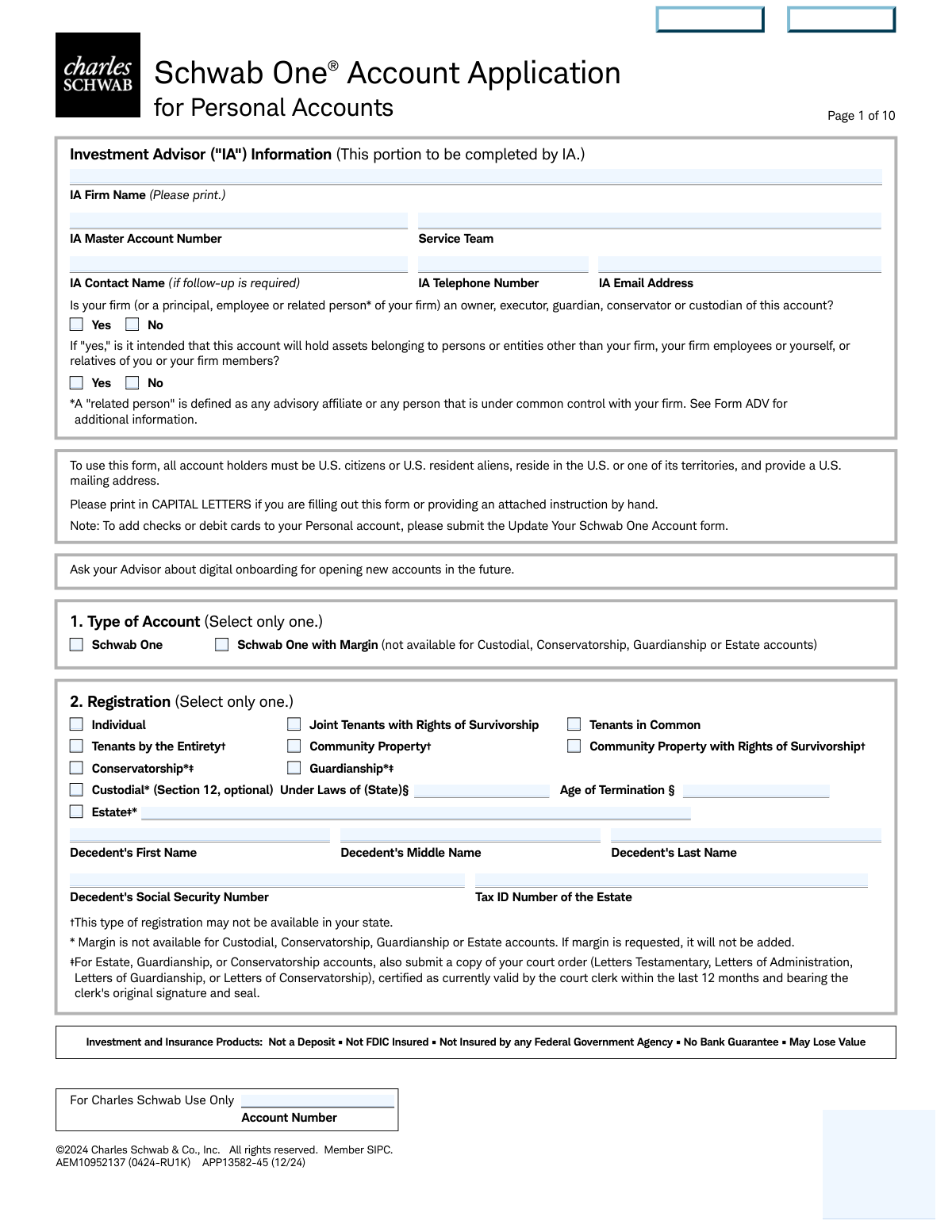
The Schwab One® Account Application for Personal Accounts is Charles Schwab & Co., Inc.’s official account-opening form for U.S. citizens or U.S. resident aliens who live in the U.S. (or its territories) and have a U.S. mailing address. It collects identity and regulatory information (e.g., taxpayer ID certification, employment/industry affiliation questions, trusted contact) required to establish and maintain a brokerage relationship. The application also lets you choose account registration and optional features like margin, checkwriting/debit cards, paperless documents, and investment advisor (IA) trading/fee authorizations. Completing it accurately is important because it governs how the account is titled, who can act on it, and what disclosures/agreements (including arbitration) apply.
Our AI automatically handles information lookup, data retrieval, formatting, and form filling.
It takes less than a minute to fill out Schwab One Personal Account Application (APP13582-45) using our AI form filling.
Securely upload your data. Information is encrypted in transit and deleted immediately after the form is filled out.

Form specifications

Form name: Schwab One® Account Application for Personal Accounts
Number of pages: 19
Filled form examples: Form Schwab One Personal Account Application (APP13582-45) Examples
Language: English
main-image

Instafill Demo: filling out a legal form in seconds

How to Fill Out Schwab One Personal Account Application (APP13582-45) Online for Free in 2026

Are you looking to fill out a SCHWAB ONE PERSONAL ACCOUNT APPLICATION (APP13582-45) form online quickly and accurately? Instafill.ai offers the #1 AI-powered PDF filling software of 2026, allowing you to complete your SCHWAB ONE PERSONAL ACCOUNT APPLICATION (APP13582-45) form in just 37 seconds or less.
Follow these steps to fill out your SCHWAB ONE PERSONAL ACCOUNT APPLICATION (APP13582-45) form online using Instafill.ai:
  1. 1 Confirm eligibility and gather required details: U.S. person status, SSN/Tax ID, government ID details, legal address (no P.O. box), contact info, and (if applicable) court documents for estate/guardianship/conservatorship.
  2. 2 Select the account setup: choose the account type (Schwab One or Schwab One with Margin) and pick the correct registration (individual, joint type, custodial/UTMA/UGMA, estate, guardianship, or conservatorship).
  3. 3 Enter account holder information: complete identity, citizenship/legal residence, ID type/number, employment and employer details, and answer the required securities-industry and public-company affiliation questions.
  4. 4 Add additional parties and protections: provide information for a joint holder/custodian/co-executor (if applicable) and optionally designate up to two Trusted Contacts with at least one contact method each.
  5. 5 Choose account programs and preferences: consent to the Cash Features Program (bank sweep), decide on Paperless Documents enrollment (or opt out), and complete required “Source of Funds” and “Purpose of Account” selections.
  6. 6 Set optional features and authorizations: choose checkwriting/debit card preferences and anticipated activity; if working with an IA, select any IA authorizations (trading, disbursement for checks/journals, and/or fee payment) and issuer communications preferences (proxy/corporate actions/interim mailings).
  7. 7 Review agreements and sign: read the Application Agreement/disclosures (including arbitration and margin disclosures if applicable), complete tax certification/backup withholding checkbox if needed, sign/date for all required parties, and complete the successor custodian nomination section if opening a custodial account.

Our AI-powered system ensures each field is filled out correctly, reducing errors and saving you time.

Why Choose Instafill.ai for Your Fillable Schwab One Personal Account Application (APP13582-45) Form?

Speed

Complete your Schwab One Personal Account Application (APP13582-45) in as little as 37 seconds.

Up-to-Date

Always use the latest 2026 Schwab One Personal Account Application (APP13582-45) form version.

Cost-effective

No need to hire expensive lawyers.

Accuracy

Our AI performs 10 compliance checks to ensure your form is error-free.

Security

Your personal information is protected with bank-level encryption.

Frequently Asked Questions About Form Schwab One Personal Account Application (APP13582-45)

This form is used to open a Schwab One® brokerage account for personal ownership types (such as Individual, Joint, Custodial, Estate, Guardianship, or Conservatorship). It also captures required identity, regulatory, and account preference information needed to establish the account.

All account holders must be U.S. citizens or U.S. resident aliens, must reside in the U.S. or one of its territories, and must provide a U.S. mailing address. If you don’t meet these requirements, you’ll need a different Schwab account-opening process.

You can select either Schwab One or Schwab One with Margin. Margin is not available for Custodial, Conservatorship, Guardianship, or Estate accounts, and if requested for those registrations it will not be added.

You must choose one registration such as Individual, Joint Tenants with Rights of Survivorship, Tenants in Common, Community Property (and variations), Custodial, Estate, Guardianship, or Conservatorship. The registration affects legal ownership, survivorship rights, and what documentation Schwab requires.

You must submit a copy of the applicable court order/letters (e.g., Letters Testamentary, Letters of Administration, Letters of Guardianship, or Letters of Conservatorship). The document must be certified as currently valid by the court clerk within the last 12 months and include the clerk’s original signature and seal.

You must provide legal name, Social Security/Tax ID number, date of birth, legal street address (no P.O. boxes), and other contact details. Schwab uses this information to verify identity as required by federal law.

You cannot use a P.O. box for the Home/Legal Street Address field; it must be a physical street address. You may use a P.O. box for the Mailing Address if it is different from your legal address.

You must select one ID type (Passport, Driver’s License, or Government-Issued ID) and provide the identification number, country of issuance, and issue/expiration dates (and state of issuance if applicable). This supports Schwab’s identity verification requirements.

These questions are required by securities industry regulations. If you (or an immediate family member) are associated with a stock exchange/FINRA member firm, you must attach an employer/affiliated broker-dealer approval letter; if you’re a director/10% shareholder/policy-making officer of a public company, you must provide the company name and trading symbol.

A Trusted Contact is someone Schwab (and your advisor, if applicable) may contact to help address concerns like suspected financial exploitation or difficulty reaching you. It’s optional, you can name up to two people, and they cannot transact or access your account unless they have separate legal authority.

No—if you have no changes, you can skip that section. If you do provide Trusted Contact information on this form, it replaces all Trusted Contact information currently on file.

Providing an email address generally enrolls you in Paperless Documents, but you may need to confirm consent by clicking “I Consent” in an email if you don’t meet the automatic enrollment criteria. To opt out, check the box that says you do not want paperless enrollment and want regulatory documents by postal mail.

You must check at least one source of funds (e.g., salary/savings, gifts, inheritance) and at least one purpose (e.g., general investing, retirement, college). Schwab uses this information for regulatory and account-profile requirements.

In the Checking Preferences section, you can choose checks only, checks plus one debit card, or checks plus two debit cards (the second card is only for the additional account holder on joint accounts). If you make no selection, you will not receive checks or Visa Platinum Debit Cards.

By signing the application, you consent to having uninvested cash in your brokerage account included in the Cash Features Program, typically the Bank Sweep feature for U.S. residents. FDIC insurance may apply to sweep deposits at each sweep bank up to applicable limits, but balances can exceed FDIC limits and Schwab is not an FDIC-insured bank.

Compliance Schwab One Personal Account Application (APP13582-45)
Validation Checks by Instafill.ai

1
Account Type Selection Is Exactly One and Compatible With Registration
Validate that exactly one account type is selected (Schwab One vs. Schwab One with Margin). If “Schwab One with Margin” is selected, confirm the registration is not Custodial, Conservatorship, Guardianship, or Estate, since margin is explicitly not available for those registrations. If validation fails, block submission and prompt the user to choose a permitted combination (or automatically remove margin only if business rules allow silent correction).
2
Registration Selection Is Exactly One and Triggers Required Subfields
Ensure exactly one registration type is selected (e.g., Individual, JTWROS, TIC, TBE, Community Property variants, Custodial, Estate, Guardianship, Conservatorship). When a special registration is chosen, require the dependent fields: Custodial requires “Under Laws of (State)” and (where applicable) “Age of Termination”; Estate requires decedent name plus decedent SSN and estate Tax ID; Guardianship/Conservatorship/Estate require court order documentation. If missing or multiple registrations are selected, reject the submission and identify the missing dependent fields/documents.
3
U.S. Eligibility Attestation: Citizenship/Residency/Address Constraints
The form states all account holders must be U.S. citizens or U.S. resident aliens, reside in the U.S. or its territories, and provide a U.S. mailing address. Validate that each account holder’s Country of Legal Residence is USA (or otherwise meets the stated eligibility rules) and that the mailing address country is U.S. or a U.S. territory as allowed by policy. If the applicant indicates non-U.S. legal residence or provides a non-U.S. mailing address, fail validation and route to an alternate onboarding process (or require a different form).
4
Primary Account Holder Identity Fields Complete and Properly Formatted
Require Primary Account Holder legal name (first/last at minimum), SSN/Tax ID, date of birth, and mother’s maiden name, as these are used for identity verification. Validate SSN/Tax ID format (9 digits; allow hyphens but store normalized), and ensure the name fields do not contain invalid characters or placeholder text (e.g., “N/A”). If any required identity field is missing or malformed, reject submission because KYC/CIP checks cannot be performed.
5
Date Fields Use mm/dd/yyyy and Are Chronologically Valid
Validate all dates (DOB, ID issue date, ID expiration date, signature dates, custodial successor designation dates) are in mm/dd/yyyy format and represent real calendar dates. Enforce logical ordering where applicable: ID issue date must be on/before today; expiration date must be after issue date and not in the past at time of submission. If a date is invalid or inconsistent, fail validation and request correction to prevent downstream compliance and document validity issues.
6
Age and Minor Logic for Custodial Accounts and Email Restrictions
If registration is Custodial, validate that the primary “Account Holder/Minor” DOB indicates a minor under the applicable age of majority and that the custodian is captured in the Additional Account Holder/Custodian section. Enforce the form rule that the minor’s email must be blank and that the custodian’s email is provided instead (if paperless is desired). If the minor is not actually a minor, or if a minor email is provided, fail validation and instruct the user to correct registration or contact details.
7
Address Rules: Legal Address Required, No P.O. Boxes for Legal Address
Validate that each account holder provides a Home/Legal Street Address and that it is not a P.O. Box (detect common patterns like “P.O. Box”, “POB”, “Box #”). Mailing address may be a P.O. Box, but if a separate mailing address is provided it must include city/state/zip/country. If the legal address is missing or is a P.O. Box, reject submission because regulatory requirements mandate a physical legal address.
8
U.S. State/ZIP and Country Consistency for Addresses
When Country is USA, validate that State is a valid U.S. state/territory code/name and ZIP is 5 digits (optionally ZIP+4). When Country is not USA (if allowed by business rules), validate postal code format per country rules and require province/region where applicable. If state/ZIP/country combinations are inconsistent (e.g., USA with non-U.S. postal code), fail validation to prevent returned mail and compliance address mismatches.
9
Phone Number and Extension Formatting and Minimum Contactability
Validate telephone/mobile/work numbers contain valid digits and lengths (e.g., 10-digit NANP for U.S. numbers; allow punctuation but normalize). If an extension is provided, ensure it is numeric and only present when a work number is provided. If all phone fields are blank for an adult account holder, flag as incomplete and require at least one reachable phone number to support account servicing and fraud prevention.
10
Email Address Format and Paperless Enrollment Logic
If an email address is provided for an adult account holder, validate it against standard email syntax and disallow obvious placeholders (e.g., “[email protected]” if policy forbids). If the applicant checks “No, do not enroll my account in Paperless Documents,” ensure the system does not auto-enroll even if an email is present, and optionally warn that email consent still applies for communications. If email is required for a chosen workflow (e.g., digital onboarding), fail validation when missing or invalid.
11
Government ID Selection and Required Fields by ID Type
Ensure exactly one ID type is selected (Passport, Driver’s License, Gov’t-Issued ID) and require the corresponding fields: identification number and country of issuance; for driver’s license/state ID require state of issuance; require issue and expiration dates. Validate that the country/state fields are consistent with the ID type (e.g., U.S. driver’s license must have a U.S. state). If ID data is incomplete or inconsistent, fail validation because identity verification cannot be completed.
12
Employment Status Drives Employer/Occupation Requirements
Validate that exactly one employment status is selected for each account holder. If “Employed” or “Self-Employed” is selected, require occupation selection and employer/business name and business address (no P.O. boxes) with city/state/zip/country. If “Retired/Student/Homemaker/Not Employed” is selected, employer fields should be blank or ignored to avoid storing misleading data; if populated, warn or require confirmation.
13
Regulatory Affiliation Questions Require Attachments/Details When 'Yes'
If the applicant answers “Yes” to being associated with a stock exchange/member firm/FINRA/municipal broker-dealer, require the company name and require an attached employer approval letter as stated on the form. If the applicant answers “Yes” to being a director/10% shareholder/policy-making officer, require company name and trading symbol. If required details or attachments are missing, fail validation and prevent account opening due to regulatory obligations.
14
Source of Funds and Purpose of Account: At Least One Selected Each
Validate that at least one Source of Funds checkbox and at least one Purpose of Account checkbox are selected, as the form marks both as required. If “Other (please specify)” is selected in either section, require a non-empty specification text and enforce reasonable length limits to prevent unusable entries. If these requirements are not met, reject submission because AML/KYC profiling would be incomplete.
15
Checking Preferences and Joint Debit Card Eligibility
If any check/debit card option is selected, validate that the account type supports it and that required parties exist (e.g., “two Visa debit cards” is only allowed when there is an additional account holder on a joint account). Enforce the imprint constraint by validating any check imprint text does not exceed 30 characters (and contains only permitted characters). If an ineligible option is selected (e.g., two cards on an individual account), fail validation and prompt for a valid selection.
16
Issuer Communications Selections Are Mutually Consistent
For Proxy Voting and Corporate Actions sections, validate that exactly one recipient is selected for the action item (Account Holder vs IA) and that the informational copy selection follows the stated rule: IA informational copies may be chosen only if the Account Holder is voting (i.e., Account Holder selected for voting/decisions). For Interim Mailings, ensure exactly one of the three options is selected. If inconsistent combinations are chosen, fail validation to prevent contradictory delivery instructions.

Common Mistakes in Completing Schwab One Personal Account Application (APP13582-45)

Selecting an ineligible account type/feature combination (e.g., Margin on Custodial/Estate)

Applicants often check “Schwab One with Margin” without noticing that margin is not available for Custodial, Conservatorship, Guardianship, or Estate registrations. The consequence is that margin will not be added (or the application may be delayed while the registration/feature selection is clarified). To avoid this, choose the registration first, then confirm eligibility notes on the form before selecting margin; if you need margin, use an eligible registration type.

Choosing the wrong registration type or selecting more than one

People frequently misunderstand legal ownership options (JTWROS vs Tenants in Common vs Community Property) or accidentally mark multiple boxes. This can create incorrect titling, survivorship rights, and tax/legal outcomes, and it often triggers follow-up and re-papering. Avoid this by selecting only one registration and confirming it matches your state rules and your intent for ownership and inheritance; when unsure, consult an attorney/advisor before submitting.

Using a P.O. Box for the required Home/Legal Street Address

Because the form allows P.O. boxes for mailing, applicants sometimes also use a P.O. box for the legal address, which is explicitly prohibited. This can cause identity verification failures and account-opening delays due to regulatory “legal address” requirements. Enter a physical residential street address for Home/Legal Address and use the Mailing Address section for a P.O. box if needed.

Providing non-U.S. eligibility information that conflicts with form requirements

This application is limited to U.S. citizens or U.S. resident aliens who reside in the U.S. or its territories and provide a U.S. mailing address, but applicants sometimes list a non-U.S. residence, omit a U.S. mailing address, or indicate non-resident status. The result is often rejection or a request to use a different Schwab onboarding path. Before completing the form, confirm you meet the eligibility statement and ensure your Country of Legal Residence and addresses align with those requirements.

Inconsistent identity details (name/SSN/DOB) or using nicknames instead of legal name

Applicants sometimes enter a preferred name in the legal name fields, transpose digits in SSNs, or use the wrong date format (mm/dd/yyyy). These mismatches commonly cause CIP/identity verification issues and can require resubmission or additional documentation. Use your legal name exactly as it appears on your government ID and Social Security records, double-check SSN digits, and ensure dates follow the stated format.

Leaving ID section incomplete or mixing ID fields (type vs issuing country/state vs dates)

The ID area requires selecting one ID type and then completing the corresponding details (ID number, country/state of issuance, issue date, expiration date), but people often check a box and leave dates blank or enter a state for a passport. Missing or mismatched ID data can delay account opening and trigger follow-up for verification. Avoid this by selecting only one ID type and completing every related field with the correct issuing jurisdiction and valid dates.

Employment/occupation information not aligned with the selection (or missing employer address)

A common error is selecting “Employed” or “Self-Employed” but not choosing an occupation category, or leaving employer/business name and street address incomplete (or using a P.O. box where prohibited). This information is required for industry regulatory purposes, and gaps can lead to processing holds. Ensure your employment status matches your situation, pick one occupation category, and provide a complete physical employer/business address when required.

Answering regulatory affiliation questions incorrectly or forgetting required attachments

Applicants sometimes answer “No” to FINRA/stock exchange affiliation or public company insider questions without realizing immediate family employment/association counts, or they answer “Yes” but forget the required employer approval letter or omit the company name/ticker. Incorrect answers can create compliance issues and may result in account restrictions or delays while documentation is requested. Read the questions carefully (including “immediate family member”), and if “Yes,” provide the requested details and attach the required letter/documentation at submission.

Trusted Contact section mistakes (missing contact method, underage contact, or unintended overwrite)

People often provide a Trusted Contact name but no phone/email, list someone under 18, or don’t realize that entering new Trusted Contact information replaces what is currently on file across Schwab accounts. This can reduce Schwab’s ability to reach someone in suspected exploitation situations and can unintentionally remove existing contacts. To avoid issues, provide at least one reliable contact method per Trusted Contact, confirm the person is 18+, and only complete the section if you intend to replace existing Trusted Contact records.

Paperless Documents enrollment confusion (email missing or opt-out box checked unintentionally)

Applicants sometimes expect paperless delivery but forget to provide an email address, or they check the “No, do not enroll” box by mistake. This can lead to receiving documents by mail, missing the consent workflow email (Scenario 2), or delays in accessing agreements and disclosures online. Decide your preference before submitting: provide a current email for paperless, watch for the post-opening consent email if required, and only check the opt-out box if you truly want postal delivery.

Omitting required “Source of Funds” and “Purpose of Account” selections

These sections require checking at least one box each, but applicants often skip them because they look informational rather than mandatory. Missing selections can cause the application to be marked incomplete and held for follow-up, delaying account opening. Avoid this by selecting all applicable sources (including original sources for transferred assets) and at least one purpose that best matches how you intend to use the account.

Signature/date and role-signature errors (especially for joint, custodial, estate/guardian accounts)

A frequent issue is missing one of the required signatures/dates, having the wrong person sign (e.g., minor signs a custodial account), or failing to have all Executors/Guardians/Conservators sign even if they won’t transact. This can invalidate the application and require re-execution, and for estate/guardianship/conservatorship it can also block account opening until authority is properly documented. Ensure every required party signs and dates in mm/dd/yyyy format, and confirm the signer’s role matches the registration (custodian/executor/guardian as applicable).
Saved over 80 hours a year

“I was never sure if my IRS forms like W-9 were filled correctly. Now, I can complete the forms accurately without any external help.”

Kevin Martin Green

Your data stays secure with advanced protection from Instafill and our subprocessors

Robust compliance program

Transparent business model

You’re not the product. You always know where your data is and what it is processed for.

ISO 27001, HIPAA, and GDPR

Our subprocesses adhere to multiple compliance standards, including but not limited to ISO 27001, HIPAA, and GDPR.

Security & privacy by design

We consider security and privacy from the initial design phase of any new service or functionality. It’s not an afterthought, it’s built-in, including support for two-factor authentication (2FA) to further protect your account.

Fill out Schwab One Personal Account Application (APP13582-45) with Instafill.ai

Worried about filling PDFs wrong? Instafill securely fills schwab-one-account-application-for-personal-accoun forms, ensuring each field is accurate.