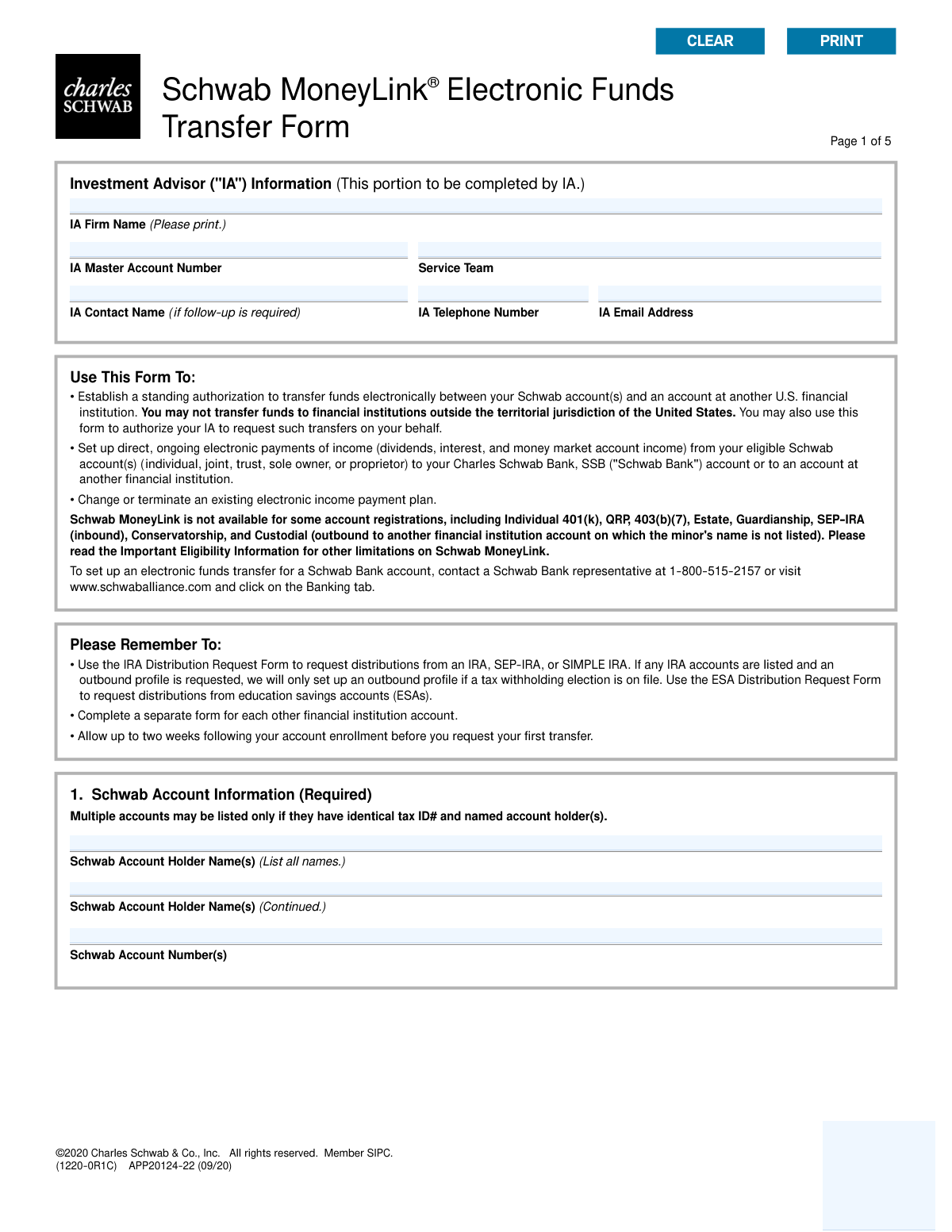
Yes! You can use AI to fill out Schwab MoneyLink® Electronic Funds Transfer Form

This form allows Charles Schwab account holders to establish a standing authorization for transferring funds electronically to or from an account at another U.S. bank. It can be used to set up on-request transfers, recurring payments, direct deposit of income, or to authorize an Investment Advisor to request transfers on the account holder's behalf. Today, this form can be filled out quickly and accurately using AI-powered services like Instafill.ai, which can also convert non-fillable PDF versions into interactive fillable forms.
Our AI automatically handles information lookup, data retrieval, formatting, and form filling.
It takes less than a minute to fill out APP20124-22 using our AI form filling.
Securely upload your data. Information is encrypted in transit and deleted immediately after the form is filled out.

Form specifications

Form name: Schwab MoneyLink® Electronic Funds Transfer Form
Number of pages: 1
Language: English
main-image

Instafill Demo: How to fill out PDF forms in seconds with AI

How to Fill Out APP20124-22 Online for Free in 2026

Are you looking to fill out a APP20124-22 form online quickly and accurately? Instafill.ai offers the #1 AI-powered PDF filling software of 2026, allowing you to complete your APP20124-22 form in just 37 seconds or less.
Follow these steps to fill out your APP20124-22 form online using Instafill.ai:
  1. 1 Navigate to Instafill.ai and upload or select the Schwab MoneyLink® Electronic Funds Transfer Form.
  2. 2 Use the AI assistant to automatically fill in your Schwab account information, including account holder names and account numbers.
  3. 3 Select your desired transfer instructions, such as setting up a new transfer, changing an existing one, or terminating a plan.
  4. 4 Provide the details for the other financial institution, including the ABA routing number, account number, and account type, and attach a voided check or other required documentation.
  5. 5 Specify the type of transfer (e.g., on-request, recurring) and any dividend or interest payment instructions.
  6. 6 If applicable, complete the Investment Advisor (IA) Authorization section by providing the required initials.
  7. 7 Review all the auto-filled information for accuracy, then electronically sign and date the authorization section to finalize the request.

Our AI-powered system ensures each field is filled out correctly, reducing errors and saving you time.

Why Choose Instafill.ai for Your Fillable APP20124-22 Form?

Speed

Complete your APP20124-22 in as little as 37 seconds.

Up-to-Date

Always use the latest 2026 APP20124-22 form version.

Cost-effective

No need to hire expensive lawyers.

Accuracy

Our AI performs 10 compliance checks to ensure your form is error-free.

Security

Your personal information is protected with bank-level encryption.

Frequently Asked Questions About Form APP20124-22

This form is used to set up, change, or terminate electronic fund transfers between your Schwab account(s) and an account at another U.S. financial institution. It can also be used to authorize your Investment Advisor to request transfers on your behalf.

Any Schwab account holder who wants to establish a standing authorization to move funds electronically to or from an external bank account should complete this form. It is also used for modifying or terminating existing transfer instructions.

No, some accounts are not eligible, including Individual 401(k), QRP, 403(b)(7), Estate, and SEP-IRA for inbound transfers. Refer to the 'Important Eligibility Information' section for a complete list of restrictions.

You are required to attach a voided, preprinted check for the external account. If you don't have checks, you can provide a deposit slip, a recent account statement, or a signed letter from the other financial institution with your account details.

You should allow up to two weeks for the enrollment to be processed. After this period, you can request your first transfer.

No, you cannot use this form for IRA distributions. You must use the specific 'IRA Distribution Request Form' or 'ESA Distribution Request Form' for retirement and education savings accounts.

On-request transfers provide the flexibility to move funds on a date and in an amount you specify for each transaction. Recurring transfers automatically move a fixed amount of money on a set schedule, such as weekly or monthly.

Initialing this section grants your IA authority to initiate MoneyLink transactions, change transfer amounts or frequency, and stop transfers on your behalf. All Schwab account holders must initial this section to grant this permission.

If you are granting authority to your Investment Advisor (Section 6), all Schwab account holders must sign. Otherwise, at least one Schwab account holder and one holder of the other financial institution account must sign.

No, you may not transfer funds to financial institutions outside the territorial jurisdiction of the United States using this form.

Complete Section 5, 'Dividend and Interest Payment Instructions,' to set up, change, or terminate a plan to have income from dividends, interest, and money market funds sent to your linked account.

Yes, services like Instafill.ai use AI to accurately auto-fill form fields, which can save you time and help you complete the form correctly.

You can use a service like Instafill.ai to complete the form digitally. Simply upload the PDF, and the platform will make the fields interactive for you to fill out and sign electronically.

If your PDF is not interactive, you can use a tool like Instafill.ai. It can convert flat, non-fillable PDFs into interactive forms that you can easily complete online.

Compliance APP20124-22
Validation Checks by Instafill.ai

1
ABA Transit Routing Number Validity
This check ensures the ABA Transit Routing Number provided in Section 3 is a valid, 9-digit number. The number should be validated against a database of U.S. financial institutions to confirm it exists and corresponds to a real bank. This is critical for ensuring electronic fund transfers are sent to the correct financial institution, preventing failed or misdirected transactions.
2
Conditional Section Completion Based on Transfer Instruction
This validation verifies that all required sections are completed based on the user's selection in Section 2. For example, if 'Set up new instructions' is chosen, the system must confirm that Sections 3, 4, and 7 are filled out. This prevents incomplete submissions that cannot be processed and reduces the need for manual follow-up.
3
Schwab Account Information Completeness
This check ensures that the 'Schwab Account Holder Name(s)' and 'Schwab Account Number(s)' fields in Section 1 are not empty. These fields are fundamental to identifying the source or destination account for the transfer. A failure in this check would make it impossible to process the form as the primary Schwab account is unknown.
4
Signature Requirement for IA Authorization
This validation enforces the rule that if Section 6 (Investment Advisor Authorization) is initialed, then all Schwab account holders listed in Section 1 must provide a signature in Section 7. If Section 6 is not initialed, at least one account holder signature is required. This is a critical compliance check to ensure proper authorization is granted for IA-initiated transactions.
5
Recurring Transfer Details Mandatory
If any 'Recurring Transfers' option is selected in Section 4, this check validates that a transfer amount, a frequency, and a start date are all provided. Omitting any of these details would make the recurring instruction ambiguous and impossible to execute. The start date should also be validated to ensure it is a valid, future date.
6
IRA Contribution Year Format
When a recurring transfer 'Into my Schwab IRA account' is selected in Section 4, this validation ensures the 'tax year' field is populated with a valid four-digit year (YYYY). This is essential for correct tax reporting and ensuring contributions are applied to the intended year. An invalid format could lead to significant tax and compliance issues for the account holder.
7
Termination Account Number Presence
This check is triggered if the user selects 'Set up an additional other financial institution account and terminate existing instructions' in Section 2. It verifies that the account number for the instructions to be terminated is filled in. Without this specific account number, the system cannot identify which existing MoneyLink setup to remove, leading to processing failure.
8
Exclusive Transfer Instruction Selection
This validation ensures that a user selects an option from either subsection A ('Set up or terminate') or subsection B ('Change existing') in Section 2, but not from both. These actions are mutually exclusive, and selecting multiple conflicting instructions would create an ambiguous request. This check guarantees a clear, actionable instruction is submitted.
9
Verification of Attached Documentation
This check confirms that the required documentation, such as a voided check or an official bank letter, has been attached to the submission as specified in Section 3. This documentation is necessary to verify the ownership and details of the external bank account. Failure to provide it will halt the setup process until the verification documents are received.
10
Signature Date Validity
This validation ensures that every signature in Section 7 is accompanied by a date in the proper 'mm/dd/yyyy' format. The date must be a valid calendar date and cannot be in the future. This is important for establishing a clear and legally binding timeline for when the authorization was granted.
11
Multiple Schwab Account Consistency Check
If multiple Schwab account numbers are entered in Section 1, this validation triggers a backend process to confirm that all listed accounts have identical tax ID numbers and named account holders. This enforces the rule stated on the form, preventing the improper linking of accounts that do not share the same registration. A mismatch would cause the request to be rejected for security and compliance reasons.
12
Dividend and Interest Plan Completeness
If the user chooses to 'Set Up' or 'Change' instructions in Section 5, this check verifies that selections are also made for both 'Income Options' and 'Frequency'. An incomplete selection in this section would result in an ambiguous instruction for handling income payments. This ensures that if the section is used, it is filled out completely.
13
IA Authorization Initial Requirement
This check verifies that if the IA Authorization in Section 6 is being granted, the initial fields are completed by all required Schwab account holders listed in Section 1. An 'X' is not sufficient. This ensures that the high-privilege action of granting an IA authority to move funds is explicitly and properly authorized by every owner of the account.
14
Other Financial Institution Account Type Selection
This validation ensures that one of the account type checkboxes (e.g., 'Personal Checking Account') is selected in Section 3. This information is often required by the ACH network to process transactions correctly and helps prevent transfer rejections. Failure to specify the account type can lead to processing delays or failures.

Common Mistakes in Completing APP20124-22

Incomplete or Incorrect ABA Routing Number

Users often mistype the 9-digit ABA routing number or copy it from an incorrect source like a deposit slip, which can have a different internal routing number. This error guarantees the electronic transfer will fail, as funds cannot be routed to the correct financial institution. To avoid this, carefully copy the number from the bottom-left corner of a preprinted check and double-check it for accuracy. AI-powered form fillers like Instafill.ai can help by validating the ABA number against a database of financial institutions.

Forgetting to Attach Required Documentation

The form requires a voided preprinted check or other specific documentation like a bank letter to verify the external account details. Applicants frequently forget to include this attachment, rendering the submission incomplete. Without this proof, Schwab cannot process the request, leading to rejection and significant delays. Always ensure you have attached a clear copy of one of the accepted documents before submitting the form.

Missing Signatures from All Required Account Holders

The signature requirements in Section 7 are complex and often misread, leading to missing signatures. For example, if authorizing an Investment Advisor in Section 6, all Schwab account holders must sign, not just one. A missing signature from a co-trustee or joint account holder makes the form legally invalid and is a primary cause for immediate rejection. Carefully review who needs to sign based on your selections and ensure all parties provide a signature, printed name, and date.

Listing Multiple Schwab Accounts with Different Owners

Section 1 allows for multiple Schwab account numbers, but only if they have identical tax ID numbers and named account holders. Users may try to link various family or trust accounts for convenience without realizing the ownership structures differ. This results in a registration mismatch, causing the form to be rejected. To prevent this, use a separate form for each unique account ownership registration.

Confusing 'Set up new' vs. 'Set up additional' Instructions

In Section 2, users who already have a MoneyLink setup may incorrectly select 'Set up new instructions' when they intend to add another bank account. This can cause their existing, valid transfer instructions to be terminated and replaced. To avoid accidentally deleting your current setups, be sure to select 'Set up an additional other financial institution account' if you are simply adding to your profile.

Missing Initials for Investment Advisor (IA) Authorization

If an applicant wants their Investment Advisor to manage transfers, Section 6 requires initials from all Schwab account holders. It is a common mistake for only one person on a joint or trust account to provide their initials. This failure to secure authorization from all owners means the IA will not be granted the requested permissions, defeating the purpose of the section. Ensure every account holder listed in Section 1 provides their initials in Section 6.

Incomplete Recurring Transfer Details

When setting up a recurring transfer in Section 4, users sometimes select an amount and direction but fail to specify the frequency and start date. Forgetting to check a box for 'Monthly' or 'Weekly' and providing a start date leaves the instructions ambiguous. This can lead to Schwab either rejecting the form or defaulting to a transfer schedule the user did not intend. Always complete both parts of the recurring transfer section to ensure payments occur as desired.

Using the Form for Ineligible IRA Distributions

Applicants may attempt to set up a recurring withdrawal from their IRA using this form, but it is not designed for that purpose and lacks the necessary tax withholding elections. The form explicitly states to use the 'IRA Distribution Request Form' for this action. Using the wrong form will lead to an automatic rejection and delay access to funds. Always use the specific form designated for retirement account distributions.

Submitting Illegible Handwritten Information

When the form is printed and filled out by hand, illegible handwriting for names, account numbers, or amounts is a frequent problem. If the processor cannot accurately read the information, the form will be rejected as it cannot be keyed into the system correctly. To avoid this, print clearly in black ink or use a tool like Instafill.ai, which can convert a flat PDF into a digitally fillable version to ensure perfect legibility.

Mismatch Between Printed Name and Signature

In the signature section, the printed name must exactly match the legal name on the account, but people sometimes print a nickname or an abbreviated version. This discrepancy can cause a signature verification failure, leading to the form being rejected. Always print your full legal name as it appears on your account statements to ensure a valid authorization.
Saved over 80 hours a year

“I was never sure if my IRS forms like W-9 were filled correctly. Now, I can complete the forms accurately without any external help.”

Kevin Martin Green

Your data stays secure with advanced protection from Instafill and our subprocessors

Robust compliance program

Transparent business model

You’re not the product. You always know where your data is and what it is processed for.

ISO 27001, HIPAA, and GDPR

Our subprocesses adhere to multiple compliance standards, including but not limited to ISO 27001, HIPAA, and GDPR.

Security & privacy by design

We consider security and privacy from the initial design phase of any new service or functionality. It’s not an afterthought, it’s built-in, including support for two-factor authentication (2FA) to further protect your account.

Fill out APP20124-22 with Instafill.ai

Worried about filling PDFs wrong? Instafill securely fills schwab-moneylink-electronic-funds-transfer-form-2 forms, ensuring each field is accurate.