Yes! You can use AI to fill out TIAA Brokerage Authorization To Gift Securities
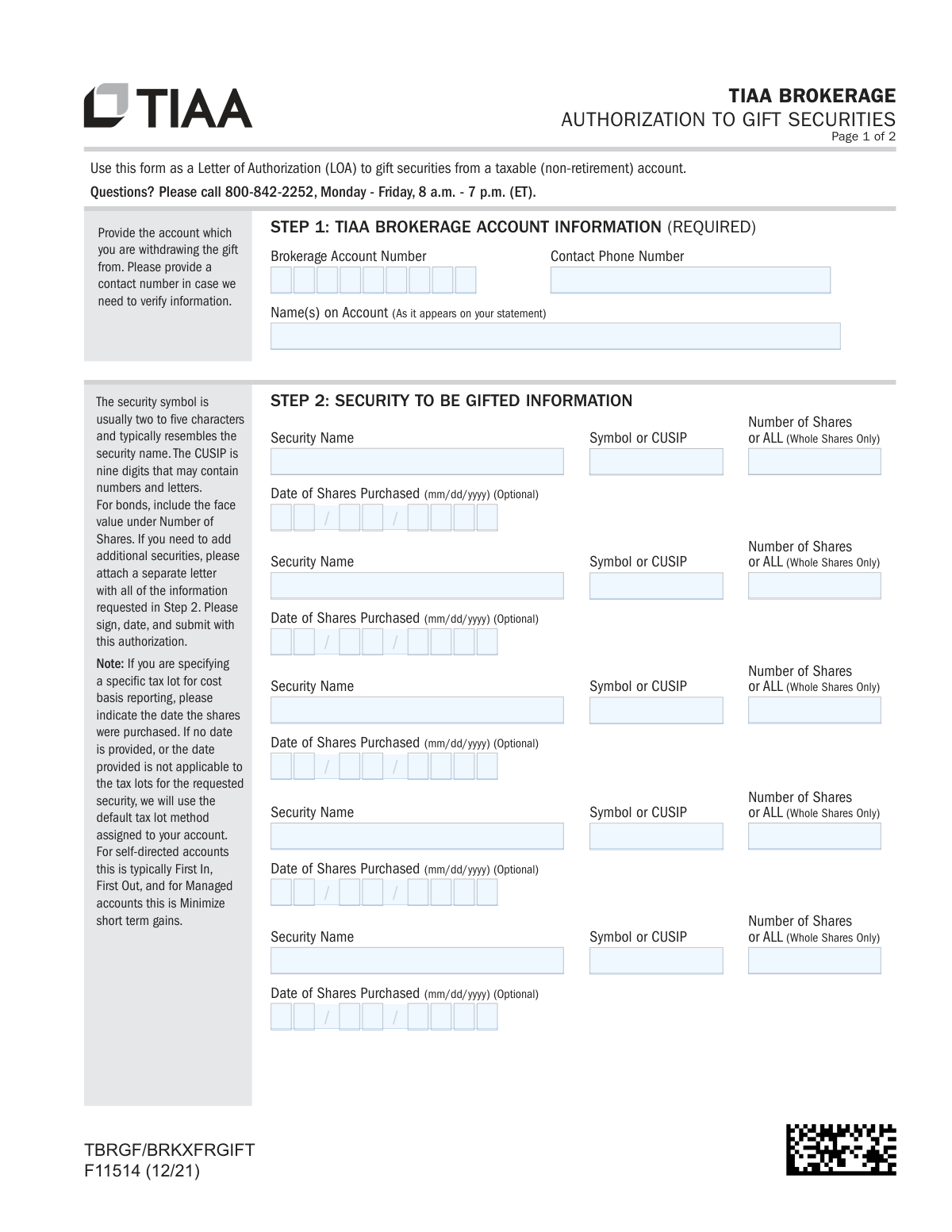
Form F11514 is a Letter of Authorization (LOA) that allows an account holder to gift securities from their taxable TIAA brokerage account to another person or organization. It serves as a formal instruction to TIAA to transfer ownership of specified stocks, bonds, or other securities. Completing this form accurately is crucial for ensuring the gift is processed correctly and legally. Today, this form can be filled out quickly and accurately using AI-powered services like Instafill.ai, which can also convert non-fillable PDF versions into interactive fillable forms.
F11514 is part of the
investment forms, brokerage forms, authorization forms, TIAA forms, financial authorization forms, SEC forms, securities forms, broker forms, brokerage authorization forms and securities transfer forms categories on Instafill.
Rather not fill this in by hand? Instafill is an online form filler that completes PDF forms automatically — upload the blank form, answer a few questions, and the AI fills every field.
Form specifications
| Form name: | TIAA Brokerage Authorization To Gift Securities |
| Number of pages: | 1 |
| Language: | English |
Our AI automatically handles information lookup, data retrieval, formatting, and form filling.
It takes less than a minute to fill out F11514 using our AI form filling.
Securely upload your data. Information is encrypted in transit and deleted immediately after the form is filled out.
Instafill Demo: How to fill out PDF forms in seconds with AI
How to Fill Out F11514 Online for Free in 2026
Are you looking to fill out a F11514 form online quickly and accurately? Instafill.ai offers the #1 AI-powered PDF filling software of 2026, allowing you to complete your F11514 form in just 37 seconds or less.
Follow these steps to fill out your F11514 form online using Instafill.ai:
- 1 Navigate to Instafill.ai and upload or select the TIAA Form F11514, Authorization To Gift Securities.
- 2 In the 'TIAA Brokerage Account Information' section (Step 1), provide your account number and a contact phone number.
- 3 For the 'Security to be Gifted Information' section (Step 2), specify the details of each security you are gifting, including the name, symbol or CUSIP, and the number of shares.
- 4 Complete the 'Receiving Account and Delivery Instructions' (Step 3) with the recipient's name, their financial firm's name, account number, and clearing/DTC number.
- 5 Carefully review all the information auto-filled by the AI to ensure accuracy and completeness across all sections.
- 6 In the 'Account Owner(s) Signature' section (Step 4), provide your digital signature and the current date. Ensure all account owners sign the form.
- 7 Download, print, or submit your completed and signed form according to the submission options provided by TIAA.
Our AI-powered system ensures each field is filled out correctly, reducing errors and saving you time.
Why Choose Instafill.ai for Your Fillable F11514 Form?
Speed
Complete your F11514 in as little as 37 seconds.
Up-to-Date
Always use the latest 2026 F11514 form version.
Cost-effective
No need to hire expensive lawyers.
Accuracy
Our AI performs 10 compliance checks to ensure your form is error-free.
Security
Your personal information is protected with bank-level encryption.
Frequently Asked Questions About F11514
This form serves as a Letter of Authorization (LOA) for you to gift securities, like stocks or bonds, from your taxable (non-retirement) TIAA brokerage account to another person or organization.
Any TIAA brokerage account holder who wants to transfer securities as a gift to an external account at another financial institution must complete this form.
You will need your TIAA brokerage account number, details of the securities being gifted (name, symbol/CUSIP), and the recipient's account information, including their firm's name, account number, and DTC number.
A CUSIP is a unique nine-digit code that identifies a security. You can typically find this number on your brokerage account statement or by looking up the security online.
If you don't specify a purchase date for a tax lot, TIAA will use the default method for your account, which is typically First In, First Out (FIFO) for self-directed accounts.
The DTC (Depository Trust Company) number is a unique identifier for the receiving brokerage firm that is necessary for the electronic transfer of securities. You can get this number from the recipient or their financial firm.
If you wish to gift more than five securities, you must attach a separate letter that includes all the information requested in Step 2 for each additional security. This letter must be signed, dated, and submitted with the form.
Yes, all account owners listed on the brokerage account must sign and date the form in Step 4 to provide their authorization for the gift.
You can submit the form digitally via the TIAA website or mobile app, or you can send all pages of the completed form by fax or mail using the contact information provided.
As a security measure, TIAA may call you to verify your instructions before processing the gift. If they cannot reach you, your request may be delayed or cancelled.
No, this form is exclusively for gifting securities from a taxable, non-retirement brokerage account. Gifting from a retirement account follows different rules and requires a different process.
Yes, you can use services like Instafill.ai, which leverage AI to help you accurately auto-fill form fields, saving time and reducing potential errors.
To use Instafill.ai, upload the form to their platform, and the AI will make the fields fillable. You can then enter your information, and the tool will populate the form for you to review, download, and submit.
If you have a non-fillable or 'flat' PDF, you can use a service like Instafill.ai to convert it into an interactive, fillable form. This allows you to easily type your information into the fields.
Compliance F11514
Validation Checks by Instafill.ai
1
Brokerage Account Number Validation
This check ensures the 'Brokerage Account Number' provided in Step 1 is a valid, active, and taxable (non-retirement) TIAA Brokerage account. It is crucial to verify the account exists and is eligible for this type of transaction to prevent processing errors. If the account number is invalid or for a retirement account, the submission must be rejected and the user notified.
2
Account Holder Name Verification
Validates that the 'Name(s) on Account' field exactly matches the legal name(s) registered to the provided 'Brokerage Account Number'. This is a critical security measure to prevent unauthorized transfer requests from individuals not associated with the account. A mismatch should trigger a rejection or a manual review process.
3
Contact Phone Number Format
Ensures the 'Contact Phone Number' is in a valid format (e.g., 10 digits with optional formatting). A valid phone number is required so TIAA can contact the account owner to verify instructions, as stated on the form. An invalid format could delay or prevent the completion of the gift request.
4
Required Recipient Information Completeness
Verifies that the 'Recipient Name', 'Receiving Firm’s or Mutual Fund Company’s Name', and 'Receiving Account Number' fields in Step 3 are all filled out. These fields are marked as required and are essential for identifying where the gifted securities should be sent. An incomplete submission would make the transfer impossible to execute.
5
Clearing or BIN Number Requirement
This check confirms that the 'Brokerage Firm’s Clearing or DTC number' or 'MF BIN number' field is completed. This number is critical for the electronic transfer of securities between financial institutions. Without a valid number, the delivery instructions are incomplete and the transfer will fail.
6
Minimum Security Gift Specification
Ensures that at least one security is fully specified for gifting in Step 2. The form cannot be processed if no assets are listed to be transferred. If all security information rows are empty, the form should be rejected as incomplete.
7
Security Identifier and Quantity Logic
For each security row entered in Step 2, this validation confirms that both a 'Symbol or CUSIP' and a 'Number of Shares' are provided. A row cannot have one field filled without the other. This prevents ambiguity and ensures each gift instruction is complete and actionable.
8
Security Ownership and Availability Check
This check cross-references the specified 'Symbol or CUSIP' and 'Number of Shares' against the holdings of the source 'Brokerage Account Number'. It verifies that the account actually owns the specified security and that the quantity being gifted does not exceed the available shares. This prevents overdrafts and rejections from the clearinghouse.
9
CUSIP/Symbol Format Validation
Validates that the 'Symbol or CUSIP' field follows standard financial formats. A CUSIP must be a nine-character alphanumeric string, while a stock symbol is typically two to five alphabetic characters. Incorrect formats would prevent the system from identifying the security to be transferred.
10
Share Purchase Date Format and Logic
If a 'Date of Shares Purchased' is provided, this check validates that it is in a proper 'mm/dd/yyyy' format and is not a future date. It should also verify that the date corresponds to an actual purchase lot for that security within the account. An invalid date would cause the system to revert to the default tax lot method, which may not be the user's intent.
11
Primary Signature and Date Requirement
Confirms that the primary account holder's signature and printed name are provided, and that the 'Today’s Date' field is filled with a valid, non-future date in mm/dd/yyyy format. The signature and date are required to legally authorize the irrevocable gift of securities. A missing signature or date invalidates the entire authorization.
12
Secondary Signature Requirement for Joint Accounts
This validation checks if the source brokerage account is a joint account. If it is, the system must verify that the secondary account holder's signature, printed name, and date are also provided, as the form states 'ALL ACCOUNT OWNERS MUST SIGN'. Failure to obtain all required signatures on a joint account would render the instruction invalid.
Common Mistakes in Completing F11514
The form explicitly requires all account owners to sign and date the authorization in Step 4. This mistake often occurs on joint accounts where one owner fills out the form but forgets to have the other owner(s) sign as well. A missing signature will cause the form to be rejected immediately, delaying the gift transfer until a properly completed form is submitted.
A simple typographical error when entering the security's symbol or CUSIP in Step 2 is a frequent mistake that can lead to gifting the wrong asset or a transaction failure. The identifier must be copied exactly from your brokerage statement. To prevent this, double-check the symbol or CUSIP against your statement before writing it on the form. AI-powered tools like Instafill.ai can help by cross-referencing and validating such data to catch errors before submission.
Step 3 requires precise details about the receiving firm, including their name, account number, and the firm's DTC or BIN number. People often struggle to find this information or enter it incorrectly, which will cause the transfer to fail. Before filling out the form, contact the recipient or their financial institution to confirm all required delivery details to prevent the gift from being sent to the wrong place or being rejected.
The form states that TIAA may call to verify instructions, and an inability to make contact can delay or cancel the request. Providing an old office number, a home phone that's never answered, or a number with a full voicemail box can halt the entire process. Always provide a primary, direct contact number in Step 1 and be prepared to answer a call from TIAA to ensure your gift is processed promptly.
In Step 1, the name provided must exactly match how it appears on the TIAA brokerage statement (e.g., 'John F. Doe' vs. 'John Doe'). Discrepancies, even minor ones like a missing middle initial, can trigger identity verification failures and processing delays. Always refer to a recent account statement to ensure the name is entered precisely as it is on record.
The optional 'Date of Shares Purchased' field in Step 2 allows you to gift specific tax lots, which has significant tax implications. A common error is leaving this blank, causing TIAA to use the default method (e.g., FIFO), which may not be the most tax-advantageous. Conversely, entering an incorrect date will also result in the default method being used. Consult your transaction history to enter the correct purchase date for the desired tax lot.
The submission instructions clearly state to 'return ALL numbered pages, including any pages you did not need to complete.' People often only submit the pages they filled out, assuming the blank or instruction pages are unnecessary. This can lead to the submission being flagged as incomplete and rejected, requiring you to resubmit the entire package. Ensure both Page 1 and Page 2 are included in your submission.
When filling out a printed form by hand, illegible handwriting is a major source of errors, especially for long strings of numbers like account numbers and CUSIPs. A '5' might look like an 'S', or a '1' like a '7', causing the transaction to fail or be misdirected. To prevent this, print clearly in block letters. If the form is a non-fillable PDF, a tool like Instafill.ai can convert it into a fillable version, allowing you to type information for perfect legibility.
In Step 2, filers may create confusion by writing 'ALL' in the 'Number of Shares' field while also specifying a numeric quantity. The form also specifies 'ALL (Whole Shares Only),' meaning fractional shares cannot be gifted this way. Such ambiguity forces TIAA to halt the process for clarification, delaying the gift. Clearly state either a specific number of whole shares or 'ALL,' but not both.
If gifting more than five securities, the instructions require attaching a separate letter with all security details that is also signed and dated. A common mistake is to attach a simple, unsigned printout or list. Without the required signature and date, this attachment is not a valid authorization, and the securities listed on it will not be gifted, resulting in an incomplete transfer.
Saved over 80 hours a year
“I was never sure if my IRS forms like W-9 were filled correctly. Now, I can complete the forms accurately without any external help.”
Kevin Martin Green
Your data stays secure with advanced protection from Instafill and our subprocessors




Robust compliance program
Transparent business model
You’re not the product. You always know where your data is and what it is processed for.
ISO 27001, HIPAA, and GDPR
Our subprocesses adhere to multiple compliance standards, including but not limited to ISO 27001, HIPAA, and GDPR.
Security & privacy by design
We consider security and privacy from the initial design phase of any new service or functionality. It’s not an afterthought, it’s built-in, including support for two-factor authentication (2FA) to further protect your account.
Fill out F11514 with Instafill.ai
Worried about filling PDFs wrong? Instafill securely fills tiaa-brokerage-authorization-to-gift-securities forms, ensuring each field is accurate.
