Yes! You can use AI to fill out New Fidelity Account® — Trust — Brokerage

This form is an application used by trustees to establish a new brokerage account with Fidelity specifically for a trust entity. It is crucial for gathering detailed information about the trust, its trustees, grantors, and beneficial owners to comply with financial regulations and properly structure the account. Today, this form can be filled out quickly and accurately using AI-powered services like Instafill.ai, which can also convert non-fillable PDF versions into interactive fillable forms.
Our AI automatically handles information lookup, data retrieval, formatting, and form filling.
It takes less than a minute to fill out Fidelity Trust Brokerage Account Application using our AI form filling.
Securely upload your data. Information is encrypted in transit and deleted immediately after the form is filled out.

Form specifications

Form name: New Fidelity Account® — Trust — Brokerage
Number of pages: 1
Language: English
Categories: trust forms, brokerage forms, Fidelity forms, broker forms
main-image

Instafill Demo: How to fill out PDF forms in seconds with AI

How to Fill Out Fidelity Trust Brokerage Account Application Online for Free in 2026

Are you looking to fill out a FIDELITY TRUST BROKERAGE ACCOUNT APPLICATION form online quickly and accurately? Instafill.ai offers the #1 AI-powered PDF filling software of 2026, allowing you to complete your FIDELITY TRUST BROKERAGE ACCOUNT APPLICATION form in just 37 seconds or less.
Follow these steps to fill out your FIDELITY TRUST BROKERAGE ACCOUNT APPLICATION form online using Instafill.ai:
  1. 1 Navigate to Instafill.ai and upload or select the 'New Fidelity Account — Trust — Brokerage' application.
  2. 2 Use the AI assistant to provide the trust's information in Section 1, including its full name, Tax ID number, and legal address.
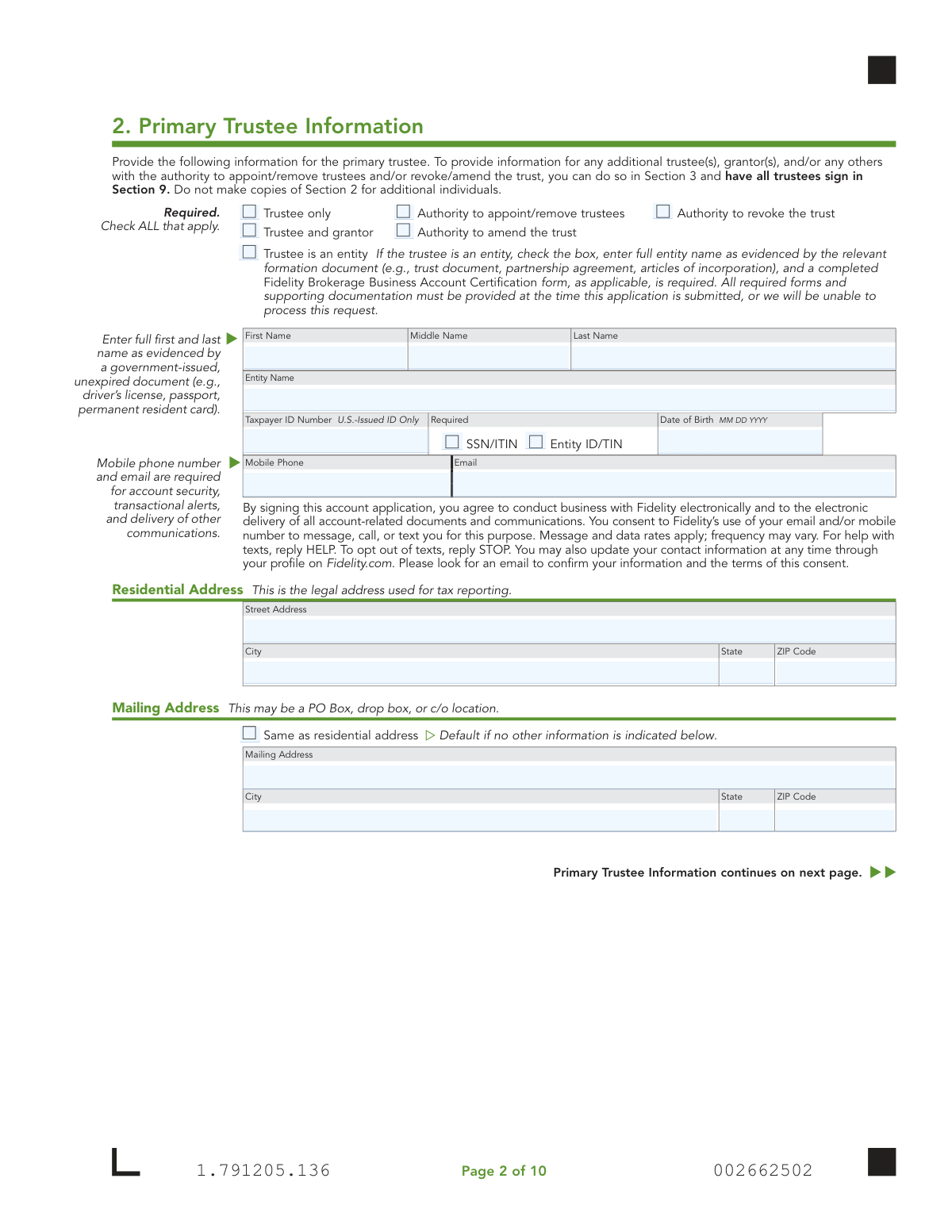
  3. 3 Complete Section 2 by entering the detailed personal, contact, and employment information for the primary trustee.
  4. 4 Provide information for any additional trustees, grantors, or other individuals with authority over the trust in Section 3.
  5. 5 Specify the initial funding method in Section 4 and set up ongoing funding options like Electronic Funds Transfer (EFT) in Section 6.
  6. 6 Select desired account features in Section 7, such as checkwriting or a debit card, noting that some may require additional forms.
  7. 7 Carefully review all entered information, then have all trustees electronically sign and date the application in Section 9 to certify the trust and complete the submission.

Our AI-powered system ensures each field is filled out correctly, reducing errors and saving you time.

Why Choose Instafill.ai for Your Fillable Fidelity Trust Brokerage Account Application Form?

Speed

Complete your Fidelity Trust Brokerage Account Application in as little as 37 seconds.

Up-to-Date

Always use the latest 2026 Fidelity Trust Brokerage Account Application form version.

Cost-effective

No need to hire expensive lawyers.

Accuracy

Our AI performs 10 compliance checks to ensure your form is error-free.

Security

Your personal information is protected with bank-level encryption.

Frequently Asked Questions About Form Fidelity Trust Brokerage Account Application

This application is specifically used to open a Fidelity Brokerage Account for a trust. To open other account types, such as an individual or joint account, you must use a different form available on Fidelity's website.

All current trustees of the trust must provide their personal information and sign the application. The form requires details about the trust itself in Section 1, the primary trustee in Section 2, and any additional trustees in Section 3.

For domestic trusts, you may need to have trustee signatures notarized or attach specific pages from the trust document if the trust is governed by the laws of certain states listed on the form. For foreign trusts, you must include relevant pages from the trust document, which must be in English.

No, do not include the entire trust document. You only need to attach copies of the pages that provide the full name of the trust, the grantor(s), trustee(s), the trust date, and all relevant signature pages.

Section 3 is for additional individuals like co-trustees. If you have more individuals than the space allows, you should make a copy of Section 3 for each additional person and include it with your application.

The Core Position is the default investment for any uninvested cash in your account. This form establishes the Fidelity Government Money Market Fund (SPAXX) as the core position, but you can change this after your account is open.

To add checkwriting, you must select the option in Section 7 and also complete and include the separate 'Checkwriting form' with this application. This additional form can be downloaded from Fidelity.com/forms.

For the fastest processing, Fidelity recommends using their digital upload process by scanning the QR code on the form or visiting Fidelity.com/upload-Trust-AO. If you are a new customer or funding with a check, mailing instructions are also available on their website.

If you are not providing pages from your domestic trust document, all trustee signatures must be notarized if the trust is governed by the laws of specific states listed in Section 9 (e.g., California, Delaware, Michigan). A U.S. Notary must complete the notary section on the signature page.

Section 4 provides several options for your initial funding. You can fund the account by check, by transferring assets from another firm using a Transfer of Assets form, or by transferring cash or assets from an existing Fidelity nonretirement account.

In Section 1, you must provide the tax reporting number for the trust, which is typically an Entity ID/TIN. For a domestic grantor trust, you may use the Social Security Number (SSN) of a living grantor, but a decedent's SSN cannot be used.

Yes, services like Instafill.ai use AI to accurately auto-fill form fields, which can save you time and help reduce errors. This is especially helpful for lengthy applications that require entering the same information multiple times.

You can upload the PDF of the form to the Instafill.ai platform. The service's AI will identify all the fields, allowing you to easily type in your information and have it auto-filled before you download, print, and sign the completed document.

If you have a flat, non-fillable PDF, you can use a service like Instafill.ai to instantly convert it into an interactive, fillable form. This allows you to type your answers directly onto the form instead of filling it out by hand.

Compliance Fidelity Trust Brokerage Account Application
Validation Checks by Instafill.ai

1
Trust Tax ID Number Validation
Verifies that the Trust Taxpayer ID Number provided in Section 1 is a validly formatted SSN, ITIN, or Entity ID/TIN. It specifically checks that the number does not belong to a deceased person and, if an SSN is used, it belongs to a living grantor as stipulated. This is critical for correct tax reporting to the IRS and legal establishment of the account. Failure to provide a valid ID will result in immediate application rejection.
2
Trustee Minimum Age Verification
Checks that the Date of Birth (DOB) for the Primary Trustee (Section 2) and any Additional Trustees (Section 3) indicates the individual is at least 18 years of age. This is essential to ensure the trustee has the legal capacity to enter into the account agreement. If a trustee is underage, the application cannot be processed and will be returned.
3
Foreign Citizen Documentation Completeness
Ensures that if a trustee checks 'Foreign citizen' in the Citizenship section, all related fields are completed. This includes Country of Citizenship, residency status, and a full Government Identification Number with its country of issuance, issuance date, and expiration date. This information is mandatory for regulatory compliance, including anti-money laundering (AML) and FATCA reporting. An incomplete section will halt the application process.
4
Unexpired Government ID Verification
Validates that the 'ID Expiration Date' provided for any government ID is a future date. The form explicitly requires an 'unexpired ID'. This check confirms the identity document is currently valid at the time of application. An expired ID will lead to application rejection pending submission of valid, current identification.
5
Signature Completeness for All Trustees
Verifies that every individual listed as a trustee in Section 2 and Section 3 has provided a signature and date in Section 9. The form states 'ALL trustees must sign'. This is a fundamental legal requirement to bind all parties to the account terms. An application missing any required trustee signature is legally incomplete and will be rejected.
6
Conditional Notarization Requirement
Checks if the trust's governing state (from Section 1) is one of the states listed in Section 9 (e.g., CA, DE, NV) and if copies of the trust document are not attached. If both conditions are true, this validation ensures the notary sections are fully completed. This is crucial for meeting specific state laws for trust certification. Failure to provide the required notarization will result in the application being rejected.
7
Deceased Grantor Data Entry Restriction
If the 'DECEASED Grantor' box is checked for an individual in Section 3, this validation ensures that only the 'First Name', 'Middle Name', and 'Last Name' fields contain data. All other personal information fields for that individual (Tax ID, DOB, Address, etc.) must be empty. This prevents the collection of incorrect or irrelevant data and ensures the form is filled out as instructed. A failure would trigger a request for correction.
8
Entity vs. Individual Trustee Data Integrity
Validates that if the 'Trustee is an entity' box is checked, the 'Entity Name' field is populated while individual name and DOB fields are blank. Conversely, if individual name fields are populated, it ensures the 'Trustee is an entity' box is not checked. This prevents ambiguous data entry and ensures clear identification of the trustee type. An application with conflicting data in this section will be rejected for clarification.
9
Associated Form Check for Checkwriting
If the 'Establish now' option for Checkwriting is selected in Section 7, this validation confirms that the separate 'Checkwriting form' is included in the submission packet. This ensures all required paperwork is present to fulfill the client's request without delay. If the form is missing, the account may be opened without the checkwriting feature, requiring a separate follow-up process.
10
Income Source Field Completion
Verifies that the 'Income Source' section is properly completed for all trustees based on their employment status. If 'Employed' or 'Self-employed' is chosen, 'Occupation' must be filled. If 'Retired' or 'Not employed' is chosen, 'Source of Income' must be filled. This information is required by industry regulations (FINRA), and its absence will render the application incomplete.
11
Logical Date of Trust
Ensures the 'Date of Trust' in Section 1 is a valid calendar date that occurs on or before the signature dates in Section 9. An account cannot be opened for a trust before its legal creation date. This logical check prevents the processing of applications with impossible timelines, which would be rejected for correction.
12
Mandatory Contact Information
Confirms that the 'Mobile Phone' and 'Email' fields are provided for the primary trustee and any living additional individuals. The form states these are required for account security, alerts, and electronic delivery of communications. Missing contact information will halt the application, as it is essential for modern security protocols and client communication.
13
Associations Disclosure Completeness
If a trustee answers affirmatively to being associated with a broker-dealer or other financial institution, this check ensures the 'Company Name' and 'Company Address' fields are completed. This disclosure is a critical FINRA regulatory requirement for compliance oversight. An incomplete disclosure will cause the application to be flagged and held until the required information is provided.
14
Initial Funding Source Specification
Validates that if 'Transfer from your Fidelity nonretirement account' is selected in Section 4, a valid 'Fidelity Account Number' is provided. It also ensures that either an 'Amount' or the 'All Assets' checkbox is selected. This prevents ambiguity in funding instructions and ensures the initial deposit can be processed correctly. An incomplete funding section will delay account opening.

Common Mistakes in Completing Fidelity Trust Brokerage Account Application

Failing to Obtain Signatures from All Trustees

The application explicitly requires signatures from ALL trustees in Section 9. This is frequently missed when a trust has co-trustees, and only the primary one signs. An application with missing signatures is considered incomplete and will be rejected, halting the account opening process until all required parties have signed and resubmitted the form.

Omitting Required Supporting Documentation

Applicants often check boxes for features like Checkwriting (Section 7) or Transfer of Assets (Section 4) but forget to include the separate, required forms. This creates an incomplete application package, leading to significant processing delays until the missing documents are submitted. To avoid this, create a checklist of all selected features and ensure the corresponding forms are completed and included.

Missing Required Notarization for Certain States

Section 9 specifies that if trust document copies are not provided, all trustee signatures MUST be notarized for trusts governed by the laws of over a dozen states (e.g., California, Minnesota, Nevada). Applicants often overlook this state-specific rule, causing the application to be returned. To prevent this, determine the trust's governing state and, if it's on the list, have all signatures notarized by a U.S. Notary.

Using an Invalid Trust Taxpayer ID Number

A critical error is entering an incorrect Taxpayer ID Number in Section 1, such as a decedent's Social Security Number (which is explicitly forbidden) or a grantor's SSN when the trust has its own Employer Identification Number (EIN). This mistake causes tax reporting failures and immediate rejection of the application. Always verify and use the correct, active tax ID number assigned to the trust itself.

Entering a Trustee Name That Doesn't Match Government ID

The form requires the trustee's full legal name as it appears on a government-issued ID. Applicants often use nicknames, initials, or common names, which causes a mismatch during the mandatory identity verification process. This failure results in processing delays while Fidelity requests clarification. Always transcribe the name exactly from a valid passport or driver's license.

Forgetting to Attach Proof for EFT Setup

When establishing an Electronic Funds Transfer (EFT) in Section 6, applicants must attach a voided check or bank statement to verify the bank account details. People frequently fill in the routing and account numbers but forget to include this physical proof. This omission prevents Fidelity from activating the EFT feature, delaying your ability to fund the account electronically.

Incomplete Information for Foreign Citizen Trustees

When a trustee is a foreign citizen, they must complete all fields in the designated section and attach a copy of their unexpired government ID. It is common for applicants to miss a field like 'ID Issuance Date' or forget to attach the ID copy. This is a critical compliance step, and any missing information will prevent the account from being opened until the full details and documentation are provided.

Ignoring Association and Affiliation Disclosures

Trustees often skip the 'Associations' and 'Affiliations' sections, assuming they don't apply or misunderstanding that they cover family members associated with financial firms or public companies. These disclosures are mandated by financial regulations (like FINRA rules). Failure to complete these sections accurately can lead to compliance violations and future restrictions on the account.

Using Illegible Handwriting on a Printed Form

This form is a non-fillable PDF, and when applicants print and fill it by hand, the writing can be illegible. Poor handwriting in CAPITAL letters can lead to data entry errors for names, addresses, and account numbers, causing significant delays and potential security issues. AI-powered tools like Instafill.ai can convert such PDFs into easily fillable versions, ensuring all information is clear, accurate, and legible.

Omitting Required Contact Information for Trustees

The form states that a mobile phone number and email address are 'required for account security' for each trustee in Sections 2 and 3. Applicants sometimes skip these fields, viewing them as optional. However, this information is essential for security alerts and electronic communications, and its absence will delay account activation until it is provided.
Saved over 80 hours a year

“I was never sure if my IRS forms like W-9 were filled correctly. Now, I can complete the forms accurately without any external help.”

Kevin Martin Green

Your data stays secure with advanced protection from Instafill and our subprocessors

Robust compliance program

Transparent business model

You’re not the product. You always know where your data is and what it is processed for.

ISO 27001, HIPAA, and GDPR

Our subprocesses adhere to multiple compliance standards, including but not limited to ISO 27001, HIPAA, and GDPR.

Security & privacy by design

We consider security and privacy from the initial design phase of any new service or functionality. It’s not an afterthought, it’s built-in, including support for two-factor authentication (2FA) to further protect your account.

Fill out Fidelity Trust Brokerage Account Application with Instafill.ai

Worried about filling PDFs wrong? Instafill securely fills new-fidelity-account-trust-brokerage forms, ensuring each field is accurate.