
Yes! You can use AI to fill out Move Assets from My Schwab Brokerage Account
Don't type 194 fields by hand. Tell our AI about yourself, or upload a document you already have, and it fills every field in seconds. You check it, then download, print or sign.
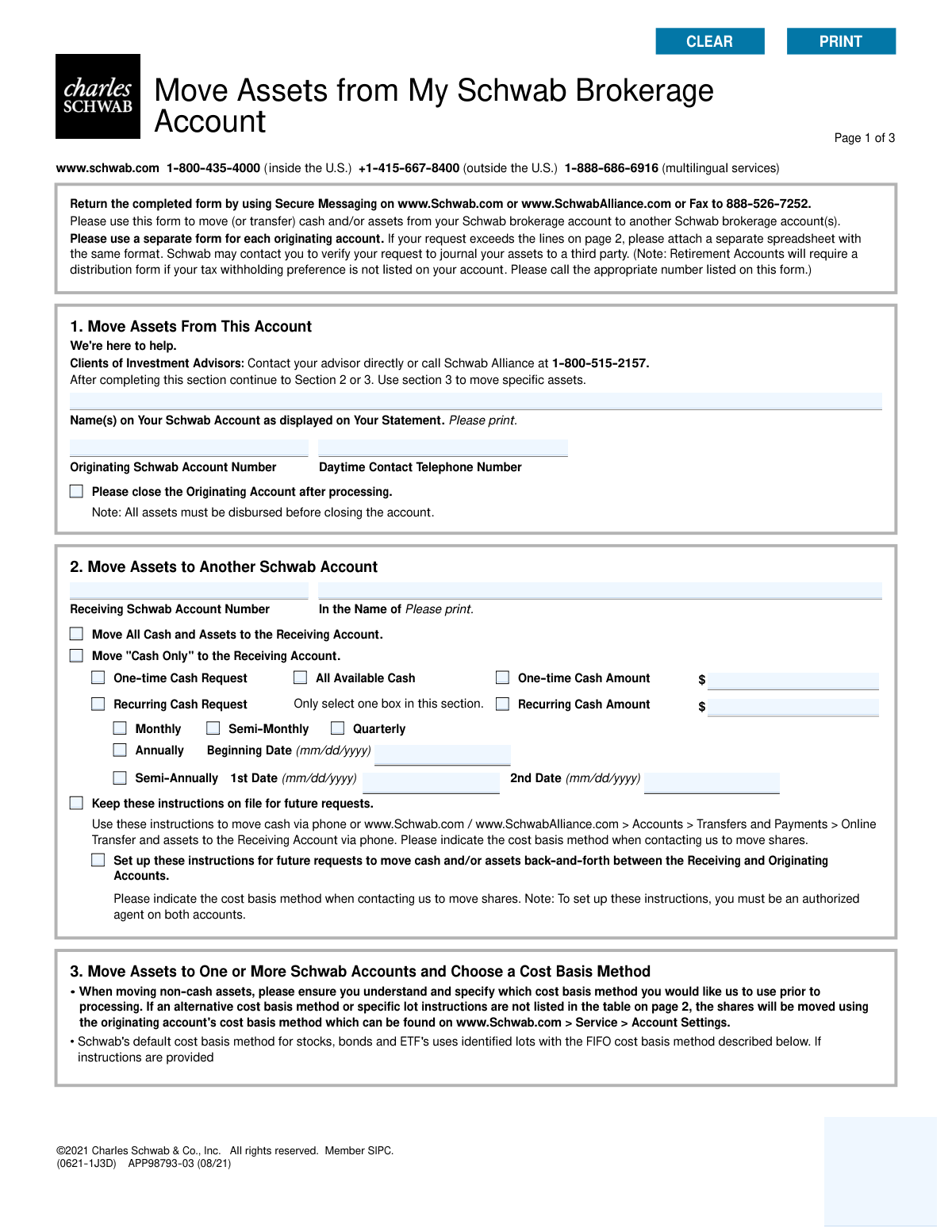
The AI does the filling. You just check it.
No typing into boxes, nothing to install.
What this form asks for
The AI fills all of it, from your answers or your documents.
The AI checks your answers before you download
13 checks built for this form, so a wrong date or a missing answer is caught before anyone else sees it.
This check verifies that the 'Originating Schwab Account Number' provided in Section 1 is a valid, active Schwab account. It also confirms that the name of the person signing the form matches the registered owner of the originating account. This is a critical security measure to prevent unauthorized transfers and fraud. If validation fails, the form is rejected pending correction and verification of identity.
This validation ensures that the user has filled out either Section 2 (for moving all assets or only cash) or Section 3 (for moving specific assets), but not both. Providing instructions in both sections creates ambiguity and could lead to incorrect asset movement. A failed validation would require the user to clarify their intent by completing only one of the two sections.
Verifies that the 'Signature' and 'Today's Date' fields in Section 4 are both completed. A signature is legally required to authorize the transaction, and the date establishes when the authorization was given. An unsigned or undated form is not legally binding and cannot be processed.
This check confirms that any 'Receiving Schwab Account Number' listed in Section 2 or Section 3 is different from the 'Originating Schwab Account Number' in Section 1. Transferring assets to the same account is a redundant and invalid action that serves no purpose. If the accounts are the same, the request will be flagged as an error for the user to correct.
If the 'Please close the Originating Account after processing' box in Section 1 is checked, this rule validates that instructions have been provided to move 100% of all assets and all cash out of the account. An account cannot be closed if it retains a balance or any assets. Failure would result in the request being rejected with a notification that all assets must be disbursed before closure can be processed.
When a 'Recurring Cash Request' is made in Section 2, this check ensures that a 'Recurring Cash Amount', a frequency (e.g., Monthly, Quarterly), and a valid 'Beginning Date' are all provided. Missing any of these parameters makes the recurring instruction incomplete and impossible to execute. The form would be returned for completion if this check fails.
And 7 more checks
- Specific Asset Holding Verification
- Sufficient Asset and Cash Balance Check
- Exclusive Asset Quantity Specification
- Valid Alternative Cost Basis Method
- Date Field Format and Validity
- Signer Name and Account Name Consistency
- Section 2 Instruction Logic
Let AI fill out your APP98793-03
No typing. Every field filled in seconds, checked, ready to sign.
How to Fill Out APP98793-03 Online for Free in 2026
What the AI walks you through.
- Navigate to Instafill.ai and upload or select the 'Move Assets from My Schwab Brokerage Account' form.
- Enter the originating account information in Section 1, including the full account number and your name.
- In Section 2 or 3, specify the receiving Schwab account(s) and the details of the assets you wish to move.
- For specific asset transfers, detail the symbol/CUSIP, quantity, and the cost basis method to be used (e.g., FIFO, LIFO).
- For cash transfers, indicate whether it's a one-time or recurring request and specify the amount and frequency.
- Review all entered information for accuracy, then proceed to Section 4 to read the terms and provide your digital signature and date.
- Download the completed form and submit it to Charles Schwab through their secure messaging system or by fax as instructed on the form.
Common Mistakes in Completing APP98793-03
The ones the AI is built to catch.
Incorrect or Mismatched Account Numbers
Account Holder Name Does Not Match Statement
Providing Conflicting Transfer Instructions
Neglecting Cost Basis Selection and Its Tax Implications
Ambiguous Asset Transfer Amount in Section 3
Incomplete Recurring Transfer Request
Invalid Specific Lot Identification
Premature Account Closure Request
Missing Signature or Incorrect Date Format
Using an Outdated Version of the Form
Frequently Asked Questions About APP98793-03
Is it really free for 7 days?
Can I fill other forms too?
How do I cancel?
How does the AI fill out APP98793-03?
What happens to my information?
How complex is APP98793-03 to fill out?
What is the purpose of the 'Move Assets from My Schwab Brokerage Account' form?
Who should use this form?
How do I submit the completed form?
What is the difference between Section 2 and Section 3?
Can I close my account after transferring the assets?
What information do I need to fill out this form?
What is a 'cost basis method' and do I need to select one?
Can I set up a recurring monthly transfer with this form?
What if I want to move assets to several different Schwab accounts?
Can I use this form for my Schwab retirement account?
What should I do if I have more assets to list than there are lines on the form?
Can AI tools help me fill out this form?
How can I fill out this form online if the PDF is not fillable?
Is there an easy way to fill this form online?
Get your APP98793-03 filled out by AI
$0 today. Cancel before Nov 1 and you pay nothing.
Other forms like this one
Schwab forms: Schwab One® Account Application for Personal Accounts, Form APP13017-29, Transfer Your Account to Schwab, Charles Schwab & Co., Inc. Account Transfer Form, Schwab Charitable Fund Transfer of Assets, Letter of Authorization (LOA) For Movement of Funds in Schwab Accounts, Open a Schwab One® Brokerage Account, Schwab OpenView Workflow Library: Close Account Process, Charles Schwab PCRA Self-Directed Brokerage Account, Open a Schwab IRA, Charles Schwab Electronic Approvals FAQs, Charles Schwab Charitable Gift Donation - Letter Of Authorization for DTC Transfer, Charles Schwab Wire Transfer Letter of Authorization, Charles Schwab IRA Distribution Form, Schwab Health Savings Brokerage Account (HSBA) to HSA Invest Choice Account Transfer Form, Schwab IRA Account Application, Schwab Personal Choice Retirement Account® (PCRA) Limited Power of Attorney (LPOA) Form For a Participant, Charles Schwab Charitable Gift Transfer Letter of Authorization, Charles Schwab IRA Account Application, Schwab One® Account Application for Incorporated Organizations, Schwab One® Account Application for Personal Accounts
brokerage forms: 41, Fidelity Change of Account Registration: Changing to an Individual, Joint, or Custodial Brokerage Account, Fidelity Change of Account Registration — Changing to a Trust, Estate, Guardian, or Conservator Brokerage Account, Open a Schwab One® Brokerage Account, Charles Schwab PCRA Self-Directed Brokerage Account, Schwab Health Savings Brokerage Account (HSBA) to HSA Invest Choice Account Transfer Form, Intra-Brokerage Securities Transfer, Moving your Vanguard funds to a Vanguard Brokerage Account Disclosure statement, Vanguard Brokerage Account CREST Transfer Form, Moving your Vanguard funds to a Vanguard Brokerage Account Disclosure statement, TIAA Brokerage Incoming Account Transfer Form, TIAA Brokerage Joint Transfer on Death Account Agreement, TIAA Brokerage IRA Distribution Request (Form F11025), Request for a Qualified Charitable Distribution (QCD) from a Brokerage Individual Retirement Account (IRA), TIAA Brokerage Authorization To Gift Securities, Form F11014, TIAA Brokerage Power of Attorney (POA) Form, TIAA Brokerage Durable Power Of Attorney Affidavit Of Full Force And Effect, TIAA Brokerage Incoming Managed Account Transfer Form (F11319), Form F11015, TIAA Brokerage Designation of Beneficiary, Form F11004, TIAA Brokerage Individual Transfer on Death Account Agreement
broker forms: Letter of Authorization to Broker, Form 1099-B, Proceeds From Broker Transactions, 41, Fannie Mae Residential Broker Price Opinion (BPO) (Revised 03/99), Fidelity Change of Account Registration: Changing to an Individual, Joint, or Custodial Brokerage Account, Fidelity Change of Account Registration — Changing to a Trust, Estate, Guardian, or Conservator Brokerage Account, Open a Schwab One® Brokerage Account, Charles Schwab PCRA Self-Directed Brokerage Account, Schwab Health Savings Brokerage Account (HSBA) to HSA Invest Choice Account Transfer Form, Intra-Brokerage Securities Transfer, Moving your Vanguard funds to a Vanguard Brokerage Account Disclosure statement, Vanguard Brokerage Account CREST Transfer Form, Moving your Vanguard funds to a Vanguard Brokerage Account Disclosure statement, TIAA Brokerage Incoming Account Transfer Form, TIAA Brokerage Joint Transfer on Death Account Agreement, TIAA Brokerage IRA Distribution Request (Form F11025), Request for a Qualified Charitable Distribution (QCD) from a Brokerage Individual Retirement Account (IRA), Form OL 75, Auto Broker Log, TIAA Brokerage Authorization To Gift Securities, Form F11014, TIAA Brokerage Power of Attorney (POA) Form
brokerage account forms: BlackRock New Account Application For Non-Retirement Accounts, Fidelity Change of Account Registration: Changing to an Individual, Joint, or Custodial Brokerage Account, Fidelity Change of Account Registration — Changing to a Trust, Estate, Guardian, or Conservator Brokerage Account, Open a Schwab One® Brokerage Account, Charles Schwab PCRA Self-Directed Brokerage Account, Schwab Health Savings Brokerage Account (HSBA) to HSA Invest Choice Account Transfer Form, Moving your Vanguard funds to a Vanguard Brokerage Account Disclosure statement, Vanguard Brokerage Account CREST Transfer Form, Moving your Vanguard funds to a Vanguard Brokerage Account Disclosure statement, TIAA Brokerage Incoming Account Transfer Form, TIAA Brokerage Joint Transfer on Death Account Agreement, Request for a Qualified Charitable Distribution (QCD) from a Brokerage Individual Retirement Account (IRA), TIAA Brokerage Incoming Managed Account Transfer Form (F11319), Form F11004, TIAA Brokerage Individual Transfer on Death Account Agreement, Fidelity® Brokerage Business Account Certification, Brokerage Corestone Account Application, IRA/IRRA®/Roth IRA/SEP/SRA Divorce Transfer Instruction Form, Merrill AwardChoice® Individual Investor Account Application Form for U.S. Persons, Merrill Business Investor Account (BIA) and Working Capital Management Account (WCMA) Account Application Booklet and Agreements, Merrill Edge Self-Directed Trust and Estate Cash Management Account (CMA Account) Account Application Booklet and Agreements
Let AI fill out your APP98793-03
Your trial starts once a card is added. You pay nothing before Nov 1.
Our AI already knows this form, all 194 fields of it. Skip the typing: tell it about yourself, or upload what you have, and it fills the whole form in seconds.
- AI fills every field on all 3 pages, checkboxes included
- No typing into boxes: answer a few questions, or upload a document you already have, an old copy of this form, a photo of a document
- The AI checks the answers; you review and change anything before you download
- Download the finished PDF, print it, or sign it online
- Encrypted, and never used to train AI
Cancel before Nov 1 and you pay nothing.
A card is needed to start the trial. Cancel in two clicks from your account.
Terms · Privacy