Yes! You can use AI to fill out Form F11015, TIAA Brokerage Designation of Beneficiary
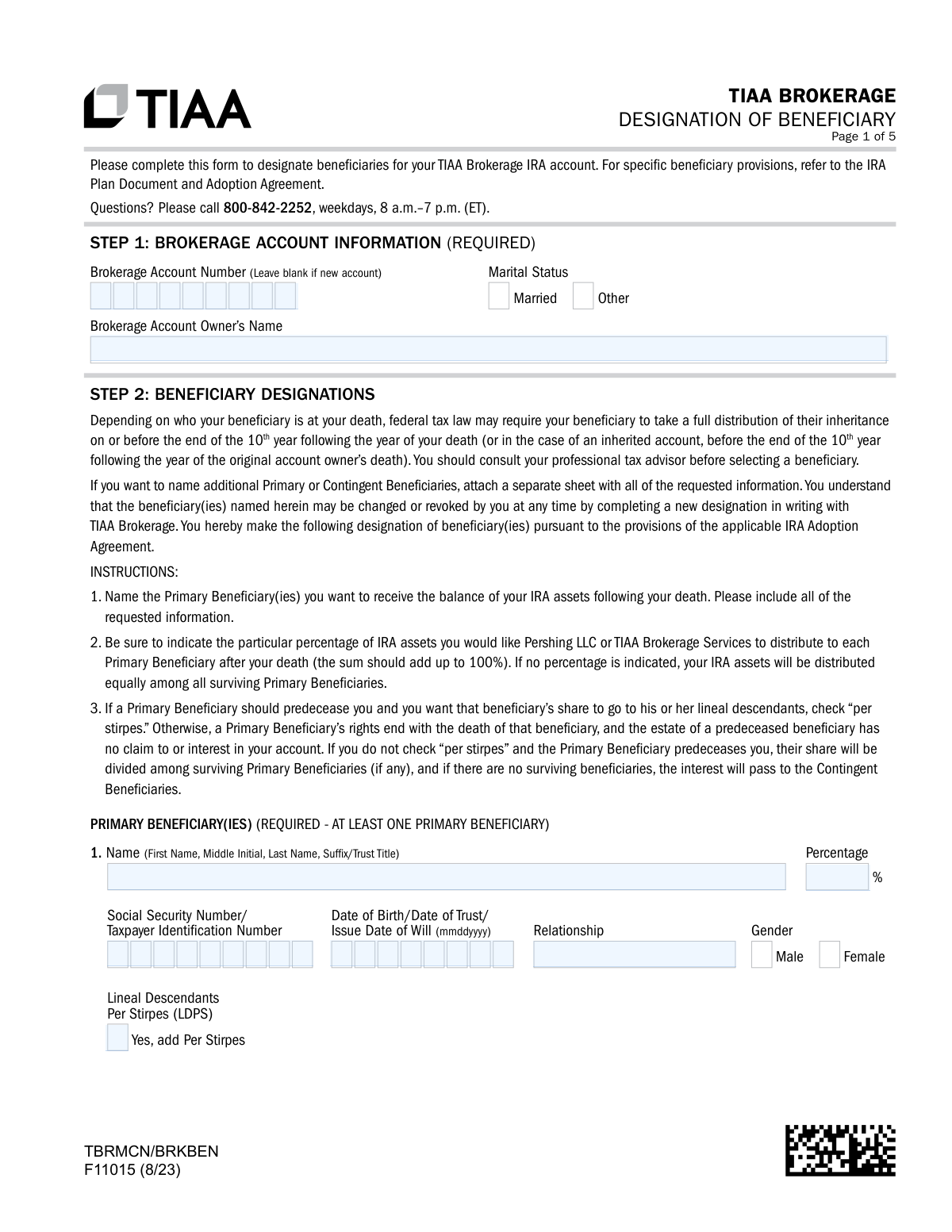
Form F11015 is the TIAA Brokerage Designation of Beneficiary form, a crucial document for owners of TIAA Brokerage IRA accounts. It allows the account holder to officially name primary and contingent beneficiaries who will receive the account's assets after their death, ensuring a smooth transfer and avoiding potential probate issues. Completing this form accurately is a key part of estate planning, and today this form can be filled out quickly and accurately using AI-powered services like Instafill.ai, which can also convert non-fillable PDF versions into interactive fillable forms.
F11015 is part of the
beneficiary forms, brokerage forms, financial account forms, beneficiary designation forms, TIAA forms, retirement account forms and broker forms categories on Instafill.
Rather not fill this in by hand? Instafill is an online form filler that completes PDF forms automatically — upload the blank form, answer a few questions, and the AI fills every field.
Form specifications
| Form name: | Form F11015, TIAA Brokerage Designation of Beneficiary |
| Number of pages: | 1 |
| Language: | English |
Our AI automatically handles information lookup, data retrieval, formatting, and form filling.
It takes less than a minute to fill out F11015 using our AI form filling.
Securely upload your data. Information is encrypted in transit and deleted immediately after the form is filled out.
Instafill Demo: How to fill out PDF forms in seconds with AI
How to Fill Out F11015 Online for Free in 2026
Are you looking to fill out a F11015 form online quickly and accurately? Instafill.ai offers the #1 AI-powered PDF filling software of 2026, allowing you to complete your F11015 form in just 37 seconds or less.
Follow these steps to fill out your F11015 form online using Instafill.ai:
- 1 Navigate to Instafill.ai and upload or select the TIAA Brokerage Designation of Beneficiary form (F11015).
- 2 In Step 1, provide your brokerage account information, including your name, account number (if applicable), and marital status.
- 3 Proceed to Step 2 to designate your Primary Beneficiary(ies). Enter their full name, SSN/TIN, date of birth, relationship, and the percentage of assets they should receive.
- 4 Optionally, designate Contingent Beneficiaries in the next section, providing the same detailed information for each.
- 5 If you are married, live in a community property state, and did not name your spouse as the sole primary beneficiary, complete the Spousal Consent section in Step 3 and have it notarized.
- 6 Review all entered information for accuracy, then electronically sign and date the form as the account owner in Step 4.
- 7 Securely download, print, or submit the completed and signed form according to the instructions provided by TIAA.
Our AI-powered system ensures each field is filled out correctly, reducing errors and saving you time.
Why Choose Instafill.ai for Your Fillable F11015 Form?
Speed
Complete your F11015 in as little as 37 seconds.
Up-to-Date
Always use the latest 2026 F11015 form version.
Cost-effective
No need to hire expensive lawyers.
Accuracy
Our AI performs 10 compliance checks to ensure your form is error-free.
Security
Your personal information is protected with bank-level encryption.
Frequently Asked Questions About F11015
This form is used to designate or update the individuals, trusts, or other entities who will inherit the assets in your TIAA Brokerage IRA account upon your death.
Any TIAA Brokerage IRA account owner who wishes to establish or change their beneficiary designations must complete this form.
Primary Beneficiaries are the first in line to receive your IRA assets. Contingent Beneficiaries will only inherit the assets if all of your Primary Beneficiaries have passed away before you.
Checking 'per stirpes' means that if a beneficiary predeceases you, their designated share will automatically pass to their children (lineal descendants). If not checked, that share is divided among the other surviving beneficiaries in the same category.
If you do not indicate a percentage for each beneficiary, your IRA assets will be distributed equally among all the surviving beneficiaries you have listed in that section.
If you need to add more beneficiaries, attach a separate sheet of paper with all the requested information for each person. You must also sign and date this attachment and submit it with the form.
Spousal consent is required if you are married, live in a community property state (e.g., AZ, CA, TX, WA), and you do not name your spouse as the 100% sole Primary Beneficiary. Your spouse's signature must be notarized in this case.
You must provide the beneficiary's full name, Social Security Number or Taxpayer ID Number, date of birth, and their relationship to you.
You can submit the form digitally, upload it via the TIAA mobile app or the TIAA website (tiaa.org/upload), or send it by fax or mail to the addresses provided on the form.
Yes, you can change or revoke your beneficiaries at any time by completing and submitting a new Designation of Beneficiary form to TIAA Brokerage.
Yes, services like Instafill.ai use AI to accurately auto-fill form fields, which can save you time and help prevent common errors.
You can upload the TIAA F11015 PDF to the Instafill.ai platform. Its AI will make the form fillable online, allowing you to type your information directly into the fields before printing for signature.
If you have a non-fillable or 'flat' PDF, you can use a service like Instafill.ai to convert it into an interactive, fillable form that you can easily complete on your device.
No, the Contingent Beneficiary section is optional. However, it is highly recommended to ensure your assets are distributed according to your wishes if your primary choices are unable to inherit.
Compliance F11015
Validation Checks by Instafill.ai
1
Ensures at least one Primary Beneficiary is designated
This check verifies that the 'PRIMARY BENEFICIARY(IES)' section is not empty and at least one beneficiary has been fully entered. Designating a primary beneficiary is a required action to ensure assets are distributed according to the account owner's wishes upon their death. If this validation fails, the form is considered incomplete and cannot be processed, as there would be no designated heir for the account balance.
2
Validates Primary Beneficiary percentages sum to 100%
This validation confirms that the sum of the 'Percentage' fields for all listed Primary Beneficiaries equals exactly 100%. This is critical for ensuring the entire account balance is allocated without ambiguity or remainder. A failure would lead to processing delays and require clarification from the account owner to determine the correct distribution of assets.
3
Validates Contingent Beneficiary percentages sum to 100%
If any Contingent Beneficiaries are listed, this check ensures their specified percentages sum to 100%. This rule applies independently of the primary beneficiaries and is necessary for the proper allocation of assets if all primary beneficiaries predecease the account owner. If the sum is not 100%, the form will be rejected to prevent disputes among contingent heirs.
4
Verifies Account Owner Information is complete
This check ensures that the 'Brokerage Account Owner’s Name' and 'Marital Status' fields in Step 1 are both filled out. This information is fundamental for identifying the correct account and for determining if spousal consent rules apply. An incomplete Step 1 will halt the processing of the form immediately.
5
Validates format of Beneficiary SSN or TIN
This check ensures that every 'Social Security Number/Taxpayer Identification Number' provided for both primary and contingent beneficiaries is a valid 9-digit number. A valid SSN/TIN is legally required for tax reporting and to uniquely identify each beneficiary, preventing misidentification and fraud. An invalid format will cause the form to be rejected.
6
Validates format and logic of Beneficiary Date of Birth/Trust
This validation confirms that the 'Date of Birth/Date of Trust/Issue Date of Will' for each beneficiary is in the 'mmddyyyy' format and represents a date in the past. This is essential for verifying the beneficiary's identity and legal status (e.g., an individual, a trust). An invalid or future date would indicate a data entry error and prevent successful processing.
7
Confirms Account Owner Signature and Date are present
This check verifies that the account owner has signed and dated the form in Step 4. The signature legally authorizes the beneficiary designations, making it one of the most critical components of the form. Without a valid signature and date, the entire designation is invalid and cannot be acted upon.
8
Determines if Spousal Consent is required and completed
This is a conditional check that first determines if spousal consent is necessary based on marital status, state of residence (community property states), and if the spouse is not the sole primary beneficiary. If these conditions are met, it then validates that the entire 'SPOUSAL CONSENT' section in Step 3, including the spouse's signature and notarization, is fully completed. Failure to provide required spousal consent can render the beneficiary designation legally voidable.
9
Verifies Notary Expiration Date is valid and in the future
If the notary section is completed, this check ensures the 'Notary Expiration Date' is a valid date that has not already passed. A notarization from a notary with an expired commission is legally invalid. This validation protects against fraudulent or improper notarization, ensuring the spousal consent is legally binding.
10
Ensures completeness of individual Primary Beneficiary entries
For each row where a Primary Beneficiary's name is entered, this validation ensures that all other required fields for that beneficiary (Percentage, SSN/TIN, Date of Birth, Relationship) are also filled out. Incomplete records create ambiguity and are not processable. This check prevents partial, unusable beneficiary information from being submitted.
11
Ensures completeness of individual Contingent Beneficiary entries
Similar to the primary beneficiary check, this validation ensures that if a Contingent Beneficiary's name is provided, all associated required fields for that entry are also complete. This is important because even though the section is optional, any entry within it must be whole and actionable. Incomplete contingent beneficiary data will cause the form to be flagged for correction.
12
Checks for date consistency between signatures
This validation compares the dates provided in the Account Owner Signature, Spousal Signature (if applicable), and Notary Signature fields. The Account Owner and Spousal signatures must be dated on or before the Notary's signature date. This chronological consistency is required to confirm that the notary witnessed the actual, already-signed document, which is a standard notarial practice.
Common Mistakes in Completing F11015
Saved over 80 hours a year
“I was never sure if my IRS forms like W-9 were filled correctly. Now, I can complete the forms accurately without any external help.”
Kevin Martin Green
Your data stays secure with advanced protection from Instafill and our subprocessors




Robust compliance program
Transparent business model
You’re not the product. You always know where your data is and what it is processed for.
ISO 27001, HIPAA, and GDPR
Our subprocesses adhere to multiple compliance standards, including but not limited to ISO 27001, HIPAA, and GDPR.
Security & privacy by design
We consider security and privacy from the initial design phase of any new service or functionality. It’s not an afterthought, it’s built-in, including support for two-factor authentication (2FA) to further protect your account.
Fill out F11015 with Instafill.ai
Worried about filling PDFs wrong? Instafill securely fills form-f11015-tiaa-brokerage-designation-of-beneficiary forms, ensuring each field is accurate.
