Yes! You can use AI to fill out Letter of Authorization (LOA) For Movement of Funds in Schwab Accounts
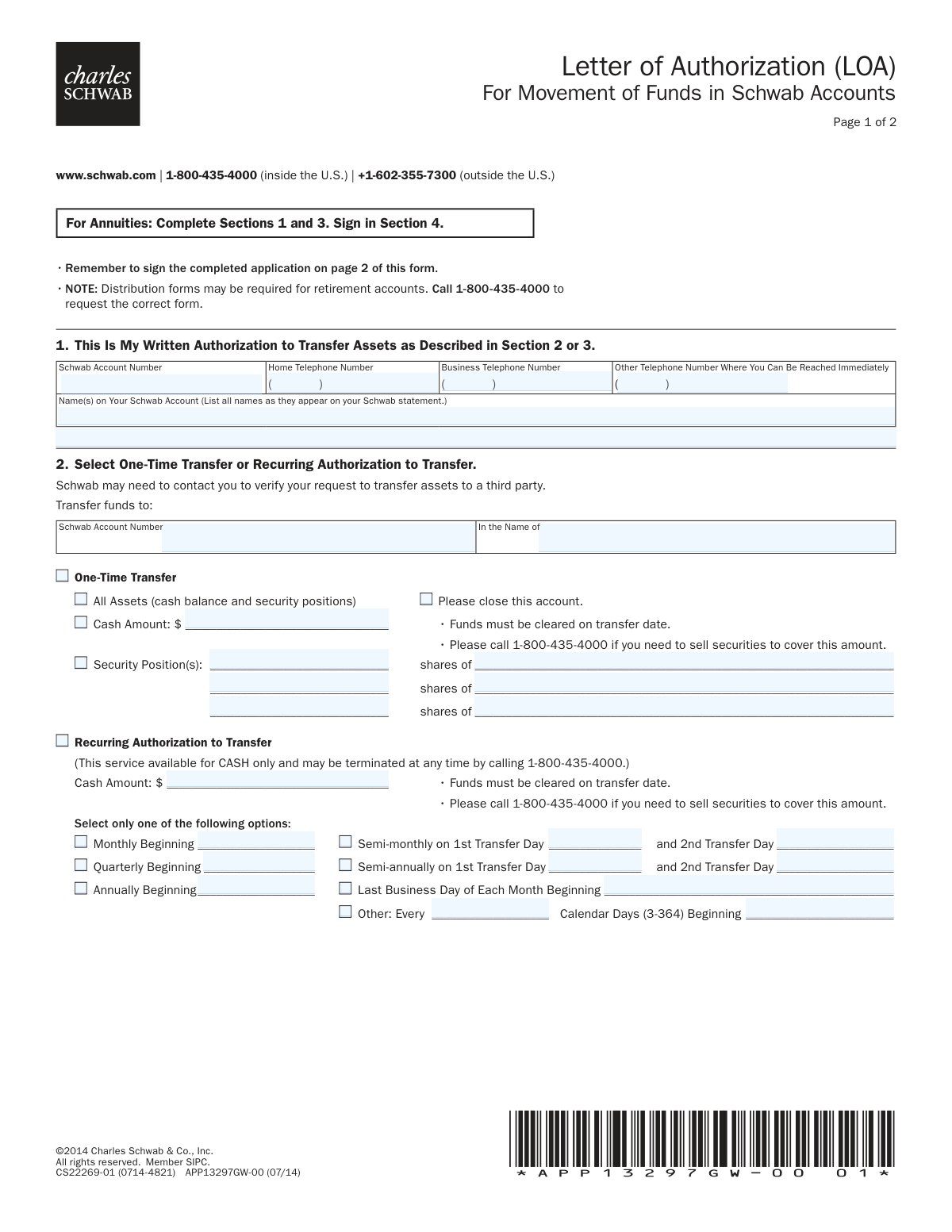
This Letter of Authorization (LOA) is a legal document used by Charles Schwab clients to authorize the movement of funds or securities from their accounts. It can be used for one-time transfers, setting up recurring payments, or issuing third-party checks, providing a secure way to manage assets without direct, constant involvement. Today, this form can be filled out quickly and accurately using AI-powered services like Instafill.ai, which can also convert non-fillable PDF versions into interactive fillable forms.
Rather not fill this in by hand? Instafill is an online form filler that completes PDF forms automatically — upload the blank form, answer a few questions, and the AI fills every field.
Form specifications
| Form name: | Letter of Authorization (LOA) For Movement of Funds in Schwab Accounts |
| Number of pages: | 1 |
| Language: | English |
Our AI automatically handles information lookup, data retrieval, formatting, and form filling.
It takes less than a minute to fill out Schwab LOA using our AI form filling.
Securely upload your data. Information is encrypted in transit and deleted immediately after the form is filled out.
Instafill Demo: How to fill out PDF forms in seconds with AI
How to Fill Out Schwab LOA Online for Free in 2026
Are you looking to fill out a SCHWAB LOA form online quickly and accurately? Instafill.ai offers the #1 AI-powered PDF filling software of 2026, allowing you to complete your SCHWAB LOA form in just 37 seconds or less.
Follow these steps to fill out your SCHWAB LOA form online using Instafill.ai:
- 1 Navigate to Instafill.ai and upload or select the Schwab Letter of Authorization form.
- 2 Use the AI assistant to automatically populate Section 1 with your name, Schwab account number, and contact information.
- 3 In Section 2, specify whether you are authorizing a one-time transfer or a recurring transfer, and provide the necessary details like amount, securities, or frequency.
- 4 If you are requesting a check to be sent to a third party, complete Section 3 with the payee's name, the amount, and mailing instructions.
- 5 Carefully review the authorization agreement in Section 4 to understand the terms of the transfer.
- 6 Digitally sign and date the form in the designated fields to provide your official authorization.
- 7 Review all the information you've provided for accuracy before downloading the completed form for submission to Schwab.
Our AI-powered system ensures each field is filled out correctly, reducing errors and saving you time.
Why Choose Instafill.ai for Your Fillable Schwab LOA Form?
Speed
Complete your Schwab LOA in as little as 37 seconds.
Up-to-Date
Always use the latest 2026 Schwab LOA form version.
Cost-effective
No need to hire expensive lawyers.
Accuracy
Our AI performs 10 compliance checks to ensure your form is error-free.
Security
Your personal information is protected with bank-level encryption.
Frequently Asked Questions About Schwab LOA
This form is used to provide Charles Schwab with written authorization to transfer assets, like cash or securities, from your Schwab account to another account or to issue a check to a third party.
Any Schwab account holder who wants to authorize a one-time or recurring transfer of assets, or request a check disbursement from their account, must complete and sign this form.
You will need your Schwab account number, the names on the account as they appear on your statement, and the specific details of the transfer, such as the amount and destination.
Section 2 is for transferring funds or securities directly into another Schwab account. Section 3 is specifically for requesting a check to be issued from your account and sent to a third party.
In Section 2, under 'One-Time Transfer,' select the option for 'All Assets (cash balance and security positions)' and check the box that says 'Please close this account.'
No, the recurring authorization service described in Section 2 is available for cash transfers only. To transfer securities, you must use the 'One-Time Transfer' option for security positions.
This form may not be suitable for retirement accounts, as special distribution forms are often required. You should call Schwab at 1-800-435-4000 to request the correct form for your retirement account.
If a scheduled transfer date lands on a weekend or a Schwab holiday, the transfer will be processed on the next business day.
If you do not have sufficient available funds to cover a transfer, Schwab may not complete it. You must ensure your account is funded or call Schwab to sell securities if needed.
You can terminate a recurring transfer at any time by calling Schwab at 1-800-435-4000 or by writing to the address noted on your account statement.
All account holders listed on the Schwab account must sign, print their name, and date the form in Section 4 for the authorization to be considered valid.
Yes, services like Instafill.ai use AI to accurately auto-fill form fields with your information, which can save you time and help reduce errors.
You can upload the Letter of Authorization PDF to the Instafill.ai platform. The AI will make the form interactive and help you complete the fields with your saved information before you download it for submission.
If your PDF is not fillable, you can use a tool like Instafill.ai. It can convert flat, non-interactive PDFs into fillable forms that you can easily complete on your computer.
Compliance Schwab LOA
Validation Checks by Instafill.ai
1
Schwab Account Number Presence and Format
This check verifies that the 'Schwab Account Number' field in Section 1 is not empty and conforms to the expected format for Schwab account numbers. The account number is the primary identifier for the source of funds, so its accuracy is critical for the transaction to be initiated correctly. If the number is missing or invalid, the entire authorization request will be rejected.
2
At Least One Valid Contact Number
This validation ensures that at least one of the telephone number fields in Section 1 (Home, Business, or Other) is completed with a valid phone number. Schwab may need to contact the account holder to verbally verify the transfer request, especially for large amounts or third-party movements. Failure to provide a contact number can lead to processing delays or rejection of the form for security reasons.
3
Exclusive Selection of Transfer Type
This check ensures that within Section 2, the user has selected either 'One-Time Transfer' or 'Recurring Authorization to Transfer', but not both. These options are mutually exclusive and selecting both creates ambiguity in the user's intent. If both or neither option is chosen, the form is considered incomplete and cannot be processed.
4
One-Time Transfer Details Completeness
This validation confirms that if 'One-Time Transfer' is selected in Section 2, the user has also specified what to transfer. The user must either check 'All Assets', provide a 'Cash Amount', or list at least one 'Security Position'. An instruction to make a one-time transfer without specifying the assets is incomplete and cannot be executed.
5
Recurring Transfer Details Completeness
This check verifies that if 'Recurring Authorization to Transfer' is selected, both a 'Cash Amount' and a complete frequency schedule are provided. A recurring transfer cannot be set up without knowing how much to send and when to send it. Missing either the amount or the frequency details will result in the rejection of the recurring setup request.
6
Valid Currency Format for All Monetary Fields
This validation ensures that all fields intended for dollar amounts, such as 'Cash Amount' in Section 2 or 'Issue Check for' in Section 3, contain valid numerical currency values. The check prevents non-numeric characters or malformed entries that would cause processing to fail. Any invalid format will require the form to be corrected before the transaction can proceed.
7
Recurring Frequency and Date Consistency
This check ensures a logical link between the selected recurring frequency and its corresponding date fields in Section 2. For example, if 'Monthly' is selected, the 'Beginning' date field must be filled; if 'Semi-monthly' is selected, both 'Transfer Day' fields must be filled. This prevents the setup of an incomplete or illogical recurring schedule.
8
Third-Party Check Disbursement Completeness
This validation confirms that if a user is filling out Section 3 for a check disbursement, both the 'Issue Check for' amount and the 'Made Payable to' fields are completed. A check cannot be created without a specified value and a designated recipient. Missing either piece of information will cause the check request to be rejected.
9
Conditional Mailing Address Validation
This check is triggered if the 'Mail to the following address' box is checked in Section 3. It verifies that the full address, including 'Home Street Address', 'City', 'State', and 'Zip Code', is provided. An incomplete address would prevent the successful mailing of the check, so the request will be held until a complete address is supplied.
10
Mandatory Signature and Date
This check ensures that the 'Account Holder Signature' and 'Date' fields in Section 4 are both completed. The signature provides the legal authorization for the transfer, and the date establishes when the authorization was granted. A missing signature or date renders the entire form invalid, and the request will be rejected immediately.
11
Printed Name and Account Name Consistency
This validation compares the 'Print Name' field in Section 4 with the 'Name(s) on Your Schwab Account' provided in Section 1. The printed name should match one of the authorized account holders to help verify the signer's identity. A significant mismatch could flag the request for additional fraud review or identity verification.
12
Valid Date Format
This check ensures that all date fields on the form, including the signature date in Section 4 and any 'Beginning' dates in Section 2, are entered in a recognizable and valid format (e.g., MM/DD/YYYY). Using an invalid or ambiguous date format can cause errors in scheduling transfers or in recording the authorization. The form will be rejected if dates are not clear and properly formatted.
13
Security Position Transfer Completeness
This validation applies if the user is transferring securities in Section 2. It ensures that for each line item used, both the number of shares and the name of the security are provided. Transferring a security requires knowing both 'how many' and 'of what,' so any incomplete entry will cause that specific part of the transfer to fail.
Common Mistakes in Completing Schwab LOA
Users often provide a nickname, omit a middle initial, or forget to list all joint account holders. The form explicitly requires all names as they appear on the Schwab statement. A name mismatch will cause the authorization to fail verification, leading to rejection of the entire request and significant delays. To avoid this, carefully copy the full name(s) exactly as printed on your official account statement. AI-powered tools like Instafill.ai can help by storing and accurately populating this information across all your forms.
Entering the Schwab account number incorrectly, such as transposing digits or leaving it blank, is a frequent and critical error. This number is the primary identifier for the account from which funds will be moved. An incorrect number will result in an immediate rejection of the form or, in a worst-case scenario, a transaction being attempted on the wrong account. Double-check the number against your account statement before submitting.
In Section 2, users must choose between a 'One-Time Transfer' and a 'Recurring Authorization'. A common mistake is to either select both options or fill out details in both sections, creating ambiguity. This forces the processing agent to either guess the user's intent or reject the form, delaying the transfer. You must select only one transfer type and complete only the corresponding fields for that choice.
When selecting a 'One-Time Transfer', checking the 'All Assets' box also prompts you to close the account. People sometimes check this thinking it will transfer all available cash, not realizing it liquidates all security positions and permanently closes the account. This irreversible action can have major financial and tax implications. Only select this option if you fully intend to close your Schwab account.
The form notes that cash amounts must be from 'cleared funds' on the transfer date. Users may request a transfer of funds from a recent deposit or security sale that has not yet settled. This results in a failed transfer because the funds are not available. To prevent this, ensure the cash you wish to transfer has fully settled in your account, or call Schwab as instructed to sell securities if needed.
When transferring securities, users must specify the exact number of shares and the full name of the security. Mistakes include misstating the share count, using an informal ticker symbol instead of the full name, or misspelling the security's name. Such errors will cause the specific security transfer to fail. Always verify the exact security name and share quantity from your account holdings page.
The 'Recurring Authorization' section contains multiple frequency options (Monthly, Quarterly, etc.) and date fields. Users may select more than one frequency or enter dates that are illogical or in an incorrect format. This ambiguity makes it impossible to set up the recurring transfer correctly, leading to rejection. Carefully select only one frequency option and provide clear, valid dates in the specified format.
In Section 3, when requesting a check, users may write an incomplete or misspelled name in the 'Made Payable to' field, or fail to specify delivery instructions. An incorrect payee name can make the check non-negotiable, while unclear delivery instructions can cause it to be mailed to the wrong address. Always write the full, legal name of the payee and clearly select either branch pickup or provide a complete mailing address.
Forgetting to sign the form in Section 4 is one of the most common reasons for rejection. For joint accounts, the form is invalid if any of the required account holders fail to sign. This oversight completely invalidates the authorization. Before submitting, always review Section 4 to ensure all account holders have signed and printed their names.
Each signature line has an accompanying date field that is frequently left blank. The date is legally required to establish when the authorization was granted, and its absence can render the document void. This leads to an automatic rejection and requires you to resubmit the form. Always write the current date next to your signature. Smart form-filling tools like Instafill.ai can automatically populate the current date to prevent this mistake.
The form's instructions explicitly state to call Schwab for the correct forms for Annuities and potentially for retirement accounts. People often overlook this and use this general LOA for a specialized account. This will result in an automatic rejection, as different account types have unique legal and regulatory requirements for distributions. Always confirm you are using the correct form for your specific account type.
Since this form is a non-fillable PDF, it must be printed and completed by hand. Poor or illegible handwriting can make critical data like account numbers, dollar amounts, and names unreadable to the processor. This can lead to data entry errors on Schwab's end or an outright rejection of the form. To avoid this, print clearly in block letters. Alternatively, a tool like Instafill.ai can convert this non-fillable PDF into a fillable one, allowing you to type your information for perfect clarity.
Saved over 80 hours a year
“I was never sure if my IRS forms like W-9 were filled correctly. Now, I can complete the forms accurately without any external help.”
Kevin Martin Green
Your data stays secure with advanced protection from Instafill and our subprocessors




Robust compliance program
Transparent business model
You’re not the product. You always know where your data is and what it is processed for.
ISO 27001, HIPAA, and GDPR
Our subprocesses adhere to multiple compliance standards, including but not limited to ISO 27001, HIPAA, and GDPR.
Security & privacy by design
We consider security and privacy from the initial design phase of any new service or functionality. It’s not an afterthought, it’s built-in, including support for two-factor authentication (2FA) to further protect your account.
Fill out Schwab LOA with Instafill.ai
Worried about filling PDFs wrong? Instafill securely fills letter-of-authorization-loa-for-movement-of-funds-in-schwab-accounts forms, ensuring each field is accurate.
