Yes! You can use AI to fill out Schwab IRA Account Application
The Schwab IRA Account Application is a form required to establish a new Individual Retirement Account, such as a Traditional, Roth, or Rollover IRA, with Charles Schwab. It gathers essential personal, financial, and employment details from the applicant, specifies investment objectives, and designates beneficiaries for the account. Today, this form can be filled out quickly and accurately using AI-powered services like Instafill.ai, which can also convert non-fillable PDF versions into interactive fillable forms.
APP36326-11 is part of the
Schwab forms, IRA forms, account application forms, IRA application forms and IRA account forms categories on Instafill.
Rather not fill this in by hand? Instafill is an online form filler that completes PDF forms automatically — upload the blank form, answer a few questions, and the AI fills every field.
Form specifications
| Form name: | Schwab IRA Account Application |
| Number of pages: | 1 |
| Language: | English |
Our AI automatically handles information lookup, data retrieval, formatting, and form filling.
It takes less than a minute to fill out APP36326-11 using our AI form filling.
Securely upload your data. Information is encrypted in transit and deleted immediately after the form is filled out.
Instafill Demo: How to fill out PDF forms in seconds with AI
How to Fill Out APP36326-11 Online for Free in 2026
Are you looking to fill out a APP36326-11 form online quickly and accurately? Instafill.ai offers the #1 AI-powered PDF filling software of 2026, allowing you to complete your APP36326-11 form in just 37 seconds or less.
Follow these steps to fill out your APP36326-11 form online using Instafill.ai:
- 1 Navigate to Instafill.ai and upload or select the Schwab IRA Account Application form.
- 2 Use the AI assistant to fill in your personal details in Section 2, including your name, address, Social Security Number, and employment information.
- 3 Select your account type, investment objective, and desired account features in Sections 1, 3, and 4.
- 4 Indicate how you will fund the account in Section 5, whether by check, transfer, or conversion from another IRA.
- 5 Complete the Beneficiary Designation in Section 6 by providing the names, contact information, and share percentages for your primary and contingent beneficiaries.
- 6 Review all the information auto-filled by the AI for accuracy and completeness.
- 7 Print the completed application, sign and date it in Section 7, and mail it to the appropriate Charles Schwab processing center as indicated in the instructions.
Our AI-powered system ensures each field is filled out correctly, reducing errors and saving you time.
Why Choose Instafill.ai for Your Fillable APP36326-11 Form?
Speed
Complete your APP36326-11 in as little as 37 seconds.
Up-to-Date
Always use the latest 2026 APP36326-11 form version.
Cost-effective
No need to hire expensive lawyers.
Accuracy
Our AI performs 10 compliance checks to ensure your form is error-free.
Security
Your personal information is protected with bank-level encryption.
Frequently Asked Questions About APP36326-11
This form is used to open a new Individual Retirement Account (IRA) with Charles Schwab. You can use it to establish various types of IRAs, including Traditional, Roth, Rollover, SEP, and SIMPLE IRAs.
Any individual looking to open a personal IRA, or an employer establishing a SEP-IRA or SIMPLE IRA plan, needs to complete this application. Employees participating in a company's SEP or SIMPLE IRA will also use this form to open their individual accounts.
Yes, a $1,000 minimum deposit is typically required to open an account. However, this minimum is waived if you establish a recurring monthly transfer of at least $100 from another account.
You will need to provide personal details like your Social Security Number, date of birth, and employment information. You will also need information from a valid government-issued ID, such as a driver's license or passport, for identity verification.
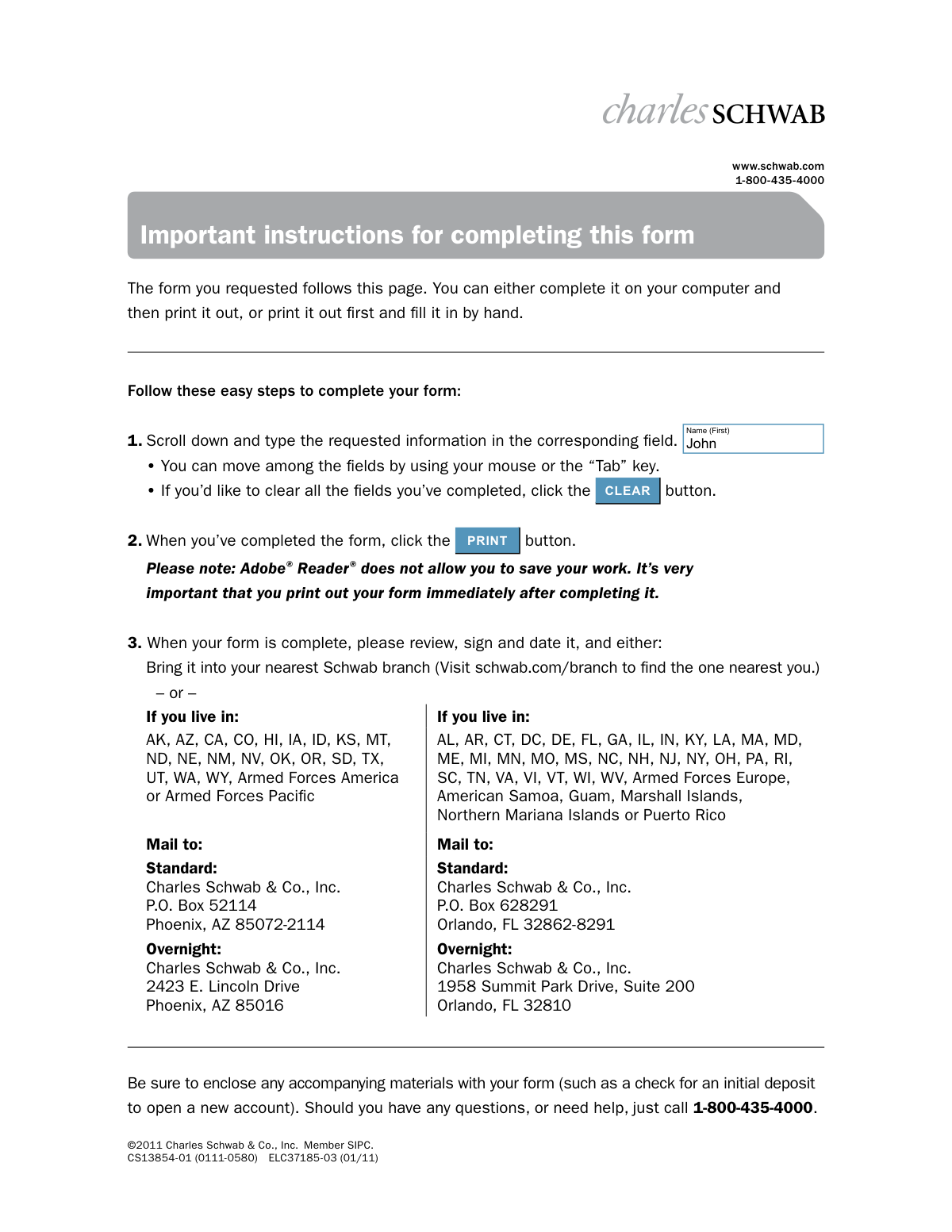
You can fill out the PDF on your computer and print it, or print the blank form and complete it by hand. After signing and dating it, you can either submit it at a local Schwab branch or mail it to the address specified for your state of residence.
The mailing address depends on your state of residence. Refer to the 'Important instructions' page to find the correct standard or overnight mailing address in either Phoenix, AZ, or Orlando, FL.
Yes, but you must disclose this in Section 2 of the application. You are also required to attach a letter from your employer approving the establishment of your Schwab account when you submit the form.
Use Section 6 to list your primary and contingent beneficiaries and the percentage share each should receive. The total shares for your primary beneficiaries must add up to 100%, and the same applies to your contingent beneficiaries.
If you do not designate a beneficiary, or if none of your named beneficiaries survive you, the full value of your account will be paid to your estate upon your death.
The form provides space for up to four beneficiaries. If you need to designate more, attach a separate sheet of paper with all the required information for each additional beneficiary as requested in Section 6.
Section 5 outlines several funding options, including enclosing a check, transferring an existing account using a separate form, or converting an existing Schwab IRA. Note that this section is not required for SEP-IRA or SIMPLE IRA applications.
Yes, services like Instafill.ai use AI to accurately auto-fill form fields with your information. This can save you time and help reduce errors, especially on multi-page applications like this one.
Simply upload the Schwab IRA application PDF to the Instafill.ai platform. The AI will make the form fillable and help you populate the fields with your saved information, after which you can download, print, and sign it.
If you have a non-fillable or 'flat' PDF, you can use a service like Instafill.ai. It can convert the static PDF into an interactive, fillable form that you can complete easily online before printing.
Compliance APP36326-11
Validation Checks by Instafill.ai
1
Ensures a single Account Type is selected
This check verifies that the applicant has selected exactly one account type from the options in Section 1 (e.g., Traditional IRA, SEP-IRA, SIMPLE IRA). Selecting zero or multiple types makes the application ambiguous and prevents proper account setup. If validation fails, the form cannot be processed until a single, clear choice is made.
2
Validates Social Security Number format and presence
This validation ensures the Social Security/Tax ID Number in Section 2 is provided and follows the standard 9-digit format (XXX-XX-XXXX). This number is mandatory for tax reporting purposes and identity verification under federal law. An invalid or missing SSN/TIN will result in immediate rejection of the application.
3
Verifies Date of Birth is valid and plausible
This check confirms the Date of Birth in Section 2 is in a valid mm/dd/yyyy format and represents a realistic age for an applicant (e.g., not in the future, and indicates the person is of legal age). This is crucial for verifying the applicant's identity and their legal eligibility to enter into a contract. An invalid date will halt the identity verification process.
4
Prohibits P.O. Box for Home/Legal Street Address
This validation ensures that the 'Home/Legal Street Address' field in Section 2 does not contain 'P.O. Box' or similar variants. Federal regulations, such as the USA PATRIOT Act, require financial institutions to obtain a physical residential address for identity verification. Failure to provide a physical address will prevent the account from being opened.
5
Conditional Requirement for Employment Details
This check ensures that if the applicant selects 'Employed' or 'Self-employed' in Section 2, the 'Employer', 'Occupation/Position', and 'Business Street Address' fields are all completed. This information is required by securities industry regulations to assess potential conflicts of interest and for suitability profiling. An incomplete submission will require follow-up before the application can be approved.
6
Validates FINRA Affiliation Disclosure and Attachment Requirement
This check verifies that a 'Yes' or 'No' answer is provided for the FINRA affiliation question in Section 2. If the answer is 'Yes,' it flags the requirement for an attached approval letter from the employer. This is a critical regulatory step to prevent conflicts of interest, and failure to provide the letter when required will delay or block account opening.
7
Conditional Requirement for Public Company Officer Details
This validation confirms that if an applicant answers 'Yes' to being an officer of a publicly held company in Section 2, the 'company name' and 'trading symbol' fields are mandatory. This information is essential for compliance with regulations concerning corporate insiders. Missing this information when required will cause the application to be flagged as incomplete.
8
Primary Beneficiary Share Percentage Sums to 100%
This check validates that the 'Share %' for all designated Primary Beneficiaries in Section 6 adds up to exactly 100%. This is crucial to ensure the account holder's assets are distributed according to their exact wishes without ambiguity. A total other than 100% will cause the beneficiary designation to be rejected, potentially leaving the account to the estate by default.
9
Contingent Beneficiary Share Percentage Sums to 100%
This validation ensures that if Contingent Beneficiaries are listed in Section 6, their 'Share %' allocations sum to exactly 100%. This provides a clear line of succession for assets if no Primary Beneficiaries are able to inherit. An incorrect total creates ambiguity and can lead to legal challenges or processing delays.
10
Verifies Completeness of Individual Beneficiary Information
For each beneficiary entry in Section 6, this check ensures that if any field is filled out, then the Name, Share %, Type (Primary/Contingent), and Relationship fields are all completed. Incomplete or partial beneficiary data is legally ambiguous and cannot be processed. The designation for that beneficiary will be considered invalid until all required information is provided.
11
Confirms Signature and Date are Present
This validation confirms that the 'Account Holder Signature' and 'Date' fields in Section 7 are both completed. The signature is the applicant's legal authorization and agreement to the terms, while the date establishes when the contract was executed. An unsigned or undated application is legally invalid and cannot be processed.
12
Validates ID Expiration Date is not in the past
This check verifies that if a Driver's License or Passport is used for identification in Section 2, the provided expiration date is a valid date and has not already passed. Financial institutions cannot accept expired identification for identity verification purposes. An expired ID will cause the application to be rejected pending submission of valid identification.
13
Validates Email Address Format
This check ensures the email address provided in Section 2 conforms to a standard format (e.g., [email protected]). The form states this email is used for web account updates and electronic trade confirmations. An invalid email format would prevent the client from receiving important account communications and accessing online features.
14
Conditional Requirement for SIMPLE IRA Employer ID
This validation checks that if the account type is 'SIMPLE IRA' and the applicant is an 'employee' (Section 1), the 'Employer’s Group ID Number' field is filled. This ID is essential for linking the employee's account to the correct employer plan for contributions. Without this number, the account cannot be properly established under the employer's SIMPLE IRA plan.
Common Mistakes in Completing APP36326-11
Applicants often complete all four pages of detailed information but forget the final, crucial step of signing and dating the form in Section 7. This happens due to oversight or rushing to mail the form. An unsigned or undated application is legally invalid and cannot be processed, leading to significant delays in account opening until a properly executed form is received.
The form requires that the share percentages for all Primary Beneficiaries add up to exactly 100%, and the same for all Contingent Beneficiaries. People frequently make calculation errors, resulting in totals that are over or under 100%. This ambiguity makes the beneficiary designation invalid, which can cause the account to default to the estate upon death, leading to lengthy probate processes and unintended distribution of assets.
The instructions provide two different mailing addresses (one in Phoenix, AZ, and one in Orlando, FL) based on the applicant's state of residence. Applicants often miss this detail and send the form to the incorrect address. This mistake results in processing delays as the mail must be rerouted internally, potentially delaying account opening and funding by several days or weeks.
In Section 6, applicants frequently omit critical details for their beneficiaries, such as their full legal name, Social Security Number (SSN) or Tax ID Number, and date of birth. This often occurs when the applicant doesn't have the information readily available. Missing information can create significant delays and legal challenges for beneficiaries when they try to claim the assets, potentially requiring court orders to prove identity.
Section 2 explicitly states 'no P.O. boxes' for the Home/Legal Street Address, a requirement under federal law for identity verification. Despite this, many applicants enter a P.O. Box out of habit. This will cause the application to be rejected, as a physical address is mandatory for compliance with Know Your Customer (KYC) regulations, delaying the entire account opening process.
Applicants may misunderstand or overlook the questions in Section 2 regarding affiliation with a stock exchange, FINRA member firm, or being an officer of a publicly held company. If they answer 'Yes' but forget to attach the required approval letter from their employer, the application will be placed on hold. This is a strict regulatory requirement designed to prevent conflicts of interest, and failure to comply will halt the application indefinitely.
When converting an IRA in Section 5, applicants are faced with a complex Tax Withholding Election. Many do not understand the consequences of their choice, especially the warning that withholding itself is considered a distribution and may be subject to penalties if under age 59½. Choosing incorrectly or failing to make a choice (which defaults to 10% withholding) can lead to unexpected tax liabilities or IRS penalties.
In Section 1, applicants must choose between several IRA types (Traditional, Roth, SEP, SIMPLE) with different contribution rules and tax implications. An individual might mistakenly select 'SEP-IRA' when they mean 'Rollover IRA,' or vice-versa. This fundamental error can lead to the wrong type of account being established, causing tax complications and requiring significant paperwork to correct.
The instructions state that Adobe Reader does not allow the user to save the completed form, and it must be printed immediately. Users often miss this warning, fill out the entire application, and then try to save it or close the window, losing all their work. This leads to extreme frustration and requires them to re-enter all the information from scratch. AI-powered tools like Instafill.ai can prevent this by converting such non-fillable PDFs into a version that can be completed and saved securely.
The beneficiary section notes that residents of community property states may need spousal consent if they do not designate their spouse as the sole primary beneficiary. This is a legal requirement that is easily missed. Overlooking this can lead to legal disputes over the account assets after the account holder's death, as the surviving spouse may have a legal claim to a portion of the funds regardless of the beneficiary designation.
Saved over 80 hours a year
“I was never sure if my IRS forms like W-9 were filled correctly. Now, I can complete the forms accurately without any external help.”
Kevin Martin Green
Your data stays secure with advanced protection from Instafill and our subprocessors




Robust compliance program
Transparent business model
You’re not the product. You always know where your data is and what it is processed for.
ISO 27001, HIPAA, and GDPR
Our subprocesses adhere to multiple compliance standards, including but not limited to ISO 27001, HIPAA, and GDPR.
Security & privacy by design
We consider security and privacy from the initial design phase of any new service or functionality. It’s not an afterthought, it’s built-in, including support for two-factor authentication (2FA) to further protect your account.
Fill out APP36326-11 with Instafill.ai
Worried about filling PDFs wrong? Instafill securely fills schwab-ira-account-application forms, ensuring each field is accurate.
