Yes! You can use AI to fill out IRA/IRRA®/Roth IRA/SEP/SRA Divorce Transfer Instruction Form

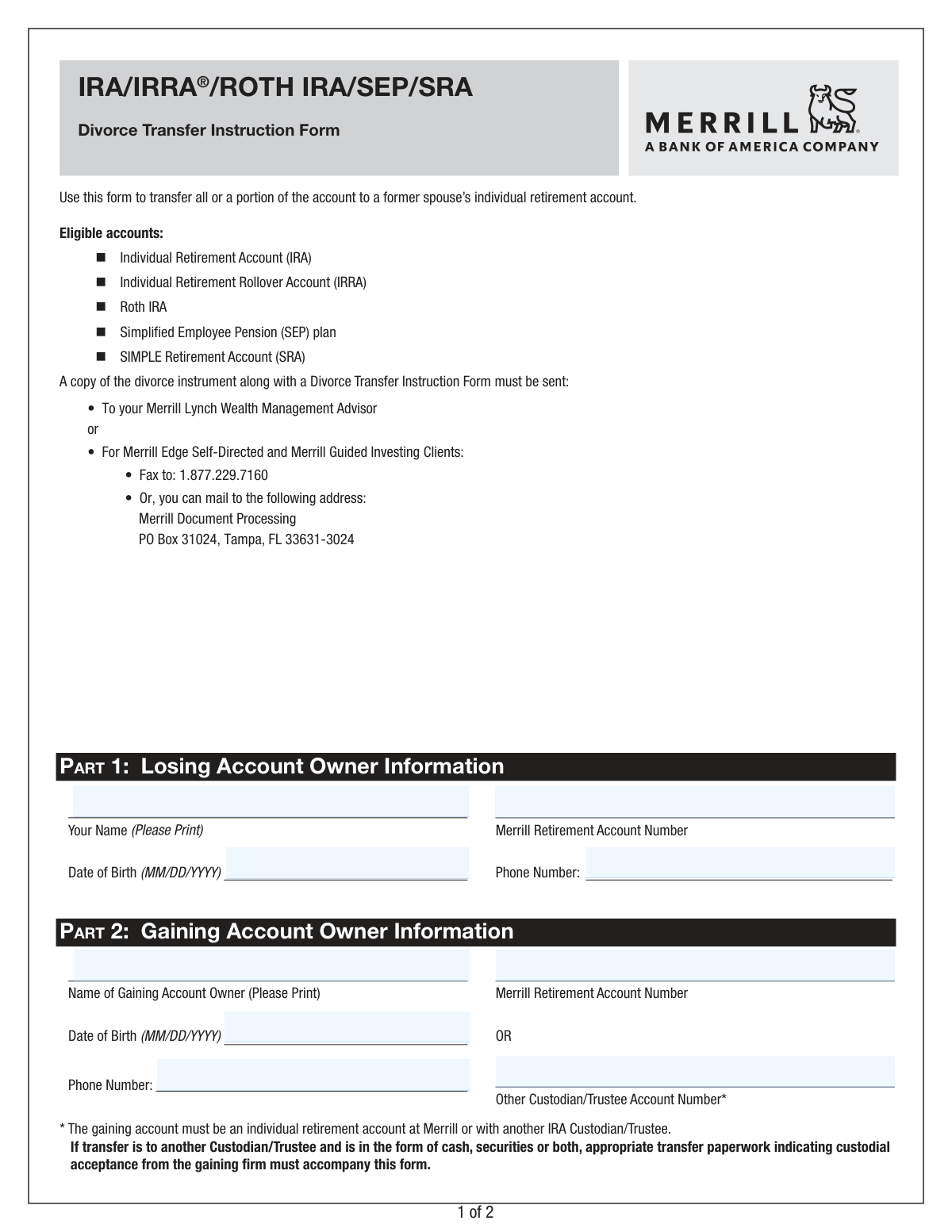
This form from Merrill Lynch is a legal document used to authorize the transfer of assets from an Individual Retirement Account (IRA, IRRA, Roth IRA, SEP, or SRA) to a former spouse's IRA as part of a divorce settlement. It ensures the transfer is treated as a non-taxable event under IRC Section 408(d)(6), preventing potential tax liabilities and penalties for the account holder. Today, this form can be filled out quickly and accurately using AI-powered services like Instafill.ai, which can also convert non-fillable PDF versions into interactive fillable forms.
Our AI automatically handles information lookup, data retrieval, formatting, and form filling.
It takes less than a minute to fill out Code 6066 using our AI form filling.
Securely upload your data. Information is encrypted in transit and deleted immediately after the form is filled out.

Form specifications

Form name: IRA/IRRA®/Roth IRA/SEP/SRA Divorce Transfer Instruction Form
Number of pages: 1
Language: English
Categories: divorce forms, IRA forms, transfer forms
main-image

Instafill Demo: How to fill out PDF forms in seconds with AI

How to Fill Out Code 6066 Online for Free in 2026

Are you looking to fill out a CODE 6066 form online quickly and accurately? Instafill.ai offers the #1 AI-powered PDF filling software of 2026, allowing you to complete your CODE 6066 form in just 37 seconds or less.
Follow these steps to fill out your CODE 6066 form online using Instafill.ai:
  1. 1 Navigate to Instafill.ai and upload or select the Merrill Divorce Transfer Instruction Form.
  2. 2 Use the AI assistant to automatically populate Part 1 with the losing account owner's personal and account information.
  3. 3 Enter the gaining account owner's details in Part 2, including their name and the receiving retirement account number.
  4. 4 In Part 3, clearly specify the transfer instructions, indicating whether it's a full or partial transfer and detailing the exact cash amounts or securities to be moved.
  5. 5 Both the losing and gaining account owners must review the acknowledgements and provide their digital signatures and the date in Part 4.
  6. 6 Attach a copy of the required divorce instrument to the completed form.
  7. 7 Review all entered information for accuracy before securely submitting the completed package to Merrill Lynch via the methods listed on the form.

Our AI-powered system ensures each field is filled out correctly, reducing errors and saving you time.

Why Choose Instafill.ai for Your Fillable Code 6066 Form?

Speed

Complete your Code 6066 in as little as 37 seconds.

Up-to-Date

Always use the latest 2026 Code 6066 form version.

Cost-effective

No need to hire expensive lawyers.

Accuracy

Our AI performs 10 compliance checks to ensure your form is error-free.

Security

Your personal information is protected with bank-level encryption.

Frequently Asked Questions About Form Code 6066

This form is used to instruct Merrill to transfer all or a portion of your retirement account assets to a former spouse's individual retirement account, as specified in a divorce or legal separation agreement.

Both the person transferring the assets (the 'losing account owner') and the person receiving them (the 'gaining account owner') must provide their information and sign the form in Part 4.

You must submit a copy of your official divorce instrument, such as a divorce decree or separation agreement, along with the completed and signed transfer instruction form.

You can give the documents to your Merrill Lynch Wealth Management Advisor. Alternatively, Merrill Edge clients can fax them to 1.877.229.7160 or mail them to the Merrill Document Processing center.

This form is eligible for transfers from an Individual Retirement Account (IRA), Individual Retirement Rollover Account (IRRA), Roth IRA, Simplified Employee Pension (SEP) plan, or a SIMPLE Retirement Account (SRA).

Yes, the transfer can be made to an IRA at another custodian or trustee. However, you must also submit appropriate transfer paperwork from the gaining firm indicating their acceptance of the assets.

Selecting this option will result in the transfer of all assets and the subsequent closure of your Merrill retirement account. A fee may be assessed for closing the account.

List the quantity and the security name or symbol exactly as it appears on your account statement. If you need more space, attach a supplemental list that is signed by both parties.

It is strongly recommended that you consult with independent tax or legal counsel. The form's acknowledgement section notes that failure to comply with IRS rules for divorce transfers can result in tax liabilities.

You both need to provide your full name, date of birth, and phone number. You must also provide the relevant retirement account numbers for both the losing and gaining accounts.

Yes, services like Instafill.ai use AI to accurately auto-fill form fields from your saved profile, which can save you time and help reduce errors.

You can use a service like Instafill.ai, which can convert flat, non-fillable PDFs into interactive forms. This allows you to easily type your information directly into the fields online.

Simply upload the form to Instafill.ai, and its AI will make the fields fillable. You can then type in your information or use the auto-fill feature from your profile to complete the form quickly.

Compliance Code 6066
Validation Checks by Instafill.ai

1
Losing Account Verification
This check validates that the 'Losing Account Owner Name' and 'Merrill Retirement Account Number' in Part 1 correspond to a valid, active, and eligible retirement account within the Merrill system. This is crucial to ensure the transfer originates from the correct account and that the person initiating it is the authorized owner. If the account number is invalid or does not match the owner's name, the form will be rejected to prevent unauthorized or erroneous transfers.
2
Date of Birth Format and Plausibility
Ensures the 'Date of Birth' for both the losing and gaining account owners is provided in the correct MM/DD/YYYY format. The validation also checks if the date is a realistic past date, confirming the individual is of legal age (e.g., over 18) and not born in the future. This is important for identity verification and compliance; an invalid format or implausible date will halt processing until corrected.
3
Exclusive Gaining Account Destination
This validation enforces the rule that either a 'Merrill Retirement Account Number' OR an 'Other Custodian/Trustee Account Number' must be provided in Part 2, but not both. This logic ensures there is a single, unambiguous destination for the transferred assets. If both fields are filled or neither is filled, the form is considered incomplete and will be returned for clarification.
4
Singular Transfer Instruction Choice
Verifies that exactly one of the primary transfer options in Part 3 is selected: either '(a) Part of my account' or '(b) My entire account'. The form cannot be processed if both or neither option is chosen, as this creates ambiguity about the account owner's intent. A failure in this check requires the user to clarify whether they are transferring all assets or only a specific portion.
5
Partial Transfer Specification Completeness
If '(a) Part of my account' is selected, this check ensures that the subsequent fields detailing the partial transfer are correctly filled. The user must specify if they are transferring 'Cash only', 'Securities in-kind only', or a combination, and provide the corresponding dollar amounts or security details. An incomplete partial instruction prevents the system from knowing what specific assets to move, leading to rejection.
6
Valid Cash Transfer Amount
When a cash transfer is indicated in Part 3, this validation confirms that the specified dollar amount is a positive numerical value. An advanced version of this check would also verify that the requested cash amount does not exceed the available cash balance in the losing account. This prevents overdraft situations and ensures the transfer instruction is executable.
7
Complete Security Pair Validation
For each security listed for transfer in Part 3, this check ensures that both the 'Quantity' and the 'Security Name or Symbol' are provided. A quantity without a symbol or a symbol without a quantity is an incomplete instruction. This validation is critical for accurately identifying and transferring the correct number of shares for the intended securities.
8
Sufficient Share Quantity for In-Kind Transfer
This validation cross-references the securities and quantities listed in Part 3 with the holdings of the 'Losing Account Owner'. It confirms that the specified security exists in the account and that the quantity requested for transfer does not exceed the quantity owned. This check is essential to prevent failed trades and ensure the transfer instructions are valid based on the account's current holdings.
9
Dual Signature Requirement
Confirms that signatures from both the 'Losing Account Owner' and the 'Gaining Account Owner' are present in Part 4. A divorce transfer is a legal directive that requires consent and authorization from both parties involved. The absence of either signature renders the instruction invalid and legally non-binding, causing the form to be rejected immediately.
10
Valid and Current Signature Dates
This check verifies that both signature date fields in Part 4 are filled with a valid date in the specified format and that the date is not in the future. The dates provide a legal timestamp for when the authorization was given. An invalid or future date can call the document's authenticity into question and will require correction before the transfer can be processed.
11
Distinct Losing and Gaining Parties
Validates that the names of the 'Losing Account Owner' and 'Gaining Account Owner' are not the same. A divorce transfer, by definition, is a movement of assets between two separate individuals (former spouses) as mandated by a legal instrument. A form where the owner is transferring assets to themselves would be invalid for this purpose and would be rejected.
12
Divorce Instrument Attachment Verification
This check confirms that a copy of the required legal 'divorce or separation instrument' has been submitted along with the form, as stated in the instructions. This legal document is the basis for the tax-free transfer under IRC Section 408(d)(6) and is mandatory for compliance and auditing purposes. Without this document, Merrill cannot legally process the transfer as a divorce-related event.
13
Phone Number Format Validation
Ensures that the phone numbers provided in Part 1 and Part 2 adhere to a standard North American phone number format (e.g., 10 digits, possibly with parentheses or hyphens). While not always a critical blocking issue, valid contact information is vital if Merrill needs to contact either party to clarify instructions or resolve issues. An invalid format may trigger a warning or require correction for record-keeping.
14
No Conflicting Instructions for 'Entire Account' Transfer
If the user selects '(b) My entire account' in Part 3, this validation ensures that no specific cash amounts or securities are also listed. Selecting 'entire account' is an all-encompassing instruction that conflicts with specifying partial amounts. If conflicting data is present, the form will be rejected to resolve the ambiguity and confirm the user's true intent.

Common Mistakes in Completing Code 6066

Forgetting to Attach the Divorce Instrument

The form instructions clearly state that a copy of the divorce instrument must be submitted along with the form. People often focus solely on filling out the transfer instructions and forget to include the necessary legal documentation. Submitting the form without the divorce decree will result in an automatic rejection and require a complete resubmission, significantly delaying the asset transfer.

Missing Signature from One or Both Parties

This form is a legal instruction that requires authorization from both the losing and gaining account owners. A very common error is for the initiating party to sign but fail to secure the signature of their former spouse. An unsigned or partially signed form is invalid and will not be processed, halting the entire transfer until a correctly executed version is received.

Failing to Include Paperwork for External Transfers

When transferring assets to an IRA at another institution (not Merrill), the form requires 'appropriate transfer paperwork indicating custodial acceptance from the gaining firm'. Many filers overlook this requirement in the fine print. Without confirmation that the receiving institution will accept the assets, Merrill cannot proceed, causing the request to be put on hold. To avoid this, you must contact the gaining custodian first and obtain their required transfer acceptance form to submit with this one.

Providing Ambiguous or Conflicting Transfer Instructions

In Part 3, users may check 'Part of my account' but then fail to specify the exact cash amount or list the securities to be transferred. Another common error is checking conflicting boxes, such as both 'Cash only' and 'My entire account'. This ambiguity makes the instruction impossible to execute and forces a rejection, requiring clarification and resubmission. Carefully select only one primary option and provide all corresponding details.

Using Incorrect or Vague Security Descriptions

The form requires security descriptions 'as they appear on your account statement'. Users often make mistakes by writing informal names, using incorrect ticker symbols, or omitting the quantity of shares. This can lead to the wrong securities being transferred or the request being rejected for being unclear. To prevent this, have a recent account statement on hand and copy the security name, symbol, and quantity exactly as listed.

Entering Incorrect or Transposed Account Numbers

A simple typo or transposition of digits in either the losing or gaining account number is a frequent and critical error. This can cause the transfer to be rejected or, in a worst-case scenario, be directed to a completely wrong account, creating a significant financial and administrative problem. Always double-check every digit of the account numbers against official statements. AI-powered form-filling tools like Instafill.ai can help prevent this by validating data formats and reducing manual entry.

Submitting an Illegible Hand-Written Form

This form is a non-fillable PDF, meaning it must be printed and completed by hand. Illegible handwriting can cause processors to misread account numbers, names, or dollar amounts, leading to significant errors. A poorly written '1' could be read as a '7', for example, drastically changing a transfer amount. To avoid this, print clearly in block letters. Alternatively, tools like Instafill.ai can convert flat PDFs into digitally fillable versions, ensuring every entry is clean, legible, and accurate.

Misunderstanding 'Entire Account' Transfer Consequences

When selecting to transfer the 'entire account', many people miss the footnote stating that 'the losing account will be closed and a fee may be assessed'. This can be an unwelcome surprise if the person intended to keep the account open for future contributions. This oversight occurs when filers do not read all the fine print associated with their selections. Always read all notes and acknowledgements on the form to fully understand the consequences of your instructions.

Providing Inconsistent Instructions with the Divorce Decree

The transfer instructions on this form must align with the terms specified in the legal divorce instrument. A user might request a cash amount or specific securities that differ from what was legally decreed. While Merrill relies on the user's certification, any discrepancy can lead to future legal disputes between the former spouses and potential tax consequences. Ensure the asset division detailed in Part 3 exactly matches the legal agreement.
Saved over 80 hours a year

“I was never sure if my IRS forms like W-9 were filled correctly. Now, I can complete the forms accurately without any external help.”

Kevin Martin Green

Your data stays secure with advanced protection from Instafill and our subprocessors

Robust compliance program

Transparent business model

You’re not the product. You always know where your data is and what it is processed for.

ISO 27001, HIPAA, and GDPR

Our subprocesses adhere to multiple compliance standards, including but not limited to ISO 27001, HIPAA, and GDPR.

Security & privacy by design

We consider security and privacy from the initial design phase of any new service or functionality. It’s not an afterthought, it’s built-in, including support for two-factor authentication (2FA) to further protect your account.

Fill out Code 6066 with Instafill.ai

Worried about filling PDFs wrong? Instafill securely fills irairraroth-irasepsra-divorce-transfer-instruction-form forms, ensuring each field is accurate.