
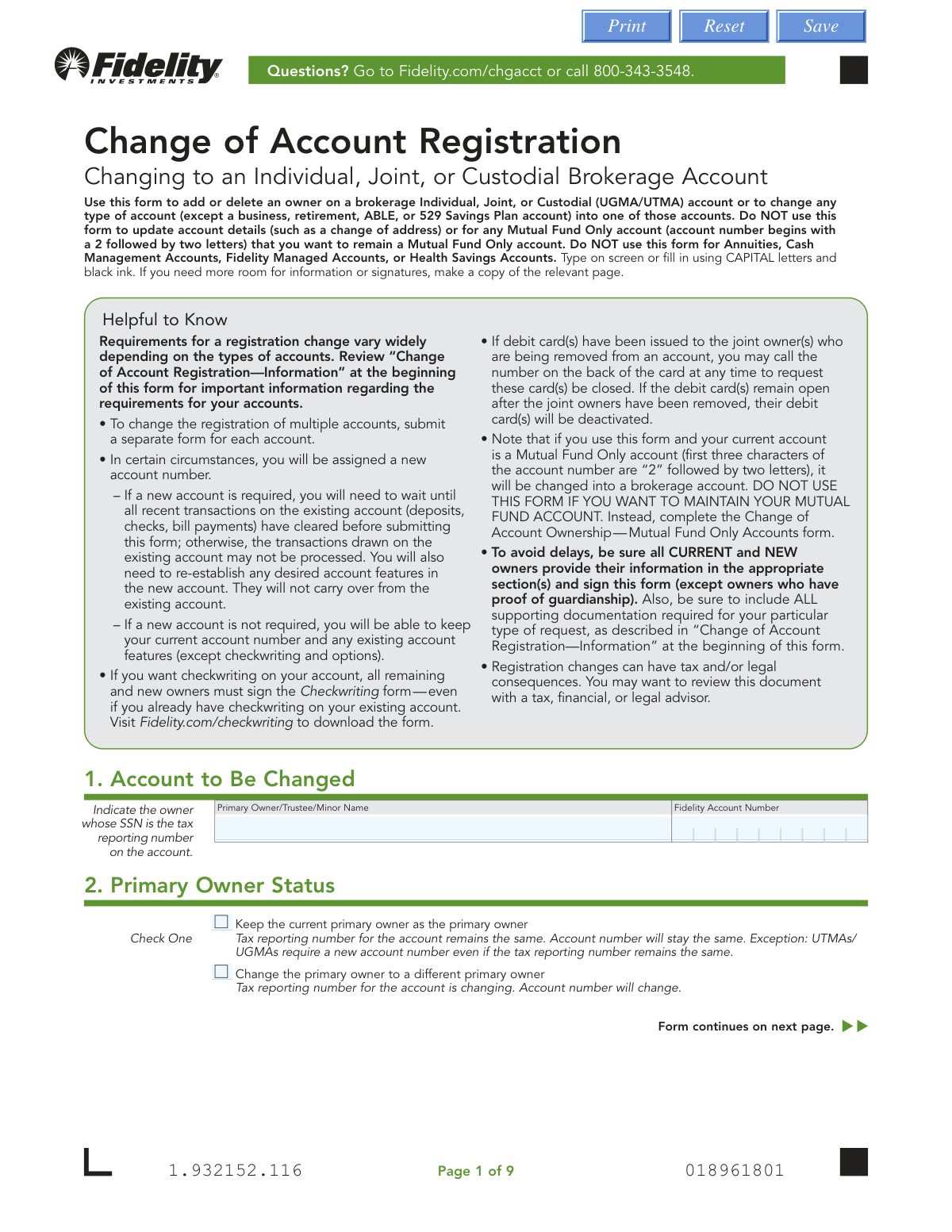
Yes! You can use AI to fill out Fidelity Change of Account Registration: Changing to an Individual, Joint, or Custodial Brokerage Account
Don't type 129 fields by hand. Tell our AI about yourself, or upload your driver's license, and it fills every field in seconds. You check it, then download, print or sign.
The AI does the filling. You just check it.
No typing into boxes, nothing to install.
What this form asks for
The AI fills all of it, from your answers or your documents.
The AI checks your answers before you download
14 checks built for this form, so a wrong date or a missing answer is caught before anyone else sees it.
This check cross-references the type of account change requested with the signature requirements matrix in the form's information section. It ensures that all required parties (e.g., current owners, new owners, legal representatives) have signed in the appropriate sections (8a or 8b). Failure to obtain all necessary signatures is a primary reason for rejection, as it indicates a lack of proper authorization for the change, delaying the process until a correctly signed form is submitted.
Validates that a Medallion signature guarantee is provided based on the rules tied to account value and transaction type (e.g., account over $100,000 when adding a non-spouse). This guarantee protects against fraudulent transfers by verifying the identity and authority of the signer. If a required guarantee is missing, the form will be rejected and returned, as the transaction cannot be processed without this level of identity assurance.
Checks for the presence of all necessary supporting documentation as specified in the requirements matrix, such as a death certificate, marriage certificate, or certified copy of court appointments. These documents provide legal proof for the requested change and are essential for compliance and legal validity. Submissions lacking the required documents will be considered incomplete and will not be processed.
Ensures all required fields in Section 4 for the Primary Account Owner (or minor) are completed, including full legal name, Taxpayer ID number, date of birth, and residential address. This information is fundamental for account setup, tax reporting (IRS), and identity verification under federal law. An incomplete Section 4 will halt the process, as the account cannot be properly registered or compliant without this core data.
This check verifies that the Social Security Number (SSN) or Taxpayer Identification Number (TIN) provided in Sections 4 and 5 consists of exactly 9 digits. It also ensures that if the primary owner is changing (Section 2), the new primary owner's TIN is different from the previous one. Correct tax information is critical for IRS reporting, and a malformed or incorrect TIN will lead to processing failure and potential tax reporting issues.
If an owner indicates they are a 'Foreign citizen', this validation ensures the government identification details are fully provided, including ID number, country of issuance, and dates. Crucially, it checks that the 'ID Expiration Date' is a future date. Using an expired ID is not permissible for identity verification, and failure to provide a valid, unexpired ID will result in the rejection of the application.
And 8 more checks
- Ensures State is Specified for UGMA/UTMA Accounts
- Checks for Logical Consistency in Employment and Income Source Fields
- Validates Fidelity Account Number and Eligibility
- Enforces Louisiana-Specific Joint Registration Rules
- Validates Date of Birth for Legal Age
- Ensures Signatures are in the Correct Section (8a vs. 8b)
- Verifies Completeness of Required Contact Information
- Validates Full Legal Name Requirement
Let AI fill out your Fidelity Change of Account Registration
No typing. Every field filled in seconds, checked, ready to sign.
How to Fill Out Fidelity Change of Account Registration Online for Free in 2026
What the AI walks you through.
- Navigate to Instafill.ai and upload or select the Fidelity Change of Account Registration form.
- Use the AI assistant to provide the existing account number and primary owner's name in Section 1.
- Specify the new registration type in Section 3 and provide the complete, updated information for the primary account owner in Section 4.
- Enter the required personal and financial details for any new or remaining additional owners in Section 5.
- Review and select any desired account features, such as margin borrowing, in Section 6.
- Ensure all parties—including owners being removed, owners remaining, and new owners—sign and date in the correct part of Section 8. Obtain a Medallion Signature Guarantee if required for your transaction value.
- Review the entire form for accuracy, gather all required supporting documents (like death certificates or marriage certificates), and submit the complete package to Fidelity.
Common Mistakes in Completing Fidelity Change of Account Registration
The ones the AI is built to catch.
Missing or Incorrect Supporting Documentation
Incorrect Signatures or Signing in the Wrong Section
Failure to Obtain a Medallion Signature Guarantee
Using the Wrong Form for the Account Type
Incomplete or Mismatched Personal Information
Misidentifying the Account Change Scenario in the Matrix
Submitting the Form Before Pending Transactions Clear
Incorrectly Filling Out Foreign Citizen Information
Ignoring Association and Affiliation Disclosures
Choosing an Ineligible or Unwanted Registration Type
Frequently Asked Questions About Fidelity Change of Account Registration
Is it really free for 7 days?
Can I fill other forms too?
How do I cancel?
How does the AI fill out Fidelity Change of Account Registration?
What happens to my information?
How complex is Fidelity Change of Account Registration to fill out?
What is the purpose of the 'Change of Account Registration' form?
Which accounts cannot be changed using this form?
I'm adding my spouse to my individual account. What documents do I need?
What is a Medallion Signature Guarantee and when is it required?
Who needs to sign the form in Section 8?
Will I get a new account number after submitting this form?
What happens if I use this form for my Mutual Fund Only account?
What documents are needed if an account owner has passed away?
How should I submit the completed form and documents?
What should I do if I have questions about a change involving a deceased owner?
Can I use an AI tool to help me fill out this form?
How can I use Instafill.ai to complete this form online?
The PDF form I downloaded from the website is not fillable. What can I do?
Get your Fidelity Change of Account Registration filled out by AI
$0 today. Cancel before Nov 1 and you pay nothing.
Other forms like this one
brokerage forms: 41, Fidelity Change of Account Registration — Changing to a Trust, Estate, Guardian, or Conservator Brokerage Account, Move Assets from My Schwab Brokerage Account, Open a Schwab One® Brokerage Account, Charles Schwab PCRA Self-Directed Brokerage Account, Schwab Health Savings Brokerage Account (HSBA) to HSA Invest Choice Account Transfer Form, Intra-Brokerage Securities Transfer, Moving your Vanguard funds to a Vanguard Brokerage Account Disclosure statement, Vanguard Brokerage Account CREST Transfer Form, Moving your Vanguard funds to a Vanguard Brokerage Account Disclosure statement, TIAA Brokerage Incoming Account Transfer Form, TIAA Brokerage Joint Transfer on Death Account Agreement, TIAA Brokerage IRA Distribution Request (Form F11025), Request for a Qualified Charitable Distribution (QCD) from a Brokerage Individual Retirement Account (IRA), TIAA Brokerage Authorization To Gift Securities, Form F11014, TIAA Brokerage Power of Attorney (POA) Form, TIAA Brokerage Durable Power Of Attorney Affidavit Of Full Force And Effect, TIAA Brokerage Incoming Managed Account Transfer Form (F11319), Form F11015, TIAA Brokerage Designation of Beneficiary, Form F11004, TIAA Brokerage Individual Transfer on Death Account Agreement
registration forms: Form DE 1, Commercial Employer Account Registration, Form 69-001, Industrial Hemp Registration, Form VTR-60, Application for Replacement License Plate(s) and/or Registration Sticker, Food (Registration of Premises) (Jersey) Order 2001 — Schedule 1 (Article 4(1)) — Form of Application for Registration of Food Premises, Discovery Health Practice Registration Form 2026 (DHHPR2001), Course Roster and Location Registration Form, Fidelity Change of Account Registration — Changing to a Trust, Estate, Guardian, or Conservator Brokerage Account, Fidelity Change of Account Registration — Cash Management Account, MS(R) 21A, Application for the Registration of a Ship under the (Malta) Merchant Shipping Act, 1973, Form 130-U, Application for Texas Title and/or Registration, Anmeldung zum R+V-Firmenportal Vorsorge (Registration for the R+V Company Portal for Pensions), Form SSA-1694, Entity Registration and Taxpayer Information, Form IIGAREG, Institutional Account Registration Form, Form 2, Application for Licensure and First Registration, Licensed Clinical Social Worker, BIR Form No. 1901, Application for Registration For Self-Employed (Single Proprietor/Professional), Mixed Income Individuals, Non-Resident Alien Engaged in Trade/Business, Estate and Trust, California Voter Registration Cancellation Request Form, Form MV-82, Vehicle Registration/Title Application, Form 1-S, Full Requirement Initial Charity Registration Application, New York Vehicle Registration/Title Application, Form MV-145V, Application for Severely Disabled Veteran, Severely Disabled Veteran Motorcycle Plate Decal or Disabled Veteran Registration Plate
Fidelity forms: Fidelity Funds Account Transfer of Assets Form, Fidelity Stock Plan Services (SPS) Transfer Request Form, How to Transfer Assets from Morgan Stanley to Fidelity Investments (Fidelity Stock Plan Services Guide), Fidelity Investments Transfer/Rollover/Exchange Form, Fidelity Investments Standing Transfer Instructions Form, Fidelity Charitable 144/145 Contribution Form, One-Time Withdrawal – IRA, Fidelity Investments, Fidelity Investments Transfer/Rollover Form, Fidelity Advisor 403(b) Distribution Request Form, Fidelity Advisor IRA Distribution Request for Automatic Rollover Accounts, Special Tax Notice: Your Rollover Options - Fidelity Investments, Fidelity Charitable Letter of Authorization, Fidelity Advisor Trading Authorization and Indemnification, Fidelity Investment-Only (Non-Prototype) Retirement Account Application, Fidelity NetBenefits Send a Document Form, Fidelity NetBenefits Auditor's Guide: An Overview of Fidelity's 2024 Plan Year Reporting Package, Fidelity NetBenefits Distribution - Recurring Payments, Fidelity Investments® Beneficiary Distribution Form, Fidelity Investments Distribution Form, Fidelity One-Time Withdrawal Form — Nonretirement
account registration forms: Fidelity Change of Account Registration — Changing to a Trust, Estate, Guardian, or Conservator Brokerage Account, Form DE 1, Commercial Employer Account Registration, Fidelity Change of Account Registration — Cash Management Account, Form IIGAREG, Institutional Account Registration Form
broker forms: Letter of Authorization to Broker, Form 1099-B, Proceeds From Broker Transactions, 41, Fannie Mae Residential Broker Price Opinion (BPO) (Revised 03/99), Fidelity Change of Account Registration — Changing to a Trust, Estate, Guardian, or Conservator Brokerage Account, Move Assets from My Schwab Brokerage Account, Open a Schwab One® Brokerage Account, Charles Schwab PCRA Self-Directed Brokerage Account, Schwab Health Savings Brokerage Account (HSBA) to HSA Invest Choice Account Transfer Form, Intra-Brokerage Securities Transfer, Moving your Vanguard funds to a Vanguard Brokerage Account Disclosure statement, Vanguard Brokerage Account CREST Transfer Form, Moving your Vanguard funds to a Vanguard Brokerage Account Disclosure statement, TIAA Brokerage Incoming Account Transfer Form, TIAA Brokerage Joint Transfer on Death Account Agreement, TIAA Brokerage IRA Distribution Request (Form F11025), Request for a Qualified Charitable Distribution (QCD) from a Brokerage Individual Retirement Account (IRA), Form OL 75, Auto Broker Log, TIAA Brokerage Authorization To Gift Securities, Form F11014, TIAA Brokerage Power of Attorney (POA) Form
custodial account forms: 403(b) Custodial Account Beneficiary Designation Change Form, Qualified Retirement Plan and 403(b)(7) Custodial Account Distribution Request Form, Custodial Account – Transfer of Ownership Form, Fidelity Investments 403(b) Custodial Account Application, Fidelity Roth Individual Retirement Account Custodial Agreement and Disclosure Statement
brokerage account forms: BlackRock New Account Application For Non-Retirement Accounts, Fidelity Change of Account Registration — Changing to a Trust, Estate, Guardian, or Conservator Brokerage Account, Move Assets from My Schwab Brokerage Account, Open a Schwab One® Brokerage Account, Charles Schwab PCRA Self-Directed Brokerage Account, Schwab Health Savings Brokerage Account (HSBA) to HSA Invest Choice Account Transfer Form, Moving your Vanguard funds to a Vanguard Brokerage Account Disclosure statement, Vanguard Brokerage Account CREST Transfer Form, Moving your Vanguard funds to a Vanguard Brokerage Account Disclosure statement, TIAA Brokerage Incoming Account Transfer Form, TIAA Brokerage Joint Transfer on Death Account Agreement, Request for a Qualified Charitable Distribution (QCD) from a Brokerage Individual Retirement Account (IRA), TIAA Brokerage Incoming Managed Account Transfer Form (F11319), Form F11004, TIAA Brokerage Individual Transfer on Death Account Agreement, Fidelity® Brokerage Business Account Certification, Brokerage Corestone Account Application, IRA/IRRA®/Roth IRA/SEP/SRA Divorce Transfer Instruction Form, Merrill AwardChoice® Individual Investor Account Application Form for U.S. Persons, Merrill Business Investor Account (BIA) and Working Capital Management Account (WCMA) Account Application Booklet and Agreements, Merrill Edge Self-Directed Trust and Estate Cash Management Account (CMA Account) Account Application Booklet and Agreements
joint account forms: Joint Account Agreement - Merrill Lynch, TIAA Brokerage Joint Transfer on Death Account Agreement, Option Information — Individual, Joint and Trust Accounts, Navy Federal Change of Information/Add Joint Owner (for primary account holders 18 and over)
Let AI fill out your Fidelity Change of Account Registration
Your trial starts once a card is added. You pay nothing before Nov 1.
Our AI already knows this form, all 129 fields of it. Skip the typing: tell it about yourself, or upload what you have, and it fills the whole form in seconds.
- AI fills every field on all 12 pages, checkboxes included
- No typing into boxes: answer a few questions, or upload your driver's license, an old copy of this form, a photo of a document
- The AI checks the answers; you review and change anything before you download
- Download the finished PDF, print it, or sign it online
- Encrypted, and never used to train AI
Cancel before Nov 1 and you pay nothing.
A card is needed to start the trial. Cancel in two clicks from your account.
Terms · Privacy