Yes! You can use AI to fill out Charles Schwab & Co., Inc. Account Transfer Form
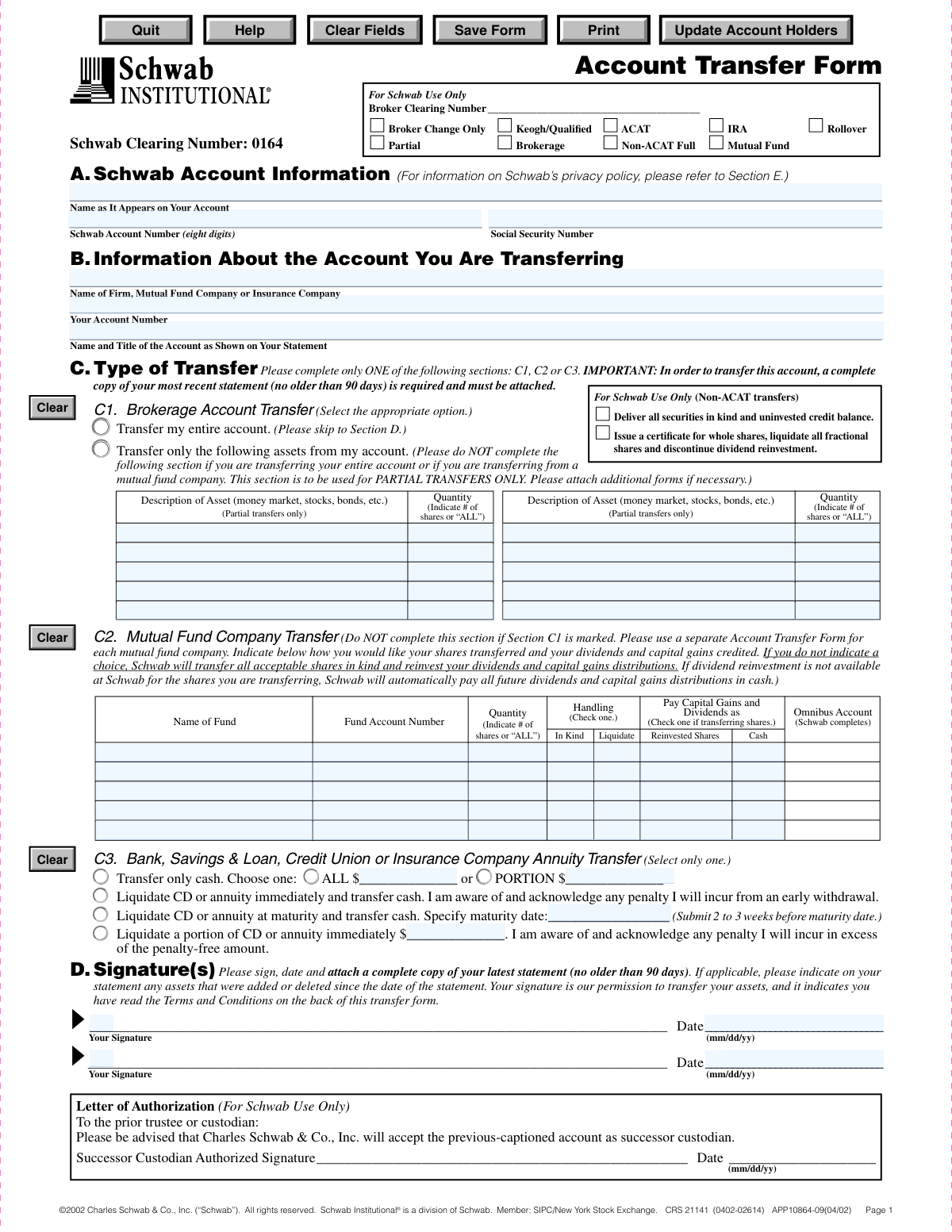
This form is a legal document that authorizes Charles Schwab & Co., Inc. to initiate the transfer of financial assets, such as stocks, mutual funds, or cash, from another brokerage, bank, or insurance company into your Schwab account. It specifies whether the entire account or only partial assets should be moved, streamlining the process of consolidating investments. Today, this form can be filled out quickly and accurately using AI-powered services like Instafill.ai, which can also convert non-fillable PDF versions into interactive fillable forms.
CRS 21141 is part of the
Schwab forms, Charles Schwab forms, account transfer forms and transfer forms categories on Instafill.
Rather not fill this in by hand? Instafill is an online form filler that completes PDF forms automatically — upload the blank form, answer a few questions, and the AI fills every field.
Form specifications
| Form name: | Charles Schwab & Co., Inc. Account Transfer Form |
| Number of pages: | 1 |
| Language: | English |
Our AI automatically handles information lookup, data retrieval, formatting, and form filling.
It takes less than a minute to fill out CRS 21141 using our AI form filling.
Securely upload your data. Information is encrypted in transit and deleted immediately after the form is filled out.
Instafill Demo: How to fill out PDF forms in seconds with AI
How to Fill Out CRS 21141 Online for Free in 2026
Are you looking to fill out a CRS 21141 form online quickly and accurately? Instafill.ai offers the #1 AI-powered PDF filling software of 2026, allowing you to complete your CRS 21141 form in just 37 seconds or less.
Follow these steps to fill out your CRS 21141 form online using Instafill.ai:
- 1 Navigate to Instafill.ai and upload or select the Charles Schwab Account Transfer Form.
- 2 Use the AI assistant to accurately fill in your Schwab account information in Section A.
- 3 Provide the details of the account you are transferring from, including the firm name and your account number, in Section B.
- 4 In Section C, specify the type of transfer you are making, such as a full brokerage transfer, a partial transfer of specific assets, or a mutual fund transfer.
- 5 Upload a complete, recent copy of your statement from the delivering firm as required.
- 6 Review all the information populated by the AI for accuracy, ensuring all details match your financial records.
- 7 Electronically sign and date the form in Section D to authorize the transfer of your assets to Schwab.
Our AI-powered system ensures each field is filled out correctly, reducing errors and saving you time.
Why Choose Instafill.ai for Your Fillable CRS 21141 Form?
Speed
Complete your CRS 21141 in as little as 37 seconds.
Up-to-Date
Always use the latest 2026 CRS 21141 form version.
Cost-effective
No need to hire expensive lawyers.
Accuracy
Our AI performs 10 compliance checks to ensure your form is error-free.
Security
Your personal information is protected with bank-level encryption.
Frequently Asked Questions About CRS 21141
This form is used to authorize the transfer of assets, such as stocks, cash, or mutual funds, from an account at another financial institution into your Charles Schwab account.
Anyone who wants to move their investments from another brokerage, mutual fund company, or bank to their existing or new Charles Schwab account should complete this form.
You must attach a complete copy of your most recent account statement from the firm you are transferring from. The statement cannot be more than 90 days old.
In Section C1, check 'Transfer my entire account' for a full transfer. For a partial transfer, select 'Transfer only the following assets' and list the specific assets and quantities you want to move.
Use Section C1 for transferring a standard brokerage account, C2 for an account directly from a mutual fund company, and C3 for transferring cash from a bank, S&L, credit union, or an annuity.
Fractional shares cannot be transferred directly. Your delivering firm will liquidate (sell) any fractional shares and transfer the resulting cash to your Schwab account.
The form authorizes your old firm to liquidate any non-transferable assets. The resulting cash balance will then be transferred to your Schwab account.
You should submit the signed form and your account statement directly to Charles Schwab. This can typically be done via their online portal, by mail, or at a local branch.
A standard electronic transfer using the ACAT system usually takes five to eight business days to complete after Schwab receives and processes your valid request.
Yes, your signature is mandatory in Section D. It provides Schwab with the legal permission to act on your behalf to transfer the assets from your other institution.
Yes, services like Instafill.ai use AI to accurately auto-fill form fields, which can save you time and help reduce errors.
You can use a service like Instafill.ai to upload the PDF and fill it out electronically. This allows you to type your information directly into the fields for a clean, legible result before printing to sign.
Tools like Instafill.ai can convert flat, non-fillable PDFs into interactive forms. Simply upload your document, and the service will automatically make the fields fillable online.
Upon receiving the transfer instruction, your old firm will cancel all open orders (like buy or sell limit orders) for your account on their books.
Compliance CRS 21141
Validation Checks by Instafill.ai
1
Ensures Schwab Account Number is an 8-digit number
This check validates that the 'Schwab Account Number' provided in Section A consists of exactly eight digits. This is crucial for correctly identifying the destination account for the transfer. If the number is not eight digits, the form submission will be rejected, and the user will be prompted to enter a valid account number to prevent misdirected assets.
2
Validates Social Security Number format
This check verifies that the 'Social Security Number' in Section A is a valid 9-digit number, accepting formats with or without hyphens (e.g., XXXXXXXXX or XXX-XX-XXXX). A valid SSN is required for tax reporting and identity verification purposes. An invalid format will trigger an error, requiring the user to correct the entry before the form can be processed.
3
Verifies a single transfer type is selected
This validation ensures that the user has completed only one of the three main transfer type sections: C1, C2, or C3. The form explicitly states that only one section should be filled out to define the transfer instructions clearly. If more than one section is completed, the submission will fail, and the user will be instructed to choose only one transfer type to avoid ambiguity.
4
Confirms attachment of a recent account statement
This check verifies that a file has been attached to the form submission, as a complete copy of the most recent statement is required. This statement is essential for the operations team to verify the assets being transferred. Failure to attach a statement will block the submission, with a message informing the user that the document is mandatory.
5
Validates the attached statement is not older than 90 days
This check inspects the date on the attached account statement to ensure it is no older than 90 days from the submission date. A recent statement provides an accurate, up-to-date snapshot of the assets to be transferred, reducing the risk of discrepancies. If the statement is too old, the user will be required to upload a more current one.
6
Ensures signature and date are provided
This validation confirms that at least one 'Your Signature' line and its corresponding 'Date' field in Section D have been completed. The signature provides legal authorization for the transfer, and the date establishes when the authorization was given. An unsigned or undated form is legally invalid and will be rejected until the required information is provided.
7
Validates date fields are in MM/DD/YY format
This check ensures that all date fields on the form, such as the signature date in Section D and the maturity date in Section C3, are entered in a valid MM/DD/YY format. Consistent date formatting is critical for accurate record-keeping and processing timelines. An invalid date format will result in an error, prompting the user to correct the entry.
8
Requires asset details for partial brokerage transfers
If the user selects 'Transfer only the following assets' in Section C1, this check ensures that at least one row in the asset table is filled out with both a 'Quantity' and a 'Description of Asset'. Without these details, a partial transfer cannot be executed. If the option is checked but no assets are listed, the form will be considered incomplete and rejected.
9
Requires maturity date for 'Liquidate at Maturity' option
This validation is triggered if the user selects 'Liquidate CD or annuity at maturity' in Section C3. It checks that the 'Specify maturity date' field is filled with a valid, future date. This date is essential for scheduling the liquidation and transfer correctly. If the date is missing or in the past, the submission will fail.
10
Verifies a valid amount for partial cash transfers
When a user selects 'Transfer only cash' and the 'PORTION' option in Section C3, this check validates that the provided value is a positive number in a valid currency format. This ensures that the instruction to transfer a specific cash amount is clear and executable. An invalid or missing amount will cause the validation to fail, requiring the user to input a proper value.
11
Checks for completeness of Section B account information
This validation ensures that all fields in Section B, 'Information About the Account You Are Transferring,' are filled out. This includes the firm name, account number, and the name on the account statement. This information is critical for Schwab to correctly identify and request the assets from the other institution, and missing data will halt the transfer process.
12
Ensures logical consistency for entire vs. partial transfers
This check enforces the logic in Section C1 that if 'Transfer my entire account' is selected, the partial transfer asset list must be empty. Conversely, if any assets are listed for a partial transfer, the 'entire account' option cannot be selected. This prevents contradictory instructions and ensures the user's intent is unambiguous, rejecting the form if both are specified.
Common Mistakes in Completing CRS 21141
The form explicitly states in Sections C and D that a complete copy of your most recent statement (no older than 90 days) from the delivering firm is required. Applicants often overlook this and submit the form without the necessary documentation, which is essential for verifying the assets to be transferred. This omission will halt the entire process, as the transfer cannot be initiated without the statement, causing significant delays.
Section A requires the name on the Schwab account, while Section B requires the name on the account being transferred. These names must match exactly, including middle initials, suffixes (e.g., Jr., III), and trust designations. A common mistake is using a nickname or an abbreviated name, which causes a name mismatch and an automatic rejection of the transfer by the delivering firm. To avoid this, carefully copy the full, official account title from both statements.
Section C is divided into three parts (C1 for Brokerage, C2 for Mutual Funds, C3 for Banks) with a clear instruction to complete only one. Confused applicants sometimes fill out portions of multiple sections, creating ambiguity about their intent. This error forces the processing agent to either reject the form or contact the applicant for clarification, delaying the transfer. Carefully read the headings and select only the single section that applies to your account type.
When performing a partial transfer in Section C1, applicants must specify the exact quantity and description of each asset. Common errors include writing 'some' instead of a specific number of shares, using incorrect ticker symbols, or providing a vague description like 'my blue-chip stocks.' This lack of clarity makes it impossible to execute the transfer correctly and will result in the form being returned. For each asset, provide the full name, ticker symbol, and the exact number of shares to transfer.
The form requires two separate account numbers: the new eight-digit Schwab account number (Section A) and the account number at the firm you are transferring from (Section B). A single mistyped digit in either number is a frequent data entry error that will cause the automated transfer system to fail, as it cannot locate the source or destination account. This halts the entire process until corrected, so it is critical to transcribe both numbers directly from your statements with perfect accuracy.
This form is a flat, non-fillable PDF, often leading people to print and complete it by hand. Illegible handwriting, especially for critical details like names, account numbers, and asset descriptions, is a major cause of data entry errors by the processing team. These errors can lead to failed transfers or assets being misidentified. To prevent this, it's best to use a tool that can make the PDF fillable, ensuring all text is clear. AI-powered tools like Instafill.ai can convert such PDFs into fillable forms and help populate the data accurately.
A signature in Section D provides the legal authorization for Schwab to initiate the transfer on your behalf. It is surprisingly common for applicants to fill out the entire form but forget to sign and date it. An unsigned form is legally invalid and will be rejected immediately, forcing you to restart the submission process. Always perform a final review to ensure all required signature and date fields are completed in the correct format (mm/dd/yy).
Section C3 provides an option to liquidate a CD or annuity immediately, requiring an acknowledgement of potential penalties. Some people check this box without first investigating the cost of an early withdrawal, which can result in a significant and unexpected loss of funds. Before selecting this option, you must contact your current bank or insurance company to understand the exact financial penalty you will incur.
In Section C2, applicants must choose whether to transfer mutual fund shares 'In Kind' (as shares) or 'Liquidate' (sell and transfer cash). If no selection is made, the form defaults to an 'In Kind' transfer, which may not be the desired outcome and could have unintended tax implications. This mistake happens when users overlook these crucial checkboxes. To avoid this, decide on your transfer strategy beforehand and clearly mark your choices for each fund.
Saved over 80 hours a year
“I was never sure if my IRS forms like W-9 were filled correctly. Now, I can complete the forms accurately without any external help.”
Kevin Martin Green
Your data stays secure with advanced protection from Instafill and our subprocessors




Robust compliance program
Transparent business model
You’re not the product. You always know where your data is and what it is processed for.
ISO 27001, HIPAA, and GDPR
Our subprocesses adhere to multiple compliance standards, including but not limited to ISO 27001, HIPAA, and GDPR.
Security & privacy by design
We consider security and privacy from the initial design phase of any new service or functionality. It’s not an afterthought, it’s built-in, including support for two-factor authentication (2FA) to further protect your account.
Fill out CRS 21141 with Instafill.ai
Worried about filling PDFs wrong? Instafill securely fills charles-schwab-co-inc-account-transfer-form forms, ensuring each field is accurate.
