Yes! You can use AI to fill out Charles Schwab IRA Account Application
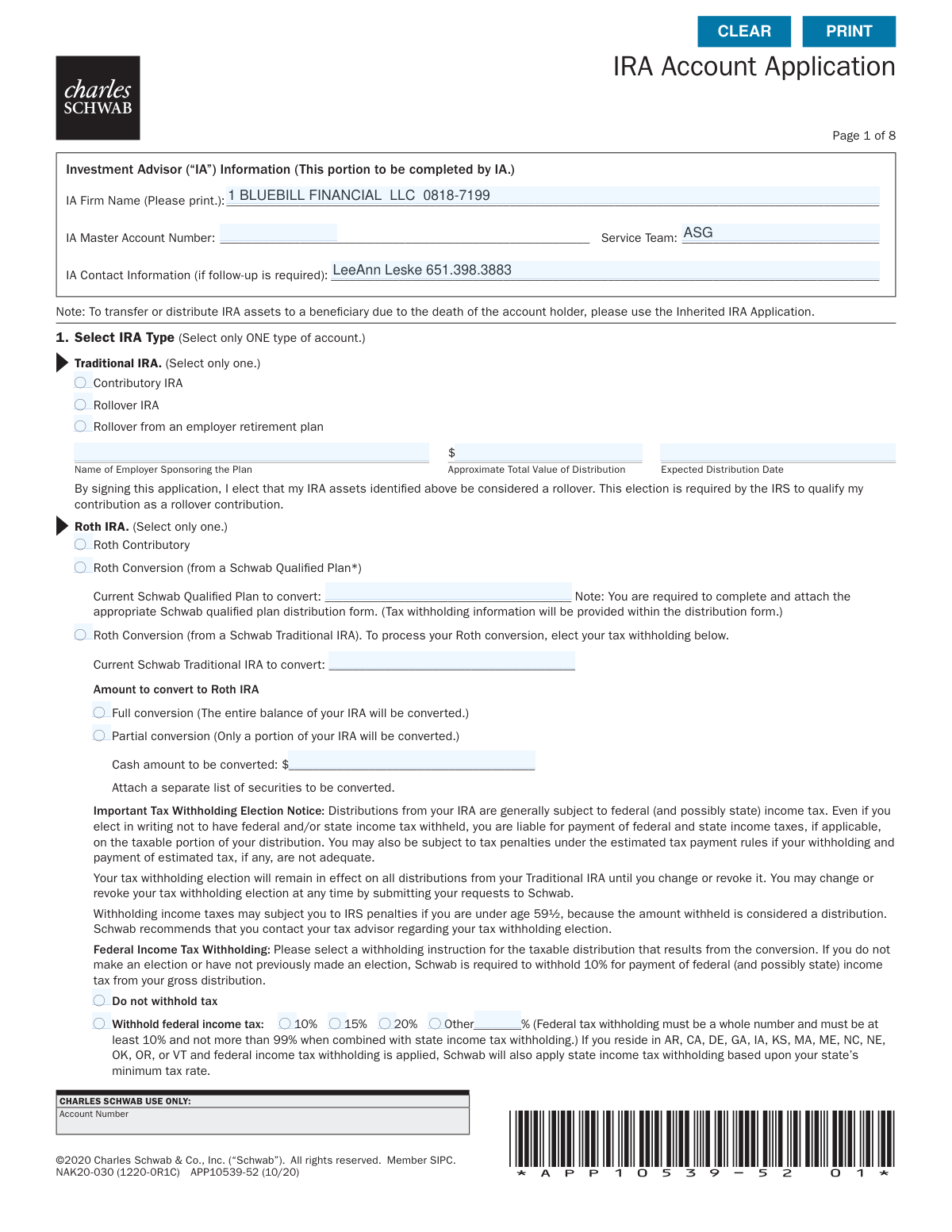
The Charles Schwab IRA Account Application is a comprehensive form required to establish an Individual Retirement Account with Charles Schwab & Co., Inc. It allows applicants to select their desired IRA type, provide personal and employment information, designate beneficiaries, and set up authorizations for investment advisors. Completing this application is the first step toward creating a tax-advantaged retirement savings plan with Schwab. Today, this form can be filled out quickly and accurately using AI-powered services like Instafill.ai, which can also convert non-fillable PDF versions into interactive fillable forms.
APP10539-52 is part of the
Schwab forms, brokerage forms, investment account forms, IRA forms, Charles Schwab forms, retirement account forms, account application forms, IRA application forms and IRA account forms categories on Instafill.
Rather not fill this in by hand? Instafill is an online form filler that completes PDF forms automatically — upload the blank form, answer a few questions, and the AI fills every field.
Form specifications
| Form name: | Charles Schwab IRA Account Application |
| Number of pages: | 1 |
| Language: | English |
Our AI automatically handles information lookup, data retrieval, formatting, and form filling.
It takes less than a minute to fill out APP10539-52 using our AI form filling.
Securely upload your data. Information is encrypted in transit and deleted immediately after the form is filled out.
Instafill Demo: How to fill out PDF forms in seconds with AI
How to Fill Out APP10539-52 Online for Free in 2026
Are you looking to fill out a APP10539-52 form online quickly and accurately? Instafill.ai offers the #1 AI-powered PDF filling software of 2026, allowing you to complete your APP10539-52 form in just 37 seconds or less.
Follow these steps to fill out your APP10539-52 form online using Instafill.ai:
- 1 Navigate to Instafill.ai and upload or select the Charles Schwab IRA Account Application form.
- 2 In Section 1, select the type of IRA you are opening, such as Traditional, Roth, or Rollover, and provide any required details for that specific type.
- 3 Complete Section 2 with your personal account holder information, including your name, address, Social Security Number, date of birth, and employment details.
- 4 Optionally, designate one or two Trusted Contacts in Section 2 to help protect your account from potential financial exploitation.
- 5 In Section 7, designate your primary and contingent beneficiaries, providing their personal information and the percentage of assets they should receive.
- 6 Review the authorizations for your Investment Advisor (IA) in Section 5 and your issuer communications preferences in Section 6, making selections as needed.
- 7 Carefully review the entire application for accuracy, then sign and date Section 8 to authorize the account opening and certify your information.
Our AI-powered system ensures each field is filled out correctly, reducing errors and saving you time.
Why Choose Instafill.ai for Your Fillable APP10539-52 Form?
Speed
Complete your APP10539-52 in as little as 37 seconds.
Up-to-Date
Always use the latest 2026 APP10539-52 form version.
Cost-effective
No need to hire expensive lawyers.
Accuracy
Our AI performs 10 compliance checks to ensure your form is error-free.
Security
Your personal information is protected with bank-level encryption.
Frequently Asked Questions About APP10539-52
This form is used to open a new Individual Retirement Account (IRA) with Charles Schwab, such as a Traditional, Roth, SIMPLE, or SEP-IRA. It is also used for rolling over funds from an employer's retirement plan or converting an existing Traditional IRA to a Roth IRA.
You should complete this form if you are opening a new Schwab IRA, rolling over funds from another retirement plan, or converting a Traditional IRA to a Roth IRA. It is typically filled out with the assistance of your Investment Advisor (IA).
No, this is not the correct form for that situation. The form states that to transfer or distribute IRA assets due to the death of an account holder, you must use the 'Inherited IRA Application'.
In Section 1, you will need to provide the name of the employer sponsoring the plan, the approximate value of the distribution, and the expected distribution date. You must also complete and attach the appropriate qualified plan distribution form.
A Trusted Contact is a person you authorize Schwab to contact regarding potential financial exploitation or if they cannot reach you. Providing this information is voluntary but encouraged; the Trusted Contact cannot make transactions or view your account information.
This is a standard regulatory question to identify potential conflicts of interest. If you are affiliated with or employed by a stock exchange or FINRA member firm, you must provide a letter from your employer approving the account.
Use Section 7 to list your primary and contingent beneficiaries and the percentage each will receive. If you have more than four beneficiaries or need more complex designation options, you must complete and attach the separate 'Schwab IRA Beneficiary Designation' form.
Yes, providing your email in Section 2 enrolls you in paperless delivery for statements, trade confirmations, and other documents. You can opt out and choose to receive documents by postal mail by checking the 'No' box in Section 4.
This optional section allows you to grant your IA specific permissions, such as placing trades in your account or authorizing the payment of advisory fees directly from your account. You must select which authorizations you wish to grant.
If you are converting a Traditional IRA to a Roth IRA and do not make a tax withholding election, Schwab is required to withhold 10% of the distribution for federal income tax. You are still liable for any additional taxes owed.
Yes, services like Instafill.ai use AI to help you accurately auto-fill form fields with your personal information. This can save you time and help prevent common errors when completing the application.
To fill out this form online, you can use a service like Instafill.ai. Simply upload the PDF, and the platform will make it an interactive, fillable form that you can complete on your computer.
If you have a non-fillable or 'flat' PDF, you can use a tool like Instafill.ai to instantly convert it into a fillable version. This allows you to type your information directly into the fields instead of printing and filling it out by hand.
By signing, you agree that your account will be governed by the Schwab Account Agreement, which includes a predispute arbitration clause. You also certify that your taxpayer information is correct and authorize Schwab to open the account.
Compliance APP10539-52
Validation Checks by Instafill.ai
1
Ensures Single IRA Type Selection
This check verifies that only one IRA account type (e.g., Traditional, Roth, SIMPLE) is selected in Section 1. Selecting a single type is fundamental for establishing the correct account structure, contribution limits, and tax implications. If more than one IRA type is selected, the application is ambiguous and must be rejected until the applicant clarifies their choice.
2
Validates Social Security Number Format and Presence
This check ensures the Social Security/Tax ID Number field in Section 2 is completed and follows the standard ###-##-#### format. This number is a critical unique identifier required by the IRS for tax reporting and is essential for account verification. An application with a missing or incorrectly formatted SSN cannot be processed and will fail compliance checks.
3
Verifies Applicant's Age and Date of Birth Validity
This validation confirms the Date of Birth in Section 2 is a real calendar date in mm/dd/yyyy format and that the applicant is of legal age to open a financial account (e.g., 18 years or older). This is a legal requirement for entering into the account agreement. An invalid date or an underage applicant will result in the application being rejected.
4
Confirms Beneficiary Portions Sum to 100%
This check verifies that if any beneficiary 'Portion %' fields are filled in Section 7, the sum for all Primary beneficiaries equals 100%, and separately, the sum for all Contingent beneficiaries equals 100%. This is crucial to ensure there is no ambiguity in asset distribution upon the account holder's death, preventing potential legal challenges. If the portions for a beneficiary type are entered but do not sum to 100%, the designation is invalid and must be corrected.
5
Requires Employment Details Based on Status
If the applicant's Employment Status in Section 2 is 'Employed' or 'Self-Employed', this check ensures the 'Employer Name/Business Name' and 'Occupation' fields are filled. This information is a key part of Know Your Customer (KYC) regulations, helping to build a financial profile and assess risk. Failure to provide these mandatory details will halt the application process.
6
Prohibits P.O. Box for Legal Address
This validation ensures the 'Home/Legal Street Address' field in Section 2 does not contain a Post Office Box. Federal regulations, such as the USA PATRIOT Act, require a physical residential address for identity verification purposes. An application listing a P.O. Box as the legal address will be flagged as incomplete and require correction.
7
Validates Combined Tax Withholding Limits
This check verifies that the sum of Federal and State income tax withholding percentages does not exceed 99%, and that the Federal withholding, if elected, is a whole number of at least 10%. These rules prevent invalid tax instructions that could lead to processing errors and IRS compliance issues. If the percentages are invalid or exceed the combined limit, the form submission will fail, requiring the applicant to adjust their elections.
8
Ensures Disclosure for Industry-Affiliated Persons
This check validates that if an applicant answers 'Yes' to being affiliated with a FINRA member or being an officer of a publicly held company, the corresponding company name and/or symbol fields are completed. This disclosure is a strict regulatory requirement to monitor for potential conflicts of interest and insider trading. An incomplete disclosure will prevent account opening until the required details are provided.
9
Mandates Identification for Non-U.S. Citizens
If the applicant is not a U.S. citizen, this validation ensures the entire Identification section (Type, Number, Issue Date, Expiration Date) is completed and that the ID is not expired. This is crucial for complying with anti-money laundering (AML) regulations and verifying the identity of foreign persons. Missing or expired identification information will block the application from being processed.
10
Validates Rollover or Conversion Source Details
When a 'Rollover IRA' or 'Roth Conversion' is selected in Section 1, this check ensures that the required source account information (e.g., 'Name of Employer Sponsoring the Plan' or 'Current Schwab Traditional IRA to convert') is provided. This data is essential for correctly processing the asset transfer and ensuring the transaction receives the proper tax treatment. Without this source information, the rollover or conversion cannot be executed.
11
Confirms Presence of Signature and Date
This is a critical check to verify that the applicant has signed and dated the application in Section 8. The signature legally binds the applicant to the account's terms and agreements, while the date establishes when the contract was executed. An application lacking a signature or date is legally non-binding and will be immediately rejected.
12
Ensures Minimum Contact Info for Trusted Contact
If a name is entered for a Trusted Contact, this check verifies that a relationship is selected and at least one method of contact (Mailing Address, Home Phone, Mobile Phone, or Email Address) is provided. This ensures Schwab has a viable way to reach the designated person if concerns about financial exploitation or other issues arise. An incomplete Trusted Contact entry will be flagged, prompting the user to either complete it or remove it.
13
Validates Conditional Logic for Issuer Communications
This check enforces the rule in Section 6 that if the applicant selects 'No' to appointing their IA for issuer communications, they must then make a subsequent choice on whether the IA 'should' or 'should not' receive informational copies. This ensures the applicant's preference is clearly and completely captured, avoiding ambiguity in document routing. An incomplete selection will result in a validation error, preventing submission until the choice is made.
14
Validates Partial Roth Conversion Amount
If the applicant selects 'Roth Conversion' from a Schwab Traditional IRA and then chooses 'Partial conversion' in Section 1, this check ensures that a valid monetary value is entered in the 'Cash amount to be converted' field. This amount is necessary to execute the specific instruction for the partial conversion. The application cannot proceed without this value if a partial conversion is requested.
Common Mistakes in Completing APP10539-52
Applicants often get confused by the various options and may select more than one IRA type or sub-type, such as checking both 'Contributory IRA' and 'Rollover IRA'. The form explicitly states to 'Select only ONE type of account.' This error leads to processing delays as the firm must contact the applicant for clarification on their intent, potentially delaying the account opening and any associated fund transfers.
When selecting a 'Rollover from an employer retirement plan' or a 'Roth Conversion,' applicants frequently omit necessary details. This includes forgetting the employer's name for a rollover, failing to specify the amount for a partial conversion, or neglecting to attach the required Schwab qualified plan distribution form. An incomplete section prevents the firm from processing the rollover or conversion, halting the application until the missing information or documents are provided.
The tax withholding section for Roth conversions is a common source of errors. Applicants may enter a percentage below the 10% minimum, fail to use a whole number for federal withholding, or simply not understand the implications of their choice, leading to unexpected tax liabilities or penalties. If no election is made, Schwab defaults to a 10% withholding, which may not align with the applicant's financial strategy. It is crucial to consult a tax advisor and enter a valid percentage.
Applicants sometimes enter a P.O. Box for their 'Home/Legal Street Address' despite the form's instruction 'No P.O. boxes, please.' Federal regulations (like the USA PATRIOT Act) require financial institutions to collect a physical residential address to verify a customer's identity. Using a P.O. Box will result in the application being rejected or delayed until a valid physical address is provided.
If an applicant is employed by or affiliated with a stock exchange or FINRA member firm, they must check 'Yes' on the regulatory question and attach a letter from their employer approving the account. People often check 'Yes' but forget to include the required letter with their application. This is a strict regulatory requirement, and its omission will halt the account opening process until the approval letter is received by Schwab.
A very frequent error is in the beneficiary designation section, where the assigned percentages for all Primary beneficiaries or all Contingent beneficiaries do not add up to exactly 100%. This often happens due to simple math errors, especially with multiple beneficiaries. An incorrect total makes the designation ambiguous and legally invalid, forcing the firm to either reject the designation or default to an equal distribution, which may not be the applicant's wish.
Applicants sometimes write a specific dollar amount (e.g., '$50,000') in the beneficiary 'Portion %' field instead of a percentage. The form explicitly states, 'Benefits cannot be expressed in dollar amounts.' This is because the account's value will fluctuate over time, making a fixed dollar designation impractical and unenforceable at the time of death. This mistake invalidates the beneficiary designation and requires correction.
Leaving critical fields blank for beneficiaries or trusted contacts, such as their Social Security Number, Date of Birth, or a complete address, is a common oversight. While some information may seem optional, its absence can create significant delays and legal hurdles for beneficiaries trying to claim the account in the future. For trusted contacts, missing contact information defeats the purpose of their designation. It is vital to provide complete and accurate data for every person listed.
The most fundamental yet common mistake is submitting the application without a signature and date on the final page. An unsigned application is not a legally binding document and cannot be processed. This simple oversight will cause the entire form to be returned, delaying the account opening and any planned financial transactions. Always double-check the signature line before submitting.
The form includes a clause stating that if the applicant lives in a community property state and does not name their spouse as the sole primary beneficiary, they warrant that the spouse has consented. Applicants often overlook this fine print, which can lead to serious legal disputes and challenges to the beneficiary designation from the surviving spouse after the account holder's death. This can override the applicant's stated wishes and result in costly litigation for the estate.
In Section 6, applicants must decide whether to appoint their Investment Advisor (IA) to handle proxy voting and other corporate actions. Many people skip this section entirely because they are unsure what to choose. If no selection is made, the form defaults to 'No,' but this may not reflect the applicant's desired arrangement with their advisor, potentially leading to missed communications or voting opportunities. It's important to discuss this with the IA and make an explicit choice.
Saved over 80 hours a year
“I was never sure if my IRS forms like W-9 were filled correctly. Now, I can complete the forms accurately without any external help.”
Kevin Martin Green
Your data stays secure with advanced protection from Instafill and our subprocessors




Robust compliance program
Transparent business model
You’re not the product. You always know where your data is and what it is processed for.
ISO 27001, HIPAA, and GDPR
Our subprocesses adhere to multiple compliance standards, including but not limited to ISO 27001, HIPAA, and GDPR.
Security & privacy by design
We consider security and privacy from the initial design phase of any new service or functionality. It’s not an afterthought, it’s built-in, including support for two-factor authentication (2FA) to further protect your account.
Fill out APP10539-52 with Instafill.ai
Worried about filling PDFs wrong? Instafill securely fills charles-schwab-ira-account-application-2 forms, ensuring each field is accurate.
