Yes! You can use AI to fill out AbbVie Savings Plan 401(k) Account Transfer Notice
The AbbVie Savings Plan 401(k) Account Transfer Notice is a guide for plan participants whose retirement accounts are moving from Fidelity to Empower. It outlines the automatic mapping of investments, key dates for a 'blackout period,' and necessary actions for participants, especially those with Self-Directed Brokerage Accounts (SDBA). Today, managing the paperwork for such financial transitions can be done quickly and accurately using AI-powered services like Instafill.ai, which can also convert non-fillable PDF versions into interactive fillable forms.
AbbVie 401(k) Transfer Notice is part of the
AbbVie forms, account transfer forms, savings plan forms and savings account forms categories on Instafill.
Rather not fill this in by hand? Instafill is an online form filler that completes PDF forms automatically — upload the blank form, answer a few questions, and the AI fills every field.
Form specifications
| Form name: | AbbVie Savings Plan 401(k) Account Transfer Notice |
| Number of pages: | 1 |
| Language: | English |
Our AI automatically handles information lookup, data retrieval, formatting, and form filling.
It takes less than a minute to fill out AbbVie 401(k) Transfer Notice using our AI form filling.
Securely upload your data. Information is encrypted in transit and deleted immediately after the form is filled out.
Instafill Demo: How to fill out PDF forms in seconds with AI
How to Fill Out AbbVie 401(k) Transfer Notice Online for Free in 2026
Are you looking to fill out a ABBVIE 401(K) TRANSFER NOTICE form online quickly and accurately? Instafill.ai offers the #1 AI-powered PDF filling software of 2026, allowing you to complete your ABBVIE 401(K) TRANSFER NOTICE form in just 37 seconds or less.
Follow these steps to fill out your ABBVIE 401(K) TRANSFER NOTICE form online using Instafill.ai:
- 1 Navigate to Instafill.ai and upload the AbbVie 401(k) Account Transfer Notice or any related forms.
- 2 Use the AI assistant to review the notice and identify key dates, required actions, and contact information for Fidelity and Empower.
- 3 If you need to fill out forms to change investment elections or SDBA preferences, let the AI pre-fill your personal information like name and account details.
- 4 Carefully review the investment mapping charts in the notice and verify the information on your forms.
- 5 Complete any remaining fields on the forms, such as selecting new investment allocations or authorizing account changes.
- 6 Securely e-sign the documents and submit them according to the instructions before the specified deadlines to ensure your preferences are recorded.
Our AI-powered system ensures each field is filled out correctly, reducing errors and saving you time.
Why Choose Instafill.ai for Your Fillable AbbVie 401(k) Transfer Notice Form?
Speed
Complete your AbbVie 401(k) Transfer Notice in as little as 37 seconds.
Up-to-Date
Always use the latest 2026 AbbVie 401(k) Transfer Notice form version.
Cost-effective
No need to hire expensive lawyers.
Accuracy
Our AI performs 10 compliance checks to ensure your form is error-free.
Security
Your personal information is protected with bank-level encryption.
Frequently Asked Questions About AbbVie 401(k) Transfer Notice
This document explains how your Legacy Allergan 401(k) account, currently with Fidelity, will be automatically transferred to a new account with Empower.
No, your account balances will transfer automatically. However, you should review the new investment mappings and decide if you want to make any changes before or after the transition.
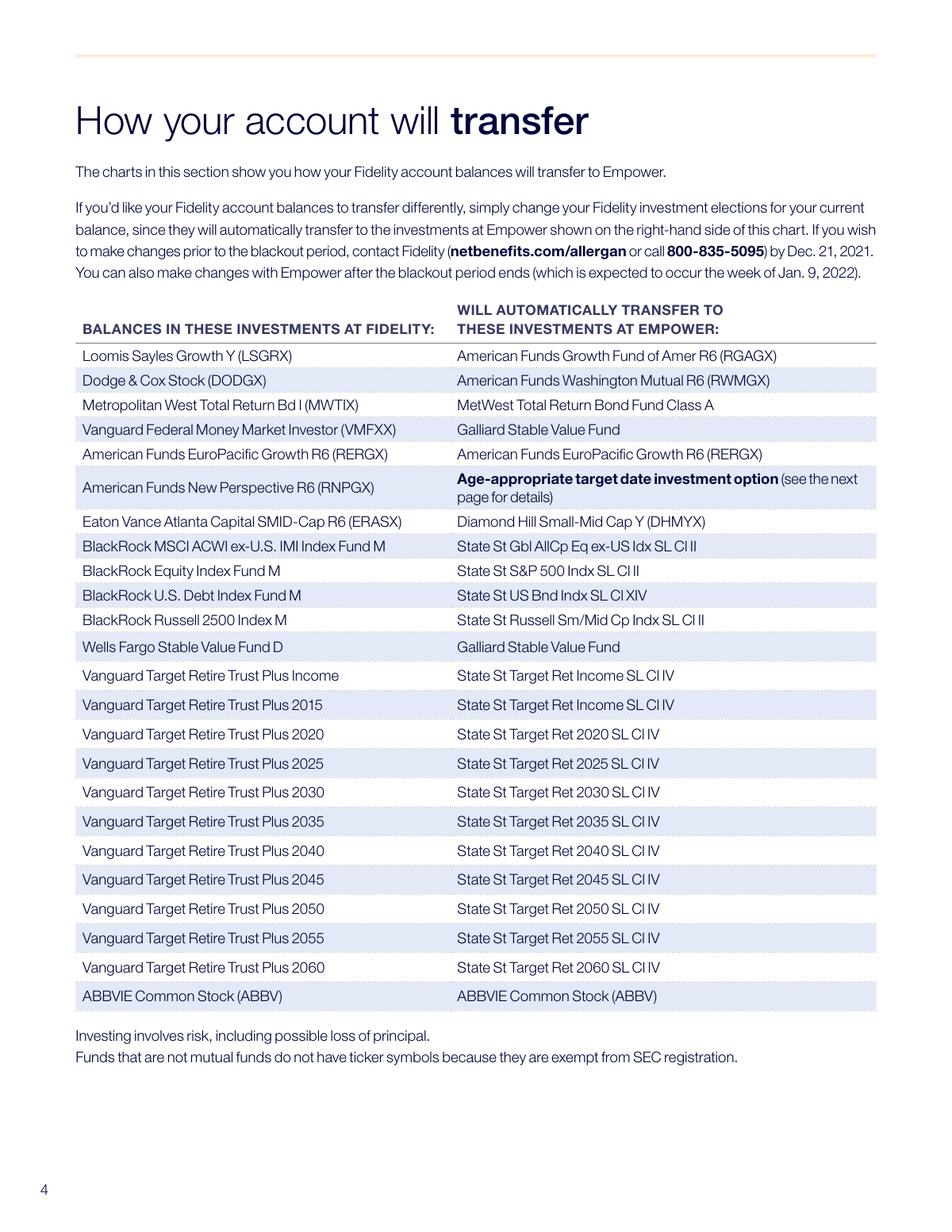
Your investments will automatically transfer to a corresponding fund at Empower as detailed in the mapping chart. For example, the Dodge & Cox Stock fund (DODGX) will transfer to the American Funds Washington Mutual R6 fund (RWMGX).
You can change your investment elections at Fidelity before 3 p.m. CT on December 21, 2021. Alternatively, you can wait and make changes with Empower after the blackout period ends.
The blackout period is a time when you cannot access or make changes to your account. It is scheduled to begin at 3 p.m. CT on December 21, 2021, and end the week of January 9, 2022.
Your Fidelity SDBA will automatically transfer to a new SDBA at Empower Brokerage unless you take action to liquidate it before the deadline. You will need to complete an online enrollment for the new Empower SDBA after the transition.
You must liquidate all holdings in your Fidelity SDBA and transfer the assets into the core funds by 3 p.m. CT on December 21, 2021. Contact Fidelity for assistance.
You will be automatically enrolled in the Empower Professional Management Program (PMP). As part of this transfer, you will receive the first 60 days of the PMP service at no cost.
To avoid automatic enrollment, you must unenroll from the Fidelity FPPA service by December 21, 2021. You can also unenroll from the PMP with Empower after the blackout period ends.
This option is determined by your date of birth, assuming a standard retirement age of 65. The document includes a chart that shows which State Street Target Retirement fund corresponds to your birth year range.
Whole shares will transfer to your new Empower SDBA, but any fractional shares will be sold. The resulting cash will be deposited into your new account.
For any questions about your current Fidelity account before the transfer, visit netbenefits.com/allergan or call Fidelity at 800-835-5095.
Yes, services like Instafill.ai use AI to help you accurately auto-fill financial or HR forms, saving you time and helping to avoid errors.
Simply upload your PDF form to the Instafill.ai platform. The AI will analyze the document, identify the fields, and allow you to fill them out quickly and easily online.
You can use a service like Instafill.ai to solve this problem. It can convert flat, non-fillable PDFs into interactive, fillable forms that you can complete and sign digitally.
Compliance AbbVie 401(k) Transfer Notice
Validation Checks by Instafill.ai
1
Validates Date of Birth for Target Fund Assignment
This check ensures that the user's Date of Birth is a valid date and falls within a reasonable range for an employee. This date is critical as it is used to automatically determine the user's age-appropriate target date investment option during the account transfer. If the date is invalid or missing, the system cannot assign a default investment, potentially delaying the investment of their funds or causing an allocation error.
2
Verifies Correct Target Date Fund Assignment Logic
This validation confirms that the system correctly assigns the 'State St Target Ret' fund based on the user's date of birth, as specified in the 'IF YOU WERE BORN' chart. It's a crucial backend check to ensure the automatic mapping logic is implemented correctly according to the plan's rules. A failure in this logic would result in participants' assets being invested in an inappropriate fund for their age and retirement horizon.
3
Enforces Blackout Period Transaction Freeze
This check prevents any user-initiated trades, transfers, or investment election changes between the start of the blackout period (3 p.m. CT on Dec. 21, 2021) and its end (the week of Jan. 9, 2022). This is essential to maintain data integrity and prevent transaction failures while assets are in transit between Fidelity and Empower. Any attempt to perform a transaction during this window would be rejected with a message explaining the blackout period.
4
FPPA Unenrollment Deadline Enforcement
This validation ensures that any request to unenroll from the Fidelity Personalized Planning & Advice (FPPA) program is submitted by the deadline of Dec. 21, 2021. This is important because after this date, enrollment is automatically transferred to the Empower Professional Management Program (PMP). An attempt to unenroll after the deadline would fail, and the user would be informed they must wait to unenroll from the PMP service after the transition is complete.
5
SDBA Transfer Opt-Out Deadline Validation
This check verifies that any request to liquidate a Self-Directed Brokerage Account (SDBA) and prevent its transfer to Empower is made by the 3 p.m. CT, Dec. 21, 2021 deadline. If a user misses this deadline, the system will proceed with automatically opening an SDBA at Empower and transferring the assets. A late request would be denied, locking the user into the transfer process.
6
Non-Eligible SDBA Asset Liquidation Deadline Check
This validation ensures that any non-eligible investments within a Fidelity SDBA (e.g., municipal bonds, foreign securities) are liquidated by the user before the Dec. 17, 2021 deadline. This is a stricter deadline to allow time for settlement. If the check fails, the system will automatically sell the investments and place the proceeds in a default cash account, which may not align with the user's investment strategy.
7
Post-Transition SDBA Enrollment Status Check
This validation confirms that a user with a transferred SDBA has completed the required online enrollment process at Empower after the blackout period ends. Access to view the SDBA and the ability to place trades is restricted until this enrollment is complete. If the check fails, the user will be blocked from trading and prompted to complete the enrollment steps.
8
SDBA Contribution Redirection Consistency
This check ensures that if a user opts to liquidate their SDBA, they have also redirected their future contributions to a different, valid core fund. It prevents a logical error where contributions are directed to an account that is being closed. If a user fails to redirect contributions, the system should flag the error and require them to select a new fund for future payroll deductions before the SDBA closure can be finalized.
9
PMP Free Period and Fee Commencement Logic
This system validation verifies that users automatically enrolled in the Professional Management Program (PMP) from FPPA receive the service at no cost for the first 60 days. It also ensures that billing for the PMP's asset-based fee correctly begins on the 61st day. A failure in this logic could lead to incorrect billing and customer dissatisfaction.
10
Fund Mapping Integrity Check
This is a system-level validation to ensure that every investment fund balance at Fidelity is correctly mapped to its designated corresponding fund at Empower as per the provided chart. This check is critical for the integrity of the entire asset transfer process, guaranteeing that billions of dollars in assets are moved to the correct destination funds. Any discrepancy would result in a major reconciliation error and incorrect participant investments.
11
Fractional Share Liquidation Rule Application
This validation ensures that during the SDBA transfer, only the fractional portion of any equity shares is liquidated into cash, while the whole shares are transferred in-kind. This rule prevents transfer failures for assets that cannot be moved fractionally. If this check fails, either the entire holding might be incorrectly liquidated or the transfer might fail altogether, requiring manual intervention.
12
Temporary Fund Balance Re-allocation Logic
This check verifies that after the blackout period, any balance in the temporary 'Dreyfus Government Cash Management Institutional Fund' is automatically invested into the participant's correct age-appropriate target date fund. This is a crucial cleanup step to ensure temporary holding funds are not held long-term. A failure would leave participant assets in a temporary, non-strategic cash fund instead of their intended default investment.
Common Mistakes in Completing AbbVie 401(k) Transfer Notice
Users often overlook the deadline to change their investment choices before the transition. If you want your funds to transfer to different investments than the default mapping, you must update your elections at Fidelity by Dec. 21, 2021; otherwise, your balances will be automatically moved to the predetermined Empower funds. This could result in an asset allocation that doesn't match your financial goals.
Participants currently in Fidelity's FPPA are automatically enrolled in Empower's PMP, which has an annual fee. Many people miss this detail and are surprised by fees after the 60-day free period ends. To avoid unwanted enrollment and fees, you must unenroll from FPPA at Fidelity by Dec. 21, 2021, or from PMP at Empower after the transition.
Self-Directed Brokerage Accounts may hold investments that are not eligible for transfer, and these have an earlier liquidation deadline of Dec. 17, 2021. If you miss this date, the assets will be forcibly sold, and the proceeds moved to a cash account, which could trigger unintended tax consequences or losses. Since this notice is a non-fillable PDF, a tool like Instafill.ai can help extract and highlight such critical, easily-missed dates.
Even after your SDBA assets are transferred to Empower, you cannot access or trade them until you complete a separate online enrollment process. People often assume the transfer is fully automatic and forget this crucial final step, leaving their brokerage assets inaccessible for trading. To avoid this, log in to the Empower portal after the blackout period ends and complete the SDBA enrollment.
Important account settings like open orders, dividend reinvestment plans, and systematic purchases do not carry over from Fidelity to Empower. Users frequently assume these settings are permanent, causing them to miss trades or have dividends paid out as cash instead of being reinvested. You must manually re-establish all account preferences and open orders in your new Empower SDBA after the transition is complete.
The default action is for your Fidelity SDBA to be automatically transferred to a new Empower SDBA. If you no longer want a brokerage account, you must take proactive steps to close it out before the transition. To prevent the transfer, you must liquidate all holdings and move the cash to your core 401(k) funds by the Dec. 21, 2021 deadline.
The blackout period freezes all account activity, including trades, transfers, and withdrawals. Participants often don't realize the full extent of these restrictions and may panic when they cannot access their account or see their balances. It's crucial to make any desired changes before the blackout begins and understand that your account will be temporarily inaccessible.
This transition involves multiple critical deadlines, such as Dec. 17 for ineligible SDBA assets and Dec. 21 for most other changes. It's easy to mix these dates up, causing you to miss a window for action and resulting in an automatic, potentially undesirable, action on your account. AI-powered tools like Instafill.ai can scan documents and help you identify and calendar all key dates to ensure nothing is missed.
When your SDBA transfers, only whole shares of stocks will move to the new account; any fractional shares will be automatically sold. While the cash proceeds are transferred, this liquidation can be a surprise and may have minor tax implications. Be aware that your new account will only contain whole shares, with the value of fractional shares appearing as cash.
The plan automatically assigns participants to a specific target-date fund based on their birth year for certain default transfers. Many people don't read this section carefully and are later confused about why their money was placed in a particular fund. Review the 'age-appropriate target date investment option' chart to understand where your assets will be directed if you don't make an active choice.
During the transition, responsibility for your account shifts from Fidelity to Empower. Contacting the wrong institution for help is a common source of frustration; for example, asking Empower about pre-transition changes is ineffective as only Fidelity can make them. For actions before Dec. 21, 2021, contact Fidelity; for questions or actions after the week of Jan. 9, 2022, contact Empower.
Saved over 80 hours a year
“I was never sure if my IRS forms like W-9 were filled correctly. Now, I can complete the forms accurately without any external help.”
Kevin Martin Green
Your data stays secure with advanced protection from Instafill and our subprocessors




Robust compliance program
Transparent business model
You’re not the product. You always know where your data is and what it is processed for.
ISO 27001, HIPAA, and GDPR
Our subprocesses adhere to multiple compliance standards, including but not limited to ISO 27001, HIPAA, and GDPR.
Security & privacy by design
We consider security and privacy from the initial design phase of any new service or functionality. It’s not an afterthought, it’s built-in, including support for two-factor authentication (2FA) to further protect your account.
Fill out AbbVie 401(k) Transfer Notice with Instafill.ai
Worried about filling PDFs wrong? Instafill securely fills abbvie-savings-plan-401k-account-transfer-notice forms, ensuring each field is accurate.
