Fill out AbbVie forms
with AI.
AbbVie forms encompass a range of administrative and financial documents essential for employees, retirees, and plan participants. These documents are often critical for managing corporate benefits, such as the AbbVie Savings Plan, and ensuring that personal financial data is correctly updated during institutional or provider transitions. Navigating these forms accurately is vital for maintaining the continuity of retirement savings and ensuring that investment preferences are honored during complex administrative shifts.
By continuing, you acknowledge Instafill's Privacy Policy and agree to get occasional product update and promotional emails.
About AbbVie forms
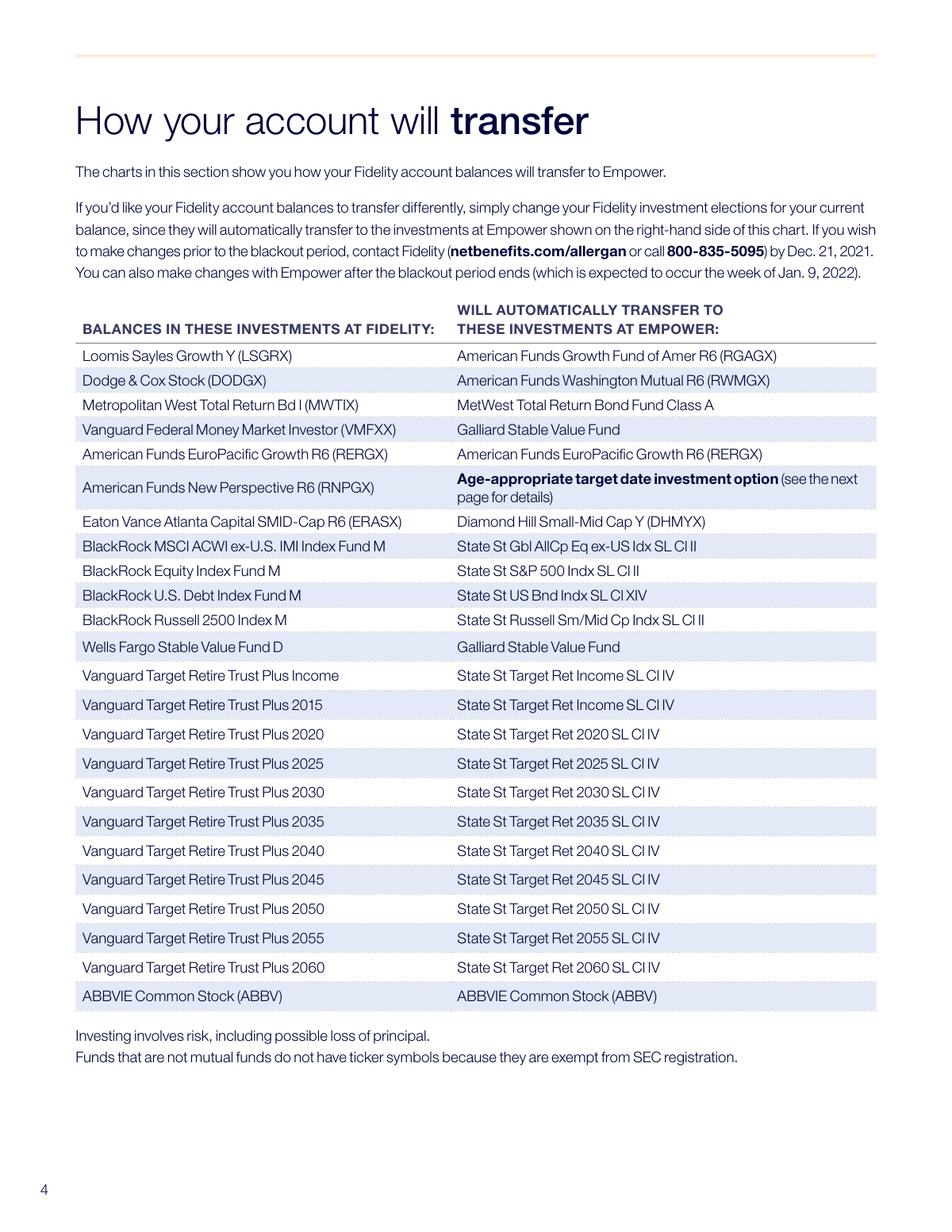
Typically, these forms are required by current or former AbbVie staff during specific events, such as the transition of 401(k) accounts between financial institutions like Fidelity and Empower. For instance, participants with Self-Directed Brokerage Accounts (SDBA) may need to provide specific notices or transfer instructions to prevent service interruptions or unintended investment mapping during "blackout periods." These situations demand high precision to ensure that account transfers occur without error, protecting the participant's long-term financial health and compliance with plan rules.
Managing the complexities of these financial transitions can be streamlined using modern technology. Tools like Instafill.ai use AI to fill these forms in under 30 seconds, ensuring that sensitive data is handled accurately and securely while saving significant manual effort. This allows participants to focus on their financial planning and investment strategies rather than the tedious details of paperwork.
Every form on this page can be completed without typing. Instafill is form filling software that reads a PDF and fills it for you — including flat and scanned documents that carry no fillable fields at all.
Forms in This Category
| Form Name | Pages | FCI | |
|---|---|---|---|
| 1. | AbbVie Savings Plan 401(k) Account Transfer Notice | 1 | – |
- Enterprise-grade security & data encryption
- 99%+ accuracy powered by AI
- 1,000+ forms from all industries
- Complete forms in under 60 seconds
How to Choose the Right Form
Navigating Your AbbVie Retirement Account Transition
If you are searching for AbbVie forms related to your employee benefits, the current documentation focuses on the significant transition of the company’s retirement savings plan. Understanding which document applies to your situation is critical for maintaining your financial health during corporate administrative shifts.
When to Use the Account Transfer Notice
The AbbVie Savings Plan 401(k) Account Transfer Notice is the primary document required for plan participants who are part of the recordkeeping move from Fidelity to Empower. You should focus on this document if:
- You have an active 401(k) balance: You need to verify how your existing assets will be automatically "mapped" to new investment options at Empower.
- You manage a Self-Directed Brokerage Account (SDBA): This notice is particularly important for SDBA holders, as these accounts often require specific manual actions to avoid liquidation during a transfer.
- You are planning a transaction: If you intend to take a loan, withdrawal, or change your contribution rate, you must consult this notice to identify the "blackout period" dates when account access will be restricted.
Key Information Found in the Notice
Rather than a simple application, the AbbVie Savings Plan 401(k) Account Transfer Notice acts as a comprehensive roadmap. It is essential for:
- Identifying Deadlines: Knowing exactly when your access to Fidelity ends and when your new Empower account becomes active.
- Confirming Beneficiaries: Determining if your beneficiary information will transfer automatically or if you must submit new designations.
- Investment Strategy: Reviewing the default investment funds to ensure they align with your long-term retirement goals.
Using AI to Simplify Your Paperwork
Financial transition documents can be dense and difficult to navigate. By using Instafill.ai, you can quickly process the AbbVie Savings Plan 401(k) Account Transfer Notice. Our AI-powered tools can help you identify key action items within the PDF or convert flat documents into interactive, fillable forms to help you keep your financial records organized and accessible.
Form Comparison
| Form | Purpose | Target Audience | Key Action Required | Transition Details |
|---|---|---|---|---|
| AbbVie Savings Plan 401(k) Account Transfer Notice | Details the transfer of retirement savings from Fidelity to Empower management. | AbbVie Savings Plan participants with active 401(k) retirement accounts. | Review investment mapping and coordinate Self-Directed Brokerage Account transfers. | Outlines blackout period dates when account changes are temporarily restricted. |
Tips for AbbVie forms
When retirement accounts move between providers, assets are often automatically mapped to similar funds. Carefully review the transfer notice to understand where your money is going and ensure the new funds align with your long-term financial strategy. If the default mapping isn't right for you, plan to make adjustments as soon as the transition period ends.
During a plan transition, there is typically a 'blackout period' where you cannot make trades or request distributions. Note the specific start and end dates in your AbbVie notice so you aren't caught off guard by a lack of account access. Complete any urgent rebalancing or withdrawals several days before the blackout begins.
Beneficiary information does not always transfer perfectly between financial institutions. Once the move to Empower is complete, log in to your new account immediately to confirm your beneficiaries are correctly listed. This ensures your assets remain protected and will be distributed according to your current wishes.
Self-Directed Brokerage Accounts (SDBA) often require additional steps compared to standard 401(k) funds. Check your notice for requirements regarding new account applications or liquidation rules that may apply to your brokerage holdings. Failing to follow these specific steps could result in your assets being moved into a default fund.
Before the transition is finalized, download and save your most recent statements from the outgoing provider. Having a clear record of your closing balances and cost basis allows you to audit the transfer for accuracy once the new account is active. These documents are also vital for your personal tax records and long-term financial tracking.
Managing the paperwork for financial transitions can be time-consuming, but AI-powered tools like Instafill.ai can complete these forms in under 30 seconds with high accuracy. Your data stays secure during the process, providing a practical and fast way to handle multiple forms. This is a significant time-saver for employees managing complex account updates.
After the account transfer is complete, check your next few pay stubs to ensure your contribution percentages remain correct. Occasionally, payroll links can experience delays during a provider change, so verifying this early prevents any gaps in your retirement savings. If you notice a discrepancy, contact your HR or benefits department immediately.
Frequently Asked Questions
AbbVie forms generally cover a range of employee benefits, retirement plan management, and patient assistance programs. In the context of the Savings Plan, these documents are used to notify participants of administrative changes, fund transfers, and updates to their 401(k) accounts.
Account transfers usually occur when AbbVie updates its plan administration to a different financial institution, such as moving from Fidelity to Empower. These transitions are designed to provide updated features, different investment options, or improved administrative services for employees.
A blackout period is a temporary window during which you cannot make changes to your retirement account, such as requesting loans, withdrawals, or changing investment allocations. This period allows the old and new record-keepers to reconcile data and ensure all assets are transferred accurately.
While many assets are mapped automatically to new funds, you should review the notice to see if your specific investments, such as those in a Self-Directed Brokerage Account, require manual intervention. It is also a good time to review and update your beneficiary designations with the new provider.
Yes, AI tools like Instafill.ai can fill out AbbVie forms in under 30 seconds. The system accurately extracts data from your source documents and places it into the correct fields, ensuring the paperwork is completed quickly and without manual entry errors.
Using traditional methods can take 15 to 20 minutes of careful data entry, but using an AI-powered service can reduce this to less than a minute. These tools can even convert non-fillable PDF versions into interactive forms for easier completion.
Participants who manage their own individual stocks or bonds within their 401(k) rather than using pre-selected mutual funds are affected. These individuals often need to complete additional paperwork to open a new brokerage window with the incoming administrator to prevent their assets from being liquidated.
Most forms should be submitted directly to the plan administrator, such as Empower or Fidelity, via their secure online portal. If a physical signature is required, the form will provide a specific mailing address or fax number for the benefits processing center.
Your existing balances are typically moved into new investment options that most closely match your current holdings, a process known as 'fund mapping.' If you do not choose new funds before the deadline, your assets are usually placed into a default investment, such as a Target Date Fund.
If you haven't received a necessary document, you can usually download it from the AbbVie Benefits Center or the current plan provider's website. You can also contact HR or the plan's customer service line to request a digital or physical copy be sent to you.
Glossary
- Blackout Period
- A temporary timeframe during a plan transition when participants are unable to access their accounts, change investments, or request loans and withdrawals.
- Investment Mapping
- The automatic process of moving your current retirement funds from an old investment option to a new one that most closely matches its risk and objective profile.
- Recordkeeper
- The financial institution, such as Fidelity or Empower, responsible for managing the administrative tasks, tracking balances, and processing transactions for the retirement plan.
- Self-Directed Brokerage Account (SDBA)
- An optional account within a 401(k) that allows participants to invest in a broader range of stocks, bonds, and mutual funds outside of the plan's standard lineup.
- Plan Participant
- Any current or former employee who is eligible to contribute to or currently holds a balance within the AbbVie Savings Plan.
- Asset Allocation
- The strategy of dividing your retirement savings among different categories, such as stocks, bonds, and cash, to balance risk and potential reward.
- Qualified Retirement Plan
- An employer-sponsored plan, like a 401(k), that meets specific IRS tax code requirements and offers tax advantages to participants.
- Rebalancing
- The process of realigning the weightings of your portfolio's assets to maintain your original desired level of risk.