Yes! You can use AI to fill out Principal Life Insurance Company UCTIE INTERNATIONAL UNION 401(K) SAVINGS PLAN Enrollment Form
This is the official enrollment packet for the UCTIE International Union 401(k) Savings Plan, provided by Principal Life Insurance Company. Employees use these forms to join the plan, specify how much of their pay to contribute, choose investment funds for their retirement savings, and designate beneficiaries. Completing this form is a critical step in planning for long-term financial security and taking advantage of employer-sponsored retirement benefits. Today, this form can be filled out quickly and accurately using AI-powered services like Instafill.ai, which can also convert non-fillable PDF versions into interactive fillable forms.
Principal 401(k) Enrollment Form is part of the
insurance forms, life insurance forms, enrollment forms, union forms, Principal forms, company forms, savings plan forms and Principal Life forms categories on Instafill.
Rather not fill this in by hand? Instafill is an online form filler that completes PDF forms automatically — upload the blank form, answer a few questions, and the AI fills every field.
Form specifications
| Form name: | Principal Life Insurance Company UCTIE INTERNATIONAL UNION 401(K) SAVINGS PLAN Enrollment Form |
| Number of pages: | 1 |
| Language: | English |
Our AI automatically handles information lookup, data retrieval, formatting, and form filling.
It takes less than a minute to fill out Principal 401(k) Enrollment Form using our AI form filling.
Securely upload your data. Information is encrypted in transit and deleted immediately after the form is filled out.
Instafill Demo: How to fill out PDF forms in seconds with AI
How to Fill Out Principal 401(k) Enrollment Form Online for Free in 2026
Are you looking to fill out a PRINCIPAL 401(K) ENROLLMENT FORM form online quickly and accurately? Instafill.ai offers the #1 AI-powered PDF filling software of 2026, allowing you to complete your PRINCIPAL 401(K) ENROLLMENT FORM form in just 37 seconds or less.
Follow these steps to fill out your PRINCIPAL 401(K) ENROLLMENT FORM form online using Instafill.ai:
- 1 Navigate to Instafill.ai and upload or select the Principal 401(k) Enrollment Form packet.
- 2 Use the AI tool to automatically populate your personal information, including name, address, Social Security number, and date of birth.
- 3 In the 'My contributions' section, specify the percentage or dollar amount of your pay to contribute, and decide if you want to enroll in the annual increase option.
- 4 Complete the 'My investment choices' section by either selecting the 'Quick Option' for a target-date fund or building your own portfolio by allocating percentages to various funds.
- 5 If applicable, fill out the Rollover and Beneficiary Designation forms included in the packet to consolidate previous retirement accounts and name your beneficiaries.
- 6 Carefully review all the information you've entered across the forms for accuracy, then proceed to the 'My signature' section to provide your digital signature and date.
- 7 Download the completed and signed forms and submit them to your benefits representative as instructed.
Our AI-powered system ensures each field is filled out correctly, reducing errors and saving you time.
Why Choose Instafill.ai for Your Fillable Principal 401(k) Enrollment Form Form?
Speed
Complete your Principal 401(k) Enrollment Form in as little as 37 seconds.
Up-to-Date
Always use the latest 2026 Principal 401(k) Enrollment Form form version.
Cost-effective
No need to hire expensive lawyers.
Accuracy
Our AI performs 10 compliance checks to ensure your form is error-free.
Security
Your personal information is protected with bank-level encryption.
Frequently Asked Questions About Principal 401(k) Enrollment Form
This packet is for enrolling in the UCTIE INTERNATIONAL UNION 401(K) SAVINGS PLAN. It allows you to set your contribution amount, choose your investments, and designate beneficiaries for your retirement savings.
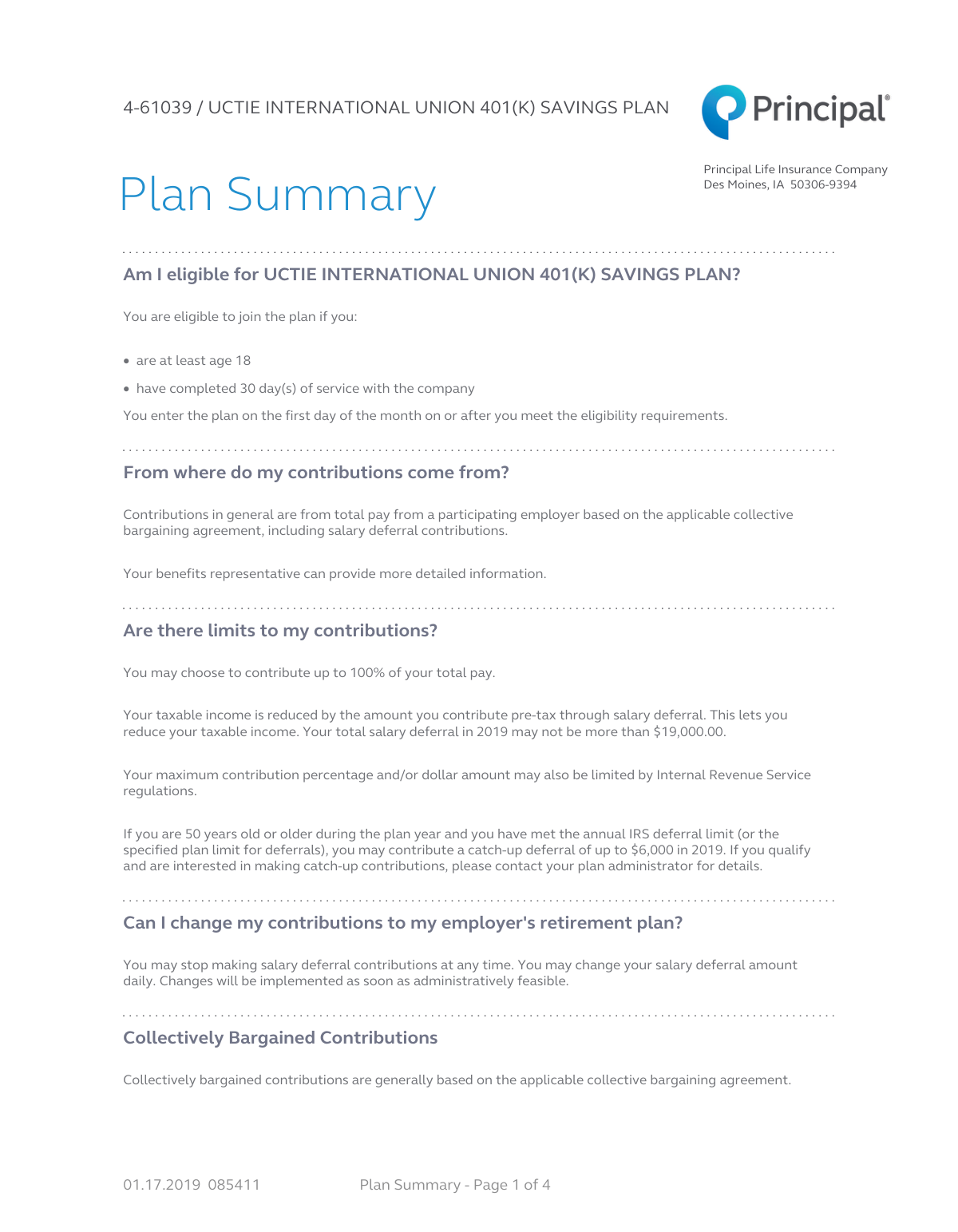
You are eligible to join the plan if you are at least 18 years old and have completed 30 days of service with the company. You can officially enter the plan on the first day of the month after meeting these requirements.
To enroll, you must complete three steps on the Enrollment Form: provide your personal information, specify your contribution percentage or dollar amount, and select your investment choices. Finally, sign the form and return it to your benefits representative.
You can contribute up to 100% of your pay, but your total pre-tax contributions cannot exceed the annual IRS limit. If you are age 50 or older, you may also be eligible to make additional 'catch-up' contributions.
The 'Quick Option' automatically invests your contributions into a Principal LifeTime Hybrid CIT, which is a target-date fund based on the plan's normal retirement date. This is the plan's default investment and is designed for those who prefer not to build their own portfolio.
Yes, you may be able to roll over funds from a previous employer's retirement plan into this one. You can indicate your interest on the Enrollment Form or complete the separate Rollover Form included in the packet.
The Beneficiary Form allows you to designate who will receive your retirement account balance in the event of your death. It is crucial to complete this to ensure your assets are distributed according to your wishes.
If you are married and designate someone other than your spouse as the sole primary beneficiary, your spouse must sign the consent section on the Beneficiary Form. This signature must be witnessed by a plan representative or a notary public.
You should return your completed and signed Enrollment Form, along with any other relevant forms like the Beneficiary or Rollover forms, to your company's benefits representative.
You are always 100% vested in your own salary deferral contributions and any collectively bargained contributions made to the plan.
Yes, services like Instafill.ai use AI to accurately auto-fill form fields, which can save you time and help prevent errors. This is especially useful for repetitive information across the different forms in the packet.
You can use a service like Instafill.ai to fill out the forms online. Simply upload the PDF, and the AI will make the fields interactive for you to complete, sign, and download.
If you have a non-fillable or 'flat' PDF, you can use a tool like Instafill.ai to convert it into an interactive, fillable form. This allows you to type your information directly into the fields instead of printing and filling by hand.
Yes, you can change your salary deferral amount daily or stop contributions at any time. Changes can be made by contacting your plan administrator or through the Principal website or automated phone system.
You can access your account information 24/7 online at principal.com or through their automated phone system at 1-800-547-7754. You will also receive quarterly participant statements.
Compliance Principal 401(k) Enrollment Form
Validation Checks by Instafill.ai
1
Validates Social Security Number Format and Presence
This check ensures the Social Security Number (SSN) field is not empty and follows the standard XXX-XX-XXXX format. The SSN is a critical unique identifier for tax reporting and account administration with the IRS. A missing or incorrectly formatted SSN will prevent the account from being opened and properly linked to the participant for tax purposes, leading to form rejection.
2
Verifies Participant Meets Minimum Age Requirement
This validation confirms that the participant's age, calculated from the provided Date of Birth, is at least 18 years old as per the plan's eligibility rules. This is a crucial compliance check to ensure only eligible employees are enrolled in the plan. If the participant is under 18, the enrollment form will be rejected, and the user will be notified that they do not meet the age requirement.
3
Ensures a Single Contribution Status is Chosen
This check verifies that the participant has selected exactly one of the three main contribution options: 'Enroll me!', 'I am already enrolled, but I want to change...', or 'I choose not to contribute...'. Selecting none or more than one of these options creates ambiguity about the participant's intent. The form submission will fail if this rule is violated, prompting the user to make a single, clear choice.
4
Validates Mutually Exclusive Contribution Amount Input
This rule ensures that for any given contribution election (e.g., regular pay or bonus pay), the participant enters either a percentage or a dollar amount, but not both. Providing both values is contradictory and can lead to processing errors. If both fields are filled for the same contribution type, the form will be flagged with an error, requiring the user to clarify their intended contribution method.
5
Validates Contribution Percentage is Within the Allowed Range
This check ensures that any contribution amount entered as a percentage is a numeric value between 0 and 100, inclusive, as specified on the form. This prevents invalid inputs like negative numbers or values over 100%, which are not permissible. An out-of-range value would cause a validation failure, prompting the user to enter a valid percentage.
6
Ensures a Single Investment Strategy is Selected
This validation confirms that the participant has selected either 'Choice A: Quick Option' or 'Choice B: Build my own portfolio,' but not both. These are mutually exclusive paths for directing investments. Selecting both would create a conflict in investment instructions, so the form will be rejected until a single, unambiguous choice is made.
7
Verifies 'Build My Own Portfolio' Allocations Sum to 100%
If the participant selects 'Choice B: Build my own portfolio,' this check calculates the sum of all entered percentages for the various investment funds. The total must equal exactly 100% to ensure all contributed funds are allocated. A total that is less than or greater than 100% will result in a validation error, forcing the user to correct their allocations before the form can be submitted.
8
Confirms Participant Signature and Date are Provided
This check verifies that the participant has signed the form and provided a signature date in the 'My signature' section of the enrollment form. The signature and date are legally required to authorize the enrollment, contribution, and investment elections. A missing signature or date invalidates the agreement, and the form will be returned as incomplete.
9
Validates Consistency Between Marital Status and Beneficiary Choice
This rule cross-references the participant's declared marital status with their selection on the beneficiary form. If 'Single' is selected on the enrollment form, 'Choice A' should be selected on the beneficiary form; if 'Married', 'Choice B' or 'Choice C' is expected. This check prevents logical contradictions and ensures the correct spousal consent rules are applied, reducing legal and compliance risks.
10
Requires Spousal Consent for Non-Spouse Beneficiary
If a participant indicates they are married and selects 'Choice C' on the beneficiary form (designating someone other than their spouse as the primary beneficiary), this validation ensures the spouse's signature is present and witnessed. Federal law requires spousal consent to waive their right to the death benefit. A missing spousal signature will cause the beneficiary designation to be rejected as legally incomplete.
11
Ensures Beneficiary Percentages Sum to 100%
This check confirms that the percentages assigned to all primary beneficiaries add up to exactly 100%. It performs a separate check to ensure the percentages for all contingent beneficiaries also sum to 100%. This is critical for ensuring the participant's assets are distributed precisely according to their wishes without ambiguity. If the percentages do not sum correctly, the form will be rejected for correction.
12
Validates 'Original Date of Employment' is a Past Date
This check ensures the 'Original date of employment' is a valid date that occurs before the current submission date. An employment date in the future is logically impossible for an existing employee enrolling in a plan. This validation prevents data entry errors and ensures service period calculations are based on accurate information.
13
Verifies Rehire Date is After Termination Date
For participants who were rehired, this validation checks that if both a 'Date of termination' and a 'Date of rehire' are entered, the rehire date is chronologically after the termination date. This maintains logical data integrity for employment history. An invalid sequence would trigger an error, requiring the user to correct the dates.
14
Validates Email Address Format
This check verifies that the provided email address follows the standard '[email protected]' format. A valid email is crucial for electronic communication, account notifications, and online access setup as mentioned on the form. An invalid format would prevent the system from sending important information, so the form would prompt the user for a correction.
Common Mistakes in Completing Principal 401(k) Enrollment Form
The enrollment form asks you to contribute either a percentage OR a dollar amount. A common error is filling in both fields, creating ambiguity for the plan administrator. This can lead to your enrollment being delayed or processed using a default interpretation you did not intend. To avoid this, decide on one method—percentage is most common as it automatically adjusts with pay changes—and fill in only that corresponding field. AI-powered tools like Instafill.ai can prevent this by enforcing 'either/or' rules during data entry.
When choosing the 'Build my own portfolio' option, the sum of percentages allocated to different funds must equal exactly 100%. People often make simple math errors, or leave the total slightly above or below 100%. If the total is incorrect, your investment election will be rejected, and your contributions will be placed in the plan's Qualified Default Investment Alternative (QDIA), which may not align with your risk tolerance. Always double-check your math before submitting the form. Smart form-filling tools can automatically calculate the total as you enter percentages, ensuring it equals 100%.
If you are married and wish to name someone other than your spouse as the sole primary beneficiary, federal law requires your spouse to formally consent. This involves your spouse signing the beneficiary form in the presence of a notary or plan representative. Failing to obtain this witnessed signature will invalidate your beneficiary designation, and upon your death, the entire account balance will legally go to your spouse, regardless of your wishes. Always ensure you complete 'Choice C' on the beneficiary form correctly if this applies to you.
The enrollment form presents two distinct investment paths: 'Choice A: Quick Option' and 'Choice B: Build my own portfolio'. A frequent mistake is to check the box for Choice A and also start filling out percentages in Choice B. This contradiction forces the plan administrator to guess your intent, and they will typically default to the 'Quick Option' (the QDIA). To avoid this, carefully select only one path that matches your investment strategy. If you want to pick your own funds, ignore Choice A completely.
The rollover form requires a detailed breakdown of pre-tax, Roth, and other after-tax funds from your previous plan. Many people guess these amounts or leave them blank because they don't have the information handy. Incorrectly classifying funds can have significant tax consequences, potentially leading to improper taxation or compliance issues. Before filling out this section, contact your previous plan administrator to get an accurate statement detailing the composition of your account. This ensures your funds are rolled over and tracked correctly for tax purposes.
Submitting an unsigned or undated enrollment, rollover, or beneficiary form is one of the most common and easily avoidable mistakes. An unsigned form is legally invalid and cannot be processed. This will delay your plan enrollment, investment choices, or beneficiary designation, potentially causing you to miss out on investment growth or employer matches. Always perform a final check for your signature and the current date in all required fields before submitting. AI tools like Instafill.ai can highlight required signature fields to ensure they are not missed.
While it's common to name children as beneficiaries, listing a minor directly can create legal hurdles. If the minor inherits the funds, a court may need to appoint a legal guardian to manage the money until they reach adulthood, which is a costly and time-consuming process. The form's instructions suggest naming an adult custodian for the minor under the Uniform Transfers to Minors Act (UTMA). This allows the named custodian to manage the funds on the minor's behalf without court intervention, ensuring your wishes are carried out smoothly.
Using general terms like 'my children' or failing to provide a beneficiary's full name, Social Security Number, and date of birth can cause significant problems. Vague language can lead to legal disputes, especially in blended families, and missing information makes it difficult for the plan administrator to locate and verify the beneficiary. Always list each beneficiary by their full legal name and provide all requested details to ensure your assets are distributed quickly and according to your exact wishes.
The optional 'Annual Increase' feature is a great tool for boosting savings, but it's often filled out incompletely. People may check the box but forget to specify the percentage/dollar increase, the number of years for the increase to occur, or the annual date for the change. An incomplete election cannot be processed, and you will miss out on the opportunity to automatically grow your savings rate over time. If you opt-in, be sure to fill out every single field in this section carefully.
The personal information section asks for termination and rehire dates if you have previously worked for the employer. Employees often overlook this, assuming their original hire date is sufficient. These dates are critical for correctly calculating vesting service and plan eligibility, as breaks in service can impact your rights to employer contributions. If you are a rehired employee, be sure to find and accurately enter both your termination and rehire dates to ensure your plan benefits are calculated correctly. Since this form is a non-fillable PDF, a tool like Instafill.ai can convert it into a fillable version, making it easier to enter all necessary information accurately.
Saved over 80 hours a year
“I was never sure if my IRS forms like W-9 were filled correctly. Now, I can complete the forms accurately without any external help.”
Kevin Martin Green
Your data stays secure with advanced protection from Instafill and our subprocessors




Robust compliance program
Transparent business model
You’re not the product. You always know where your data is and what it is processed for.
ISO 27001, HIPAA, and GDPR
Our subprocesses adhere to multiple compliance standards, including but not limited to ISO 27001, HIPAA, and GDPR.
Security & privacy by design
We consider security and privacy from the initial design phase of any new service or functionality. It’s not an afterthought, it’s built-in, including support for two-factor authentication (2FA) to further protect your account.
Fill out Principal 401(k) Enrollment Form with Instafill.ai
Worried about filling PDFs wrong? Instafill securely fills principal-life-insurance-company-uctie-international-union-401k-savings-plan-enrollment-form forms, ensuring each field is accurate.
