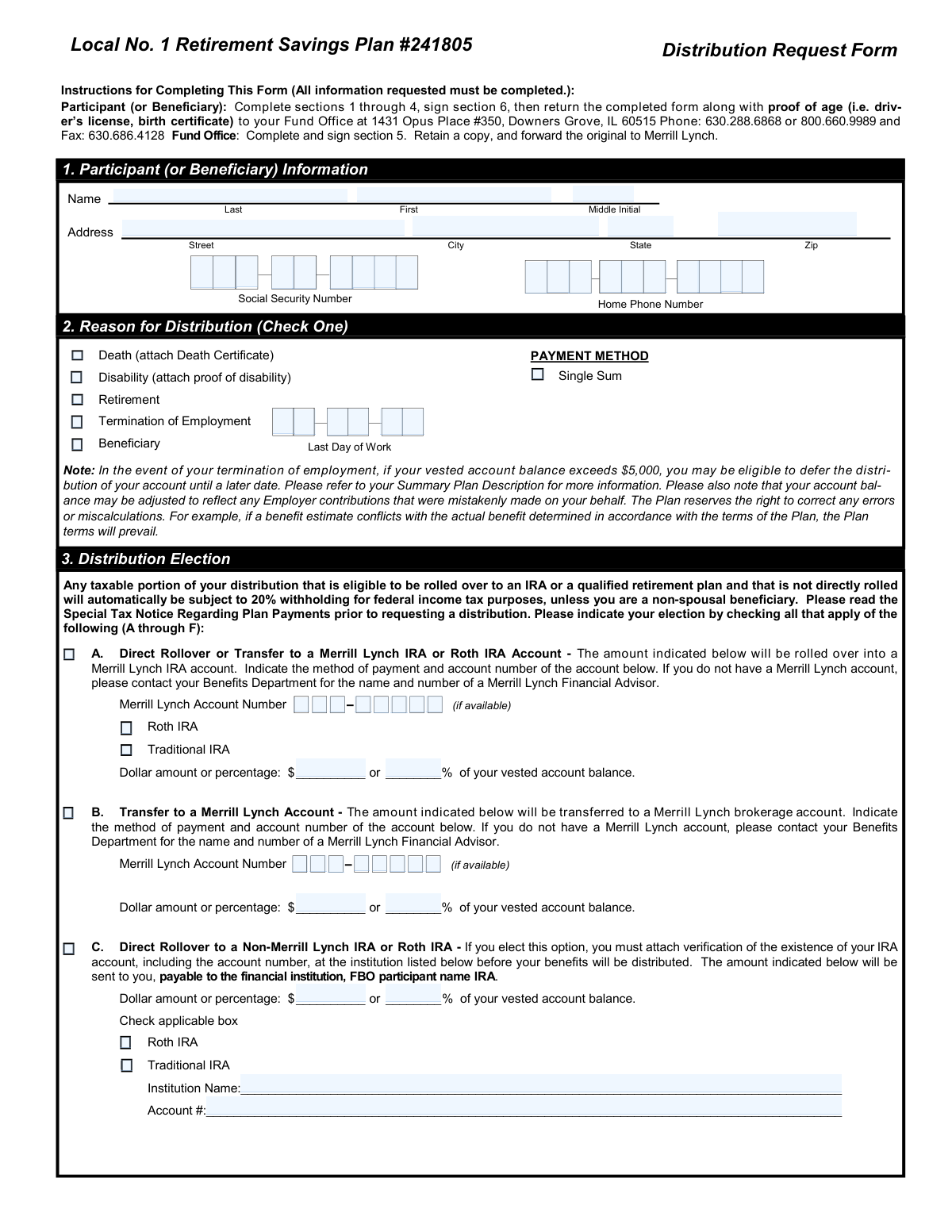
Yes! You can use AI to fill out Distribution Request Form Local No. 1 Retirement Savings Plan #241805
This form is used by participants or beneficiaries of the Local No. 1 Retirement Savings Plan to request a distribution of their vested account balance. It allows individuals to specify the reason for the distribution, such as retirement, termination of employment, disability, or death, and to elect how the funds will be paid out, including direct rollovers to an IRA or another qualified plan, or as a direct payment. Today, this form can be filled out quickly and accurately using AI-powered services like Instafill.ai, which can also convert non-fillable PDF versions into interactive fillable forms.
Our AI automatically handles information lookup, data retrieval, formatting, and form filling.
It takes less than a minute to fill out Distribution Request Form using our AI form filling.
Securely upload your data. Information is encrypted in transit and deleted immediately after the form is filled out.
Form specifications
| Form name: | Distribution Request Form Local No. 1 Retirement Savings Plan #241805 |
| Number of pages: | 1 |
| Language: | English |
| Categories: | retirement forms, retirement plan forms, distribution forms, savings plan forms |
Instafill Demo: How to fill out PDF forms in seconds with AI
How to Fill Out Distribution Request Form Online for Free in 2026
Are you looking to fill out a DISTRIBUTION REQUEST FORM form online quickly and accurately? Instafill.ai offers the #1 AI-powered PDF filling software of 2026, allowing you to complete your DISTRIBUTION REQUEST FORM form in just 37 seconds or less.
Follow these steps to fill out your DISTRIBUTION REQUEST FORM form online using Instafill.ai:
- 1 Navigate to Instafill.ai and upload or select the Distribution Request Form for the Local No. 1 Retirement Savings Plan.
- 2 Use the AI assistant to accurately fill in your personal details in Section 1, including your name, address, Social Security Number, and contact information.
- 3 In Section 2, check the box that corresponds to your reason for distribution (e.g., Retirement, Termination of Employment).
- 4 Complete Section 3 by selecting your distribution election, indicating whether you want a direct rollover, transfer, or direct payment, and specifying the dollar amount or percentage.
- 5 Fill out Section 4 to make your federal and state income tax withholding elections.
- 6 Carefully review all the information you've entered, then proceed to Section 6 to certify and electronically sign the form.
- 7 Download the completed form and submit it to the Fund Office along with any required supporting documents, such as proof of age or a death certificate.
Our AI-powered system ensures each field is filled out correctly, reducing errors and saving you time.
Why Choose Instafill.ai for Your Fillable Distribution Request Form Form?
Speed
Complete your Distribution Request Form in as little as 37 seconds.
Up-to-Date
Always use the latest 2026 Distribution Request Form form version.
Cost-effective
No need to hire expensive lawyers.
Accuracy
Our AI performs 10 compliance checks to ensure your form is error-free.
Security
Your personal information is protected with bank-level encryption.
Frequently Asked Questions About Form Distribution Request Form
This form is used by participants or beneficiaries of the Local No. 1 Retirement Savings Plan to request a withdrawal of funds from their account due to retirement, termination of employment, disability, or death.
This form must be completed by the plan participant or their designated beneficiary who wishes to receive a distribution from their retirement savings account.
You must submit proof of age, such as a driver's license or birth certificate. Depending on the reason for distribution, you may also need to provide a death certificate or proof of disability.
Return the completed and signed form along with all required documents to the Fund Office at 1431 Opus Place #350, Downers Grove, IL 60515.
A direct rollover moves your money to another retirement account, deferring taxes. A direct payment to you is subject to a mandatory 20% federal income tax withholding on the taxable amount.
You must attach verification of the existence of your external account, including the financial institution's name and your account number, before your benefits will be distributed.
For payments not eligible for rollover, you can elect to withhold the standard 10%, a different percentage, or no federal tax. Be aware that distributions are taxable income, so it is wise to consult a tax advisor.
No, if your vested account balance is over $5,000, you may be eligible to defer the distribution until a later date. Please refer to your Summary Plan Description for more information.
The participant or beneficiary must sign and date the form in Section 6, titled 'Certification'. The Fund Office will complete and sign Section 5.
Yes, services like Instafill.ai use AI to accurately auto-fill form fields with your information, which can save you time and help reduce errors.
You can use a service like Instafill.ai to upload the PDF and fill it out on your computer. This allows you to type your information directly into the fields before printing the completed form for signature.
If you have a non-fillable or 'flat' PDF, tools like Instafill.ai can convert it into an interactive, fillable form online, making it easy to complete.
The Fund Office will complete and sign Section 5, retain a copy for their records, and then forward the original, completed form to Merrill Lynch to process your distribution request.
Compliance Distribution Request Form
Validation Checks by Instafill.ai
1
Social Security Number Format
Validates that the Social Security Number in Section 1 is provided and follows the 9-digit format (XXX-XX-XXXX or XXXXXXXXX). This is crucial for proper tax reporting to the IRS and for uniquely identifying the participant. A missing or incorrectly formatted SSN will prevent the form from being processed.
2
Participant Information Completeness
Ensures that the participant's full name (Last, First) and full address (Street, City, State, Zip) in Section 1 are completely filled out. This information is essential for legal identification, communication, and for mailing physical checks or documents. An incomplete address will result in the form being rejected.
3
Reason for Distribution Selection
Verifies that exactly one reason for distribution (e.g., Death, Retirement, Termination) is checked in Section 2. Selecting a reason is mandatory as it determines the participant's eligibility for a distribution under the plan's rules. Failure to select a reason, or selecting multiple reasons, makes the request ambiguous and invalid.
4
Attachment Verification for Death or Disability
Checks if the 'Death' or 'Disability' box is checked in Section 2, and if so, confirms that the required supporting documentation (Death Certificate or proof of disability) is attached. This is a legal and procedural requirement to authorize the distribution under these specific circumstances. The request cannot be fulfilled without the required proof.
5
Distribution Election Completeness
Verifies that at least one distribution election checkbox (A through F) is selected in Section 3. The form cannot be processed without explicit instructions on how the funds should be distributed. A form submitted without any distribution election selected is incomplete and will be returned to the participant.
6
Total Distribution Percentage Limit
Calculates the sum of all percentage values entered across the various distribution elections (A-F). This validation ensures the total sum does not exceed 100%. Requesting more than 100% of the account balance is a logical error that must be corrected before the distribution can be calculated and processed.
7
Mutually Exclusive Distribution Amount
For each selected distribution option (A-F), this check ensures that the participant has entered either a dollar amount OR a percentage, but not both. Providing both values for a single election creates ambiguity and can lead to incorrect payment amounts. The form should be flagged for correction if both are provided for the same option.
8
Conditional Requirement for Merrill Lynch Account Number
If distribution option 'A. Direct Rollover or Transfer to a Merrill Lynch IRA' or 'B. Transfer to a Merrill Lynch Account' is checked, this validation confirms that a Merrill Lynch Account Number has been provided. This number is essential for electronically routing the funds to the correct destination account. A missing account number will halt the transfer process.
9
Conditional Requirement for Non-Merrill Lynch Details
If distribution option 'C. Direct Rollover to a Non-Merrill Lynch IRA' or 'D. Direct Transfer to a Non-Merrill Lynch Account' is selected, this check verifies that the 'Institution Name' and 'Account #' fields are filled out. This information is mandatory for the paying agent to correctly issue and direct the payment to the external financial institution.
10
Conditional IRA Type Selection
When a rollover to an IRA is selected (Option A or C), this validation ensures that either the 'Roth IRA' or 'Traditional IRA' checkbox is also marked. This designation is critical for tax reporting purposes and for ensuring the funds are deposited into the correct type of account. An ambiguous or missing selection will prevent the rollover.
11
Federal Tax Withholding Election Logic
In Section 4A, this check ensures that one and only one of the three federal withholding options is selected. If the option to withhold a custom percentage is chosen, it also validates that a valid whole number is entered in the corresponding field. This prevents conflicting or incomplete instructions for tax withholding.
12
Participant Signature and Date Presence
Verifies that the participant (or beneficiary) has physically signed and dated the form in Section 6. The signature legally certifies the accuracy of the information and provides authorization to execute the distribution. A missing signature or date invalidates the entire request, and it cannot be processed.
13
Date Field Format Validation
This check ensures that all date fields on the form (e.g., Last Day of Work, Date of Birth, Signature Date) are entered in a valid and recognizable date format, such as MM/DD/YYYY. Incorrectly formatted dates can cause processing delays, system errors, and incorrect eligibility calculations.
14
Vested Percentage Format
Validates that the 'Vested %' field, to be completed by the Fund Office in Section 5, contains a valid numerical percentage value between 0 and 100. This value is fundamental to calculating the participant's distributable account balance. An invalid or missing value prevents the final benefit calculation.
Common Mistakes in Completing Distribution Request Form
The form requires specific documents depending on the request, such as proof of age for all participants, a death certificate for beneficiary claims, or verification of an external IRA account for non-Merrill Lynch rollovers. People often overlook these instructions, leading to an incomplete submission. This will cause significant processing delays as the Fund Office must contact the participant to request the missing paperwork, holding up the distribution.
In Section 3, participants often make errors like selecting multiple distribution options whose percentages total more than 100%, or filling in both a dollar amount and a percentage for the same option where it should be one or the other. This creates ambiguity and forces the plan administrator to reject the form or contact the participant for clarification. To prevent this, ensure the total percentage across all selected options (A-F) equals exactly 100% of the amount you wish to distribute and choose either a dollar amount or a percentage for each election, not both.
A missing signature or date in Section 6 is one of the most common and critical errors, as it legally invalidates the entire request. This often happens when people are in a hurry and focus only on the financial details of the form. An unsigned form cannot be processed under any circumstances and will be returned, forcing the entire submission process to start over. Always perform a final review of the completed form, paying special attention to the signature and date fields in Section 6 before sending it.
When requesting a rollover to any account (Merrill Lynch or otherwise), transposing digits or providing an incomplete account number is a frequent mistake. This error can cause the distribution to be rejected or, in a worst-case scenario, sent to the wrong account, creating a complex and stressful situation to resolve. To avoid this, carefully copy the full account number from an official statement and double-check it for accuracy. AI-powered form fillers like Instafill.ai can help by storing and accurately populating this type of critical information.
The tax withholding section (Section 4) is often confusing, leading to unintended financial consequences. Participants may not realize that if they take a direct payment (Option F) of funds eligible for rollover, a mandatory 20% federal withholding applies, overriding any choice made in Section 4. The elections in Section 4 apply to payments *not* eligible for rollover. This misunderstanding can result in a much smaller net payment than expected, so it is crucial to read the 'Special Tax Notice Regarding Plan Payments' and consult a tax advisor.
In Section 1, the 'Last Day of Work' field is required to verify eligibility for distribution due to termination of employment. Participants sometimes leave this blank, assuming the Fund Office already has this information. An empty field will stop the processing of the request, as the administrator cannot confirm the participant's status. To ensure a smooth process, enter the exact date of your last day of employment, which can be found on your final pay stub or by contacting your former employer's HR department.
For Option E, rolling over to another qualified plan, the form warns that the receiving plan may not accept all types of funds. Participants often assume their new plan will accept the funds without confirming first, and they fail to indicate what to do with non-accepted assets. If the rollover is rejected, the funds are returned, and the participant must submit a new distribution request, causing significant delays. Before selecting Option E, contact the administrator of the receiving plan to confirm they will accept the rollover.
The instructions clearly state to return the completed form to the 'Fund Office' at the Downers Grove, IL address, after which the Fund Office forwards it to Merrill Lynch. However, because Merrill Lynch is mentioned throughout the form, participants sometimes mistakenly send it directly to Merrill Lynch. This reroutes the form, causing unnecessary delays as it must be sent back to the correct Fund Office for initial processing and approval. Always follow the submission instructions on the first page precisely.
Section 5 is clearly marked 'To Be Completed By Fund Office,' containing fields like 'Vested %' and 'Date of Participation.' Some participants, in an attempt to be thorough, try to fill out these fields themselves, often with incorrect information. This can create confusion and requires the administrator to verify and correct the data, slowing down the approval process. Participants should only complete the sections designated for them (1, 2, 3, 4, and 6). Since this is a non-fillable PDF, a tool like Instafill.ai can convert it to a smart, fillable version that can help prevent this by clearly delineating user fields from admin-only fields.
Saved over 80 hours a year
“I was never sure if my IRS forms like W-9 were filled correctly. Now, I can complete the forms accurately without any external help.”
Kevin Martin Green
Your data stays secure with advanced protection from Instafill and our subprocessors

Robust compliance program
Transparent business model
You’re not the product. You always know where your data is and what it is processed for.
ISO 27001, HIPAA, and GDPR
Our subprocesses adhere to multiple compliance standards, including but not limited to ISO 27001, HIPAA, and GDPR.
Security & privacy by design
We consider security and privacy from the initial design phase of any new service or functionality. It’s not an afterthought, it’s built-in, including support for two-factor authentication (2FA) to further protect your account.
Fill out Distribution Request Form with Instafill.ai
Worried about filling PDFs wrong? Instafill securely fills distribution-request-form-local-no-1-retirement-savings-plan-241805 forms, ensuring each field is accurate.