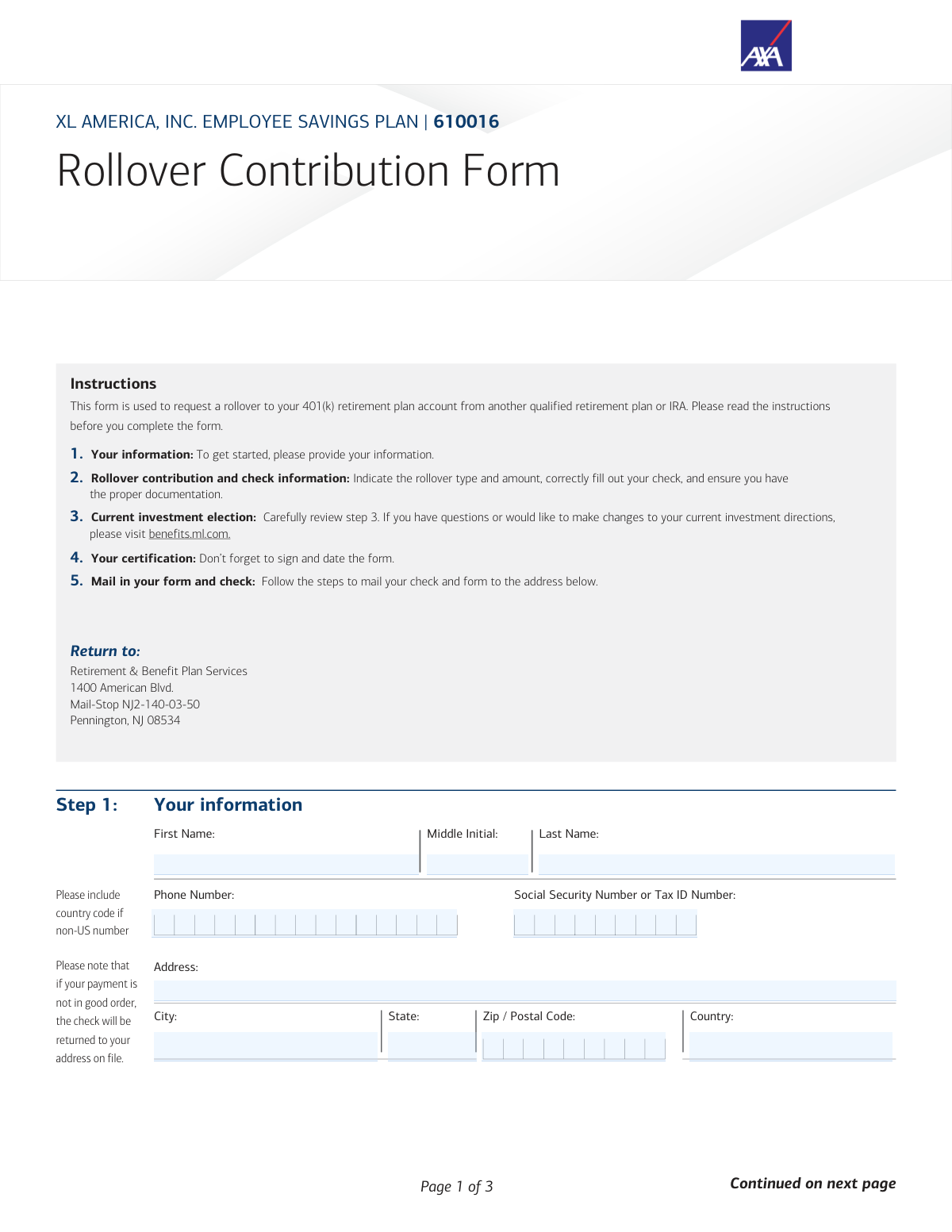
Yes! You can use AI to fill out XL America, Inc. Employee Savings Plan Rollover Contribution Form

This form facilitates the process of a rollover, which is the movement of retirement funds from a previous employer's plan or an IRA into your current XL America, Inc. Employee Savings Plan. Completing this form correctly is crucial for consolidating your retirement assets without incurring tax penalties. Today, this form can be filled out quickly and accurately using AI-powered services like Instafill.ai, which can also convert non-fillable PDF versions into interactive fillable forms.
Our AI automatically handles information lookup, data retrieval, formatting, and form filling.
It takes less than a minute to fill out 610016ROL using our AI form filling.
Securely upload your data. Information is encrypted in transit and deleted immediately after the form is filled out.

Form specifications

Form name: XL America, Inc. Employee Savings Plan Rollover Contribution Form
Number of pages: 1
Language: English
Categories: employee forms, rollover forms, savings plan forms
main-image

Instafill Demo: How to fill out PDF forms in seconds with AI

How to Fill Out 610016ROL Online for Free in 2026

Are you looking to fill out a 610016ROL form online quickly and accurately? Instafill.ai offers the #1 AI-powered PDF filling software of 2026, allowing you to complete your 610016ROL form in just 37 seconds or less.
Follow these steps to fill out your 610016ROL form online using Instafill.ai:
  1. 1 Navigate to Instafill.ai and upload the Rollover Contribution Form or select it from their template library.
  2. 2 Use the AI assistant to automatically populate your personal information, such as your name, address, and Social Security Number, into Step 1.
  3. 3 In Step 2, provide the details of your rollover, including the check amount and the type of account the funds are coming from, by answering simple questions.
  4. 4 Review the investment direction information in Step 3, confirming that your funds will be invested according to your current elections.
  5. 5 Carefully read the certification in Step 4, then use the platform's tools to securely sign and date the document.
  6. 6 Download the completed and signed form, print it, and mail it along with your physical rollover check to the address provided in Step 5.

Our AI-powered system ensures each field is filled out correctly, reducing errors and saving you time.

Why Choose Instafill.ai for Your Fillable 610016ROL Form?

Speed

Complete your 610016ROL in as little as 37 seconds.

Up-to-Date

Always use the latest 2026 610016ROL form version.

Cost-effective

No need to hire expensive lawyers.

Accuracy

Our AI performs 10 compliance checks to ensure your form is error-free.

Security

Your personal information is protected with bank-level encryption.

Frequently Asked Questions About Form 610016ROL

This form is used to request the transfer of funds from another qualified retirement plan or an IRA into your XL America, Inc. Employee Savings Plan account.

You should fill out this form if you are a participant in the XL America, Inc. Employee Savings Plan and wish to consolidate funds from a previous employer's retirement plan or an IRA.

You must include the rollover contribution check from your prior plan and the required distribution qualification documents, such as a distribution statement or IRA statements.

The check must be made payable to 'XL AMERICA, INC. EMPLOYEE SAVINGS PLAN, FBO [Your Name]' to be processed correctly.

In a direct rollover, your old plan pays your new plan directly without withholding taxes. In an indirect rollover, the funds are paid to you, taxes are withheld, and you have 60 days to deposit the funds into your new plan.

Your rollover funds will be invested according to your current investment choices. If you haven't made any selections, the funds will be invested in the plan's default investment option.

If your rollover includes Roth dollars, you must provide the date of your first Roth contribution and documentation showing the breakdown of Roth contributions and earnings.

Yes, but you must provide both the opening and closing IRA statements. Note that after-tax contributions to an IRA are not eligible to be rolled over into the plan.

Mail the signed form and your check to: Retirement & Benefit Plan Services, 1400 American Blvd., Mail-Stop NJ2-140-03-50, Pennington, NJ 08534.

Yes, the instructions state that you must print the form and provide a manual signature in Step 4 before mailing it.

If you have questions about completing the form or the rollover process, you can call the Retirement & Benefits Contact Center at 800.228.4015.

Yes, services like Instafill.ai use AI to accurately auto-fill form fields, which can save you time and help you avoid common errors.

Simply upload the PDF to the Instafill.ai platform. The AI will make the form fillable online, allowing you to type your information, sign it, and download the completed document for mailing.

You can use a service like Instafill.ai, which is designed to convert non-fillable PDFs into interactive, fillable forms that you can easily complete on your computer.

Compliance 610016ROL
Validation Checks by Instafill.ai

1
SSN/Tax ID Format and Completeness
This check verifies that the Social Security Number or Tax ID Number field is not empty and conforms to a valid format (e.g., XXX-XX-XXXX for SSN or XX-XXXXXXX for a Tax ID). This number is the primary identifier for the participant's account and is critical for tax reporting and ensuring the funds are credited correctly. If the number is missing or invalid, the form cannot be processed and will be returned.
2
Participant Full Name Requirement
Ensures that both the 'First Name' and 'Last Name' fields in Step 1 are filled out. A complete legal name is necessary to correctly identify the participant and match the rollover to their existing account. An incomplete name could lead to processing delays or the funds being misapplied, requiring manual intervention to resolve.
3
Rollover Amount Matches Check Amount
This validation confirms that the dollar amount entered in Step 2 is exactly equal to the amount written on the enclosed rollover check. This is a critical reconciliation step to ensure the integrity of the financial transaction and prevent accounting discrepancies. A mismatch will cause the entire submission to be rejected and returned to the participant for correction.
4
Rollover Type Selection Exclusivity
Verifies that exactly one option, either 'Direct Rollover' or 'Indirect Rollover', is selected in Step 2. The tax implications and processing rules are significantly different for each type, so a clear, unambiguous choice is required. If zero or both options are selected, the form is considered incomplete and processing will be halted.
5
Source Account Type Selection
This check ensures that at least one checkbox indicating the source of the rollover funds (e.g., 'Qualified Retirement Plan', 'Traditional IRA') is selected in Step 2. This information is legally required to determine the tax status of the funds (pre-tax, after-tax, Roth) and ensure compliance with IRS regulations. Failure to select a source will result in the form being returned for completion.
6
Conditional Roth Contribution Date Requirement
If the 'Designated Roth Account' or 'Qualified Retirement Plan – In-Plan Roth Conversions' checkbox is selected, this validation ensures that the 'Date your first Roth contribution was made' field is filled out. This date is essential for calculating the five-year aging period for qualified Roth distributions in the future. Missing this date when Roth funds are present will delay processing until the information is provided.
7
Roth Contribution Date Format and Validity
This check validates that the provided Roth contribution date is in the correct MM-DD-YYYY format and represents a logical date that is not in the future. An invalid date format or a future date would be a data entry error and would prevent accurate record-keeping for tax purposes. The form would be flagged for correction if the date is invalid.
8
Signature Presence Verification
Confirms that a signature is present in the 'Your Signature' field in Step 4. The signature legally certifies that all the information provided is accurate and that the participant agrees to the terms outlined in the certification section. A missing signature invalidates the entire request, and the form will be immediately rejected.
9
Signature Date Requirement and Validity
Ensures the date field next to the signature in Step 4 is completed in MM-DD-YYYY format and is not a future date. This date establishes the official time of the certification and is used for compliance checks, such as the 60-day rollover rule. An invalid or missing date will cause the form to be returned.
10
Indirect Rollover 60-Day Rule Compliance
If 'Indirect Rollover' is selected in Step 2, this check compares the distribution date on the supporting documents to the signature date in Step 4. The signature date must be no more than 60 days after the distribution date to comply with IRS rules for tax-free rollovers. A violation of this rule would make the distribution a taxable event, so the transaction would be rejected if the window has passed.
11
Check Payee Name Verification
This validation verifies that the payee on the enclosed check is written exactly as 'XL AMERICA, INC. EMPLOYEE SAVINGS PLAN, FBO [Participant Name]'. The participant's name on the check must also match the name provided in Step 1. An incorrectly written payee means the check cannot be deposited, and the entire package will be returned to the participant to obtain a corrected check from their prior institution.
12
Required Documentation Presence
Based on the account type selected in Step 2, this check confirms that the necessary supporting documents are included with the submission (e.g., distribution statement for a qualified plan, opening/closing statements for an IRA). These documents are required to verify the source and tax status of the funds. Missing documentation is a common reason for processing delays and will result in the submission being placed on hold.
13
Complete Mailing Address
This check ensures that the full address, including 'Address', 'City', 'State', and 'Zip / Postal Code', is provided in Step 1. A complete address is required for the participant's record and is the location where any returned checks or correspondence will be sent. An incomplete address will cause the form to be flagged for correction to ensure proper communication.
14
Phone Number Format Validation
Validates that the provided phone number is in a recognizable format. This is important as it is the primary contact method if there are questions or issues with the rollover request. An invalid or missing number can significantly slow down the resolution of any problems, delaying the investment of funds.

Common Mistakes in Completing 610016ROL

Incorrect Check Payee Information

The form requires the rollover check be payable to 'XL AMERICA, INC. EMPLOYEE SAVINGS PLAN, FBO (insert your name)'. Filers often abbreviate the company name or, more commonly, forget to include the 'FBO [Your Name]' portion. An incorrectly named payee will cause the check to be rejected, forcing the filer to request a new check from their prior institution and causing significant processing delays.

Mismatch Between Form Amount and Check Amount

In Step 2, the dollar amount entered on the form must exactly match the amount written on the physical check. This mistake frequently occurs due to simple typos or transcription errors when filling out the form. Any discrepancy, no matter how small, will flag the submission as 'not in good order', leading to the entire package being returned and delaying the investment of funds.

Missing Required Supporting Documentation

The form's 'Rollover Guide' clearly states that certain account types, like Traditional IRAs or Designated Roth Accounts, require specific documentation such as opening/closing statements or a breakdown of contributions and earnings. Forgetting to include these documents is a primary reason for delay, as the plan administrator cannot process the rollover without verifying the tax status (e.g., pre-tax vs. after-tax basis) of the incoming funds.

Forgetting to Sign or Date the Form

A missing signature or date in Step 4 is a critical and frequent oversight that immediately invalidates the entire request. This often happens when filers are in a hurry to mail the documents. Without a wet signature and a corresponding date, the certification is not legally binding, and the form will be rejected and returned for completion.

Illegible Handwriting on a Non-Fillable Form

This form is a flat PDF that must be printed and completed by hand, which often results in illegible entries for critical data like names, addresses, and Social Security Numbers. Poor handwriting can lead to data entry errors by the processing team, causing delays, returned mail, or even security verification issues. AI-powered tools like Instafill.ai can convert non-fillable PDFs into clean, typable forms to prevent these errors.

Incorrectly Identifying the Source Account Type

In Step 2, filers must accurately select the type of account the money is coming from, and the form allows for multiple selections. A common error is failing to select all applicable types, such as not checking both 'Qualified Retirement Plan – Pre-tax Dollars' and 'Designated Roth Account' when a 401(k) contains both. This mistake can lead to improper tax accounting for the rolled-over funds and future tax complications.

Leaving the First Roth Contribution Date Blank

When rolling over any Roth money, the form requires the date of the very first Roth contribution to any plan. Many people do not know this date and leave the field blank, but it is essential for tracking the 5-year rule for qualified Roth distributions. Leaving this field empty will halt the processing of the Roth portion of the rollover until the filer provides the necessary information from their prior plan's records.

Using a Digital Signature Instead of a Manual One

The instructions in Step 4 explicitly state, 'Please print the form and manually sign before returning'. Despite this, some individuals may attempt to use a digital signature or simply type their name, assuming it will be accepted. This will result in an automatic rejection, as financial institutions often require a physical 'wet' signature for legal and compliance purposes.

Misunderstanding the Investment Direction Default

Filers may incorrectly assume this form is where they choose how the rollover funds will be invested. Step 3 clarifies that funds will be invested based on existing elections or, if none exist, into the plan's default investment. This misunderstanding can result in large sums of money being placed in a default fund that may not match the individual's financial goals, requiring them to log in separately to reallocate the assets after the fact.

Forgetting to Include the Physical Check with the Form

It may seem obvious, but it is a common mistake to mail the completed form without the enclosed rollover check, or vice-versa. This often happens when the check and form are handled at different times. This separation of required items means the submission is incomplete and cannot be processed, leading to delays and follow-up communication to locate the missing component.
Saved over 80 hours a year

“I was never sure if my IRS forms like W-9 were filled correctly. Now, I can complete the forms accurately without any external help.”

Kevin Martin Green

Your data stays secure with advanced protection from Instafill and our subprocessors

Robust compliance program

Transparent business model

You’re not the product. You always know where your data is and what it is processed for.

ISO 27001, HIPAA, and GDPR

Our subprocesses adhere to multiple compliance standards, including but not limited to ISO 27001, HIPAA, and GDPR.

Security & privacy by design

We consider security and privacy from the initial design phase of any new service or functionality. It’s not an afterthought, it’s built-in, including support for two-factor authentication (2FA) to further protect your account.

Fill out 610016ROL with Instafill.ai

Worried about filling PDFs wrong? Instafill securely fills xl-america-inc-employee-savings-plan-rollover-contribution-form forms, ensuring each field is accurate.