
Yes! You can use AI to fill out Transfer Between Existing Fidelity Accounts
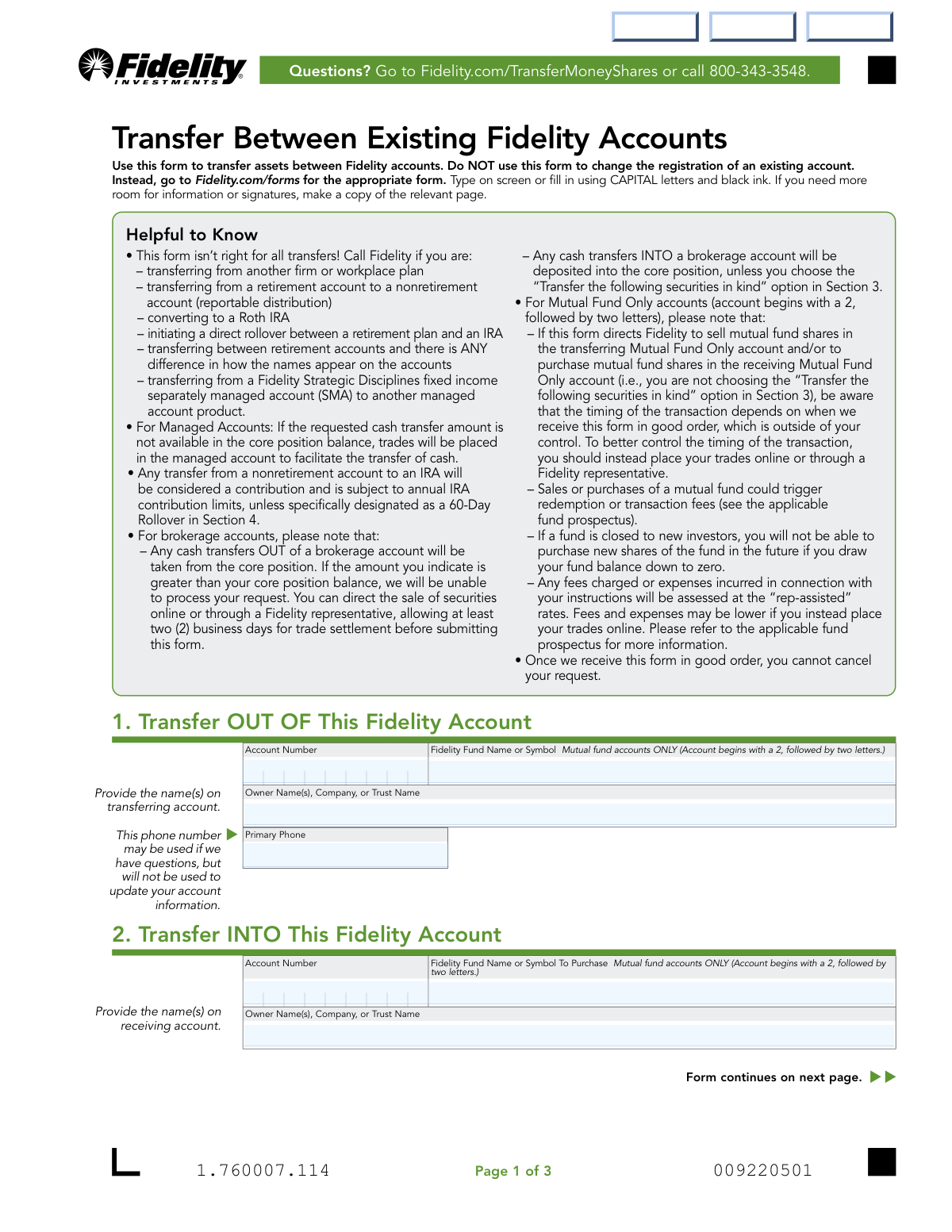
Don't type 46 fields by hand. Tell our AI about yourself, or upload a document you already have, and it fills every field in seconds. You check it, then download, print or sign.
The AI does the filling. You just check it.
No typing into boxes, nothing to install.
What this form asks for
The AI fills all of it, from your answers or your documents.
The AI checks your answers before you download
14 checks built for this form, so a wrong date or a missing answer is caught before anyone else sees it.
This check verifies that the 'Transfer OUT OF' account number in Section 1 is not identical to the 'Transfer INTO' account number in Section 2. A transfer must occur between two distinct accounts. If the account numbers are the same, the form submission will be rejected as it represents a logically impossible transaction.
This validation confirms that the 'Owner Name(s)' provided in Section 1 and Section 2 match the legal owner names registered to the corresponding account numbers in Fidelity's system. This is a critical security measure to prevent unauthorized transfers and ensure assets are moved by the rightful owner. A mismatch will halt the process and may trigger a security review.
This check ensures that the user has selected only one of the three primary transfer methods in Section 3: 'FULL transfer', 'ONLY the following amount of cash', or 'Transfer the following securities in kind'. Selecting more than one of these options creates ambiguity in the transfer instruction. The form should be rejected if multiple primary options are checked, requiring the user to clarify their intent.
When a user specifies a dollar amount for a cash transfer in Section 3, this validation checks if the 'Transfer OUT OF' account's core position balance is greater than or equal to the requested amount. This prevents transfer failures and overdraft situations. If the balance is insufficient, the request will be rejected, and the user will be instructed to either deposit more funds or sell securities to raise the required cash.
For each security listed for an 'in kind' transfer in Section 3, this check verifies that the user has either entered a specific 'Number of Shares' or checked the 'ALL' box, but not both. Providing both inputs for a single security is a contradictory instruction. The form will be considered 'not in good order' and rejected until the ambiguity is resolved.
If a user opts to transfer securities in kind, this validation confirms that the specified CUSIP/Symbol and the number of shares exist in the 'Transfer OUT OF' account. This prevents attempts to transfer assets that are not owned. If the security or the specified quantity of shares is not present, the transfer for that line item will fail, and the entire form may be rejected.
And 8 more checks
- Mutually Exclusive Transfer Reason Selection
- Conditional Requirement for IRA Contribution Year
- Logical Consistency of Account Types and Transfer Reason
- Conditional Requirement for Non-Gift Explanation
- Signature and Date Completeness
- Valid and Logical Date Formatting
- Conditional Medallion Signature Guarantee Requirement
- Cash-Only Validation for IRA Contributions
Let AI fill out your Fidelity Form 1.760007.114
No typing. Every field filled in seconds, checked, ready to sign.
How to Fill Out Fidelity Form 1.760007.114 Online for Free in 2026
What the AI walks you through.
- Navigate to Instafill.ai and upload or select the 'Transfer Between Existing Fidelity Accounts' form.
- Provide the account details for the account you are transferring assets FROM, including the account number and owner's name.
- Enter the account information for the account you are transferring assets INTO.
- Specify the transfer details in Section 3, indicating whether it's a full transfer, a specific cash amount, or a transfer of particular securities 'in kind'.
- Select the reason for the transfer in Section 4, such as an IRA contribution, a gift, or account consolidation.
- Review all the information auto-filled by the AI for accuracy and completeness.
- Digitally sign the form, download the completed document, and submit it to Fidelity following the instructions on the form.
Common Mistakes in Completing Fidelity Form 1.760007.114
The ones the AI is built to catch.
Using the Form for an Ineligible Transaction Type
Requesting a Cash Transfer Exceeding the Core Balance
Missing the Medallion Signature Guarantee
Providing Inexact or Mismatched Account Owner Names
Incorrectly Specifying Securities for an 'In Kind' Transfer
Failing to Specify the Reason for a Non-Gift Transfer
Missing a Required Signature on Joint or Trust Accounts
Incorrectly Specifying an IRA Contribution Year
Transposing Digits in Account Numbers
Forgetting to Keep an Account Open After a Full Transfer
Frequently Asked Questions About Fidelity Form 1.760007.114
Is it really free for 7 days?
Can I fill other forms too?
How do I cancel?
How does the AI fill out Fidelity Form 1.760007.114?
What happens to my information?
How complex is Fidelity Form 1.760007.114 to fill out?
What is the purpose of the 'Transfer Between Existing Fidelity Accounts' form?
Are there any transfers I cannot make with this form?
What information do I need to fill out this form?
How do I submit the completed form to Fidelity?
When is a Medallion signature guarantee required?
What does it mean to 'transfer securities in kind'?
What happens if I request to transfer more cash than is in my core position?
How is a transfer from a nonretirement account to an IRA treated?
If I choose a 'FULL transfer,' will my account be closed?
Can I cancel my transfer request after submitting the form?
What is the difference between a 'Gift' and 'Non-Gift' transfer in Section 4?
Can I use an AI tool to help me fill out this form?
How can I use Instafill.ai to fill this form out online?
The PDF I downloaded isn't fillable. What can I do?
Get your Fidelity Form 1.760007.114 filled out by AI
$0 today. Cancel before Nov 1 and you pay nothing.
Other forms like this one
Fidelity forms: Fidelity Funds Account Transfer of Assets Form, Fidelity Stock Plan Services (SPS) Transfer Request Form, How to Transfer Assets from Morgan Stanley to Fidelity Investments (Fidelity Stock Plan Services Guide), Fidelity Investments Transfer/Rollover/Exchange Form, Fidelity Investments Standing Transfer Instructions Form, Fidelity Charitable 144/145 Contribution Form, One-Time Withdrawal – IRA, Fidelity Investments, Fidelity Investments Transfer/Rollover Form, Fidelity Advisor 403(b) Distribution Request Form, Fidelity Advisor IRA Distribution Request for Automatic Rollover Accounts, Special Tax Notice: Your Rollover Options - Fidelity Investments, Fidelity Charitable Letter of Authorization, Fidelity Advisor Trading Authorization and Indemnification, Fidelity Investment-Only (Non-Prototype) Retirement Account Application, Fidelity NetBenefits Send a Document Form, Fidelity NetBenefits Auditor's Guide: An Overview of Fidelity's 2024 Plan Year Reporting Package, Fidelity NetBenefits Distribution - Recurring Payments, Fidelity Investments® Beneficiary Distribution Form, Fidelity Investments Distribution Form, Fidelity One-Time Withdrawal Form — Nonretirement
account transfer forms: Fidelity Funds Account Transfer of Assets Form, Group Transfer Form Fidelity Health Savings Account (HSA), Form APP13017-29, Transfer Your Account to Schwab, Transfer of Assets Out - Partial Account or Charitable Gift Transfers, Charles Schwab & Co., Inc. Account Transfer Form, HSA Bank Investment Account Transfer Form, Rollover/Transfer Request — ABLE Account, Schwab Health Savings Brokerage Account (HSBA) to HSA Invest Choice Account Transfer Form, Retirement Transfer Between Existing Vanguard Accounts, The Vanguard 529 College Savings Plan Transfer Due to Death of Account Owner Form, Vanguard Brokerage Account CREST Transfer Form, Account Transfer Authorization (ACATS) Form, AbbVie Savings Plan 401(k) Account Transfer Notice, Rollover/Transfer Request — ABLE Account, TIAA Brokerage Incoming Account Transfer Form, TIAA Brokerage Joint Transfer on Death Account Agreement, TIAA Brokerage Incoming Managed Account Transfer Form (F11319), Health Savings Account (HSA) Transfer Request, Client Account Transfer Form to Merrill Lynch, Pierce, Fenner & Smith Incorporated, Authorization to transfer funds from a bank retirement account
transfer forms: Form REG 227, Application for Replacement or Transfer of Title, City of Harvey Real Estate Transfer Declaration & Application (with Certificate for Exemption), DBPR ABT-6002 – Application for Transfer of Ownership of an Alcoholic Beverage License, DBPR ABT-6002, Division of Alcoholic Beverages and Tobacco Application for Transfer of Ownership of an Alcoholic Beverage License, Request for Transfer of Records (Adelaide Health Care) – AHC-0013-05-PS (Version 2), DBPR Form ABT-6002, Division of Alcoholic Beverages and Tobacco Application for Transfer of Ownership of an Alcoholic Beverage License, Pfändungs- und Überweisungsbeschluss (Garnishment and Transfer Order) – German Civil Enforcement Court Form, Fidelity Funds Account Transfer of Assets Form, Fidelity Stock Plan Services (SPS) Transfer Request Form, How to Transfer Assets from Morgan Stanley to Fidelity Investments (Fidelity Stock Plan Services Guide), Transfer Due to Divorce — IRA/HSA/529, Fidelity Investments Transfer/Rollover/Exchange Form, Fidelity Investments Standing Transfer Instructions Form, Fidelity Investments Transfer/Rollover Form, Group Transfer Form Fidelity Health Savings Account (HSA), Plan–to-Plan Transfer, Plan Exchange, or Service Credit Authorization Form, Beneficiaries — Nonretirement Transfer on Death, Transfer Shares as a Gift — Nonretirement, Form APP13017-29, Transfer Your Account to Schwab, Transfer of Assets Out - Partial Account or Charitable Gift Transfers
Let AI fill out your Fidelity Form 1.760007.114
Your trial starts once a card is added. You pay nothing before Nov 1.
Our AI already knows this form, all 46 fields of it. Skip the typing: tell it about yourself, or upload what you have, and it fills the whole form in seconds.
- AI fills every field on all 3 pages, checkboxes included
- No typing into boxes: answer a few questions, or upload a document you already have, an old copy of this form, a photo of a document
- The AI checks the answers; you review and change anything before you download
- Download the finished PDF, print it, or sign it online
- Encrypted, and never used to train AI
Cancel before Nov 1 and you pay nothing.
A card is needed to start the trial. Cancel in two clicks from your account.
Terms · Privacy