Yes! You can use AI to fill out Charles Schwab IRA Account Application

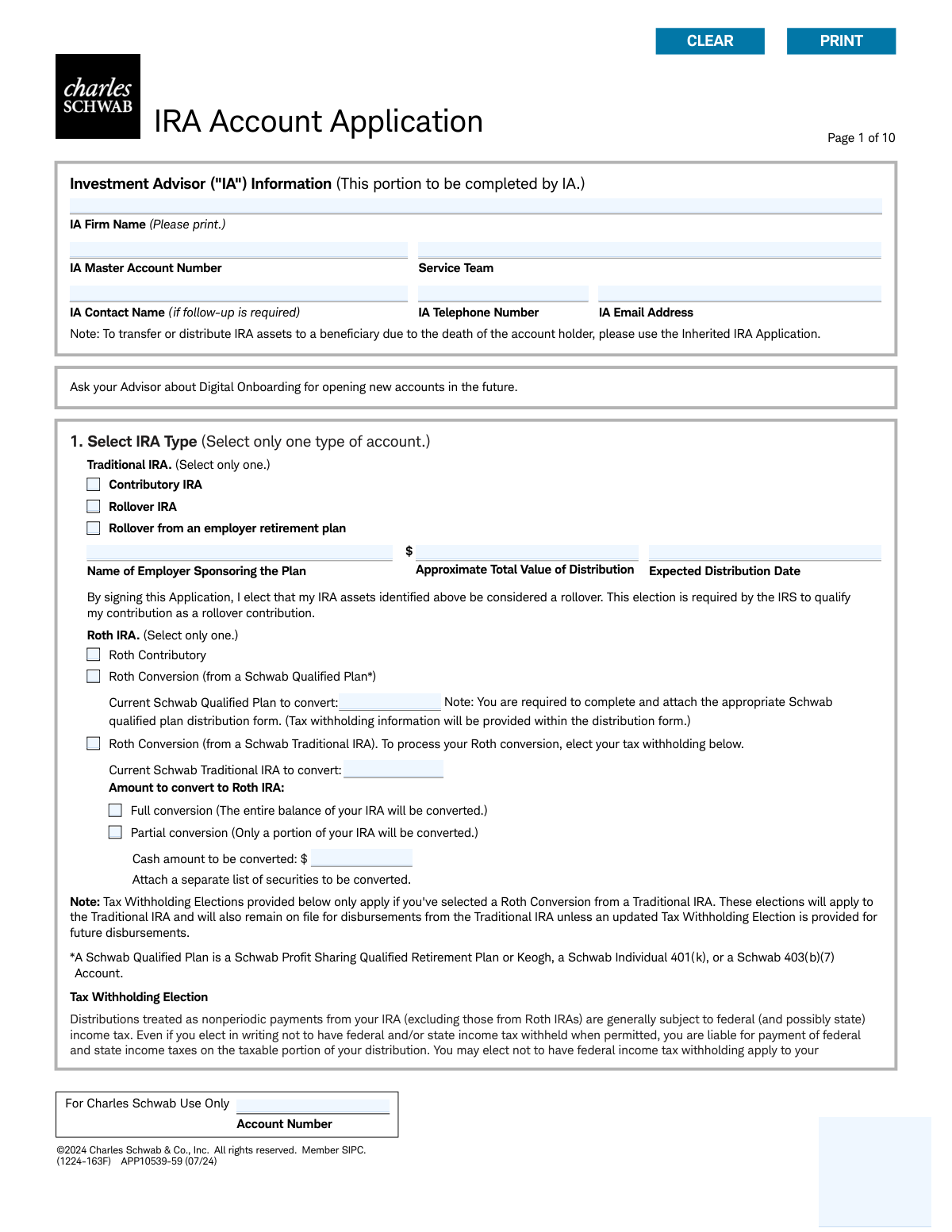
The Charles Schwab IRA Account Application is a comprehensive form required to establish a new Individual Retirement Account with Charles Schwab. It gathers essential personal information, employment details, investment advisor authorizations, and beneficiary designations to set up various IRA types. Completing this multi-page document accurately is crucial for legally opening your retirement account and ensuring your assets are managed and distributed according to your wishes. Today, this form can be filled out quickly and accurately using AI-powered services like Instafill.ai, which can also convert non-fillable PDF versions into interactive fillable forms.
Our AI automatically handles information lookup, data retrieval, formatting, and form filling.
It takes less than a minute to fill out APP10539-59 using our AI form filling.
Securely upload your data. Information is encrypted in transit and deleted immediately after the form is filled out.

Form specifications

Form name: Charles Schwab IRA Account Application
Number of pages: 1
Language: English
Categories: Schwab forms, IRA forms, Charles Schwab forms
main-image

Instafill Demo: How to fill out PDF forms in seconds with AI

How to Fill Out APP10539-59 Online for Free in 2026

Are you looking to fill out a APP10539-59 form online quickly and accurately? Instafill.ai offers the #1 AI-powered PDF filling software of 2026, allowing you to complete your APP10539-59 form in just 37 seconds or less.
Follow these steps to fill out your APP10539-59 form online using Instafill.ai:
  1. 1 Navigate to Instafill.ai and upload or select the Charles Schwab IRA Account Application form.
  2. 2 In Section 1, select the type of IRA you wish to open (e.g., Traditional, Roth, Rollover) and provide details about the source of funds if applicable.
  3. 3 Complete Section 2 with your personal information, including name, address, Social Security Number, date of birth, and employment details.
  4. 4 Designate your primary and contingent beneficiaries in Section 7, providing their personal information and the percentage of assets they will receive.
  5. 5 Review and complete the optional authorizations for your Investment Advisor (IA) in Sections 5 and 6, and indicate your preference for paperless document delivery in Section 4.
  6. 6 Carefully review all entered information for accuracy, then proceed to Section 8 to electronically sign and date the application, certifying the information provided.
  7. 7 Download, print, or submit the completed and signed application as instructed.

Our AI-powered system ensures each field is filled out correctly, reducing errors and saving you time.

Why Choose Instafill.ai for Your Fillable APP10539-59 Form?

Speed

Complete your APP10539-59 in as little as 37 seconds.

Up-to-Date

Always use the latest 2026 APP10539-59 form version.

Cost-effective

No need to hire expensive lawyers.

Accuracy

Our AI performs 10 compliance checks to ensure your form is error-free.

Security

Your personal information is protected with bank-level encryption.

Frequently Asked Questions About Form APP10539-59

This form is used to open a new Individual Retirement Account (IRA) with Charles Schwab. This includes Traditional, Roth, SIMPLE, and SEP-IRA account types for contributions, rollovers, or conversions.

Any individual working with an Investment Advisor who wants to establish a new retirement account at Charles Schwab should use this form. It is not intended for those inheriting an IRA; a separate 'Inherited IRA Application' is required for that purpose.

You will need your personal information, including your Social Security Number, date of birth, legal address, and employment details. You'll also need information for a valid government-issued ID, such as a driver's license or passport.

This form is for various IRA types, each with different tax implications and rules. It is highly recommended that you consult with your Investment Advisor or a tax professional to choose the account that best fits your financial situation and retirement goals.

A Trusted Contact is a person you authorize Schwab to contact if there are concerns about potential financial exploitation or if they cannot reach you. Designating a trusted contact is voluntary but strongly encouraged for your account's security.

You can list your primary and contingent beneficiaries and specify the percentage of assets each should receive. The total for each beneficiary type (primary and contingent) must add up to 100%.

If you need to name more than four beneficiaries, attach a separate signed and dated sheet with their information. For special designations like 'Per Stirpes', you must skip Section 7 and submit the separate 'Schwab IRA Beneficiary Designation form' along with this application.

When converting a Traditional IRA to a Roth IRA, the amount converted is generally taxable income. This section allows you to elect a percentage of federal and state tax to be withheld from the conversion to help cover your tax liability.

These sections allow you to grant your IA specific permissions, such as placing trades, requesting check disbursements to you, paying advisory fees from the account, and handling proxy voting. Review these authorizations carefully with your advisor.

By providing an email address, you are automatically enrolled in paperless delivery for account statements, trade confirmations, and other documents. If you prefer to receive paper documents by mail, you must check the box in Section 4 to opt out.

This application is designed to be completed with your Investment Advisor (IA). Your IA will handle the submission process to Charles Schwab on your behalf.

Yes, services like Instafill.ai use AI to accurately auto-fill form fields with your saved information. This can save you significant time and help prevent errors when completing long and detailed forms like this one.

You can upload the IRA Account Application PDF to the Instafill.ai platform. The service makes the form interactive, allowing you to easily type in your information, which can then be securely saved for future use on other forms.

If you have a non-fillable or 'flat' PDF, Instafill.ai can help. Upload the file, and the platform will automatically convert it into an interactive, fillable form that you can complete and sign digitally.

Compliance APP10539-59
Validation Checks by Instafill.ai

1
Exclusive IRA Type Selection
This check ensures that the applicant has selected only one IRA type in Section 1 (e.g., Traditional, Roth, SIMPLE, or SEP-IRA). Selecting multiple types would create ambiguity in account setup. If more than one IRA type is selected, the form submission should be rejected with an error message prompting the user to choose only one.
2
Rollover IRA Conditional Fields Completion
This validation verifies that if 'Rollover from an employer retirement plan' is selected under Traditional IRA in Section 1, the subsequent fields 'Name of Employer Sponsoring the Plan', 'Approximate Total Value of Distribution', and 'Expected Distribution Date' are all completed. This information is essential for correctly processing the rollover. A failure would halt submission and highlight the missing required fields.
3
Account Holder SSN/Tax ID Format
This check validates that the 'Social Security/Tax ID Number' in Section 2 is entered in a valid format (e.g., XXX-XX-XXXX for an SSN or XX-XXXXXXX for a TIN). This is critical for tax reporting and identity verification as required by federal law. An invalid format would trigger an error message requesting the user to correct the number before proceeding.
4
Account Holder Date of Birth Validity and Age
This validation ensures the 'Date of Birth' in Section 2 is a valid calendar date in MM/DD/YYYY format and that the calculated age of the applicant is 18 years or older. Opening a financial account requires the holder to be of legal age. If the date is invalid or the applicant is underage, the submission will be blocked.
5
Legal Address P.O. Box Prohibition
This check verifies that the 'Home/Legal Street Address' field in Section 2 does not contain 'P.O. Box' or similar variations. Federal regulations require a physical residential address for identity verification purposes. If a P.O. Box is detected, an error message will instruct the user to provide a physical street address.
6
Government ID Expiration Date Logic
This validation confirms that the 'Expiration Date' provided for the government-issued ID in Section 2 is a valid date and occurs after the 'Issue Date'. An expired ID is not valid for identity verification, and an expiration date before the issue date is a logical impossibility. A failure would prompt the user to review and correct the ID dates.
7
Employment Details Consistency
This check ensures that if 'Employed' or 'Self-Employed' is selected in the Employment Information part of Section 2, then the 'Occupation', 'Employer Name/Business Name', and 'Business Street Address' fields are filled out. This information is required by securities industry regulations. If the condition is met but the fields are empty, the form will prompt the user for the missing details.
8
FINRA Association Disclosure Requirement
This validation enforces that if an applicant answers 'Yes' to the question about being associated with a FINRA member firm in Section 2, the 'List the company name' field must be completed. This disclosure is a regulatory requirement to monitor for potential conflicts of interest. A 'Yes' answer without a company name will result in a validation error.
9
Trusted Contact Minimum Contact Information
This check verifies that if a 'Trusted Contact Person' is named in Section 2, at least one method of contact (Mailing Address, Telephone Number, Mobile Number, or Email Address) is provided. Without contact information, the designation is useless. If a name is entered but no contact method is provided, the user will be prompted to add at least one.
10
Primary Beneficiary Percentage Summation
This validation calculates the sum of all 'Portion %' fields for beneficiaries marked as 'Primary' in Section 7. The total must equal exactly 100%. This ensures the account assets are fully and clearly allocated. If the sum is not 100%, an error will be displayed, requiring the user to adjust the percentages.
11
Contingent Beneficiary Percentage Summation
This validation calculates the sum of all 'Portion %' fields for beneficiaries marked as 'Contingent' in Section 7. The total must equal exactly 100%. This ensures a clear line of succession if no primary beneficiaries survive the account holder. If the sum is not 100%, an error will be displayed, requiring the user to adjust the percentages.
12
Beneficiary Entity and Name Field Consistency
This check ensures that if a beneficiary's relationship is an entity (Trust, Organization, Estate), the 'Trust/Organization/Estate' name field is filled. Conversely, if the relationship is an individual (Spouse, Child, etc.), the 'First' and 'Last' name fields must be filled. This prevents ambiguous beneficiary designations. A mismatch would trigger an error asking for clarification.
13
Federal Tax Withholding Rate Range
This check validates that the value entered for 'Federal Income Tax Withholding' in Section 1 is a whole number between 0 and 100, inclusive. The IRS specifies allowable withholding rates, and this prevents invalid data entry. An entry outside this range or containing decimals would be flagged as an error.
14
Mandatory Signature and Date
This validation confirms that the 'Signature' and 'Today's Date' fields in Section 8 are not empty. The signature is legally required to authorize the account opening and agree to the terms, and the date establishes when the agreement was made. An unsigned or undated application is invalid and will be rejected.

Common Mistakes in Completing APP10539-59

Selecting the Wrong IRA Account Type

In Section 1, applicants often get confused by the various options (Traditional, Roth, SEP, SIMPLE) and sub-types (Contributory, Rollover, Conversion), selecting an account that doesn't match their intention. For example, choosing 'Contributory' when they mean to perform a 'Rollover' from a 401(k). This error can lead to significant tax consequences and requires extensive paperwork to correct. To avoid this, carefully research each account type or consult a financial advisor before making a selection.

Incomplete Rollover or Roth Conversion Details

When selecting a 'Rollover IRA' or 'Roth Conversion' in Section 1, applicants frequently fail to provide all the necessary supporting information, such as the 'Name of Employer Sponsoring the Plan' or the specific Schwab account number to convert from. This oversight, often because the information isn't readily available, will cause the application to be rejected or delayed. To prevent this, gather all required account statements and details before you begin filling out the form.

Using a P.O. Box for the Legal Address

Applicants often enter a P.O. Box in the 'Home/Legal Street Address' field in Section 2, which is explicitly forbidden for identity verification purposes under federal law. This mistake will cause the application to be rejected, delaying the account opening. Always provide your physical residential address in this field and use the separate 'Mailing Address' section if you want mail sent to a P.O. Box. AI-powered tools like Instafill.ai can help by validating address formats and flagging P.O. boxes in fields requiring a physical address.

Providing Incomplete or Expired Identification Details

In Section 2, the form requires complete details for a valid ID, including the ID number, issuing state/country, issue date, and expiration date. It is common for applicants to omit the issue date or provide details from an expired ID, which results in an immediate failure of the identity verification process. To avoid this, have your unexpired ID in front of you and carefully transcribe all information. Since this form is a non-fillable PDF, a tool like Instafill.ai can convert it into an interactive version with validated fields for dates and numbers, reducing the chance of errors.

Misinterpreting FINRA and Public Company Affiliation Questions

The regulatory questions in Section 2 regarding affiliation with a broker-dealer or being an officer of a public company are often misunderstood, particularly the scope of 'immediate family member.' Answering 'Yes' but failing to attach the required approval letter or provide the company name will halt the application. Answering 'No' incorrectly can lead to compliance violations. It is crucial to read these questions carefully and seek clarification if you are unsure about your status.

Beneficiary Allocation Percentages Not Totaling 100%

A frequent error in Section 7 is assigning percentages to beneficiaries that do not sum to exactly 100% for each category (Primary and Contingent). This happens due to simple math errors or incorrect rounding when dividing assets among multiple people. An incorrect total will cause the beneficiary designation to be rejected, potentially leading to an unintended distribution of assets upon death. Always double-check that the portions for your Primary beneficiaries add up to 100% and do the same for your Contingent beneficiaries. AI form-fillers like Instafill.ai can automatically validate these calculations to prevent submission errors.

Omitting Beneficiary Social Security Number or Date of Birth

Applicants often leave the Social Security Number (SSN) and Date of Birth (DOB) fields blank for their beneficiaries in Section 7. This is a critical omission, as this data is essential for the firm to locate and verify the identity of your heirs. Missing information can create significant delays, costs, and legal hurdles for your beneficiaries when they attempt to claim the account assets. Before filling out the form, be sure to collect this vital information from anyone you plan to name as a beneficiary.

Improperly Requesting 'Per Stirpes' on the Application

The form explicitly states that for complex designations like 'Per Stirpes', applicants must skip Section 7 and complete the separate 'Schwab IRA Beneficiary Designation form'. Many people miss this instruction and write 'Per Stirpes' in the name field or margins, which is invalid and will be ignored by the custodian. This can cause assets to be distributed in a way that contradicts the applicant's wishes, such as disinheriting the children of a deceased beneficiary. If your estate plan requires anything beyond a simple percentage split, you must use the correct, separate form.

Incorrect or Uninformed Tax Withholding Elections

The tax withholding section for Roth conversions is complex, and applicants often make mistakes due to a lack of understanding of tax law. They may leave the fields blank assuming a 0% default or choose an arbitrary percentage, leading to a surprise tax bill and potential under-withholding penalties from the IRS. Before making an election, it is crucial to consult a tax professional to determine the appropriate federal and state withholding rates for your specific financial situation.

Making Conflicting Selections for Issuer Communications

In Section 6, which governs proxy voting and corporate actions, applicants must make several selections that can easily conflict. For example, the form notes that the Investment Advisor (IA) can only receive informational copies if the Account Holder is voting, but people often select 'IA' for both. Such conflicting instructions create ambiguity and can cause the form to be returned for correction. To avoid this, read each option and its dependencies carefully before making a selection.
Saved over 80 hours a year

“I was never sure if my IRS forms like W-9 were filled correctly. Now, I can complete the forms accurately without any external help.”

Kevin Martin Green

Your data stays secure with advanced protection from Instafill and our subprocessors

Robust compliance program

Transparent business model

You’re not the product. You always know where your data is and what it is processed for.

ISO 27001, HIPAA, and GDPR

Our subprocesses adhere to multiple compliance standards, including but not limited to ISO 27001, HIPAA, and GDPR.

Security & privacy by design

We consider security and privacy from the initial design phase of any new service or functionality. It’s not an afterthought, it’s built-in, including support for two-factor authentication (2FA) to further protect your account.

Fill out APP10539-59 with Instafill.ai

Worried about filling PDFs wrong? Instafill securely fills charles-schwab-ira-account-application forms, ensuring each field is accurate.