Yes! You can use AI to fill out Schwab MoneyLink® Electronic Funds Transfer Form

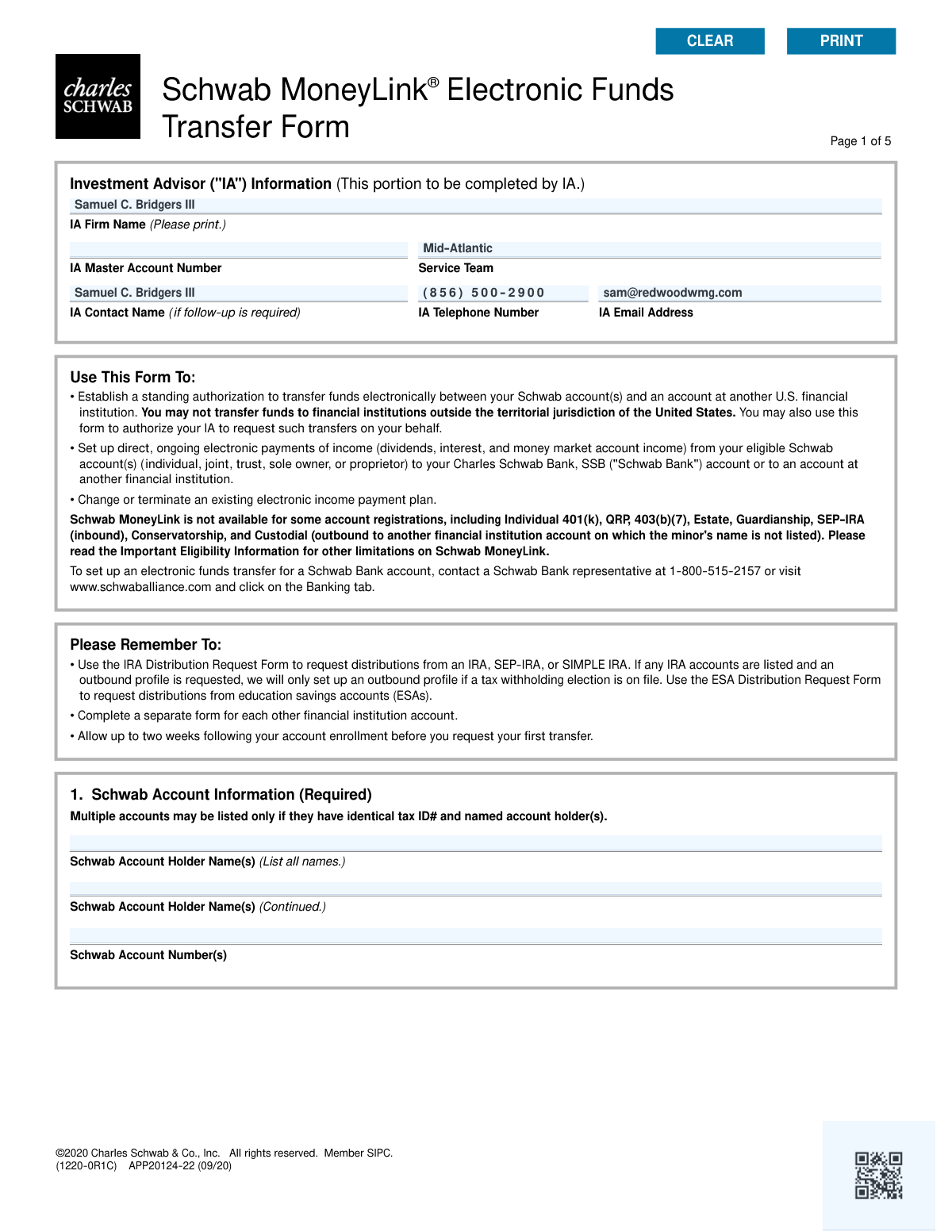
This form establishes a standing authorization to move money electronically between your Schwab accounts and another U.S. bank or financial institution. It is used to set up one-time or recurring transfers, direct deposit of investment income, or to authorize an Investment Advisor to initiate transfers on your behalf. Today, this form can be filled out quickly and accurately using AI-powered services like Instafill.ai, which can also convert non-fillable PDF versions into interactive fillable forms.
Our AI automatically handles information lookup, data retrieval, formatting, and form filling.
It takes less than a minute to fill out Schwab MoneyLink Form using our AI form filling.
Securely upload your data. Information is encrypted in transit and deleted immediately after the form is filled out.

Form specifications

Form name: Schwab MoneyLink® Electronic Funds Transfer Form
Number of pages: 1
Language: English
main-image

Instafill Demo: How to fill out PDF forms in seconds with AI

How to Fill Out Schwab MoneyLink Form Online for Free in 2026

Are you looking to fill out a SCHWAB MONEYLINK FORM form online quickly and accurately? Instafill.ai offers the #1 AI-powered PDF filling software of 2026, allowing you to complete your SCHWAB MONEYLINK FORM form in just 37 seconds or less.
Follow these steps to fill out your SCHWAB MONEYLINK FORM form online using Instafill.ai:
  1. 1 Navigate to Instafill.ai and upload the Schwab MoneyLink® Electronic Funds Transfer Form or select it from their template library.
  2. 2 Provide your Schwab account information in Section 1, including the account holder names and account numbers.
  3. 3 In Section 2, specify the transfer instructions, such as setting up a new transfer, changing an existing one, or terminating instructions.
  4. 4 Enter the other financial institution's details in Section 3, including the ABA routing number and account number, and attach a voided check or other required documentation.
  5. 5 Define the type of transfer in Section 4, choosing between on-request or recurring transfers and specifying amounts, frequency, and start dates.
  6. 6 Complete the authorization in Section 7 by providing the required digital signatures and dates for all necessary account holders.
  7. 7 Review the completed form for accuracy and submit it electronically to Charles Schwab as per their instructions.

Our AI-powered system ensures each field is filled out correctly, reducing errors and saving you time.

Why Choose Instafill.ai for Your Fillable Schwab MoneyLink Form Form?

Speed

Complete your Schwab MoneyLink Form in as little as 37 seconds.

Up-to-Date

Always use the latest 2026 Schwab MoneyLink Form form version.

Cost-effective

No need to hire expensive lawyers.

Accuracy

Our AI performs 10 compliance checks to ensure your form is error-free.

Security

Your personal information is protected with bank-level encryption.

Frequently Asked Questions About Form Schwab MoneyLink Form

This form is used to establish, change, or terminate a standing authorization for electronic fund transfers (EFT) between your Schwab account(s) and an account at another U.S. financial institution.

Any Schwab account holder who wants to set up the ability to move money electronically to or from a personal or corporate account at a different U.S. bank or financial institution should use this form.

You are required to attach a voided, preprinted check from the other financial institution. Alternatively, you can submit a deposit slip, a recent account statement, or a letter from the bank that shows the account title, number, and ABA routing number.

You should allow up to two weeks for Schwab to process your enrollment. After this period, you will be able to initiate your first transfer.

On-request transfers provide the flexibility to move funds when you choose by logging in or contacting Schwab. Recurring transfers automatically move a fixed amount of money on a set schedule, such as weekly or monthly.

By initialing Section 6, you grant your Investment Advisor permission to initiate and manage MoneyLink transfers on your behalf. This includes setting up one-time transfers, changing recurring amounts, and stopping transfers.

Yes, certain account types are not eligible, including Individual 401(k), QRP, 403(b)(7), Estate, and Conservatorship accounts. The form lists other specific limitations as well.

No, this form cannot be used for IRA distributions. You must use the specific 'IRA Distribution Request Form' to take money from an IRA.

Yes, you can list multiple Schwab accounts on one form, but only if they all share the identical tax ID number and have the exact same account holders.

At least one Schwab account holder and one account holder from the other financial institution must sign. However, if you are granting authority to your Investment Advisor in Section 6, all Schwab account holders are required to sign.

No, the Schwab MoneyLink service is only for transfers between your Schwab account and another financial institution located within the territorial jurisdiction of the United States.

Yes, services like Instafill.ai use AI to accurately auto-fill form fields with your information, which can save you time and help reduce errors.

You can use a service like Instafill.ai to upload the PDF and fill it out on your computer. The platform allows you to type directly into the fields, add your signature, and download the completed form.

If you have a non-fillable or 'flat' PDF, you can upload it to a platform like Instafill.ai. It will automatically convert the document into an interactive, fillable form that you can complete online.

Compliance Schwab MoneyLink Form
Validation Checks by Instafill.ai

1
Schwab Account Eligibility and Consistency
This check verifies that the Schwab Account Number(s) provided in Section 1 are valid and eligible for the MoneyLink service, excluding prohibited types like Individual 401(k), QRP, or SEP-IRA (for inbound). It also confirms that if multiple accounts are listed, they all share identical tax ID numbers and named account holders. This is critical to prevent setup failures on ineligible accounts and ensure funds are linked to the correct legal entity. A failure would result in form rejection, requiring the user to correct the account numbers or submit separate forms.
2
Exclusive Transfer Instruction Selection
Validates that the user has selected an option from either Section 2A ('Set up or terminate') or Section 2B ('Change existing'), but not from both. The form structure requires a single, unambiguous instruction for processing. Selecting options from both sections creates a logical conflict. If validation fails, the form would be flagged as ambiguous and returned to the user for clarification on their intended action.
3
ABA Transit Routing Number Validation
This check ensures the ABA Transit Routing Number in Section 3 is exactly 9 digits and passes the standard checksum algorithm. An incorrect routing number is a primary cause of ACH transfer failures, leading to delays and potential fees. This validation is crucial for ensuring the electronic transfer can be successfully routed to the correct financial institution. A failure would halt processing until a valid routing number is provided.
4
Required Documentation Attachment
Verifies that the submission includes the required documentation, such as a voided check or an accepted alternative like a bank letter, as specified in Section 3. This documentation is necessary to manually verify the account details (name, account number, routing number) of the other financial institution. Without this proof, the link cannot be established securely, and the form submission will be considered incomplete and rejected.
5
Recurring Transfer Completeness
If a 'Recurring Transfer' is selected in Section 4, this check ensures that a transfer amount, a frequency, and a valid start date are all provided. Missing any of these components makes the recurring instruction impossible to execute. This validation prevents the setup of incomplete or ambiguous automated transfers. A failure would require the user to provide all necessary details for the recurring schedule.
6
IRA Contribution Year Format
When a recurring transfer is designated for an IRA contribution in Section 4, this validation ensures the 'tax year' is entered as a valid four-digit year (YYYY). This is essential for correct tax reporting and ensuring the contribution is applied to the intended year. An invalid format could lead to tax complications or misapplication of funds. The form would be rejected pending correction of the year.
7
Dividend Plan Selection Logic
In Section 5, this check confirms that the user has not selected both the 'All Income Plan' and one of the 'Flexible Income Plan' options simultaneously. These choices are mutually exclusive, as 'All Income' encompasses all other options. This validation prevents conflicting instructions for dividend and interest payments. If both are selected, the form will be returned for the user to choose only one income plan type.
8
Signature Requirement for IA Authorization
This validation enforces a critical business rule: if the Investment Advisor (IA) Authorization in Section 6 is initialed, then all Schwab account holders listed in Section 1 must provide a signature in Section 7. This ensures that all owners of the account consent to granting the IA authority to initiate transfers. A mismatch between the number of account holders and the number of signatures will cause the authorization to be rejected as incomplete.
9
Standard Signature Completeness
This check verifies that the signature requirements in Section 7 are met. It ensures at least one Schwab account holder has signed (if Section 6 is not initialed) and that at least one account holder from the other financial institution has also signed. Signatures provide the legal authorization for Schwab to perform the requested actions. Missing required signatures renders the entire form invalid and it will be rejected until all necessary parties have signed.
10
Date Field Format and Plausibility
Ensures that all date fields, such as the signature dates in Section 7 and the start dates in Section 4, are in the correct format (e.g., mm/dd/yyyy) and represent a valid, plausible date. For instance, a start date for a recurring transfer must be in the future, and a signature date cannot be a future date. This prevents data entry errors and ensures instructions are time-stamped correctly for processing and auditing. An invalid date would require user correction.
11
Conditional Termination Account Number
If the user selects the option in Section 2A to 'Set up an additional other financial institution account and terminate existing instructions,' this check verifies that an account number to be terminated is actually provided. This field is conditionally required based on the user's selection. Without the specific account number, the system cannot identify which existing MoneyLink instruction to remove. The form would be considered incomplete if this information is missing.
12
On-Request Transfer Direction Selection
When 'On-Request Transfers' is selected in Section 4, this validation ensures one of the direction options ('Into my Schwab account,' 'Out of my Schwab account,' or 'Into and out of my Schwab account') is chosen. Although the form specifies a default, enforcing a selection ensures user intent is explicit and reduces ambiguity. This prevents the system from defaulting to a transfer direction the user may not have wanted. A missing selection would prompt the user to clarify the transfer direction.
13
External Account Type Specification
This check validates that a 'Type of Account' (e.g., Personal Checking, Corporate Savings) has been selected in Section 3. This information is important for the ACH process and can affect processing requirements, especially for corporate or organization accounts. Failing to specify the account type leaves a critical piece of information missing. The form would be held until the account type is specified by the user.

Common Mistakes in Completing Schwab MoneyLink Form

Forgetting to Attach a Voided Check or Equivalent

Section 3 requires attaching a voided check or other approved documentation to verify the external bank account information. People often overlook this step, assuming that manually entering the account and routing numbers is sufficient. Submitting the form without this required proof will lead to an automatic rejection and significant processing delays until the documentation is provided. To avoid this, always attach a voided check or one of the listed alternatives, like a bank statement or direct deposit form, before submission.

Missing Required Signatures for All Account Holders

The signature requirements in Section 7 are conditional and often misread. While only one signature is needed for a basic setup, authorizing an Investment Advisor in Section 6 requires signatures from ALL Schwab account holders. Failing to gather all necessary signatures renders the form legally invalid and results in its rejection. Carefully read the instructions in Section 7 to ensure every required individual, including joint account holders, has signed.

Incorrectly Entering Bank Routing or Account Numbers

Manually transposing digits in the ABA routing number or the bank account number in Section 3 is a frequent and critical error. These long strings of numbers are easy to mistype, which can cause transfers to fail or, in a worst-case scenario, be sent to the wrong account. Recovery of misdirected funds can be a lengthy and difficult process. Using an AI-powered form filler like Instafill.ai can help prevent this by validating number formats and cross-referencing data to ensure accuracy.

Using the MoneyLink Form for Ineligible IRA Distributions

This form is for setting up electronic fund transfers, but it explicitly excludes IRA distributions, which have tax implications. Users often mistakenly try to set up a recurring withdrawal from their IRA using this form instead of the required 'IRA Distribution Request Form'. This results in the request being denied, forcing the user to start over with the correct paperwork. Always verify the form's purpose and limitations, especially when dealing with retirement accounts.

Listing Schwab Accounts with Mismatched Ownership

In Section 1, the form states that multiple Schwab accounts can only be listed if they have identical tax ID numbers and named account holders. Users may try to link personally owned and jointly owned accounts together for convenience, violating this rule. This will cause the request to be rejected for the non-matching accounts, delaying the setup. A separate form must be completed for accounts with different ownership structures.

Using a Checkmark Instead of Initials for IA Authorization

Section 6 specifically requires all Schwab account holders to initial the box to grant authority to their Investment Advisor, stating that an 'X' is not sufficient. It's a common habit to use a checkmark, but this will invalidate the authorization. This oversight means the IA will not be able to manage transfers as intended, disrupting financial plans. Always use handwritten initials as instructed. Since this form is a non-fillable PDF, a tool like Instafill.ai can convert it to a fillable version, making it easier to add digital initials and signatures correctly.

Providing Ambiguous or Contradictory Transfer Instructions

The form presents many choices in Section 2 (new vs. change) and Section 4 (on-request vs. recurring), and users sometimes select conflicting options. For example, checking 'Set up new instructions' while also checking 'Change amount for recurring transfer' creates confusion. Ambiguous instructions force the processing team to contact you for clarification, halting the process. Review your selections to ensure they represent a single, clear request.

Mismatched Account Registrations Without Proper Documentation

Users may attempt to link a personal Schwab account to an external business or organization account without providing the necessary paperwork. The form notes that corporate or organization accounts have additional requirements, such as a corporate resolution or a letter from the bank. Failing to provide this documentation when account registrations don't match will put the application on hold. Ensure you have all required legal documents ready if the Schwab and external accounts are not identically registered to you as an individual.

Setting an Unrealistic Start Date for Recurring Transfers

When setting up a recurring transfer in Section 4, users might select a start date that doesn't account for the form's processing time, which can be up to two weeks. The form states that if the first date is missed, the schedule will begin on the next occurrence. This can lead to a missed initial payment or contribution. To avoid this, set your start date at least two to three weeks in the future.

Making Contradictory Selections in the Income Payment Plan

In Section 5, the form instructs you to choose either the 'All Income Plan' OR up to three options from the 'Flexible Income Plan'. A common mistake is to select both 'All Income Plan' and also check individual boxes like 'Dividends' and 'Interest'. This creates an ambiguous request that cannot be processed without clarification, delaying the setup of your income distributions. You must choose one path or the other.

Providing an Illegible or Mismatched Signature

In Section 7, the signature must be legible and match the printed name as well as the signature Schwab has on file for the account holder. Rushing this step can lead to an illegible scrawl or a signature that doesn't match, causing a rejection for security and compliance reasons. Always print your name clearly and sign deliberately as you would on other official documents. AI-powered tools like Instafill.ai can help by applying a clean, consistent, and legally binding digital signature.
Saved over 80 hours a year

“I was never sure if my IRS forms like W-9 were filled correctly. Now, I can complete the forms accurately without any external help.”

Kevin Martin Green

Your data stays secure with advanced protection from Instafill and our subprocessors

Robust compliance program

Transparent business model

You’re not the product. You always know where your data is and what it is processed for.

ISO 27001, HIPAA, and GDPR

Our subprocesses adhere to multiple compliance standards, including but not limited to ISO 27001, HIPAA, and GDPR.

Security & privacy by design

We consider security and privacy from the initial design phase of any new service or functionality. It’s not an afterthought, it’s built-in, including support for two-factor authentication (2FA) to further protect your account.

Fill out Schwab MoneyLink Form with Instafill.ai

Worried about filling PDFs wrong? Instafill securely fills schwab-moneylink-electronic-funds-transfer-form forms, ensuring each field is accurate.