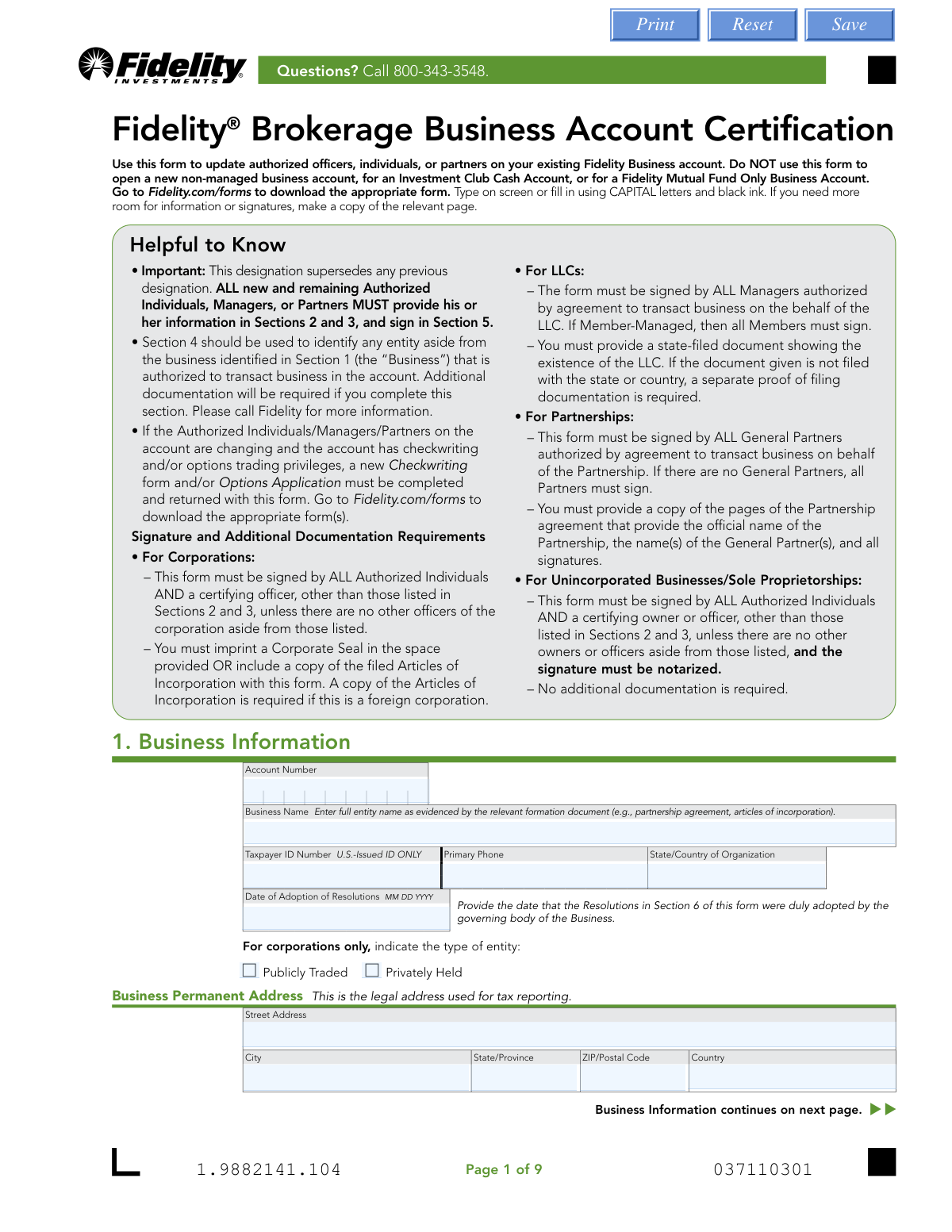
Yes! You can use AI to fill out Fidelity® Brokerage Business Account Certification

The Fidelity® Brokerage Business Account Certification is a legal document used by business entities to formally change or confirm the individuals who have authority to manage and transact on their Fidelity brokerage account. It is crucial for maintaining account security and ensuring that only currently authorized personnel can access and control the account's assets, superseding all previous designations. Today, this form can be filled out quickly and accurately using AI-powered services like Instafill.ai, which can also convert non-fillable PDF versions into interactive fillable forms.
Our AI automatically handles information lookup, data retrieval, formatting, and form filling.
It takes less than a minute to fill out Fidelity Business Account Certification using our AI form filling.
Securely upload your data. Information is encrypted in transit and deleted immediately after the form is filled out.

Form specifications

Form name: Fidelity® Brokerage Business Account Certification
Number of pages: 1
Language: English
Categories: business forms, brokerage forms, business account forms, Fidelity forms, certification forms, broker forms
main-image

Instafill Demo: How to fill out PDF forms in seconds with AI

How to Fill Out Fidelity Business Account Certification Online for Free in 2026

Are you looking to fill out a FIDELITY BUSINESS ACCOUNT CERTIFICATION form online quickly and accurately? Instafill.ai offers the #1 AI-powered PDF filling software of 2026, allowing you to complete your FIDELITY BUSINESS ACCOUNT CERTIFICATION form in just 37 seconds or less.
Follow these steps to fill out your FIDELITY BUSINESS ACCOUNT CERTIFICATION form online using Instafill.ai:
  1. 1 Navigate to Instafill.ai and upload the Fidelity® Brokerage Business Account Certification form or select it from the template library.
  2. 2 Use the AI assistant to accurately fill in the Business Information in Section 1, including the business name, Taxpayer ID Number, and address.
  3. 3 Provide the detailed personal information for each new and remaining Authorized Individual, Manager, or Partner in Sections 2 and 3.
  4. 4 If another entity is authorized to transact on the account, complete the 'Additional Authorized Entity' details in Section 4.
  5. 5 Carefully review the certifications and resolutions, then have all required parties e-sign in Section 5, ensuring compliance with the specific signature rules for your business type (e.g., Corporation, LLC, Partnership).
  6. 6 If required for your business type (e.g., Unincorporated Business), complete the notarization section.
  7. 7 Download the completed, signed form and gather any necessary supporting documents (e.g., Articles of Incorporation) to submit to Fidelity.

Our AI-powered system ensures each field is filled out correctly, reducing errors and saving you time.

Why Choose Instafill.ai for Your Fillable Fidelity Business Account Certification Form?

Speed

Complete your Fidelity Business Account Certification in as little as 37 seconds.

Up-to-Date

Always use the latest 2026 Fidelity Business Account Certification form version.

Cost-effective

No need to hire expensive lawyers.

Accuracy

Our AI performs 10 compliance checks to ensure your form is error-free.

Security

Your personal information is protected with bank-level encryption.

Frequently Asked Questions About Form Fidelity Business Account Certification

This form is used to update the list of authorized officers, individuals, or partners who can transact on your existing Fidelity Business brokerage account. It is not used for opening a new account.

Yes, this form supersedes any previous designations. You must provide information for ALL new and remaining authorized individuals in Sections 2 and 3, and they must all sign in Section 5.

Required documents vary by business type. For example, Corporations need Articles of Incorporation or a Corporate Seal, LLCs need a state-filed document showing existence, and Partnerships need specific pages from the partnership agreement.

All new and remaining authorized individuals must sign. Additionally, a certifying officer, manager, or partner (depending on your business structure) who may or may not be an authorized individual must also sign.

Notarization is only required for Unincorporated Businesses or Sole Proprietorships. Other business types like Corporations, LLCs, and Partnerships do not require a notary.

Yes, if you are changing authorized individuals and the account has checkwriting or options trading, you must complete and return a new Checkwriting form and/or Options Application with this form.

For the fastest processing, scan the entire form and any required documents and upload them at Fidelity.com/upload-Bus-Cert. If you cannot upload digitally, you can find mailing instructions on Fidelity's website.

This section is for identifying another entity, like a trust or another company, that is authorized to transact on the account. Completing this section requires submitting an additional copy of this form and supporting documents for that entity.

A non-U.S. citizen must provide their country of citizenship, U.S. residency status, and details from an unexpired, government-issued photo ID like a passport. A copy of this ID must also be attached to the form.

This form accommodates up to seven individuals. To add more, you must complete a separate Account Authority form for each person beyond the seventh.

Yes, services like Instafill.ai use AI to accurately auto-fill form fields, which can save you time and help reduce errors.

You can use a service like Instafill.ai to upload the PDF. The tool will make the form fillable online, allowing you to type your information directly into the fields before printing for signature.

If you have a non-fillable or 'flat' PDF, you can use a service like Instafill.ai. It can convert the document into an interactive, fillable form for you to complete on your computer.

Compliance Fidelity Business Account Certification
Validation Checks by Instafill.ai

1
Validates Social Security Number (SSN) and Taxpayer ID Number (TIN) Format
This check ensures that the Business Taxpayer ID Number in Section 1 and the Social Security/Individual Taxpayer ID Number in Sections 2 and 3 adhere to the standard U.S. government formats (e.g., XX-XXXXXXX for an EIN, XXX-XX-XXXX for an SSN). Correct formatting is critical for tax reporting and identity verification. A failure would prevent the form from being processed due to invalid identification data.
2
Verifies Authorized Individual is of Legal Age
This validation confirms that the 'Date of Birth' provided for each Authorized Individual in Sections 2 and 3 indicates the person is at least 18 years old. This is a legal requirement for individuals to enter into the binding agreements associated with the account. If an individual is underage, their authorization is invalid and the submission must be rejected.
3
Ensures Foreign Citizen Identification is Complete and Unexpired
If an individual in Section 2 or 3 is marked as a 'Foreign citizen', this check verifies that all Government Identification fields are completed, including ID number, country of issuance, issuance date, and expiration date. It specifically validates that the 'ID Expiration Date' is in the future. Submitting an expired ID or incomplete information fails federal 'Know Your Customer' (KYC) regulations and will halt the update process.
4
Conditional Validation of Income Source Details
This check enforces the rule that if 'Employed' or 'Self-employed' is selected as the 'Income Source' in Section 2 or 3, the 'Occupation' and 'Employer' (if applicable) fields must be filled. Conversely, if 'Retired' or 'Not employed' is selected, the 'Source of Income' field must be completed. This ensures compliance with industry regulations requiring the collection of this information and prevents incomplete submissions.
5
Verifies Consistency Between Resolution Adoption Date and Signature Dates
This logical check ensures that the 'Date of Adoption of Resolutions' in Section 1 is on or before all signature dates provided in Section 5. The resolutions must be adopted before the officers can certify them by signing the form. A signature date that precedes the adoption date is a logical contradiction and would invalidate the certification.
6
Confirms All Authorized Individuals Have Signed
This validation cross-references the names of all individuals listed in Sections 2 and 3 against the signatures provided in Section 5. The form states that it supersedes all previous designations and requires ALL new and remaining individuals to sign. Missing signatures would render the update incomplete and legally ambiguous, thus the form would be rejected.
7
Validates Certifying Officer is a Separate Individual
For Corporations and Unincorporated Businesses, this check verifies that the name of the 'Certifying Officer' in Section 5 is not one of the individuals already listed in Sections 2 and 3. This is an internal control measure to ensure proper authorization, unless the form indicates no other officers exist. A failure suggests a potential conflict of interest or improper certification procedure.
8
Enforces Notarization for Unincorporated Businesses/Sole Proprietorships
This check confirms that if the business entity is an Unincorporated Business or Sole Proprietorship, the 'Certificate of Acknowledgement of Notary Public' section in Section 5 is fully completed, including the notary's name, signature, date, and seal. This is a strict requirement for this entity type as stated on the form. Failure to provide a valid notarization will result in immediate rejection of the form.
9
Verifies Submission of Required Supporting Documentation
This check validates that the necessary supporting documents, as specified on the first page, are included with the form submission based on the business type. For example, a Corporation must provide a Corporate Seal or Articles of Incorporation, and an LLC must provide a state-filed document. Without these documents, Fidelity cannot verify the existence and structure of the entity, making the form submission incomplete.
10
Validates Conditional Requirement for Mailing Addresses
This check ensures that if the 'Same as permanent address' or 'Same as residential address' checkbox is left unchecked in Sections 1, 2, or 3, then the corresponding mailing address fields (Street, City, State, ZIP) are mandatory and must be filled out. This prevents ambiguity and ensures communications are sent to the correct location. An unchecked box with empty fields would be considered an incomplete submission.
11
Ensures Existing Account Number is Provided
This validation confirms that the 'Account Number' field in Section 1 is filled. The form's stated purpose is to update an *existing* Fidelity Business account, not to open a new one. A missing account number means the update cannot be applied to any account and indicates the user may be using the wrong form or has submitted incomplete information.
12
Validates Presence and Format of Required Contact Information
This check verifies that the 'Mobile Phone' and 'Email' fields in Sections 2 and 3 are not empty and that the data entered follows a standard format (e.g., a 10-digit phone number and an email address containing '@' and a domain). The form explicitly states these are required for account security and communications. Missing or malformed contact information would compromise account security and prevent the delivery of critical alerts.

Common Mistakes in Completing Fidelity Business Account Certification

Omitting Existing Authorized Individuals

This form supersedes all previous designations, meaning every individual who should have authority—both new and existing—must be listed in Sections 2 or 3 and sign in Section 5. A common error is to only list the new person being added, which inadvertently removes access for all previously authorized individuals not included on the new form. To avoid this, carefully review current account authorities and ensure every person who needs to remain on the account is fully listed and provides a signature.

Incorrect or Missing Signatures

The signature requirements in Section 5 are complex and vary significantly based on the business entity type (Corporation, LLC, Partnership, etc.). People frequently miss signatures, such as forgetting the required 'certifying officer' for a corporation or failing to have all managers sign for an LLC. This is a primary cause for form rejection. Carefully read the specific instructions for your entity type on pages 1 and 6 to ensure all required parties sign in the correct capacity.

Forgetting Required Supporting Documentation

Each business structure requires specific legal documents to be submitted with the form, such as Articles of Incorporation for corporations or a state-filed document for LLCs. Applicants often forget to attach these documents or submit incorrect versions, leading to processing delays and rejection. Before submitting, create a checklist based on the 'Signature and Additional Documentation Requirements' on page 1 to ensure all necessary paperwork is included.

Using an Incorrect or Abbreviated Business Name

Section 1 requires the full legal entity name exactly as it appears on formation documents. Many people mistakenly use a common abbreviation, a trade name, or a 'Doing Business As' (DBA) name. This mismatch with official records will cause the form to be rejected. Always reference your Articles of Incorporation, Partnership Agreement, or other official formation document to ensure the name is entered precisely as registered.

Incomplete Information for Foreign Citizens

While U.S. citizens can skip several fields, non-U.S. citizens must provide detailed information, including their country of citizenship, residency status, and government ID details. A frequent mistake is missing one of these fields or failing to attach a required copy of the unexpired government ID. This incomplete information will halt the update process. Non-U.S. citizens must meticulously complete all required fields in the 'Citizenship' and 'Government Identification Number' sections.

Missing Notarization for Unincorporated Businesses

Uniquely, Unincorporated Businesses and Sole Proprietorships require the signature of a certifying owner or officer to be notarized in Section 5. This requirement is often overlooked because it does not apply to other entity types like corporations or LLCs. Failure to get the form notarized will result in immediate rejection. If your business is a sole proprietorship, you must sign in the presence of a U.S. Notary Public.

Failing to Update Related Checkwriting/Options Forms

The instructions on page 1 state that if authorized individuals are changing on an account with checkwriting or options trading, new applications for those specific features must also be submitted. People often focus only on the main certification form and forget these ancillary documents. This can lead to a disruption of services or the inability for new individuals to use those features. Always verify if these features are active and submit the corresponding forms simultaneously.

Using a P.O. Box for a Permanent or Residential Address

The form clearly distinguishes between a 'Permanent Address' (for the business) or 'Residential Address' (for an individual) and a 'Mailing Address'. The permanent/residential address is a legal address used for tax reporting and cannot be a P.O. Box. Applicants frequently enter a P.O. Box in this field, which is invalid. Ensure a physical street address is used for all permanent and residential address fields.

Entering an Incorrect 'Date of Adoption of Resolutions'

In Section 1, the form asks for the date the resolutions in Section 6 were adopted by the business's governing body. People are often unsure what this date is and may enter the current date or the business formation date. This can cause compliance issues or processing delays. The correct date is from the board meeting or official action where these specific account authorities were approved; this should be documented in your corporate records.

Misunderstanding the 'Associations' and 'Affiliations' Sections

These sections are required for regulatory compliance (FINRA and SEC rules) and are often confusing. People may not realize that being an employee of a financial institution or a relative of a director of a public company requires disclosure. Leaving these sections blank when they apply can lead to compliance violations. Carefully read the definitions to determine if you or your relatives meet the criteria for an 'Association' or 'Affiliation'.

Submitting an Incomplete Form Packet

The instructions on page 9 specify that the entire form (all 9 pages) must be scanned and submitted. A common shortcut is to only scan the pages that were filled out, omitting blank pages or the final page containing the resolutions. Fidelity requires the complete document for their records, and submitting a partial file can lead to the submission being rejected as incomplete. To avoid this, ensure your scan or photo set includes every single page from 1 to 9.
Saved over 80 hours a year

“I was never sure if my IRS forms like W-9 were filled correctly. Now, I can complete the forms accurately without any external help.”

Kevin Martin Green

Your data stays secure with advanced protection from Instafill and our subprocessors

Robust compliance program

Transparent business model

You’re not the product. You always know where your data is and what it is processed for.

ISO 27001, HIPAA, and GDPR

Our subprocesses adhere to multiple compliance standards, including but not limited to ISO 27001, HIPAA, and GDPR.

Security & privacy by design

We consider security and privacy from the initial design phase of any new service or functionality. It’s not an afterthought, it’s built-in, including support for two-factor authentication (2FA) to further protect your account.

Fill out Fidelity Business Account Certification with Instafill.ai

Worried about filling PDFs wrong? Instafill securely fills fidelity-brokerage-business-account-certification forms, ensuring each field is accurate.