Yes! You can use AI to fill out TIAA Brokerage IRA Distribution Request (Form F11025)
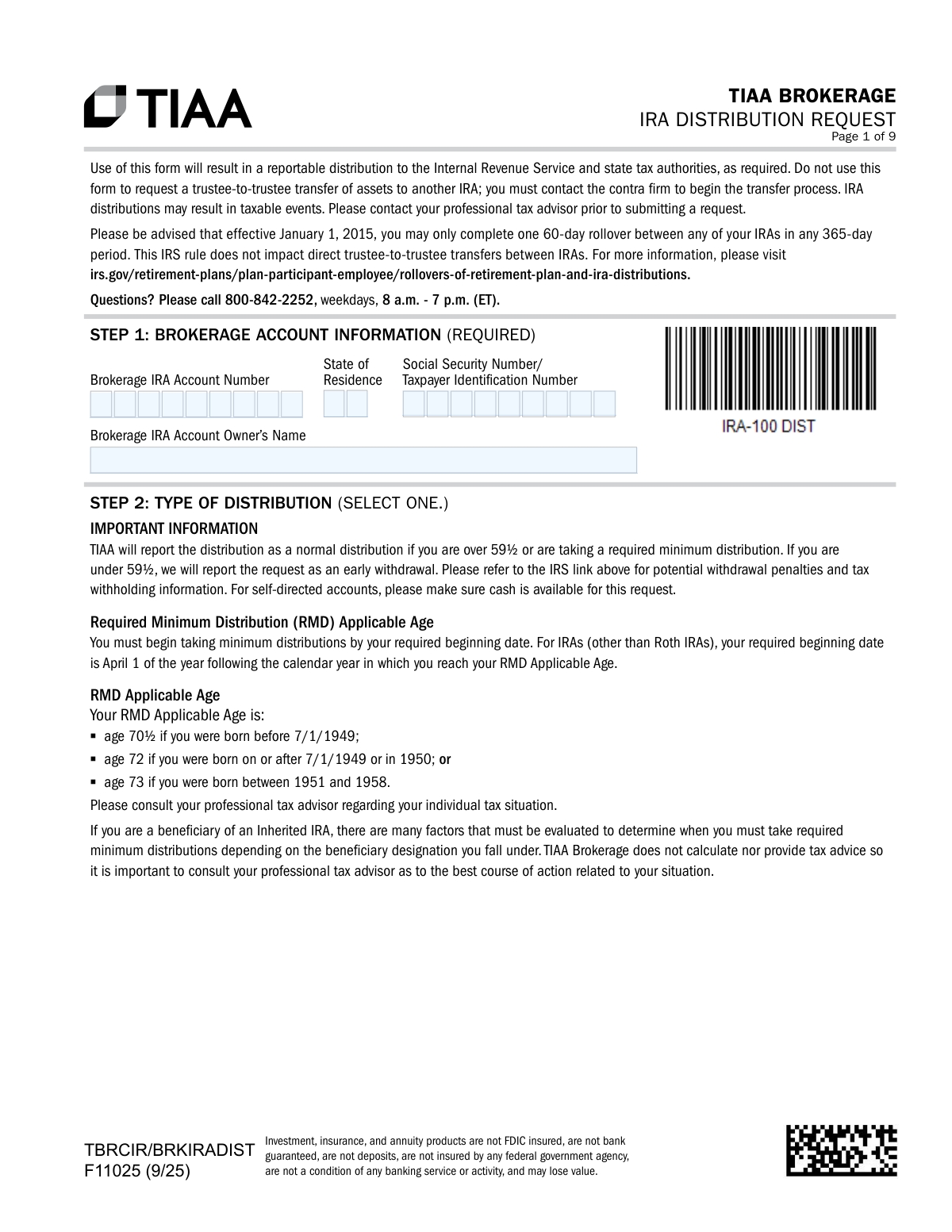
Form F11025, the TIAA Brokerage IRA Distribution Request, is used by account holders to request a one-time, recurring, or required minimum distribution (RMD) from their TIAA Brokerage IRA. It allows you to specify the distribution type, make federal and state tax withholding elections, and choose how you want to receive the funds. Today, this form can be filled out quickly and accurately using AI-powered services like Instafill.ai, which can also convert non-fillable PDF versions into interactive fillable forms.
F11025 is part of the
brokerage forms, IRA forms, TIAA forms, distribution forms, broker forms, distribution request forms and IRA distribution forms categories on Instafill.
Rather not fill this in by hand? Instafill is an online form filler that completes PDF forms automatically — upload the blank form, answer a few questions, and the AI fills every field.
Form specifications
| Form name: | TIAA Brokerage IRA Distribution Request (Form F11025) |
| Number of pages: | 1 |
| Language: | English |
Our AI automatically handles information lookup, data retrieval, formatting, and form filling.
It takes less than a minute to fill out F11025 using our AI form filling.
Securely upload your data. Information is encrypted in transit and deleted immediately after the form is filled out.
Instafill Demo: How to fill out PDF forms in seconds with AI
How to Fill Out F11025 Online for Free in 2026
Are you looking to fill out a F11025 form online quickly and accurately? Instafill.ai offers the #1 AI-powered PDF filling software of 2026, allowing you to complete your F11025 form in just 37 seconds or less.
Follow these steps to fill out your F11025 form online using Instafill.ai:
- 1 Navigate to Instafill.ai and upload the TIAA Brokerage IRA Distribution Request form, or select it from their library.
- 2 Provide your brokerage account information, including your account number, name, and Social Security Number, in Step 1.
- 3 In Step 2, select the type of distribution you are requesting (e.g., Normal, Early, RMD) and complete the tax withholding elections in Step 3.
- 4 Detail your distribution request by completing the appropriate section: Step 4 for a one-time distribution, Step 5 for recurring instructions, or Step 6 for automated RMDs.
- 5 Choose your preferred delivery method for the funds, such as ACH, check, or wire transfer, in Step 7.
- 6 Carefully review all the information you've entered, then electronically sign and date the form in Step 8 to certify your request.
- 7 Download the completed form and submit it to TIAA via their mobile app, online portal, fax, or mail as instructed on the form.
Our AI-powered system ensures each field is filled out correctly, reducing errors and saving you time.
Why Choose Instafill.ai for Your Fillable F11025 Form?
Speed
Complete your F11025 in as little as 37 seconds.
Up-to-Date
Always use the latest 2026 F11025 form version.
Cost-effective
No need to hire expensive lawyers.
Accuracy
Our AI performs 10 compliance checks to ensure your form is error-free.
Security
Your personal information is protected with bank-level encryption.
Frequently Asked Questions About F11025
This form is used to request a one-time or recurring withdrawal (distribution) from your TIAA Brokerage IRA. This includes normal distributions, Required Minimum Distributions (RMDs), and early withdrawals.
Any TIAA Brokerage IRA account owner who wishes to take money out of their account needs to complete this form. This action is a reportable event to the IRS and state tax authorities.
No, this form is for distributions only. To move your IRA assets directly to another IRA in a trustee-to-trustee transfer, you must contact the receiving company to initiate the process.
If you leave the federal tax withholding section blank, TIAA will automatically withhold a default rate of 10% from your distribution. State tax withholding will be applied based on your state of residence's specific rules.
For distributions over $250,000, you can receive funds via check or Fedwire, but ACH transfer is not available. Your signature on the form must also be notarized for the request to be processed.
An RMD is the minimum amount you must withdraw from your IRA annually after reaching a certain age. You can use Step 6 of this form to establish automated RMD payments on a monthly, quarterly, or annual basis.
You can choose to receive your funds via check, ACH transfer to your bank (for amounts up to $250,000), Fedwire, or as a direct transfer to a taxable TIAA Brokerage account. If no method is selected, a check will be mailed to your address on file.
You can submit the form digitally, by uploading it through the TIAA mobile app or TIAA.org website, or by sending it via fax or mail. Detailed submission instructions are provided on the last page of the form.
Yes, Step 5 allows you to set up recurring payments. You can choose a monthly, quarterly, or annual frequency, with payments scheduled for either the 5th or 20th of the month.
A notary is required if your total distribution request is over $250,000. Notarization is also necessary if you are requesting a check be made payable to an alternate payee or sent to an address not on file.
Yes, you can use this form to request a 'Return of Excess Contribution'. In Step 2, select this option and provide the tax year, the excess amount, the date of the contribution, and any associated earnings.
Yes, services like Instafill.ai use AI to accurately auto-fill form fields with your information. This can save you time and help prevent errors on complex forms like this one.
Simply upload the TIAA Brokerage IRA Distribution Request form to the Instafill.ai platform. The AI will identify the fields, allowing you to securely provide your information and have the form filled out automatically before you review and download it.
If you have a non-fillable or 'flat' PDF, you can use a service like Instafill.ai. It can convert the static PDF into an interactive, fillable form online so you can easily type in your information.
Compliance F11025
Validation Checks by Instafill.ai
1
SSN/TIN Format Validation
This check ensures the Social Security Number or Taxpayer Identification Number provided in Step 1 is in a valid format (XXX-XX-XXXX for SSN or XX-XXXXXXX for TIN). This is critical for accurate IRS reporting and account holder verification. If the format is incorrect, the form submission will be rejected, and the user will be prompted to correct the entry.
2
Exclusive Distribution Type Selection
Validates that only one option is selected in the 'Type of Distribution' section (Step 2). The form requires the user to choose a single distribution type, such as 'Normal Distribution' or 'Return of Excess Contribution'. This check prevents ambiguity in processing the request, and a failure would require the user to clarify their intent by selecting only one option.
3
Conditional Requirement for Return of Excess Contribution
If 'Return of Excess Contribution' is selected in Step 2, this validation ensures that the associated fields ('Tax Year', 'Contribution Date', 'Excess amount', 'Earnings') are all completed. These details are mandatory for correctly processing the reversal and reporting it to the IRS. An incomplete section will halt the submission until all required information is provided.
4
Federal Withholding Rate Range and Format
Verifies that the federal withholding rate entered in Step 3, Line 2, is a whole number between 0 and 100, inclusive. This prevents invalid data entry, such as decimals or numbers outside the allowed percentage range. An invalid entry would trigger an error message, forcing the user to input a valid whole number percentage.
5
State Tax Withholding Rules Based on Residency
This check cross-references the 'State of Residence' from Step 1 with the state tax withholding election in Step 3. It enforces mandatory withholding rules for certain states (e.g., CT, MI) and validates that any elected percentage meets state minimums. This ensures compliance with state tax laws, and a failure would require the user to adjust their withholding election to match their state's requirements.
6
Notary Requirement for High-Value Distributions
This validation checks if a one-time distribution request (Step 4) via Check or Fedwire (Step 7) exceeds $250,000. If it does, the system verifies that the Notary Public Certification section (Step 8) is completed. This is a critical security measure to prevent large, fraudulent withdrawals, and a missing notary seal on a qualifying transaction will cause the request to be rejected.
7
ACH Distribution Amount Limit
Ensures that if the delivery method selected in Step 7 is 'ACH', the total distribution amount from Step 4 or Step 5 does not exceed $250,000. This rule is explicitly stated on the form and is a system limitation for this transfer type. If the amount is over the limit, the user must select an alternative delivery method like Fedwire or Check.
8
Recurring Instruction Date Logic
For recurring instructions in Step 5, this check validates that the 'Beginning' date (mm/yyyy) is not in the past and that the optional 'End After' date, if provided, is later than the 'Beginning' date. This prevents the setup of logically impossible payment schedules. A validation failure would require the user to correct the date entries before the recurring plan can be established.
9
Conditional Requirement for Beneficiary RMD Information
If 'Beneficiary: Scheduled RMD from an Inherited IRA' is selected in Step 6, this check ensures that all related fields (Decedent’s Date of Birth, Decedent’s Date of Death, Original Beneficiary’s Date of Birth, Relationship) are filled out. This information is essential for correctly calculating the Required Minimum Distribution for an inherited account. The form will be considered incomplete if this information is missing.
10
Beneficiary RMD Date Consistency
When beneficiary RMD information is provided in Step 6, this validation confirms that the 'Decedent’s Date of Birth' is before the 'Decedent’s Date of Death'. This is a logical check to ensure the integrity and accuracy of the data provided for RMD calculations. An inconsistency would result in an error, prompting the user to review and correct the dates.
11
Notary Requirement for Alternate Payee or Address
This check verifies that if an 'Alternate Payee' or 'Alternate Address' is specified in the Delivery Method section (Step 7), the Notary Public Certification in Step 8 is completed. This is a fraud prevention measure to ensure the account owner has authorized sending funds to a different person or location. A request with these options selected but without a notary will be rejected.
12
Fedwire Field Completeness
If 'Fedwire Funds request' is chosen as the delivery method in Step 7, this validation ensures all required banking fields (Receiving Bank, ABA/Routing Number, Account Number, etc.) are completed. Incomplete or missing information would make the wire transfer impossible to process. The system will flag the missing fields and require the user to provide all necessary details.
13
Signature Date Timeliness
Validates that the 'Today’s Date' provided in the signature section (Step 8) is within 30 days of the date the form is received for processing. This ensures the account holder's intent is current and reduces the risk of processing a stale or forgotten request. Forms dated more than 30 days prior will be rejected, and a new, currently dated form will be required.
14
SIMPLE IRA Two-Year Rule Selection
When 'Premature SIMPLE IRA Distribution' is selected in Step 2, this check ensures that the subsequent question 'Has it been two years or more since the first contribution into this plan?' has been answered with either 'Yes' or 'No'. This answer is critical for determining the correct early withdrawal penalty (10% vs. 25%). The form cannot be processed without this selection being made.
Common Mistakes in Completing F11025
Users often confuse the rules for 'Normal' and 'Early' distributions in Step 2. Selecting 'Early Distribution' when you are over age 59½, or 'Normal' when you are under, can lead to incorrect tax reporting and processing delays. Always verify your age against the 59½ threshold before making a selection to ensure you are not subject to unexpected early withdrawal penalties.
Many people skip the complex Tax Withholding Election in Step 3, not realizing this results in a default 10% federal income tax withholding. This can lead to a smaller-than-expected distribution amount or insufficient withholding, potentially causing a large tax bill and underpayment penalties later. To avoid this, carefully complete the substitute Form W-4R section to specify your desired withholding rate, even if it's 0%.
State tax rules are complex and vary significantly, as shown in the tax grid. A common error is selecting 'Do NOT withhold state income tax' in a state where withholding is mandatory if federal tax is withheld, causing the form to be rejected. It is crucial to consult the state tax grid provided and make a valid election for your state of residence to avoid processing delays.
In Step 4, individuals frequently request a specific cash distribution amount without ensuring sufficient cash is available in their self-directed brokerage account. They forget that securities must be sold and the trade must settle before the funds are available for withdrawal. This oversight will cause the distribution request to be delayed or rejected until the necessary funds are settled in the account.
The form explicitly warns against using it for a trustee-to-trustee transfer to another IRA, yet this remains a common mistake. People confuse this with the 'Direct Rollover to a Qualified Retirement Plan' option, inadvertently creating a taxable distribution instead of a non-taxable transfer. To avoid this costly error, you must initiate IRA-to-IRA transfers by contacting the receiving firm, not by using this distribution form.
The form requires a notary certification for several scenarios, such as distributions over $250,000 or payments to an alternate payee/address (Step 7). Overlooking this requirement is a frequent cause for immediate rejection of the form. This forces the applicant to restart the process, causing significant delays in receiving their funds.
When setting up recurring payments in Step 5, users often forget to specify a 'Beginning' month/year or select a payment day (5th or 20th). The form defaults to the 5th of the month if no day is chosen, but missing a start date will leave the instructions ambiguous and delay the setup of the payment plan. Double-checking that all frequency and date fields are complete is essential for timely payments.
The 'Return of Excess Contribution' section in Step 2 is highly technical and prone to errors. Applicants often enter the wrong tax year, an incorrect contribution date, or fail to accurately calculate and include the 'Earnings on excess contribution.' These mistakes can lead to incorrect reporting to the IRS, potentially resulting in further tax complications and penalties.
A surprisingly common mistake is submitting this multi-page document without a signature or date in Step 8. An unsigned form is invalid and cannot be processed, halting the entire request. Furthermore, the form must be dated within 30 days of receipt, so an old date can also cause rejection, forcing the applicant to fill out and resubmit the entire form.
In Step 6, beneficiaries of Inherited IRAs often struggle with the complex distribution rules, especially with changes from the SECURE Act. They may incorrectly select the automated RMD option based on life expectancy when they are actually subject to the 10-year rule, leading to non-compliance and steep IRS penalties. Due to the complexity, consulting a tax advisor before completing this section is strongly recommended.
When selecting a delivery method in Step 7, such as Fedwire or ACH, applicants often make data entry errors in the ABA/Routing Number or bank account number. A single transposed digit will cause the transfer to fail, delaying access to funds. Using an AI-powered form-filling tool like Instafill.ai can help prevent these errors by validating number formats and ensuring all required fields are completed.
This form is a flat, non-fillable PDF, which often leads to illegible handwriting, missed fields, and calculation errors when filled out manually. These issues frequently result in processing delays or rejections. To avoid this, tools like Instafill.ai can convert the document into a smart, fillable form, guiding you through the fields and validating your data to ensure accuracy before submission.
Saved over 80 hours a year
“I was never sure if my IRS forms like W-9 were filled correctly. Now, I can complete the forms accurately without any external help.”
Kevin Martin Green
Your data stays secure with advanced protection from Instafill and our subprocessors




Robust compliance program
Transparent business model
You’re not the product. You always know where your data is and what it is processed for.
ISO 27001, HIPAA, and GDPR
Our subprocesses adhere to multiple compliance standards, including but not limited to ISO 27001, HIPAA, and GDPR.
Security & privacy by design
We consider security and privacy from the initial design phase of any new service or functionality. It’s not an afterthought, it’s built-in, including support for two-factor authentication (2FA) to further protect your account.
Fill out F11025 with Instafill.ai
Worried about filling PDFs wrong? Instafill securely fills tiaa-brokerage-ira-distribution-request-form-f11025 forms, ensuring each field is accurate.
