Yes! You can use AI to fill out Merrill IRA/IRRA®/SEP/SRA Substantially Equal Periodic Payment (72(t)) Distribution Form
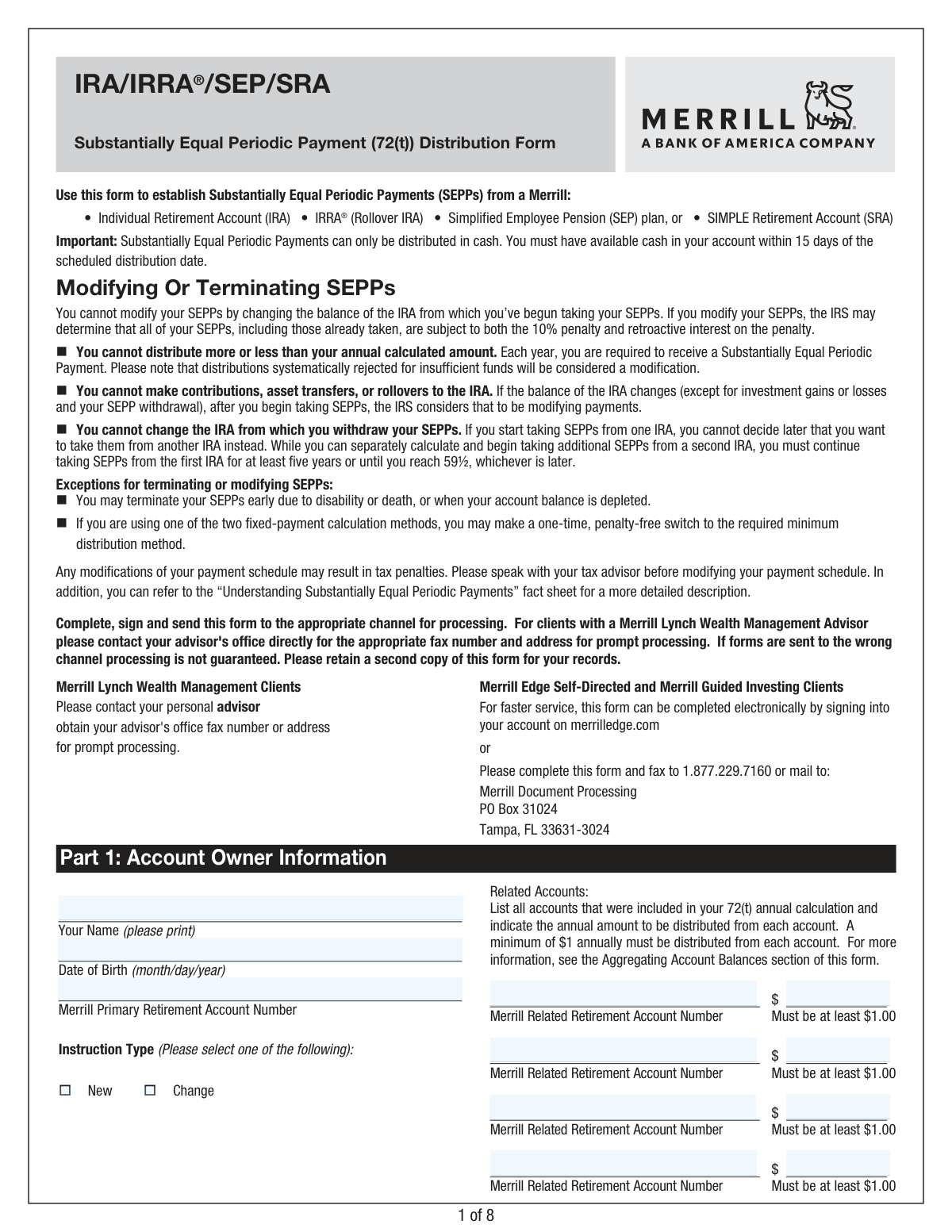
This form, officially named the IRA/IRRA®/SEP/SRA Substantially Equal Periodic Payment (72(t)) Distribution Form, is a crucial document for Merrill account holders who wish to take early distributions from their retirement accounts. It allows individuals to set up a series of payments according to IRS rule 72(t), thereby avoiding the 10% early withdrawal penalty. Today, this form can be filled out quickly and accurately using AI-powered services like Instafill.ai, which can also convert non-fillable PDF versions into interactive fillable forms.
Our AI automatically handles information lookup, data retrieval, formatting, and form filling.
It takes less than a minute to fill out Merrill 10187 SEPP using our AI form filling.
Securely upload your data. Information is encrypted in transit and deleted immediately after the form is filled out.
Form specifications
| Form name: | Merrill IRA/IRRA®/SEP/SRA Substantially Equal Periodic Payment (72(t)) Distribution Form |
| Number of pages: | 1 |
| Language: | English |
| Categories: | payment forms, IRA forms, distribution forms, Merrill forms |
Instafill Demo: How to fill out PDF forms in seconds with AI
How to Fill Out Merrill 10187 SEPP Online for Free in 2026
Are you looking to fill out a MERRILL 10187 SEPP form online quickly and accurately? Instafill.ai offers the #1 AI-powered PDF filling software of 2026, allowing you to complete your MERRILL 10187 SEPP form in just 37 seconds or less.
Follow these steps to fill out your MERRILL 10187 SEPP form online using Instafill.ai:
- 1 Navigate to Instafill.ai and upload the Merrill SEPP Distribution Form PDF or select it from their template library.
- 2 Provide your personal details and Merrill retirement account numbers in Part 1, including any related accounts to be aggregated for the calculation.
- 3 In Part 2, specify your SEPP calculation method (e.g., Life Expectancy, Amortization), distribution frequency, start date, and the annual computed amount.
- 4 Complete Part 3 to make your federal and state income tax withholding elections, noting the default rates and your option to change them.
- 5 Select your preferred distribution method in Part 4, such as a direct transfer to a Bank of America account, an external bank account via ACH, or a mailed check.
- 6 Optionally, complete Part 5 to authorize automatic liquidation of specific mutual funds to fund your distributions if you don't plan to maintain a cash balance.
- 7 Carefully review all the information you've entered, then electronically sign and date the form in Part 6 to authorize the SEPP plan.
Our AI-powered system ensures each field is filled out correctly, reducing errors and saving you time.
Why Choose Instafill.ai for Your Fillable Merrill 10187 SEPP Form?
Speed
Complete your Merrill 10187 SEPP in as little as 37 seconds.
Up-to-Date
Always use the latest 2026 Merrill 10187 SEPP form version.
Cost-effective
No need to hire expensive lawyers.
Accuracy
Our AI performs 10 compliance checks to ensure your form is error-free.
Security
Your personal information is protected with bank-level encryption.
Frequently Asked Questions About Form Merrill 10187 SEPP
This form is used to establish a series of Substantially Equal Periodic Payments (SEPPs) from your Merrill retirement account. This allows you to take distributions before age 59½ without the usual 10% early withdrawal penalty, as permitted by IRS rule 72(t).
You should use this form if you are a Merrill client under age 59½ and wish to start taking regular, penalty-free withdrawals from your IRA, IRRA®, SEP, or SRA account.
Modifying your SEPPs in any way, including changing the withdrawal amount or adding funds to the account, can have serious tax consequences. The IRS may impose a 10% penalty plus retroactive interest on all distributions you have already received.
If you do not make an election, Merrill will automatically withhold 10% for federal income tax. You can choose to have a different rate withheld (from 0% to 100%) or elect no withholding by entering '0' on the specified line in Part 3.
State tax requirements vary, and some states mandate withholding. You must consult the supplemental 'State Tax Withholding Rate Document' to understand your state's rules and make your election in Part 3.
You are responsible for having sufficient cash in your account 15 days prior to each scheduled distribution. You can also complete the optional Part 5 to authorize Merrill to automatically sell specific mutual funds to cover the payment.
Merrill Lynch Wealth Management clients should contact their personal advisor for submission instructions. Merrill Edge clients can complete the form electronically online or mail/fax it to the address listed in the instructions.
Yes, you can aggregate the balances of multiple Merrill retirement accounts to calculate your annual SEPP amount. You must enroll all involved accounts in the SEPP service and designate one as the primary account for distributions.
You must attach a statement from your prior financial institution showing the distributions you've already taken for the year. If you are on a rolling calendar cycle, a prior year 1099-R is also required.
You are required to continue the payments for a minimum of five years or until you reach age 59½, whichever period is longer. Stopping early, except in cases of death or disability, will likely trigger tax penalties.
You can choose to have funds deposited directly into a Merrill or Bank of America account, sent via ACH to an external bank account, or mailed to you as a check. You must provide the necessary account details in Part 4.
Yes, services like Instafill.ai use AI to help you accurately auto-fill form fields with your personal and account information, which saves time and helps prevent common errors.
To fill this form online, you can upload the PDF to Instafill.ai. The platform will make the document interactive, allowing you to type your information, select your choices, and prepare the form for signature and submission.
If you have a non-fillable or 'flat' PDF, you can use a service like Instafill.ai to instantly convert it into an interactive, fillable form. This allows you to easily type your information into the correct fields before printing.
Compliance Merrill 10187 SEPP
Validation Checks by Instafill.ai
1
Verifies Date of Birth for SEPP Eligibility
This check validates that the account owner's date of birth indicates they are under the age of 59 ½. Substantially Equal Periodic Payments (SEPP) are designed as an exception to the 10% early withdrawal penalty, which applies to individuals under this age. If the owner is 59 ½ or older, they are not subject to the penalty, do not need a SEPP plan, and should use a standard distribution form, so the submission should be flagged for review.
2
Ensures Consistency Between Instruction Type and SEPP Start Date
This validation cross-references the 'Instruction Type' in Part 1 with the 'Date of SEPP distribution' in Part 2(f). If the instruction type is 'New', the date in 2(f) must be identical to the 'new distributions to start' date in 2(d). If the instruction type is 'Change', the date in 2(f) must be a valid date in the past, representing the original start of the plan. This prevents logical errors in establishing or modifying the payment plan.
3
Validates Distribution Start Date Lead Time
This check enforces the business rules for the distribution start date in Part 2(d). The selected date must be more than 3 business days in the future if an ACH distribution method is selected in Part 4, and more than 7 business days in the future if Automatic Liquidation is selected in Part 5. This ensures there is adequate processing time for setting up electronic transfers or liquidations, preventing failed or delayed initial payments.
4
Enforces Minimum Distribution from Related Accounts
In Part 1, if the user lists any 'Related Retirement Account Number' for aggregating balances, this check ensures the corresponding distribution amount is a numeric value equal to or greater than $1.00. The form explicitly states this minimum is required for each related account in the SEPP relationship. Failure to meet this minimum would violate the plan's setup terms and cause a processing rejection.
5
Validates Completeness of Distribution Method Details
This check ensures that once a distribution method is selected in Part 4, all associated required fields are filled out. For example, if 'Distribute to an outside financial institution' is chosen, the Name of Institution, Account Number, and ABA Routing Number fields become mandatory. This prevents incomplete instructions that would make it impossible to transfer the funds as requested.
6
Validates ABA Routing Number Format
For any distribution method in Part 4 that requires an ABA Routing Number, this validation confirms the entry is exactly 9 digits long and contains only numeric characters. An incorrect or improperly formatted ABA number is a primary cause of failed ACH transfers. This check is critical for ensuring the successful and timely delivery of funds to the correct financial institution.
7
Validates Federal Withholding Rate Input
In Part 3, if the user chooses to specify a federal withholding rate, this check verifies that the input is a whole number between 0 and 100, inclusive. The form specifies 'no decimals', so any non-integer or out-of-range value would be invalid. This ensures the withholding instruction is clear and can be processed correctly by the payroll system, preventing tax calculation errors.
8
Ensures Mutual Exclusivity of State Withholding Options
When a user elects to withhold state income tax in Part 3, they can specify either a percentage rate or a flat dollar amount. This validation ensures that only one of these two fields is filled, not both. Allowing both would create ambiguity in the withholding instruction, so the form must be rejected until the user provides a single, clear directive.
9
Enforces Foreign Address Withholding Rules
This check applies specific rules in Part 3 if the user has a foreign address. If 'I am a U.S. Citizen or U.S. resident living abroad' is selected, the withholding rate must be 10% or greater. If 'I am a Non-Resident Alien' is selected and the 'Tax Treaty rate' option is chosen, the 'Country' field becomes mandatory. This validation enforces IRS regulations for non-resident and expatriate taxation.
10
Verifies Automatic Liquidation Percentages Total 100%
If the optional Automatic Liquidation section (Part 5) is completed, this validation calculates the sum of all 'Percentage Amount' fields. The total must equal exactly 100%. This ensures that the instructions for funding the distribution are complete and unambiguous, preventing situations where funds are partially sourced or where the logic for liquidation fails.
11
Confirms Mandatory Selections for Payment Calculation
This is a completeness check for Part 2, ensuring the user has made a selection for (a) Calculation method, (b) Distribution frequency, and (c) Distribution measuring period. These three parameters are fundamental to defining the SEPP schedule and amount. The form cannot be processed without this information, as it would be impossible to calculate or schedule the payments.
12
Checks for Presence of Signature and Date
This validation confirms that the signature and date fields in Part 6 are not empty. The signature provides legal authorization for Merrill to execute the instructions, and the date establishes when the authorization was given. An unsigned or undated form is not legally valid and must be rejected.
13
Validates Aggregated Distribution Amount Consistency
This check ensures the total annual distribution is consistent across the form. It verifies that the 'Annual computed amount' in Part 2(e) equals the sum of the distribution amounts specified for the primary and all related accounts listed in Part 1. This logical cross-check prevents discrepancies that would lead to incorrect total distributions and a potential modification of the SEPP, which can trigger tax penalties.
14
Conditional Requirement for Prior Distribution Documentation
This validation is triggered if a value is entered in Part 2(g) for distributions already taken at a prior firm. The system should require the user to check a box acknowledging that a copy of the prior custodian's statement is attached, as stipulated in the form's notes. This ensures that required proof is submitted with the form, which is necessary to correctly calculate the remaining distribution for the year and avoid tax penalties.
Common Mistakes in Completing Merrill 10187 SEPP
This mistake involves entering an annual distribution amount in Part 2(e) that does not precisely match the amount calculated using an IRS-approved method. Because SEPP rules are extremely strict, distributing even one dollar more or less than the calculated amount is considered a plan modification. This modification can trigger a 10% early withdrawal penalty plus retroactive interest on all distributions taken since the plan began. To avoid this, double-check your calculations and ensure the figure entered is exact, as tools like Instafill.ai can help by validating data formats before submission.
In Part 1, users often fail to list all the accounts that were aggregated to calculate the total SEPP amount, or they forget to assign a distribution of at least $1.00 to each related account. This error can invalidate the SEPP calculation and lead to compliance issues, as all accounts in the relationship must be monitored. The consequence is a potential plan modification and severe tax penalties. Carefully list every account included in your initial calculation and assign the correct distribution amounts to each.
When transferring an existing SEPP plan to Merrill, people often forget to complete Part 2(g), which requires them to state the distribution amount already received from the prior institution that year. This omission causes Merrill to distribute the full annual amount, resulting in an over-distribution for the year. This is a modification that nullifies the penalty exception. Always provide this figure and attach the required statement from your prior custodian to ensure your distributions remain compliant.
Many individuals skip Part 3, not realizing that the form defaults to 10% federal tax withholding. This can result in an unexpected reduction in their payment or improper tax planning. Furthermore, state withholding rules are complex and vary, and failing to make a valid election can lead to under-withholding and state tax penalties. You should carefully review your tax situation and explicitly enter your desired federal withholding rate (even if it's 0%) and make a specific, valid choice for state taxes.
A common data entry error in Part 4 is transposing digits in the bank account or ABA routing number for an ACH distribution. Another frequent mistake is failing to enclose the required voided check or letter of authorization for distributions to an outside financial institution. These errors will cause the payment to fail, and a systematically rejected distribution can be considered a plan modification, jeopardizing your SEPP. Using an AI-powered tool like Instafill.ai can help prevent these errors by validating routing numbers and reminding you of documentation requirements.
In Part 2(d), users may enter a start date that is too soon, ignoring the form's requirement for it to be more than 3 business days out for ACH or 7 for automatic liquidation. This causes an immediate processing delay or rejection of the form, requiring resubmission. To prevent this, carefully read the instructions for the chosen distribution method and select a date that allows for adequate processing time.
Part 2(f) asks for a date that differs depending on whether the plan is new or a continuation, which often causes confusion. For a new plan, this date should match the start date in 2(d), but for a continuing plan, it must be the date of the very first SEPP distribution ever received. Entering the wrong date can disrupt the tracking of the mandatory five-year payment period, creating compliance issues. Carefully read the field's instructions to ensure you provide the correct historical or start date.
In the optional Part 5, people make errors such as entering percentages that do not total exactly 100% or providing incorrect mutual fund security symbols. A failed liquidation due to these errors could result in insufficient cash to make the scheduled payment. Since the form states that a distribution rejected for insufficient funds is a modification, this mistake could trigger significant tax penalties. Always verify security symbols and ensure your allocation percentages sum precisely to 100%.
A surprisingly frequent mistake is submitting the form without a signature and date in Part 6. An unsigned form is invalid and will be rejected immediately, halting the entire setup or modification process. This simple oversight can cause you to miss your intended distribution start date, potentially creating a gap in payments. Always perform a final review of the entire form before submission, paying special attention to the signature line to avoid unnecessary delays.
In Part 2, selecting a distribution frequency (e.g., 'Monthly') without considering the chosen measuring period ('Calendar Year' vs. 'Rolling Calendar Year') can lead to compliance failures. For example, starting a monthly distribution late in a 'Calendar Year' may make it impossible to withdraw the full annual amount by December 31st. This failure to take the required amount constitutes a plan modification and incurs penalties. Ensure your frequency and start date allow for the full annual distribution to be completed within the selected measuring period.
Saved over 80 hours a year
“I was never sure if my IRS forms like W-9 were filled correctly. Now, I can complete the forms accurately without any external help.”
Kevin Martin Green
Your data stays secure with advanced protection from Instafill and our subprocessors

Robust compliance program
Transparent business model
You’re not the product. You always know where your data is and what it is processed for.
ISO 27001, HIPAA, and GDPR
Our subprocesses adhere to multiple compliance standards, including but not limited to ISO 27001, HIPAA, and GDPR.
Security & privacy by design
We consider security and privacy from the initial design phase of any new service or functionality. It’s not an afterthought, it’s built-in, including support for two-factor authentication (2FA) to further protect your account.
Fill out Merrill 10187 SEPP with Instafill.ai
Worried about filling PDFs wrong? Instafill securely fills merrill-irairrasepsra-substantially-equal-periodic-payment-72t-distribution-form forms, ensuring each field is accurate.