Yes! You can use AI to fill out Merrill Funds Transfer Service Enrollment Form
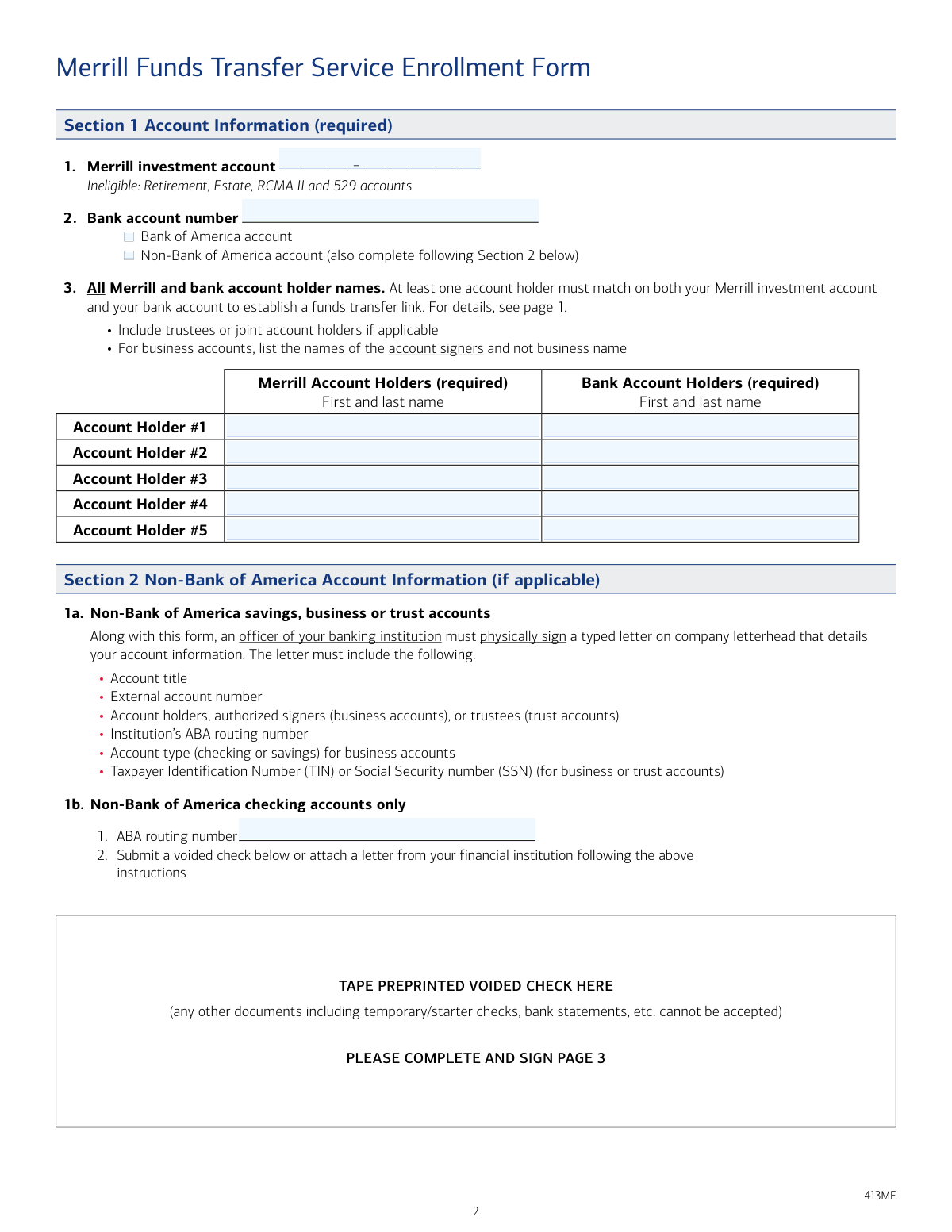
This form, officially titled the Merrill Funds Transfer Service Enrollment Form, authorizes Merrill Lynch to initiate electronic fund transfers between your investment account and a designated bank account. It is essential for clients who want the flexibility to move money via phone or online through merrilledge.com. Today, this form can be filled out quickly and accurately using AI-powered services like Instafill.ai, which can also convert non-fillable PDF versions into interactive fillable forms.
Our AI automatically handles information lookup, data retrieval, formatting, and form filling.
It takes less than a minute to fill out 413ME using our AI form filling.
Securely upload your data. Information is encrypted in transit and deleted immediately after the form is filled out.
Form specifications
| Form name: | Merrill Funds Transfer Service Enrollment Form |
| Number of pages: | 1 |
| Language: | English |
| Categories: | enrollment forms, transfer forms, Merrill forms, funds transfer forms |
Instafill Demo: How to fill out PDF forms in seconds with AI
How to Fill Out 413ME Online for Free in 2026
Are you looking to fill out a 413ME form online quickly and accurately? Instafill.ai offers the #1 AI-powered PDF filling software of 2026, allowing you to complete your 413ME form in just 37 seconds or less.
Follow these steps to fill out your 413ME form online using Instafill.ai:
- 1 Navigate to Instafill.ai and upload the Merrill Funds Transfer Service Enrollment Form or select it from their library.
- 2 Provide your Merrill investment account number and bank account information in Section 1.
- 3 If using a non-Bank of America account, complete Section 2 by providing the ABA routing number and attaching a voided check or a letter from your bank.
- 4 List the names of all account holders for both the Merrill and bank accounts to ensure at least one name matches.
- 5 In Section 3, select your desired transfer options, including the direction of transfers and any automatic settings for dividends and interest.
- 6 Review all the information auto-filled by the AI for accuracy and completeness.
- 7 Electronically sign and date the form in Section 4 to authorize the service, then submit it to Merrill via fax, mail, or their online portal.
Our AI-powered system ensures each field is filled out correctly, reducing errors and saving you time.
Why Choose Instafill.ai for Your Fillable 413ME Form?
Speed
Complete your 413ME in as little as 37 seconds.
Up-to-Date
Always use the latest 2026 413ME form version.
Cost-effective
No need to hire expensive lawyers.
Accuracy
Our AI performs 10 compliance checks to ensure your form is error-free.
Security
Your personal information is protected with bank-level encryption.
Frequently Asked Questions About Form 413ME
This form is used to establish a secure link between your eligible Merrill investment account and a designated bank account, allowing you to make transfers online through merrilledge.com or over the phone.
You should use this form if you have a Merrill retail investment account, such as a CMA or BIA/WMCA Sole Proprietorship account, and want to link it to a bank account for fund transfers.
Yes, this form cannot be used for Retirement, 529, RCMA II, Delaware (IIA), Estate, or Commercial Business Bank accounts. These require different, specific forms for setting up transfers.
You will need your Merrill investment account number, your bank account number, and the full names of all account holders on both accounts. For non-Bank of America accounts, you will also need the ABA routing number and a voided check or a bank letter.
Yes, to establish the funds transfer link, at least one account holder's name must be the same on both your Merrill investment account and your bank account.
For a non-Bank of America checking account, you must provide the ABA routing number and attach a preprinted voided check. For savings, business, or trust accounts, you must provide a signed letter from your bank on their letterhead detailing your account information.
Yes, in Section 3, you can choose to have all dividends and interest from your Merrill account automatically transferred to your bank account daily or monthly. This selection will override any previous instructions for your dividends and interest.
You can submit the form online by logging into your account at merrilledge.com, by fax to 1-877-229-7160, or by standard mail to the Merrill Document Processing center.
All account holders listed on the Merrill account must sign the form. For trust accounts, signatures from all trustees on both the Merrill and bank accounts are required.
Yes, services like Instafill.ai use AI to accurately auto-fill form fields from your saved profile, which can save you time and help prevent errors.
Simply upload the Merrill Funds Transfer Service form to Instafill.ai. The platform's AI will identify the fields and help you fill them in quickly, and you can then download the completed form for submission.
If you have a non-fillable PDF, you can use a service like Instafill.ai. It can convert flat, non-interactive PDFs into fillable forms that you can easily complete on your computer.
No, this form only establishes the link between accounts. To set up standing instructions for recurring transfers, you must do so separately on merrilledge.com or by calling customer service after your enrollment is complete.
Generally, you cannot set up transfers from a Merrill account to a bank account if one is a business account and the other is personal. An exception is made if the business is a sole proprietorship.
Compliance 413ME
Validation Checks by Instafill.ai
1
Merrill Account Eligibility Check
This validation verifies that the Merrill investment account number provided in Section 1 is an eligible account type. The form explicitly prohibits Retirement, Estate, RCMA II, and 529 accounts for this service. This check is crucial to prevent processing errors and ensure the client uses the correct form for their account type, avoiding delays and compliance issues. If an ineligible account is detected, the form submission should be rejected with instructions to use the appropriate form.
2
Cross-Account Holder Name Match
This check ensures that at least one account holder's full name is listed for both the Merrill investment account and the designated bank account as required in Section 1. This is a fundamental security and authorization requirement to link accounts. A failure to find an exact match between the two lists of account holders indicates a potential authorization issue, and the submission must be flagged for manual review or rejected.
3
Conditional Non-BofA Information Requirement
This validation confirms that Section 2 (Non-Bank of America Account Information) is completed if the 'Non-Bank of America account' option is selected in Section 1. This ensures that all necessary details, like the ABA routing number and supporting documentation, are provided for external banks. If this condition is met but Section 2 is empty, the form is incomplete and cannot be processed.
4
ABA Routing Number Format and Validity
This check validates that the ABA routing number provided in Section 2 is a 9-digit number and conforms to the financial industry's checksum algorithm. This is critical for ensuring that funds are sent to the correct financial institution. An invalid or incorrectly formatted routing number will cause the transfer to fail, so the submission must be rejected if the number is not valid.
5
Non-BofA Documentation Verification
This validation verifies that for a non-BofA account, either a voided check is attached or a signed bank letter is provided as specified in Section 2. The form explicitly forbids temporary/starter checks and bank statements. This check ensures the bank account details are authenticated by a valid document, preventing fraud and processing errors. Submissions lacking the correct documentation must be rejected.
6
Transfer Option Selection Completeness
This check ensures that at least one of the two 'Ability to transfer funds' checkboxes in Section 3 is selected. This section is marked as required, and without a selection, the core purpose of the form—authorizing transfers—is not defined. A submission without a selected transfer direction is incomplete and must be returned to the user for completion.
7
Automatic Transfer Logical Dependency
This validation enforces the rule that if 'Daily' or 'Monthly' automatic transfers are selected in Section 3, the 'From Bank Account to Merrill Account' option must also be selected. The form states this is a consequence of choosing automatic funding. This check prevents a logical contradiction in the transfer instructions. If the rule is violated, the system should either auto-select the required option or flag the submission for correction.
8
Signature and Date Presence
This check verifies that every signature line used in Section 4 also has an accompanying date. A signature without a date can be legally ambiguous regarding when the authorization was granted. This ensures the form is fully and properly executed. A submission with a missing date next to a signature should be considered incomplete and rejected.
9
Signature Count Matches Account Holders
This validation ensures the number of signatures in Section 4 corresponds to the number of account holders listed in Section 1. This is critical for ensuring all required parties have provided authorization, especially for joint or trust accounts. A mismatch in the number of signatures indicates incomplete authorization and the form must be rejected.
10
Disbursement Eligibility for 'Merrill to Bank' Transfers
This check validates the eligibility for transfers 'From Merrill Account to Bank Account'. The form notes this is not allowed for 'Business to personal' (unless sole proprietorship) or 'UTMA/UGMA if different registration'. This requires cross-referencing account ownership details to prevent unauthorized or non-compliant transfers. If an ineligible transfer type is requested, the submission should be flagged for review or rejected.
11
Trust Account Signature Completeness
This validation specifically enforces the rule that for Trust accounts, signatures from all trustees are required. This is a strict legal and compliance requirement to ensure all fiduciaries have authorized the action. The system must identify the account as a trust and verify that every listed trustee has signed the form, otherwise the submission is invalid.
12
Date Field Chronology
This check ensures that the date provided next to each signature in Section 4 is not a future date. Authorizations cannot be post-dated. This validation confirms the form was signed on or before the date of submission, which is essential for legal and audit purposes. A form with a future date should be rejected as invalid.
13
Bank Account Number Format
This validation checks that the 'Bank account number' in Section 1 contains only numeric digits and falls within a reasonable length for a bank account number. While specific formats vary, this basic check helps catch obvious data entry errors like including letters or special characters. An invalid format would cause any transfer attempt to fail, so it's important to catch it early.
Common Mistakes in Completing 413ME
Applicants often overlook the explicit instructions on page one and attempt to use this form for ineligible accounts like Retirement (IRA), 529, Estate, or certain business accounts. This happens due to not reading the 'DO NOT PROCEED' section carefully. Submitting the form for an ineligible account will result in immediate rejection and significant delays in setting up transfers, as the applicant will need to find and complete the correct, separate form for their account type.
A core requirement is that at least one account holder's name must exactly match between the Merrill investment account and the external bank account. People make this mistake by using nicknames, failing to list all joint owners, or having different registrations (e.g., individual vs. trust). This error leads to rejection of the linkage request, as the system cannot verify ownership. To avoid this, carefully list all account holders for both accounts exactly as they appear on official statements.
When linking a non-Bank of America checking account, the form strictly requires a preprinted voided check to be attached; it explicitly states that temporary checks, starter checks, or bank statements are not acceptable. This mistake occurs when an applicant doesn't have preprinted checks on hand and submits an alternative document. This will cause the form to be rejected, delaying the account linking process until the correct documentation is provided.
For non-BofA savings, business, or trust accounts, a simple voided check is insufficient; a signed letter from the banking institution on its letterhead is required. Applicants frequently miss this requirement or submit a letter that omits necessary details like the ABA routing number, account holders, or TIN. This is a common point of failure that leads to rejection, requiring the applicant to go back to their bank to obtain a compliant letter, causing significant delays.
In Section 1, the form instructs applicants with business accounts to list the names of the authorized signers, not the business entity's name. People often default to entering the business name out of habit. This prevents Merrill from performing the necessary identity verification against the individual signers, leading to the form's rejection. Always list the full legal names of the individuals authorized to transact on the business account.
The form requires signatures from account holders in Section 4, but the specific requirements can be easily missed, especially for complex accounts. Forgetting a signature from a joint account holder or, critically, from any trustee on a trust account, is a frequent error. An unsigned or incompletely signed form is invalid and will be returned, halting the entire process until all required parties have signed.
Applicants often enter the ABA routing number incorrectly by transposing digits or providing the routing number for wire transfers instead of the one for ACH/electronic transfers found on a check. This data entry error will cause all transfer attempts to fail, even if the form is approved. To prevent this, double-check the 9-digit number from the bottom of a check. AI-powered tools like Instafill.ai can help validate the ABA routing number format to reduce such errors.
In Section 3, the option 'From Merrill Account to Bank Account' has specific restrictions, such as not being allowed for transfers from a business to a personal account (unless it's a sole proprietorship). Applicants may check this box without reading the fine print, leading to that specific transfer capability being denied. It's crucial to review the eligibility rules for each transfer direction to ensure the requested services can be established.
In Section 3, selecting 'Daily' or 'Monthly' automatic transfers of dividends and interest has an important side effect: it automatically enables transfers 'From Bank Account to Merrill Account'. An applicant might only want the automatic dividend feature without enabling inbound transfers, leading to confusion. This can result in unintended permissions on the account. Carefully read the description for this option to understand all the changes it will make to your account's transfer capabilities.
Since this form is a non-fillable PDF, users must print and fill it out by hand, often leading to illegible handwriting, missed fields, or smudges over critical information like account numbers. Any ambiguity can cause the form to be rejected for data entry or verification purposes. To avoid this, write clearly in block letters. Alternatively, a service like Instafill.ai can convert a flat PDF into a fillable form, allowing you to type information clearly and ensure all required fields are completed before printing.
Saved over 80 hours a year
“I was never sure if my IRS forms like W-9 were filled correctly. Now, I can complete the forms accurately without any external help.”
Kevin Martin Green
Your data stays secure with advanced protection from Instafill and our subprocessors

Robust compliance program
Transparent business model
You’re not the product. You always know where your data is and what it is processed for.
ISO 27001, HIPAA, and GDPR
Our subprocesses adhere to multiple compliance standards, including but not limited to ISO 27001, HIPAA, and GDPR.
Security & privacy by design
We consider security and privacy from the initial design phase of any new service or functionality. It’s not an afterthought, it’s built-in, including support for two-factor authentication (2FA) to further protect your account.
Fill out 413ME with Instafill.ai
Worried about filling PDFs wrong? Instafill securely fills merrill-funds-transfer-service-enrollment-form forms, ensuring each field is accurate.