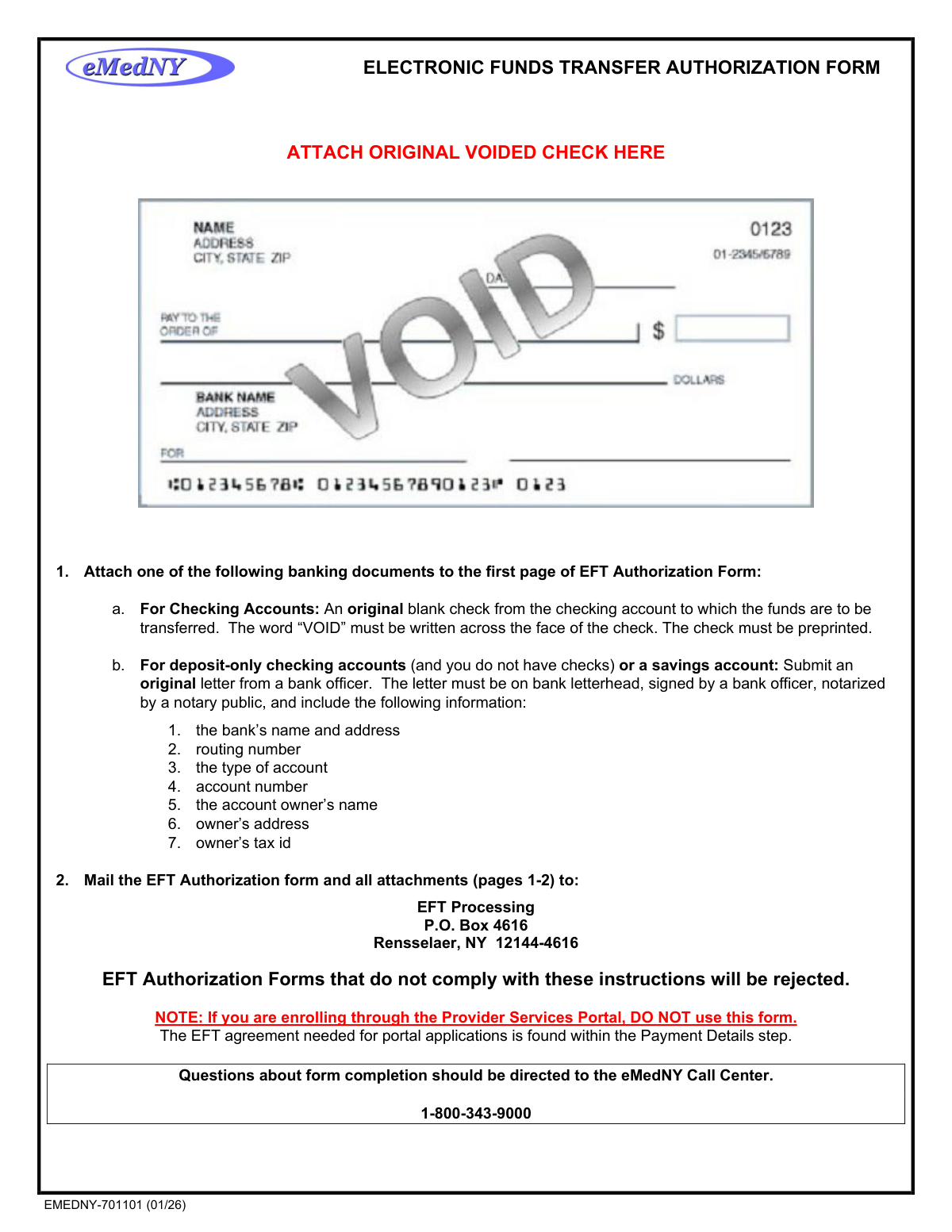
Yes! You can use AI to fill out eMedNY Electronic Funds Transfer Authorization Form (EMEDNY-701101)
The eMedNY Electronic Funds Transfer Authorization Form (EMEDNY-701101) is an official New York State Department of Health document used by Medicaid providers, group practices, and institutions to authorize the direct electronic deposit of Medicaid payments into a designated checking or savings account. It is essential for providers who wish to receive payments faster and more securely than traditional paper checks, and it also supports changes or cancellations to existing EFT arrangements. Completing this form accurately is critical, as incomplete or illegible submissions will be rejected and returned to the provider. Today, providers can fill out this form quickly and accurately using AI-powered services like Instafill.ai, which can also convert non-fillable PDF versions into interactive fillable forms.
Our AI automatically handles information lookup, data retrieval, formatting, and form filling.
It takes less than a minute to fill out EMEDNY-701101 using our AI form filling.
Securely upload your data. Information is encrypted in transit and deleted immediately after the form is filled out.
Form specifications
| Form name: | eMedNY Electronic Funds Transfer Authorization Form (EMEDNY-701101) |
| Number of pages: | 1 |
| Language: | English |
| Categories: | authorization forms, transfer forms, funds transfer forms |
Instafill Demo: How to fill out PDF forms in seconds with AI
How to Fill Out EMEDNY-701101 Online for Free in 2026
Are you looking to fill out a EMEDNY-701101 form online quickly and accurately? Instafill.ai offers the #1 AI-powered PDF filling software of 2026, allowing you to complete your EMEDNY-701101 form in just 37 seconds or less.
Follow these steps to fill out your EMEDNY-701101 form online using Instafill.ai:
- 1 Navigate to Instafill.ai and upload the EMEDNY-701101 EFT Authorization Form PDF or select it from the available form library to begin filling it out online.
- 2 Enter your Provider Information, including the provider's full name and address exactly as it appears on file with New York Medicaid.
- 3 Complete the Provider Identifiers section by entering your Federal Tax Identification Number (TIN) or Employer Identification Number (EIN), National Provider Identifier (NPI), and/or MMIS Provider ID as applicable to your provider type.
- 4 Fill in the Provider Contact Information section with the contact person's name, telephone number, extension, email address, and fax number.
- 5 Enter your Financial Institution Information, including the bank's name, address, routing number, account number, and select the account type (Checking or Savings).
- 6 Provide the authorized signature, printed name, title, and submission date in the signature section, ensuring the correct representative signs based on whether the submission is for an individual practitioner, group, or institution.
- 7 Attach a voided original check (or a notarized bank officer letter for savings or deposit-only accounts) and mail the completed form and all attachments to the EFT Processing address at P.O. Box 4616, Rensselaer, NY 12144-4616.
Our AI-powered system ensures each field is filled out correctly, reducing errors and saving you time.
Why Choose Instafill.ai for Your Fillable EMEDNY-701101 Form?
Speed
Complete your EMEDNY-701101 in as little as 37 seconds.
Up-to-Date
Always use the latest 2026 EMEDNY-701101 form version.
Cost-effective
No need to hire expensive lawyers.
Accuracy
Our AI performs 10 compliance checks to ensure your form is error-free.
Security
Your personal information is protected with bank-level encryption.
Frequently Asked Questions About Form EMEDNY-701101
This form is used by New York Medicaid providers to enroll in, change, or cancel Electronic Funds Transfer (EFT) for receiving Medicaid payments directly into their bank account. It authorizes the eMedNY Fiscal Agent to deposit funds into the provider's designated checking or savings account.
New York Medicaid providers, group practices, and healthcare institutions who want to receive Medicaid payments via direct deposit need to complete this form. Individual practitioners, group practices, and authorized business representatives can all submit this form on behalf of their respective entities.
For a standard checking account, attach an original blank check with 'VOID' written across the face — it must be preprinted. For deposit-only checking accounts or savings accounts without checks, attach an original letter from a bank officer on bank letterhead, signed, notarized, and including the bank name, address, routing number, account type, account number, account owner's name, address, and tax ID.
Mail the completed EFT Authorization Form along with all attachments (pages 1–2) to: EFT Processing, P.O. Box 4616, Rensselaer, NY 12144-4616. Forms that do not comply with the instructions will be rejected and returned to the provider.
Allow a minimum of 6–8 weeks for your EFT enrollment request to be processed. During the processing period, a test transaction of one cent will be transferred to your account to verify the banking information.
Medicaid funds are normally scheduled to be transferred on Wednesday afternoons. Due to standard banking procedures, funds may not become available in your account for up to 48 hours after the initial transfer. Contact your financial institution directly with questions about fund availability.
To change banking information, submit a new completed EFT Authorization Form with the updated banking details, a voided check or notarized bank letter for the new account, and a signed letter on company letterhead explaining the change and listing your provider number(s), new account number, and routing number. Note that payments will revert to paper checks for approximately two weeks while the new account is being set up.
No — do not close your old account until your new account is confirmed to be set up and receiving payments. Payments will automatically revert to paper checks for a two-week period during the transition, and closing your old account prematurely could cause a delay in receiving payments.
To cancel EFT, submit a written notice including your provider number(s) and applicable MMIS and/or NPIs to the EFT Processing mailing address. Also verify your Pay-to Address on file by calling the eMedNY Call Center at 1-800-343-9000, and allow 3–4 weeks to transition back to receiving paper checks.
You must provide your Federal Tax Identification Number (TIN) or Employer Identification Number (EIN), and your National Provider Identifier (NPI) unless you are exempt. If you are NPI-exempt, you must provide your MMIS Provider ID (Trading Partner ID). Providers with multiple provider numbers must submit a signed attachment on original letterhead listing all MMIS IDs and NPIs.
Yes — if you are enrolling through the Provider Services Portal, do NOT use this paper form. The EFT agreement for portal applications is found within the Payment Details step of the portal enrollment process. This paper form is only for providers not using the portal.
If submitting for an individual practitioner, the practitioner must sign with an original signature. If submitting for a group, business, or institution, an authorized representative must sign. The printed name and title of the signer must also be included, and the submission date must be recorded.
Yes — services like Instafill.ai use AI to auto-fill form fields accurately, saving you time and reducing errors. You can upload the EFT Authorization Form to Instafill.ai, and it will help populate fields such as provider name, address, NPI, routing number, and account information quickly and accurately.
If you have a flat, non-fillable version of the PDF, Instafill.ai can convert it into an interactive fillable form, allowing you to type directly into the fields online. This eliminates the need to print and handwrite the form, making the process faster and more convenient.
Questions about form completion should be directed to the eMedNY Call Center at 1-800-343-9000. You can also contact them to verify your provider name, address, or Pay-to Address on file with Medicaid before submitting the form.
Compliance EMEDNY-701101
Validation Checks by Instafill.ai
1
Provider Name Matches Medicaid Records
Validates that the Provider Name entered on the form exactly matches the name on file with New York Medicaid, including spelling, punctuation, and legal entity designation. This is critical because the instructions explicitly state the name must be entered 'exactly as it was filed with Medicaid' and as it appears on current checks and remittance statements. If the name does not match, the form will be rejected and returned to the provider, causing processing delays.
2
Tax Identification Number (TIN/EIN) Format Validation
Validates that the Federal Tax Identification Number or Employer Identification Number is entered in the correct numeric format — nine digits, typically formatted as XX-XXXXXXX for an EIN or XXX-XX-XXXX for an SSN/TIN. The form requires the provider to select either TIN or EIN via radio button, and the corresponding number must match the format for the selected type. An incorrectly formatted or missing TIN/EIN will prevent proper identification of the provider in the Medicaid system and result in form rejection.
3
TIN or EIN Radio Button Selection Required
Validates that the provider has selected exactly one option — either TIN or EIN — from the radio button group accompanying the tax identification number field. Leaving this selection blank creates ambiguity about the type of identifier provided, which could cause mismatches during identity verification against Medicaid enrollment records. The form cannot be processed without a clear designation of the identifier type.
4
NPI Format and Exemption Logic Validation
Validates that the National Provider Identifier (NPI) is a 10-digit numeric value if provided, and checks that either an NPI or a Trading Partner/MMIS Provider ID is present unless the provider is documented as NPI-exempt. The form marks NPI as 'Required, unless exempt,' meaning that if the NPI field is blank, the MMIS Provider ID field must be populated to satisfy the identifier requirement. Failure to provide at least one valid provider identifier will result in the form being unprocessable.
5
Provider Address Completeness Check
Validates that all components of the Provider Address are present and non-empty, including Street, City, State/Province, and ZIP Code/Postal Code. The instructions specify that the address must match what is on file with Medicaid as it appears on current checks and remittance statements. An incomplete or mismatched address may cause the form to be rejected or result in payment routing issues.
6
ZIP Code Format Validation for Provider and Financial Institution
Validates that the ZIP Code/Postal Code fields for both the Provider Address and the Financial Institution Address conform to the standard U.S. ZIP code format of either 5 digits (XXXXX) or the ZIP+4 format (XXXXX-XXXX). Non-numeric characters or incorrect lengths in these fields indicate data entry errors that could prevent proper mail delivery or address matching. Both address sections must independently pass this format check.
7
Provider Contact Information Completeness
Validates that the Provider Contact Name and Telephone Number fields are populated, as Step 4 of the instructions explicitly requires a contact name, telephone number, and email address. The telephone number should follow a standard 10-digit U.S. format (e.g., XXX-XXX-XXXX), and the email address should conform to a valid email format (e.g., [email protected]). Missing contact information prevents eMedNY staff from reaching the provider if there are questions or issues during processing.
8
Financial Institution Routing Number Format and Length Validation
Validates that the Financial Institution Routing Number is exactly 9 digits in length and contains only numeric characters, consistent with the ABA routing number standard used in the United States. The routing number is a critical field for directing electronic fund transfers to the correct bank, and an incorrect or malformed routing number will cause the EFT to fail or be misdirected. The system should also verify the routing number passes the standard ABA checksum algorithm if possible.
9
Account Number Presence and Numeric Format Validation
Validates that the Account Number with Financial Institution field is populated and contains only numeric characters, as bank account numbers do not include letters or special characters. This field is required for the EFT to be directed to the correct account at the financial institution. A missing or improperly formatted account number will result in failed transactions and potential delays in Medicaid payment disbursement.
10
Account Type Selection Validation (Checking or Savings)
Validates that exactly one account type — either CHECKING or SAVINGS — has been selected on the form, as the instructions require the provider to 'check one.' Leaving this field blank or selecting both options creates ambiguity that could cause the financial institution to reject the EFT transaction. The selected account type must also be consistent with the banking documentation attached (e.g., a voided check implies a checking account).
11
Financial Institution Name and Address Completeness
Validates that the Financial Institution Name, Street, City, State/Province, and ZIP Code fields are all populated, as Step 5 requires the full name and address of the banking institution. Incomplete financial institution information may hinder eMedNY's ability to verify the banking details or contact the institution if issues arise. All sub-fields of the financial institution address must be non-empty to pass this check.
12
Authorized Signature and Submission Date Presence
Validates that the Original Signature field and the Submission Date field are both completed, as Step 7 mandates an original signature and date for the form to be valid. The form explicitly states that individual practitioners must sign personally, while groups or institutions must have an authorized representative sign. A missing signature or date renders the authorization legally invalid and will result in the form being rejected and returned.
13
Printed Name and Title of Authorized Representative Required
Validates that both the Printed Name and the Printed Title of the Practitioner or Authorized Representative fields are populated. The instructions specify that the title must be indicated for all submissions, whether from an individual practitioner or an organizational representative. Missing printed name or title makes it impossible to verify the authority of the signatory and will cause the form to be returned unprocessed.
14
Submission Date Format and Logical Validity
Validates that the Submission Date entered on the form is in a recognizable date format (e.g., MM/DD/YYYY) and represents a valid calendar date that is not in the future. A date in the future would be logically inconsistent with a form being submitted today, and an improperly formatted date could cause processing errors in the eMedNY system. The date should also not be unreasonably old, which could indicate a stale or previously rejected form being resubmitted without updates.
15
Voided Check or Bank Letter Attachment Indicator Validation
Validates that the form submission includes an indication that the required banking documentation — either an original voided preprinted check or a notarized bank officer letter — has been attached to page 1 of the form. For savings or deposit-only accounts, the bank letter must include all seven required elements: bank name and address, routing number, account type, account number, account owner's name, owner's address, and owner's tax ID. Without the appropriate attachment, the EFT Authorization Form will be rejected per the stated instructions.
16
Consistency Between Account Type and Supporting Documentation
Validates that the type of account selected on the form (CHECKING or SAVINGS) is consistent with the type of banking documentation attached. If CHECKING is selected, an original voided preprinted check should be attached; if SAVINGS or a deposit-only checking account is indicated, a notarized bank officer letter on bank letterhead must be provided instead. A mismatch between the selected account type and the attached documentation will result in the form being flagged for review or rejected.
Common Mistakes in Completing EMEDNY-701101
Many providers scan or photocopy their check and attach it to the form, not realizing that only an original physical check is accepted. The instructions explicitly require an original blank check with 'VOID' written across its face. Submitting a photocopy will result in the form being rejected and returned, causing significant delays. Always attach the actual paper check from your checkbook, write 'VOID' clearly across the entire face, and never submit a printed or digital image of a check.
Some providers write 'VOID' only in the signature line or in a small area of the check, which may not be considered compliant. The instructions require the word 'VOID' to be written across the face of the check to prevent it from being used as a live payment instrument. An improperly voided check can lead to form rejection or, worse, potential fraud risk. Write 'VOID' in large, clear letters spanning the full width of the check before attaching it.
Providers often enter their current or preferred business name and address rather than the exact name and address on file with Medicaid. The instructions specifically state the information must be entered 'exactly as it was filed with Medicaid,' matching what appears on current checks and remittance statements. A mismatch can cause the request to be rejected or payments to be misrouted. If unsure of the exact name and address on file, contact the eMedNY Call Center at 1-800-343-9000 before completing the form. Tools like Instafill.ai can help ensure consistent data entry across form fields.
The routing number is a 9-digit code that is easy to confuse with the account number, especially since both appear at the bottom of a check. Transposing digits or entering the account number in the routing number field will cause EFT deposits to fail or be sent to the wrong account. Always verify the routing number by cross-referencing it with your bank's official website or a bank officer letter, and double-check each digit carefully. AI-powered tools like Instafill.ai can validate routing number formats to catch common entry errors.
At the bottom of a check, there are typically three sets of numbers: the routing number, the account number, and the check number. Many providers mistakenly enter the check number in the account number field, which will cause EFT transactions to fail. The account number is the middle or last set of numbers (depending on the bank's format), while the check number typically appears at the far right and also in the upper right corner of the check. Carefully identify each number field on your check or consult your bank to confirm the correct account number.
Providers with multiple MMIS Provider IDs or NPIs sometimes list all numbers directly on the single form, which is not permitted. The instructions require that providers with multiple provider numbers submit a signed attachment on original letterhead listing all MMIS IDs and NPIs to be placed on EFT. Failing to follow this procedure will result in the form being rejected or only one provider number being processed. Prepare a separate signed letterhead attachment listing all applicable provider numbers before submitting the form.
The form explicitly requires an 'original signature,' meaning a wet ink, handwritten signature from the practitioner or authorized representative. Submitting a form with a typed name, electronic signature, or rubber stamp will result in rejection. This is a common mistake when forms are completed digitally and printed without a physical signature being added afterward. Always print the completed form and sign it by hand before mailing it to the EFT Processing address.
Many submitters fill in the signature and printed name but forget to include the title of the practitioner or authorized representative, which is a required field. The instructions state that 'the Title of provider or practice or business representative must be indicated.' An incomplete form will be returned unprocessed, causing delays of weeks. Ensure the title (e.g., 'Owner,' 'Office Manager,' 'MD,' 'CEO') is clearly printed in the designated field before submission.
When updating banking information, providers often submit only the new EFT Authorization Form with a voided check, forgetting that a separate cover letter on company letterhead is also required. This letter must include provider numbers (MMIS and NPI), the new account and routing numbers, a brief explanation for the change, and an original signature with title. Missing this letter will result in the change request being rejected. Review the 'Instructions to Change Banking Information' section carefully and prepare all three required documents before mailing.
Providers changing their banking information sometimes close their old account immediately after submitting the change form, not realizing that payments revert to paper checks for approximately two weeks during the transition period. Closing the old account prematurely can result in returned payments or delays in receiving Medicaid funds. The instructions explicitly warn: 'DO NOT close your old account until your new account is set up and receiving payments.' Keep the old account open and active until you confirm that EFT deposits are successfully arriving in the new account.
Providers who are enrolling or updating EFT information through the eMedNY Provider Services Portal sometimes also submit this paper form, which is incorrect and will cause confusion or duplicate processing issues. The form clearly states multiple times: 'If you are enrolling through the Provider Services Portal, DO NOT use this form.' The EFT agreement for portal applications is found within the Payment Details step of the portal. Determine your enrollment method first—if using the portal, complete the process entirely online without submitting this paper form.
Providers frequently call the eMedNY Call Center expecting EFT to be active within days of submission, not realizing the process takes a minimum of 6–8 weeks. During this period, a test transaction of one cent will be deposited to verify the account. Additionally, even after EFT is active, funds transferred on Wednesday afternoons may not be available for up to 48 hours due to standard banking procedures. Plan accordingly and do not close paper check arrangements prematurely. Contact your financial institution—not eMedNY—with questions about fund availability timelines.
Saved over 80 hours a year
“I was never sure if my IRS forms like W-9 were filled correctly. Now, I can complete the forms accurately without any external help.”
Kevin Martin Green
Your data stays secure with advanced protection from Instafill and our subprocessors

Robust compliance program
Transparent business model
You’re not the product. You always know where your data is and what it is processed for.
ISO 27001, HIPAA, and GDPR
Our subprocesses adhere to multiple compliance standards, including but not limited to ISO 27001, HIPAA, and GDPR.
Security & privacy by design
We consider security and privacy from the initial design phase of any new service or functionality. It’s not an afterthought, it’s built-in, including support for two-factor authentication (2FA) to further protect your account.
Fill out EMEDNY-701101 with Instafill.ai
Worried about filling PDFs wrong? Instafill securely fills emedny-electronic-funds-transfer-authorization-form-emedny-701101 forms, ensuring each field is accurate.