Yes! You can use AI to fill out Merrill Direct Rollover Delivery Instructions for Individuals
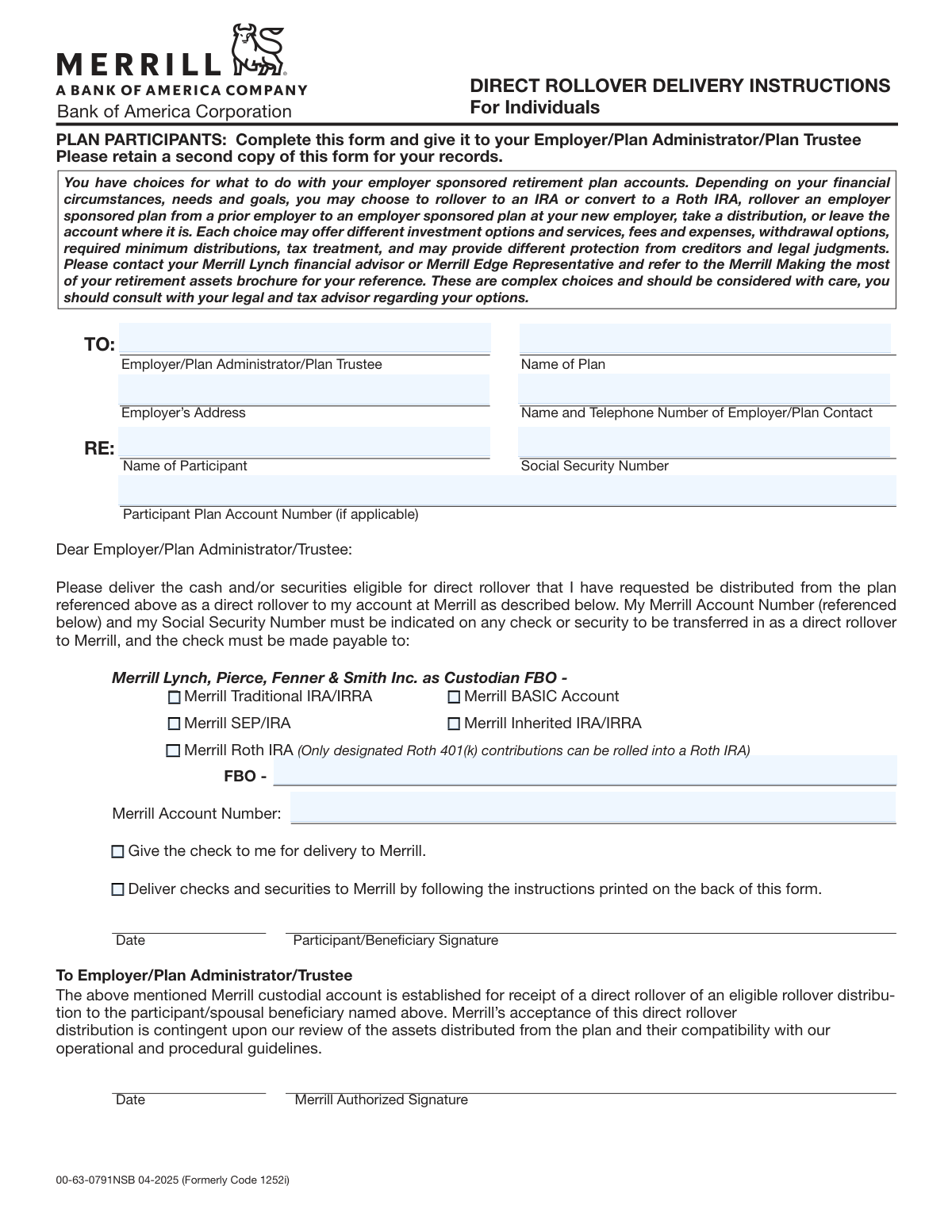
This form serves as a formal request from a retirement plan participant to their plan administrator to execute a direct rollover of funds. It provides the necessary instructions to transfer assets from an employer-sponsored plan, such as a 401(k), directly into a specified Merrill IRA or other investment account, ensuring the transaction is processed correctly for tax purposes. Today, this form can be filled out quickly and accurately using AI-powered services like Instafill.ai, which can also convert non-fillable PDF versions into interactive fillable forms.
00-63-0791NSB is part of the
Merrill forms category on Instafill.
Rather not fill this in by hand? Instafill is an online form filler that completes PDF forms automatically — upload the blank form, answer a few questions, and the AI fills every field.
Form specifications
| Form name: | Merrill Direct Rollover Delivery Instructions for Individuals |
| Number of pages: | 1 |
| Language: | English |
Our AI automatically handles information lookup, data retrieval, formatting, and form filling.
It takes less than a minute to fill out 00-63-0791NSB using our AI form filling.
Securely upload your data. Information is encrypted in transit and deleted immediately after the form is filled out.
Instafill Demo: How to fill out PDF forms in seconds with AI
How to Fill Out 00-63-0791NSB Online for Free in 2026
Are you looking to fill out a 00-63-0791NSB form online quickly and accurately? Instafill.ai offers the #1 AI-powered PDF filling software of 2026, allowing you to complete your 00-63-0791NSB form in just 37 seconds or less.
Follow these steps to fill out your 00-63-0791NSB form online using Instafill.ai:
- 1 Navigate to Instafill.ai and upload or select the Merrill Direct Rollover Delivery Instructions form.
- 2 Provide your personal details, including your full name, Social Security Number, and participant plan account number.
- 3 Enter the information for your current Employer/Plan Administrator, including their name, address, and contact details.
- 4 Specify the destination Merrill account by checking the appropriate box (e.g., Traditional IRA, Roth IRA) and entering your Merrill account number.
- 5 Indicate how the rolled-over funds should be delivered to Merrill.
- 6 Review all entered information for accuracy, then sign and date the form.
- 7 Download the completed form and submit it to your Employer, Plan Administrator, or Plan Trustee as instructed.
Our AI-powered system ensures each field is filled out correctly, reducing errors and saving you time.
Why Choose Instafill.ai for Your Fillable 00-63-0791NSB Form?
Speed
Complete your 00-63-0791NSB in as little as 37 seconds.
Up-to-Date
Always use the latest 2026 00-63-0791NSB form version.
Cost-effective
No need to hire expensive lawyers.
Accuracy
Our AI performs 10 compliance checks to ensure your form is error-free.
Security
Your personal information is protected with bank-level encryption.
Frequently Asked Questions About 00-63-0791NSB
This form is used to instruct your former employer's retirement plan administrator to directly transfer your retirement funds, such as from a 401(k), into a new or existing Merrill account.
You, the plan participant, should complete this form if you are separating from an employer and wish to move your retirement plan assets into a Merrill IRA or another eligible account.
After you fill out and sign the form, you must give it to your former Employer, Plan Administrator, or Plan Trustee. Do not send this form directly to Merrill.
You will need your Social Security Number, your new Merrill account number, and details about your old plan, including the plan administrator's name and contact information.
You should select the account type that matches the destination account you have opened or are opening with Merrill. If you are unsure, consult with your Merrill financial advisor to determine the correct option for your situation.
No, only funds from a designated Roth 401(k) can be rolled into a Roth IRA. Traditional, pre-tax 401(k) contributions must be rolled into a Traditional IRA or a similar pre-tax account.
FBO stands for 'For Benefit Of.' You should write your full name in this field, as you are the beneficiary of the funds being rolled into the Merrill account.
Having the check delivered directly to Merrill is often the most secure and efficient option. If you choose to receive the check yourself, you are responsible for promptly delivering it to Merrill to complete the rollover process.
Yes, the form has a section for a 'Merrill Authorized Signature.' You should have your Merrill representative sign it to confirm that your account is established and ready to receive the rollover funds.
Processing time varies and depends on your former plan administrator. After they receive your completed form, it can take from several business days to a few weeks for them to process the distribution and transfer the assets.
Yes, this form can be used to instruct your plan administrator to deliver both cash and/or eligible securities to your Merrill account. The back of the form provides specific delivery instructions for securities.
Yes, services like Instafill.ai use AI to accurately auto-fill form fields, which can save you time and help prevent common errors.
You can upload the PDF of the form to the Instafill.ai platform. The service will make the document interactive, allowing you to type your information directly into the fields before printing the completed form for signatures and submission.
If you have a non-fillable or 'flat' PDF, you can use a tool like Instafill.ai. It can convert the document into an interactive, fillable form so you can easily type in your information.
Compliance 00-63-0791NSB
Validation Checks by Instafill.ai
1
Social Security Number Format
This check verifies that the Social Security Number (SSN) field contains exactly nine digits, optionally formatted with hyphens (XXX-XX-XXXX). The SSN is a critical identifier for tax reporting and linking the rollover to the correct individual. If the format is invalid, the form submission should be rejected to prevent processing errors and potential security risks.
2
Merrill Account Number Format and Presence
Validates that the 'Merrill Account Number' field is not empty and conforms to the specified 8-character format. This account number is the primary destination identifier for the funds transfer. An incorrect or missing number will cause the rollover to fail or be misdirected, leading to significant financial and administrative complications.
3
Exclusive Account Type Selection
Ensures that the participant has selected exactly one destination account type from the provided options (e.g., Traditional IRA, Roth IRA). Selecting zero options leaves the destination account undefined, while selecting multiple options creates ambiguity. The validation prevents submission until a single, clear choice is made, ensuring the funds are deposited into the correct type of account.
4
Exclusive Delivery Method Selection
This check confirms that exactly one of the two delivery instruction checkboxes has been selected ('Give the check to me' or 'Deliver checks and securities to Merrill'). This instruction is for the plan administrator, and having zero or both options selected would make it impossible for them to know how to proceed with the physical distribution. The form should be blocked until one clear instruction is provided.
5
Conditional FBO Field for Inherited IRA
Verifies that if the 'Merrill Inherited IRA/IRRA' checkbox is selected, the 'FBO' (For Benefit Of) field is populated with the name of the original, deceased account owner. This is a legal and tax-reporting requirement for properly titling an inherited account. Failure to provide this information will result in the rejection of the rollover as it cannot be legally established.
6
Participant Signature Date Validity
Checks that the 'Date' field next to the participant's signature contains a valid date that is not in the future. This date legally establishes when the participant authorized the transaction. An invalid or future date can call the authenticity and timing of the authorization into question, so the submission should be rejected until a valid, current or past date is entered.
7
Employer Contact Phone Number Format
This validation parses the 'Name and Telephone Number of Employer/Plan Contact' field to ensure a valid phone number is present. While the name is also important, a valid contact number is crucial for Merrill or the participant to resolve any issues with the rollover request. If a recognizable phone number format is not found, a warning or error should be presented to the user.
8
Participant and Plan Information Completeness
Ensures that the 'Name of Participant', 'Employer/Plan Administrator/Plan Trustee Name', and 'Name of Plan' fields are not empty. These fields are essential for the sending institution to identify the correct person, plan, and account from which to withdraw the funds. A submission with any of these fields missing is incomplete and cannot be processed.
9
Roth IRA Rollover Source Verification
This is a logical check that flags submissions where 'Merrill Roth IRA' is selected. The form explicitly states that only designated Roth 401(k) contributions can be rolled into a Roth IRA. While the form doesn't capture the source, the system should flag this for manual review or require an additional attestation from the user to ensure compliance with tax laws and prevent an invalid rollover.
10
Signature Presence
Verifies that the 'Participant/Beneficiary Signature' field is not blank. A signature is the legal authorization for the entire transaction, indicating the participant agrees to the terms and directs the plan administrator to act. A missing signature renders the form invalid and legally non-binding, and the submission must be rejected.
11
Internal Account and Participant Consistency
A system-level check that cross-references the provided 'Merrill Account Number', 'Name of Participant', and 'Social Security Number' against Merrill's internal records. This validation ensures that the account number provided actually belongs to the participant named on the form. This is a critical fraud prevention measure that stops funds from being incorrectly deposited into an unrelated account.
12
Employer Address Presence
Validates that the 'Employer's Address' field is filled out. This address is necessary for the plan administrator to confirm their identity and for any required mail correspondence related to the rollover. An incomplete address can cause processing delays if Merrill needs to contact the administrator via mail, so the form should not be accepted without it.
Common Mistakes in Completing 00-63-0791NSB
Participants often mistakenly list their direct manager or a generic HR contact instead of the official Employer/Plan Administrator/Trustee. This can also happen when using outdated information for a former employer. An incorrect recipient name or address will cause the form to be lost or rejected, significantly delaying the rollover process. To avoid this, obtain the precise contact information from your most recent plan statement or the company's benefits portal.
People sometimes confuse this field with their new Merrill account number or leave it blank if they don't know it. The originating plan administrator needs this number to identify your specific account for the distribution. Without it, they cannot process the rollover, leading to delays and requiring you to resubmit the form. Always locate this number on a statement from your old retirement plan before filling out the form.
A common error is checking 'Merrill Roth IRA' for a rollover from a traditional, pre-tax 401(k) without understanding the tax implications. This action constitutes a Roth conversion and creates a taxable event for the participant. The form explicitly notes that only designated Roth 401(k) funds can be rolled directly to a Roth IRA without tax consequences. To avoid this, confirm the tax status of your source funds and select the corresponding IRA type, consulting a tax advisor if unsure.
Transposing digits or not entering the full 8-digit Merrill account number is a critical error. This number is the primary identifier for where the funds should be deposited. An incorrect number could cause the rollover to be rejected, delayed, or in a worst-case scenario, credited to the wrong account. Carefully copy the 8-digit account number from your Merrill statement and double-check it for accuracy before submitting.
The form requires the check to be made payable to Merrill Lynch FBO (For Benefit Of) the participant, but people sometimes overlook filling in their name after 'FBO -'. This creates ambiguity and can cause the check to be rejected by Merrill's processing department, as the funds cannot be clearly tied to the intended beneficiary's account. To prevent this, always write your full legal name in the space provided after 'FBO -'.
The instructions clearly state to give the form to your 'Employer/Plan Administrator/Plan Trustee.' However, because it is a Merrill-branded form, participants often mistakenly mail it directly to Merrill. Merrill cannot initiate the distribution; only the current plan administrator can. This mistake halts the entire process until the form is correctly routed to the administrator of the plan you are rolling money out of.
Since this form is often printed and filled out by hand, poor handwriting can make your SSN and account numbers unreadable, leading to data entry errors, rejected transfers, and significant delays. To avoid this, print clearly in block letters. AI-powered tools like Instafill.ai can convert non-fillable PDFs into an electronically fillable format, ensuring all entries are perfectly legible and accurate.
An unsigned or undated form is not legally valid and will be immediately rejected by the plan administrator. This is a simple oversight that happens when people are in a hurry, but it completely invalidates the request. The rollover process cannot begin without a valid signature and date authorizing the transaction. Always perform a final review of the form to ensure the signature and date fields are completed before submission.
The form provides two options for how the rollover check should be handled: 'Give the check to me' or 'Deliver checks...to Merrill.' Participants sometimes check both boxes or neither, leaving the plan administrator unsure of how to proceed. This ambiguity forces the administrator to contact the participant for clarification, delaying the distribution. You must choose only one option to provide a clear instruction.
This form is for a 'Direct Rollover,' where the check must be made payable to 'Merrill Lynch...FBO [Your Name]'. Some participants incorrectly ask their administrator to make the check payable to them personally. This creates an 'indirect rollover,' which can trigger mandatory tax withholding and a 60-day deadline to deposit the funds to avoid taxes and penalties. Ensure your plan administrator understands the check must be made payable to Merrill Lynch as instructed.
Saved over 80 hours a year
“I was never sure if my IRS forms like W-9 were filled correctly. Now, I can complete the forms accurately without any external help.”
Kevin Martin Green
Your data stays secure with advanced protection from Instafill and our subprocessors




Robust compliance program
Transparent business model
You’re not the product. You always know where your data is and what it is processed for.
ISO 27001, HIPAA, and GDPR
Our subprocesses adhere to multiple compliance standards, including but not limited to ISO 27001, HIPAA, and GDPR.
Security & privacy by design
We consider security and privacy from the initial design phase of any new service or functionality. It’s not an afterthought, it’s built-in, including support for two-factor authentication (2FA) to further protect your account.
Fill out 00-63-0791NSB with Instafill.ai
Worried about filling PDFs wrong? Instafill securely fills merrill-direct-rollover-delivery-instructions-for-individuals forms, ensuring each field is accurate.
