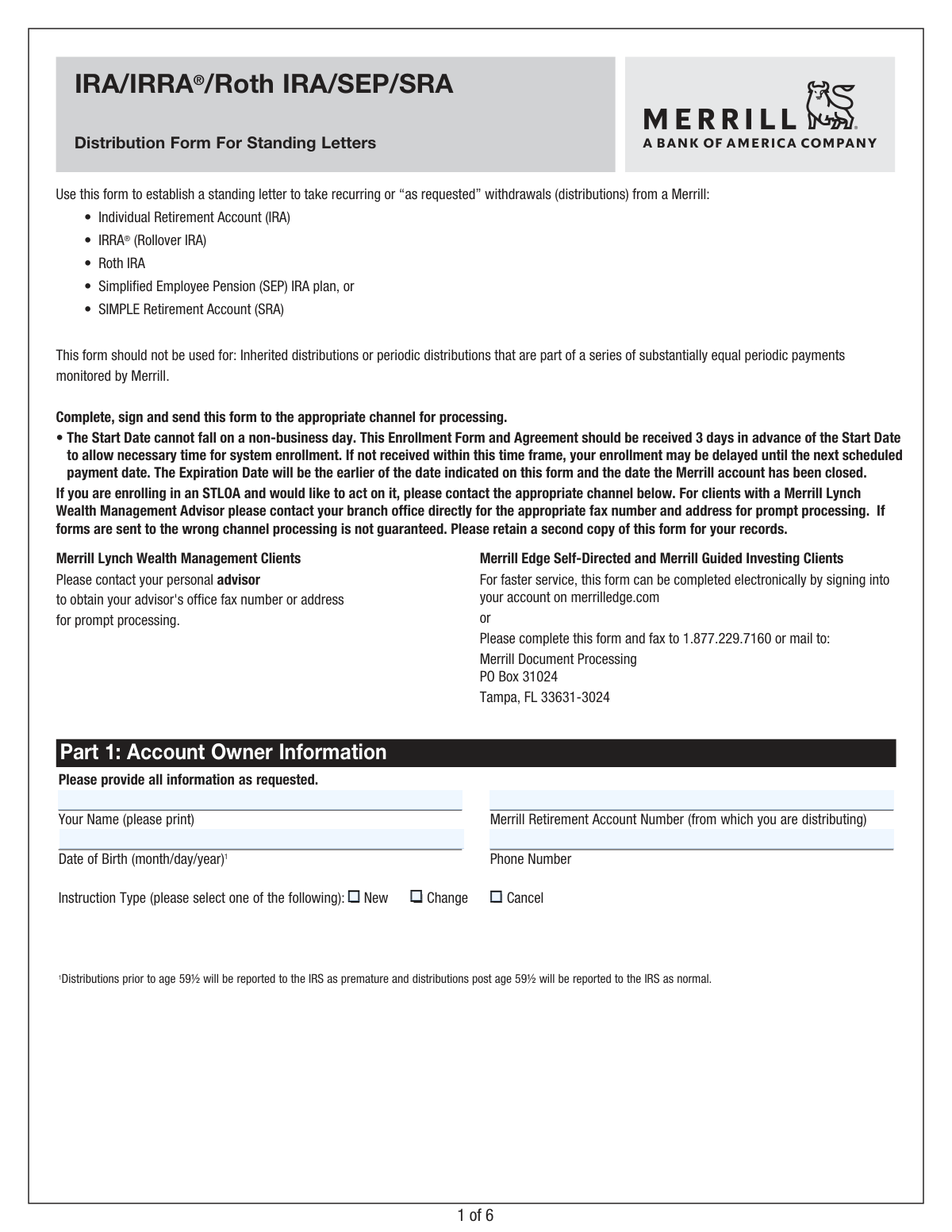
Yes! You can use AI to fill out IRA/IRRA®/Roth IRA/SEP/SRA Distribution Form For Standing Letters

This form, provided by Merrill, a Bank of America company, allows account holders to establish standing instructions for distributions from their Individual Retirement Accounts (IRA, IRRA®, Roth IRA), Simplified Employee Pension (SEP) IRA, or SIMPLE Retirement Account (SRA). It is used to authorize either automatic recurring withdrawals or to set up the ability to request distributions as needed. Today, this form can be filled out quickly and accurately using AI-powered services like Instafill.ai, which can also convert non-fillable PDF versions into interactive fillable forms.
Our AI automatically handles information lookup, data retrieval, formatting, and form filling.
It takes less than a minute to fill out 10187 SL using our AI form filling.
Securely upload your data. Information is encrypted in transit and deleted immediately after the form is filled out.

Form specifications

Form name: IRA/IRRA®/Roth IRA/SEP/SRA Distribution Form For Standing Letters
Number of pages: 1
Language: English
Categories: IRA forms, distribution forms
main-image

Instafill Demo: How to fill out PDF forms in seconds with AI

How to Fill Out 10187 SL Online for Free in 2026

Are you looking to fill out a 10187 SL form online quickly and accurately? Instafill.ai offers the #1 AI-powered PDF filling software of 2026, allowing you to complete your 10187 SL form in just 37 seconds or less.
Follow these steps to fill out your 10187 SL form online using Instafill.ai:
  1. 1 Navigate to Instafill.ai and upload or select the Merrill IRA Distribution Form.
  2. 2 Use the AI assistant to accurately fill in your personal details and Merrill retirement account number in Part 1.
  3. 3 In Part 2, specify the distribution type, choosing between a standing letter for automatic payments or a standing letter for on-request withdrawals, and define the schedule and amounts.
  4. 4 Complete Part 3 by making your federal and state tax withholding elections, referencing the provided W-4R information.
  5. 5 Select your preferred distribution method in Part 4, such as a direct deposit to a Bank of America account, an ACH transfer to an external bank, or a mailed check.
  6. 6 Optionally, complete Part 5 to authorize the automatic liquidation of specific mutual funds to fund your distributions.
  7. 7 Carefully review all entered information, then digitally sign and date the form in Part 6 before submitting it to the appropriate Merrill channel for processing.

Our AI-powered system ensures each field is filled out correctly, reducing errors and saving you time.

Why Choose Instafill.ai for Your Fillable 10187 SL Form?

Speed

Complete your 10187 SL in as little as 37 seconds.

Up-to-Date

Always use the latest 2026 10187 SL form version.

Cost-effective

No need to hire expensive lawyers.

Accuracy

Our AI performs 10 compliance checks to ensure your form is error-free.

Security

Your personal information is protected with bank-level encryption.

Frequently Asked Questions About Form 10187 SL

This form is used to establish a standing letter to take recurring (e.g., monthly) or "as requested" withdrawals, also known as distributions, from your Merrill IRA, Roth IRA, SEP, or SRA account.

You should use this form if you own a Merrill retirement account and want to set up a plan for taking distributions. It should not be used for inherited IRAs or distributions that are part of a series of substantially equal periodic payments.

An STLOI (Part 2, Section 1) sets up automatic, scheduled distributions for a specific amount and frequency. An STLOA (Part 2, Section 2) authorizes Merrill to process distributions only when you request them in the future, up to a pre-set maximum amount.

Merrill Lynch Wealth Management clients should contact their advisor for submission details. Merrill Edge clients can complete it electronically on merrilledge.com or fax the form to 1.877.229.7160.

Your completed form should be received at least 3 business days before your requested start date. If you are also setting up automatic liquidation, it should be received at least 7 business days in advance to allow for processing.

Yes, if you are sending funds to an outside checking account, you must attach a pre-printed voided check. For distributions to an outside savings account, you must provide a letter of authorization from that financial institution.

If you do not make an election, federal income tax will be automatically withheld from your distribution at the default rate of 10%. You can choose to have a different rate (from 0-100%) withheld by specifying it in Part 3.

Yes, but distributions taken before age 59½ are generally reported to the IRS as premature. These withdrawals may be subject to income tax and an additional 10% penalty, so it is best to consult a tax advisor.

You can complete the optional Automatic Liquidation section (Part 5) to authorize Merrill to automatically sell specific mutual funds to cover your scheduled distribution. Otherwise, you are responsible for ensuring sufficient cash is available.

Yes, in Part 4 you can elect to have a check mailed to an alternate address or an alternate payee. You will still be responsible for any taxes due as a result of the distribution.

To change or cancel an existing distribution plan, you must complete and submit a new form. Simply check the 'Change' or 'Cancel' box in Part 1 and fill out the relevant sections.

Yes, services like Instafill.ai use AI to help you accurately auto-fill form fields, which can save time and reduce the chance of errors. This is particularly helpful for completing your personal and account information.

To fill this form out online, you can upload the PDF to the Instafill.ai platform. The service will make the document interactive, allowing you to type your information directly into the fields before printing for signature.

If you have a non-fillable PDF, you can use a service like Instafill.ai to convert it into an interactive, fillable form. This allows you to easily complete it on your computer without needing to print and write by hand.

Compliance 10187 SL
Validation Checks by Instafill.ai

1
Verifies Instruction Type is Mutually Exclusive
This check ensures that the user has selected exactly one option from 'New', 'Change', or 'Cancel' in Part 1. Selecting more than one or none at all would create ambiguity in how to process the request. If validation fails, the form submission should be blocked until a single, valid choice is made.
2
Validates Date of Birth and Age for Distribution Type
This check confirms that the 'Date of Birth' in Part 1 is a valid, past date. It also calculates the account owner's age to determine if distributions are 'premature' (prior to age 59½) or 'normal', as this impacts IRS reporting. An invalid date format or a future date will result in an error, and the age calculation is critical for correct tax processing.
3
Ensures Distribution Type Selections are Complete
This validation verifies that if a distribution type is selected in Part 2 (e.g., STLOI), all of its mandatory sub-fields are filled out. For instance, selecting 'Periodic Installments' requires an amount and a frequency. This prevents incomplete instructions from being submitted, which would lead to processing delays or rejection.
4
Validates STLOI Start Date Business Rules
This check ensures the 'Starting date' for a Standing Letter of Instruction (STLOI) is a valid future business day (not a weekend or holiday). It also enforces the lead time requirements mentioned in the form: the date must be more than 3 business days out for ACH distributions and more than 7 for Automatic Liquidation. This is crucial for allowing the system enough time to enroll the instructions correctly.
5
Checks for Logical Expiration Date
This validation ensures that if an 'Expiration date' is entered in Part 2, it is a valid date that occurs after the specified 'Starting date'. An expiration date that is before the start date is illogical and would cause the instruction to be invalid from the outset. This check prevents the creation of impossible distribution schedules.
6
Validates Federal Withholding Rate for U.S. Addresses
This check confirms that if a federal withholding rate is entered for a U.S. address, it is a whole number between 0 and 100. Entering a decimal, a negative number (other than 0), or a number over 100 would be invalid for tax calculation purposes. This ensures compliance with IRS Form W-4R requirements and prevents calculation errors.
7
Enforces Foreign Address Withholding Restrictions
This validation checks withholding elections against the user's residency status for those with a foreign address. It ensures U.S. citizens/residents abroad do not elect a rate below 10%, and that Non-Resident Aliens select a valid option (30%, treaty rate, or >30%). This is critical for maintaining tax compliance for international distributions.
8
Prevents Prohibited Cash Dividend Election
This check cross-references the user's status with their distribution choice, specifically prohibiting the 'Cash dividends' option for U.S. citizens living abroad and Non-Resident Aliens. The form explicitly states this restriction, and this validation enforces it to prevent setting up a non-compliant distribution plan.
9
Validates Distribution Method and Required Details
This check ensures that exactly one distribution method is selected in Part 4 and that all required information for the chosen method is provided. For example, if 'Distribute to a Bank of America account' is selected, the ABA Routing Number and Account Number fields must be filled. This prevents submissions with ambiguous or incomplete payment instructions.
10
Validates ABA Routing Number Format
For any distribution via Automated Clearing House (ACH), this check verifies that the provided ABA Routing Number is exactly 9 digits long. A proper validation would also include a checksum calculation to ensure the number is mathematically valid and corresponds to a real financial institution. An incorrect ABA number is a primary cause of failed electronic fund transfers.
11
Ensures Automatic Liquidation Percentages Total 100%
If the optional Automatic Liquidation section (Part 5) is used, this validation calculates the sum of all entered percentages and ensures the total is exactly 100%. This is crucial to confirm that the user has provided complete instructions for funding the entire distribution amount. A total other than 100% would lead to ambiguity and potential funding shortfalls.
12
Validates Compatibility of Automatic Liquidation
This check ensures that the Automatic Liquidation section (Part 5) is only completed if the 'Standing Letter of Instruction (STLOI)' is the selected distribution type in Part 2. The form notes this option is 'Applicable to STLOI only'. This validation prevents users from setting up an invalid instruction combination that the system cannot process.
13
Verifies Signature and Date for Authorization
This is a critical completeness check to ensure the signature and date fields in Part 6 are filled. The signature provides the legal authorization for Merrill to act on the instructions, and the date establishes when the authorization was given. A form without a signature is invalid and cannot be processed.
14
Validates STLOA First Distribution Amount
If a user opts to initiate their first distribution under a Standing Letter of Authorization (STLOA) in Part 2, this check ensures the requested amount is not greater than the 'maximum allowable amount' defined for the STLOA. This prevents an immediate transaction that would violate the authorization's own terms. Failure would require the user to correct the amount before submission.

Common Mistakes in Completing 10187 SL

Selecting an Invalid Distribution Start Date

Users often select a start date that falls on a weekend, holiday, or does not account for the required processing time (3-7 business days). This happens due to overlooking the fine print. The consequence is that the enrollment is delayed, and the first distribution will not occur on the desired date, potentially being pushed to the next scheduled payment cycle.

Confusing Standing Letter of Instruction (STLOI) and Authorization (STLOA)

People frequently misunderstand the difference between STLOI (automatic, recurring distributions) and STLOA (on-demand distributions based on future requests). Choosing the wrong option can lead to unintended automatic withdrawals or the failure of expected payments to process. Carefully read the description for each option in Part 2 to ensure you are setting up the correct type of distribution plan for your needs.

Incomplete Federal Tax Withholding Election

Many individuals leave the federal withholding section (Part 3) blank, assuming no tax will be withheld. However, the form clearly states that failing to make an election results in a default 10% withholding. This can lead to a smaller-than-expected distribution amount. To avoid this, you must explicitly enter a whole number percentage, even if it is '0' to elect no withholding.

Incorrect State Tax Withholding Information

State tax rules are complex and vary, often leading to errors. Common mistakes include forgetting to specify the state, selecting a withholding percentage below the state's required minimum, or checking 'Do not withhold' in a state where withholding is mandatory. This can cause processing delays or rejection of the form until the state tax information is corrected.

Missing Required Documentation for ACH Transfers

When setting up a distribution to an outside financial institution (Part 4e), applicants often forget to include the required supporting documents. A pre-printed voided check is necessary for checking accounts, and a signed letter from the bank is required for savings accounts. Failure to provide this documentation will prevent the setup of the electronic transfer, causing the request to be rejected.

Forgetting to Sign and Date the Form

It is a surprisingly common oversight to submit the form without a signature and date in Part 6. An unsigned form is legally invalid and will not be processed under any circumstances. This simple mistake halts the entire process, requiring the user to resubmit the form and causing significant delays for their distribution request.

Miscalculating Automatic Liquidation Percentages

In the optional Automatic Liquidation section (Part 5), the total of the specified percentages must equal exactly 100%. Users sometimes make calculation errors, causing the sum to be over or under 100%. This invalidates the liquidation instructions, and the system may default to using only available cash, which might be insufficient to fund the distribution.

Ignoring Stricter Rules for Foreign Addresses

Account holders with foreign addresses often miss the special withholding rules in Part 3. U.S. citizens living abroad cannot elect 0% federal withholding, and Non-Resident Aliens are subject to a 30% or tax treaty rate and must have a valid W-8BEN on file. An incorrect election will be rejected, and a missing W-8BEN will terminate the instructions, halting all distributions.

Using Invalid Characters in Numeric Fields

When specifying the federal withholding rate, users may enter a percentage sign (%) or a decimal, but the form explicitly requires a whole number. This data entry error can cause the form to be flagged for manual review or rejected by automated systems. To prevent this, always enter rates like '10' or '15', not '10%' or '15.5'. AI-powered tools like Instafill.ai can help by automatically formatting data correctly.

Omitting Third-Party Payee Details

When requesting a check be mailed to an alternate payee (Part 4), it is crucial to complete the 'Third Party Instructions' box with the payee's name, their relationship to you, and the reason for the distribution. People often leave this section blank, assuming the alternate address is sufficient. This omission will cause a processing delay while the firm seeks clarification to ensure compliance and proper tax reporting.

Submitting a Flat, Non-Fillable PDF

This form is often distributed as a non-fillable PDF, leading to illegible handwriting, missed fields, and data entry errors upon manual transcription. This can cause significant processing delays or outright rejection of the form. To avoid this, use a service like Instafill.ai, which can convert any flat PDF into an interactive, fillable form, ensuring all entries are clear, complete, and correctly formatted before submission.
Saved over 80 hours a year

“I was never sure if my IRS forms like W-9 were filled correctly. Now, I can complete the forms accurately without any external help.”

Kevin Martin Green

Your data stays secure with advanced protection from Instafill and our subprocessors

Robust compliance program

Transparent business model

You’re not the product. You always know where your data is and what it is processed for.

ISO 27001, HIPAA, and GDPR

Our subprocesses adhere to multiple compliance standards, including but not limited to ISO 27001, HIPAA, and GDPR.

Security & privacy by design

We consider security and privacy from the initial design phase of any new service or functionality. It’s not an afterthought, it’s built-in, including support for two-factor authentication (2FA) to further protect your account.

Fill out 10187 SL with Instafill.ai

Worried about filling PDFs wrong? Instafill securely fills irairraroth-irasepsra-distribution-form-for-standing-letters forms, ensuring each field is accurate.