Yes! You can use AI to fill out Form CMS-588, Electronic Funds Transfer (EFT) Authorization Agreement
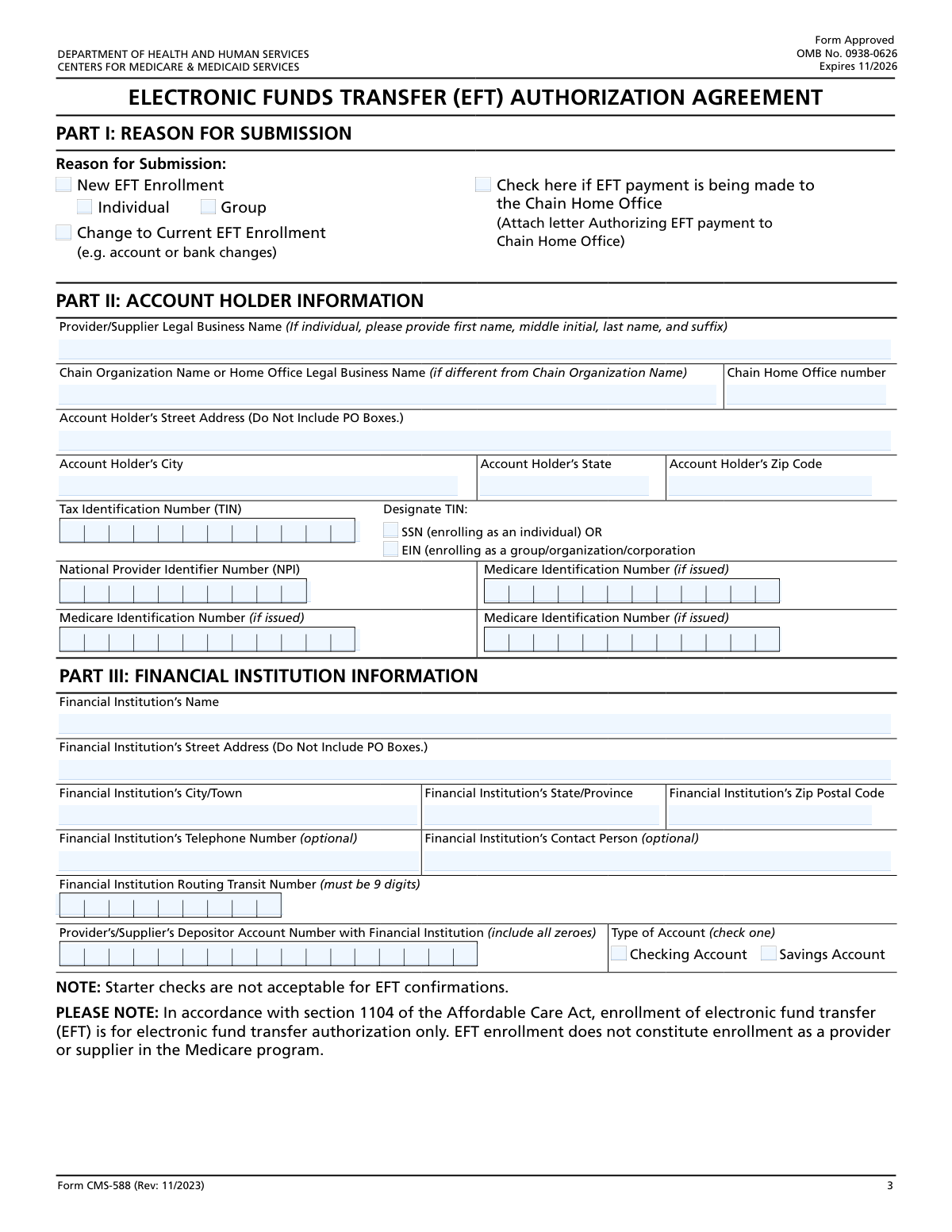
Form CMS-588, the Electronic Funds Transfer (EFT) Authorization Agreement, is a mandatory document for healthcare providers and suppliers enrolling with Medicare. It is used to authorize the Centers for Medicare & Medicaid Services (CMS) to deposit payments directly into a designated bank account, ensuring timely and secure electronic reimbursement. Today, this form can be filled out quickly and accurately using AI-powered services like Instafill.ai, which can also convert non-fillable PDF versions into interactive fillable forms.
Our AI automatically handles information lookup, data retrieval, formatting, and form filling.
It takes less than a minute to fill out CMS-588 using our AI form filling.
Securely upload your data. Information is encrypted in transit and deleted immediately after the form is filled out.
Form specifications
| Form name: | Form CMS-588, Electronic Funds Transfer (EFT) Authorization Agreement |
| Number of pages: | 1 |
| Language: | English |
| Categories: | CMS forms, authorization forms, transfer forms, funds transfer forms |
Instafill Demo: How to fill out PDF forms in seconds with AI
How to Fill Out CMS-588 Online for Free in 2026
Are you looking to fill out a CMS-588 form online quickly and accurately? Instafill.ai offers the #1 AI-powered PDF filling software of 2026, allowing you to complete your CMS-588 form in just 37 seconds or less.
Follow these steps to fill out your CMS-588 form online using Instafill.ai:
- 1 Navigate to Instafill.ai and upload or select the CMS-588 form to begin.
- 2 In Part I, indicate the reason for submission, whether it's a new EFT enrollment or a change to your current information.
- 3 Complete Part II with the account holder's information, including the legal business name, address, Tax ID Number (TIN), and National Provider Identifier (NPI).
- 4 Fill out Part III with your financial institution's details, such as the bank name, routing number, and account number, and prepare a voided check or bank letter for verification.
- 5 Designate a contact person in Part IV who can answer any questions regarding the information submitted on the form.
- 6 In Part V, carefully review the authorization statement, then have the authorized or delegated official electronically sign and date the form.
- 7 After a final review of all entered data for accuracy, download the completed form and submit it to the appropriate Medicare Administrative Contractor (MAC) as instructed.
Our AI-powered system ensures each field is filled out correctly, reducing errors and saving you time.
Why Choose Instafill.ai for Your Fillable CMS-588 Form?
Speed
Complete your CMS-588 in as little as 37 seconds.
Up-to-Date
Always use the latest 2026 CMS-588 form version.
Cost-effective
No need to hire expensive lawyers.
Accuracy
Our AI performs 10 compliance checks to ensure your form is error-free.
Security
Your personal information is protected with bank-level encryption.
Frequently Asked Questions About Form CMS-588
This form, the Electronic Funds Transfer (EFT) Authorization Agreement, is used to authorize Medicare to send your payments directly to your bank account. It is required for providers and suppliers to receive Medicare payments electronically.
Providers and suppliers must complete this form when first enrolling in Medicare, during revalidation, or when changing Medicare contractors. You also need to submit a new form if you change your bank account information.
You must attach a voided check or a signed letter on bank letterhead to verify your account information. The document must show the account holder's legal business name, routing number, and account number.
You must enter the provider’s or supplier’s legal business name exactly as it was reported to the IRS on form CP-575. The bank account to which payments are made must also be under this same legal name.
No, the instructions explicitly state that you cannot use P.O. Boxes for either the account holder's address or the financial institution's address. You must provide a physical street address.
The form must be signed and dated by the same Authorized Representative or Delegated Official who is named on the CMS-855 Medicare enrollment application that your Medicare contractor has on file.
You can upload the completed form to the Provider Enrollment, Chain and Ownership System (PECOS) or mail it to the Medicare Administrative Contractor (MAC) that services your geographical area. Do not mail it to the address in the Paperwork Reduction Act notice.
All EFT requests are subject to a pre-certification period where your bank account information is verified by the financial institution. Direct deposits will only begin after this verification process is successfully completed.
If you have had a change of ownership or practice location, you must first submit a change of information using the Medicare enrollment application (CMS-855). This EFT form should be submitted after or along with that update.
You must submit a separate CMS-588 EFT authorization form for each Medicare contractor to whom you submit claims for payment. A provider may only have one EFT account per enrollment with a specific contractor.
Yes, services like Instafill.ai can help you fill out this form quickly and accurately. These tools use AI to auto-fill fields based on your information, which can save time and reduce errors.
You can use a service like Instafill.ai to complete the form online. Simply upload the PDF, and the platform will make it fillable, allowing you to type your information directly into the fields and save or print the completed document.
If you have a non-fillable or 'flat' PDF, you can use a tool like Instafill.ai to convert it into an interactive, fillable form. This allows you to easily type in your information without needing to print and fill it out by hand.
Compliance CMS-588
Validation Checks by Instafill.ai
1
Ensures Reason for Submission is Selected
This check verifies that the user has selected a reason for submission in Part I, either 'New EFT Enrollment' or 'Change to Current EFT Enrollment'. This information is fundamental to how the form is processed and routed. A failure to select a reason would result in an incomplete submission, as the processing office would not know how to handle the request.
2
Validates Chain Home Office Authorization Attachment
This validation confirms that if the 'Check here if EFT payment is being made to the Chain Home Office' box is checked in Part I, a corresponding authorization letter is attached. The form instructions explicitly require this letter, signed by officials from both the provider and the chain home office. Without this attachment, the request to pay a third-party chain cannot be legally processed.
3
Verifies Tax Identification Number (TIN) Format and Type
This check ensures that a Tax Identification Number is provided in Part II, that the type (SSN or EIN) is designated, and that the number itself is a valid 9-digit format. The TIN is critical for IRS reporting and identity verification. An invalid or missing TIN would cause the application to be rejected due to failure to meet federal identification requirements.
4
Validates National Provider Identifier (NPI) Number
This validation ensures the National Provider Identifier (NPI) number in Part II is present and consists of exactly 10 digits. The form instructions state the NPI is required to process the form, as it is the standard unique identifier for health care providers. An incorrect or missing NPI would prevent the system from linking the EFT request to the correct provider enrollment record.
5
Prohibits P.O. Boxes in Address Fields
This check scans the street address fields for both the Account Holder (Part II) and the Financial Institution (Part III) to ensure they do not contain 'P.O. Box' or similar text. The form explicitly prohibits P.O. Boxes for physical addresses, likely for identity verification and compliance reasons. A submission with a P.O. Box would be considered invalid and require correction.
6
Validates Financial Institution Routing Number Format
This check verifies that the 'Financial Institution Routing Transit Number' in Part III is exactly nine digits long. This number is essential for correctly routing electronic fund transfers through the ACH network. An incorrect number of digits would lead to an automatic failure of the pre-certification process and rejection of the payment setup.
7
Ensures Account Type Selection
This validation confirms that exactly one account type, either 'Checking Account' or 'Savings Account', is selected in Part III. This information is required by the financial institution to correctly process the direct deposit. Failure to select an account type or selecting both would result in an ambiguous instruction and cause the EFT setup to fail.
8
Verifies Presence of Signature and Date
This check ensures that the 'Authorized/Delegated Official Signature' field is signed and the 'Date' field is completed in Part V. The form explicitly states it must be signed and dated to be processed, as this constitutes the legal authorization for the EFT agreement. An unsigned or undated form is not legally binding and will be immediately rejected.
9
Cross-Validates Legal Name on Supporting Documents
This validation compares the 'Provider/Supplier Legal Business Name' from Part II with the account holder name on the required supporting documentation (e.g., voided check or bank letter). The instructions mandate that the bank account must be in the provider's legal business name to prevent fraud and ensure payments are made to the correct entity. A mismatch would halt the verification process until corrected documentation is provided.
10
Ensures Completeness of Contact Person Information
This check verifies that the 'Contact Person’s Name' and 'Contact Person’s Telephone Number' fields in Part IV are filled out. This information is crucial for CMS to resolve any questions or issues with the submission efficiently. Missing contact information can significantly delay processing if clarification is needed, potentially leading to a rejected application.
11
Validates Completeness of Authorized Official Details
This validation ensures that the printed name and telephone number of the Authorized/Delegated Official are provided in Part V alongside the signature. This information is necessary to verify the identity of the person signing the legal agreement. If the signature is illegible or its authenticity is questioned, this contact information provides a direct means of verification.
12
Verifies Completeness of Account Holder Address
This check ensures that the Account Holder's full address, including Street Address, City, State, and Zip Code, is completely filled out in Part II. A complete and valid physical address is a standard requirement for business and identity verification. An incomplete address would render the application invalid and prevent successful enrollment.
13
Requires Supporting Financial Documentation
This validation confirms that a file has been attached to the submission, corresponding to the required voided check or bank letterhead. The form requires this documentation to independently verify the routing number, account number, and account holder name. A submission without this attachment is incomplete and cannot proceed to the pre-certification stage.
Common Mistakes in Completing CMS-588
Applicants often enter a DBA ('doing business as') name or a slight variation of their official name instead of the exact Legal Business Name as registered with the IRS. This mismatch between the form and IRS records will cause an immediate rejection. To avoid this, refer directly to your IRS CP-575 form and enter the name precisely as it appears there, ensuring it also matches the name on the bank account.
The form requires a voided check or a signed bank letter to verify account details, but applicants frequently forget to attach it or submit unacceptable documents like starter checks. This leads to processing delays as the account cannot be pre-certified. Always include a clear copy of a voided check or a formal bank letter that contains the account holder's legal name, routing number, and account number to prevent this.
A critical error is when the name on the financial account (Part III) does not exactly match the provider's Legal Business Name (Part II). Medicare requires payments to go to an account owned by the enrolled entity, not a personal or unrelated business account. This mistake results in payment failure and form rejection. Ensure the bank account is titled with the exact same Legal Business Name reported to the IRS.
The authorization in Part V must be signed by the same Authorized or Delegated Official on file with Medicare from the CMS-855 enrollment application. An office manager or another staff member signing the form will render it invalid. This causes rejection and requires resubmission, delaying payments. Always verify who the designated official is and ensure they are the one to print, sign, and date the form.
The form explicitly states 'Do Not Include PO Boxes' for both the account holder's street address and the financial institution's address. Applicants sometimes overlook this instruction and use a P.O. Box out of habit, which is not permissible for physical location verification. This will cause the form to be returned. Always provide a physical street address in these fields to ensure compliance.
Simple data entry errors, such as transposing digits or omitting leading zeros in the 9-digit routing number or the depositor account number, are very common. These mistakes are critical as they will cause electronic payments to fail. Carefully double-check these numbers against your bank documentation before submitting. AI-powered tools like Instafill.ai can help by validating the 9-digit format for routing numbers, reducing the chance of error.
Forgetting to sign or date the authorization section is one of the most frequent and easily avoidable mistakes. An unsigned or undated form is incomplete and cannot be processed, leading to immediate rejection and the need to start over. Before submitting, perform a final review to confirm that the authorized official has signed and dated the form in Part V.
Applicants who have had a change of ownership or practice location often mistakenly believe this EFT form is sufficient. The instructions note that a separate Medicare enrollment application (CMS-855) must be submitted to the Medicare contractor for such changes. Submitting only the EFT form will result in processing holds until the required enrollment change information is received and approved.
If payments are being directed to a Chain Home Office (CHO), the form requires an attached letter authorizing this arrangement, signed by officials from both the provider and the CHO. Applicants often check the box indicating a CHO payment but forget to include this mandatory letter. This omission will halt the enrollment process until the required documentation is provided.
Users may get confused about whether to provide their Social Security Number (SSN) or Employer Identification Number (EIN). The form requires an SSN for individuals and an EIN for groups, organizations, or corporations. Entering the wrong type of TIN or an incorrect number will cause a data mismatch with IRS records and lead to rejection. Confirm your entity type and provide the corresponding, correct TIN.
Saved over 80 hours a year
“I was never sure if my IRS forms like W-9 were filled correctly. Now, I can complete the forms accurately without any external help.”
Kevin Martin Green
Your data stays secure with advanced protection from Instafill and our subprocessors

Robust compliance program
Transparent business model
You’re not the product. You always know where your data is and what it is processed for.
ISO 27001, HIPAA, and GDPR
Our subprocesses adhere to multiple compliance standards, including but not limited to ISO 27001, HIPAA, and GDPR.
Security & privacy by design
We consider security and privacy from the initial design phase of any new service or functionality. It’s not an afterthought, it’s built-in, including support for two-factor authentication (2FA) to further protect your account.
Fill out CMS-588 with Instafill.ai
Worried about filling PDFs wrong? Instafill securely fills form-cms-588-electronic-funds-transfer-eft-authorization-agreement forms, ensuring each field is accurate.