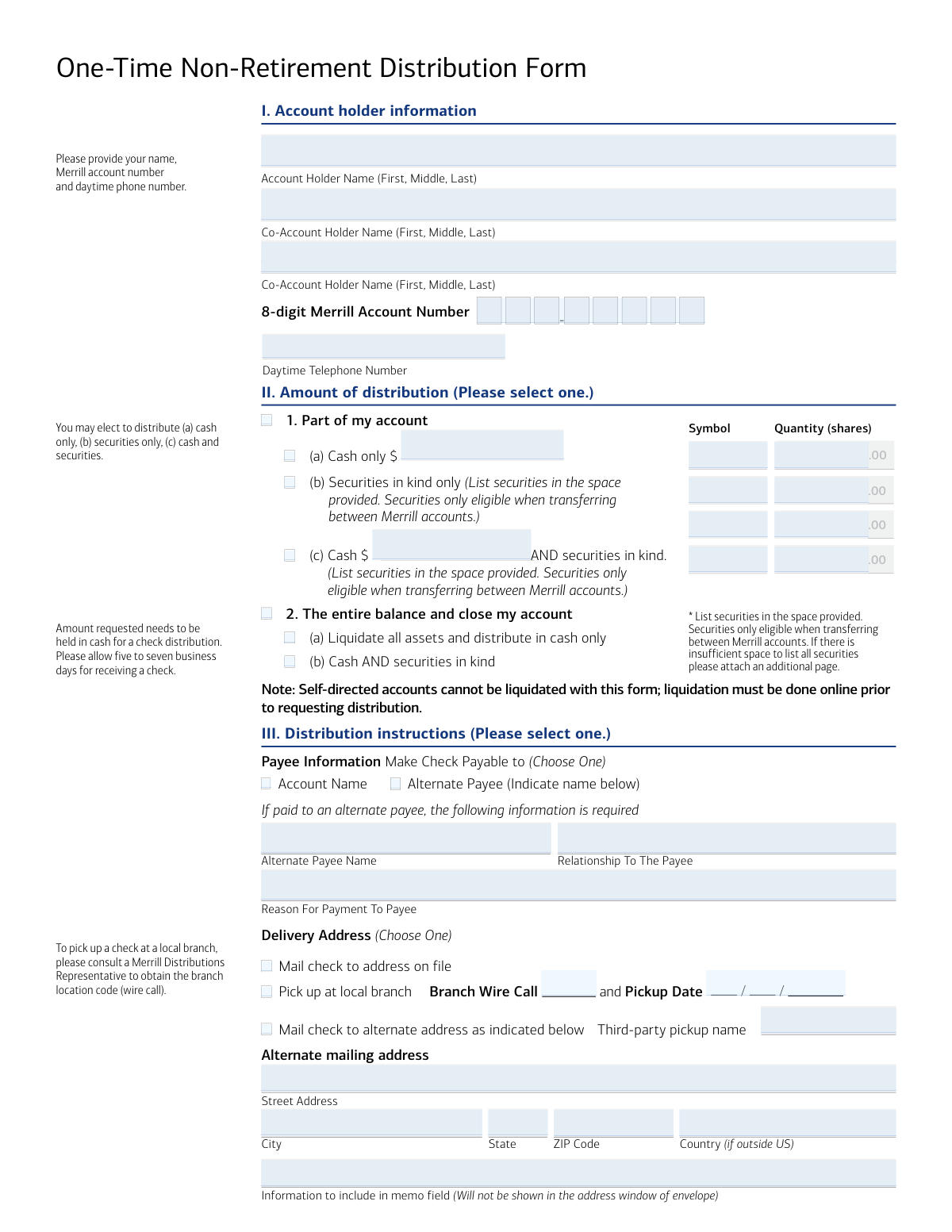
Yes! You can use AI to fill out Merrill Lynch One-Time Non-Retirement Distribution Form

This form allows Merrill Lynch clients to request a one-time distribution of cash or securities from their non-retirement accounts, such as a Cash Management Account® (CMA®) or Working Capital Management Account® (WCMA®). It is essential for accessing funds, transferring assets between accounts, or closing an account. Today, this form can be filled out quickly and accurately using AI-powered services like Instafill.ai, which can also convert non-fillable PDF versions into interactive fillable forms.
Our AI automatically handles information lookup, data retrieval, formatting, and form filling.
It takes less than a minute to fill out 00-66-0597NSB using our AI form filling.
Securely upload your data. Information is encrypted in transit and deleted immediately after the form is filled out.

Form specifications

Form name: Merrill Lynch One-Time Non-Retirement Distribution Form
Number of pages: 1
Language: English
Categories: retirement forms, distribution forms, Merrill forms
main-image

Instafill Demo: How to fill out PDF forms in seconds with AI

How to Fill Out 00-66-0597NSB Online for Free in 2026

Are you looking to fill out a 00-66-0597NSB form online quickly and accurately? Instafill.ai offers the #1 AI-powered PDF filling software of 2026, allowing you to complete your 00-66-0597NSB form in just 37 seconds or less.
Follow these steps to fill out your 00-66-0597NSB form online using Instafill.ai:
  1. 1 Navigate to Instafill.ai and upload the Merrill Lynch One-Time Non-Retirement Distribution Form or select it from their template library.
  2. 2 Provide your personal account holder information in Section I, including your name, Merrill account number, and contact details.
  3. 3 In Section II, specify the amount of the distribution, indicating whether you are withdrawing a partial amount (cash or securities) or the entire account balance.
  4. 4 Complete Section III with your distribution instructions, choosing how you want to receive the funds, such as by check, wire transfer, or a transfer to another account.
  5. 5 If the distribution is being made to an alternate payee or involves a wire transfer to another institution, fill out the required details in the relevant sections.
  6. 6 Review all the information auto-populated by the AI to ensure accuracy and completeness, making any necessary corrections.
  7. 7 Electronically sign and date the form in Section V, then download the completed document to fax or mail it to Merrill Lynch as instructed.

Our AI-powered system ensures each field is filled out correctly, reducing errors and saving you time.

Why Choose Instafill.ai for Your Fillable 00-66-0597NSB Form?

Speed

Complete your 00-66-0597NSB in as little as 37 seconds.

Up-to-Date

Always use the latest 2026 00-66-0597NSB form version.

Cost-effective

No need to hire expensive lawyers.

Accuracy

Our AI performs 10 compliance checks to ensure your form is error-free.

Security

Your personal information is protected with bank-level encryption.

Frequently Asked Questions About Form 00-66-0597NSB

This form is used to request a one-time withdrawal from specific non-retirement Merrill accounts like a CMA or WCMA. You can also use it to make a contribution from one of these accounts into a Merrill Retirement account.

Any Merrill client holding a Cash Management Account® (CMA®), Working Capital Management Account® (WCMA®), or other specified non-retirement account who wishes to make a one-time withdrawal must use this form.

Merrill will process the form within 24 hours of receipt. However, receiving a check by mail can take 5-7 business days, while wire transfers and account-to-account transfers typically take 24-48 hours.

For faster service, you can complete the request electronically on merrilledge.com. Alternatively, you can fax the completed form to 1.877.229.7160 or mail it to the Merrill Document Processing center in Tampa, FL.

You must provide a clear, enlarged photocopy of a government-issued photo ID for each person signing the form, if one is not already on file. Failure to provide this may delay your request.

Yes, you can request a distribution of securities, but this option is only available when transferring them between two Merrill accounts. You must list the specific securities and quantities on the form.

No, this form cannot be used to liquidate assets in a self-directed account. You must first liquidate the assets online through your account before submitting this form to request the final distribution of cash.

You must provide the receiving bank's name, ABA routing number, the name on the receiving account, and the account number. Contact your bank to confirm these instructions are correct to avoid delays or fees.

Yes, a fee will be charged for wire transfers to a non-Bank of America account. This fee is deducted from the gross distribution amount if additional cash is not available in the account.

If you are paying an alternate payee, you must complete Section IV with their information, including their relationship to you and the reason for the payment, as required by the USA PATRIOT Act.

Yes, you can make a prior-year contribution to a retirement account, but it must be completed before the tax filing deadline for that year. Make sure to select 'Prior Year' in the contribution section.

Yes, services like Instafill.ai use AI to accurately auto-fill form fields with your information, which can save you time and help prevent common errors.

Simply upload the form's PDF to the Instafill.ai platform. The AI will identify all the fields, allowing you to auto-fill your saved information or type directly into the digital form before printing.

If you have a flat, non-fillable PDF, you can use a service like Instafill.ai to instantly convert it into an interactive, fillable form. This allows you to easily type your information into the fields.

Compliance 00-66-0597NSB
Validation Checks by Instafill.ai

1
Validates Merrill Account Number Format
This check ensures that the '8-digit Merrill Account Number' field contains exactly 8 digits and no other characters. This is critical for correctly identifying the source account for the distribution. A failure in this validation would prevent the system from locating the account, causing the entire request to be rejected.
2
Ensures Core Account Holder Information is Complete
Verifies that the 'Account Holder Name', '8-digit Merrill Account Number', and 'Daytime Telephone Number' fields in Section I are all filled out. These fields are fundamental for identifying the client and communicating with them about the transaction. An incomplete submission would be halted pending receipt of the missing information.
3
Exclusive Selection in 'Amount of distribution'
This validation confirms that the user has selected only one of the two main options in Section II: either '1. Part of my account' or '2. The entire balance and close my account'. Selecting both or neither is an invalid state. This check prevents ambiguity in the core instruction of the request, and a failure would require user correction before processing.
4
Conditional Data Entry for Partial Distributions
If 'Part of my account' is selected in Section II, this check ensures the corresponding sub-fields are correctly filled. If 'Cash only' or 'Cash AND securities' is chosen, a valid monetary amount must be entered; if 'Securities in kind only' or 'Cash AND securities' is chosen, at least one security symbol and quantity must be listed. This prevents requests for partial distributions that lack the specific amount or assets to be distributed.
5
Exclusive Selection in 'Distribution instructions'
Confirms that only one primary distribution method is selected in Section III (e.g., Check, Account to Account Transfer, or Federal Funds Wire Transfer). The form allows for only one destination for the funds per request. A failure here indicates a conflicting instruction that must be clarified by the user.
6
Completeness Check for Alternate Payee
If the user opts to make a check payable to an 'Alternate Payee', this validation ensures the 'Alternate Payee Name', 'Relationship To The Payee', and 'Reason For Payment To Payee' fields are all completed. This information is required for compliance and security purposes, particularly under the USA PATRIOT Act. Missing information will delay the request until it is provided.
7
Validates ABA Routing Number Format
When a 'Federal Funds Wire Transfer' is requested, this check verifies that the 'Bank ABA Routing #' field contains a valid 9-digit number. An incorrect ABA number will cause the wire transfer to fail, potentially resulting in fees and significant delays in the recipient receiving their funds. This validation helps prevent transaction errors at the banking level.
8
Conditional Requirement for Alternate Address
If the user selects 'Mail check to alternate address' in Section III, this check ensures the 'Street Address', 'City', 'State', and 'ZIP Code' fields are all populated. Without a complete address, the check cannot be mailed correctly, leading to a failed distribution. This validation prevents lost or undeliverable checks.
9
Conditional Requirement for Branch Pickup Details
This check is triggered if the user selects 'Pick up at local branch'. It verifies that both the 'Branch Wire Call' code and a valid future 'Pickup Date' have been provided. Without this information, the branch cannot prepare the check for pickup, and the client's request cannot be fulfilled as specified.
10
Signature and Date Presence
Verifies that at least the primary account holder's signature and a valid signature date are provided in Section V. A signature is a legal requirement to authorize the distribution from the account. A missing signature or date renders the form invalid and legally non-binding, and processing will be stopped until a signed form is received.
11
Logical Consistency of Signatures
This validation compares the number of signatures provided in Section V with the number of account holders listed in Section I. If co-account holders are listed on the account, their signatures and signature dates are also required for authorization. A mismatch in signatures can lead to the request being rejected for lacking proper authorization from all account owners.
12
Completeness of Retirement Contribution Details
If the distribution is being made as a 'Contribute to Merrill Retirement account', this check ensures all necessary sub-options are selected. This includes the 'Contribution Type' (Individual, Rollover, Employer), the 'Contribution Year' (Current, Prior), and, if applicable, the 'Deductibility'. This data is essential for correct tax reporting and account processing, and missing details would require clarification.

Common Mistakes in Completing 00-66-0597NSB

Incomplete or Incorrect Account Number

Users often enter their 8-digit Merrill account number incorrectly, either by transposing digits, omitting one, or confusing it with another account number. An incorrect account number will cause the entire request to be rejected, as the firm cannot identify the source account. To prevent this, double-check the number against your account statement. AI-powered tools like Instafill.ai can help by validating the format to ensure the correct number of digits is entered.

Contradictory Distribution Amount Selections

A frequent error is selecting conflicting options in Section II, such as checking both 'Part of my account' and 'The entire balance and close my account.' This ambiguity makes it impossible for Merrill to process the request, leading to rejection and processing delays. To avoid this, carefully choose only one primary option that reflects your exact intention for the distribution.

Requesting an Ineligible 'In-Kind' Security Transfer

The form specifies that transferring securities 'in kind' is only eligible when moving them between Merrill accounts. People mistakenly list securities for distribution to an external bank account, which is not permitted by this form. This results in the securities portion of the request being denied, requiring the user to resubmit the form correctly.

Insufficient Settled Cash for Distribution

Account holders often request a cash distribution without first ensuring the requested amount is available as settled cash, not just as total account value. Assets must be sold and the trade settled before the funds can be withdrawn, a process that can take several days. This mistake leads to a failed transaction and requires the user to liquidate assets and resubmit the form after the funds have settled.

Missing Information for an Alternate Payee

When directing a payment to a third party (an 'Alternate Payee'), filers frequently forget to complete the required fields, such as the payee's relationship and the reason for the payment. This information is mandated by regulations like the USA PATRIOT Act to prevent fraud. Omitting these details will cause an immediate halt to the processing of your request until the information is provided.

Incorrect Wire Transfer Instructions

Providing an incorrect ABA routing number or destination account number is a critical and common error. This often happens when users guess the information or copy it from an old document instead of confirming with the receiving bank. An incorrect wire transfer can result in the funds being delayed, rejected (incurring fees), or sent to the wrong account. AI form-filling tools like Instafill.ai can help prevent typos by validating routing number formats.

Missing Signatures on a Joint Account

For accounts with multiple owners, all listed account holders are required to sign the form in Section V. It is a very common oversight for only one person to sign, rendering the authorization incomplete. The form will be returned unprocessed, delaying the distribution until all required signatures are obtained and submitted.

Attempting to Liquidate a Self-Directed Account with the Form

The form contains a specific note that self-directed accounts cannot be liquidated using this paper form; liquidation must be performed online first. Many users miss this fine print and select 'The entire balance and close my account,' expecting Merrill to sell their assets. This will lead to the request being rejected, forcing the user to log in, perform the liquidation, and then resubmit the distribution request.

Forgetting to Attach Required Photo ID

The signature section states that a government-issued photo ID is required for each signatory if one has not been previously provided. Account holders, especially new ones, often forget to include a legible copy of their driver's license or passport. This omission will delay the verification process and prevent the distribution from being processed until the required identification is received.

Confusion Over Retirement Contribution Rules

When using the form to contribute to a Merrill Retirement account, users often make errors regarding the contribution year and type. For example, they might try to make a 'Prior Year' contribution after the tax filing deadline has passed or be confused about deductibility options. These mistakes can have significant tax implications and may require amendments or cause the contribution to be miscategorized.
Saved over 80 hours a year

“I was never sure if my IRS forms like W-9 were filled correctly. Now, I can complete the forms accurately without any external help.”

Kevin Martin Green

Your data stays secure with advanced protection from Instafill and our subprocessors

Robust compliance program

Transparent business model

You’re not the product. You always know where your data is and what it is processed for.

ISO 27001, HIPAA, and GDPR

Our subprocesses adhere to multiple compliance standards, including but not limited to ISO 27001, HIPAA, and GDPR.

Security & privacy by design

We consider security and privacy from the initial design phase of any new service or functionality. It’s not an afterthought, it’s built-in, including support for two-factor authentication (2FA) to further protect your account.

Fill out 00-66-0597NSB with Instafill.ai

Worried about filling PDFs wrong? Instafill securely fills merrill-lynch-one-time-non-retirement-distribution-form forms, ensuring each field is accurate.