Yes! You can use AI to fill out Merrill Lynch Information Change/Update Form
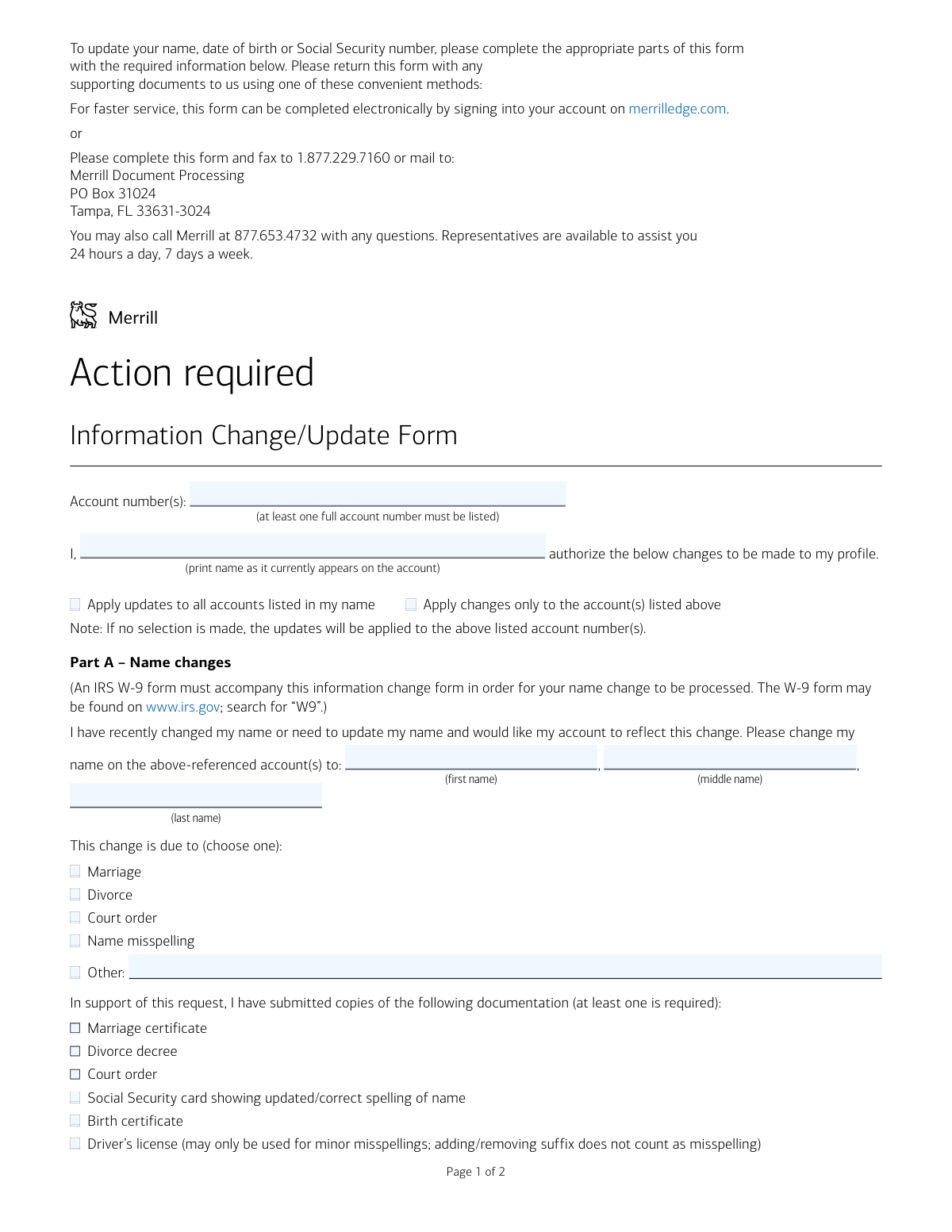
This form is a formal request for Merrill Lynch clients to update key personal information on their accounts, such as name, date of birth, Social Security number, or marital status. Keeping this information current is vital for accurate tax reporting, account security, and ensuring you receive important communications. Today, this form can be filled out quickly and accurately using AI-powered services like Instafill.ai, which can also convert non-fillable PDF versions into interactive fillable forms.
Our AI automatically handles information lookup, data retrieval, formatting, and form filling.
It takes less than a minute to fill out INFOLOA using our AI form filling.
Securely upload your data. Information is encrypted in transit and deleted immediately after the form is filled out.
Form specifications
| Form name: | Merrill Lynch Information Change/Update Form |
| Number of pages: | 1 |
| Language: | English |
| Categories: | Merrill forms |
Instafill Demo: How to fill out PDF forms in seconds with AI
How to Fill Out INFOLOA Online for Free in 2026
Are you looking to fill out a INFOLOA form online quickly and accurately? Instafill.ai offers the #1 AI-powered PDF filling software of 2026, allowing you to complete your INFOLOA form in just 37 seconds or less.
Follow these steps to fill out your INFOLOA form online using Instafill.ai:
- 1 Navigate to Instafill.ai and upload or select the Merrill Lynch Information Change/Update Form.
- 2 Use the AI assistant to automatically fill in your account number(s) and the name as it currently appears on the account.
- 3 Indicate which parts of the form you need to complete, such as Part A for a name change or Part D for a marital status update.
- 4 Provide the new information and let the AI populate the correct fields, ensuring the appropriate checkboxes for supporting documentation are selected.
- 5 Review all the information entered by the AI for accuracy, paying close attention to details like dates and Social Security numbers.
- 6 Electronically sign the form in Part F and download the completed document, along with any required attachments like a Form W-9.
- 7 Submit the completed form package to Merrill Lynch using one of the methods listed, such as fax, mail, or their online portal.
Our AI-powered system ensures each field is filled out correctly, reducing errors and saving you time.
Why Choose Instafill.ai for Your Fillable INFOLOA Form?
Speed
Complete your INFOLOA in as little as 37 seconds.
Up-to-Date
Always use the latest 2026 INFOLOA form version.
Cost-effective
No need to hire expensive lawyers.
Accuracy
Our AI performs 10 compliance checks to ensure your form is error-free.
Security
Your personal information is protected with bank-level encryption.
Frequently Asked Questions About Form INFOLOA
This form is used to update your personal information on your Merrill Lynch account(s), such as your legal name, date of birth, Social Security number, or marital status.
Any Merrill Lynch account holder who needs to update their personal profile information due to a life event like marriage, divorce, or to correct an error should complete this form.
For the fastest service, complete the form electronically on merrilledge.com. Alternatively, you can fax the completed form and documents to 1.877.229.7160 or mail them to the Merrill Document Processing center in Tampa, FL.
You must submit a completed IRS Form W-9 along with a copy of a supporting document, such as a marriage certificate, divorce decree, court order, or Social Security card with your updated name.
As instructed in Part F, you must sign the form with your new name when submitting a name change request.
Yes, a completed IRS Form W-9 must be submitted with this form if you are changing your name or updating your Social Security number.
You can choose to apply the changes to all accounts under your name or only to the specific account numbers you list on the form. If you make no selection, updates will only apply to the listed accounts.
To correct your date of birth on your account, you must submit a copy of your driver's license, birth certificate, or passport along with the form.
For a minor name misspelling, you can submit a copy of your driver's license or Social Security card showing the correct spelling. A driver's license cannot be used for adding or removing a suffix.
In Part E of the form, you can check the box to request a replacement Visa debit card and/or checks to be issued with your updated information.
You can call Merrill at 877.653.4732 for assistance. Representatives are available 24 hours a day, 7 days a week.
Yes, services like Instafill.ai use AI to accurately auto-fill form fields from your saved profile, which can save you time and help prevent errors.
You can upload the PDF to a service like Instafill.ai, which allows you to fill it out on any device, add your e-signature, and then download or email the completed form.
If you have a flat, non-fillable PDF, you can use a tool like Instafill.ai to instantly convert it into an interactive, fillable form that you can complete electronically.
Compliance INFOLOA
Validation Checks by Instafill.ai
1
Mandatory Account Number
Ensures at least one full account number is provided in the 'Account number(s)' field. This is critical for identifying which account(s) the requested changes should be applied to. A submission without an account number cannot be processed and will be rejected.
2
Signature and Date Presence
Validates that the form has been signed and dated in Part F. A signature is a legal attestation required to authorize any changes to the account holder's information. Forms submitted without a signature or date are considered incomplete and will be returned to the client for completion.
3
At Least One Change Requested
Checks that the user has filled out at least one of the information change sections (Part A, B, C, D, or E). A form that is signed but contains no requested updates is ambiguous and serves no purpose. The system should flag such submissions as invalid to prevent unnecessary processing.
4
Conditional Name Change Requirement
If a name change is initiated in Part A, this validates that the new first name, last name, a reason for the change, and at least one supporting document have been provided. Missing any of these components makes the name change request incomplete. The form will be rejected with a request for the missing information.
5
Name Change 'Other' Reason Specificity
If the 'Other' option is selected as the reason for a name change in Part A, this check ensures the corresponding text field is filled out. This provides necessary context for compliance and record-keeping. Failure to specify the 'Other' reason will result in the form being flagged as incomplete.
6
W-9 Form Requirement for Name or SSN Change
Verifies that an IRS Form W-9 is included if a name change (Part A) or Social Security number update (Part C) is requested. This is an IRS requirement for tax reporting purposes. Submissions lacking the required W-9 form will be put on hold and the client will be notified to provide the document before the change can be processed.
7
Correct Date of Birth Format and Documentation
If a date of birth update is requested in Part B, this check validates that the 'Correct date of birth' field contains a valid date (e.g., MM/DD/YYYY) and that at least one supporting document is selected. This ensures data integrity and proper identity verification. An invalid date format or missing documentation proof will cause the request to be rejected.
8
Correct Social Security Number Format
Validates that the 'Correct Social Security number' in Part C is entered in a valid 9-digit format (e.g., XXX-XX-XXXX or XXXXXXXXX). This is crucial for accurate tax reporting and identity verification. An incorrectly formatted SSN will fail validation and prevent the form from being processed.
9
Conditional Spouse/Partner Name
Ensures that if 'Married' or 'Domestic Partner' is selected in the Marital Status update (Part D), the corresponding name field for the spouse or partner is filled in. This information is often required for account beneficiary designations or householding purposes. A missing name will result in an incomplete submission.
10
Signature Name Consistency for Name Changes
Performs a logical check to ensure that if a name change is requested in Part A, the signature in Part F is made using the new name. The form explicitly requires this as an acknowledgment of the new legal name. A mismatch could indicate confusion or an unauthorized change and may require follow-up with the client.
11
Driver's License Documentation Restriction
Checks the business rule that a driver's license can only be used as supporting documentation for a name change due to a 'Name misspelling'. If a driver's license is the only document provided for a change due to marriage or divorce, the submission is invalid. This rule prevents the use of insufficient documentation for major name changes, and failure will result in a request for a more appropriate document like a marriage certificate or court order.
12
SSN Update Documentation Requirement
If a Social Security number update is requested in Part C, this check confirms that the 'Social Security card' checkbox is selected as supporting documentation. As this is the only documentation option listed for an SSN change, it is mandatory. A request without this selection will be considered incomplete and rejected.
Common Mistakes in Completing INFOLOA
Users often focus on the main form and overlook the fine print requiring a separate IRS W-9 for name or Social Security number changes. Without the W-9, the financial institution cannot update tax reporting information, causing the entire request to be rejected and delayed. To avoid this, carefully read all instructions for the specific section you are completing and download the W-9 form from the IRS website as instructed.
The form explicitly requires signing with the *new* name in Part F when requesting a name change, but people instinctively sign with their old, familiar signature. This creates a mismatch between the requested change and the authorization, leading to processing delays or rejection. Always double-check the signature block instructions; for a name change, you must sign with your new legal name to validate the request.
Applicants sometimes forget to list any account numbers or provide only partial numbers, assuming their name is enough to identify the accounts. The form requires at least one full account number to locate the correct profile and apply changes, and failure to provide it will result in the form being returned unprocessed. Before submitting, verify that you have written at least one complete account number in the designated field at the top of the form.
Changes to critical personal information like name, date of birth, or SSN require legal proof, but users often submit the form without the necessary attachments like a marriage certificate or passport. This is a common reason for immediate rejection, as the institution cannot legally process the update without verification. Ensure you have gathered and included clear copies of all required documents listed in the relevant section before sending the form.
The form specifies that a driver's license can only be used for minor misspellings, yet individuals may submit it as proof for a major change due to marriage or divorce. This leads to rejection because a driver's license is not considered primary proof for such significant changes. To avoid this, use the appropriate document like a marriage certificate, divorce decree, or court order as specified for your situation.
An unsigned or undated form is legally invalid and is one of the most frequent and basic errors. Without a signature and date in Part F, the entire request is void and cannot be processed, forcing the user to resubmit. Always perform a final check to ensure you have signed and dated the form before faxing or mailing it.
The form asks users to 'print name as it currently appears on the account' to authorize the changes, but people making a name change sometimes mistakenly write their *new* name here. This causes a verification failure, as the initial authorization must match the name currently on file. To prevent this, carefully read the instruction and print your name exactly as it is currently listed on your Merrill Lynch account statements.
The form provides a choice to apply updates to all accounts or only the ones listed, but users often leave this section blank. The form defaults to updating only the listed accounts, which may not be the user's intent if they have multiple accounts and want the change applied universally. This can lead to inconsistent information across their portfolio, so it's crucial to explicitly check one of the two boxes to ensure the change is applied as desired.
Since this form is often printed and filled out by hand, illegible handwriting is a common issue, especially for critical data like account numbers or new names. Poor handwriting can lead to data entry errors by the processor, resulting in incorrect updates or rejection of the form if the information cannot be deciphered. To avoid this, it's best to use an AI-powered tool like Instafill.ai, which can convert the non-fillable PDF into a fillable version, allowing you to type your information clearly and ensure accuracy.
When updating their status to 'Married' or 'Domestic Partner' in Part D, users may check the box but forget to write their spouse's or partner's full name in the space provided. While seemingly minor, this incomplete information can affect account settings or compliance checks, potentially requiring follow-up communication. To ensure a complete update, always fill in the spouse's or partner's name if you select one of those options.
Saved over 80 hours a year
“I was never sure if my IRS forms like W-9 were filled correctly. Now, I can complete the forms accurately without any external help.”
Kevin Martin Green
Your data stays secure with advanced protection from Instafill and our subprocessors

Robust compliance program
Transparent business model
You’re not the product. You always know where your data is and what it is processed for.
ISO 27001, HIPAA, and GDPR
Our subprocesses adhere to multiple compliance standards, including but not limited to ISO 27001, HIPAA, and GDPR.
Security & privacy by design
We consider security and privacy from the initial design phase of any new service or functionality. It’s not an afterthought, it’s built-in, including support for two-factor authentication (2FA) to further protect your account.
Fill out INFOLOA with Instafill.ai
Worried about filling PDFs wrong? Instafill securely fills merrill-lynch-information-changeupdate-form forms, ensuring each field is accurate.