Yes! You can use AI to fill out IRA Account Application
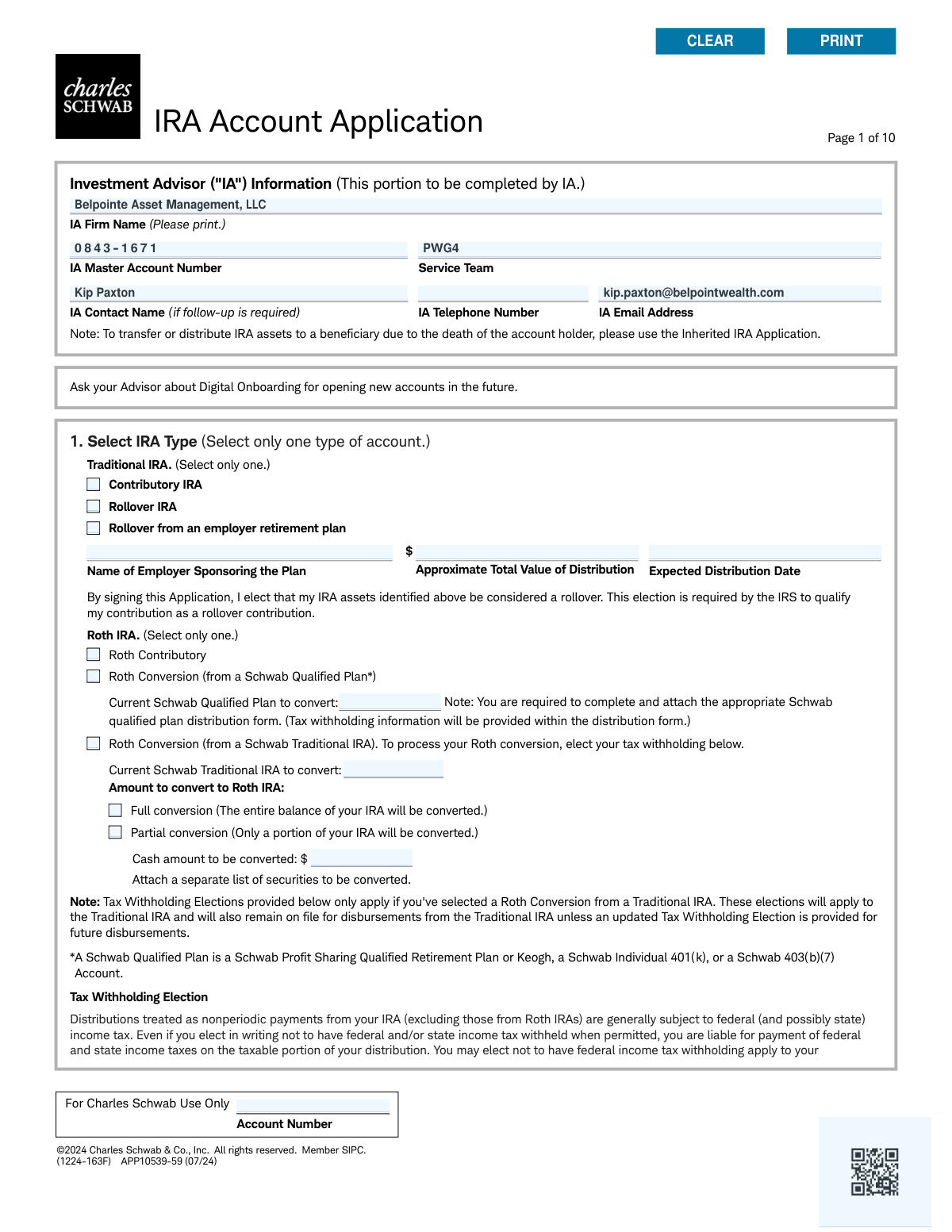
The Charles Schwab IRA Account Application (APP10539-59) is the official form required to open a new Individual Retirement Account with Charles Schwab. It allows applicants to specify the type of IRA, provide personal and employment information, designate beneficiaries, and set up account authorizations. Properly completing this form is the first step toward establishing a tax-advantaged retirement savings plan with one of the nation's leading brokerage firms. Today, this form can be filled out quickly and accurately using AI-powered services like Instafill.ai, which can also convert non-fillable PDF versions into interactive fillable forms.
APP10539-59 is part of the
investment forms, financial account forms, IRA forms, retirement account forms, account application forms, IRA application forms and IRA account forms categories on Instafill.
Rather not fill this in by hand? Instafill is an online form filler that completes PDF forms automatically — upload the blank form, answer a few questions, and the AI fills every field.
Form specifications
| Form name: | IRA Account Application |
| Number of pages: | 1 |
| Language: | English |
Our AI automatically handles information lookup, data retrieval, formatting, and form filling.
It takes less than a minute to fill out APP10539-59 using our AI form filling.
Securely upload your data. Information is encrypted in transit and deleted immediately after the form is filled out.
Instafill Demo: How to fill out PDF forms in seconds with AI
How to Fill Out APP10539-59 Online for Free in 2026
Are you looking to fill out a APP10539-59 form online quickly and accurately? Instafill.ai offers the #1 AI-powered PDF filling software of 2026, allowing you to complete your APP10539-59 form in just 37 seconds or less.
Follow these steps to fill out your APP10539-59 form online using Instafill.ai:
- 1 Navigate to Instafill.ai and upload or select the Charles Schwab IRA Account Application form.
- 2 Use the AI assistant to select your desired IRA type (e.g., Traditional, Roth, SEP) and provide details for any rollovers or conversions.
- 3 Enter your personal information in Section 2, including your name, address, Social Security Number, and employment details, letting the AI guide you through each field.
- 4 Complete the Trusted Contact Designation and make your selections for paperless document enrollment and Investment Advisor (IA) authorizations if applicable.
- 5 Designate your primary and contingent beneficiaries in Section 7, providing their personal information and the percentage portion for each.
- 6 Carefully review all entered information for accuracy, then proceed to Section 8 to read the authorization agreement and electronically sign and date the application.
Our AI-powered system ensures each field is filled out correctly, reducing errors and saving you time.
Why Choose Instafill.ai for Your Fillable APP10539-59 Form?
Speed
Complete your APP10539-59 in as little as 37 seconds.
Up-to-Date
Always use the latest 2026 APP10539-59 form version.
Cost-effective
No need to hire expensive lawyers.
Accuracy
Our AI performs 10 compliance checks to ensure your form is error-free.
Security
Your personal information is protected with bank-level encryption.
Frequently Asked Questions About APP10539-59
This form is used to open a new Individual Retirement Account (IRA) with Charles Schwab. This includes Traditional, Roth, SIMPLE, and SEP-IRA account types.
Any individual who wants to open a new retirement account with Charles Schwab should fill out this form. However, it should not be used to open an Inherited IRA; a separate 'Inherited IRA Application' is required for that purpose.
A 'Contributory IRA' is a new account you plan to fund with your annual contributions. A 'Rollover IRA' is an account you are funding by moving assets from a former employer's retirement plan, such as a 401(k).
In Section 1, you must provide the account number of the Schwab Traditional IRA you are converting and specify if it's a full or partial conversion. You will also need to make your federal and state tax withholding elections in the same section.
You must provide your personal details like name, Social Security Number, date of birth, and address, along with employment information. You also need to provide details from a valid government-issued ID, such as a driver's license or passport number and its expiration date.
A Trusted Contact is someone you authorize Schwab to contact if there are concerns about potential financial exploitation or your well-being. Designating a Trusted Contact in Section 2 is completely voluntary but is encouraged for your protection.
If you do not name any beneficiaries, your account assets will be distributed according to a default order upon your death. The assets will go first to your spouse, then to your living children in equal shares, and finally to your estate.
This application form does not support complex designations like 'per stirpes'. To use this option, you must skip Section 7 and submit a separate 'Schwab IRA Beneficiary Designation form' along with your application.
If you live in a community property state and do not designate your spouse as the sole primary beneficiary, the form requires you to warrant that your spouse has consented to the designation. You should consult a legal advisor to ensure compliance with your state's laws.
Authorizing your IA in Section 5 allows them to perform specific actions on your behalf, such as placing trades, requesting check disbursements to your address of record, or deducting advisory fees. You can select the specific level of authority you wish to grant.
The form suggests asking your advisor about 'Digital Onboarding' for a modern submission process. Alternatively, you can sign the completed physical form and provide it to your Investment Advisor or submit it directly to Charles Schwab as instructed.
Yes, services like Instafill.ai use AI to accurately auto-fill form fields with your saved information. This can save you time and help prevent common errors when completing the application.
To use Instafill.ai, upload the IRA Account Application PDF to the platform. The AI will make the form fillable, and you can automatically populate your information, review it for accuracy, and complete the remaining sections before downloading the finished document.
If your PDF is not interactive, you can use a tool like Instafill.ai to convert it. Simply upload the flat PDF, and the service will make it a fillable form that you can complete on your computer.
Compliance APP10539-59
Validation Checks by Instafill.ai
1
Exclusive IRA Type Selection
This check ensures that the applicant has selected only one IRA type in Section 1 (Traditional, Roth, SIMPLE, or SEP-IRA). Since these account types are mutually exclusive for a single application, selecting more than one would create ambiguity in account setup. If validation fails, the user is prompted to select only one option before proceeding.
2
Beneficiary Percentage Allocation
This validation verifies that the sum of all 'Portion %' fields for Primary Beneficiaries equals exactly 100% and that the sum for all Contingent Beneficiaries also equals 100%. This is critical for ensuring the account holder's assets are distributed according to their exact wishes without ambiguity. A failure would prevent submission and require the user to correct the percentages.
3
Account Holder SSN/Tax ID Format
This check validates that the Social Security Number or Tax ID Number in Section 2 is entered in the correct format (e.g., XXX-XX-XXXX or XX-XXXXXXX). Correct formatting is essential for identity verification, tax reporting, and compliance with federal regulations. An invalid format will trigger an error message requiring the user to correct the entry.
4
ID Expiration Date Validity
This validation ensures the 'Expiration Date' provided for the government-issued ID in Section 2 is a future date. Submitting an expired ID is not permissible for identity verification under federal law (USA PATRIOT Act). If the date is in the past, the form will be rejected, and the user must provide a current, valid form of identification.
5
Conditional Employment Information Requirement
This check makes the 'Occupation', 'Employer Name', and 'Business Street Address' fields in Section 2 mandatory if the applicant's 'Employment Information' is 'Employed' or 'Self-Employed'. This information is required by securities industry regulations to understand the client's financial background. Failure to provide this information when required will halt the application process.
6
Legal Address P.O. Box Prohibition
This validation confirms that the 'Home/Legal Street Address' field in Section 2 does not contain 'P.O. Box' or similar variations. Federal regulations require a physical residential address for identity verification purposes. If a P.O. Box is detected, the system will prompt the user to enter a valid physical street address.
7
FINRA Affiliation Disclosure
This check ensures that if a user answers 'Yes' to being associated with a FINRA member firm (Section 2), the corresponding 'List the company name' field is filled out. This disclosure is a regulatory requirement to monitor for potential conflicts of interest. An incomplete disclosure will prevent the application from being processed.
8
Roth Partial Conversion Amount
This validation is triggered if the applicant selects 'Roth Conversion (from a Schwab Traditional IRA)' and then chooses 'Partial conversion' in Section 1. It ensures the 'Cash amount to be converted' field is populated with a positive numeric value. This is necessary to execute the specific financial transaction requested by the applicant.
9
Date of Birth Age Verification
This check verifies that the 'Date of Birth' entered in Section 2 indicates the applicant is of legal age to open a financial account (typically 18 years or older). Opening an account for a minor requires a different process (e.g., a custodial account). If the applicant is underage, the application will be flagged for rejection or redirection to the appropriate process.
10
Proxy Voting Authorization Logic
In Section 6.A, this check enforces the rule that if the Investment Advisor ('IA') is selected to vote proxies, the 'IA' option cannot also be selected to receive informational copies. The form explicitly states this is only allowed if the Account Holder is voting. This prevents a logically inconsistent authorization that could cause issues with proxy material delivery and voting.
11
Beneficiary Entity Name Requirement
This validation ensures that if a beneficiary's relationship is selected as 'Trust', 'Organization', or 'Estate' in Section 7, the corresponding 'Trust/Organization/Estate' name field is completed. This is crucial for legally identifying the correct non-individual beneficiary and preventing distribution failures or legal challenges in the future.
12
Combined Tax Withholding Limit
This check validates that the sum of the Federal and State income tax withholding percentages in the 'Tax Withholding Election' section does not exceed 100%. This prevents an impossible withholding instruction. If the total exceeds 100%, the user will be required to adjust the percentages before the form can be submitted.
13
Trusted Contact Minimum Information
If a user begins to fill out information for a 'Trusted Contact Person' in Section 2 (e.g., by entering a name), this check ensures that the 'Relationship' and at least one method of contact (address, phone, or email) are also provided. This ensures that if a trusted contact is designated, Schwab has enough information to actually reach them if needed.
14
Mandatory Signature and Date
This is a final completeness check to ensure that the 'Signature' and 'Today's Date' fields in Section 8 are not blank. The signature legally binds the applicant to the terms and agreements of the application, and the date establishes when the agreement was made. The application is invalid and cannot be processed without both.
Common Mistakes in Completing APP10539-59
Applicants often miscalculate the percentages assigned to their primary and contingent beneficiaries, resulting in a total that is not exactly 100% for each group. This happens due to simple math errors, especially when dividing assets among several people. An incorrect allocation creates ambiguity and will be rejected, causing significant processing delays and requiring the applicant to resubmit the form, which can be critical for estate planning. To avoid this, double-check that the portions for all primary beneficiaries sum to 100%, and do the same for all contingent beneficiaries.
Federal regulations (specifically the USA PATRIOT Act) require financial institutions to collect a physical, legal street address for identity verification purposes. Many people enter a P.O. Box in the 'Home/Legal Street Address' field out of habit, but the form explicitly forbids this. Using a P.O. Box will result in the application being immediately rejected for non-compliance, delaying the account opening process until a valid physical address is provided. A P.O. Box is only acceptable for the separate 'Mailing Address' field.
While an applicant may correctly list a beneficiary's name and percentage, they often neglect to provide other critical details like the beneficiary's Social Security Number, full date of birth, and complete address. This information is vital for Schwab to locate and positively identify the beneficiary upon the account holder's death. Omitting these details can create significant legal and administrative hurdles for heirs, delaying the distribution of assets. Always gather and enter all requested information for each designated beneficiary.
When selecting a 'Rollover from an employer retirement plan' or a 'Roth Conversion (from a Schwab Qualified Plan),' the form explicitly notes that a separate, appropriate distribution form must be completed and attached. Applicants frequently overlook this instruction in the fine print, leading to an incomplete application package. This omission will halt the entire process, as Schwab cannot proceed with the asset transfer without the correctly authorized distribution paperwork from the other plan.
The tax withholding section is complex, and applicants often make mistakes like entering a percentage with a decimal (the form requires a whole number) or not understanding the consequences of their choice. For example, electing 0% withholding on a Traditional IRA distribution to maximize the immediate payout can lead to a large, unexpected tax bill and potential underpayment penalties from the IRS. It is crucial to understand that this election remains in effect for future distributions and to consult a tax advisor to choose an appropriate rate.
Applicants can easily get confused between the various IRA types, such as selecting 'Contributory IRA' when they intend to perform a 'Rollover IRA' from a 401(k). This mistake has significant tax and regulatory consequences, as contributions and rollovers are treated very differently by the IRS. An incorrect selection can lead to excess contribution penalties or an improper rollover, requiring extensive paperwork to correct. Carefully read the description for each IRA type in Section 1 before making a selection.
In Section 2, applicants are asked if they or an immediate family member are associated with a FINRA member firm. People who answer 'Yes' often fail to follow the subsequent instruction to attach an approval letter from their employer. This approval letter is a strict regulatory requirement to prevent potential conflicts of interest. Submitting the application without this required letter will stop the account opening process until the documentation is provided.
Securities industry regulations require brokerage firms to collect detailed employment information. Applicants often check 'Employed' or 'Self-Employed' but then fail to provide the full employer name and business street address (not a P.O. Box). Similarly, they might select 'Other' for their occupation without specifying the role in the provided field. This missing data will cause the application to be flagged as incomplete, requiring follow-up and delaying the account setup.
The form explicitly states that beneficiary portions cannot be expressed in dollar amounts, yet applicants sometimes write specific figures like '$25,000' instead of a percentage. This is not allowed because the account's value fluctuates daily, making a fixed dollar amount designation impractical and invalid. Any application with dollar amounts in the beneficiary section will be rejected, forcing the applicant to correct and resubmit the form using only percentages. AI-powered tools like Instafill.ai can help prevent this by validating data formats as you fill out the form.
Although the Trusted Contact section is optional, skipping it can leave the account holder more vulnerable. This person is a resource Schwab can contact if they suspect financial exploitation or cannot reach the account holder. Many applicants pass over this section, or provide only a name without a phone number or email, rendering the designation useless. Providing this information is a simple but effective step to add a layer of security to your account, especially as you get older.
Saved over 80 hours a year
“I was never sure if my IRS forms like W-9 were filled correctly. Now, I can complete the forms accurately without any external help.”
Kevin Martin Green
Your data stays secure with advanced protection from Instafill and our subprocessors




Robust compliance program
Transparent business model
You’re not the product. You always know where your data is and what it is processed for.
ISO 27001, HIPAA, and GDPR
Our subprocesses adhere to multiple compliance standards, including but not limited to ISO 27001, HIPAA, and GDPR.
Security & privacy by design
We consider security and privacy from the initial design phase of any new service or functionality. It’s not an afterthought, it’s built-in, including support for two-factor authentication (2FA) to further protect your account.
Fill out APP10539-59 with Instafill.ai
Worried about filling PDFs wrong? Instafill securely fills ira-account-application forms, ensuring each field is accurate.
