Yes! You can use AI to fill out Joint Account Agreement - Merrill Lynch

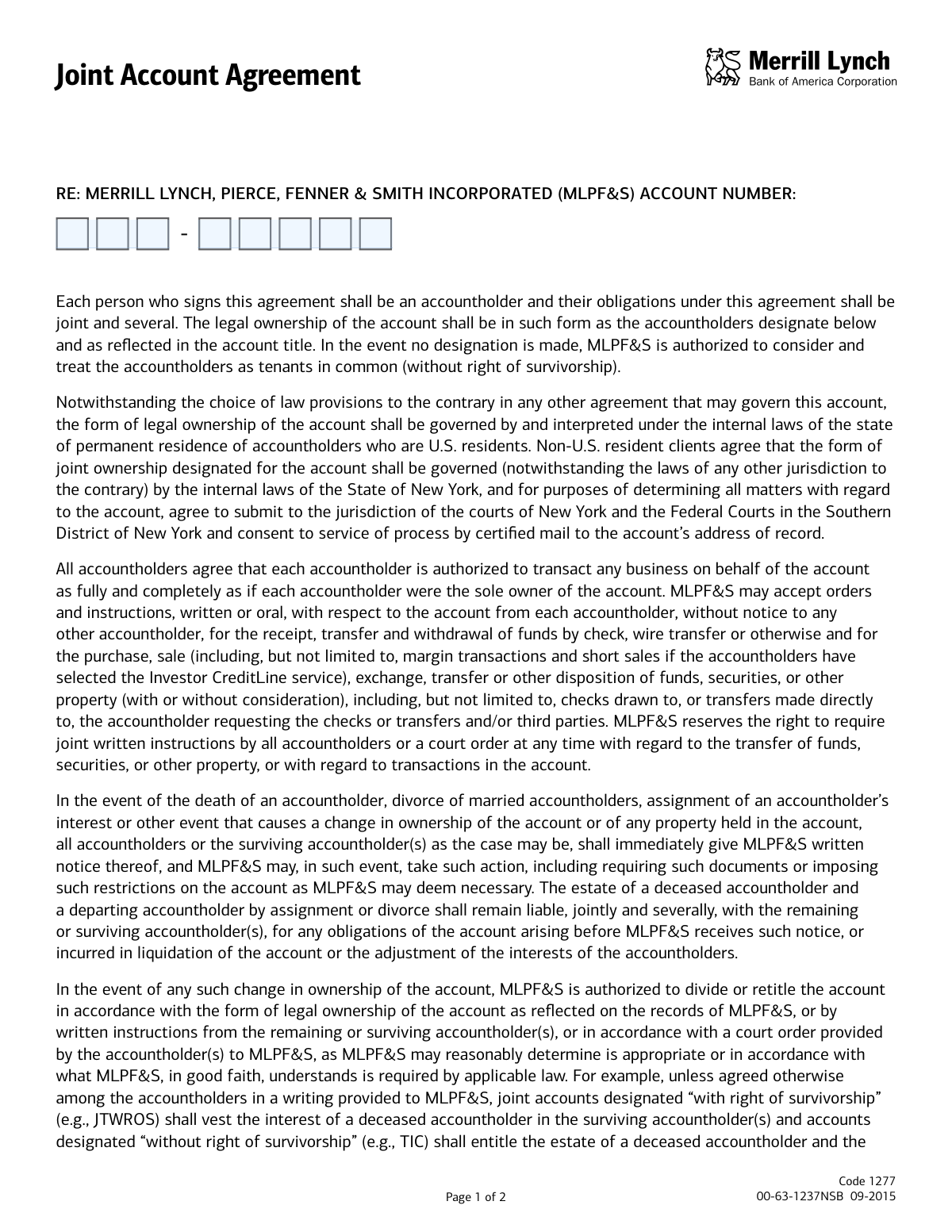
This form is an agreement with Merrill Lynch, Pierce, Fenner & Smith Incorporated (MLPF&S) that defines the legal ownership and operational rules for a joint investment account. It specifies how transactions are authorized, outlines the different types of joint ownership (such as JTWROS or TIC), and details procedures in the event of an accountholder's death. Today, this form can be filled out quickly and accurately using AI-powered services like Instafill.ai, which can also convert non-fillable PDF versions into interactive fillable forms.
Our AI automatically handles information lookup, data retrieval, formatting, and form filling.
It takes less than a minute to fill out Code 1277 using our AI form filling.
Securely upload your data. Information is encrypted in transit and deleted immediately after the form is filled out.

Form specifications

Form name: Joint Account Agreement - Merrill Lynch
Number of pages: 1
Language: English
Categories: Merrill forms
main-image

Instafill Demo: How to fill out PDF forms in seconds with AI

How to Fill Out Code 1277 Online for Free in 2026

Are you looking to fill out a CODE 1277 form online quickly and accurately? Instafill.ai offers the #1 AI-powered PDF filling software of 2026, allowing you to complete your CODE 1277 form in just 37 seconds or less.
Follow these steps to fill out your CODE 1277 form online using Instafill.ai:
  1. 1 Navigate to Instafill.ai and upload or select the Merrill Lynch Joint Account Agreement.
  2. 2 Enter your Merrill Lynch account number in the designated field.
  3. 3 Select the appropriate form of legal ownership by checking one of the boxes, such as JTWROS, TIC, or Community Property, after consulting with a legal advisor.
  4. 4 Review the pre-filled information for all accountholders, which the AI populates from your profile.
  5. 5 Ensure all accountholders provide their digital signatures in the required signature blocks.
  6. 6 Enter the current date on the form.
  7. 7 Download, print, or securely submit the completed and signed agreement to Merrill Lynch.

Our AI-powered system ensures each field is filled out correctly, reducing errors and saving you time.

Why Choose Instafill.ai for Your Fillable Code 1277 Form?

Speed

Complete your Code 1277 in as little as 37 seconds.

Up-to-Date

Always use the latest 2026 Code 1277 form version.

Cost-effective

No need to hire expensive lawyers.

Accuracy

Our AI performs 10 compliance checks to ensure your form is error-free.

Security

Your personal information is protected with bank-level encryption.

Frequently Asked Questions About Form Code 1277

This form establishes the legal terms for a Merrill Lynch investment account owned by two or more people. It defines the rights, responsibilities, and ownership structure for all accountholders.

Every person who will be a legal owner of the joint account must sign this form. It is a binding agreement for all parties involved.

JTWROS (Joint Tenancy with Right of Survivorship) means a deceased owner's share automatically passes to the surviving owners. TIC (Tenants in Common) means a deceased owner's share passes to their estate.

Yes, the agreement grants each accountholder full authority to conduct transactions, including withdrawals and trades, as if they were the sole owner of the account.

The surviving accountholders must immediately provide written notice to Merrill Lynch. The account's assets will then be handled according to the form of legal ownership selected, such as transferring to survivors or the deceased's estate.

Your Merrill Lynch account number should be entered in the field at the top of the first page, labeled 'RE: MERRILL LYNCH, PIERCE, FENNER & SMITH INCORPORATED (MLPF&S) ACCOUNT NUMBER:'.

No, the form explicitly states that Merrill Lynch representatives cannot provide legal or tax advice on this matter. You should consult with your attorney or tax advisor to make the appropriate choice.

If Merrill Lynch receives inconsistent instructions, they have the right to restrict account activity or require written instructions signed by all accountholders to proceed.

These are specific forms of ownership for married couples, available only in certain states. Consult a legal professional to determine if these options apply to your circumstances.

Yes, the form clearly states 'All Accountholders Must Sign this Form'. Failure to obtain all signatures will render the agreement incomplete.

Yes, services like Instafill.ai use AI to accurately auto-fill form fields with your information, which can save time and help reduce errors.

You can use a service like Instafill.ai to complete the form digitally. Simply upload the PDF, and the tool will help you fill in the necessary fields before you print it for physical signatures.

If you have a non-fillable PDF, you can use a platform like Instafill.ai. It can convert flat PDFs into interactive, fillable forms that you can easily complete on your computer.

In case of divorce, you must provide written notice to Merrill Lynch. The firm may then require additional documents or a court order to divide or retitle the account assets.

Compliance Code 1277
Validation Checks by Instafill.ai

1
Account Number Completeness and Format
This check verifies that the MLPF&S Account Number field is fully populated and adheres to the required format. An incomplete or improperly formatted account number prevents the form from being correctly associated with the client's account. If validation fails, the submission is rejected and the user is prompted to enter a valid and complete account number.
2
Account Number Existence
This validation confirms that the provided account number exists within the Merrill Lynch system and corresponds to an active account. This is critical to ensure the agreement is applied to the correct legal entity and prevent fraudulent or erroneous submissions. A non-existent account number will result in an error, requiring the user to correct the number or contact support.
3
Exclusive Ownership Type Selection
This check ensures that exactly one ownership type checkbox is selected from the available options (JTWROS, TIC, ATBE, etc.). The form explicitly states to 'mark one box only' as selecting multiple or none creates legal ambiguity regarding the account's ownership structure. A failure will halt processing and require the user to make a single, valid selection.
4
Minimum Required Signatures
This validation verifies that signatures from at least the 'First Accountholder' and 'Second Accountholder' are present. As this is a 'Joint Account Agreement', a minimum of two parties is required to enter into the agreement. Submissions lacking the two primary signatures are considered incomplete and will be rejected.
5
Signature Presence Verification
For every signature line that is expected to be signed, this check validates the presence of a mark, image, or digital signature data. This ensures that all intended parties have formally executed the agreement, making it legally binding. If a signature is missing where expected, the form is flagged as incomplete and returned for completion.
6
Date Field Presence
This check ensures that the date field associated with the signatures is not empty. The execution date is a critical piece of legal information that establishes when the agreement became effective. A missing date renders the document incomplete and will cause the submission to be rejected.
7
Date Format and Validity
This validation confirms the date is entered in a valid format (e.g., MM/DD/YYYY) and represents a real calendar day. It also checks that the date is not in the future, as an agreement cannot be executed on a future date. An invalid format or a future date will trigger an error, requiring the user to correct the entry.
8
JTWROS State Restriction
This check validates that if 'JTWROS' is selected, the accountholders' state of residence is not Louisiana, as noted on the form. This is crucial for legal and regulatory compliance, as this form of ownership is not available in that state. If a Louisiana resident selects JTWROS, the submission will be flagged with an error explaining the restriction.
9
ATBE Eligibility Check
This validation verifies that if 'As Tenants by Entireties (ATBE)' is selected, the accountholders' profile indicates they are married and reside in a state where this form of ownership is legally recognized. Selecting an inapplicable ownership type can lead to significant legal and tax complications. A failed check will require the user to select a different ownership type or update their profile information.
10
Community Property Eligibility Check
This check confirms that if 'Community Property (COMMPROP)' is selected, the accountholders are married and their state of residence is a recognized community property state. This ensures the account titling aligns with state law, which is essential for matters of divorce or inheritance. If the criteria are not met, the system will prevent submission and guide the user to a more appropriate choice.
11
Wisconsin-Specific Ownership Validation
This validation ensures that if 'Survivorship Marital Property' or 'Marital Property' is selected, the accountholders are married and are residents of Wisconsin. These are highly specific ownership types available only to Wisconsin residents as stated on the form. Selecting these options without meeting the criteria will result in a validation failure and block the submission.
12
Signature Count Consistency
This check compares the number of signatures on the form against the total number of accountholders listed for that account in the master system. The rule 'All Accountholders Must Sign' means every individual owner must execute the agreement. A mismatch in the count indicates an incomplete agreement, which will be rejected until all required signatures are provided.
13
Form Version Verification
This check validates the form code (00-63-1237NSB) and revision date (09-2015) to ensure the submitted document is the most current version. Using outdated forms can lead to non-compliance with current regulations and policies. If an old version is detected, the submission is rejected and the user is directed to obtain and complete the current form.

Common Mistakes in Completing Code 1277

Entering an Incomplete or Incorrect Account Number

The form requires the full Merrill Lynch account number, which is often long and may be hyphenated. Applicants frequently transpose digits, omit a section of the number, or leave it blank, leading to processing delays or the agreement being linked to the wrong account. To prevent this, carefully copy the entire account number from an official statement and double-check it for accuracy before submitting.

Failing to Select a Legal Ownership Type

The form requires applicants to 'mark one box only' to designate the account's legal ownership. A common oversight is leaving this section blank, which causes the account to default to 'Tenants in Common' (TIC), potentially misaligning with the accountholders' estate planning goals. This can create significant legal complications upon the death of an owner, as the deceased's share would pass to their estate instead of the surviving accountholder.

Choosing an Inapplicable or Geographically Restricted Ownership Type

Applicants often select an ownership type without understanding its legal requirements, such as choosing 'As Tenants by Entireties' (ATBE) when not legally married or selecting a Wisconsin-specific option while residing in another state. This error occurs due to a lack of legal knowledge and can invalidate the ownership designation, causing the form to be rejected or the account to be set up with unintended legal and tax consequences. It is crucial to understand the restrictions noted on the form for each option.

Marking More Than One Ownership Box

Despite the clear instruction to 'mark one box only,' some applicants check multiple ownership types, usually out of uncertainty. This action creates ambiguity regarding legal intent and will result in the form's immediate rejection by the financial institution. Before submission, all parties should review the form to ensure only one, single ownership designation has been selected.

Missing Signatures from All Accountholders

The form explicitly states 'All Accountholders Must Sign this Form,' but it is frequently submitted with one or more required signatures missing. This invalidates the agreement and halts any account modifications or setup processes until a correctly completed form is received. To avoid rejection, ensure every individual listed on the account has signed in the designated space.

Omitting the Signature Date

The single date field located near the signature lines is often left blank. This date is critical as it establishes when the legal agreement takes effect. An undated form is considered incomplete and can lead to processing delays or rejection for compliance and record-keeping purposes.

Using Illegible Handwriting on a Paper Form

When this form is printed and filled out by hand, illegible handwriting for the account number or signatures is a frequent issue. If staff cannot read the information, they cannot process the form, leading to rejection and requiring the applicants to start over. Using an AI-powered tool like Instafill.ai can convert this non-fillable PDF into a digital, fillable version, ensuring all entered information is perfectly clear and legible.

Signature Does Not Match Legal Name on Record

The signature provided must correspond to the legal name on file with the financial institution. Applicants sometimes use a nickname, an initial, or an informal signature that does not match their official records, causing a verification failure. This discrepancy will lead to the form being rejected for security reasons, requiring resubmission with a signature that matches official documentation.

Ignoring State-Specific Survivorship Rules

The form contains important state-specific restrictions, such as 'JTWROS (not available for Louisiana residents)' and options exclusive to Wisconsin. Applicants often overlook these parenthetical notes and select an option that is invalid for their state of residence. This error can cause the form to be rejected or, worse, result in the account being established with a default ownership type that has unintended legal and financial consequences. AI form-filling tools like Instafill.ai can help prevent these mistakes by validating selections against residency rules.
Saved over 80 hours a year

“I was never sure if my IRS forms like W-9 were filled correctly. Now, I can complete the forms accurately without any external help.”

Kevin Martin Green

Your data stays secure with advanced protection from Instafill and our subprocessors

Robust compliance program

Transparent business model

You’re not the product. You always know where your data is and what it is processed for.

ISO 27001, HIPAA, and GDPR

Our subprocesses adhere to multiple compliance standards, including but not limited to ISO 27001, HIPAA, and GDPR.

Security & privacy by design

We consider security and privacy from the initial design phase of any new service or functionality. It’s not an afterthought, it’s built-in, including support for two-factor authentication (2FA) to further protect your account.

Fill out Code 1277 with Instafill.ai

Worried about filling PDFs wrong? Instafill securely fills joint-account-agreement-merrill-lynch forms, ensuring each field is accurate.