Yes! You can use AI to fill out Fidelity Certification of Trust
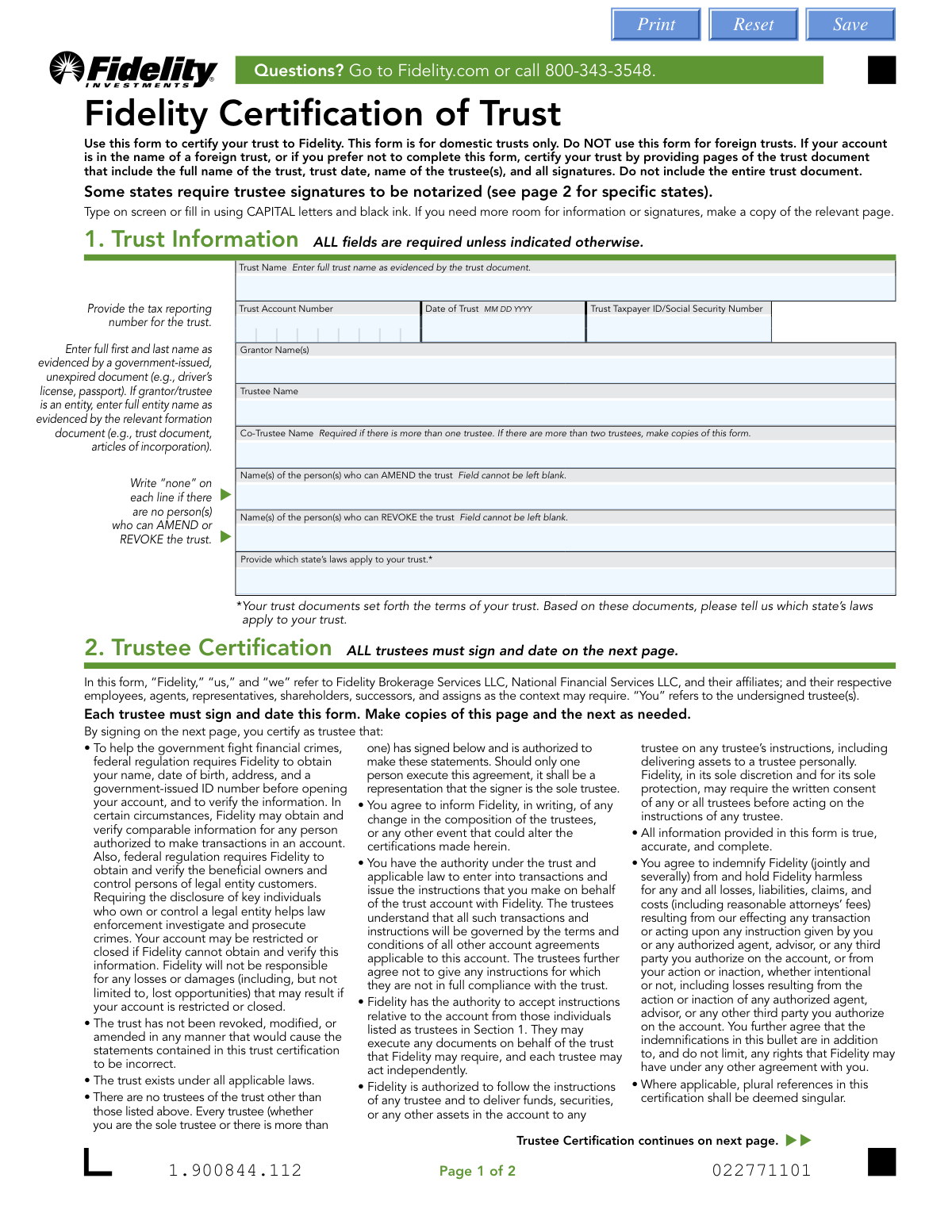
The Fidelity Certification of Trust is a document used by trustees to provide Fidelity with essential information about a domestic trust without submitting the entire trust document. It certifies key details such as the trust's name, date, trustees, and the authority of those trustees to act on behalf of the trust. Today, this form can be filled out quickly and accurately using AI-powered services like Instafill.ai, which can also convert non-fillable PDF versions into interactive fillable forms.
Our AI automatically handles information lookup, data retrieval, formatting, and form filling.
It takes less than a minute to fill out 532335.12.0 using our AI form filling.
Securely upload your data. Information is encrypted in transit and deleted immediately after the form is filled out.
Form specifications
| Form name: | Fidelity Certification of Trust |
| Number of pages: | 1 |
| Language: | English |
| Categories: | trust forms, Fidelity forms, certification forms |
Instafill Demo: How to fill out PDF forms in seconds with AI
How to Fill Out 532335.12.0 Online for Free in 2026
Are you looking to fill out a 532335.12.0 form online quickly and accurately? Instafill.ai offers the #1 AI-powered PDF filling software of 2026, allowing you to complete your 532335.12.0 form in just 37 seconds or less.
Follow these steps to fill out your 532335.12.0 form online using Instafill.ai:
- 1 Navigate to Instafill.ai and upload or select the Fidelity Certification of Trust form.
- 2 Use the AI assistant to automatically populate the Trust Information section, including the trust name, date, and Taxpayer ID number.
- 3 Review and confirm the names of the Grantor(s), Trustee(s), and any Co-Trustees as identified by the AI from your documents.
- 4 Enter the names of individuals who can amend or revoke the trust and specify which state's laws govern the trust.
- 5 Proceed to the Trustee Certification section to review the declarations and apply your digital signature.
- 6 If your state requires it, use an integrated online notary service to have the trustee signatures notarized directly on the platform.
- 7 Download the completed, signed, and notarized form for digital submission to Fidelity or for printing and mailing.
Our AI-powered system ensures each field is filled out correctly, reducing errors and saving you time.
Why Choose Instafill.ai for Your Fillable 532335.12.0 Form?
Speed
Complete your 532335.12.0 in as little as 37 seconds.
Up-to-Date
Always use the latest 2026 532335.12.0 form version.
Cost-effective
No need to hire expensive lawyers.
Accuracy
Our AI performs 10 compliance checks to ensure your form is error-free.
Security
Your personal information is protected with bank-level encryption.
Frequently Asked Questions About Form 532335.12.0
This form is used to certify the key details of your domestic trust to Fidelity. It confirms the trust's existence and the authority of the trustees to manage the account, serving as an official summary for Fidelity's records.
The trustee or trustees of a domestic trust that holds or is opening an account with Fidelity must complete this form. It is not intended for foreign trusts.
No, this form is for domestic trusts only. For a foreign trust, you must provide copies of the pages from the trust document that show the trust's full name, date, trustee names, and all signatures.
You must provide the full trust name, date of trust, the trust's Taxpayer ID or Social Security Number, and the names of all grantors and trustees. You also need to identify who can amend or revoke the trust and which state's laws govern it.
The form has space for two trustees. If your trust has more, you should make copies of the form as needed to provide information and signatures for all trustees.
If there are no persons who can amend or revoke the trust, you must write the word 'none' on the corresponding lines in Section 1.
Yes, the form requires all current trustees to sign and date the certification. By signing, you are also confirming that no other trustees exist besides those listed.
Notarization is mandatory if your trust is governed by the laws of CA, DE, ID, IA, KS, MI, MN, MS, NE, NV, SD, TN, or VT. For other states, it is not required unless specified by your state's law.
Fidelity's preferred method is digital submission. You can scan or photograph the completed form and upload it at Fidelity.com/upload-COT or by using the QR code on the form.
Yes, if you prefer not to complete this form, you can provide Fidelity with copies of the specific pages from your trust document that include the trust name, date, trustee names, and all signatures.
Your trust document will specify which state's laws govern its terms. You should review your trust agreement to find this information, as it is required on the form.
Yes, services like Instafill.ai use AI to accurately auto-fill form fields with your information, which can save you time and help reduce errors.
You can use a service like Instafill.ai to fill out the form online. Simply upload the PDF to their platform, and their AI will help you complete the fields interactively before you download it for signing and submission.
If you have a non-fillable or 'flat' PDF, you can use a tool like Instafill.ai. It can convert the document into an interactive, fillable form that you can easily complete on your computer.
Compliance 532335.12.0
Validation Checks by Instafill.ai
1
Validates Date of Trust Format and Logic
This check ensures the 'Date of Trust' is provided in a valid MM DD YYYY format and is not a future date. A valid and historical trust date is fundamental for establishing the trust's legal existence and timeline. Submissions with an invalid format or a future date will be rejected for correction, as they represent a logical impossibility for a legal document.
2
Ensures Tax ID Number is a Valid SSN or EIN
This validation verifies that the 'Trust Taxpayer ID/Social Security Number' field contains a number formatted as either a 9-digit Social Security Number (XXX-XX-XXXX) or a 9-digit Employer Identification Number (XX-XXXXXXX). This number is critical for tax reporting and legal identification of the trust entity. An incorrectly formatted number will prevent account setup and cause rejection of the form.
3
Verifies Completeness of Amend and Revoke Fields
This check confirms that the fields for 'Name(s) of the person(s) who can AMEND the trust' and '...REVOKE the trust' are not left blank. The form explicitly requires entering a name or the word 'none' to clarify who holds these powers. Leaving these fields empty creates ambiguity about the trust's terms, so the form will be returned for completion.
4
Confirms Consistency Between Trustee Name and Signature Block
This validation cross-references the 'Trustee Name' provided in Section 1 with the 'PRINT TRUSTEE NAME' in the signature block on page 2. The names must match exactly to ensure the person certifying the trust is the same individual listed as the trustee. A mismatch could indicate an error or an unauthorized signature, leading to rejection of the form pending clarification.
5
Enforces Mandatory Notarization for Specific States
This is a critical logical check that verifies if the trustee signatures have been notarized when the trust is governed by the laws of specific states (CA, DE, ID, IA, KS, MI, MN, MS, NE, NV, SD, TN, or VT). State law in these jurisdictions requires notarization for this type of certification to be legally binding. If the governing state is on this list and the notary section is incomplete, the form will be rejected as legally insufficient.
6
Validates Signature Date is On or After Trust Date
This check ensures the date of the trustee's signature is on or after the 'Date of Trust' provided in Section 1. A trustee cannot legally certify a trust before it has been created. This validation prevents logical and chronological errors that would invalidate the certification, and a failure will result in the form being sent back for correction.
7
Requires Co-Trustee Signature if Co-Trustee is Named
This rule checks if the 'Co-Trustee Name' field in Section 1 is populated. If it is, the system then verifies that the corresponding co-trustee signature block (printed name, signature, and date) is also complete. This ensures all listed fiduciaries have properly executed the certification, which is necessary for Fidelity to act on instructions.
8
Verifies Notary Commission Expiration Date
This validation confirms that the notary's commission expiration date is present and is not in the past. A notary can only perform official acts while their commission is active and valid. An expired commission invalidates the notarization, making the certification legally non-compliant where required, and will result in the form's rejection.
9
Ensures Full Trust Name is Provided
This check verifies that the 'Trust Name' field is not empty and contains the full legal name of the trust as stated in the trust document. The full name is essential for correctly titling the account and ensuring all actions are legally tied to the correct entity. Abbreviated or missing names will lead to rejection to prevent legal and operational errors.
10
Validates Notary Date Matches Trustee Signature Date
This check ensures the date entered by the notary public in the 'Certificate of Acknowledgement' matches the date the trustee signed the form. The purpose of notarization is to witness the signature, so the dates must align to confirm the event occurred as documented. A discrepancy in dates can call the validity of the notarization into question and will require the form to be corrected and re-signed.
11
Requires Grantor Name(s) to be Completed
This validation ensures the 'Grantor Name(s)' field is filled out with the full name of the person(s) who established the trust. Identifying the grantor is a key piece of information for understanding the trust's origin and is required for compliance and record-keeping. An empty grantor field will result in the form being flagged as incomplete and returned for correction.
12
Verifies Governing State Law is Specified
This check confirms that the field indicating which state's laws apply to the trust has been completed. This information is crucial as it dictates legal requirements, including the need for notarization, and governs the interpretation of the trust's terms. Failure to provide the governing state makes it impossible to assess the form's legal sufficiency, leading to its rejection.
Common Mistakes in Completing 532335.12.0
People often use a shortened version or an abbreviation of the trust's name instead of the full legal name as it appears on the trust document. This discrepancy can cause significant processing delays or rejection as the name must match official records exactly. To avoid this, carefully copy the full, official name from the first page of your trust agreement.
The form requires all current trustees to be listed, but individuals often forget to list all co-trustees or fail to make copies of the form if there are more than two. This omission results in an incomplete certification, as all trustees must be identified and must sign. Always review the trust document to confirm the current trustees and attach additional pages as needed for their information and signatures.
The form explicitly states to write 'none' if no person has the power to amend or revoke the trust, but many applicants leave these fields blank. A blank field is considered incomplete and will halt the application, as the firm cannot assume the answer is 'none'. To prevent this, carefully read the field-level instructions and write 'none' if applicable, ensuring every required field is filled.
A common point of confusion is whether to use the grantor's Social Security Number (SSN) or the trust's own Taxpayer Identification Number (TIN). Using the incorrect number can lead to tax reporting errors and account setup issues. Refer to your trust's formation documents or consult with a tax advisor to determine the correct number; generally, irrevocable trusts have their own TIN, while revocable trusts may use the grantor's SSN.
The form specifies that all trustee signatures must be notarized if the trust is governed by the laws of certain states (e.g., CA, DE, ID). Applicants frequently overlook this state-specific requirement, leading to the form's immediate rejection. Before signing, check the list of states on page 2 and determine if your trust's governing state requires notarization to avoid this critical error.
Even when a form is notarized, it may be rejected if the notary's section is incomplete. Common errors include a missing notary seal or stamp, a forgotten commission expiration date, or failure to specify the state and county. Remind the U.S. Notary Public to fill out their section completely and legibly to ensure the notarization is valid and accepted.
Applicants sometimes enter the current date or the date they are signing the form in the 'Date of Trust' field. This field requires the original date the trust was legally created, as stated in the trust document. Entering the wrong date creates a mismatch with the legal document and will cause the certification to fail verification; always reference the trust agreement for the correct date.
When a trust has multiple co-trustees, all of them must sign the certification form. It is a frequent mistake for only one trustee to sign, rendering the document invalid for representing the entire trust. Ensure that every trustee listed in Section 1 provides their signature in Section 2, making copies of the signature page if necessary.
When scanning or uploading the form, people sometimes only submit the first page, forgetting the second page with the signatures and notary block. Since this is a two-page document, submitting only one page results in an incomplete application that cannot be processed. Always ensure you scan and upload all pages of the form, even if a page only contains signatures.
The instructions specify filling out the form using CAPITAL letters and black ink, but this is often ignored. Using lowercase letters, colored ink, or having illegible handwriting can lead to data entry errors on Fidelity's end or cause the form to be rejected. Using a tool like Instafill.ai can prevent this by converting the flat PDF into a fillable version, allowing you to type directly onto the form for maximum clarity and compliance.
Saved over 80 hours a year
“I was never sure if my IRS forms like W-9 were filled correctly. Now, I can complete the forms accurately without any external help.”
Kevin Martin Green
Your data stays secure with advanced protection from Instafill and our subprocessors

Robust compliance program
Transparent business model
You’re not the product. You always know where your data is and what it is processed for.
ISO 27001, HIPAA, and GDPR
Our subprocesses adhere to multiple compliance standards, including but not limited to ISO 27001, HIPAA, and GDPR.
Security & privacy by design
We consider security and privacy from the initial design phase of any new service or functionality. It’s not an afterthought, it’s built-in, including support for two-factor authentication (2FA) to further protect your account.
Fill out 532335.12.0 with Instafill.ai
Worried about filling PDFs wrong? Instafill securely fills fidelity-certification-of-trust forms, ensuring each field is accurate.