Yes! You can use AI to fill out Merrill Lynch Account upgrade Letter of Authorization

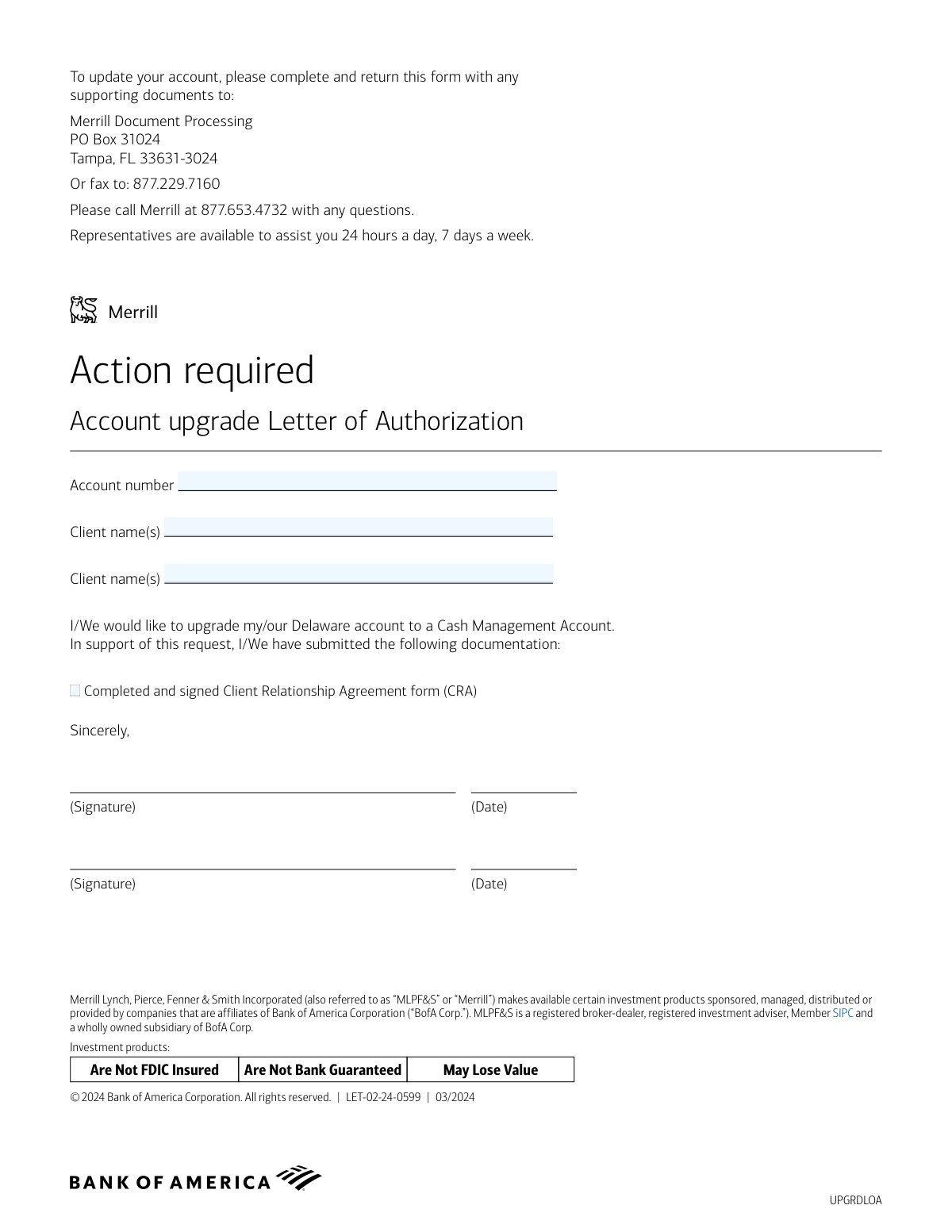
The Merrill Lynch Account Upgrade Letter of Authorization is a formal document used by clients to request a change in their account status, specifically to upgrade a Delaware account to a Cash Management Account. This letter serves as official instruction to Merrill Lynch and must be submitted along with a completed Client Relationship Agreement (CRA) form. Today, this form can be filled out quickly and accurately using AI-powered services like Instafill.ai, which can also convert non-fillable PDF versions into interactive fillable forms.
Our AI automatically handles information lookup, data retrieval, formatting, and form filling.
It takes less than a minute to fill out UPGRDLOA using our AI form filling.
Securely upload your data. Information is encrypted in transit and deleted immediately after the form is filled out.

Form specifications

Form name: Merrill Lynch Account upgrade Letter of Authorization
Number of pages: 1
Language: English
Categories: authorization forms, Merrill forms
main-image

Instafill Demo: How to fill out PDF forms in seconds with AI

How to Fill Out UPGRDLOA Online for Free in 2026

Are you looking to fill out a UPGRDLOA form online quickly and accurately? Instafill.ai offers the #1 AI-powered PDF filling software of 2026, allowing you to complete your UPGRDLOA form in just 37 seconds or less.
Follow these steps to fill out your UPGRDLOA form online using Instafill.ai:
  1. 1 Navigate to Instafill.ai and upload the Merrill Lynch Account Upgrade Letter of Authorization or select it from their template library.
  2. 2 Use the AI assistant to automatically fill in your client name(s) and account number in the designated fields.
  3. 3 Confirm the pre-filled request to upgrade your Delaware account to a Cash Management Account.
  4. 4 Acknowledge that you have submitted the required 'Completed and signed Client Relationship Agreement form (CRA)' by checking the appropriate box.
  5. 5 Apply your secure, legally-binding electronic signature and the current date in the signature blocks.
  6. 6 Review the entire document to ensure all information is correct and complete before finalizing.
  7. 7 Download the completed Letter of Authorization to print and mail or fax to Merrill Document Processing as per the form's instructions.

Our AI-powered system ensures each field is filled out correctly, reducing errors and saving you time.

Why Choose Instafill.ai for Your Fillable UPGRDLOA Form?

Speed

Complete your UPGRDLOA in as little as 37 seconds.

Up-to-Date

Always use the latest 2026 UPGRDLOA form version.

Cost-effective

No need to hire expensive lawyers.

Accuracy

Our AI performs 10 compliance checks to ensure your form is error-free.

Security

Your personal information is protected with bank-level encryption.

Frequently Asked Questions About Form UPGRDLOA

This form is used to formally request an upgrade of your existing Merrill Delaware account to a Cash Management Account (CMA).

You should complete this form if you are a Merrill client with a Delaware account and you wish to upgrade it to a Cash Management Account.

You will need to provide your full name(s) as they appear on the account, your Merrill account number, and your signature(s) with the date.

You must submit a completed and signed Client Relationship Agreement (CRA) form along with this Letter of Authorization. Be sure to check the box on the form to confirm its inclusion.

The CRA is a separate document that should be provided by Merrill. If you don't have a copy, please call Merrill at 877.653.4732 to request one.

Yes, the form provides fields for two client names and two signatures, indicating that all account holders must sign to authorize the upgrade.

You can mail the form and supporting documents to Merrill Document Processing, PO Box 31024, Tampa, FL 33631-3024, or fax them to 877.229.7160.

The form does not specify a processing time. For an estimated timeframe, it is best to contact a Merrill representative after you have submitted your documents.

If you have any questions, you can call Merrill at 877.653.4732. Customer service representatives are available 24 hours a day, 7 days a week.

Yes, services like Instafill.ai use AI to accurately auto-fill form fields with your personal information, which can save you time and help reduce errors.

To fill this form online, you can upload the PDF to Instafill.ai. The service will help you complete the required fields digitally before you print the form for signing.

If you have a non-fillable or 'flat' PDF, you can use a service like Instafill.ai. It can convert the document into an interactive, fillable form that you can complete on your computer.

Yes, a physical signature is required for this authorization. After filling out the form, you must print it, sign and date it, and then submit it via mail or fax.

Compliance UPGRDLOA
Validation Checks by Instafill.ai

1
Account Number Presence
This check verifies that the 'Account number' field is not empty. The account number is a critical identifier required to locate the specific account for the upgrade request. If this field is blank, the form cannot be processed and must be returned to the client for completion.
2
Account Number Format Validation
This validation ensures the account number adheres to Merrill's specific format, such as a set number of digits or specific character patterns. An incorrectly formatted number can lead to processing errors or failure to find the account in the system. Submissions with invalid formats will be flagged for manual review or rejection.
3
Client Name and Account Number Match
This is a critical security check that cross-references the provided 'Client name(s)' with the name(s) registered to the 'Account number' in the system of record. This prevents unauthorized changes and protects against fraud. A mismatch will cause the request to be immediately rejected pending verification from the account holder.
4
Client Name Consistency
This check verifies that the client name entered in the first 'Client name(s)' field matches the name entered in the second 'Client name(s)' field near the signature block. Inconsistencies can indicate a clerical error or confusion, potentially delaying the process. The form should be flagged for clarification if the names do not match exactly.
5
Signature Presence Detection
This validation confirms that a signature or legally binding mark is present in at least one of the designated signature fields. A signature is required to authorize the account upgrade and make the letter legally effective. Forms without a signature are considered incomplete and invalid, and cannot be acted upon.
6
Signature Date Presence
This check ensures that the 'Date' field next to each signature is filled out. The date of signature is essential for establishing a timeline for the request and for compliance and audit trail purposes. A missing date will render the authorization incomplete and require follow-up with the client.
7
Signature Date Format
This validation verifies that the date entered next to the signature is in a valid and recognizable format (e.g., MM/DD/YYYY). An ambiguous or invalid date format can cause confusion and processing delays. The system should attempt to parse common formats, but flag any unreadable dates for manual correction.
8
Signature Date Logical Validity
This check ensures the signature date is not in the future and is on or after the form's revision date of 03/2024. A future date is invalid, and a date preceding the form's creation is illogical. Such errors can invalidate the authorization and will require the form to be re-signed and dated correctly.
9
CRA Documentation Checkbox Confirmation
This validation checks if the box next to 'Completed and signed Client Relationship Agreement form (CRA)' is marked. The form explicitly lists this as submitted documentation, so an unchecked box indicates a potentially incomplete submission package. The request should be paused until the presence of the CRA form is confirmed.
10
Joint Account Signature Completeness
If the system identifies the account number as a joint account, this check verifies that both signature lines are completed by all required account holders. For joint accounts, authorization from all parties is typically necessary to perform an upgrade. If a signature is missing, the request is incomplete and cannot be processed.
11
Client Name Field Completeness
This check ensures that the 'Client name(s)' field is filled out, as it is a primary identifier for the account holder. An empty name field makes it impossible to verify the identity of the person making the request. The form will be rejected as incomplete if the client name is missing.
12
Account Type Verification
This validation confirms that the account associated with the provided account number is a 'Delaware account' eligible for an upgrade to a 'Cash Management Account'. Attempting to upgrade an ineligible account type would result in a processing failure. If the account is not eligible, the request should be rejected and the client notified.

Common Mistakes in Completing UPGRDLOA

Incomplete or Incorrect Account Number

This error often occurs due to a simple typo or transposing digits when manually entering the account number from memory or another document. An incorrect account number prevents Merrill from identifying the account to be upgraded, leading to immediate rejection of the request and significant processing delays. To avoid this, carefully cross-reference the account number with an official statement and double-check your entry before submission.

Mismatched or Incomplete Client Name

Clients may use a nickname, omit a middle initial, or otherwise fail to write their name exactly as it appears on the account. Since this form has two fields for the client name, inconsistencies can also arise between them, causing verification to fail. This will result in the form being returned for correction to prevent fraud, delaying the account upgrade. Always use your full legal name as it is registered on the account.

Missing Signatures on a Joint Account

The form provides two signature lines, which is a common source of error for joint accounts where one account holder fills out the form but forgets to have the other sign. Without signatures from all account holders, the authorization is legally invalid and will be rejected. Before submitting, confirm if your account is jointly held and ensure all parties have signed in the designated spaces.

Forgetting to Submit the Client Relationship Agreement (CRA)

This form is a Letter of Authorization that must be accompanied by a separate, completed Client Relationship Agreement (CRA). Applicants often overlook this instruction and only send the authorization letter, making the submission incomplete. This will halt the upgrade process until the missing CRA is received, causing unnecessary delays. Always read the checklist on the form and ensure all supporting documents are included in your submission.

Illegible Handwriting

When a form is filled out by hand, poor or rushed handwriting can make names and account numbers unreadable to the processing team. This can lead to data entry errors on Merrill's end or an inability to process the form altogether, requiring them to contact you for clarification. To prevent this, it is best to use a tool like Instafill.ai, which can convert this non-fillable PDF into a digital form, allowing you to type your information for perfect clarity.

Missing or Incorrectly Formatted Date

Forgetting to write the date next to the signature is a frequent oversight that renders the document incomplete. Additionally, using a non-standard date format (e.g., DD-MM-YYYY) can cause confusion or lead to the form being flagged as stale if misinterpreted. An undated or improperly dated form will be rejected, forcing you to resubmit. AI-powered tools like Instafill.ai can automatically populate the current date in the correct MM/DD/YYYY format, preventing this error.

Using an Invalid Digital Signature

In an attempt to be efficient, some people may type their name in a cursive font or use a basic e-signature tool, assuming it's a valid signature. However, financial institutions often require a physical 'wet' signature for legal authorizations unless a specific, secure e-signature platform is approved. Using an invalid signature type will cause the authorization to be rejected. It is safest to print the form, sign it with a pen, and then scan or mail it.

Sending the Form to an Outdated Address or Fax

Clients might find an old address for Merrill Lynch through a web search or in their records instead of using the one specified on the form. Sending the document to the wrong location means the correct processing department will never receive it, and your upgrade request will be lost without any notification of the error. Always use the exact mailing address or fax number printed directly on the most current version of the form.

Inconsistent Information Across Documents

The request requires both this Letter of Authorization and a separate CRA form, which are often filled out at different times. This can lead to minor discrepancies in how a name or other detail is written between the two documents. Such inconsistencies raise red flags during compliance checks, pausing the process while the firm seeks clarification. Using a service like Instafill.ai ensures consistency by populating all related forms from a single, verified data profile.

Leaving the Second 'Client Name' Field Blank

The form contains two separate fields for 'Client name(s)', one at the top and one near the signatures, which can be confusing. An individual account holder might fill out the top field and mistakenly leave the bottom one blank, assuming it's redundant. This will cause the form to be flagged as incomplete and rejected, requiring a full resubmission. Ensure all fields, even those that seem repetitive, are filled out completely.
Saved over 80 hours a year

“I was never sure if my IRS forms like W-9 were filled correctly. Now, I can complete the forms accurately without any external help.”

Kevin Martin Green

Your data stays secure with advanced protection from Instafill and our subprocessors

Robust compliance program

Transparent business model

You’re not the product. You always know where your data is and what it is processed for.

ISO 27001, HIPAA, and GDPR

Our subprocesses adhere to multiple compliance standards, including but not limited to ISO 27001, HIPAA, and GDPR.

Security & privacy by design

We consider security and privacy from the initial design phase of any new service or functionality. It’s not an afterthought, it’s built-in, including support for two-factor authentication (2FA) to further protect your account.

Fill out UPGRDLOA with Instafill.ai

Worried about filling PDFs wrong? Instafill securely fills merrill-lynch-account-upgrade-letter-of-authorization forms, ensuring each field is accurate.