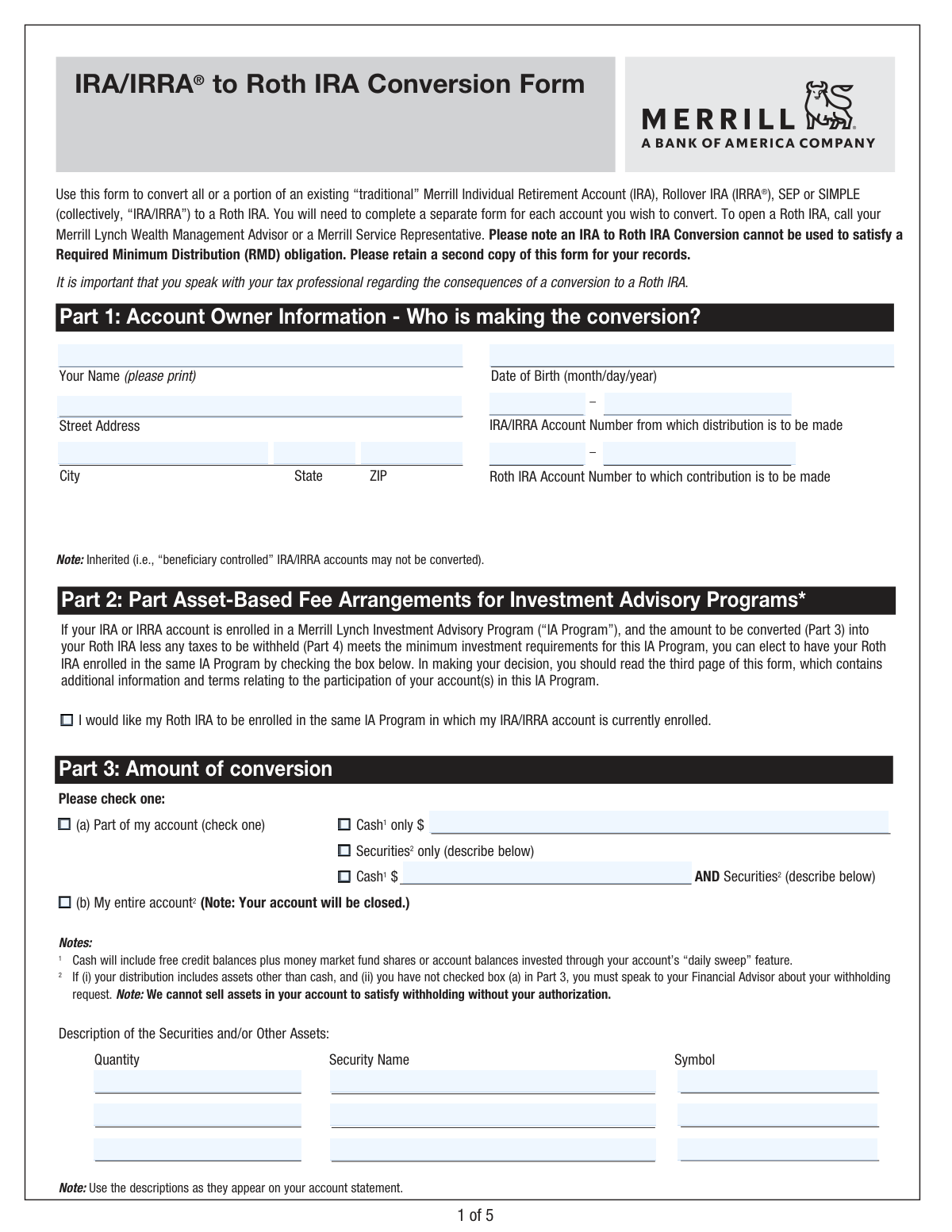
Yes! You can use AI to fill out Merrill Lynch IRA/IRRA® to Roth IRA Conversion Form

This form allows clients of Merrill Lynch to convert all or part of an existing traditional Individual Retirement Account (IRA), Rollover IRA (IRRA®), SEP, or SIMPLE IRA into a Roth IRA. It is a crucial document for individuals looking to change their retirement savings strategy, which has significant tax implications that should be discussed with a tax professional. Today, this form can be filled out quickly and accurately using AI-powered services like Instafill.ai, which can also convert non-fillable PDF versions into interactive fillable forms.
Our AI automatically handles information lookup, data retrieval, formatting, and form filling.
It takes less than a minute to fill out Merrill Lynch 0871CONV using our AI form filling.
Securely upload your data. Information is encrypted in transit and deleted immediately after the form is filled out.

Form specifications

Form name: Merrill Lynch IRA/IRRA® to Roth IRA Conversion Form
Number of pages: 1
Language: English
Categories: IRA forms, Merrill forms, Roth conversion forms
main-image

Instafill Demo: How to fill out PDF forms in seconds with AI

How to Fill Out Merrill Lynch 0871CONV Online for Free in 2026

Are you looking to fill out a MERRILL LYNCH 0871CONV form online quickly and accurately? Instafill.ai offers the #1 AI-powered PDF filling software of 2026, allowing you to complete your MERRILL LYNCH 0871CONV form in just 37 seconds or less.
Follow these steps to fill out your MERRILL LYNCH 0871CONV form online using Instafill.ai:
  1. 1 Navigate to Instafill.ai and upload or select the Merrill Lynch IRA to Roth IRA Conversion Form.
  2. 2 Use the AI assistant to accurately fill in your personal details and account numbers in Part 1: Account Owner Information.
  3. 3 In Part 3, specify the amount of the conversion, indicating whether you are converting the entire account or a partial amount of cash and/or securities.
  4. 4 Complete Part 4: Withholding Election, by clearly stating your preferences for federal and state income tax withholding on the distribution.
  5. 5 If applicable, make your election for asset-based fee arrangements in Part 2.
  6. 6 Carefully review all the information you've entered for accuracy, then digitally sign and date the form in Part 5.
  7. 7 Download the completed form to retain a copy for your records and submit it to Merrill Lynch as instructed.

Our AI-powered system ensures each field is filled out correctly, reducing errors and saving you time.

Why Choose Instafill.ai for Your Fillable Merrill Lynch 0871CONV Form?

Speed

Complete your Merrill Lynch 0871CONV in as little as 37 seconds.

Up-to-Date

Always use the latest 2026 Merrill Lynch 0871CONV form version.

Cost-effective

No need to hire expensive lawyers.

Accuracy

Our AI performs 10 compliance checks to ensure your form is error-free.

Security

Your personal information is protected with bank-level encryption.

Frequently Asked Questions About Form Merrill Lynch 0871CONV

This form is used to convert all or a portion of your existing traditional, Rollover (IRRA), SEP, or SIMPLE IRA at Merrill Lynch into a Roth IRA. A conversion is a taxable event, so it's important to understand the implications.

You need to fill out this form if you are a Merrill Lynch client who wants to move assets from a pre-tax retirement account (like a traditional IRA) to a post-tax Roth IRA. You must already have an open Roth IRA to receive the funds.

You will need your personal details, the account number of the IRA you are converting from, and the account number of the Roth IRA you are converting to. If converting specific securities, you will also need their name, symbol, and quantity.

No, the form explicitly states that inherited, or 'beneficiary controlled,' IRA accounts are not eligible for conversion to a Roth IRA.

No, you must complete a separate conversion form for each individual IRA or IRRA account you wish to convert to a Roth IRA.

In Part 3, you can choose to convert 'Part of my account' by specifying a cash amount or certain securities, or you can select 'My entire account'. Note that choosing to convert your entire account will result in that account being closed.

The default federal income tax withholding is 10% of the distribution value. In Part 4, you can elect to have no taxes withheld by entering '0' or choose a different rate between 0% and 100%.

No, an IRA to Roth IRA conversion cannot be used to satisfy an RMD obligation. You must take your RMD for the year before converting funds from that IRA.

Yes, the rules are different. If you are a U.S. citizen living abroad, you cannot waive the federal withholding. If you are a Non-Resident Alien, distributions are subject to a 30% withholding rate or a tax treaty rate.

After completing and signing the form, you should submit it to your Merrill Lynch Wealth Management Advisor. You can also contact a Merrill Service Representative for submission instructions.

Yes, services like Instafill.ai use AI to auto-fill form fields accurately and save time. This can help you complete the form more efficiently and with fewer errors.

You can use Instafill.ai to easily fill out this form online. Simply upload the PDF, and the tool will make it interactive, allowing you to type your information directly into the fields before printing.

If you have a non-fillable or 'flat' PDF, you can upload it to Instafill.ai. The service can convert the document into an interactive, fillable form that you can complete on your computer.

Compliance Merrill Lynch 0871CONV
Validation Checks by Instafill.ai

1
Date of Birth Format and Age Verification
This check ensures the Date of Birth in Part 1 is entered in a valid MM/DD/YYYY format and represents a plausible age for an account holder. It validates that the date is not in the future and that the account owner is over the legal age of majority, typically 18 years. If the date is invalid or the individual is underage, the form submission will be rejected to prevent processing for ineligible individuals.
2
Account Number Existence and Type Validation
This validation verifies that both the source 'IRA/IRRA Account Number' and the destination 'Roth IRA Account Number' from Part 1 exist within the Merrill Lynch system and belong to the specified account owner. It also confirms the source account is a convertible type (Traditional, Rollover, SEP, or SIMPLE) and not an Inherited ('beneficiary controlled') IRA, as explicitly prohibited. An error will be generated if either account is invalid, mismatched, or of an ineligible type.
3
Exclusive Conversion Amount Selection
In Part 3, the user must select either '(a) Part of my account' or '(b) My entire account', but not both. This check ensures that one and only one of these primary options is chosen. If 'Part of my account' is selected, it further validates that exactly one sub-option ('Cash only', 'Securities only', or 'Cash AND Securities') is checked. This prevents ambiguity in processing the conversion amount.
4
Partial Conversion Specification Completeness
This check is triggered if the user selects '(a) Part of my account' in Part 3. It verifies that the required corresponding fields are filled. For 'Cash only' or 'Cash AND Securities', a valid dollar amount must be entered. For 'Securities only' or 'Cash AND Securities', at least one full row in the securities description table must be completed. Failure to provide these details will result in an error asking the user to specify the assets to be converted.
5
Securities Holding and Quantity Verification
For each security listed in Part 3, this validation confirms that the specified Symbol and Security Name match an actual holding in the source IRA/IRRA account. It also checks that the 'Quantity' entered for conversion does not exceed the quantity currently held in that account. This is critical to prevent transaction failures due to insufficient assets or incorrect security identifiers.
6
Federal Withholding Rate Format (U.S. Address)
This check applies to the Federal Withholding section in Part 4 for users with a U.S. address. If a user enters a custom withholding rate, this validation ensures the value is a whole number (no decimals) between 0 and 100, inclusive. An invalid entry would be rejected to comply with IRS Form W-4R requirements and prevent processing errors.
7
State Withholding Method Exclusivity
In the State Withholding section of Part 4, if a user elects to withhold state tax, they can specify a percentage or a flat dollar amount. This check ensures that only one of these two fields is filled, not both. Providing both values creates ambiguity, so the form would be returned with an error requesting the user to choose a single withholding method.
8
State Withholding Minimum Compliance
The form notes that some states have minimum withholding requirements. This validation cross-references the state entered in Part 4 with a supplemental state tax document or database. It ensures that the entered percentage or dollar amount for state withholding meets or exceeds the mandatory minimum for that specific state, ensuring state tax compliance.
9
U.S. Citizen Abroad Withholding Minimum
For users who identify as a 'U.S. Citizen or U.S. resident living abroad' in Part 4, specific withholding rules apply. This check validates that any custom percentage entered is 10% or greater. If a dollar amount is specified, it validates that this amount is greater than 10% of the total conversion value calculated from Part 3. This enforces the stricter withholding rules for payments delivered outside the U.S.
10
Non-Resident Alien Prerequisite Check
If a user checks 'I am a Non-Resident Alien' in Part 4, this validation triggers a system check to confirm that a valid, unexpired Form W-8BEN is on file for the account owner. Processing a distribution for a Non-Resident Alien without a valid W-8BEN can lead to incorrect tax withholding and compliance issues. If the form is missing or expired, the submission will be halted pending completion of a new W-8BEN.
11
RMD Satisfaction Prohibition Check
The form explicitly states that a Roth conversion cannot be used to satisfy a Required Minimum Distribution (RMD). This logical check verifies the account owner's RMD status for the current year. If the owner has an outstanding RMD, the system will flag or block the conversion to ensure it is not being improperly used to meet that obligation, which could have negative tax consequences.
12
Distinct Source and Destination Accounts
This is a basic sanity check to ensure the 'IRA/IRRA Account Number' and the 'Roth IRA Account Number' in Part 1 are not identical. A conversion must move funds from one account to another. If the same account number is entered for both the source and destination, the form is invalid and will be rejected to prevent a nonsensical transaction.
13
Signature and Date Requirement
This validation confirms that the form has been signed and dated in Part 5. A signature is required to make the document legally binding and to authorize the transaction. The date confirms when the authorization was given. An unsigned or undated form is considered incomplete and will not be processed.

Common Mistakes in Completing Merrill Lynch 0871CONV

Entering Incomplete or Incorrect Account Numbers

Users often mistype their IRA/IRRA or Roth IRA account numbers, or they confuse them with other non-retirement account numbers. This error will cause an immediate rejection of the form, as the system cannot identify the source or destination accounts for the conversion. To avoid this, carefully double-check the account numbers against your official Merrill Lynch statements before submitting the form.

Attempting to Convert Before Opening a Roth IRA

A frequent mistake is submitting this conversion form without having an existing Roth IRA account to receive the funds. The form clearly states that a Roth IRA must be opened first, but users may assume this form initiates that process. This leads to a complete halt of the transaction until a destination account is established, delaying the conversion.

Ambiguous or Incomplete Conversion Instructions

In Part 3, users may select 'Part of my account' but then fail to specify the exact cash amount or list the specific securities to be converted. This ambiguity makes it impossible for the firm to process the request, leading to rejection and delays. Always provide precise details: either a specific dollar amount for cash or the exact quantity, name, and symbol for each security.

Ignoring the Tax Withholding Election

Many people skip Part 4, assuming no action is needed if they don't want taxes withheld. However, the form defaults to a 10% federal tax withholding if no election is made, which can result in an unexpectedly smaller amount being converted to the Roth IRA. To prevent this, you must explicitly enter '0' on the federal withholding line if you wish to opt out.

Using Incorrect Formatting for Withholding Percentages

The federal withholding section in Part 4 explicitly asks for a whole number without decimals or a percentage sign. Users often enter '15%' or '12.5' instead of '15' or '13', which can cause automated processing systems to reject the input. AI-powered form fillers like Instafill.ai can help prevent this by automatically validating and formatting data according to the specific requirements of each field.

Misunderstanding State Tax Withholding Requirements

State tax laws for IRA distributions are complex and vary significantly, with some states mandating withholding. Users may incorrectly elect to have no state tax withheld in a state where it is required, or fail to provide a rate when one is necessary. This can lead to non-compliance and potential state tax penalties, so it is crucial to consult the supplemental tax documents or a tax professional.

Forgetting to Sign or Date the Form

A simple but critical error is failing to sign and date the form in Part 5. An unsigned or undated form is not legally valid and will be rejected immediately upon receipt. This requires the entire submission process to be repeated, causing significant and unnecessary delays for the conversion.

Incorrectly Describing Securities for Conversion

When choosing to convert specific securities, individuals may use informal names, incorrect ticker symbols, or forget to list the quantity. The form requires using the exact descriptions from the account statement. Such errors can lead to the wrong assets being converted, or the request being rejected for being unclear, delaying the entire transaction.

Confusion by Non-Resident Aliens on Withholding

Non-Resident Aliens (NRAs) often mistakenly fill out the section for U.S. residents or are unaware of the requirement to have a valid Form W-8BEN on file. The form has specific instructions for NRAs, including a default 30% withholding, which are easily missed. This error leads to incorrect tax withholding and processing delays until the proper documentation is provided.

Attempting to Use a Conversion to Satisfy an RMD

The form explicitly warns that a Roth conversion cannot be used to satisfy a Required Minimum Distribution (RMD). However, account owners may overlook this and attempt the conversion before taking their RMD for the year. This will result in a failed transaction and could lead to significant tax penalties for failing to take the RMD on time.

Using an Outdated Version of the Form

Financial forms are updated periodically to comply with new tax laws and regulations, as indicated by the revision code (e.g., 'REV 01/26'). Using an old version downloaded from an unofficial source can lead to rejection because it may lack required fields or disclosures. Always ensure you are using the most current version available directly from the financial institution's website.

Illegible Handwriting on a Printed Form

When filling out a printed PDF, poor handwriting can make names, addresses, and especially account numbers or dollar amounts unreadable. This forces the processing agent to guess, which can lead to errors, or more likely, reject the form and request a new, legible copy. Using a tool like Instafill.ai can convert a flat PDF into a fillable one, allowing you to type directly into the fields for perfect clarity.
Saved over 80 hours a year

“I was never sure if my IRS forms like W-9 were filled correctly. Now, I can complete the forms accurately without any external help.”

Kevin Martin Green

Your data stays secure with advanced protection from Instafill and our subprocessors

Robust compliance program

Transparent business model

You’re not the product. You always know where your data is and what it is processed for.

ISO 27001, HIPAA, and GDPR

Our subprocesses adhere to multiple compliance standards, including but not limited to ISO 27001, HIPAA, and GDPR.

Security & privacy by design

We consider security and privacy from the initial design phase of any new service or functionality. It’s not an afterthought, it’s built-in, including support for two-factor authentication (2FA) to further protect your account.

Fill out Merrill Lynch 0871CONV with Instafill.ai

Worried about filling PDFs wrong? Instafill securely fills merrill-lynch-irairra-to-roth-ira-conversion-form forms, ensuring each field is accurate.