Yes! You can use AI to fill out Merrill Inherited IRA Transfer Instruction Form

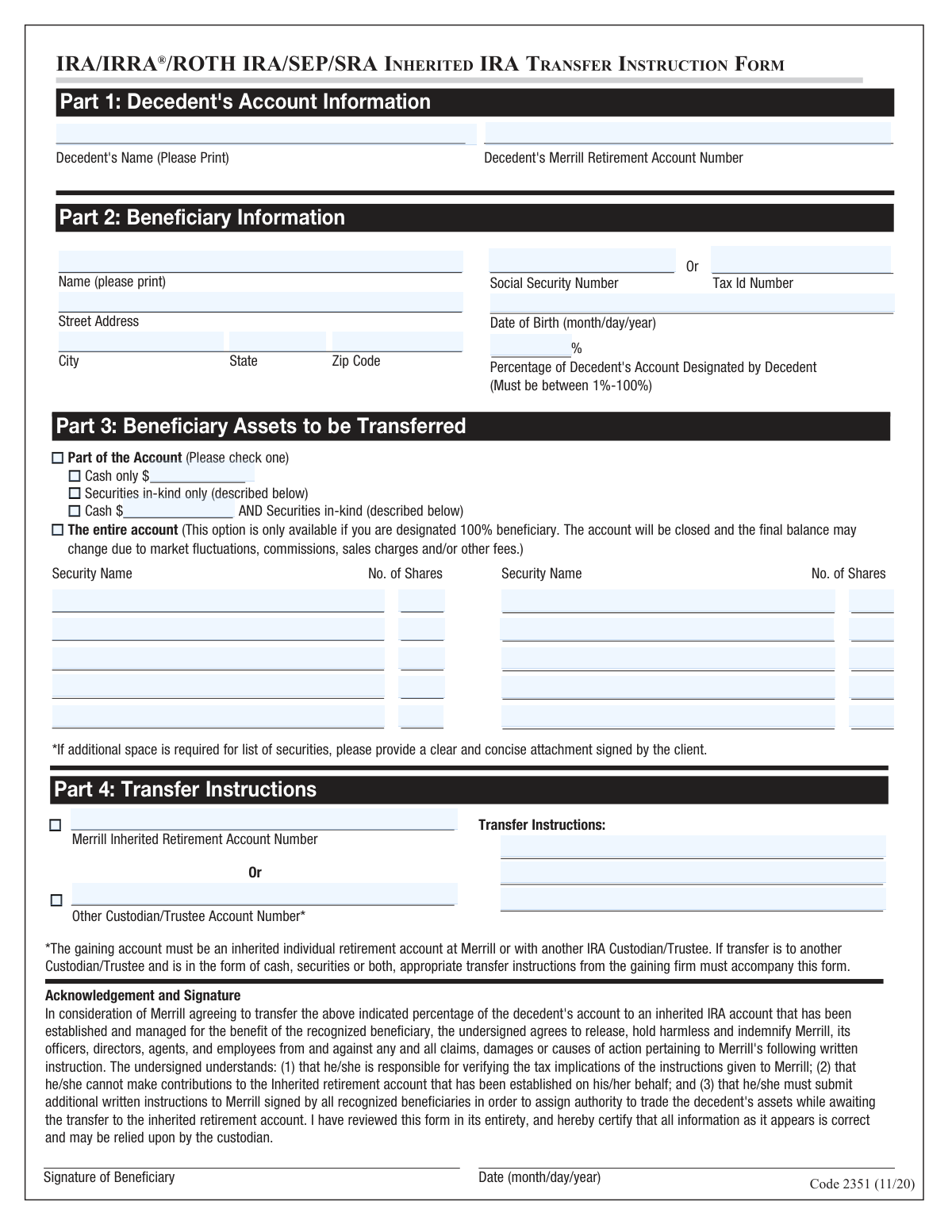
This form, provided by Merrill, is a legal document for beneficiaries to direct the transfer of assets from a deceased individual's IRA, Roth IRA, SEP, or SRA account into a newly established Inherited IRA. It requires detailed information about the decedent, the beneficiary, and the specific assets to be moved, and must be submitted with a copy of the death certificate. Today, this form can be filled out quickly and accurately using AI-powered services like Instafill.ai, which can also convert non-fillable PDF versions into interactive fillable forms.
Our AI automatically handles information lookup, data retrieval, formatting, and form filling.
It takes less than a minute to fill out Code 2351 using our AI form filling.
Securely upload your data. Information is encrypted in transit and deleted immediately after the form is filled out.

Form specifications

Form name: Merrill Inherited IRA Transfer Instruction Form
Number of pages: 1
Language: English
Categories: IRA forms, transfer forms, Merrill forms
main-image

Instafill Demo: How to fill out PDF forms in seconds with AI

How to Fill Out Code 2351 Online for Free in 2026

Are you looking to fill out a CODE 2351 form online quickly and accurately? Instafill.ai offers the #1 AI-powered PDF filling software of 2026, allowing you to complete your CODE 2351 form in just 37 seconds or less.
Follow these steps to fill out your CODE 2351 form online using Instafill.ai:
  1. 1 Navigate to Instafill.ai and upload or select the Merrill Inherited IRA Transfer Instruction Form.
  2. 2 Use the AI assistant to provide the decedent's account information in Part 1, including their name and Merrill retirement account number.
  3. 3 Enter your personal beneficiary information in Part 2, such as your name, Social Security Number, address, and date of birth.
  4. 4 In Part 3, specify which assets you are transferring, whether it's the entire account, a specific cash amount, or particular securities.
  5. 5 Complete Part 4 with the transfer instructions, indicating the destination Inherited IRA account number at Merrill or another financial institution.
  6. 6 Carefully review all the information populated by the AI for accuracy, then electronically sign and date the acknowledgment section.
  7. 7 Download the completed form and submit it, along with a copy of the death certificate, to your financial advisor or the appropriate Merrill center as instructed.

Our AI-powered system ensures each field is filled out correctly, reducing errors and saving you time.

Why Choose Instafill.ai for Your Fillable Code 2351 Form?

Speed

Complete your Code 2351 in as little as 37 seconds.

Up-to-Date

Always use the latest 2026 Code 2351 form version.

Cost-effective

No need to hire expensive lawyers.

Accuracy

Our AI performs 10 compliance checks to ensure your form is error-free.

Security

Your personal information is protected with bank-level encryption.

Frequently Asked Questions About Form Code 2351

This form is used by a beneficiary to transfer assets from a deceased person's Merrill retirement account, such as an IRA or Roth IRA, into a new Inherited IRA.

Any designated beneficiary of an eligible Merrill retirement account who wishes to move the assets into an Inherited IRA must complete this form. This applies whether you are a spouse or non-spouse beneficiary choosing this specific option.

You must provide a copy of the decedent's death certificate to your financial advisor. If you are transferring assets to an external custodian, you must also include transfer instructions from that firm.

No, this form is only for creating an Inherited IRA. For a spousal rollover or a lump-sum distribution, you should complete form 10187 BENE instead.

In Part 3, you can choose to transfer a specific cash amount, specific securities 'in-kind', or a combination of both. If you are the sole (100%) beneficiary, you also have the option to transfer the entire account.

Yes, you can transfer the assets to an inherited IRA at another custodian. You must provide the new account number in Part 4 and attach the required transfer instructions from the receiving firm.

Send the completed form to your financial advisor or the Merrill Advisory Center. If you are a Merrill Edge® Self-Directed investing client, return it to the Investment Center.

No, you cannot make personal contributions to an Inherited IRA. The account is only permitted to hold the assets transferred from the decedent's original account.

Yes, as the beneficiary, you are responsible for understanding and verifying all tax implications of the transfer. It is strongly recommended to consult with a qualified tax professional.

You must indicate the specific percentage of the account you were designated to receive in Part 2. Note that the option to transfer 'The entire account' in Part 3 is only available if you are the 100% beneficiary.

Yes, services like Instafill.ai use AI to accurately auto-fill form fields, which can save you time and help reduce errors. This is especially helpful for complex forms with repetitive information.

You can use a service like Instafill.ai to complete the form digitally. Simply upload the PDF to their platform, and the AI will help you fill in the required fields before you print and sign it.

If you have a non-fillable or 'flat' PDF, you can use a tool like Instafill.ai. It can convert the document into an interactive, fillable form online, making it easy to complete on your computer.

An in-kind transfer means moving the investments, like stocks or bonds, directly to your new Inherited IRA without selling them for cash first. This allows the securities to remain invested during the transfer.

Compliance Code 2351
Validation Checks by Instafill.ai

1
Decedent Information Completeness
This check verifies that both the 'Decedent's Name' and 'Decedent's Merrill Retirement Account Number' fields in Part 1 are filled. These fields are critical for identifying the source account from which assets are being transferred. If this information is missing or incomplete, the transfer cannot be initiated as the system cannot locate the correct decedent's account, leading to processing delays or rejection of the form.
2
Beneficiary Taxpayer ID Presence and Format
Validates that either a 'Social Security Number' or a 'Tax Id Number' is provided for the beneficiary in Part 2, but not both. The provided number must also conform to the standard format (e.g., 9 digits for an SSN). This information is legally required for tax reporting purposes on the inherited account. Failure to provide a valid ID will result in the form being rejected until the information is corrected.
3
Beneficiary Date of Birth Validity
Ensures the 'Date of Birth' in Part 2 is a complete and valid date in MM/DD/YYYY format and that the date is in the past. This is important for identity verification and for determining rules related to required minimum distributions (RMDs) from the inherited IRA. An invalid or future date will cause a validation error and prevent form submission.
4
Designated Percentage Range
This check confirms that the 'Percentage of Decedent's Account' entered in Part 2 is a numerical value strictly between 1 and 100, inclusive. This percentage dictates the portion of the decedent's assets the beneficiary is entitled to claim. An entry outside this range (e.g., 0 or 101) is illogical and would cause the form to be rejected for correction.
5
Entire Account Transfer Consistency Check
This validation enforces the rule that the 'The entire account' checkbox in Part 3 can only be selected if the beneficiary's 'Percentage of Decedent's Account' in Part 2 is exactly 100%. This prevents a partial beneficiary from attempting to claim the entire account. If a beneficiary with less than 100% designation selects this option, the form will be flagged for review and correction.
6
Partial Transfer Specification
If the 'Part of the Account' checkbox is selected in Part 3, this validation ensures that one of the three sub-options ('Cash only', 'Securities in-kind only', or 'Cash AND Securities in-kind') is also selected. This is necessary to provide clear instructions on how the partial transfer should be executed. A failure to specify the type of partial transfer leaves the instructions ambiguous and will halt processing.
7
Conditional Cash Amount Requirement
Verifies that if 'Cash only' or 'Cash AND Securities in-kind' is selected in Part 3, a valid, positive numerical value is entered in the corresponding cash amount field. Without a specified amount, the instruction to transfer cash is incomplete and cannot be acted upon. The form will be returned if the cash option is checked but the amount is missing or invalid.
8
Conditional Securities Data Requirement
Checks that if 'Securities in-kind only' or 'Cash AND Securities in-kind' is selected in Part 3, at least one 'Security Name' and corresponding 'No. of Shares' is provided. An instruction to transfer securities without specifying which ones is not actionable. The form will be considered incomplete if this section is not properly filled out when the securities option is chosen.
9
Paired Security and Share Information
For each row in the securities list in Part 3, this validation ensures that if a 'Security Name' is entered, a 'No. of Shares' is also entered, and vice-versa. It also checks that the number of shares is a positive number. This prevents incomplete or nonsensical instructions, such as naming a security without specifying how many shares to transfer. Any row with mismatched or incomplete data will trigger an error.
10
Exclusive Transfer Destination Selection
This check ensures that in Part 4, the user selects either the 'Merrill Inherited Retirement Account' option OR the 'Other Custodian/Trustee' option, but not both. Selecting both creates conflicting instructions on where to send the assets. The form must have one clear, unambiguous destination to be processed.
11
Conditional Destination Account Number
Validates that if a transfer destination is chosen in Part 4, the corresponding account number field ('Merrill Inherited Retirement Account Number' or 'Other Custodian/Trustee Account Number') is filled out. The transfer cannot be executed without the account number of the receiving institution. The form will be rejected if a destination is selected but the account number is missing.
12
Signature and Date Completeness
Verifies the presence of the beneficiary's signature and the date in the final section of the form. The signature legally authorizes Merrill to act on the instructions provided and certifies the correctness of the information. A missing signature or date invalidates the entire form, and it will be returned to the client for completion.
13
Signature Date Validity
This check ensures the signature date is a valid date and is not set in the future. The date establishes when the authorization was given. A future date is logically impossible and would indicate a data entry error, requiring the user to correct the date before the form can be accepted.

Common Mistakes in Completing Code 2351

Using the Incorrect Form for the Intended Action

This form is exclusively for transferring assets into an Inherited IRA. Beneficiaries, especially spouses, often mistakenly use it when they intend to perform a spousal rollover or take a lump-sum distribution, which requires a different form (10187 BENE). This error leads to immediate rejection and significant delays in accessing the funds. Always verify that the form's purpose matches your specific financial election before filling it out.

Forgetting to Submit the Death Certificate

The instructions clearly state that a copy of the decedent's death certificate must be provided to the financial advisor, but it is a commonly forgotten attachment. This is a non-negotiable requirement for processing any death-related transfer. Forgetting this document will halt the entire process until it is received, delaying the transfer of assets indefinitely.

Entering an Inaccurate Decedent Account Number

Mistyping or transposing digits in the decedent's Merrill Retirement Account Number is a frequent data entry error. Because this number is the primary identifier for the source account, even a single wrong digit will result in a failure to locate the assets. This mistake causes processing to stop until the beneficiary can be contacted to provide the correct number, leading to unnecessary delays.

Stating an Incorrect Beneficiary Percentage

In Part 2, beneficiaries may guess or enter the percentage they wish to receive, rather than the specific percentage designated by the decedent on the original account documents. The firm will verify this against their records, and any mismatch will cause the form to be rejected. You must enter the exact percentage you were legally designated to inherit to ensure the form is processed correctly.

Providing Contradictory Asset Transfer Instructions

Beneficiaries sometimes check multiple conflicting boxes in Part 3, such as selecting both 'Cash only' and 'The entire account'. This creates ambiguity and makes it impossible for the firm to know the user's true intent, forcing them to reject the form and request clarification. To avoid this, carefully select only one option that accurately reflects your transfer choice.

Incorrectly Selecting 'The Entire Account' Option

The option to transfer 'The entire account' is strictly for beneficiaries who are designated to receive 100% of the assets. A beneficiary with a partial share (e.g., 50%) who selects this option will have their form rejected, as it creates a conflict with other potential beneficiaries. If you are not the sole beneficiary, you must specify the partial assets (cash or securities) to be transferred.

Missing Destination Account Information

In Part 4, a beneficiary must provide the account number for the new Inherited IRA where the assets will be transferred. It is a common mistake to leave this section blank, assuming the firm will automatically create a new account or find an existing one. Failure to provide a valid destination account number will prevent the transfer from being executed, as there is no designated endpoint for the assets.

Omitting Required External Transfer Paperwork

When transferring assets to another custodian (not Merrill), the form requires that transfer instructions from the receiving firm be included. Beneficiaries often overlook this fine print, submitting only the Merrill form. This omission results in an incomplete request, as Merrill cannot initiate an external transfer without the proper authorization and instructions from the other institution.

Submitting an Unsigned or Undated Form

Forgetting to sign and date the form in the final section is one of the most common and easily avoidable mistakes. An unsigned form is legally invalid and cannot be acted upon, leading to an automatic rejection. Always double-check for a signature and a current date before submitting to prevent your request from being immediately returned.

Vague or Incomplete Security Descriptions

When choosing to transfer specific securities in Part 3, beneficiaries may list ambiguous names like 'ABC stock' without a ticker symbol or CUSIP number. This lack of detail can lead to the wrong security being transferred or cause delays while the firm seeks clarification. To prevent errors, provide the full, unambiguous name and ticker symbol for each security. AI-powered tools like Instafill.ai can help auto-complete and validate this information.

Providing Both SSN and Tax ID Number

The beneficiary information section in Part 2 asks for a Social Security Number 'Or' a Tax ID Number, but not both. Some applicants fill in both fields out of an abundance of caution, which can create confusion in the system or for the processor. You should only provide one of these identifiers, depending on whether you are an individual or an entity (like a trust).

Failing to Read the Acknowledgement Before Signing

Many people sign the acknowledgement section without reading the text, which states they are responsible for tax implications and indemnifies Merrill from claims. This is a significant oversight, as the beneficiary is legally agreeing to important terms they may not understand. To avoid future financial or legal surprises, always read and understand any legal attestations before signing. If the form is a non-fillable PDF, a tool like Instafill.ai can convert it to a fillable version, making it easier to review and complete each section carefully.
Saved over 80 hours a year

“I was never sure if my IRS forms like W-9 were filled correctly. Now, I can complete the forms accurately without any external help.”

Kevin Martin Green

Your data stays secure with advanced protection from Instafill and our subprocessors

Robust compliance program

Transparent business model

You’re not the product. You always know where your data is and what it is processed for.

ISO 27001, HIPAA, and GDPR

Our subprocesses adhere to multiple compliance standards, including but not limited to ISO 27001, HIPAA, and GDPR.

Security & privacy by design

We consider security and privacy from the initial design phase of any new service or functionality. It’s not an afterthought, it’s built-in, including support for two-factor authentication (2FA) to further protect your account.

Fill out Code 2351 with Instafill.ai

Worried about filling PDFs wrong? Instafill securely fills merrill-inherited-ira-transfer-instruction-form forms, ensuring each field is accurate.