Yes! You can use AI to fill out Fidelity Trustee Certification — Adding or Removing Trustees
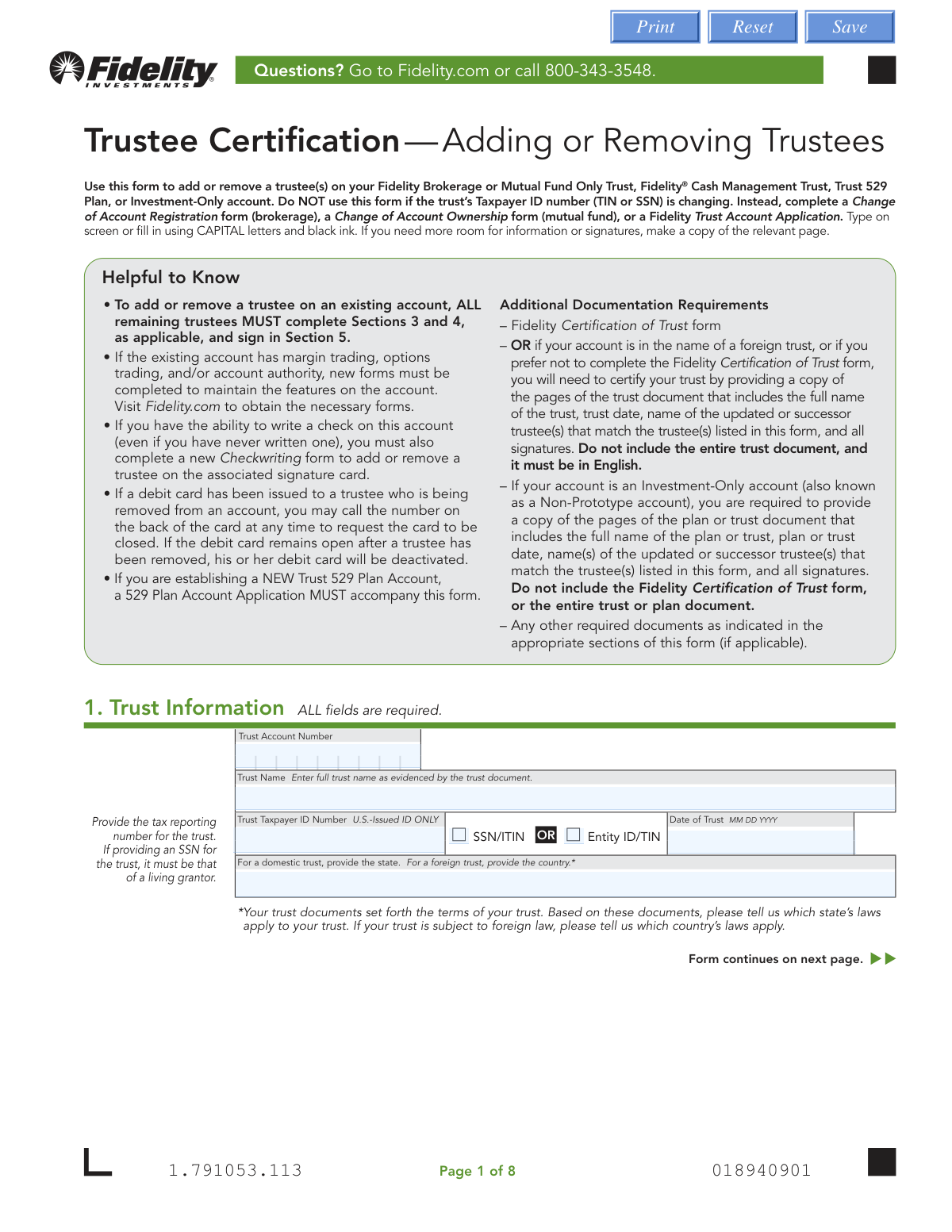
This Fidelity form is a legal document required to formally add a new trustee or remove an existing one from a trust account held at Fidelity, ensuring account records accurately reflect the current individuals with fiduciary responsibility. Properly updating trustee information is crucial for legal compliance, ensuring smooth account management, and preventing unauthorized actions. Today, this form can be filled out quickly and accurately using AI-powered services like Instafill.ai, which can also convert non-fillable PDF versions into interactive fillable forms.
Our AI automatically handles information lookup, data retrieval, formatting, and form filling.
It takes less than a minute to fill out Fidelity Add/Remove Trustee Form using our AI form filling.
Securely upload your data. Information is encrypted in transit and deleted immediately after the form is filled out.
Form specifications
| Form name: | Fidelity Trustee Certification — Adding or Removing Trustees |
| Number of pages: | 1 |
| Language: | English |
| Categories: | trust forms, Fidelity forms, certification forms, trustee forms |
Instafill Demo: How to fill out PDF forms in seconds with AI
How to Fill Out Fidelity Add/Remove Trustee Form Online for Free in 2026
Are you looking to fill out a FIDELITY ADD/REMOVE TRUSTEE FORM form online quickly and accurately? Instafill.ai offers the #1 AI-powered PDF filling software of 2026, allowing you to complete your FIDELITY ADD/REMOVE TRUSTEE FORM form in just 37 seconds or less.
Follow these steps to fill out your FIDELITY ADD/REMOVE TRUSTEE FORM form online using Instafill.ai:
- 1 Navigate to Instafill.ai and upload the 'Trustee Certification — Adding or Removing Trustees' form, or select it from their library of templates.
- 2 Use the AI assistant to fill in Section 1 with the trust's information, including the full trust name, account number, and Taxpayer ID Number.
- 3 In Section 2, specify whether you are adding, removing, or replacing a trustee and provide the necessary details and supporting documentation for the action.
- 4 Complete the detailed personal information for the primary trustee in Section 3 and for any additional trustees or grantors in Section 4.
- 5 Carefully review all the certifications in Section 5. All remaining and new trustees must sign the form where indicated.
- 6 Check if a Medallion signature guarantee is required, typically for accounts valued over $100,000, and obtain it if necessary before submission.
- 7 Download the completed form, gather any required attachments (e.g., death certificate, court order), and submit the entire package to Fidelity through their specified mail or digital upload process.
Our AI-powered system ensures each field is filled out correctly, reducing errors and saving you time.
Why Choose Instafill.ai for Your Fillable Fidelity Add/Remove Trustee Form Form?
Speed
Complete your Fidelity Add/Remove Trustee Form in as little as 37 seconds.
Up-to-Date
Always use the latest 2026 Fidelity Add/Remove Trustee Form form version.
Cost-effective
No need to hire expensive lawyers.
Accuracy
Our AI performs 10 compliance checks to ensure your form is error-free.
Security
Your personal information is protected with bank-level encryption.
Frequently Asked Questions About Form Fidelity Add/Remove Trustee Form
This form is used to add or remove one or more trustees on an existing Fidelity Brokerage, Mutual Fund, Cash Management, or 529 Trust account.
All remaining and newly added trustees must sign Section 5. If a trustee is resigning, they must also sign in Section 2 to certify their resignation.
You should NOT use this form. Instead, you must complete a Change of Account Registration form, a Change of Account Ownership form, or a Fidelity Trust Account Application, depending on the account type.
You must include a copy of the death certificate. Additionally, a state tax waiver may be required, depending on the laws of the decedent's state of residence.
A Medallion signature guarantee is required if the trust's account value is over $100,000. It is not needed if the form is completed at a Fidelity Investor Center with all signers present.
A Medallion signature guarantee is a special certification for financial transactions that guarantees the signature is authentic, which is different from a standard notary seal. You can obtain one from most banks or credit unions.
You will likely need to submit a Fidelity Certification of Trust form or copies of the relevant pages from your trust document. Other documents, like a physician's letter for incapacitation, may be needed depending on your reason for the change.
You can scan and upload the entire form and attachments digitally via the QR code on the form. Alternatively, you can send it via regular or overnight mail to the addresses provided on the last page.
Any debit card issued to a removed trustee will be deactivated. To maintain other features like checkwriting or margin trading, you must complete new, separate forms for those services.
Yes, Section 4 requires you to provide information for grantors and others with authority over the trust, even if they are not trustees. These individuals are listed as Beneficial Owners but will not have account authority unless they are also a trustee.
Yes, the instructions specify that you must send the ENTIRE form (all 8 pages) and any attachments to Fidelity for processing.
Yes, services like Instafill.ai use AI to accurately auto-fill form fields with your saved information, which saves time and helps prevent common errors.
Simply upload the Trustee Certification PDF to the Instafill.ai platform. The tool will make the document interactive, allowing you to type your information directly into the fields online.
If you have a non-fillable or 'flat' PDF, a service like Instafill.ai can convert it into an interactive, fillable form. This allows you to easily complete and save it digitally.
Compliance Fidelity Add/Remove Trustee Form
Validation Checks by Instafill.ai
1
Trust Information Completeness
Verifies that all required fields in Section 1, 'Trust Information', are filled out. This includes the Trust Account Number, full Trust Name, Trust Taxpayer ID Number, and the Date of Trust. This information is fundamental for identifying the correct account and ensuring the request is applied to the right entity. A failure would result in the form being rejected until all required fields are completed.
2
Trust Taxpayer ID Number Format and Selection
Ensures the 'Trust Taxpayer ID Number' in Section 1 is a valid 9-digit number and that the corresponding radio button (SSN/ITIN or Entity ID/TIN) is selected. This is critical for correct tax reporting and legal identification of the trust. If the format is invalid or the selection is missing, the submission cannot be processed.
3
Date of Trust Validity
Validates that the 'Date of Trust' in Section 1 is a real calendar date provided in MM DD YYYY format and is not a date in the future. This date establishes the legal inception of the trust and is a key identifier. An invalid or future date would cause the form to be rejected for correction.
4
Actionable Request in Section 2
Checks that at least one action in Section 2 ('Add or Remove Trustee(s)') has been selected and the corresponding name(s) are provided. The form's purpose is to change trustees, so a submission without a specified change is invalid. The form would be returned as incomplete if no action to add, name a successor, or remove a trustee is indicated.
5
Reason for Removal and Supporting Details
If 'Removing/Replacing a trustee' is selected in Section 2, this check confirms that a 'Reason' checkbox is marked. If the reason is 'Other', it verifies that the explanation field is filled. This is important for audit trails and determining if additional documentation, like a death certificate or court order, is required. Failure to provide a reason or explanation will halt processing.
6
Resigning Trustee Signature Presence
Verifies that if 'Resignation of trustee' is chosen as the reason for removal in Section 2, the 'Resigning Trustee Signature' block is fully completed with a printed name, signature, and date. This signature is the legal confirmation of the trustee's voluntary resignation. Without it, the resignation cannot be processed and the form will be considered incomplete.
7
Entity vs. Individual Trustee Data Consistency
In Sections 3 and 4, if the 'Trustee is an entity' box is checked, this validates that the 'Entity Name' is provided and individual details like 'First Name' and 'Date of Birth' are blank. Conversely, if the box is unchecked, it ensures individual name and DOB are provided. This prevents data conflicts and ensures the correct type of trustee is registered. A mismatch would require user correction.
8
Foreign Citizen Identification Completeness
For any trustee in Section 3 or 4 identified as a 'Foreign citizen', this check ensures all required government identification details are provided, including ID number, country of issuance, and dates. It specifically validates that the 'ID Expiration Date' is a valid date that has not passed. This is a federal requirement for identity verification, and missing or expired ID information will block account updates.
9
Conditional Income Source Details
In Sections 3 and 4, this validates that if a trustee's 'Income Source' is 'Employed' or 'Self-employed', the 'Occupation' field is filled. Furthermore, if 'Employed' is selected, the 'Employer' name must be provided. This information is required for regulatory compliance (KYC). The form will be flagged as incomplete if this conditional information is missing.
10
Deceased Grantor Information Logic
In Section 4, if the 'DECEASED Grantor' role is checked, this validation ensures that only the full legal name is provided for that individual. It checks that other personal data fields like Date of Birth, Taxpayer ID, and address are left empty. This prevents the collection of unnecessary and inapplicable data for a deceased person, ensuring data integrity.
11
Completeness of All Trustee Signatures
Performs a critical cross-check to ensure that every individual listed as a new or remaining trustee in Sections 3 and 4 has provided a signature in Section 5. The total number of signing trustees must match the number of active and newly added trustees on the account. A missing signature from any required trustee invalidates the entire request.
12
Medallion Signature Guarantee Requirement
Checks if a Medallion Signature Guarantee is required and present. The guarantee is mandatory in Section 5 if a trustee is being removed or a co-trustee is being added and the account value is over $100,000. This high-level verification protects against fraud on high-value accounts, and its absence under these conditions will cause the request to be rejected.
13
Required Contact Information Format
Validates that the 'Mobile Phone' and 'Email' fields in Sections 3 and 4 are filled out with correctly formatted data. The phone number should be a valid number and the email must contain an '@' symbol and a domain. This information is required for account security alerts and electronic communications, and invalid formats would prevent successful contact.
14
Amend/Revoke Authority Declaration
On the supplemental 'Fidelity Certification of Trust' form, this check ensures the fields for 'Name(s) of the person(s) who can AMEND the trust' and 'REVOKE the trust' are not blank. As per instructions, these fields must contain either the names of the authorized individuals or the word 'none'. An empty field creates ambiguity about who holds these critical powers and would cause the certification to be rejected.
Common Mistakes in Completing Fidelity Add/Remove Trustee Form
The form requires signatures from ALL remaining and newly added trustees in Section 5. People often miss this, obtaining a signature only from the primary or new trustee. This results in an immediate rejection of the form, causing significant processing delays. To avoid this, create a list of all current and new trustees and ensure every individual signs the form before submission.
The form requires a Medallion signature guarantee, not a notary stamp, for certain high-value transactions. A Medallion guarantee is a special signature verification for transferring securities that financial institutions provide, while a notary only verifies identity. Submitting a notarized signature instead of the required Medallion guarantee will cause the form to be rejected. Always visit your bank or credit union to obtain the correct guarantee when required.
Section 1 requires the full, official name of the trust exactly as it appears in the legal trust document. Filers often use a shortened or informal version, which creates a mismatch with Fidelity's records. This discrepancy can lead to processing delays or rejection while the information is verified. Always reference the original trust instrument to ensure the name is entered correctly and completely.
When removing a trustee for reasons like death, incapacitation, or court order, specific supporting documents are mandatory. For example, a death certificate or a physician's letter is required, and filers frequently forget to include them. Without this documentation, Fidelity cannot process the change, leading to delays. Before submitting, review Section 2 carefully and create a checklist of all required attachments for your specific situation.
Sections 3 and 4 contain mandatory disclosures regarding associations with broker-dealers (Associations) or roles in publicly traded companies (Affiliations). Many people skip these sections, assuming they don't apply, or they misunderstand the questions. Failure to complete these fields can lead to compliance holds on the account. It is crucial to read the definitions carefully and complete these sections accurately.
The form requires the trust's Taxpayer Identification Number (TIN) or, in specific cases, the grantor's Social Security Number (SSN). Users may mistakenly provide their personal SSN when an Entity ID/TIN is required, or vice-versa. This error leads to tax reporting issues and processing failures. Double-check the trust documents to confirm the correct tax reporting number and type before filling out Section 1.
The form's instructions explicitly state it should NOT be used if the trust's Taxpayer ID number is changing. People focused on changing a trustee may miss this critical detail and submit the wrong paperwork. This results in a complete rejection, forcing the user to start over with the correct 'Change of Account Registration' form. Always read the 'Helpful to Know' section first to ensure the form is appropriate for your needs.
The instructions on the final page clearly state to send the ENTIRE form (all 8 pages) and any attachments. It's a common mistake to only send the pages that were filled out, assuming the blank or instructional pages are unnecessary. This will cause the submission to be marked as incomplete and returned, delaying the trustee change. Always mail or upload all pages of the document as a single packet.
If the separate 'Fidelity Certification of Trust' form is required, users often make critical errors, such as leaving the 'amend' or 'revoke' fields blank instead of writing 'none' as instructed. They may also forget to have signatures notarized if the trust is governed by one of the states listed in the form's instructions. These mistakes invalidate the certification and halt the entire process. AI-powered tools like Instafill.ai can help by highlighting such specific instructions and ensuring all fields are completed correctly.
Sections 3 and 4 require extensive personal details for each trustee, including full legal name, date of birth, citizenship status, and employment source. These fields are often left partially blank, which violates federal 'Know Your Customer' (KYC) regulations and prevents the account update. To prevent rejection, meticulously fill out every required field for each individual. Since this form is a non-fillable PDF, a tool like Instafill.ai can convert it into a fillable version and help ensure all required personal data fields are completed before printing.
Saved over 80 hours a year
“I was never sure if my IRS forms like W-9 were filled correctly. Now, I can complete the forms accurately without any external help.”
Kevin Martin Green
Your data stays secure with advanced protection from Instafill and our subprocessors

Robust compliance program
Transparent business model
You’re not the product. You always know where your data is and what it is processed for.
ISO 27001, HIPAA, and GDPR
Our subprocesses adhere to multiple compliance standards, including but not limited to ISO 27001, HIPAA, and GDPR.
Security & privacy by design
We consider security and privacy from the initial design phase of any new service or functionality. It’s not an afterthought, it’s built-in, including support for two-factor authentication (2FA) to further protect your account.
Fill out Fidelity Add/Remove Trustee Form with Instafill.ai
Worried about filling PDFs wrong? Instafill securely fills fidelity-trustee-certification-adding-or-removing-trustees forms, ensuring each field is accurate.