Yes! You can use AI to fill out Dividend and/or Capital Gain Distributions Authorization Form (G27569-13)
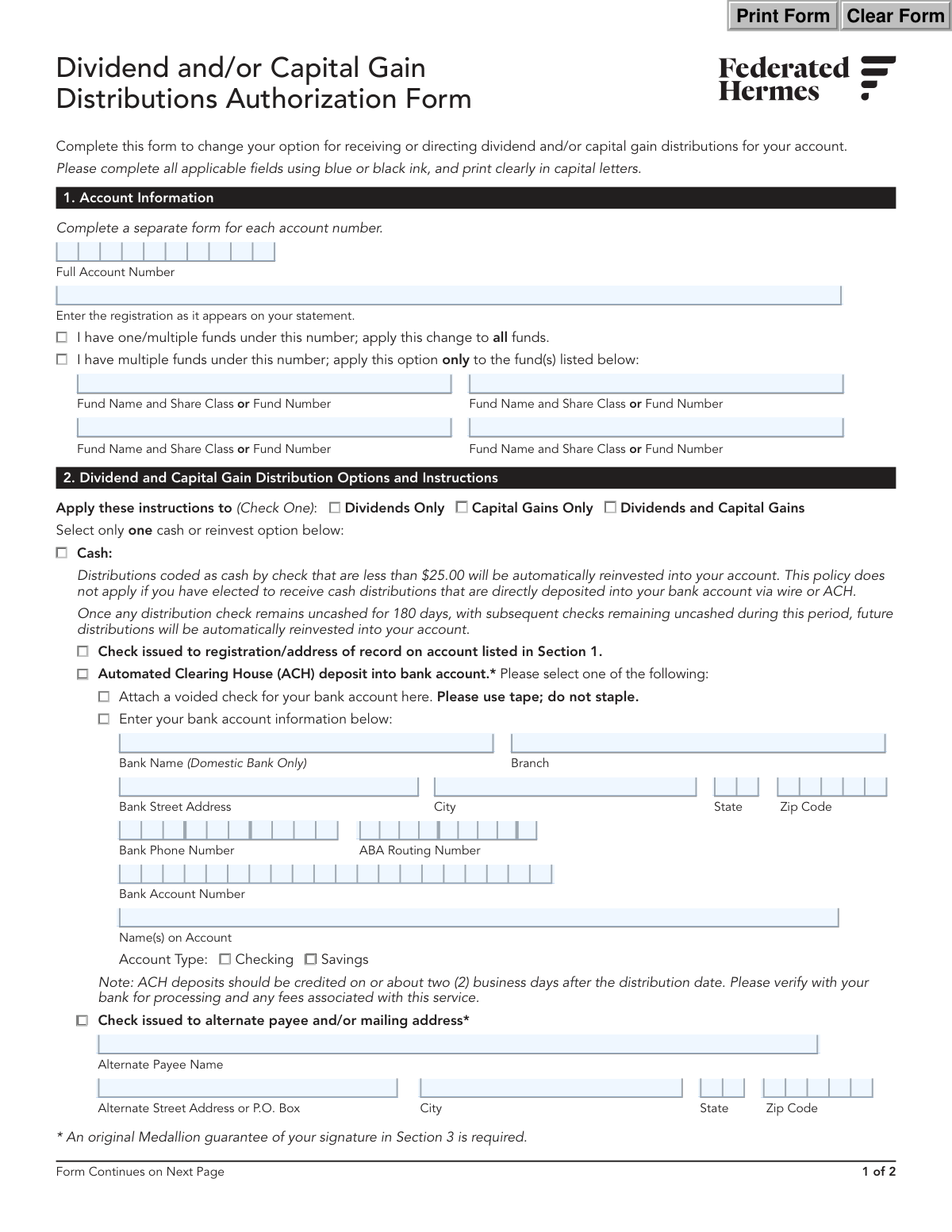
This form allows an investor to change their option for receiving or directing dividend and/or capital gain distributions for their investment account. It provides choices to receive cash via check or direct deposit (ACH), or to reinvest the distributions into the same or a different fund. Completing this form ensures your investment earnings are managed according to your financial strategy. Today, this form can be filled out quickly and accurately using AI-powered services like Instafill.ai, which can also convert non-fillable PDF versions into interactive fillable forms.
G27569-13 is part of the
investment forms, authorization forms, financial account forms, mutual fund forms, distribution forms and dividend distribution forms categories on Instafill.
Rather not fill this in by hand? Instafill is an online form filler that completes PDF forms automatically — upload the blank form, answer a few questions, and the AI fills every field.
Form specifications
| Form name: | Dividend and/or Capital Gain Distributions Authorization Form (G27569-13) |
| Number of pages: | 1 |
| Language: | English |
Our AI automatically handles information lookup, data retrieval, formatting, and form filling.
It takes less than a minute to fill out G27569-13 using our AI form filling.
Securely upload your data. Information is encrypted in transit and deleted immediately after the form is filled out.
Instafill Demo: How to fill out PDF forms in seconds with AI
How to Fill Out G27569-13 Online for Free in 2026
Are you looking to fill out a G27569-13 form online quickly and accurately? Instafill.ai offers the #1 AI-powered PDF filling software of 2026, allowing you to complete your G27569-13 form in just 37 seconds or less.
Follow these steps to fill out your G27569-13 form online using Instafill.ai:
- 1 Navigate to Instafill.ai and upload or select the Dividend and/or Capital Gain Distributions Authorization Form.
- 2 Use the AI assistant to accurately fill in your Account Information in Section 1, including your full account number and registration details.
- 3 In Section 2, specify whether the instructions apply to dividends, capital gains, or both, and select the funds the change applies to.
- 4 Choose your distribution option: 'Cash' (by check or ACH) or 'Reinvest'. Provide necessary details like bank information for ACH or the destination fund for reinvestment.
- 5 Proceed to Section 3 to review the acknowledgements. The AI can help identify if a simple signature, a Signature Validation Program (SVP) stamp, or a Medallion Signature Guarantee is required based on your selections.
- 6 Review the entire AI-completed form for accuracy, then download the document to print, obtain any required signatures or guarantees, and mail it according to the instructions in Section 4.
Our AI-powered system ensures each field is filled out correctly, reducing errors and saving you time.
Why Choose Instafill.ai for Your Fillable G27569-13 Form?
Speed
Complete your G27569-13 in as little as 37 seconds.
Up-to-Date
Always use the latest 2026 G27569-13 form version.
Cost-effective
No need to hire expensive lawyers.
Accuracy
Our AI performs 10 compliance checks to ensure your form is error-free.
Security
Your personal information is protected with bank-level encryption.
Frequently Asked Questions About G27569-13
This form allows you to change how you receive your dividend and/or capital gain distributions for your account. You can choose to receive them as cash by check or direct deposit, or have them reinvested into a fund.
Any account holder who wants to change their current instructions for receiving dividend and capital gain distributions should complete this form.
No, you only need one form per account number. In Section 1, you can choose to apply your new instructions to all funds under that account or specify which individual funds the change should apply to.
A Medallion Signature Guarantee is a special stamp that verifies your identity to protect your account from fraud. It is required for higher-risk requests like setting up direct deposit (ACH), sending a check to an alternate address, or reinvesting into an account with a different owner.
You can obtain one from a financial institution like a bank, credit union, or brokerage firm that participates in the Medallion program. Please note that a signature verification by a notary public is not an acceptable substitute.
If you elect to receive distributions by check and the amount is less than $25.00, it will be automatically reinvested back into your account. This policy does not apply if you have set up direct deposit (ACH).
Yes, you can select the Automated Clearing House (ACH) option in Section 2. You will need to provide your bank account information or attach a voided check, and your signature on the form will require a Medallion Signature Guarantee.
Yes, you can reinvest into another fund or account. If the receiving account has a different registration (owner), you will need to provide a Medallion Signature Guarantee on the form.
You will need your full account number, the account registration details as they appear on your statement, and your bank account information if choosing direct deposit. If specifying certain funds, you'll also need the fund names or numbers.
You can mail the form via Regular Mail to P.O. Box 219318, Kansas City, MO 64121-9318, or via Overnight Delivery to 801 Pennsylvania Avenue, Suite 219318, Kansas City, MO 64105-1307.
Yes, services like Instafill.ai use AI to accurately auto-fill form fields, which can save you time and help prevent errors. After the form is filled, you will still need to print it for the required signatures and Medallion Guarantee stamp.
You can use a service like Instafill.ai to upload the PDF and fill it out electronically. The platform allows you to type directly into the fields, ensuring your entries are clear and legible before you print the form for submission.
You can use a tool like Instafill.ai, which can convert flat, non-fillable PDFs into interactive, fillable forms. This allows you to easily type your information into the correct fields online before printing.
If the fund determines you are a 'lost shareholder,' often due to returned mail or lack of contact, all account activity and mailings may be suspended. Eventually, your account assets may be transferred to the state as unclaimed property.
Compliance G27569-13
Validation Checks by Instafill.ai
1
Account Number Presence and Format
This check ensures that the 'Full Account Number' field in Section 1 is not empty and conforms to the expected format (e.g., specific length, numeric, or alphanumeric pattern). This is critical for identifying the correct client account to which the changes will be applied. If the account number is missing or invalid, the form cannot be processed as the system cannot locate the target account.
2
Conditional Fund Specification
This validation verifies that if the user checks 'I have multiple funds under this number; apply this option only to the fund(s) listed below', at least one of the 'Fund Name and Share Class or Fund Number' fields is completed. This is important to ensure the user's instructions are applied to the intended fund(s). If this condition is met but no funds are listed, the submission will be rejected for being incomplete and ambiguous.
3
Distribution Application Scope Selection
This check ensures that exactly one option is selected in Section 2 for the instruction application scope: 'Dividends Only', 'Capital Gains Only', or 'Dividends and Capital Gains'. This selection is mandatory for defining which distributions the new instructions will affect. A failure to select one, or selecting multiple, results in an ambiguous instruction that cannot be processed.
4
Exclusive Distribution Method Selection
This validation confirms that the user has selected only one primary distribution method in Section 2, either from the 'Cash' options or the 'Reinvest' options, but not both. These instructions are mutually exclusive, and selecting both creates a logical conflict. If both are selected, the form must be rejected and returned to the user for clarification.
5
ACH Information Completeness
If the 'Automated Clearing House (ACH) deposit' option is selected, this check verifies that all required bank details are provided, including Bank Name, ABA Routing Number, Bank Account Number, and Account Type. Missing information would make it impossible to electronically transfer funds, leading to a failed transaction. The form will be considered incomplete if any of these fields are empty.
6
ABA Routing Number Format
This validation ensures the 'ABA Routing Number' is exactly nine digits and contains only numbers. This is a standard requirement for all U.S. financial institutions for processing electronic fund transfers. An incorrect ABA number will cause the ACH transaction to be rejected by the banking system, delaying the distribution payment.
7
Alternate Payee Information Completeness
When the 'Check issued to alternate payee and/or mailing address' option is selected, this check ensures the 'Alternate Payee Name' and full address fields (Street, City, State, Zip) are filled out. This is necessary to ensure the distribution check is issued to the correct individual and mailed to the correct location. Incomplete information would prevent the check from being created and sent.
8
Reinvestment Destination Completeness
If the user selects to reinvest into a 'Fund/account below' (either with identical or different registration), this check validates that the 'Fund Name' and 'Full Account Number' for the destination account are provided. Without this information, the system cannot identify the target account for the reinvestment. The transaction will fail due to a missing destination.
9
Cross-Account Reinvestment Prohibition
This is a logical check to enforce the rule that 'Distributions cannot be reinvested between retirement and non-retirement accounts.' The system must verify the account types of both the source account (from Section 1) and the destination account (if reinvesting to a different registration). This validation is crucial for maintaining tax compliance and preventing prohibited transactions, which can have significant financial and legal consequences for the account holder.
10
Primary Signature and Date Presence
This check verifies that the 'Signature and Title of Owner' and the corresponding 'Date' field in Section 3 are both completed. A signature and date are legally required to authorize the changes requested on the form. A missing signature or date invalidates the entire request, and the form will be rejected immediately.
11
Daytime Phone Number Format
This validation ensures that the 'Daytime Phone Number' field contains a valid phone number format (e.g., 10 digits, possibly with common separators like hyphens or parentheses). A valid phone number is essential for client services to contact the account holder if there are any questions or issues with processing the form. An invalid number hinders communication and can delay the request.
12
Medallion Signature Guarantee Conditional Requirement
This critical validation checks for the presence of an original Medallion Signature Guarantee (MSG) stamp if certain high-risk options are selected. The form requires an MSG for 'ACH deposit', 'Alternate Payee', or 'Reinvest to a different fund/account with a different registration'. This guarantee protects the account from fraudulent activity. If a required MSG is missing, the request must be rejected for security reasons.
Common Mistakes in Completing G27569-13
This is the most common reason for rejection. Users often misunderstand what a Medallion Signature Guarantee (MSG) is, or they fail to get one when required for ACH setups, alternate payees, or reinvesting to an account with a different registration. The form will be returned unprocessed, delaying the distribution change. To avoid this, identify if your selection requires an MSG, contact your bank or broker in advance to obtain the original stamp directly on the form, and remember that a notary public stamp is not an acceptable substitute.
When setting up ACH deposits, users frequently transpose digits in their bank account or ABA routing number. This can cause distributions to be rejected or, in a worst-case scenario, sent to the wrong account. To prevent this, carefully copy the numbers from a voided check and double-check them before submission. AI-powered form filling tools like Instafill.ai can help by automatically validating the format of ABA routing numbers to catch errors instantly.
The form requires all owners to sign exactly as their names appear on the account registration, including any titles like 'Trustee' or 'Custodian'. People often use a common signature that omits a middle initial or title, or a co-owner forgets to sign. This mismatch causes an automatic rejection for security reasons. Always review your account statement for the exact registration and ensure all parties sign as required.
In Section 2, users must select only one primary option from the 'Cash' or 'Reinvest' categories. A common error is checking a box in both sections, for example, selecting both 'ACH deposit' and 'Reinvest into account listed in Section 1'. This creates a contradiction, forcing the firm to reject the form as they cannot determine the user's intent. Carefully review Section 2 and ensure only one primary distribution method is chosen.
In Section 1, if an account has multiple funds, the user must specify how the change should be applied. A frequent mistake is checking the box for 'apply this option only to the fund(s) listed below' but then forgetting to list the specific funds. This ambiguity makes the form impossible to process, leading to delays while the firm seeks clarification. Ensure you either apply the change to all funds or clearly list the specific funds intended for the change.
Users are instructed to enter the account registration exactly as it appears on their statement, but often shorten it or use a nickname. For example, writing 'John Smith' when the account is registered as 'John A. Smith, Trustee'. This can lead to a failure in matching the form to the correct account in the system, causing the request to be rejected. Always have a recent statement on hand to copy the registration precisely.
At the top of Section 2, the form asks whether the new instructions apply to 'Dividends Only', 'Capital Gains Only', or 'Dividends and Capital Gains'. It is easy to overlook this selection, but failing to check one of these boxes renders the entire instruction invalid. The form will be sent back because the processing team does not know which distribution type to modify. Always make a selection in this required field.
The form has specific rules for reinvesting distributions, such as the receiving fund needing a minimum initial investment and a prohibition on cross-investing between retirement and non-retirement accounts. Users may not be aware of these restrictions and select an ineligible target account. This results in a failed transaction after the form is submitted. Before completing this section, confirm the eligibility of the receiving account by checking the prospectus or contacting client services.
The form requires printing clearly in capital letters, but handwritten submissions are often difficult to read. Illegible account numbers, names, or bank details can lead to critical data entry errors by the processing agent, resulting in delays or misdirected funds. If the form is a flat PDF, AI tools like Instafill.ai can convert it into a digitally fillable version, ensuring all information is perfectly clear and eliminating handwriting-related mistakes.
When setting up ACH and selecting the option to 'Attach a voided check', users sometimes forget to physically tape the check to the form. While the form also allows for manual entry of bank details, selecting the voided check option without attaching one creates an incomplete submission. This will halt the setup process until the required document is provided. Always double-check that all required attachments are included before mailing the form.
Saved over 80 hours a year
“I was never sure if my IRS forms like W-9 were filled correctly. Now, I can complete the forms accurately without any external help.”
Kevin Martin Green
Your data stays secure with advanced protection from Instafill and our subprocessors




Robust compliance program
Transparent business model
You’re not the product. You always know where your data is and what it is processed for.
ISO 27001, HIPAA, and GDPR
Our subprocesses adhere to multiple compliance standards, including but not limited to ISO 27001, HIPAA, and GDPR.
Security & privacy by design
We consider security and privacy from the initial design phase of any new service or functionality. It’s not an afterthought, it’s built-in, including support for two-factor authentication (2FA) to further protect your account.
Fill out G27569-13 with Instafill.ai
Worried about filling PDFs wrong? Instafill securely fills dividend-andor-capital-gain-distributions-authorization-form-g27569-13 forms, ensuring each field is accurate.
