Yes! You can use AI to fill out Application Form Franklin Templeton Investment Funds
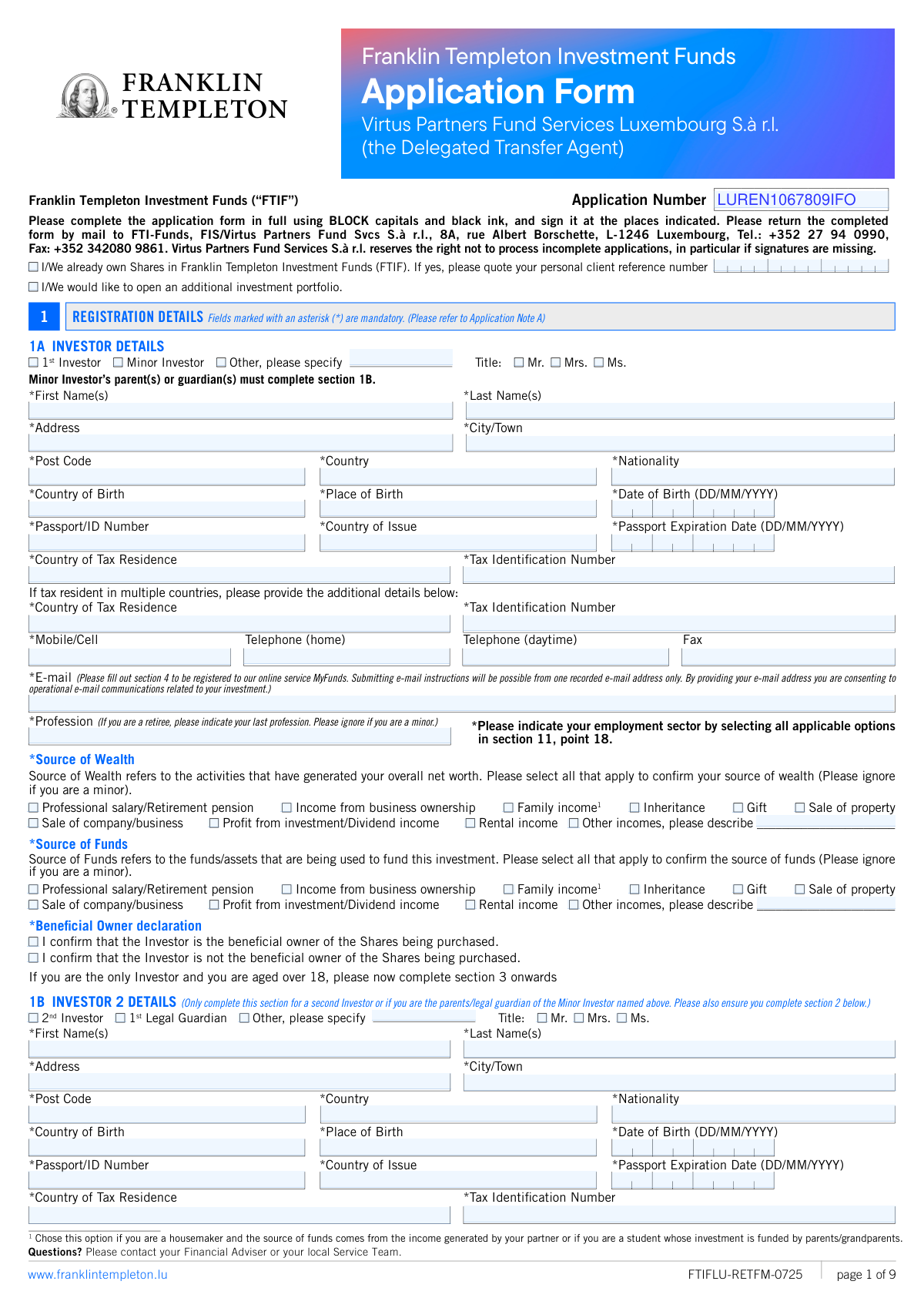
This form is an application for individuals, companies, trusts, or other entities to invest in Franklin Templeton Investment Funds. It collects essential information about the investor(s), including personal details, tax residency, source of wealth, and specific investment choices. Completing this multi-page document accurately is crucial for opening an investment account. Today, this form can be filled out quickly and accurately using AI-powered services like Instafill.ai, which can also convert non-fillable PDF versions into interactive fillable forms.
FTIFLU-RETFM-0725 is part of the
investment forms, mutual fund forms, fund investment forms, investment fund forms, Franklin Templeton forms, fund application forms and investment application forms categories on Instafill.
Rather not fill this in by hand? Instafill is an online form filler that completes PDF forms automatically — upload the blank form, answer a few questions, and the AI fills every field.
Form specifications
| Form name: | Application Form Franklin Templeton Investment Funds |
| Number of pages: | 1 |
| Language: | English |
Our AI automatically handles information lookup, data retrieval, formatting, and form filling.
It takes less than a minute to fill out FTIFLU-RETFM-0725 using our AI form filling.
Securely upload your data. Information is encrypted in transit and deleted immediately after the form is filled out.
Instafill Demo: How to fill out PDF forms in seconds with AI
How to Fill Out FTIFLU-RETFM-0725 Online for Free in 2026
Are you looking to fill out a FTIFLU-RETFM-0725 form online quickly and accurately? Instafill.ai offers the #1 AI-powered PDF filling software of 2026, allowing you to complete your FTIFLU-RETFM-0725 form in just 37 seconds or less.
Follow these steps to fill out your FTIFLU-RETFM-0725 form online using Instafill.ai:
- 1 Navigate to Instafill.ai and upload the Franklin Templeton Investment Funds Application Form.
- 2 Use the AI assistant to accurately fill in Section 1 with registration details for all investors, including personal information, tax residency, and source of wealth.
- 3 Complete Section 5, 'Investment Details,' by specifying the fund name, investment amount, and currency for your desired investment.
- 4 Provide your bank account information in Section 8 for receiving sales proceeds, dividends, or regular withdrawal payments.
- 5 Carefully review the declarations in Section 11, then digitally sign and date the form in the designated signature areas.
- 6 Download the completed, signed application and submit it along with any required identification documents as instructed on the form.
Our AI-powered system ensures each field is filled out correctly, reducing errors and saving you time.
Why Choose Instafill.ai for Your Fillable FTIFLU-RETFM-0725 Form?
Speed
Complete your FTIFLU-RETFM-0725 in as little as 37 seconds.
Up-to-Date
Always use the latest 2026 FTIFLU-RETFM-0725 form version.
Cost-effective
No need to hire expensive lawyers.
Accuracy
Our AI performs 10 compliance checks to ensure your form is error-free.
Security
Your personal information is protected with bank-level encryption.
Frequently Asked Questions About FTIFLU-RETFM-0725
This is an application form for individuals or entities to open an account and make an initial investment in the Franklin Templeton Investment Funds (FTIF).
'Source of Wealth' refers to the activities that generated your total net worth, while 'Source of Funds' refers to the specific origin of the money being used for this particular investment. For many applicants, these sources may be the same.
Individuals must provide a certified copy of a photo ID like a passport. Companies and other entities must submit additional documents, such as tax self-certification forms (e.g., W-8BEN-E), a list of authorized signatories, and documents explaining the entity's structure.
Complete the minor's details in section 1A and the parent's or legal guardian's details in section 1B. You must also submit the minor's birth certificate and a copy of their passport, if available, with the application.
Yes, the minimum initial investment is typically USD 1,000 or its equivalent, but this amount can be significantly higher for certain fund classes as specified in the prospectus. Subsequent investments have a minimum of USD 1,000.
You must fill out the form using BLOCK capitals and black ink, sign it in all required places, and mail the completed original form along with necessary identification documents to the address in Luxembourg provided on the first page.
By default, dividends are automatically reinvested into the fund. If you prefer to receive cash payouts, you must tick the box in Section 6 to have them paid to your bank account.
Yes, you can establish a Regular Withdrawal Plan in Section 7 if your investment capital is at least US$25,000 or equivalent. The minimum withdrawal amount is US$100 or its currency equivalent.
Providing your TIN is mandatory for compliance with international tax regulations like FATCA and the Common Reporting Standard (CRS). Franklin Templeton is legally required to report this information to the relevant tax authorities.
In Section 2, you decide if one holder ('Separately') or all holders ('Jointly') must sign for future transactions. If you do not make a selection, 'Jointly' will be the default, requiring signatures from all account holders for instructions.
The KID, which details the fund's objectives, risks, and charges, can be downloaded from www.ftidocuments.com. By ticking the box in Section 9, you consent to accessing this document online for future investments.
Yes, services like Instafill.ai use AI to auto-fill form fields accurately and save time. The AI can use your profile information to quickly populate the required fields, helping to reduce errors.
Upload the Franklin Templeton application PDF to Instafill.ai, which will make the document interactive. You can then use its AI assistant to help you complete the fields quickly before you download and print the form for signature and submission.
If the PDF is a flat, non-fillable file, you can use a service like Instafill.ai to instantly convert it into an interactive, fillable form. This allows you to type your information directly into the fields on your computer.
Compliance FTIFLU-RETFM-0725
Validation Checks by Instafill.ai
1
Mandatory Field Completeness Check
Verifies that all fields marked with an asterisk (*) have been filled out across all relevant sections. This is a fundamental check to ensure the application is not missing critical information required for account opening, compliance, and processing. Incomplete forms will be rejected and returned to the applicant, causing significant delays.
2
Date of Birth and Age Verification
Ensures the 'Date of Birth' in Section 1A/1B is in a valid DD/MM/YYYY format and corresponds to an applicant over 18 years of age. If the 'Minor Investor' box is checked, this validation confirms the applicant is under 18. This is crucial for determining legal capacity to enter a contract and for applying specific rules for minor accounts. An invalid date or age mismatch will halt the application process.
3
Passport/ID Expiration Date Validity
Checks that the 'Passport Expiration Date' is a valid date in DD/MM/YYYY format and is not in the past. Submitting an application with an expired identification document is a common reason for rejection as it fails basic identity verification standards required by anti-money laundering (AML) regulations. The application cannot proceed until a valid, current ID is provided.
4
Bank Account Holder Name Verification
Validates that the 'Account Name' provided in Section 8 (Bank Account Details) matches the investor's name(s) in Section 1A/1B or the entity name in 1C. This is a critical security measure to prevent fraud and comply with regulations prohibiting payments to third parties. A mismatch will prevent the setup of payment instructions and will require correction before any funds can be paid out.
5
IBAN and BIC/SWIFT Format Validation
Verifies that the 'IBAN' and 'BIC/SWIFT' codes in Section 8 adhere to their internationally recognized formats. An incorrect IBAN or SWIFT code will result in failed payment transactions for dividends or withdrawals, leading to delays and potential bank fees for the investor. This check ensures the data is syntactically correct to facilitate smooth electronic payments.
6
Minor Investor and Guardian Section Consistency
If the 'Minor Investor' checkbox is selected in Section 1A, this validation ensures that Section 1B is completed with the details of a parent or legal guardian. It also confirms that the '1st Legal Guardian' box is checked in Section 1B. This is a logical check to ensure that applications for minors are correctly authorized and managed by a responsible adult as legally required.
7
Conditional 'Other' Field Requirement
Checks that if the 'Other incomes' checkbox is selected under 'Source of Wealth' or 'Source of Funds', the corresponding text field for description is not left empty. This is required for regulatory compliance, as financial institutions must have a clear and specific understanding of the origin of an investor's wealth and funds. Failure to provide a description will result in an incomplete AML profile.
8
Investment Amount Minimums
Ensures the 'Investment Amount' in Section 5 meets the minimum initial investment threshold (e.g., USD 1,000 or equivalent) as stated in the application notes. This check prevents the submission of applications that do not meet the fund's entry criteria. Applications with insufficient investment amounts will be rejected or delayed until the amount is corrected.
9
Online Access Email Uniqueness
If online access is requested for both Investor 1 and Investor 2 in Section 4, this validation confirms that the email addresses provided in Section 1A and Section 1B are different. The system requires a unique email address for each user to serve as a distinct login identifier. Using the same email for both would prevent the creation of the second online account.
10
Joint Investor Authorization Check
Verifies that if details for two investors are provided (Sections 1A and 1B), then the authorization instruction in Section 2 ('Separately' or 'Jointly') has been selected. This instruction is critical as it defines how future transactions on the account can be authorized. Omitting this choice creates ambiguity and will require clarification before the account can be fully operational.
11
Beneficial Owner Declaration Completeness
Confirms that one of the 'Beneficial Owner declaration' checkboxes has been selected in Section 1A (and 1B if applicable). This declaration is a mandatory component of Know Your Customer (KYC) and AML procedures to identify who ultimately owns and benefits from the investment. An application without this declaration is considered incomplete for compliance purposes and will be rejected.
12
Regular Withdrawal Plan Minimums
If Section 7 (Regular Withdrawal Plan) is completed, this check verifies that the requested 'Withdrawal Sum' is at least US$100 (or equivalent) and that the investor's initial investment meets the US$25,000 minimum capital requirement. This ensures the plan is set up according to its predefined rules. An attempt to set up a plan without meeting these minimums will be denied.
13
Signature and Date Requirement
Validates that the signature and date fields in Section 11 are completed for all required parties. If two investors are listed, both must sign and date the form. A missing signature or date invalidates the applicant's declaration and agreement to the terms, making the entire application legally unenforceable and subject to immediate rejection.
14
Employment Sector Declaration Check
Ensures that for each investor, at least one checkbox is selected in the employment sector declaration (Section 11, point 18). This information is collected for enhanced due diligence and risk profiling as part of AML regulations. An incomplete declaration will flag the application for follow-up and delay processing.
Common Mistakes in Completing FTIFLU-RETFM-0725
Applicants often misunderstand the distinction between 'Source of Wealth' (how their total net worth was generated) and 'Source of Funds' (where the money for this specific investment is coming from). This can lead to ticking the same boxes for both without proper consideration, causing compliance flags and processing delays. To avoid this, carefully read the definitions on the form and accurately report the origins for both your overall wealth and the specific funds being invested. An AI-powered tool like Instafill.ai can provide contextual help to clarify these distinctions.
Providing a complete and accurate Tax Identification Number (TIN) and listing all countries of tax residence is mandatory for international reporting standards like CRS and FATCA. Applicants often forget their TIN or fail to list all relevant countries if they have dual residency. This omission is a critical error that will halt the application process until the correct information is provided, and can lead to incorrect tax reporting. Always double-check your tax status and have your TIN ready before filling out the form.
The form is frequently rejected because of missing signatures, especially in Section 11. For joint accounts, both investors must sign, and for minor accounts, all legal guardians must sign. It's easy for one party to overlook their signature field, which automatically invalidates the entire application. To prevent this, carefully review all signature blocks before submission, ensuring every required person has signed and dated the form.
In Section 8, applicants often provide incomplete bank details, such as missing an IBAN for a European account or providing a BIC/SWIFT code with transposed characters. Another common error is listing an account name that does not exactly match the investor's name, which is prohibited. These mistakes will prevent or delay any dividend payouts or sale proceeds. Using a tool like Instafill.ai can help validate formats like IBAN and ensure consistency between the investor name and the bank account name.
In Section 5, applicants may write a generic fund name without the specific Fund Number or ISIN, or forget to specify the investment amount and currency. This ambiguity makes it impossible for the firm to execute the investment, leading to delays and missed opportunities. Always use the precise Fund Number/ISIN found in the fund's documentation and clearly state the exact amount and currency you wish to invest.
A mandatory checklist for the investor's employment sector is located in Section 11, point 18, buried within dense legal text. Due to its unusual placement, applicants frequently miss it entirely, resulting in an incomplete application that must be returned. To avoid this, read every point in the declaration section carefully, not just the signature line. AI form-filling tools can highlight all mandatory fields, including easily missed ones like this, to ensure completion.
When applying as a company, trust, or other entity (Section 1C), applicants often fail to include the required supplementary documents, such as the Self-Certification Forms for the entity and its controlling persons, or a W-8BEN-E form. The application cannot be processed without this documentation for compliance and tax purposes. Ensure you gather all necessary attachments listed in the form notes before submitting the application.
The form specifies the DD/MM/YYYY date format for fields like 'Date of Birth' and 'Passport Expiration Date'. Applicants, particularly from the US, often default to the MM/DD/YYYY format, which causes data entry errors and can lead to compliance issues or rejection. Always check the required format next to the field. Smart tools like Instafill.ai can automatically reformat dates to match the form's requirements, preventing this common error.
In Section 2, joint applicants often forget to specify whether they wish to operate the account 'Separately' or 'Jointly'. The form defaults to 'Jointly,' which requires both signatures for all future transactions and may not be the applicants' intent. This oversight can create significant administrative hurdles later. Discuss and decide on the authorization with your co-investor and be sure to tick the appropriate box.
The instruction to use 'BLOCK capitals and black ink' is critical for paper forms that are scanned and processed by optical character recognition (OCR) systems. Using cursive, lowercase letters, or non-black ink can lead to scanning errors, misinterpretation of data, and significant processing delays. If you must fill the form by hand, print clearly. Alternatively, a service like Instafill.ai can convert a flat PDF into a digitally fillable version, ensuring perfect legibility.
Saved over 80 hours a year
“I was never sure if my IRS forms like W-9 were filled correctly. Now, I can complete the forms accurately without any external help.”
Kevin Martin Green
Your data stays secure with advanced protection from Instafill and our subprocessors




Robust compliance program
Transparent business model
You’re not the product. You always know where your data is and what it is processed for.
ISO 27001, HIPAA, and GDPR
Our subprocesses adhere to multiple compliance standards, including but not limited to ISO 27001, HIPAA, and GDPR.
Security & privacy by design
We consider security and privacy from the initial design phase of any new service or functionality. It’s not an afterthought, it’s built-in, including support for two-factor authentication (2FA) to further protect your account.
Fill out FTIFLU-RETFM-0725 with Instafill.ai
Worried about filling PDFs wrong? Instafill securely fills application-form-franklin-templeton-investment-funds forms, ensuring each field is accurate.
