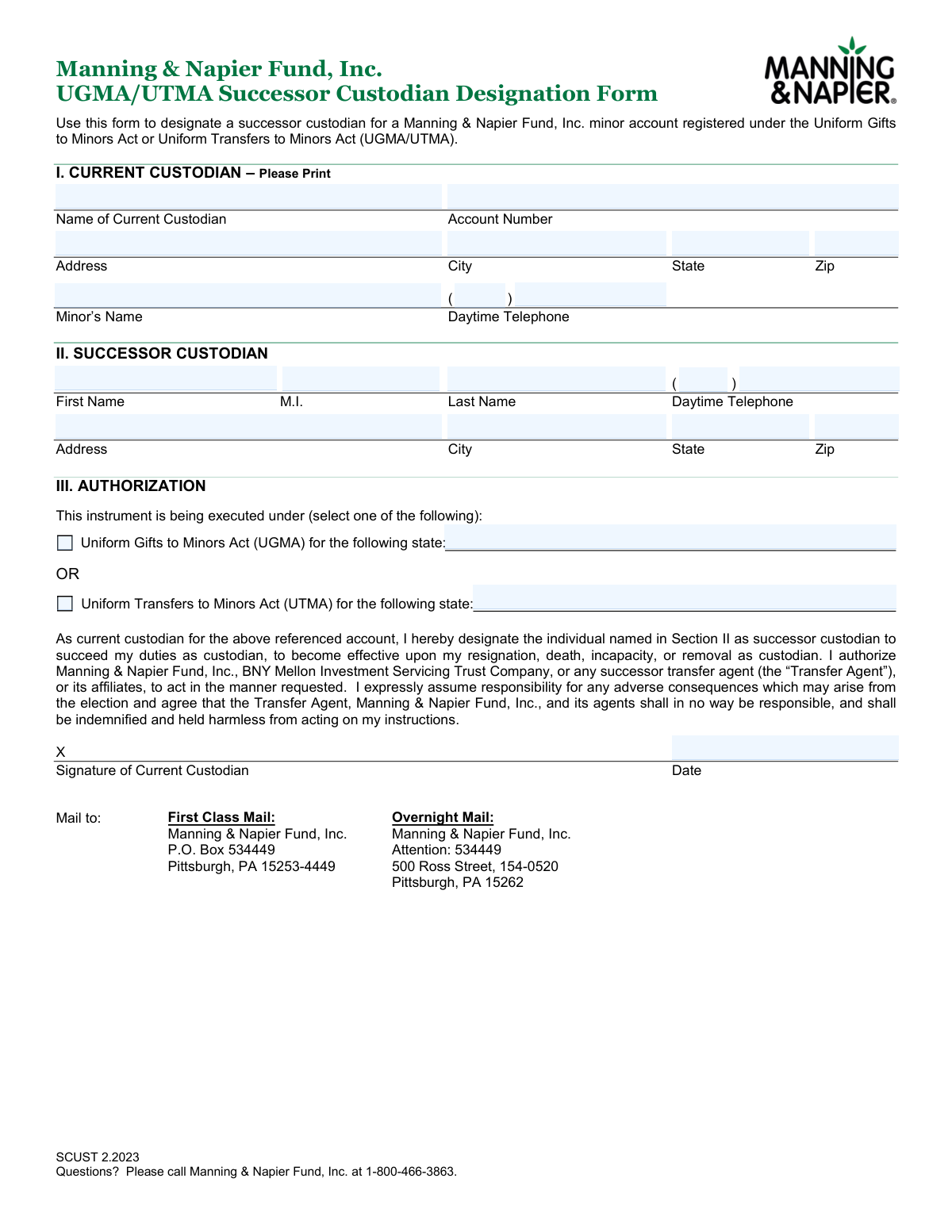
Yes! You can use AI to fill out Manning & Napier Fund, Inc. UGMA/UTMA Successor Custodian Designation Form
This form allows the current custodian of a minor's account, registered under the Uniform Gifts to Minors Act (UGMA) or Uniform Transfers to Minors Act (UTMA) with Manning & Napier Fund, Inc., to designate a successor. It ensures a smooth transition of custodial duties in the event of the current custodian's resignation, death, or incapacitation, safeguarding the minor's assets. Today, this form can be filled out quickly and accurately using AI-powered services like Instafill.ai, which can also convert non-fillable PDF versions into interactive fillable forms.
Our AI automatically handles information lookup, data retrieval, formatting, and form filling.
It takes less than a minute to fill out SCUST 2.2023 using our AI form filling.
Securely upload your data. Information is encrypted in transit and deleted immediately after the form is filled out.
Form specifications
| Form name: | Manning & Napier Fund, Inc. UGMA/UTMA Successor Custodian Designation Form |
| Number of pages: | 1 |
| Language: | English |
| Categories: | UTMA forms |
Instafill Demo: How to fill out PDF forms in seconds with AI
How to Fill Out SCUST 2.2023 Online for Free in 2026
Are you looking to fill out a SCUST 2.2023 form online quickly and accurately? Instafill.ai offers the #1 AI-powered PDF filling software of 2026, allowing you to complete your SCUST 2.2023 form in just 37 seconds or less.
Follow these steps to fill out your SCUST 2.2023 form online using Instafill.ai:
- 1 Navigate to Instafill.ai and upload the UGMA/UTMA Successor Custodian Designation Form or select it from their template library.
- 2 Provide the current custodian's information in Section I, including name, account number, address, and contact details.
- 3 Enter the full name, address, and telephone number of the designated successor custodian in Section II.
- 4 In Section III, indicate whether the account falls under the Uniform Gifts to Minors Act (UGMA) or the Uniform Transfers to Minors Act (UTMA) and specify the relevant state.
- 5 Review all the information auto-filled by the AI to ensure accuracy and completeness across all sections.
- 6 Electronically sign and date the form in the Authorization section to certify the designation.
- 7 Download the completed form and mail it to the appropriate First Class or Overnight Mail address provided for Manning & Napier Fund, Inc.
Our AI-powered system ensures each field is filled out correctly, reducing errors and saving you time.
Why Choose Instafill.ai for Your Fillable SCUST 2.2023 Form?
Speed
Complete your SCUST 2.2023 in as little as 37 seconds.
Up-to-Date
Always use the latest 2026 SCUST 2.2023 form version.
Cost-effective
No need to hire expensive lawyers.
Accuracy
Our AI performs 10 compliance checks to ensure your form is error-free.
Security
Your personal information is protected with bank-level encryption.
Frequently Asked Questions About Form SCUST 2.2023
This form allows the current custodian of a Manning & Napier Fund, Inc. minor's account to officially name a person who will take over as custodian in the event of their resignation, death, or incapacitation.
The current custodian of a minor's account registered under the Uniform Gifts to Minors Act (UGMA) or Uniform Transfers to Minors Act (UTMA) should complete this form.
You will need your name and contact information, the minor's name, the account number, and the full name and contact details for the person you are appointing as the successor custodian.
Your account number is printed on your Manning & Napier Fund, Inc. account statements. If you cannot locate it, please call customer service at 1-800-466-3863.
UGMA and UTMA are state laws governing custodial accounts for minors. You must select the act that applies to your specific account and specify the state, which can be found on your account documents.
The person you name as successor custodian will only assume control of the account upon your resignation, death, incapacity, or legal removal as the current custodian.
If a successor is not designated, a court proceeding may be necessary to appoint a new custodian, which can be a time-consuming and expensive process for the minor's account.
You can send the form via First Class Mail to P.O. Box 534449, Pittsburgh, PA 15253-4449, or via Overnight Mail to 500 Ross Street, 154-0520, Pittsburgh, PA 15262.
No, the successor custodian does not need to sign this form. Only the signature of the current custodian is required in Section III.
For any questions while completing the form, you can contact Manning & Napier Fund, Inc. directly at 1-800-466-3863 for assistance.
Yes, services like Instafill.ai use AI to accurately auto-fill form fields, which can save you time and help reduce errors.
You can use a service like Instafill.ai to upload the PDF and fill it out on your computer. After filling it in, you can download the completed form to print, sign, and mail.
If you have a non-fillable PDF, tools like Instafill.ai can convert it into an interactive, fillable form that you can easily complete online.
Compliance SCUST 2.2023
Validation Checks by Instafill.ai
1
Current Custodian Information Completeness
This check verifies that all fields in Section I, including the Current Custodian's Name, Account Number, full address, and the Minor's Name, are completed. This information is fundamental for identifying the specific account and verifying the identity of the person authorizing the change. A failure would result in the form being rejected as it cannot be processed without knowing which account to modify.
2
Successor Custodian Information Completeness
This validation confirms that all fields in Section II for the Successor Custodian, including their full name, address, and daytime telephone number, are filled out. A complete profile is legally required to establish the designated successor and to enable contact when the successorship becomes effective. Incomplete information would render the designation invalid and the form would be returned for completion.
3
Account Number Validation and Type Check
This check ensures the provided Account Number conforms to the expected format and corresponds to an active UGMA/UTMA account in the system. This is a critical security and accuracy measure to prevent modifications to the wrong account or an ineligible account type. If the account number is invalid, not found, or not an UGMA/UTMA account, the submission is immediately rejected.
4
Custodian and Account Ownership Verification
This validation cross-references the 'Name of Current Custodian' with the name associated with the given 'Account Number' in the company's records. This is a key fraud prevention step, ensuring that only the authorized custodian can make changes to the account. A mismatch would trigger a security review and rejection of the form pending identity verification.
5
Minor's Name and Account Verification
This check confirms that the 'Minor’s Name' provided on the form matches the minor registered to the specified 'Account Number'. This ensures the designation is being applied to the correct minor's account, maintaining the integrity of the custodial arrangement. An incorrect minor name would lead to rejection of the form to prevent critical errors.
6
Exclusive UGMA/UTMA Selection
This validation ensures that the user has selected exactly one option, either the Uniform Gifts to Minors Act (UGMA) or the Uniform Transfers to Minors Act (UTMA), and has provided the corresponding state. Selecting both or neither creates legal ambiguity about the governing statute for the account. The form will be considered incomplete and rejected if this selection is not made clearly and exclusively.
7
Valid State Field Entry
This check verifies that all 'State' fields (for custodian addresses and the UGMA/UTMA selection) contain a valid US state name or two-letter abbreviation. Correct state information is crucial for mailing, address verification, and determining the proper legal jurisdiction. An invalid entry would cause the form to fail validation and require correction.
8
ZIP Code Format Validation
This check ensures that all ZIP code fields are in a valid 5-digit or 9-digit (ZIP+4) format. Accurate ZIP codes are essential for the deliverability of important mail, such as statements and legal notices. An incorrectly formatted ZIP code would flag the address as potentially invalid and require user correction.
9
Phone Number Format Validation
This validation confirms that the daytime telephone numbers for both the current and successor custodians are valid 10-digit numbers, including the area code. This information is important for client servicing and allows the firm to contact the custodians with questions or important updates. An invalid number would trigger a warning or require correction before submission.
10
Signature Presence Confirmation
This check verifies that the signature field for the Current Custodian has been signed. A signature is legally required to authorize the designation of a successor custodian and to make the document legally binding. A missing signature renders the entire form invalid, and it will be rejected immediately.
11
Signature Date Format and Plausibility
This check ensures the 'Date' field is a valid calendar date (e.g., MM/DD/YYYY) and is not a future date or a date unreasonably far in the past. The signature date establishes the legal timing of the designation. An invalid or nonsensical date would cause the form to be rejected for correction to ensure proper record-keeping.
12
Ensures Successor Custodian is Not the Minor
This validation compares the name of the Successor Custodian against the name of the Minor on the account. A minor is legally ineligible to act as their own custodian, so these names cannot match. This check prevents the creation of a legally invalid custodial structure, and a match would result in an error and rejection of the form.
13
Ensures Successor is Different from Current Custodian
This check verifies that the designated Successor Custodian is not the same person as the Current Custodian. The purpose of the form is to name a successor in the event the current custodian can no longer serve, not to re-designate the same person. If the names match, the form is redundant and will be flagged for clarification or rejection.
Common Mistakes in Completing SCUST 2.2023
Custodians often do not know if the account was established under the Uniform Gifts to Minors Act (UGMA) or the Uniform Transfers to Minors Act (UTMA) and may guess, select both, or leave it blank. This is a critical error as it determines the legal framework for the account, and an incorrect selection will cause the form to be rejected. To avoid this, review original account statements or contact the financial institution to confirm the account type before filling out the form.
After selecting either UGMA or UTMA in Section III, filers frequently forget to write in the specific state under which the act applies. This information is legally required to properly administer the account according to that state's laws, and its absence will halt the processing of the designation. Always double-check that the state field next to your selected act is filled in correctly before submitting the form.
Forgetting to sign the form in Section III is one of the most common and critical mistakes, immediately invalidating the entire document. This often happens when people are in a hurry and focus only on the information fields. To prevent this, make the signature and date the very last step you review, ensuring the 'X' is signed by the current custodian of record.
Mistyping the account number, such as transposing digits or omitting a number, is a frequent data entry error. This prevents the financial institution from locating the correct UGMA/UTMA account, leading to rejection and delays in processing the successor designation. Carefully copy the full account number from a recent account statement to ensure accuracy; using a tool like Instafill.ai can autofill this information precisely from saved records, eliminating transcription errors.
Filers may inadvertently use nicknames or informal names for the minor, the current custodian, or the designated successor (e.g., 'Jim' instead of 'James'). All names must match the full legal names on file for the account and on government-issued IDs to ensure proper legal designation. Using incorrect names will cause verification to fail and the form to be returned for correction.
In Section I, individuals sometimes mistakenly enter the minor's name in the 'Name of Current Custodian' field. The form requires the name of the adult currently managing the account, not the child who is the beneficiary. This confusion leads to processing delays as the institution must contact the filer for clarification.
When this form is printed and filled out by hand, illegible handwriting can make names, addresses, and account numbers unreadable to the processing staff. This can lead to incorrect data entry on their end or outright rejection of the form if the information is indecipherable. To avoid this, print clearly in block letters or use a tool like Instafill.ai, which can convert flat PDFs into digitally fillable forms for clean, typed entries.
Next to the signature line, there is a field for the date which is often left blank. An undated signature can raise legal questions about when the designation was made, potentially invalidating the document. Always fill in the current date when you sign the form to ensure its legal validity and prevent processing holds.
Filers sometimes leave fields in Section II (Successor Custodian) blank, such as the full address or a daytime phone number. This information is essential for the financial institution to contact and verify the successor custodian when the need arises. Incomplete details can delay the transfer of custodial duties, so ensure every field in this section is filled out completely.
Saved over 80 hours a year
“I was never sure if my IRS forms like W-9 were filled correctly. Now, I can complete the forms accurately without any external help.”
Kevin Martin Green
Your data stays secure with advanced protection from Instafill and our subprocessors

Robust compliance program
Transparent business model
You’re not the product. You always know where your data is and what it is processed for.
ISO 27001, HIPAA, and GDPR
Our subprocesses adhere to multiple compliance standards, including but not limited to ISO 27001, HIPAA, and GDPR.
Security & privacy by design
We consider security and privacy from the initial design phase of any new service or functionality. It’s not an afterthought, it’s built-in, including support for two-factor authentication (2FA) to further protect your account.
Fill out SCUST 2.2023 with Instafill.ai
Worried about filling PDFs wrong? Instafill securely fills manning-napier-fund-inc-ugmautma-successor-custodian-designation-form forms, ensuring each field is accurate.